
The new X Server offers performance improvements and code modifications that will be used by GNOME 3.8. Ubuntu 13.04 will likely not use the new X Server because AMD’s proprietary driver is currently still incompatible…
Read more at The H

Self-promotion in an open source world, it starts with a shameless plug—a simple way to make people aware of something you’re passionate about. Then, over time, you get more comfortable with using the shameless plug and that desire to make people aware transforms into purposeful marketing. At some time or another when working on an open source project, you’re bound to have to promote it. Self-promotion can be an uncomfortable topic for some people, but I’ve found word of mouth is the best way to promote open source.
Is Android the new embedded Linux? Of course not, said Karim Yaghmour, OperSys founder, during the panel discussion on this topic at the Android Builders Summit last month in San Francisco. It was a question meant to spur discussion, he said, that’s all.
It worked. The idea ignited a lively debate among embedded Linux pros with three of the four panelists ultimately siding with Yaghmour. What seemed to be their litmus test? If Android can conceivably be used in “classic” embedded projects, it is embedded Linux.
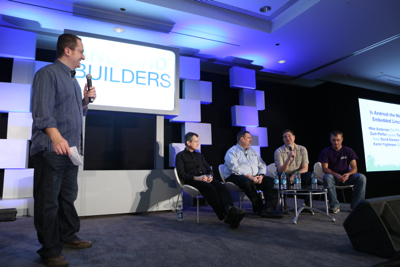 A classic embedded device has a fixed function, argued Tim Bird, senior staff engineer for Sony Entertainment, in the panel discussion. “When you bake it at the factory that’s what it does forever. “ By this definition, Android is not embedded Linux because it’s “more of a platform play,” he said.
Google custom-built Android as a mobile operating system that comes with its own ecosystem, separate from the classic Linux ecosystem. Its user interface is optimized for touch screen devices. It comes with a set of APIs that make for a more standardized application development environment. And Android devices can tap a slew of Google services.
Android makes a lot of sense when building an embedded device that needs access to those features. But most classic embedded devices don’t need Google maps, for example. And therefore, the panelists largely concluded, Android is not embedded Linux.
But the line between what is and is not a mobile device is blurring. Processors shrink in size, get more powerful and cheaper. And everyday things, from TVs to parking meters, are more connected.
“As the capabilities of the hardware changes, the definition of embedded Linux is bound to change as well,” said John Cherry, senior engineering manager at Mentor Graphics, via email.
Android becomes an appealing alternative as those “classics” get smarter and become more phone/tablet/ TV-like. Some would even say Android becomes a viable embedded Linux replacement because it standardizes software development for such devices.
“Before the invention of the loom you had artisans that would craft textiles. The loom standardized how you created textiles,” said Zach Pfeffer, who leads the Android effort at Linaro, during the ABS panel. “Android is the loom for craft weavers.”
Still, Android may be gaining in popularity but it has a ways to go before it’s used in equal proportion to embedded Linux, let alone replaces it. It’s still a distant second to “classic” embedded Linux varieties that dominate as the OS of choice for embedded developers. In a recent EE Times survey, 50 percent of developers planned to use embedded Linux in their projects this year, compared with 16 percent using Android, according to an analysis by LinuxGizmos.
Arguing over the definition of embedded Linux, or the future of the OS, “would be going down an unproductive rathole,” in the words of Mentor’s John Cherry. So the real question becomes, what can embedded developers do with Android now?
At its core, Android runs the same kind of Linux kernel that embedded Linux runs and shares the same drivers, memory management and networking capabilities. But it also includes some kernel modifications that make it ideal for mobile systems. And it comes loaded with extra features pulled from other open source projects. (For a full comparison of the technical differences see Frank Maker and Yu-Hsuan Chan’s survey on Android vs. Linux.)
Or to say it simply: “Android is really Linux plus a lot of stuff,” said Steve Sakoman, an independent embedded engineering consultant.
For most embedded Linux devices that are tucked away in industrial machinery, for example, and that thrive on low power – those mobile-friendly features are extra bulk that a developer needs to strip away. A developer would do better to build the OS from scratch with a framework like Buildroot, OpenEmbedded or the Yocto Project than to pare down Android for a purpose it wasn’t optimized to serve.
“The monolithic nature of (Android) makes it really tough to pull things out when you do want to save on boot time or footprint or those types of things,” said David Stewart, Embedded Linux engineering manager at Intel, in the panel discussion. “Which is kind of a constraint; Not everybody has a Xeon-class processor.”
Android has been wildly successful as a mobile OS. But it’s not being used much yet for that classic embedded development geared more toward headless devices, said Chris Buerger, senior director of open platform products at Wind River. And where it is being used in consumer-grade products such as multi-function printers or point-of-sale devices, it tends to replace embedded Windows not embedded Linux, he said.
Android makes the most sense in a device that plays to its strengths in UI and media, said Sakoman. But it’s not great for just about anything else, he said.
“Android certainly wasn’t optimized for the traditional embedded world and is totally inappropriate for devices with real-time requirements,” Sakoman said. “That’s not to say that there aren’t applications where it makes sense — things like media players, gps/navigation, dedicated devices for medical offices make perfect sense.”
To most embedded developers it’s very obvious that Android doesn’t fill their needs for embedded Linux projects… Yet. But there are still many factors to consider when making the decision. Next week we’ll explore how to choose an embedded operating system – comparing some of the pros and cons of Android vs. classic embedded Linux.
Soon after Canonical’s unveiling of its slick Ubuntu Touch platform for phones and tablets, and on the same day it released the first beta of Ubuntu 13.04, the Ubuntu project announced a potentially significant — and already controversial — change in windowing interfaces.
Starting with the Ubuntu Touch smartphone implementation in this coming October’s Ubuntu 13.10 release, a revised version of Ubuntu’s Unity environment will shift from the X.org Server implementation of X Window to a homegrown display server called Mir. Two years ago, Canonical had said it would instead switch to the Wayland windowing interface. According to a MirSpec wiki written by Canonical’s Mir project leader, Robert Ancell, Wayland was unable to meet Ubuntu 14.04’s goal of being able to smoothly display window environments from the same code running on different desktop and mobile devices.
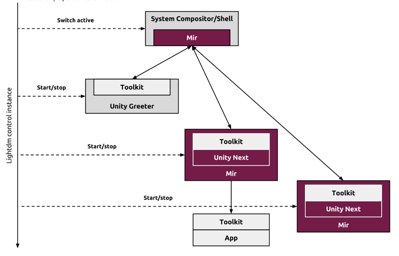 The Mir-equipped “Unity Next” environment will be rebuilt entirely on the Qt framework and QML (Qt Meta-Object-Language) Javascript language, says Canonical. Unity Next and Mir will be fully integrated into Ubuntu 14.04, the platform-convergent LTS release due in April 2014.
Mir will support Android drivers right from the start. According to Ancell, in an email to Linux.com, the first two targets will be the Android-based Galaxy Nexus and the Nexus 4 smartphones, which were already slated as the first devices to run Ubuntu Touch.
“We expect this list to grow in the future,” said Ancell. The current Ubuntu Touch version running on those devices uses the Android-based SurfaceFlinger windowing technology, which will be swapped out for Mir in October.
Unix- and Linux-based systems have been depending on X Window for some three decades, and it’s definitely showing its age. When Canonical’s Mark Shuttleworth announced in Nov. 2010 that Ubuntu would scrap the venerable display server in favor of the newer Wayland interface, there was relatively little grumbling. After all, other Linux distros such as Fedora were looking to adopt Wayland, and Google took a pass on using X in Android.
The shift from X was nowhere near as controversial as the earlier decision to swap out GNOME in favor of Canonical’s Unity UI environment. Nor did it stir the same angst that came from the Jan. 2011 announcement that in Ubuntu 11.04 Canonical would scrap the GTK+-like “Nux” OpenGL toolkit in favor of Qt.
All three changes would help Ubuntu support both desktop and mobile devices with a single binary, promised Shuttleworth. Unity was quickly cemented as the default Ubuntu environment, despite some defections to other distros, but Qt has only been partially integrated, and Wayland has been missing in action.
Like Wayland, Mir is faster and less complicated than X.org, and it similarly adds built-in support for the hardware-accelerated graphics commonly found on modern computers and mobile devices. In fact, Mir requires a GPU, says Ancell.
They are also both similarly well-suited to work with Qt, he adds. “Qt doesn’t matter here,” says Ancell. “Qt has a Wayland backend and we have developed a Mir backend, so applications will work in both.”
According to Ancell, Wayland is less flexible than Mir in supporting existing resources like hardware-based compositors or Android device drivers, while at the same time has difficulty adapting to new input methods like 3D gesture technology. Unlike the more rigid Wayland, Mir offers a well-crafted “protocol-agnostic inner core” as well as an “outer-shell together with a frontend-firewall that allow us to port our display server to arbitrary graphics stacks and bind it to multiple protocols,” according to Ancell’s wiki.
The switch to Mir means that “certain legacy applications” will require “an in-session rootless X server that is integrated with Mir,” according to the wiki. Ancell told me these potentially include some major apps like LibreOffice and Firefox, “though we will investigate if it’s possible to have them running natively on Mir.” Ancell added, “GTK+ and Qt applications should run on Mir fine, which will cover the vast majority of current applications out there. Cases that won’t be native are Java applications and other toolkits.” In any case, he says, “The end user shouldn’t notice.”
Another challenge may be getting GPU manufacturers to quickly support the technology. So far, Canonical has yet to announce any specific Ubuntu Touch support from chip vendors, hardware manufacturers, or carriers. The wiki notes that the Mir project plans to “distill a reusable and unified [OpenGL-based] EGL-centric driver model that further eases display server development.”
Ancell expanded on this in his email, saying, “Currently Mir doesn’t work on closed source drivers and we want to change that. We are working actively to solve that and the timeframe will be dependent on working with those driver developers.”
Mir is already proving more controversial than the switch to Wayland, according to some Google+ discussions summarized by Michael Larabel on Phoronix. Wayland developers led by Kristian Høgsberg claim that Mir’s benefits over Wayland are overstated, and that Wayland’s input handling is not nearly as bad as Canonical says. Open source driver developer Jerome Glisse argues that the architecture described on the wiki appears to be missing key components like atomic commit or frame synchronization.
At this point, it is difficult to determine how serious the alleged gaps may be, and whether they will delay Canonical’s proposed timeline. Although there do appear to be some issues here beyond sour grapes over the late-stage switch, there is also a lot of pent-up anger at Canonical for insisting on homegrown solutions rather than established open source technologies.
Larabel himself seems to agree with the overall critique, writing, “If there is one thing though that Canonical is becoming wildly successful at is alienating and fragmenting the core upstream Linux communities with their ‘Not Invented Here’ syndrome.”
When you buy a Raspberry Pi, the $35 computer doesn’t come with an operating system. Loading your operating system of choice onto an SD card and then booting the Pi turns out to be pretty easy. But where do Pi-compatible operating systems come from?
With the Raspberry Pi having just turned one year old, we decided to find out how Raspbian—the officially recommended Pi operating system—came into being. The project required 60-hour work weeks, a home-built cluster of ARM computers, and the rebuilding of 19,000 Linux software packages. And it was all accomplished by two volunteers.