
Dell is now selling its Sputnik developer laptop, pre-installed with Ubuntu 12.04 LTS, in its UK and German online stores. In the UK, customers save £120 (ex VAT) compared to the regular Windows model.
Read more at The H
I was a loyal and happy KDE 3.x user way back when only dinosaurs used Linux. Then KDE4 came along and my happy KDE world was upended. The first KDE4 release was back in 2008– how time flies!– and like so many KDE3 users I had my complaints: Too lardy! Too weird! Where is my stuff?
Well, that was then, and here we are five years later. So what does KDE4 look like these days? Is it still lardy and full of weird stuff? I installed Kubuntu 12.10 just to get KDE 4.10 so I could poke at it and see what it’s doing.
I know, when you hear “Nepomuk” you want to wave strings of garlic and sprinkle holy water on it. But give it a chance– Nepomuk is an extremely ambitious and advanced technology, and you might be interested in reading KDE 4: Leader of the Semantic Pack to learn more about it. In 4.10 Nepomuk has received a considerable cleanup and overhaul, and Strigi has been replaced with a homegrown solution.
Let’s take a moment for a quick review: Nepomuk (Networked Environment for Personal, Ontology-based Management of Unified Knowledge) is the only serious attempt on any platform to develop a genuine semantic search engine, and to progress beyond relying on text as the basis for searches. Filenames and hierarchical filesystems are all right as the underpinnings of our data storage, but for actually finding things they are unwieldy, especially as even casual computer users can rack up hundreds of gigabytes of files without trying. One of the goals of Nepomuk is to extract and index useful metadata from file contents without user intervention. Another goal is to make information machine-understandable. It’s a tall order, and I’m thankful the KDE team has invested so much time and energy into trying to make this work because it is genuinely revolutionary and useful.
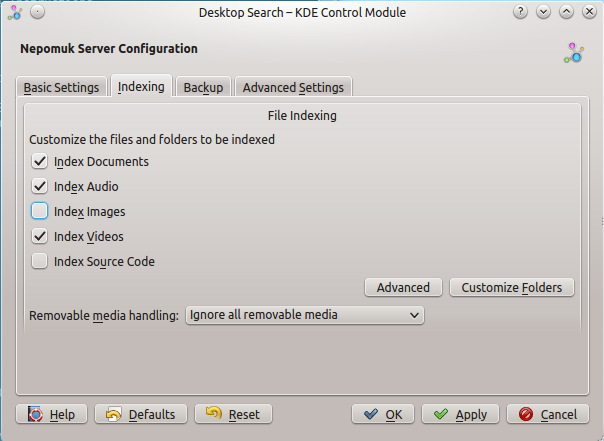 Figure 1: Nepomuk configuration
Strigi is the indexer that crawls your filesytem and does deep indexing, and extracts semantic data to store in the Nepomuk database. Even though the concepts behind Strigi are wonderful and far-sighted, the code base for Strigi is very large and complex, and integrating it into Nepomuk was fraught with difficulties. So the Nepomuk developers have abandoned Strigi in favor of their own homegrown indexer. It is simpler and not as capable, but it is faster and easier to maintain. The primary Nepomuk developer, Vishesh Handa, wrote about this in Nepomuk without Strigi. The new indexer is written in a mere 500 lines of code. it doesn’t have all the functionality of Strigi, but it’s a lot more maintainable, and contributors are invited to help expand it.
A common Nepomuk complaint was that it bogged down the whole system. And it did on a new installation, until it had completed its first run indexing the whole system. After that first run it didn’t have much impact on system performance. InKDE 4.10 it’s a lot more efficient, and on my Thinkpad (4GB RAM, Intel Core 2 Duo) it’s not noticeable. It has some nicer defaults, and thanks to the new homegrown indexer it allows filtering by mimetypes (figure 1.) So you can select or exclude images, videos, documents, source code, and audio files for indexing.
User searches have been optimized and streamlined, so when you fire up Dolphin and search for something you should see considerably faster results. Nepomuk/kioslaves/search has some great tips for fine-tuning Nepomuk search queries, for example searching by image file properties such as size, orientation, ISO speed, or flash.
After all these years of computering, I can handle anything except printers. Printers are demon spawn sent to batter us into mental disability. KDE 4.10 doesn’t include any special printer magic, but they did streamline the printer manager nicely, and you can set up a new printer in just a couple of clicks (figure 2).
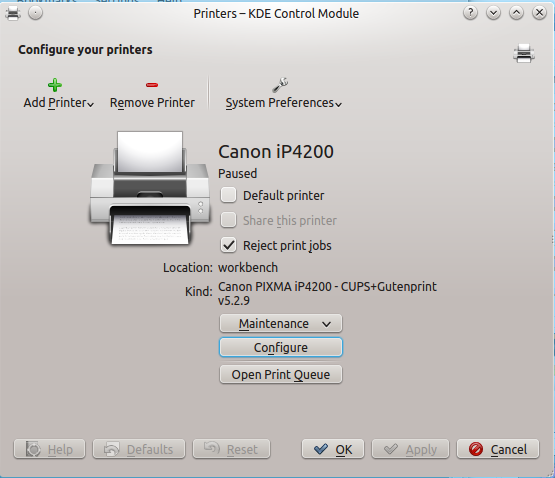 Figure 2: Configuring printers is more streamlined.
The Gwenview image manager has always been a powerhouse, but it’s had its ups and downs in the user interface. For KDE 4.10 it has received some substantial additions. Finally, Gwenview has Activities support, so you can connect open sessions to an Activity. It now has limited color profile support. Currently it reads color profile information from JPGs and PNGs, and can display them correctly on a color-corrected screen. It does not support color profiles in other image formats, and does not have printer color profiling. Doubtless it will progress to having full support, and when it does it will be the queen of image managers.
Another much-needed new feature is a recursive file importer. In older versions you had to navigate to the folder you wanted to import from removable media, which meant knowing which weirdo filename you wanted (DCIM01, IMOO1, etc.). Now Gwenview can dump everything, or you can pick and choose, and it will remember which root folder you select for different devices.
Konsole has always been my favorite x-terminal by a country mile. It’s a feature-packed little xterm, and yet well-organized. Throw in some easily-configured custom keyboard shortcuts, some nice readable custom color schemes, and you become a speedy productivity whiz. It has notifications for activity and silence, which is super-useful when you’re debugging something and don’t want to just stare at the screen until something happens. You can drag-and-drop text, make bookmarks, and now it even has a print screen option. That’s right, you can send the screen to printer, or print to file. (Check out Expert Tips and Tricks With Kate and Konsole to learn more about cool things you can do with Konsole.)
Nobody beats KDE for sheer prettiness, and there are still a hundred and one ways to dress up your KDE desktop with themes, widgets, background images, and my favorite, pictures in picture frames (figure 3).
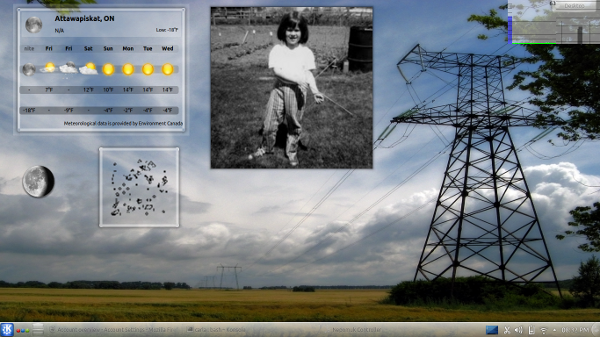 Figure 3: Pretty!
The libraries for KDE games have been cleaned up, so gameplay is smoother and nicer-looking. Check out the new Picmi game: It’s somewhat like Minesweeper, only more difficult. You get numerical hints for uncovering cells in the correct pattern, and when you succeed you are rewarded with a hidden image.
There is a separate version for mobile devices, which we’ll look at sometime soon. In my occasionally-humble opinion it’s a lot more sensible to tailor a separate mobile edition, rather than trying to make a single interface fit all devices.
It’s been a long road, but KDE4 has improved steadily, and with each release the most advanced Linux desktop is better and more user-friendly.
There are some other Linux.com articles about KDE that you may enjoy:
KDE4 Activities for Fast Efficient Workflow
Random Linux Tips: Making KDE4 Behave, Thwacking Those Weirdo U3 Partitions on USB Sticks
Embedded developer Bjarne Rosengren has never been to the Southern United States. But he’s got a better idea of the fun that lies ahead at LinuxCon in New Orleans this September – and the chance to go — thanks to Tux.
 Earlier this month we sent Tux to New Orleans during Mardi Gras to scout out the best landmarks, food, drinks and fun. He sent back a video travel log of some of the highlights of his trip (see below). Then we held a contest – anyone who shared the video on Twitter or Google Plus was entered into a random drawing to win a free pass to LinuxCon North America.
Bjarne was the lucky winner and plans to live it up in NOLA, Tux-style. This will be his third LinuxCon North America conference, after attending events in Portland and San Diego in previous years.
“Whenever I go to conferences (and other places) I try to get a few days to look around, checking out local sights and trying local food, etc. This time will be no exception,” he said via email.
“The thing about LinuxCon is the great diversity of people presenting and attending it,” he wrote. “There are always sessions that are of interest and it gets even better when it is collocated with other conferences like Linux Plumbers and ELC.”
The 42-year-old software engineer at Axis Communications has been using Linux since his days at Lund University. He remembers getting access to the school’s computer rooms and FTP’ing to funet.fi to download and make disks for his 386sx.
He’s used it ever since at home, beginning with Debian and now on Ubuntu. Linux is also the main operating system on his company’s development workstations and runs in many, but not all of its embedded products.
He has worked with Axis since 1997, when he started writing embedded software in the company’s proprietary OS and Systems-on-a-Chip (SoCs). Ten years ago he moved on to work with the Axis network cameras that run Linux on the SoCs. And he’s now an architect responsible for one of the main software functions in their products.
“I think one of the greatest things about Linux is that you can run it on almost any kind of devices,” he said, “from big server parks down to workstations and the further down to smaller systems like the ones produced by Axis.”
 The Linux Foundation is holding its annual Collaboration Summit April 15-17 in San Francisco, Calif. And now, the linuep of keynote speakers and other details about the meetup are in place. “Leaders from the Linux developer, industry and end-user communities will gather at the invitation-only Linux Foundation Collaboration Summit to advance the state-of-the-art of Linux and open source software,” the announcement notes. Here are more details on what to expect at the conference, and details on complete video sessions form last year’s Collaboration Summit.
The Collaboration Summit homepage is here, and you can find a very complete collection of free videos from last year’s event here. According to the Linux Foundation, the following somewhat exhaustive set of topics will be tackled at this year’s summit: automotive engineering, big data, cloud computing, virtualization, mobile and embedded development, filesystems, kernel development, legal topics, the Linux Standard Base, SPDX, parallel processing, Tizen, tools, and tracing.