
 There could be major changes coming in how Ubuntu is released next year if the Ubuntu kernel developers have their way. In a broadcast conversation between Ubuntu Kernel Team Manager Leann Ogasawara and Canonical developer liaison Daniel Holbach, Ogasawara talked about discussions that the Ubuntu kernel developers had been having concerning switching the distribution’s release cycle to a rolling methodology with Ubuntu 14.04. The plan could see Canonical, the company behind the distribution, release a long term support (LTS) version every two years with rolling updates in between. Ogasawara and Holbach, both Canonical employees, acknowledge the virtues of the new approach to the developers, but Ogasawara is sceptical that users of the distribution would be satisfied with a concrete release every two years…Read more at The H
Open Source Cloud Fuels Tremendous Innovation
There may be considerable debate over what, exactly, constitutes an “open cloud,” but open source software is frequently considered an important part of it.
Cost, customizability, transparency and collaborative development are all among the benefits typically attributed to the use of such software in the cloud, and recently hosting provider Rackspace suggested another one: innovation.
“Using open source cloud technology boosts innovation,” the company’s UK division wrote in its announcement of the results of a new research study last month.
Usage on the Rise
As part of Rackspace’s study, research firm Vanson Bourne last fall surveyed 250 IT managers from 250 UK organizations that outsource IT services. What it found was that a full 74 percent of the companies using open source cloud technology said that it makes them more innovative.
Cost efficiency, vendor neutrality and scalability were cited as the main benefits of open source software that help drive this innovation.
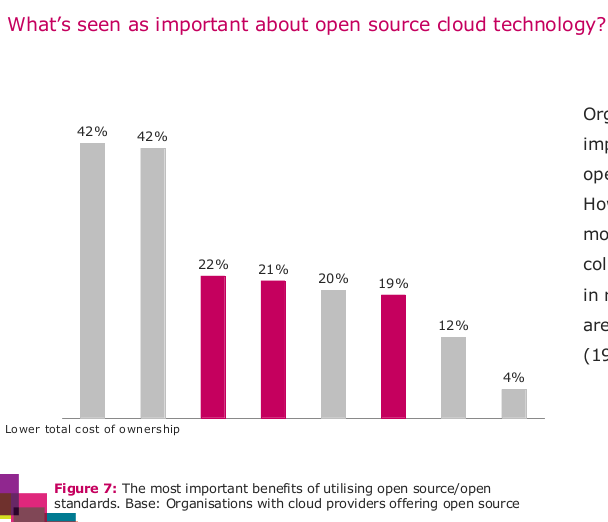 Benefits of open source cloud technologies (Rackspace)
No wonder, then, that a full 56 percent of those using an open source cloud said their usage is increasing, with a particularly strong trend in that direction among the retail and financial services sectors.
‘Accelerated Time to Market’
For Andy Knosp, vice president of product at open cloud platform provider Eucalyptus, Rackspace’s findings weren’t surprising.
“One of the primary benefits that Eucalyptus customers realize from open cloud is that of agility and being able to respond to business demands more quickly,” Knosp told Linux.com.
“This agility often leads to faster development cycles for applications, accelerated time to market, and ultimately greater innovation within their business,” he added.
Multiple Clouds
Another notable finding from the study was that more than 50 percent of respondents said they already work with two or more cloud providers.
“As the cloud continues to grow in importance, multiple clouds will become increasingly commonplace,” said Rackspace CTO John Engates. “It is therefore vital that applications deployed in different clouds can ‘talk’ to each other and those of partners and customers. Open source platforms provide the easiest way of enabling this collaboration.
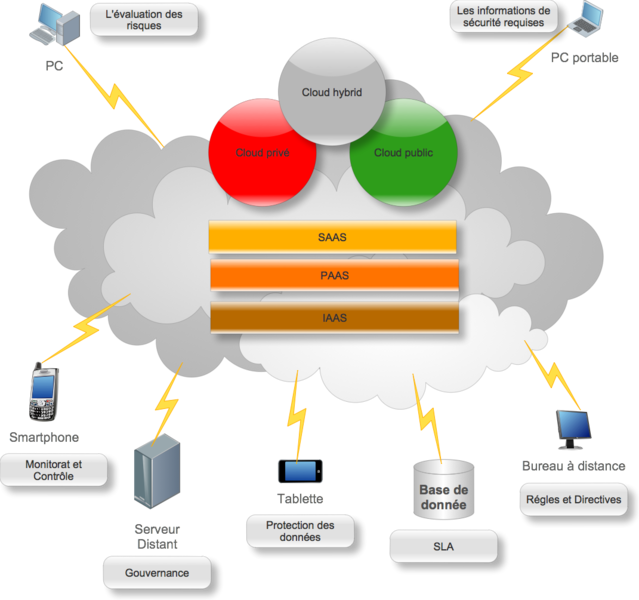
“By choosing an open cloud solution, businesses avoid being locked-in to one technology and gain the freedom to move their data and applications between, public, private and hybrid cloud models as required,” Engates added.
‘More Cost-Effective’
“It follows that being able to modify your cloud management platform allows you to be more innovative,” Sam Johnston, president of the Open Cloud Initiative, told Linux.com. “Removing the licensing component from your budget can also be more cost-effective, provided you don’t have to invest more time to make it all work.
“However, were there common, open formats and interfaces between OpenStack and a proprietary cloud stack, then many of the same freedoms (freedom from vendor lock-in, in particular) would be adequately protected,” added Johnston, whose nonprofit advocacy group has outlined a list of Open Cloud Principles.
In any case, there’s no doubt that open source software is a core component of cloud computing, Jay Lyman, a senior analyst with 451 Research, told Linux.com.
‘Performance and Innovation’
“Enterprises, service providers and others have embraced open source software to more effectively leverage cloud computing resources alongside their existing hardware and data centers and also to empower their software developers and system administrators,” Lyman explained. “Today, rather than question open source software, these large enterprises and service providers tend to expect open source software and support it, particularly when it comes to the cloud.”
Cost is always a factor, of course, but “the main drivers for open source tend to be speed and availability, support and growth of developer communities, flexibility and — increasingly — performance and innovation,” Lyman pointed out.
“By supporting open source software and people who can effectively leverage it, organizations can also better prepare themselves for adjacent and emerging trends such as cloud computing, mobility, DevOps and polyglot programming,” he concluded.
Image Credit
Cloud computing map courtesy Wikimedia Commons , Creative CommonsAttribution-Share Alike 3.0 Unported

Mozilla Unveils First Two Firefox OS Phones

After news of its development throughout all of last year, Mozilla’s Firefox OS platform for smartphones has made an official debut on two phones that will ship to developers working on apps. The phones will ship to developers in February, but won’t become available to everybody until later this year. As we’ve reported, Mozilla is primarily targeting emerging markets with the phones, but there have been signs that they may be marketed throughout Europe and in the U.S. Here are more details.
You can find Mozilla Hacks’ post on the new phones here. According to the post, the phones have the following specs and names:
The Keon model
- CPU Qualcomm Snapdragon S1 1Ghz
- UMTS 2100/1900/900 (3G HSPA)
- GSM 850/900/1800/1900 (2G EDGE)
- Screen 3.5″ HVGA Multitouch
- 3 MP Camera

Android Candy: WiFi Analyzer
 I have a new day job, and as part of the hiring package, I was issued a smartphone. I’m a little bitter that it doesn’t include a tethering plan, but that doesn’t upset me nearly as much as the lack of Wi-Fi analysis apps. See, my new job issued me an iPhone. I really like the iPhone (it’s true, I can’t lie), but in order to scan Wi-Fi, I’d have to jailbreak my phone! more>>
Professional Graphics Creation on Linux
There is far more to multi-media production on Linux than GIMP (GNU Image Manipulation Program), the beloved drawing and painting program, though it seems that is all there is because it gets all the attention. GIMP is wonderful, but there is an entire universe of profession-level multi-media creation applications in all creative arenas: drawing and illustration, photography, desktop publishing, music, and movies and videos. Today we’ll look at my recommend Linux distributions for multi-media production, graphics creation applications. Then in future installments in this series we’ll dive into audio production, video production, CAD, 3D printing, and other industrial programs.
Dream Studio
I’ve covered Dream Studio before, and since that first review creator Dick MacInnis has continued to polish and improve it. Dream Studio is based on Ubuntu, supports both 32- and 64-bit systems, and contains a vast assortment of creative applications, both visual and audio. It’s an excellent ready-to-use distro already tuned for good audio/video performance, and a big selection of apps to try.
Debian and Arch Linux
My other favorite distros for multi-media production are Debian and Arch. They’re not all polished and prefab like Dream Studio, but are for experienced Linux users who prefer to tune and manage their own systems. Both give you great flexibility and excellent package management. Debian has the largest software repositories of any distribution. Arch is lightweight, and both have superior documentation.
 butterfly on hand, shot on Canon 30D, edited in Digikam
Arch is on a rolling release cycle, which means it is continually updated. So you never have to upgrade to a new release. Debian is on a release cycle, so you have to upgrade to new releases periodically. The Debian upgrade and package management system is famously sophisticated and reliable, and a well-maintained Debian system can be upgraded for years without ever having to be re-installed. Debian comes in four flavors: Stable, Testing, Unstable, and Experimental. Stable is rock-solid and gets fast security patches, but it is on a slower release cycle. Testing and Unstable are plenty stable for desktop users and get newer packages, but spotty security patches. Experimental is for the adventurous.
Now let’s look at some of the best graphics applications Linux has to offer.
Drawing, Painting, Illustration
I called Krita a hidden Linux treasure, and since then it’s gotten even better. Krita is a professional digital painting program for creating comics, beautiful illustrations, story boards, and lush detailed matte paintings. It is a KDE program, but it’s an independent project and it depends on just a few KDE libraries. (It doesn’t require Akonadi or Nepomuk.) Krita is absolutely brilliant both in its interface and capabilities; any drawing and illustration program has hundreds of options and tools, and the Krita developers have done a magnificent job of streamlining its interface without sacrificing features.
Another reason I love Krita is they have created a separate version optimized for touch-screens, Krita Sketch. You get the full power of Krita on any touch device.
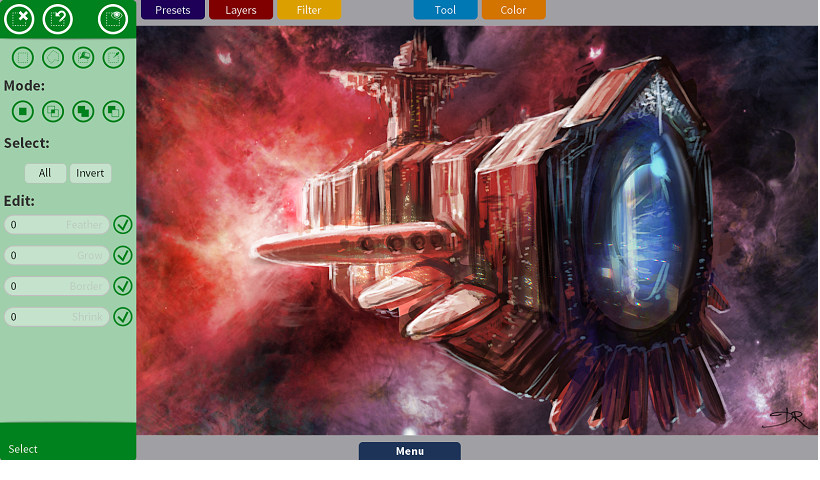 Krita Sketch
Some other excellent choices are Inkscape, Xara Xtreme, and LibreOffice Draw. Cinepaint is a nice GIMP fork with advanced features like 16-bit and 32-bit color channel support, high-dynamic resolution (HDR), flipbooks, and color management.
3D Rendering and Modeling
Linux has a wealth of cutting-edge advanced 3D modeling and rendering applications. Blender is probably the best-known. It started out as a commercial closed-source application, and then was released under the GPL. Blender supports both animation and still image creation.
Persistence of Vision Raytracer creates absolutely stunning 3D still images. It supports different light sources and lot of textures and effects such as smoke and fog, ripples, reflections, refractions, and a whole lot more.
Radiance is an advanced suite of tools for lighting simulations. It’s a superior tool for architectural lighting simulations, and pretty nifty for whatever lighting scenarios you can dream up. Glasses, created in POV-Ray
Desktop Publishing and Layout
Both LibreOffice Writer and Calligra Words are good graphical desktop publishing and layout applications. Both are frames-oriented, rather than page-oriented (like Microsoft Word), so you have precise control over page elements and placement. Both also use styles, so you can quickly format documents, and just as quickly do global changes.
My personal favorite is Scribus. Scribus can create editable and inter-active PDFs, and supports advanced PDF features like transparency, bookmarks, and annotations. It supports a wide range of graphical formats and scripting. Writer and Words are fine for simpler jobs like brochures and newsletters, but if you need to put together professional-level pre-press (for example, preparing a book manuscript or magazine for print) then you want Scribus.
Photography
There are so many excellent photographic apps and tools they could fill a book. Let’s hit the highlights.
Digikam is the primo digital photo management and editing program. It supports color management, a feast of RAW editing features, archiving and collection management, face recognition, and a lot of advanced editing features. You can import and export multiple file formats, and directly to sites like Flickr, SmugMug, and Facebook.
Darktable is a brilliant RAW editor, and as much as I love Digikam I find I’m using Darktable more for my RAW manipulation. It offers side-by-side comparison views, tethered shooting, and a whole lot of fine-tuning and tweaks.
Hugin gets my vote for panorama creator, with splendid tools for blending images seamlessly and correcting problems. It has a batch processor and my favorite tool, a lens calibrator so you don’t have make the same adjustments for every image.
Fear not if your photo archives are on paper, because you can make high-quality scans with XSane. The so-called simple scanners that have come out recently just don’t work for me; they’re not simple and they don’t do much that is useful. XSane is an old workhorse that has been around forever, is completely reliable, and has actual useful features.
Come back Friday to read about my picks for best high-quality video editing and creation programs.
Image Credits
Butterfly on hand, Carla Schroder
Glasses, public domain, named one of the finest images on Wikipedia, Courtesy Wikimedia Commons

Linux Foundation Puts Out Linux 3.4 “LTSI” Kernel
 From the Linux Foundation’s Consumer Electronics Workgroup is a Linux 3.4 kernel that’s part of their Long-Term Support Initiative. The LTSI Linux 3.4 kernel will be maintained for two years while back-porting some of the features of newer Linux kernel releases. The LTSI Linux Foundation blog announced on Monday they are running an LTSI kernel based on Linux 3.4…Read more at Phoronix
GitLab 4.1 adds sign-up pages and public repositories
 The latest release of the open source, self-hosted source code repository management software GitLab adds an optional sign-up page, to allow new users to create accounts, and the ability to create public repositories. GitLab 4.1 also introduces an improved comment system and the ability to remember dashboard filters by storing them in browser cookies….Read more at The H