
------------------------------------------------------------------------
The Debian Project                                http://www.debian.org/
Debian Project News                    debian-publicity< at >lists.debian.org
January 21st, 2013            http://www.debian.org/News/weekly/2013/02/
------------------------------------------------------------------------
Welcome to this year's second issue of DPN, the newsletter for the
Debian community. Topics covered in this issue include:
  * Bits from Debian Med
  * A look into the Linux kernel of Debian "Wheezy"
  * Other news
  ...Read more at Debian Weekly News
30 Linux Kernel Developers in 30 Weeks: Paul McKenney
Today we celebrate the completion of our 30 Linux Kernel Developers in 30 Weeks series. We’ve talked to 30 of the world’s best developers over the last eight months in an effort to learn more about how the world’s largest collaborative development project works. We’ve also learned a lot of details about what makes these amazing people tick and what advice they have for people who want to get involved.
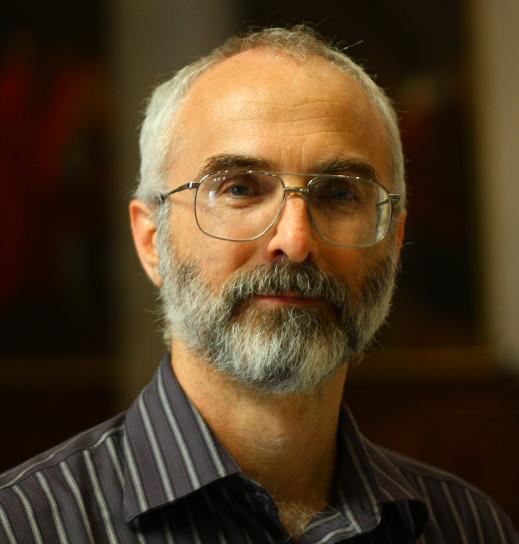
Today we talk to Paul McKenney, who says his kernel development addicition is funded by IBM. He explains why he uses Vi and how Alexey Kuznetsov prompted Paul’s first experience with Linux – and not in the way you might think.
Enjoy the last post in this series and stay tuned: We have a new series in the works that we hope to debut in February. I also want to give a big thanks to everyone who participated in this series.
 Name
Name
Paul E. McKenney, IRC nickname paulmck
What role do you play in the community and/or what subsystem(s) do you work on?
Read-copy update (RCU) is my baby; though, I do occasionally get out into other parts of the kernel and into a few user-mode projects, including userspace RCU and “Is Parallel Programming Hard, And, If So, What Can You Do About It?”
Where do you get your paycheck?
IBM Linux Technology Center funds my kernel development addiction.
What part of the world do you live in? Why there?
I live in Beaverton, Oregon, USA.
One reason is that both my wife and I grew up on Oregon. Another reason is that Beaverton was where Sequent Computer System was located — and they were hiring back in 1990 when it came time to move back home from the Bay Area.
What are your favorite productivity tools for software development? What do you run on your desktop?
The usual productivity tools: git, cscope, vi, bash, awk, and the rare bout with python. Why vi? Well, the shared system I was using 30 years ago could support seven or eight concurrent vi sessions, but only one emacs session. In that environment, therefore, use of emacs was socially irresponsible.
I run Ubuntu with Unity2D at the moment.
How did you get involved in Linux kernel development?
The first time was in 1997, back when I was working on DYNIX. I got an email from someone with a .ru email address asking for a machine-readable copy of an old paper of mine. I sent along a postscript of the paper and asked what he was using it for. He replied that he was working on this kernel named “Linux.” Although I had heard of Linux, it would be some years before I learned the significance of the name “Alexey Kuznetsov.”
The second time was in 2000, when I joined the IBM Linux Technology Center.
What keeps you interested in it?
The constant challenge of keeping up with the what people are using the Linux kernel for. The need for SMP scalability, real-time response, small memory footprint, and energy efficiency (to say nothing of the reliability required to support millions of devices) has resulted in a long series of very interesting problems to solve.
What’s the most amused you’ve ever been by the collaborative development process (flame war, silly code submission, amazing accomplishment)?
I am often amazed when a single technical solution addresses problems that appear to have absolutely nothing to do with each other. The first time was CONFIG_NO_HZ being required by battery-powered devices on the one hand and by mainframes on the other: The smallest of the small and the biggest of the big. Later I was surprised by how the -rt patchset was so effective at finding SMP bugs. More recently, a patch I am working on for the HPC and real-time communities might well also turn out to be useful for energy efficiency.
What’s your advice for developers who want to get involved?
Read all the great advice from the other 29 kernel developers. I cannot think of anything to say that they have not already said. 🙂
What do you listen to when you code?
I listen to contemporary music. If it is more than three or four centuries old, I have a hard time relating to it.
What mailing list or IRC channel will people find you hanging out at? What conference(s)?
LKML and linux-rt-users for email lists, and #linux-rt on IRC. That said, I cannot say that I really keep up with any of them.
GPLv3 driver for exFAT reaches version 1.0
 ExFAT project member Andrew Nayenko has released version 1.0.0 of fuse-exfat, a filesystem driver that can read and write to Microsoft’s exFAT (Extended File Allocation Table) filesystem. Like the Ntfs-3G NTFS driver that is used in Linux distributions, the exFAT driver is based on FUSE (Filesystem in Userspace) and works under Linux as well as OS X. In a short test with Fedora 18, reading from and writing to a USB flash drive that was freshly formatted with exFAT worked fine.
The exfat-fuse driver took three years of development time and nine beta versions to reach version 1.0.0…Read more at The H
Weekend Project: Becoming a Linux Expert
Last I wrote up a basic guide to getting started with Linux for people who have no Linux experience. Then a few days later, the Linux Foundation hosted a live question-and-answer on Facebook (or “stump the chump”, perhaps), and that made me realize I had only scratched the surface. It is a good introduction, but the Linux world extends far beyond a user-friendly general-purpose desktop system. Want to become a Linux expert? Your first decision is expert in what? Kernel development, application programming, multimedia production, productivity, enterprise apps, system and network administration, embedded, mainframe…what? There are hundreds of options.

A field that is rich in potential is helping businesses migrate away from Microsoft to Linux and FOSS. Some of the difficulties are figuring out what to do with archives of documents in closed, proprietary formats, mail, calendar, and contacts stores, finding good FOSS replacements for essential software, and ongoing training and support. Education is under-served, as are accessibility technologies.
Whatever field of interest you choose to explore, your most valuable skill is learning how to find information, and cultivating the ability to continually learn and expand your skillset. Linux does not stand still, and it favors the self-starter. The Linux and free/open source software world is full of smart, helpful people, but you have to show some initiative and willingness to dig in and do your homework. (Which is the most valuable life skill, IMO.) If you have an Internet connection you have the whole world at your fingertips. Here are some guidelines to help you get started.
Certifications
Do employers value certifications, and do you learn anything useful from becoming certified? Yes and yes. The two Linux main certifications are the Linux Professional Institute (LPI) and Red Hat Certified Engineer (RHCE). The LPI is vendor-neutral. The RHCE is specific to Red Hat Enterprise Linux, and the RHCE exam is rigorous and hands-on.
Linux Training
What about formal training? That is a big subject because Linux is so big, so you need to get specific: system and network administration, documentation, security, audio production, video production, animation, drawing and illustration, photography, math and science, office productivity, Web application development and social media, embedded coding, Android apps, medical records and practice, and on and on…so it all depends on what you want to do. If you’re college-bound a computer science degree is a solid foundation for your whole life. A lot of schools are offering multiple computer science degrees with emphasis in different specialties like programming, security, and network and systems administration. It may sound odd, but I consider a liberal arts degree to be more valuable, and some universities offer computer science degrees through their College of Letters and Science rather than their engineering schools. The difference is getting more classes in literature, history, and philosophy, in addition to computer science courses. Technology is just a means to an end, and a good grounding in the liberal arts helps with keeping your focus on goals and consequences, and avoid getting tech-toy tunnel vision.
The Linux Foundation offers all kinds of training courses, and has a lot of free training videos and other materials. Check your local community college, see if there is a Linux User Group (LUG) in your town, and if there isn’t one think about starting one.
Online communities are rich resources, so invest some time in finding some for your particular interest. You might start with the forums and mailing lists for your favorite Linux distribution, or favorite application. For example, Krita and Inkscape are first-rate professional drawing and illustration programs, and have their own communities. Programming languages always have large active user communities. Another approach is from your chosen field of interest, such as Linux security, high-end networking, distributed computing. System and network administration covers a lot of ground, from simple standalone servers to datacenters full of clouds and virtual machines.
Product vendors often sell training, for example enterprise resource planning (ERP), business intelligence (BI), and accounting and financial products. Red Hat, SUSE, and Ubuntu all have various training courses.
Books and Magazine
There are still a lot of good commercial Linux publications, both books and magazines. Books are for deep dives into a specific area of interest. O’Reilly’s Safari Books Online is a subscription service that gives you access to most of their catalog. Of course all tech publishers still offer dead-tree editions that you can browse in real live physical bookstores, and there are still some printed Linux magazines, like Linux Pro Magazine and Linux Format Magazine. The grandpappy of Linux magazines, Linux Journal Magazine, no longer has a print edition, but is digital-only.
But What About Free
There are abundant free-of-cost learning resources online: YouTube, IRC, forums, mailing lists, and thousands upon thousands of online tech publications and blogs published by enthusiasts and professionals. Don’t forget to look for vendor blogs; sometimes these are just fluffy marketing junk, but more often you’ll find a surprising amount of in-depth useful information. Developer blogs are often rich sources of product and coding howtos. Again, look for something specific to your interests. These Linux news/howtos and news aggregation sites are good starting points:
And of course you must hang out here at Linux.com. Again, the key to learning is to be willing to invest time and energy in study and practice. Linux is free, and there are trainloads of free learning resources, so the rest is up to you. When you need help be as specific as you can: summarize the steps you have taken, and then ask your question.
But What About Hardware
I am glad you asked, because the weak point of free software is hardware. Hardware is largely outside of our control, and so we’re continually bumping into closed, proprietary hardware obstacles: smartphones,
set-top boxes like Tivo and Roku, video cards, external storage devices, cameras, audio devices, and so on. Hardware, of course, is a more difficult challenge because of the expense and difficulty of manufacturing. There are two approaches: become an ace reverse-engineer, or design and manufacture your own. There are various ways to take the latter approach. You can do like independent Linux computer vendor ZaReason, and work with overseas manufacturers to produce devices to your own specifications. Arduino and Raspberry Pi are examples of tiny open platforms, though even they have to deal with closed components such as ARM chipsets. AMD just announced a modular open motherboard.
I’m afraid I can’t offer much guidance on how to become an open hardware mogul, though becoming involved with existing open hardware projects might be a good start.
In fact, that’s a good approach for anything you find interesting in Linux-land: Don’t reinvent stuff. We don’t need yet another Ubuntu re-spin, or desktop, or gratuitous user interface re-arrangement. (In fact, some actual sensible UI is sorely-needed.) Get involved with an existing project. You’ll build useful relationships, learn how to function in a cat herd, and learn the mechanics of running a FOSS project. The most valuable skill you can ever learn is how to work effectively with your fellow humans.
Image Credits
Cirpack Linux, public domain, courtesy Wikimedia Commons

GNU and Tux, Free Art License, courtesy Wikimedia Commons

Stash the Cat, Carla Schroder
Open Math: An argument for spatial and visual learning

A hole exists in primary and secondary education that open math can fill. Visual mathematics, spatial or visual reasoning, or the application of mathematics to nature is seldom included in math curriculums or public schools. This gives me math angst because spatial thinking in particular is crucial to many jobs from builders and London cabbies to astrophysists and should be more prevalent in print and online than it is, especially in our digital age.
This severe lack of spatial thinking in math curriculums and public schools is detrimental to our children’s futures. Both parents and policymakers have gone to dizzying lengths to improve math scores and rank. Math curriculums, video games, and tutoring centers abound. Too frequently art, music, recess, and physical education have been cut in favor of improving math scores and a school’s rank. And yet despite various promises to improve math proficiency, test scores or ranking have left many children without a love of math, a level of enthusiasm for math, or much beyond basic computational math skills…Read more at OpenSource.com
Hardware Hacks: Raspberry Pi arcade, Radio-4-Matic, PirateBox
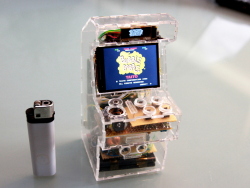 The H‘s Hardware Hacks section collects stories about the wide range of uses of open source in the rapidly expanding area of open hardware. It’s where you can find out about interesting projects, the re-purposing of devices and the creation of a new generation of deeply open systems. In this edition, GitHub’s make-me 3D printing server, the Radio-4-Matic, how to build a mini arcade with a Raspberry Pi, and the PirateBox.
- GitHub’s make-me – To keep the MakerBot 3D printer in their office busy, the developers at GitHub wrote make-me, a software component that plugs into the company’s Hubot server and allows users to send STL files as print jobs to a connected 3D printer…Read more at The H