
Cisco CEO John Chambers doesn’t fear network virtualization and sees VMware as a key partner even if it’ll soon be a foe, too.
Read more at Enterprise Open Source Toolkit
Nothing ever need be a mystery on Linux as it has a large number of excellent utilities for discovering hardware and monitoring hardware health. Here are a handful of good tools for spotting possible hard drive failure, displaying hardware information and monitoring temperatures, fans, voltages, email, music players and more.
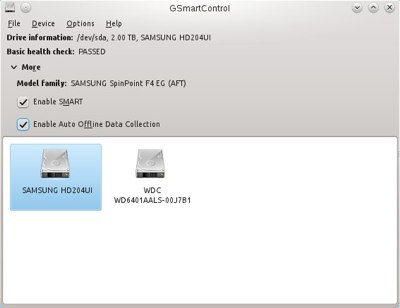
You’re probably familiar with the excellent smartmontools for monitoring hard drive health, and getting early warning of possible drive failure. Smartmontools runs tests and reads data on drives that have the Self-Monitoring, Analysis and Reporting Technology (S.M.A.R.T.) system built into them. It’s been around seemingly forever, but did you know there is a graphical interface for it? SmartControl puts a nice interface on smartmontools and supports all of its functions.
You can run a short or long self-test with a button click, and GSmartControl is especially valuable for quickly and easily finding log files and reading SMART attributes data, reading test results, and seeing detailed data on your hard drives.
It’s not fun when your first warning of a failed CPU fan is a melted-down CPU. lm-sensors is still my top choice for monitoring temperatures, fans, and voltages:
 $ sensors
atk0110-acpi-0
Adapter: ACPI interface
Vcore Voltage:      +1.23 V  (min =  +0.85 V, max =  +1.60 V)
 +3.3 Voltage:      +3.31 V  (min =  +2.97 V, max =  +3.63 V)
 +5 Voltage:        +4.97 V  (min =  +4.50 V, max =  +5.50 V)
 +12 Voltage:      +12.15 V  (min = +10.20 V, max = +13.80 V)
CPU FAN Speed:     3183 RPM  (min =  600 RPM)
CPU Temperature:    +44.0°C  (high = +60.0°C, crit = +95.0°C)
MB Temperature:     +40.0°C  (high = +45.0°C, crit = +75.0°C)
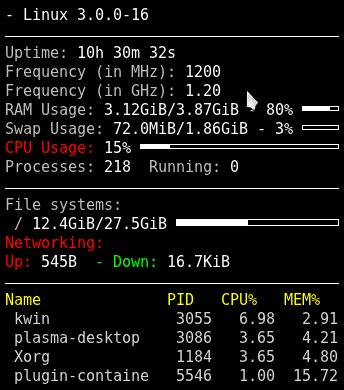
I wish for a nice graphical front-end and alerter to lm-sensors; GNOME and KDE release nice ones and then they disappear. Xsensors is simple, the xfce4-sensors-plugin looks great in XFCE, and the KDE4 System Monitor widget is all right, but it’s not very configurable and does no alerting. psensor is a rather nice, and it can run as a server for remote monitoring. GKrellM is an old favorite cram-full of features, alerting, and configurability.
Conky takes the prize for most objects supported. In addition to the usual system monitors it monitors email, music players, instant messaging, logfiles, weather forecast, and pretty much anything you want. If there isn’t a plugin to do what you want you can write one.
It helps to know what is on your system, and you’re probably familiar with the lscpi command for getting detailed information on everything connected to the PCI bus. Here are a few options you may not know about:
lspci with no options shows a hardware list with vendor names, chipsets, and device types.
lspci -k displays the kernel driver in use for each device, and available kernel modules, like this example for an Nvidia graphics card:
01:00.0 VGA compatible controller: nVidia Corporation G98 [GeForce 8400 GS] (rev a1)
        Subsystem: Micro-Star International Co., Ltd. Device 1162
        Kernel driver in use: nvidia
        Kernel modules: nvidia_current, nouveau, nvidiafb
lspci -t displays a tree view that shows the relationships between your devices.
The vendor names, chipsets, subsystems, device classes– all the information displayed by lspci comes from a giant database, the PCI ID Repository. You can update your local copy of this database, /usr/share/misc/pci.ids, by running the update-pciids command as root.
dmidecode is a wonderful utility for getting information about everything on your motherboard without opening the case, or booting to the BIOS. If you run dmidecode with no options it spits out pages of data. You can select what you want to see by consulting the DMI types table in man dmidecode. Here are some examples.
How much RAM does your motherboard support?
$ sudo dmidecode -t 16
# dmidecode 2.9
SMBIOS 2.5 present.
Handle 0x0033, DMI type 16, 15 bytes
Physical Memory Array
        Location: System Board Or Motherboard
        Use: System Memory
        Error Correction Type: None
        Maximum Capacity: 16 GB
        Error Information Handle: Not Provided
        Number Of Devices: 4
How much RAM is installed, and in which slots? This example has most of the output snipped:
$ sudo dmidecode -t 17
# dmidecode 2.9
SMBIOS 2.5 present.
Handle 0x0035, DMI type 17, 27 bytes
Memory Device
        Total Width: 64 bits
        Data Width: 64 bits
        Size: 2048 MB
        Form Factor: DIMM
        Set: None
        Locator: DIMM0
        Bank Locator: BANK0
        Type: DDR2
        Type Detail: Synchronous
        Speed: 800 MHz (1.2 ns)
What are the onboard devices, such as video, networking, sound?
$ sudo dmidecode -t 10
# dmidecode 2.9
SMBIOS 2.5 present.
Handle 0x002C, DMI type 10, 6 bytes
On Board Device Information
        Type: Video
        Status: Enabled
        Description:   ATI
Handle 0x002D, DMI type 10, 6 bytes
On Board Device Information
        Type: Ethernet
        Status: Enabled
        Description: To Be Filled By O.E.M.
And much, much more, which is all detailed in the man page.
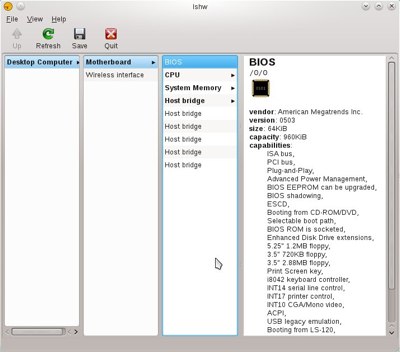
The lshw command also gives a detailed peek inside your PC, and you can invoke its graphical view with lshw -X (left). It’s a little weird to navigate, but everything is there.
I like the way lshw presents information. It includes details like filesystem types and sizes, bus information, and capabilities. It has a couple of nice extras: the -sanitize option scrubs IP addresses, serial numbers, and other identifiers, and the -class option lets you choose categories such as volume and disk for block devices, memory, and display. Run lshw -short to see what the categories are. Here is an abbreviated example:
$ sudo lshw -short
H/W path         Device       Class       Description
=====================================================
/0/33/2                       memory      2GiB DIMM DDR2 Synchronous 800 MHz (1.2 ns
/0/33/3                       memory      DIMM [empty]
/0/100/a/0       eth0         network     RTL8111/8168B PCI Express Gigabit Ethernet
/0/100/11/0      /dev/sda     disk        2TB SAMSUNG HD204UI
/0/100/11/0/1    /dev/sda1    volume      1651GiB EXT4 volume
/0/100/11/0/2    /dev/sda2    volume      211GiB EXT4 volume
/0/100/11/1      /dev/sdb     disk        640GB WDC WD6401AALS-0
/0/100/11/1/1    /dev/sdb1    volume      27GiB EXT4 volume
/0/100/11/1/2    /dev/sdb2    volume      1907MiB Linux swap volume
/0/100/11/0.0.0  /dev/cdrom2  disk        iHAS424   B
/1               wlan0        network     Wireless interface
Getting your algorithm to take advantage of multicore processors and GPUs can be difficult. Enter the Xcelerit SDK 2.0 toolkit, which is designed to make light work of exploiting the parallelism existing in today’s HPC hardware.
Using the Xcelerit SDK, companies only need to make quite minor changes to their existing code and they can then run it on multi-core CPUs, GPUs, and grids of such platforms achieving maximum performance with very little programmer effort”, said Hicham Lahlou, CEO of Xcelerit.
According to Xcelerit, the new SDK also supports the new Kepler GPU architecture from Nvidia. Read the Full Story.
Related posts:

Samsung’s Galaxy S III is a pretty lust-worthy gadget to begin with, but the Korean electronics giant just won’t leave well enough alone. First they put together a model that managed to combine both an LTE radio and an Exynos quad-core chipset, a combination that unfortunately hasn’t trickled out of the country yet.
Now it seems that U.K. phone retailer Clove has the skinny on yet another hardware revision. The folks at Phandroid spotted a landing page for Clove created for that handsome new black GSIII that’s been spotted in the wild that mentions it will ship with 64GB of internal memory in October.
Better late than never, I suppose. Galaxy fanatics may remember that Samsung promised a 64GB Galaxy S III at the company’s ostentatious London launch event, but the device failed to appear in due course. Naturally, many assumed that particular model got the axe at some point, a notion that Samsung eventually denied — according to them, the 64GB version was instead slated for a launch during the “second half” of 2012.
It shouldn’t come as much surprise that there isn’t much information on what the mildly-tweaked handset will cost, or when we can expect to see it embark on a world tour. In fact, Samsung hasn’t even officially confirmed the device’s existence, but that’s all right — third-party retailers and carriers (including T-Mobile USA, which is a bit of an eyebrow-raiser) are apparently more than happy to spread the word anyway.