
The Slackware developers have delivered the first release candidate of Slackware 14. According to the developers, all bugs from the beta have been fixed and many packages were refreshed.
Read more at The H
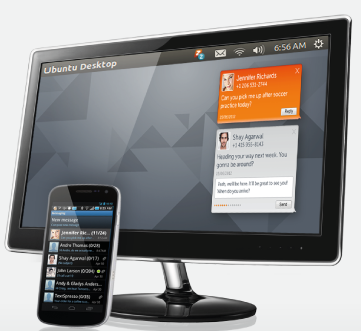
The company that introduced the Textspresso machine to the world has now released its desktop cloud texting application for Linux.
Zipwhip’s Android app, which sends text messages to and from your desktop or tablet via the cloud is now available on Ubuntu and Mint, as well as Windows and Mac.
Zipwhip first caught our attention in April by building an espresso machine that takes orders via text message using its cloud texting application. We reported then that the service runs on a suite of Linux-based products but its solution for Linux desktop users was still in development. The company has since made good on its promise to release a Linux desktop version.
“Zipwhip is a Linux-based platform and there was no chance of us not supporting our beloved desktop app for the Linux OS,” the company wrote in a blog post this week announcing the release.
Do you dual boot? Not a problem. The application can be installed on multiple desktops running different operating systems and still sync with the messages from one phone number.
The Zipwhip app runs in the notification area of your Ubuntu desktop—the same place apps like Skype and Dropbox run. When a text message hits your phone, it also appears on your desktop in the upper right corner.
Read it, reply and swipe it away. The service immediately updates the SQLite database on your Android phone so that swiped messages show up as read on your phone as well as your desktop. You can also drag the text box lower and post it to your desktop to save it for later.
Watch Zipwhip’s video, below, for a complete demonstration. (The message from Linus Torvalds is a nice touch.) And download the desktop app at http://zipwhip.com/features/linux.
One of the most common questions when comparing network monitoring tools is “What does Zenoss do that Nagios doesn’t?”
Like a lot of grumpy old network admins, you can pry my Nagios from my cold dead fingers. I know it inside out, and deep knowledge of a particular tool often gets better results that unfamiliarity with a (theoretically) superior tool. Nagios + Cacti = monitoring, alerting, and historical performance happiness.
Zenoss is one heck of a sophisticated, enterprise network monitoring, alerting, and IT systems management application that may be the better choice under certain conditions. If you’re riding herd on less than 100 networked devices, or manage a static network that rarely changes it’s probably overkill, though it doesn’t hurt anything to try it out. (You might want to count your network hosts, as even a small network often contains more nodes than you might think: printers, laptops, tablets, routers, wireless access points, smart switches, smartphones…)
Both Nagios and Zenoss have free community editions, and commercial versions with more functionality. It is easier to learn about Nagios without installing it first because there are several live demos for all Nagios versions, and you can even log in as Administrator and mess things up. The nice Zenoss people have invested considerable effort into producing flashy videos, Webex sessions, whitepapers, and blogs, but it is all heavily-larded with marketingspeak, there are no live hands-on demos like there are for Nagios, and the enterprise evaluation and some of the presentations require jumping through registration or salespeople hoops. (Fie on Webex anyway, as it is unreliable and never wants to work for me.)
The “killer feature” that used to set Zenoss apart is its excellent network host auto-detection. Nagios has this now via a number of good third-party plugins that detect hosts and write Nagios configuration files for them. Nagios has mobile plugins, high-availability, mass quantities of plugins, and it’s not hard to write your own, so it is easy to customize.
Both have cloud support, and reams of good documentation: books, howtos, blogs, videos, and even the official vendor docs are pretty good.
So when would you choose Zenoss over Nagios? When you have a large, complex network: multiple locations, networked storage, virtual machines, clouds, mobile devices, and whatever else people are stuffing into their IT infrastructures these days. Zenoss Service Dynamics (not included in the free core) gives a complete, real-time picture of a complex dynamic network. Its most valuable ability, in my sometimes humble opinion, is the dependency and service mapping that shows the relationships between all of your various network elements. This is priceless when you’re troubleshooting, because it shows the exact linkages between services, servers, virtual machines, and storage. They even have a feature called “Automated Root Cause Analysis” for zeroing in on problem spots.
Zenoss bundles some nice analytics so you can easily track workloads and find bottlenecks. It even has some flashy predictive analytics to help plan when and where to add capacity.
You can automate responses and fixes for problems. For example, stop and start services when certain performance thresholds are reached, send alerts to humans, generate trouble tickets, and trigger custom scripts to do whatever else you might want, like re-allocating cloud resources.
If you do decide to go with Zenoss, there are a few caveats you must know about. Zenoss has a pretty AJAX-based Web interface, but it still requires a bit more effort and knowledge than point-and-click. You still need to understand snmp, MIBs, Linux networking utilities, network protocols, and the servers and services you’re monitoring. Zenoss offers online training courses via Webex. These are all things any network admin should know, but sometimes people get the idea that a pretty interface means you don’t need to know anything.
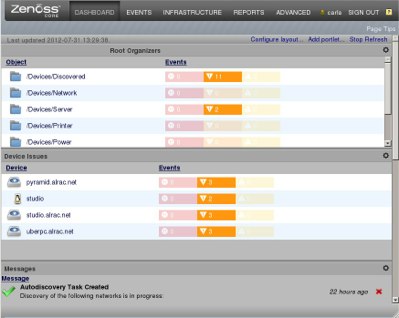
The dashboard is customizable with the addition or removal of portlets (see above), and there are all kinds of community-supported portlets to try in addition to the stock portlets. If you know a bit of Python or JavaScript you can write your own.
Zenoss runs on the usual LAMP stack, and Zenoss Core is included in a number of Linux distributions for easy installation and updates. You can also download VMWare images for Linux, Mac, and Windows, and binary stack installers that bundle all dependencies for Linux and Mac. Source tarballs should build on pretty much any Unix-y operating system.

There isn’t much we don’t already know about Huawei’s 10-inchMediaPad FHD, revealing most of its secrets well before its launch later this month. Now that it’s swung through Washington to be poked and prodded by the screwdriver-clutching mavens at the FCC, we know that the US Government thinks it’s safe for human consumption. The slate’s impressed even the surliest of our staffers when we played with it, making us deeply excited for its arrival in stores. Those interested in seeing what lies beneath that glass-and-aluminum surface should check out the autopsy gallery we’ve got for you below.
Gallery: Huawei MediaPad 10 Internal Photos


Continue reading Huawei MediaPad 10 FHD spills the beans (and its guts) at the FCC
Filed under: Tablet PCs
Huawei MediaPad 10 FHD spills the beans (and its guts) at the FCC originally appeared on Engadget on Fri, 10 Aug 2012 10:14:00 EDT. Please see our terms for use of feeds.
Permalink |  FCC | Email this | Comments