
Fedora 17, the latest release that is cooked with an odd codename, has just been released for IBM System z…
Read more at Phoronix
Mathbuntu brings a nice batch of math and science software, textbooks, and other goodies to Ubuntu and Kubuntu. Let’s try it out and see if it makes us smarter.
Mathbuntu can be obtained in three ways. One is to download and run its slick little installation script for existing Ubuntu and Kubuntu systems. This adds all the Mathbuntu bits without having to download the whole distro. It will take a while because it downloads a lot of packages.
You can order a DVD for a few bucks, and there are also complete downloadable .isos. The available versions are K/Ubuntu 11.10 and 12.04, both 32- and 64-bit. The download links on the download page are obscured, which is sad for wget fans, but there is still a way to use wget. I certainly do, because it automatically retries interrupted downloads and supports rate-limiting. It seems that ever so many FOSS projects and distros like to play funny games with download links, so one way to find them is to go ahead and start the download with Firefox. Then the Download Manager will tell you when you right-click on your download, as in figure 1.
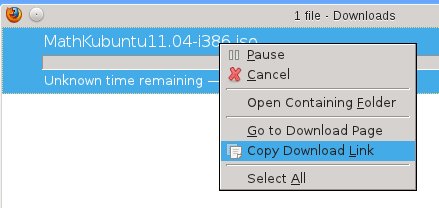
Click on Copy Download Link, and then middle-click paste in a terminal. Now you can prepend your favorite wget incantation, like this one that continues interrupted downloads and limits its bandwidth to 100k:
$ wget -c --limit-rate=100k http://www.mathbuntu.org/iso/MathKubuntu12.04-amd64.iso
There is a lot of installation help on Mathbuntu.org, including videos.
The download images are over 2GB. Burn one to a DVD and there’s your live DVD and installation disk, and of course you can easily make a bootable USB stick. I installed a Kubuntu image and gave it a whirl.
However you get Mathbuntu, what does it give you? For starters, you get a batch of open source and public domain textbooks, such as the highly-regarded three-volume “History of Modern Mathematics” by David Eugene Smith, “Introduction to Real Analysis” by William Trench, and “Elementary Calculus: An Infinitesimal Approach” by H. Jerome Keisler.
I have a special fondness for readily-accessible textbooks. Textbooks have traditionally been a bit of a racket; “new” editions often contain only trivial changes, and they’re expensive. Textbook publishers are discovering both the good and bad sides of high tech: digital distribution is cheaper, faster, and more flexible, but fences and walls are also tempting. And so students get to have fun adventures with purchasing time-bombed access codes which they cannot re-sell, and which sometimes don’t work, and good luck sorting that out. I like books I can just pick up and read without drama, and resell or give away.
There is a fair bit of good science and math software for Linux, and Mathbuntu collects a sizable herd of it, including:
Mathbuntu also includes links to meaty online educational sites like Khan Academy, MIT Open Courseware, Sage Online, and WolframAlpha, the online answer engine built on Mathematica.
Installation was uneventful, and no, I am not nostalgic for the olden days when installing Linux required determination and iron geek muscles. Installing most any Linux has been a non-dramatic event for many years now, and I like it that way. Mathbuntu expands to about 6GB, and that includes the customary Linux richness of apps like LibreOffice, GIMP, various email, Web, messaging, multimedia, and system utilities. (I shall refrain from making my customary comparison to our big proprietary commercial friend who can barely cram an operating system into 15GB, let alone applications.)
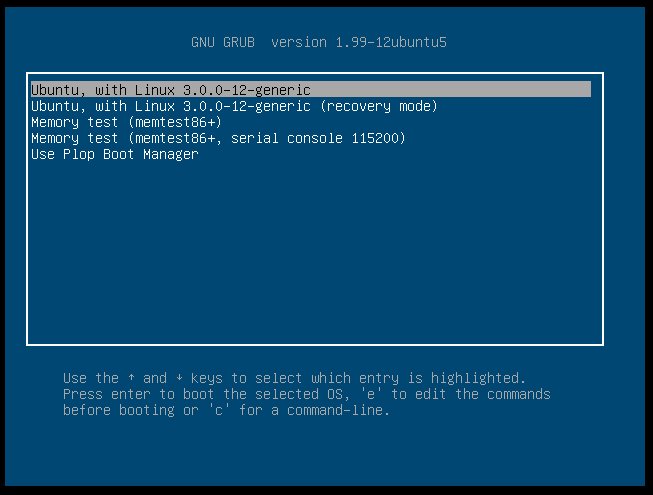 The bootloader has useful customizations as Figure 2 shows: boot to a serial console and the Plop boot manager, which lets you boot from USB media even on older systems that don’t support it.
The menu organization is a little confusing for me, with overlapping entries in multiple categories like Development, Science, and Math. I’d like to see a Mathbuntu category with all the special Mathbuntu apps in one place, a nice one-stop shop for perusing all the goodies and trying them out.
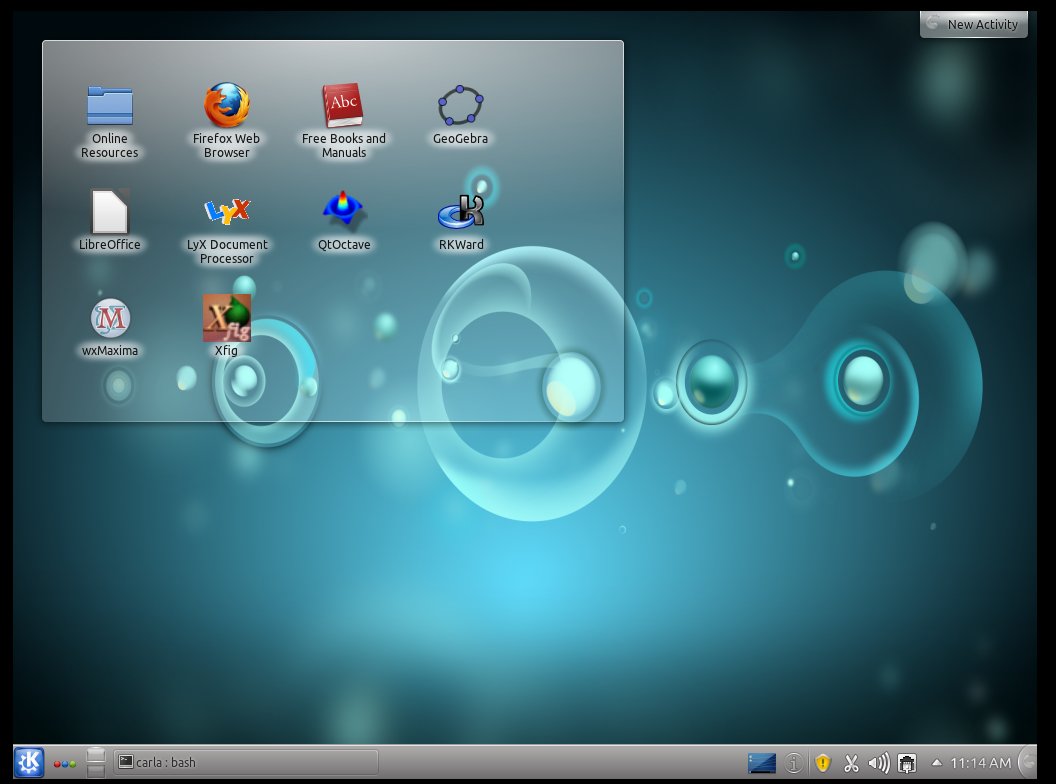
Mathbuntu is maintained by Dr. Leon Brin, who is a mathematician and professor. He is also the author of IFS Tools, and contributes to Maxima. Dr. Brin said in a FLOSS For Science interview that he is open to more contributors working on Mathbuntu. He wants a better website with more interaction with users and contributors, a more flexible installer that lets users tailor the installation, and more documentation and more textbooks. (Figure 3 shows the Mathbuntu KDE desktop.)
 I’ve long felt that one of Ubuntu’s strongest features is the common repositories that serve all Ubuntu flavors: Kubuntu, Ubuntu Server, Edubuntu, Xubuntu, Lubuntu, and all the myriad independent offshoots. This means that any single Ubuntu installation can easily morph into any variant by simply installing a few packages, rather than having to support a completely new installation. This also makes it easy to roll out specialty variations like Mathbuntu without introducing incompatibilities. Mathbuntu is useful for the math and science nerd who already knows what software they want, and especially useful for introducing Linux users to some of the great math and science apps in Linux.
 This week EMC Corporation rolled out the new VNX HPC storage appliance, a preconfigured hardware and software appliance designed to simplify complex Lustre environments for commercial HPC customers.
Lustre is one of the most powerful file systems on the market for handling HPC workloads and a natural fit for emerging commercial HPC applications. But the management complexity, especially in fast growing environments, can be daunting. Many of these organizations don’t have the resources to take full advantage of complex Lustre based implementations. EMC is helping to change that with its VNX HPC series solution, which is appliance based for easy deployments and integrated with Terascala for simple end-to-end management and EMC global support.”
EMC says that the company began by focusing on simplicity first to make Lustre accessible, usable, and cost effective for commercial HPC. The VNX HPC series includes metadata and object servers, EMC VNX5100 metadata storage, VNX7500 object storage and the Terascala LustreStack software suite—delivering 10s of GB/sec bandwidth and 10s of petabytes of capacity.
Read the Full Story.
Related posts:

If this rumor is true – and it certainly sounds true – then HP and other OEMs are about to pull the plug on their own Windows on ARM RT (WART) devices thanks to Microsoft essentially beating them to market with potentially superior hardware. SemiAccurate writes:
You’ll notice a few things there: first, Microsoft expects OEMs to make certain types of hardware at certain times. Remember all those all-in-one touchscreen PCs nobody bought? That was a Microsoft effort that forced OEMs to make at least two touchscreen devices per line. The same thing happened whenever manufacturers tried to build a Windows tablet and the same thing will happen when Windows 8 ships.
Oddly, however, this time Microsoft is doing its own handcuffing, forcing manufacturers to compete against a Platonic ideal of future Microsoft tablets. While OEMs rarely have much spine, this may end up being the straw that broke the HPs back.

