Earlier this month, the Linux Foundation announced the formation of Continuous Delivery Foundation (CDF) – a new foundation that joins the likes of Cloud Native Computing Foundation (CNCF) and Open Container Initiative (OCI).
Continuous Integration and Continuous Delivery (CI/CD) has become an essential building block of modern application lifecycle management. This technique allows business to increase the velocity of delivering software to users. Through CI/CD, what was once confined to large, web-scale companies became available to early-stage startups and enterprises.
With the launch of CDF, Linux Foundation has taken the first step in bringing the most popular CI/CD tools under the same roof. This would enable key contributors such as CloudBees, Netflix, Google, and other members to collaborate rather than duplicating the efforts. The foundation would encourage members to contribute to critical areas of software delivery with an increased focus. This immensely helps the ecosystem in adopting the best of the breed tools and the best practices of implementing CI/CD pipelines.
There is something truly exciting about customizing your operating system through the collection of hidden files we call dotfiles. In What a Shell Dotfile Can Do For You, H. “Waldo” Grunenwald goes into excellent detail about the why and how of setting up your dotfiles. Let’s dig into the why and how of sharing them.
What’s a dotfile?
“Dotfiles” is a common term for all the configuration files we have floating around our machines. These files usually start with a . at the beginning of the filename, like .gitconfig, and operating systems often hide them by default. For example, when I use ls -a on MacOS, it shows all the lovely dotfiles that would otherwise not be in the output.
dotfiles on master
➜ ls
README.md Rakefile bin misc profiles zsh-custom
dotfiles on master
➜ ls-a
. .gitignore .oh-my-zsh README.md zsh-custom
.. .gitmodules .tmux Rakefile
.gemrc .global_ignore .vimrc bin
.git .gvimrc .zlogin misc
.gitconfig .maid .zshrc profiles
If I take a look at one, .gitconfig, which I use for Git configuration, I see a ton of customization. I have account information, terminal color preferences, and tons of aliases that make my command-line interface feel like mine.
This article is about text processing in Rust, but it also contains a quick introduction to pattern matching, which can be very handy when working with text.
Strings are a huge subject in Rust, which can be easily realized by the fact that Rust has two data types for representing strings as well as support for macros for formatting strings. However, all of this also proves how powerful Rust is in string and text processing.
Apart from covering some theoretical topics, this article shows how to develop some handy yet easy-to-implement command-line utilities that let you work with plain-text files. If you have the time, it’d be great to experiment with the Rust code presented here, and maybe develop your own utilities.
Rust and Text
Rust supports two data types for working with strings: String and str. The String type is for working with mutable strings that belong to you, and it has length and a capacity property. On the other hand, the str type is for working with immutable strings that you want to pass around. You most likely will see an str variable be used as &str. Put simply, an str variable is accessed as a reference to some UTF-8 data. An str variable is usually called a “string slice” or, even simpler, a “slice”. Due to its nature, you can’t add and remove any data from an existing str variable.
Red Hat is noted for making open source a culture and business model, not just a way of developing software, and its message of open source as the path to innovation resonates on many levels.
In anticipation of the upcoming Open Networking Summit, we talked with Thomas Nadeau, Technical Director NFV at Red Hat, who gave a keynote address at last year’s event, to hear his thoughts regarding the role of open source in innovation for telecommunications service providers.
One reason for open source’s broad acceptance in this industry, he said, was that some very successful projects have grown too large for any one company to manage, or single-handedly push their boundaries toward additional innovative breakthroughs.
“There are projects now, like Kubernetes, that are too big for any one company to do. There’s technology that we as an industry need to work on, because no one company can push it far enough alone,” said Nadeau. “Going forward, to solve these really hard problems, we need open source and the open source software development model.”
Here are more insights he shared on how and where open source is making an innovative impact on telecommunications companies.
Linux.com: Why is open source central to innovation in general for telecommunications service providers?
Nadeau: The first reason is that the service providers can be in more control of their own destiny. There are some service providers that are more aggressive and involved in this than others. Second, open source frees service providers from having to wait for long periods for the features they need to be developed.
And third, open source frees service providers from having to struggle with using and managing monolith systems when all they really wanted was a handful of features. Fortunately, network equipment providers are responding to this overkill problem. They’re becoming much more flexible, more modular, and open source is the best means to achieve that.
Linux.com: In your ONS keynote presentation, you said open source levels the playing field for traditional carriers in competing with cloud-scale companies in creating digital services and revenue streams. Please explain how open source helps.
Nadeau: Kubernetes again. OpenStack is another one. These are tools that these businesses really need, not to just expand, but to exist in today’s marketplace. Without open source in that virtualization space, you’re stuck with proprietary monoliths, no control over your future, and incredibly long waits to get the capabilities you need to compete.
There are two parts in the NFV equation: the infrastructure and the applications. NFV is not just the underlying platforms, but this constant push and pull between the platforms and the applications that use the platforms.
NFV is really virtualization of functions. It started off with monolithic virtual machines (VMs). Then came “disaggregated VMs” where individual functions, for a variety of reasons, were run in a more distributed way. To do so meant separating them, and this is where SDN came in, with the separation of the control plane from the data plane. Those concepts were driving changes in the underlying platforms too, which drove up the overhead substantially. That in turn drove interest in container environments as a potential solution, but it’s still NFV.
You can think of it as the latest iteration of SOA with composite applications. Kubernetes is the kind of SOA model that they had at Google, which dropped the worry about the complicated networking and storage underneath and simply allowed users to fire up applications that just worked. And for the enterprise application model, this works great.
But not in the NFV case. In the NFV case, in the previous iteration of the platform at OpenStack, everybody enjoyed near one-for-one network performance. But when we move it over here to OpenShift, we’re back to square one where you lose 80% of the performance because of the latest SOA model that they’ve implemented. And so now evolving the underlying platform rises in importance, and so the pendulum swing goes, but it’s still NFV. Open source allows you to adapt to these changes and influences effectively and quickly. Thus innovations happen rapidly and logically, and so do their iterations.
Linux.com: Tell us about the underlying Linux in NFV, and why that combo is so powerful.
Nadeau: Linux is open source and it always has been in some of the purest senses of open source. The other reason is that it’s the predominant choice for the underlying operating system. The reality is that all major networks and all of the top networking companies run Linux as the base operating system on all their high-performance platforms. Now it’s all in a very flexible form factor. You can lay it on a Raspberry Pi, or you can lay it on a gigantic million-dollar router. It’s secure, it’s flexible, and scalable, so operators can really use it as a tool now.
Linux.com: Carriers are always working to redefine themselves. Indeed, many are actively seeking ways to move out of strictly defensive plays against disruptors, and onto offense where they ARE the disruptor. How can network function virtualization (NFV) help in either or both strategies?
Nadeau: Telstra and Bell Canada are good examples. They are using open source code in concert with the ecosystem of partners they have around that code which allows them to do things differently than they have in the past. There are two main things they do differently today. One is they design their own network. They design their own things in a lot of ways, whereas before they would possibly need to use a turnkey solution from a vendor that looked a lot, if not identical, to their competitors’ businesses.
These telcos are taking a real “in-depth, roll up your sleeves” approach. ow that they understand what they’re using at a much more intimate level, they can collaborate with the downstream distro providers or vendors. This goes back to the point that the ecosystem, which is analogous to partner programs that we have at Red Hat, is the glue that fills in gaps and rounds out the network solution that the telco envisions.
Learn more at Open Networking Summit, happening April 3-5 at the San Jose McEnery Convention Center.
iostat is used to get the input/output statistics for storage devices and partitions. iostat is a part of the sysstat package. With iostat, you can monitor the read/write speeds of your storage devices (such as hard disk drives, SSDs) and partitions (disk partitions). In this article, I am going to show you how to monitor disk input/output using iostat in Linux. So, let’s get started.
Installing iostat on Ubuntu/Debian:
The iostat command is not available on Ubuntu/Debian by default. But, you can easily install the sysstat package from the official package repository of Ubuntu/Debian using the APT package manager. iostat is a part of the sysstat package as I’ve mentioned before.
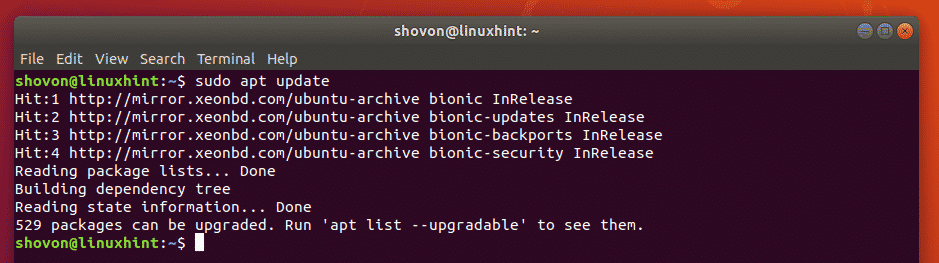
First, update the APT package repository cache with the following command:
One of the things I love about using Linux is how connected you feel to the community. That’s especially true when the actual creator and CEO of a Linux desktop OS reaches out and personally invites you to give it test drive. And after reading what’s in store for Zorin OS 15 (currently in beta), this one just climbed higher on my list of distributions to discover. … Read more at Forbes
The “future of the firm” is a big deal. As jobs become more automated, and people more often work in teams, with work increasingly done on a contingent and contract basis, you have to ask: “What does a firm really do?” Yes, successful businesses are increasingly digital and technologically astute. But how do they attract and manage people in a world where two billion people work part-time? How do they develop their workforce when automation is advancing at light speed? And how do they attract customers and full-time employees when competition is high and trust is at an all-time low?
When thinking about the big-picture items affecting the future of the firm, we identified several topics that we discuss in detail in this report:
Trust, responsibility, credibility, honesty, and transparency.
Customers and employees now look for, and hold accountable, firms whose values reflect their own personal beliefs. We’re also seeing a “trust shakeout,” where brands that were formerly trusted lose trust, and new companies build their positions based on ethical behavior. And companies are facing entirely new “trust risks” in social media, hacking, and the design of artificial intelligence (AI) and machine learning (ML) algorithms.
The search for meaning.
Employees don’t just want money and security; they want satisfaction and meaning. They want to do something worthwhile with their lives.
New leadership models and generational change.
Firms of the 20th century were based on hierarchical command and control models. Those models no longer work. In successful firms, leaders rely on their influence and trustworthiness, not their position.
The Lightweight Directory Access Protocol (LDAP) allows for the querying and modification of an X.500-based directory service. In other words, LDAP is used over a Local Area Network (LAN) to manage and access a distributed directory service. LDAPs primary purpose is to provide a set of records in a hierarchical structure. What can you do with those records? The best use-case is for user validation/authentication against desktops. If both server and client are set up properly, you can have all your Linux desktops authenticating against your LDAP server. This makes for a great single point of entry so that you can better manage (and control) user accounts.
The most popular iteration of LDAP for Linux is OpenLDAP. OpenLDAP is a free, open-source implementation of the Lightweight Directory Access Protocol, and makes it incredibly easy to get your LDAP server up and running.
In this three-part series, I’ll be walking you through the steps of:
Installing OpenLDAP server.
Installing the web-based LDAP Account Manager.
Configuring Linux desktops, such that they can communicate with your LDAP server.
In the end, all of your Linux desktop machines (that have been configured properly) will be able to authenticate against a centralized location, which means you (as the administrator) have much more control over the management of users on your network.
In this first piece, I’ll be demonstrating the installation and configuration of OpenLDAP on Ubuntu Server 18.04. All you will need to make this work is a running instance of Ubuntu Server 18.04 and a user account with sudo privileges. Let’s get to work.
Update/Upgrade
The first thing you’ll want to do is update and upgrade your server. Do note, if the kernel gets updated, the server will need to be rebooted (unless you have Live Patch, or a similar service running). Because of this, run the update/upgrade at a time when the server can be rebooted. To update and upgrade Ubuntu, log into your server and run the following commands:
sudo apt-get updatesudo apt-get upgrade -y
When the upgrade completes, reboot the server (if necessary), and get ready to install and configure OpenLDAP.
Installing OpenLDAP
Since we’ll be using OpenLDAP as our LDAP server software, it can be installed from the standard repository. To install the necessary pieces, log into your Ubuntu Server and issue the following command:
sudo apt-get instal slapd ldap-utils -y
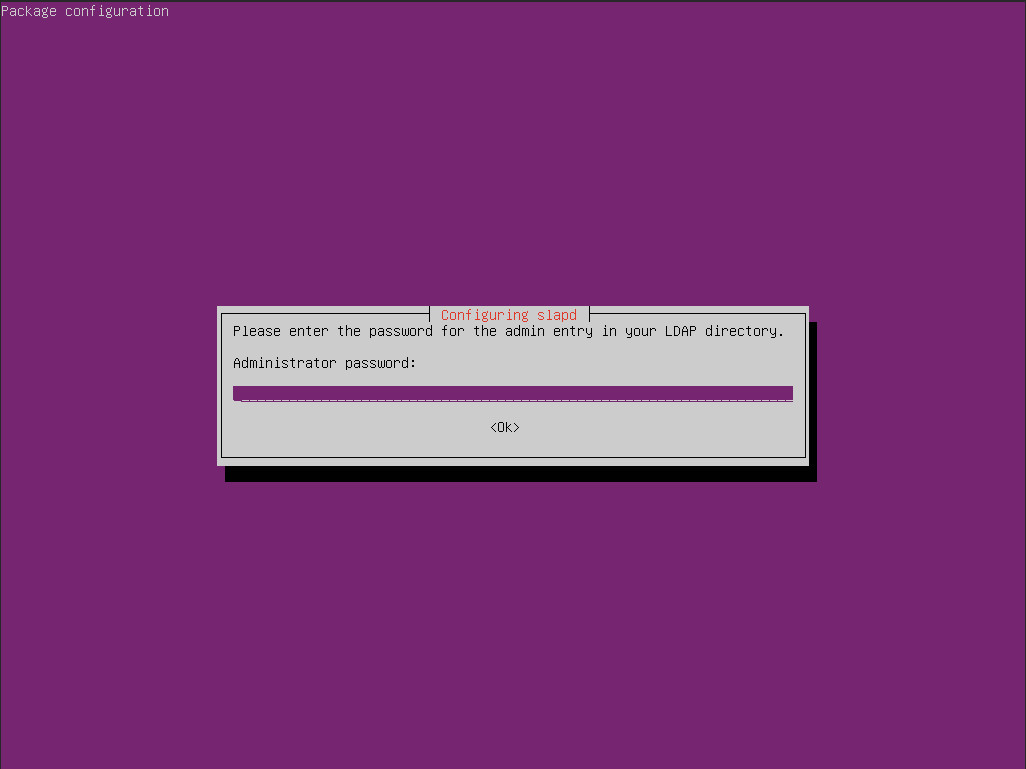
During the installation, you’ll be first asked to create an administrator password for the LDAP directory. Type and verify that password (Figure 1).
Figure 1: Creating an administrator password for LDAP.
Configuring LDAP
With the installation of the components complete, it’s time to configure LDAP. Fortunately, there’s a handy tool we can use to make this happen. From the terminal window, issue the command:
sudo dpkg-reconfigure slapd
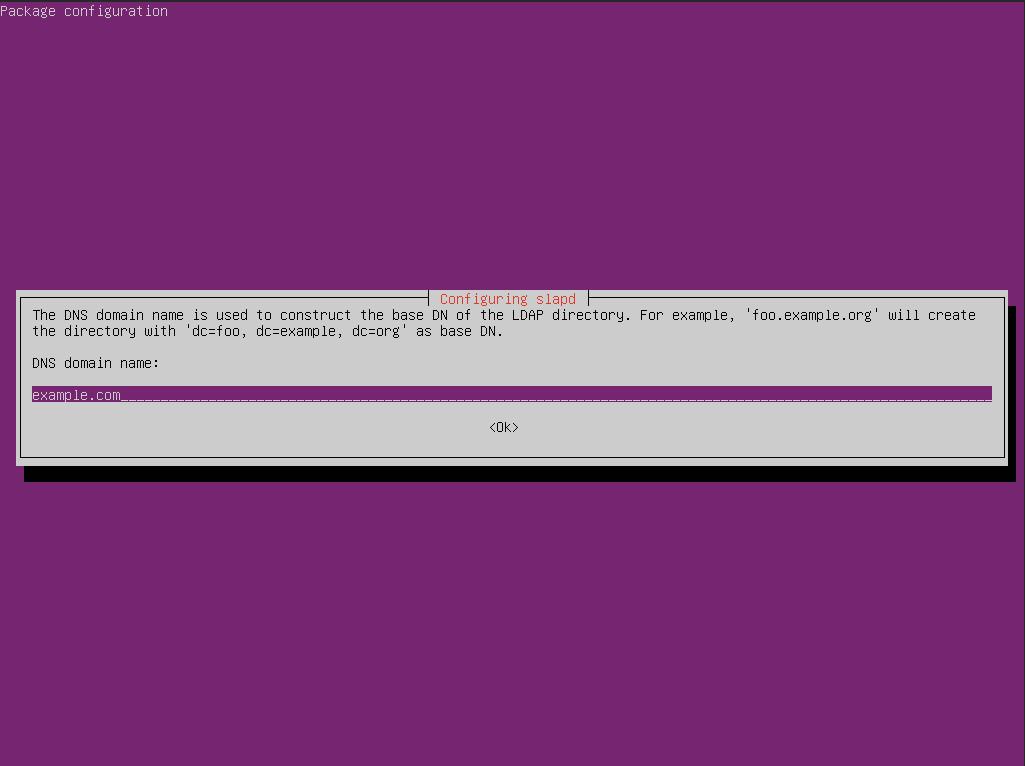
In the first window, hit Enter to select No and continue on. In the second window of the configuration tool (Figure 2), you must type the DNS domain name for your server. This will serve as the base DN (the point from where a server will search for users) for your LDAP directory. In my example, I’ve used example.com (you’ll want to change this to fit your needs).
Figure 2: Configuring the domain name for LDAP.
In the next window, type your Organizational name (ie the name of your company or department). You will then be prompted to (once again) create an administrator password (you can use the same one as you did during the installation). Once you’ve taken care of that, you’ll be asked the following questions:
Database backend to use – select MDB.
Do you want the database to be removed with slapd is purged? – Select No.
Move old database? – Select Yes.
OpenLDAP is now ready for data.
Adding Initial Data
Now that OpenLDAP is installed and running, it’s time to populate the directory with a bit of initial data. In the second piece of this series, we’ll be installing a web-based GUI that makes it much easier to handle this task, but it’s always good to know how to add data the manual way.
One of the best ways to add data to the LDAP directory is via text file, which can then be imported in with the ldapaddcommand. Create a new file with the command:
In the above file, every entry in all caps needs to be modified to fit your company needs. Once you’ve modified the above file, save and close it with the [Ctrl]+[x] key combination.
To add the data from the file to the LDAP directory, issue the command:
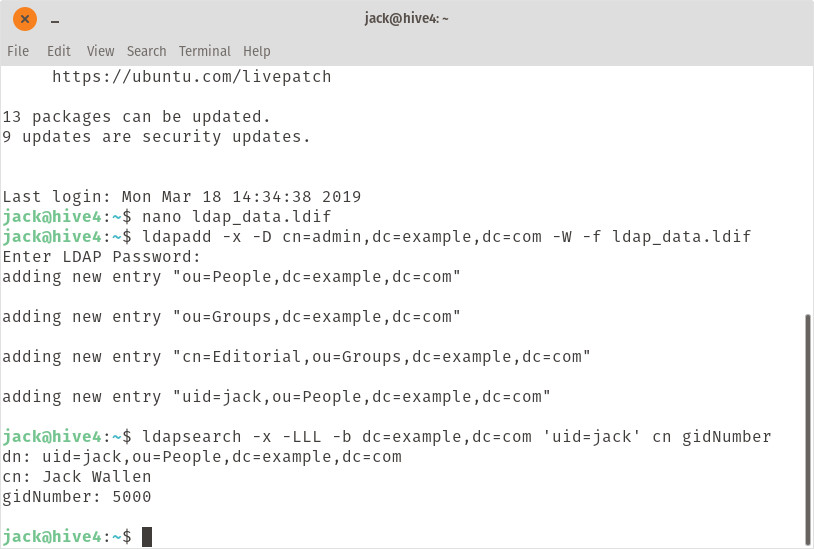
Remember to alter the dc entries (EXAMPLE and COM) in the above command to match your domain name. After running the command, you will be prompted for the LDAP admin password. When you successfully authentication to the LDAP server, the data will be added. You can then ensure the data is there, by running a search like so:
Where EXAMPLE and COM is your domain name and USER is the user to search for. The command should report the entry you searched for (Figure 3).
Figure 3: Our search was successful.
Now that you have your first entry into your LDAP directory, you can edit the above file to create even more. Or, you can wait until the next entry into the series (installing LDAP Account Manager) and take care of the process with the web-based GUI. Either way, you’re one step closer to having LDAP authentication on your network.
Why bother having a process for proposing changes to your open source project? Why not just let people do what they’re doing and merge the features when they’re ready? Well, you can certainly do that if you’re the only person on the project. Or maybe if it’s just you and a few friends.
But if the project is large, you might need to coordinate how some of the changes land. Or, at the very least, let people know a change is coming so they can adjust if it affects the parts they work on. A visible change process is also helpful to the community. It allows them to give feedback that can improve your idea. And if nothing else, it lets people know what’s coming so that they can get excited, and maybe get you a little bit of coverage on Opensource.com or the like. Basically, it’s “here’s what I’m going to do” instead of “here’s what I did,” and it might save you some headaches as you scramble to QA right before your release.
So let’s say I’ve convinced you that having a change process is a good idea. How do you build one?
Decide who needs to review changes
One of the first things you need to consider when putting together a change process for your community is: “who needs to review changes?” This isn’t necessarily approving the changes; we’ll come to that shortly. But are there people who should take a look early in the process?
Kubernetes, microservices and the advent of cloud native deployments have created a Renaissance-era in computing. As developers write and deploy code as part of continuous integration and continuous delivery (CI/CD) production processes, an explosion of tools has emerged for CI/CD processes, often targeted for cloud native deployments.
“Basically, when we all started looking at microservices as a possible paradigm of development, we needed to learn how to operationalize them,” Priyanka Sharma, director of alliances at GitLab and a member of the governing board at the Cloud Native Computing Foundation (CNCF), said. “That was something new for all of us. And from a very good place, a lot of technology came out, whether it’s open source projects or vendors who are going to help us with every niche problem we were going to face.”
As a countermeasure to this chaos, The Linux Foundation created the CD Foundation, along with more than 20 industry partners, to help standardize tools and processes for CI/CD production pipelines. Sharma has played a big part in establishing the CD Foundation, which she discusses in this episode of The New Stack Makers podcast hosted by Alex Williams, founder and editor-in-chief of The New Stack.