
Tablet PC fans waiting for the other shoe to drop from Dell will have to wait a bit longer to get the details on what’s supposed to be a 7-inch version of the recently unveiled Streak mini-tablet.
Read more at internetnews.com
Maverick Meerkat, the next release of Ubuntu and its official derivatives, is scheduled to hit the Internet in two weeks’ time. When it does, users will find a more polished release that continues Canonical’s five-year trend of providing steady incremental improvements. Ubuntu continues to make small usability changes that push each desktop experience slightly forward without tripping up users, but all most people will notice is a faster, more stable Linux distribution.
The public release of Maverick is slated for October 10 in order to play off of the day’s binary-like date (10/10/10). ISO images of the beta release are available (via both HTTP and Bittorrent) through ubuntu.com for Ubuntu Desktop, Netbook, and Server, as well as mainline variants such as Kubuntu, Edubuntu, Ubuntu Studio, and several others. I tested the Desktop release for several days, as it is the most commonly-selected option.
Since it had been several years since I had installed Ubuntu from scratch, I opted to do so with this release to see what had changed. Not surprisingly, the entire process is far more streamlined than it was even a few releases ago — there is little more to do than select a target disk and set up a new user account. This is not merely a cosmetic change, however; just a few years ago most hard drives had bootloader limitations that forced the user to create a separate /boot partition, there were debates about using ext3 or ext4 as the filesystem, and other low-level woes that mandated the headache-inducing disk partition step. On top of that, the state of wireless networking adapters and X.org were bad enough that manual configuration was a necessity. If you are too new to Linux to remember those days, consider yourself lucky.
Nevertheless, there are some interesting surprises in the installation process. Home folder encryption is an install-time option, which is good from a security standpoint, but the “auto login at boot” option is selected by default, which is exactly the opposite from a security standpoint.
Auto-login is also a puzzling choice considering that the default screensaver behavior is to lock the screen at time-out, requiring a password. That combination of options means a thief could steal your laptop and reboot it for unfettered access, but you get hassled every time you step away for five minutes.
Another install-time dialog box explains to you that Ubuntu ships with MP3 playback support courtesy of the Fluendo codec shop. This is a good, albeit small, reminder that patent-encumbered multimedia codecs continue to be an annoyance to open source advocates. Awareness of the video codec situation would be nice as well, but as we will see later, Ubuntu does not yet ship a complete answer to that problem.
Last and certainly least in the installation comments, I could have sworn that some previous Ubuntu release starting referring to the world’s time zones by their standard names, but the Maverick installer instead asks the misleading question “Where are you?” — the correct answer to which, in my case, is a full thousand miles away from what the installer really wants to know, which is “What city in the same time zone as you has the largest population?” But hey, we’re used it.
Several other reviews of Ubuntu 10.10 that I have read focused considerable attention on what was not available: GNOME 3.0, the much-anticipated Btrfs filesystem, Firefox 4, and so on. That could give a newcomer the impression that this release does not pack much in the way of improvements or new features, which is not the case.
For starters, 10.10 ships with Linux kernel 2.6.35, up from 2.6.32 that shipped with Ubuntu 10.4. The list of improvements this brings is long. It includes the open source Nouveau video drivers for NVIDIA graphics cards, the ability to switch between onboard and graphics card GPUs on laptops, a host of new WiFi and WiMAX network adapters, improved KVM virtualization, better RAID management, and better power management for both CPUs and storage devices — most notably support for AMD’s “Turbo Core” feature, which can speed up just one core of a multi-core chip while letting the other sleep. Although BTRFS did not make the cut, two new filesystems did make it into the release: the distributed Ceph filesystem targeting clusters, and LogFS, which uses logging structures to reduce wear on flash drives.
Desktop users are more likely to notice true the multi-touch gesture support in X, however. This feature allows up to four-finger gestures on compatible hardware, and does not require applications to build in specific support with a specialized API. Ubuntu’s implementation framework is named uTouch, and adds multi-touch scrolling and dragging to many GTK apps, with more complicated gestures slated to arrive in the future.
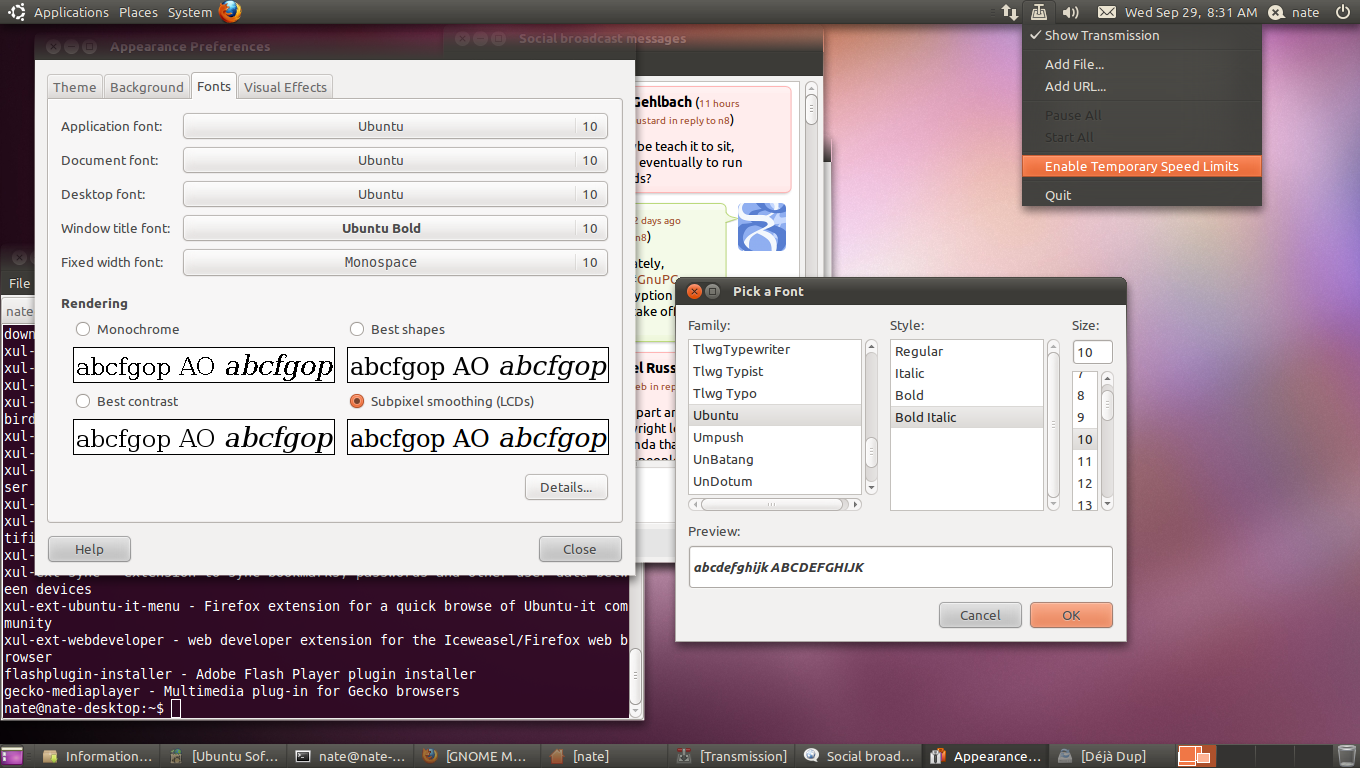 Ubuntu’s application indicators also make their debut in 10.10. Application indicators are an effort by Canonical’s Ayatana team to bring some sanity and consistency to the wild world of GNOME panel applets and “notification area” icons. In the past, GNOME, GTK+, and even KDE apps could minimize to the notification area, run inside the panel, require left-click or right-click access to context menus at will, or a host of other behaviors at the whim of the developer. Application indicators are a cross-platform API that follows up on Ubuntu’s work to systematically clean up system indicators (networking, sound, and so forth) in previous releases.
Thus far, just a few applications are taking advantage of the new, cleaner framework: the Transmission Bittorrent client, Brasero optical media burner, Epiphany browser, Vino VNC client, and Deja-Dup backup tool. The Rhythmbox audio player can now be controlled from Ubuntu’s “sound menu,” and the old GNOME network manager applet has been rolled into a new “network menu,” both of which are part of the related, but separate system indicator design mentioned above.
Although I have only tested the application indicators for a few days (apart from Rhythmbox, the initial set of supported applications just did not lend itself towards heavy usage), I do consider them all an improvement over the free-for-all techniques in the old System Tray Protocol. It will likely be a long time before all apps make use of the new specification — Tomboy and the GNOME system clock are notable exceptions at the moment — but the sooner the migration starts, the better.
Although GNOME 3.0’s release date was pushed back several months ago, Ubuntu’s GNOME 2.31-based desktop environment sports some new improvements, including a new icon theme and a choice of several window manager and GTK+ themes. Aesthetics being what they are, themes are a very personal thing, but overall Ubuntu’s trend over the past few releases has been towards a more neutral (some would say “less orangey” …) color palette and darker choices for system components such as the panel. This reads very “professional” compared to contemporary desktops, and it has the extra advantage of following the prevailing trends in Linux UI design on netbooks (MeeGo) and handhelds (MeeGo, Maemo, and Android).
A few popular desktop applications have undergone revisions since the previous Ubuntu release. These include Gwibber, the multi-protocol status-updating app that remains far superior to Ubuntu’s built-in “Me menu,” the PiTiVi video editor, and Ubuntu’s own Ubuntu Software Center, an application for easy installation of other desktop apps. Under the hood, the Software Center uses Apt, and the more exhaustive Synaptic remains in the System menu, but the Software Center does a good job of making the glut of available packages manageable for people who are concerned primarily about “apps” and not libraries, -dev and -doc packages, and dependencies. This version is far more usable, sporting Featured and What’s New sections, complete with human-readable descriptions and screenshots, and the ability to suggest plugins and add-ons for apps that support them.
Finally, F-Spot, the simple photo browser that was the default digital camera tool in previous releases, has been replaced by the new application Shotwell. Although there was some speculation in the blog universe that this had something to do with F-Spot’s use of the Mono runtime framework, there appears to be no evidence to justify that claim. Instead, Shotwell simply appears to have been judged more stable, has added more basic photo editing capabilities (image adjustment, red-eye removal, and so forth) than its predecessor, and it can perform all of its functions without first having to import the images in question into its internal library. I am not a fan of either choice, because neither one implements what I consider to be an absolutely essential feature: search; I can only hope that Shotwell will add this functionality sooner rather than later now that it is a featured application.
Some highly expected features are not yet in the 10.10 betas, including the much publicized Ubuntu Font. The font, designed by professional studio Dalton Maag, is still scheduled to drop with the final release, however. As of last night, interested users can test the font by installing the new ttf-ubuntu-font-family package, replacing the older, Launchpad-based testing strategy. The font is not used by default in any of the desktop themes, however.
Firefox 4 certainly will not make it into the final 10.10 release, which is primarily of importance to end-users because it is the first Firefox series to include support for Google’s new open-and-royalty-free WebM video codec. A number of high-profile video sharing Web sites have started offering WebM content through HTML5, obviating the need for the proprietary Flash plugin, but end users will have to wait a bit longer.
On the other hand, those who were disappointed to hear that GNOME 3.0 would be released in 2011 instead of 2010 can still get a taste for GNOME Shell, Zeitgeist, and the other new goodies the desktop environment has planned. Ubuntu does not install them by hand, but sudo apt-get install gnome-shell will let the interested test out the updated platform on their desktop system, rather than installing a dedicated netbook distribution.
Ubuntu still has its share of quirks, such as the loud and jarring login music, and I’m afraid the rumors were true: the new Heinz-57-splattered background image really is that bad. But this is a release without major regressions, without introducing major new interfaces changes, and with solid, snappier performance at both the system and application levels.
Reworked panel menus, a revised and updated Software Center, multi-touch gestures, and a suite of new kernel features … does that sound like global-release-PR-fodder? Maybe not, but that’s actually a good thing. For the past several years, Mark Shuttleworth has been promoting the idea of stable, predictable, and synchronized release cycles, and Ubuntu’s chain of incremental updates to the user experience and underlying hardware support are the result of that focus. The NotifyOSD work that debuted in Lucid Lynx, for example, may have sparked debate at the time, but ultimately harmed no one’s user experience, and now I can’t imagine certain apps without it.
Way back in 2004, I wrote a column lamenting the pains of updating a Linux distribution from one release to another. It was Fedora at the time, but that was not the issue: packaging problems and changes were. Core components changed rapidly, and drastically, between releases of every distro back then. LILO and GRUB were both in play, Firefox was still newly split from Mozilla, X.org was newly split from XFree86; any given release was likely to change a laundry list of major components, wipe away user preferences, and cause downstream package dependency problems. It is amazing how far things have come since then.
In the past two years or so, no major update to a Linux distribution has had a catastrophic effect. Things are a lot calmer over six-month update cycles, but when you look back over the long term, the incremental improvements have taken the operating system a considerable distance. Without a doubt, the stable and predictable release schedule model that all of the large projects have adopted since then is one of the reasons why. So while you may not notice the impact of application indicator support or improved power management in Ubuntu 10.10, desktop Linux is taking long, slow strides forward, and this individual step is keeping it on the right path.