
Open-Xchange has released version 6.18 of its email and groupware solution, which improves the integration of data from social networks and the management of emails and external accounts
Read more at The H
KDE 4.5 brings to the table plenty of useful, functional, innovative features. One of those very features is the Desktop Activity. Although many scoffed at the idea (even tried to get the feature pulled), those same naysayers are (hopefully) glad their requests were not followed. Why? The KDE Desktop Activities feature is a great new desktop metaphor that takes the Linux desktop to new levels of organization.
Prior to Desktop Activities a user could have multiple desktops (thanks to the ever-present KDE pager). You could use one desktop for productivity, one for networking, one for graphics, one for fun, or whatever categories you needed. This was a great way to keep yourself organized. The KDE team saw something that no one else seemed to see — that the Pager idea could be greatly improved.
As it stood, the Linux pager could have particular windows associated with it, but when you added a particular Plasmoid (Desktop Widget) that widget would be found on every desktop. So, what if you could associate widgets with particular desktop activities? And then, what if you could associate particular windows (or even files) to a particular desktop activity? What if you could give your desktops truly separate identities? And what if each activity had multiple workspaces of its own?
That is exactly what Desktop Activities is all about. No more are you limited to moving windows to different workspaces and associating different wallpaper to different workspaces. Now, each workspace takes on an entire life of their own, making them a feat of organization and efficiency unheard of on the PC desktop, until KDE 4.5. Now the Linux desktop can enjoy a multi-dimensional, multi-faceted desktop environment that no other software has ever offered.
Now, let’s take a look and see how to use KDE 4.5 Desktop Activities.
Activity Types
There are three types of Desktop Activities you can add:
Desktop: This is the default activity and is your standard desktop environment.
Folder View: This turns your desktop into a pseudo file navigator.This is, effectively, like having a directory worth of files/folders on your desktop that you can double-click to open. The nice thing about having the folder view activity is these icons are limited to only that activity. This means all other activities are clear of clutter.
Newspaper Activity: This activity is laid out in scrollable column format. This activity is more useful for smaller screens, but it can also be very handy for larger screens as the widgets are laid out across the width of the screen.
Search and Launch Containment: This is another Activity that could be easily seen as geared toward the netbook (and other, smaller screens), but is very functional on a standard desktop. This activity is like a Start menu (or, in KDE parlance, a Kickoff Menu) for the desktop. From this activity you can launch applications, search for just about anything on your desktop (akin to GNOME Do), and open (or launch) any search results.
First things first
I will assume you already have upgraded KDE to the 4.5 release. If not, do so now as even 4.4 Desktop Activities were burdened with enough bugs to render them still useless.
You’ll also need to disable Compiz, as KDE 4.5 has its own compositor built in, using Compiz can cause you to miss out on a number of Desktop Activity features. You will also need to disable any window decorator other than KWin. If you are running Emerald you can issue the command kwin --replace to replace whatever window decorator you are using with KWin.
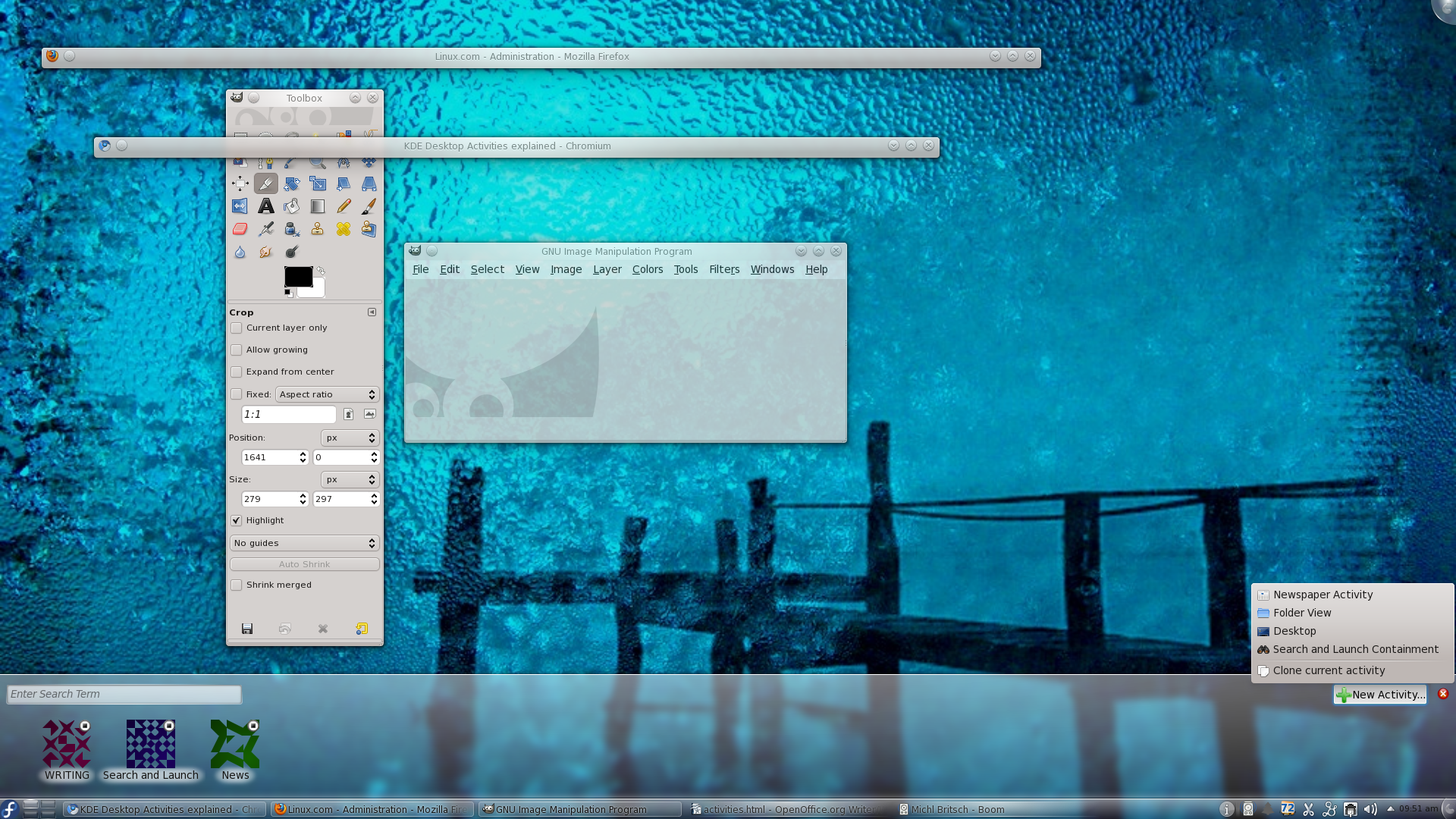 Adding a Desktop Activity is simple.
1. Click on the “Desktop Cashew” in the upper right hand corner of your screen and select Activities. NOTE: Alternately you can hit the key combination META-q to open up the next step.
2. When the “Activities Panel” opens (see Figure 1) click on the New Activity button which will reveal a popup window where you can select the type of activity you want to add.
3. Select the type of activity you want to add.
You now have a new activity on your desktop of the type you selected. You will quickly notice (if you click META-q again) that this new activity was created with the name “Unnamed”. You might want to rename that activity to be unique (say you have two Folder Activities on your desktop and you want to easily know which is which). To rename an activity follow these steps:
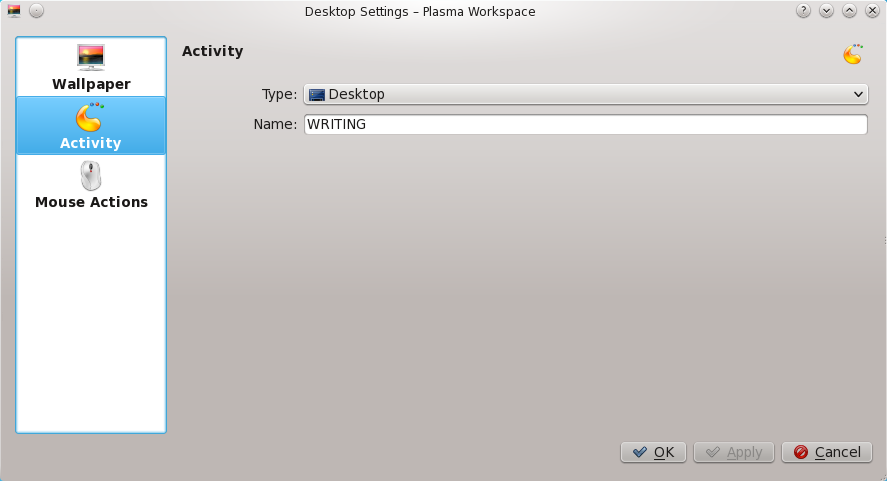 1. Move to the activity you want to rename. NOTE: To move to different activities hit the META-TAB combination, hold down the META key, and hit TAB until you land on the Activity you want to work on.
2. Right click an empty spot on the desktop and select Desktop Settings.
3. From the new window (see Figure 2) select the Activity “tab”.
4. In the Name: space, give your new activity a unique name.
5. Click OK.
That’s it. Your activity has now been renamed. You are ready to begin adding items/features to that activity!
Now let’s take a look at how to associate windows with Activities. This is equally as easy. Let’s say you have a Desktop Activity for Work and your work consists of using a browser, an office suite, and email. So to get these three tools associated with that particular Activity you would right-click the title bar of each window and select Activities and then check which activities you want that window to be associated with. You can associate a window with a single activity, all activities, or any number of activities.
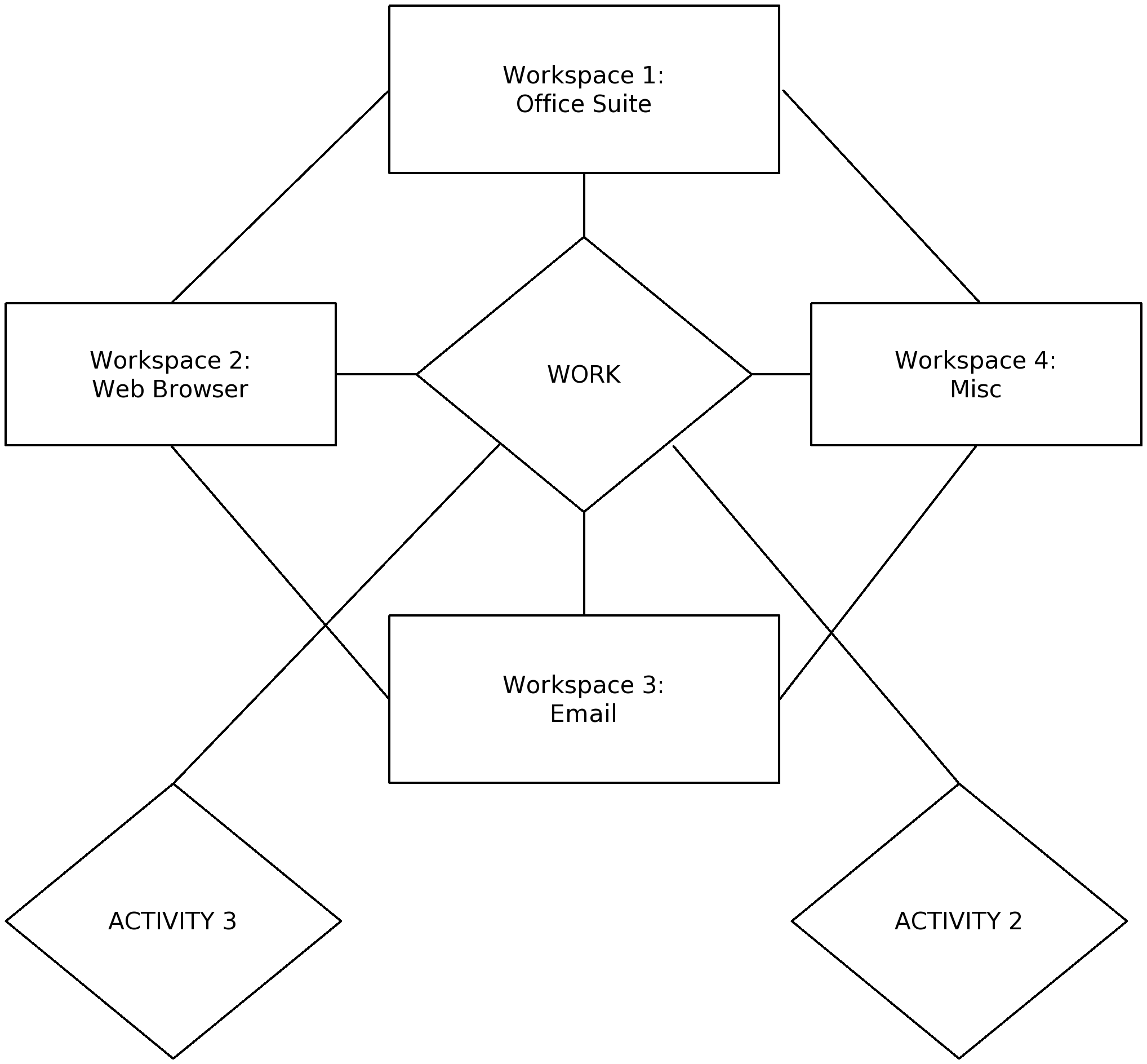 You can take this a step further. Let’s continue with the “Work” Desktop Activity example. You now have your browser, office suite, and email client associated with your “Work” activity (which happens to be of the “Desktop” type).
Now you can further organize this by sending each window to its own workspace. To do this right-click the title bar of the window and select To Desktop and then select the Desktop you want the window to be moved to. Now you have multi-dimensional desktop environment (as shown in representation with Figure 3) that can have layer upon layer added to further enhance the organization of the desktop.
It seems like KDE has grown ever-more complex. But the truth of the matter is, the computing world is far more complicated than it once was. With far more tools to be used and experienced, the old tried-and-true desktop method has become far too one-dimensional to contain the growing needs of even the average desktop user. For the advanced user (like many Linux users are) a newer, multi-layered desktop is required, and that is exactly what KDE 4.5 Desktop Activities offers the user.