No matter how you try, sometimes you can’t escape the clutches of Microsoft and Windows. You might have a fortress of Linux solitude at home, but unless you are one of the lucky ones working in a Linux-only environment, you are going to have to interact with Windows.
One of the trickiest aspects of getting Linux to play well with Windows is the Windows Domain. For the longest time this was a challenge most were simply not ready (or able) to handle. This task required a very deep understanding of Samba and how to get Samba to communicate with that Windows domain. Even armed with that knowledge, this wouldn’t always work. Even after hours of editing your /etc/samba/smb.conf file, you found yourself stumped until you simply gave up.
That is, until now. Fortunately, things have continued to get easier on the Linux operating system to where even what was once the most challenging tasks are mundane. One such tool that has made the challenge of joining a Windows domain is Likewise Open. Using Likewise Open’s handy GUI tool (that also comes with an equally hand command line version) you can quickly and easily connect a Linux machine to a Windows domain.
What you will need
-
An already running Ubuntu installation (I prefer 10.04, but 9.10 should work fine).
-
Domain name: This will be your company domain.
-
DNS: If your machine uses something like OpenDNS, you might need to have the IP address(es) of your company DNS server(s).
-
Access: You are going to need authentication credentials for an account that is able to join a domain.
-
GROUP: You will need to know the group your user belongs to on the domain.
Installation
This is simple. Follow these steps to get both the GUI and command line tools installed:
-
Open up the Add/Remove Software tool.
-
Search for “likewise open”.
-
Marke likewise-open5, likewise-open5-gui, and winbind for installation (the Add/Remove tool will pick up any necessary dependencies for you).
-
Click Apply to install (and Apply to accept any dependencies).
That’s it. You are now ready to join your Windows domain. Let’s tackle this via command line first.
Joining using the command line
You will be surprised how easy this is to do. Open up a terminal window and issue the following command:
sudo domainjoin-cli join DOMAIN_NAME USER
Where DOMAIN_NAME is the name of the Windows domain you want to join and USER is the user you authenticate with. You will be prompted for your user password and, upon successful authentication, you will have officially joined that domain! You should be able to do things like browse all machines on your network domain as well as connect to your Exchange server using Evolution!
Now if you want to leave the domain you can do so equally as easy with the command:
sudo domainjoin-cli leave
This will drop you from the domain you are currently joined. Now let’s take a look at the same task from the GUI tool.
GUI goodness
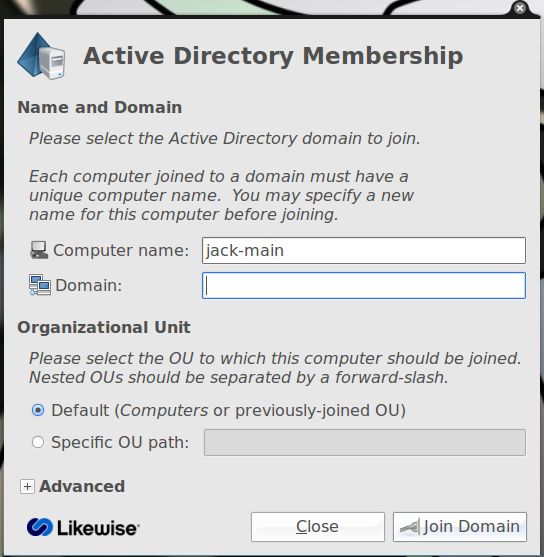 To start up the GUI click F2 and enter domainjoin-gui to open up the graphical tool (see Figure 1). This should be fairly straight-forward. You can name your computer what you want but you do have to use the exact domain name you would use to connect a Windows machine to your domain. In other words, if you domain is DOMAIN.LOCAL then use DOMAIN.LOCAL. If your domain is just DOMAIN then just use DOMAIN. As well, if you have to use an OU (Ogranizational Unit) to connect, make sure you have that correct.
Once you have the information entered click Connect and an authentication window will appear. In this window you must enter your username and your password as you would enter them when connecting on a Windows machine. After you enter your credentials click OK and Likewise Open will attempt to connect.
Upon successful authentication you will be a part of your company domain. Congratulations!
Logging in
Now log out of your desktop and log back in with your domain credentials. This most likely will mean you will log in with the username in the DOMAINuser configuration. You can also log in to your local machine by logging in with the standard username and password on your local system.
Sudo issues
You will find, when logged into your domain, that your user doesn’t have sudo privileges. This means you will not be able to install software and administer various tasks/tools. You can fix this by making an addition to the /etc/sudoers file. Do this with the following warning: You can really mess up your system with an improperly configured /etc/sudoers file…so use caution!
Open up the /etc/sudoers file and look for the line:
#Members of the Admin group may gain root privileges and do the following:
Under this line add the following:
%DOMAINGROUP ALL=(ALL) ALL
Where DOMAIN is the actual domain and GROUP is the group your user belongs to on the domain.
Now log out and log back in and your domain user should have sudoer privileges.
Final thoughts
I remember the days when joining a Windows domain was something very few could manage. Now anyone who can install an application can join a Windows domain. The method I describe has worked for me flawlessly on a number of domains. If you have trouble connecting to your domain, post the information below (just don’t break company policy by posting information that should not be made public) and see how quickly any given member of the Linux.com community comes to the rescue. Bazinga!
