Linus has released the 2.6.35 kernel with no further prepatches after 2.6.35-rc6, as he had suggested might be possible. The relatively long announcement includes some thoughts on this development cycle (he’s happy with how it went) and some concerns about the state of linux-next heading into 2.6.36. Some headline features in 2.6.35 include…
I’ve recently spotted an article talking about yet another “10 problems” about Linux. I usually start reading these articles with a big sigh.
First of all, finding “10 Linux problems”, as an operating system, is really odd, as Linux is not an operating system in itself. I sometimes hear people saying, for example, “Linux is unusable”. To that question I usually respond “Which distribution are you talking about?”.
When I see articles mentioning that choosing a distribution is a problem, I can’t find how is this problem related to the operating system or Linux whatsoever – it is indeed more simple to have a “one size fits all” solution (there are distros for that), but in no way having choices should be a problem. After all, in each product we use, we choose the one that best fits our need. Why should it be any different when it comes to the operating system?
I’ve been using Gentoo for about 2 years now and it perfectly fits my needs. In my opinion, it’s one of the best Linux distributions out there for the one who wants a custom-made OS. But not everybody wants that – and it’s perfectly fine. That’s why distributions exist! And if you cannot find what you like, well, there’s always FreeBSD, Window, Mac OS… If having to choose between multiple GNU/Linux distributions is a problem, well, I don’t know what to say. Let the manufacturers decide for us then! After all, they know what’s best for the consumer, right? Moving on!
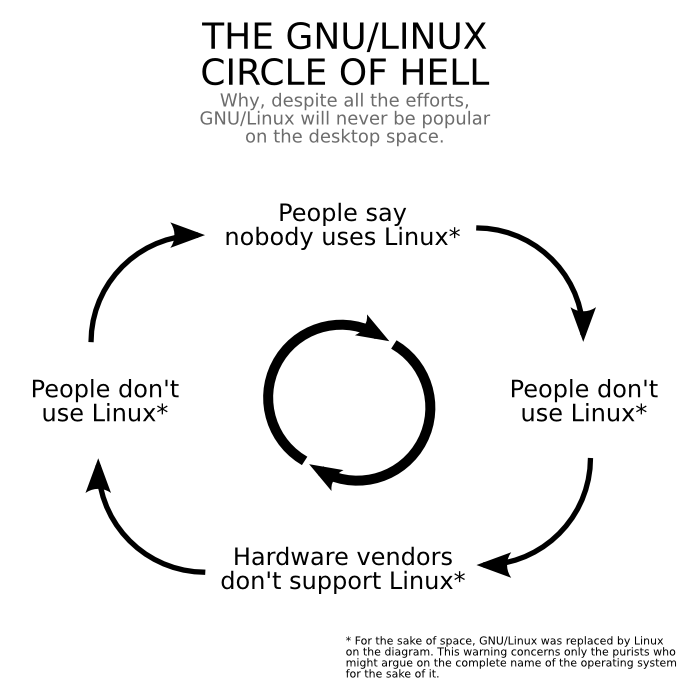
I’ll skip all the “no [game, software, hardware] support” thing here – is the OS really to blame? I don’t think it is – not entirely, at least. There are many factors which must be taken into account, enough to make a whole post about it. I summarized my view of the situation in a little comic picture, though. I’ve posted it once on a forum, it led to a rather big discussion.
Linux distros are not perfect – there is not a single OS that is. You might be a Linux user, Mac OS user, Windows user, Unix user, whatever! The important thing is that you have what works best for you. For that, you need choice. If you find Windows X to be better than X Linux distro, I’ll most probably disagree with you. But I’m not going to be the one to tell you what you like and you don’t.
Back in March an announcement came out of NVIDIA as they were getting ready to launch the GeForce GTX 400 “Fermi” graphics cards that they would be dropping support for the xf86-video-nv driver. The xf86-video-nv driver really didn’t provide much of a feature set and was far behind the Nouveau KMS and Gallium3D drivers even though these were reverse-engineered by the open-source, so NVIDIA announced they would be discontinuing this open-source DDX driver and advised its customers to just use the VESA driver until they are able to download and install NVIDIA’s proprietary Linux graphics driver. However, today they have decided to release an updated driver…
Today is the 11th Annual SysAdmin Appreciation Day! In celebration, Linux.com is launching a new series titled “SysAdmin Toolbox” aimed at providing SysAdmins with all the resources needed to do their important work. This series consists of special contributions from experts throughout the IT industry. Zenoss’ Mark R. Hinkle is our first contributor and shares with us a comprehensive review of Open Source Toolchains for Linux SysAdmins. Mark is also speaking at LinuxCon about using open source toolchains for cloud computing. More information about his session can be found here.
Open Source Toolchains for Linux Systems Administrators
Two of the most notable trends in systems management are DevOps and the related and partially redundant Agile Operations movement. These initiatives are popular in many Web 2.0 and cloud computing oriented companies like Twitter, Google, Yahoo! and Facebook where the companies’ products are highly dependent on IT. Though in reality the same practices are just as well-suited to the IT administrator in the traditional organization with massive infrastructure, unrealistic workloads and businesses that needs to improve efficiency to meet their business goals.
DevOps transcends the silos of IT responsibilities and encourages operations personnel to jointly plan product delivery with developers. In addition, the evolving the role of the systems administrator is no longer to be a reactive maintainer of infrastructure trudging through repetitive systems building tasks, but rather an engineer who designs and builds systems so they are highly available. In the past, systems administrators might have captured their domain knowledge in a collection of random scripts; but today’s savvy systems engineer is coding their infrastructure and making sure that code is understood and institutionalized throughout their organization.
According to Red Monk analyst Michael Coté, ”Much of the emphasis on virtualization and cloud computing has been on optimizing the infrastructure, making the lives of IT admins easier and IT more affordable for companies. Building on that, the idea of DevOps is to apply cloud and cloud-inspired technologies to improve the application delivery process. The goal is to inject the spirit of Agile software development and frequent functionality delivery into the entire life of the application, not just the coding. That small goal requires a tremendous amount of technology and cultural refactoring, but the goal of making the end-user’s life a little better (and worth paying more for, however “payment” is collected) is certainly worth it.”
You could probably ask three different practitioners familiar with the terms how they define them and get three slightly different answers. For the purposes of this conversation DevOps and Agile operations aren’t defined as a technology changes but rather professional and culture changes. They redefine the role of the IT management professional from someone who maintains systems and IT infrastructure (the traditional systems administrator) to someone who manages and defines replicable, resilient, highly available IT systems (the systems engineer).
Accompanying this change are some tactical improvements designed to meet the goals of higher availability and improved effectiveness. While not an exhaustive list, the following practices are commonly used by agile systems engineers.
• Automated Infrastructure – Rather than executing recurring tasks, administrators create mechanized processes that formalize them using tools that can be used to generate consistent results and be shared among other members of their team.
• Server Version Control – Changes aren’t taking place on the server; they are made in a central repository and pushed out to servers so that there is a process and a rollback mechanism in the case of an error.
• Frequent Improvements and Releases/Updates – The old way of thinking is to change servers and other infrastructure infrequently and only in very narrow maintenance windows to minimize risk. Agile operations people make small changes frequently so systems are constantly improving. And in the event there is a problem, they can track the change that is adversely affecting their infrastructure.
To accomplish these goals the systems engineer needs an updated bag of tools. Luckily the open source management community has produced numerous tools that lend themselves to achieving these results.
Open Source Tool Chains
Software developers are very familiar with toolchains, series of programs where the output of one program forms the input for the next. A free software example would be using the GNU Emacs editor, the GNU bin-utils and the GNU Compiler Collection (GCC) to write a program. Software developers frequently create programs and subroutines that are used in other programs rather than recoding the same process over and over again.
Toolchains for systems administrators have historically come in inflexible form from large commercial software vendors. Within the nascent DevOps and Agile Operations movements, communities of individual practitioners are forming to help define their own toolchains from their favorite tool choices. One such community is the DevOps Toolchain Project.
“The DevOps-toolchain project is about providing a forum for developers and administrators to document success stories and lessons learned” says Alex Honor, one of the project’s founding members. “The focus thus far has been on practices and tooling to support provisioning, monitoring and operations in large scale fast moving environments”
Just as software developers have different task-specific tools to make up software tool chains (e.g. editors, compilers, build scripts), systems administrators can use tool chains made up of tools used to automate management functions and maintenance of Linux servers. They can be classified into three broad categories: Provisioning, Configuration Management and Automation and Monitoring.
Provisioning tools automate the installation of packages on the Linux server. They leverage the package systems on the server like rpm or apt to install packages. Some even do some cursory configuration. Configuration management and automation are used to set parameters or start services on a newly provisioned server. They can also be used to restore a system to a previous state when it has encountered an error. Monitoring tools collect data about servers and produce reports on availability, performance and other system stats.
Figure 1.1 Examples of Open Source Tools Well-Suited for Open Source Toolchains
Integrating Systems Management Tools
Open source toolchains are a boon in maintaining an aggressive service level, since automation, when done correctly, is much faster and more effective than then manually fixing the problem. For example, if you wanted to maintain a very highly available service level of Five-Nines, defined as a system that has 99.999% uptime, there is very little margin for error. Over the course of a year that only allows for 5 minutes and 15 seconds of downtime before that service level is compromised. That is hardly enough time for an administrator to receive and acknowledge a page, let alone log in to a server and diagnose a problem. Besides being reactive in fixing problems by monitoring and managing the service, you can also provide a mechanism to prevent outages from happening.
A good place to start when building a tool chain is with the tools that can automate the building of a server. Using tools like this speed the time of deployment and make it possible to deploy a large number of servers in a short amount of time and make the build process easily repeatable. Or in the case of a severe failure, you can rebuild infrastructure.
Early on, Linux users may have piped a list of packages to rpm to install software, a very simple tool chain. Later the process was improved using Kickstart to execute unattended Linux installs. Now Cobbler has taken that functionality to the next level by providing a way to parallelize the building of systems, configuring DHCP or DNS for both physical and virtual machines.
Cobbler also integrates with other tools like the configuration management and automation tool, Puppet. After the software is installed, the services can be updated and readied for service. With the addition of automation tools like ControlTier services can be restarted so configuration changes can take effect. Closing the loop for deployment of a Linux server.
PuppetLabs founder, Luke Kanies noted, “Companies of all sizes are using Puppet to manage machines from initial installation to end of life, completely avoiding manual interaction when building servers or deploying new application versions.”
Another example of an open source tool chain is the integrated provisioning and configuration and automation tools used in the Red Hat sponsored Genome project. Genome is a set of tools that allows users to maintain cloud-based infrastructure. A use case for Genome would be to deploy a multi-tiered web application that includes an Apache reverse proxy tier, to a JBoss application server tier connecting to replicated PostgresSQL databases.
Figure 1.2 Genome Architecture
Most of the tools mentioned so far are active; they make changes and do work. However, they often lack the information about current state of a system, that’s where monitoring comes in. The role of monitoring for traditional systems administrator is to alert them when a fault occurs, usually via a page or an email. However, monitoring tools (e.g. Nagios, OpenNMS and Zenoss Core) can and should do much more by providing insight into the performance and capacity of servers. This information can be used to inform the actions of these active tools. Some of these tools even provide interfaces to kick off process in other tools. For example, Zenoss Core can, based on a monitoring event, reconfigure a service through Cfengine, Chef or Puppet.
An operational demonstration of this type of leverage was given at the O’Reilly Velocity Conference, called DevOps GameDay. The exercise consisted of a scenario were a web application was hosted in both East and West coast datacenters of Amazon’s Elastic Compute cloud. The administrators caused a server failure for some of the servers in the West coast data center. The infrastructure was monitored with Zenoss Core, which captured the failure and notified OpsCode’s Chef to take action. Chef then updated the Dynect Platform’s service via the Dynect API to reroute traffic to the East coast facility. Once the new servers went live, Chef pushed the new instances into Zenoss, which started monitoring them in the remediated architecture.
Figure 1.3 Sample Web Application Failover Toolchain
This demonstration was conducted as an example of how infrastructure automation could be used to improve recovery of the systems. In this case, the system had built-in redundancy with multiple web servers and DNS load balancing. However, when failure was introduced into the system the infrastructure was able to automatically recover in less than 90 seconds. Also, this was a simple demonstration but the same design points could be applied using other tools and other use cases.
Summary
For years proprietary software management vendors have tried to provide full server lifecycle management via broad management suites. These products are typically comprised of technology developed in a secretive environment and then supplemented by acquiring technology from smaller companies. They are cobbled together in a way that allows them to sell to a broad audience with long lists of features that often are long on promises and short on results. They also lack input from users until after the product is brought to market and, even then, those users have to pay significantly to use that product forming small exclusive communities of users.
Open source toolchains have a lot of advantages for managing infrastructure. First, they provide a choice in what elements a user wants to use. Second, technology is developed in the open and input is accepted from the end-users as part of the software development process better informing the feature set. Third, open source tools foster innovation and are inclusive, encouraging participation since they are free with little barrier to use them and contribute to their development. Finally, the culture of open source software favors open standards, interoperability and open APIs which makes it easy to integrate.
According to John M. Willis, VP of Services at Opscode, ”Managing infrastructure in a cloudy world can no longer rely on slow paced non-integrated legacy software. At Opscode we view open source, automated infrastructure and systems integration as the last mile of highly scalable systems. Today’s infrastructures need to be managed with speed, frequency and agility. Relying on non-integrated closed solutions can’t keep pace with the changing world. Open API’s and single touch transactions is the new standard for highly scalable operations.”
Regardless of your infrastructure there is probably an advantage to be had by creating your own toolchain with open source tools.
Contributed by:
By Mark R. Hinkle VP of Community, Zenoss
We’re not far from seeing this big update in the flesh, but in the meanwhile, EVO 4G owners (and fans) might be interested to take a closer look at the features they’ll be getting once it arrives. HTC appears to have put surprising effort into rendering a lifelike torch for its Flashlight app, while app sharing (seen after the break) is a neat addition — and don’t worry, devs, it only works on items that aren’t copy protected. We’re also being told that…
A mainframe cloud may seem oxymoronic like a lead Zeppelin (“a” included on purpose), or intuitively obvious (given the virtualization and metering capabilities that have been in mainframes for decades). But Unisys has nonetheless fluffed up a mainframe cloud for its ClearPath mainframe customers.…
There are few additions to your network that will make as immediate of a performance boost as setting up a caching DNS server. Every computer on the local segment of your network makes hundreds — if not thousands — of DNS queries, and if you forward each one of them to a server on the other side of your WAN pipe, you are just throwing away bandwidth. Not only is caching DNS services simple to set up, you even have multiple options for doing so under Linux.
As always, picking the best approach starts with looking at your local network configuration. If you only have one box to worry about, you can install a caching DNS server on that box that intercepts all queries before they even reach the network adapter. If you have multiple machines, you can install the DNS server at the gateway, and share one cache between all of the machines, further speeding up name resolution. Furthermore, if the gateway machine is also a dynamic host configuration protocol (DHCP) server, the client-side setup is even easier. Finally, if you have hostnames for your local-area servers and desktops, you should go ahead and set up the caching DNS server to answer for them, too, rather than trying to maintain /etc/hosts files — after all, as long as you’re saving time, you’d might as well save your own in addition to your DNS clients’….
The most popular caching DNS choice for small-to-medium deployments is dnsmasq, which is both a lightweight DNS server and a lightweight DHCP server. It is GPL-licensed and is a standard package in modern Linux distributions. If your distro doesn’t provide it, though, you can download and install the source without too much trouble; there are no major external package dependencies.
A less-well-known but equally valid option is pdnsd (which seems to stand for either “proxy DNS” or “permanent DNS” depending on where you look). Pdnsd has the advantage of writing its cache of query results to disk, so that they can be saved from one session to another. On the other hand, pdnsd does not incorporate DHCP functionality, so serving an entire network will require another software package.
The Lone Resolver
Although it is usually referred to as a network service, if you only have a single Linux box, you can set up dnsmasq to run as the “server” even though the “client” sending requests is the same machine. Without dnsmasq running, a Linux machine looks in the file /etc/resolv.conf for an ordered list of DNS servers to query. Statically-configured machines might add servers to this file manually; DHCP client machines have the file automatically updated whenever they get a new lease from their DHCP server.
When you’ve installed dnsmasq, open the file /etc/dnsmasq.conf as root. There are several dozen configuration options — all of them well-documented — but it only takes a few to get set up for normal use. Near the top, uncomment out the listen-address= directive and add the localhost address 127.0.0.1: listen-address=127.0.0.1. This tells dnsmasq to listen for DNS queries that originate on the local machine.
If you maintain a static resolv.conf, simply open it in an editor and add nameserver 127.0.0.1 to the top. The locally-running copy of dnsmasq will now receive all DNS queries first, and cache the results.
Alternatively, if your computer is a DHCP client — and if you are installing dnsmasq on it, you presumably do not have access to the DHCP server — you will need to alter a different file instead. Open your DHCP configuration file — typically /etc/dhcp3/dhclient.conf. Then either uncomment or (if it is not present) add the line prepend domain-name-servers 127.0.0.1;. Be sure to include the closing semicolon.
This tells the DHCP client to add 127.0.0.1 to the head of the line whenever the DHCP server sends over the list of DNS servers. The supplied servers may be ISP-provided or at-large public DNS servers, but whatever they are, the local dnsmasq server will get the queries first, enabling the cache.
Whichever configuration you use, start dnsmasq with /etc/rc.d/dnsmasq start. You can use the “dig” command to send a DNS query from the command line; by running it twice in a row, you can see how much shorter the reported “query time” is for the second, cached, reply. In my test, dig www.linux.com took 132 ms uncached and dropped to 1 ms once cached. In addition to the speed gains, though, caching query results locally keeps your browser and other applications from timing out when one of the ISP’s DNS servers is suddenly unreachable. There’s no real way to test for that scenario, but most of us hope to avoid it anyway.
The LAN
Although you could run dnsmasq on every machine on your local network, running a single instance of it that answers and caches all machines’ DNS queries is simpler, and results in fewer queries being forwarded upstream. First, set one machine up as the server. However, in addition to specifying 127.0.0.1 as the listen-address in /etc/dnsmasq.conf, you must also add a listen-address line for the server’s local IP address, such as listen-address=192.168.1.101. If your server is a gateway machine with more than one network adapter, you should also be sure to bind dnsmasq only to the local interface, by uncommenting the “interface” line and specifying the adapter: interface=eth0.
You then configure the clients individually. For all non-DHCP clients, you can simply add the server machine’s IP to /etc/resolv.conf, e.g., nameserver 192.168.1.101. If your DHCP clients use a separate DHCP server, you can likewise add prepend domain-name-servers 192.168.1.101; to their /etc/dhcp3/dhclient.conf files.
Things are even easier if you use dnsmasq as both the DNS and the DHCP server, though. To enable the DHCP functionality, open /etc/dnsmasq.conf and uncomment the “dhcp-range=” line. This line takes two required and one optional argument. The required arguments are the start and end addresses of the DHCP leases for the server to hand out; if so desired you can optionally add a lease time as the third. For example, dhcp-range=192.168.0.100,192.168.0.200,23h.
It can also help to uncomment the “expand-hosts” and “domain=” lines; doing so appends whatever domain you specify after domain= to the names of local network hosts — “.local” for example, is unambiguous. If you have some statically-configured hosts (say, servers) and some DHCP clients (say, laptops), dnsmasq.conf gives you several options to set static hostnames — by IP address, by hardware MAC address, by the hostname the host reports for itself. In this sort of mixed environment, using expand-hosts to tack .local onto hostnames can help prevent accidents like having DNS queries about a local machine forwarded upstream and out to a public DNS server that will not know what to do with them.
Using pdnsd
The above instructions used dnsmasq as the example, but you could also perform most of the same steps (except for the integrated DHCP server, of course) using the disk-caching pdnsd. On the client side, the configuration details are the same: you add the DNS server’s IP address to /etc/resolv.conf or the appropriate “prepend” line to /etc/dhcp3/dhclient.conf.
Configuring the server is no more difficult; it just uses a slightly different syntax. In /etc/pdnsd.conf, you would specify the IP address to listen on for DNS queries with server_ip=192.168.1.101, or the interface to listen on with interface=eth0. You do need to tell pdnsd where to find the upstream DNS servers to forward recursive queries to; the simplest way is with a file=/etc/resolv.conf line, although you can also specify the other DNS servers individually. Finally, you can either use the default location for the cache file, /var/cache/pdnsd, or specify a different location with cache_dir=/some/directory/path/of/your/choosing.
Getting Fancy
Once you start playing around with dnsmasq and/or pdnsd, you may think of a few uses for these services beyond what we have covered here. The most obvious, perhaps, is configuring either for IPv6 addresses. Both support it; the relevant example lines just weren’t shown with IPv6 dummy addresses for clarity.
But there is actually more; dnsmasq, for example, has special support for virtual private networks (VPNs), by which you can have dnsmasq direct queries for certain domains (like the company’s) to a particular server, rather than forwarding them out to the Internet at large. You can also set up dnsmasq to enable a local-network-only mail service using a local MX record. There is plenty more where that comes from, but let’s face it — most of us want to set-and-forget DNS service, so we can spend more of our browsing time actually reading the sites that interest us, and more of our free time thinking up really good hostnames for all of those LAN clients….