
Home Blog Page 2859

OpenStack: Open Standards Meet The Cloud

Collaborative development has leveled the playing field and given power to the individual. One young man from Finland started a project, invited others to help, and started a computing revolution. Today two people can use cloud services and free software to start businesses that before needed millions of VC funding. Small device manufacturers, by using open source, can now use the same software used by industry giants. There has been one space missing, however: large scale super computing.

We’re pleased to see OpenStack, the new open source project for cloud computing projects from Rackspace and NASA. In the past, only large institutions like NASA had access to super computing functionality to complete large-scale computational projects. NASA has donated the code they have developed to manage their environments to the OpenStack project to allow others to tap into the same power. With OpenStack, “using these components, organizations would be able to turn physical hardware into scalable and extensible cloud environments using the same code currently in production serving tens of thousands of customers and large government projects.”

Imagine the possibilities of scientists around the world able to tap into this computing power. Innovation in cloud computing will impact innovation in such endeavors as climate science, DNA modeling, and medical research. I would argue there is probably no other area of innovation that will garner as much return.

But there is more to OpenStack: it also gets the power of open standards and how this relates to the cloud. Cloud Computing is the wild west of computing right now with competing strategies and technologies fighting for dominance. The Linux Foundation is pleased to see this new entry that is based on open, collaborative development as well as open standards. Without open standards in cloud computing, we could be headed to the same vendor lock that once gripped the industry. Based on what I can see from the Open Stack project, Rackspace’s aim seems to be to eliminate vendor lock in. If so, I think we will see a huge acceleration in cloud uptake by companies small and large who have been hesitant to enter.

This is a bold move by Rackspace, “giving away” what many would see as their proprietary technology and enabling others to compete with them. It echoes previous moves, however, that turned out very well for the companies involved. Just look at the balance sheets of Red Hat or IBM to see the result of embracing open source and collaborative development models. When individuals have the power to start projects and invite others to join them, great things can happen. Just ask that guy from Finland. Let’s keep an eye on Open Stack: I think we all may benefit.
What Could You Do With a $35 Tablet?

The media has been buzzing about a prototype tablet from India. This article in NetworkWorld is one of many covering a device that may be available in 2011. “The $35 tablet prototype from India will run a variation of the open source Linux operating system.

Read more at LWN

Ubuntu Global Jam: Start Your Engines!

Are you good folks aware of what is happening on 27th – 29th August 2010. But of course, it is the Ubuntu Global Jam!

In the last few cycles we have organized and run an event called the Ubuntu Global Jam. The idea was simple: encourage our awesome global Ubuntu community to get together in the same room to work on bugs, translations, documentation, testing and more. And they did, all over the world, as can be seen here.

To make the event as simple and accessible as possible, we have picked five topic areas and we are encouraging you lovely people to organize an event with one or more of them:

  • Bugs – finding, triaging and fixing bugs.
  • Testing – testing the new release and reporting your feedback.
  • Upgrade – upgrading to Maverick from Lucid and reporting your upgrade experience.
  • Documentation – writing documentation about how to use Ubuntu and how to join the community.
  • Translations – translating Ubuntu and helping to make it available in everyone’s local language.
  • Packaging – packaging software for Ubuntu users to install with a clock.
  • Other – other types of contribution such as marketing and advocacy etc.

With six primary methods of getting involved, there is something for everyone in this rocking global event.

One thing that I am keen that everyone remembers: you don’t have to be an official developer, packager or programmer to take part in the Ubuntu Global Jam. Also, lets not forget that Ubuntu Global Jam events are a fantastic place to learn and improve your skills: you can sit next to someone who can show you how to do something or explain something in more detail.

If this is all sounding right up your street and you fancy organizing an event, go and read this page and then add your event to the LoCo Directory by following these instructions.

Rock and roll: let’s make this one to remember. Start your engines, folks…

Read more at jonobacon@home

Awesome GUADEC Espresso and Coffee Bar

I have always been a fan of helping in any way I can to encourage people to support small organizations and businesses who are doing their best to be successful by working hard and providing a friendly, honest service.

For the earlier part of this week I am in The Hague at GUADEC, and I stumbled across a small espresso shop that is the embodiment of these kinds of small business. It is impeccably clean, the food is awesome, the coffee is fantastic, it is good value, and the guy who runs the shop is the definition of kind and welcoming. Oh, and it has great wi-fi too.

So, I wanted to share with all my friends who are visiting GUADEC too to come and support this guy’s small business, drink some coffee and leach his Internet.

The address is: 7 o’clock Espressobar, Wagenstraat 187 2512 AW Den Haag and if you are walking back to the hotel before you walk over the small bridge you will see it on the left with a big Coca-Cola sign above it.

More details on the website.

Read more at jonobacon@home

Sprint Has New Android Market Store

If you’ve been a Verizon user for a while, and you use the Android OS, you may be familiar with the dedicated branch of Android Market called VCast Apps. It has provided access to the carrier’s own applications. Now, Sprint has a new store that has appeared on the EVO 4G network. The Sprint aisle currently contains no Sprint apps, though, only third-party apps. Check out JKOnTheRun’s exploration of the offering.

Read more at Ostatic

Google Fixes Critical Vulnerabilities in Chrome 5

Google has released version 5.0.375.125 of Chrome, a security update that addresses three “high” risk vulnerabilities in its WebKit-based browser

Read more at The H

Periodic Table of the Open Source Graphics and Design Apps

Are you ever overwhelmed by the sheer numbers of open source software projects produced by the community? Even when looking at just a subset — such as graphics applications —  Let’s examine each design field in turn. We’ll start by describing the leading program or programs in each, followed by the smaller or younger projects, and end with the special-purpose tools.

Read more here.


Linuxables: Meet Kate, the KDE Text Editor


We conclude our whimsical jaunt down text editor lane with a look at the KDE take on that always-necessary tool – the text editor. The KDE version is called Kate. Kate takes a different approach to the simplicity most of these tools take.

How is this? Kate is actually made of up two parts:

* KatePart: This is the underlying tool that serves as the functional editor. This portion of Kate is shared by any of the KDE components (such as the composer for the KMail mail client) that require a text editor. 

* Kate: This is the front-end for KatePart that allows KatePart to stand on its own.

This approach allows Kate to be a much more flexible tool than a standard text editor (at least in a desktop-wide scope). This also prevents KDE developers from having to re-invent the wheel when they need to use a text editor within their application.

But what does Kate offer that other text editors do not offer? Is it worth forsaking your favorite console editor for? Let’s take a look at the feature list for Kate.

Features

  • Regular expression find/replace support.
  • Syntax highlighting and bracket matching.
  • Code and text folding.
  • Infinite undo/redo.
  • Block selection.
  • Auto indentation.
  • Auto completion.
  • Shell integration.
  • MDI, window splitting, and window tabbing.
  • Spell check.
  • CR/CRLF/LF newline support.
  • Encoding support.
  • Encoding conversion.
  • Numerous protocols support (http, ftp, ssh, webdav etc.).
  • Internet transparency.
  • Plugin support.
  • Customizable shortcuts.
  • Integrated command line.
  • Scriptable (JavaScript).

That’s a fairly hefty feature list for a simple text editor! But a feature list isn’t going to help someone who needs a user-friendly tool to edit their /etc/samba/smb.conf file. The good news is, yes indeed, Kate is one of the more user-friendly text editors. Let’s take a look and see how Kate works.

Main Window

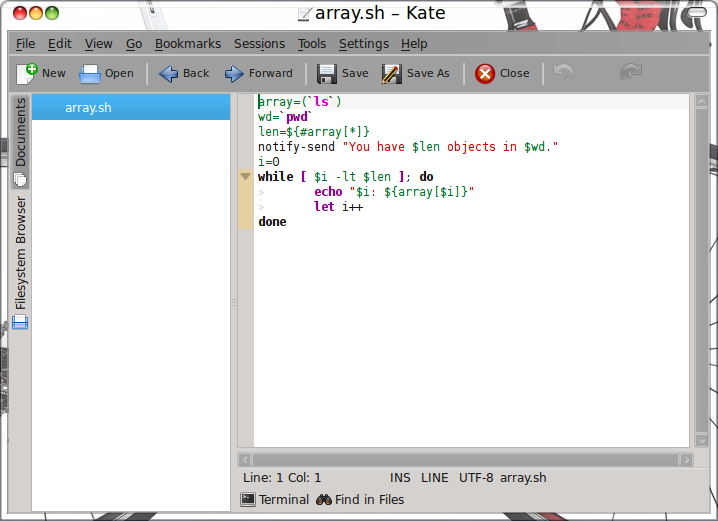
Kate Main WindowYou open up Kate by clicking Accessories > Kate. This will open up the Kate Main Window (see Figure 1). You will instantly notice how different Kate is from other text editors. First and foremost, you will notice the two-pane layout. The left pane is the “navigation” pane where you can have multiple tabs open as well as navigate for files from either the Filesystem Browser or the Documents folder. The larger left-side white pane is the “tabs” location where you can click on the name of an open file and instantly switch to that working tab.

The larger right-side pane is the working window. As you can see (again in Figure 1), I have my sample bash script open to reveal how Kate deals with syntax highlighting as well as code indentation.

Added Value

One of the tools that set Kate apart from other text editors is an embedded terminal window. At the bottom of the Kate window (near the center), you will see a Terminal Window button. If you click that button it will reveal a full-blown terminal window, which can be used just like a standard terminal. This is very handy for coders who want to work on the their code and compile said code in the same window.

Nifty Fact

Say you like the Kate editor, but you don’t like the KDE desktop. If you fall into this category, fear not – you can have your Kate and eat it too! Even if you’re a fan of the GNOME desktop, go ahead and install Kate (the installation will install numerous libraries and other dependencies). Once installed you can use it just like you would if you were on the KDE desktop. It might take a bit longer to start, but it’s there and ready to do your bidding! Muhaha!

Build a Real-Time web-based tool with jQuery, XMPP and PHP

Readl-Time apps have been popularized by social-notification tools like Twitter and Friendfeed. With a Real-Time web app you can get website information as soon as it’s published. Learn techniques that allow you to create responsive, continually updated web applications that conserve server resources while providing a slick user experience using jQuery, XMPP and PHP.

Google Debuts First Secure Cloud Apps for Gov’t

Knowing how serious the Obama administration is about trimming costs and using the latest technology, Google makes a strong case with the release of new version of Google Apps that meets federal security requirements.

Read more at internetnews.com