
With configuration, installation, and the use of Hadoop in single-node and also the use in multi-node architectures under your belt, you can now turn to the task of developing applications within the Hadoop infrastructure. This article explores the Hadoop APIs and data flow and demonstrates their use with a simple mapper and reducer application.
OpenSUSE 11.3 is Ready!!!
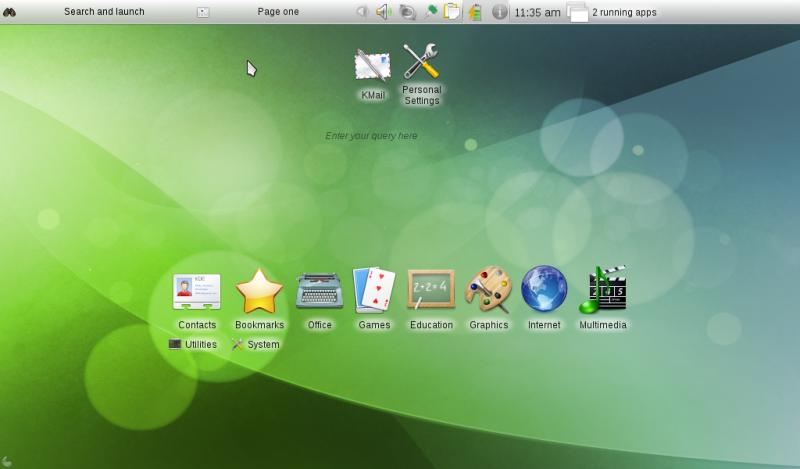
Open Suse was released this July 15 and is ready to download. Some of the main features are:
Netbook Support:
If you use a small, lightweight netbook 11.3 has a lot to offer for you. You will not only benefit from the improved hardware support but also from the two netbook desktop environments this version brings.
Smartphone Support:
The world is mobile and openSUSE is too. Are you one of the increasing number of app-addicted and always online people with a smartphone? Look no further for an operating system that lets you interact with all the current devices, be it the increasingly popular Android, the chique iPhone or the business workhorse BlackBerry – you can manage them all. Sync your music, access your photos or use your phone to supply internet access, simply be mobile!
Secure backup and file sharing in the cloud
With openSUSE 11.3 we provide a personal cloud for our users. With SpiderOak we provide an easy, secure and consolidated free online backup, sync, sharing, access & storage solution for openSUSE 11.3.
These are some of the new features OpenSuse has for you. If you are ready to try it, follow the next link and to see all the new features and screenshots follow this link.
Source: OpenSUSE Wiki
Samsung Spins 512GB Solid State Disk
Samsung announced what appears to be its first 512GB SSD (solid state disk), utilizing & high-performance toggle-mode& DDR NAND flash. The device provides three times the performance of a typical hard disk drive, and extends battery life even further than previous SSDs, the company claims….
Read more at LinuxDevices
IBM Begins Beta Test for AIX 7
The new release will give customers operating system virtualization, so they can run older versions of the Unix OS in virtual containers.
Read more at internetnews.com
Startup Offers Third-Party Google Apps Backup
A Cambridge, Mass.-based compay called Backupify is pitching IT admins on a cloud-based backup service for Google Apps, offering an additional safeguard to augment Google’s own storage.
Read more at internetnews.com
Droid X Sells Out Despite Verizon Preparation
The Motorola Droid X is sold out online and in certain parts of the country at retail Verizon and Best Buy stores, despite Verizon Wireless’ insistence that it would have plenty of the phones in stock.
Read more at ComputerWorld
Adobe Open Source Now on SourceForge
SourceForge, the development and distribution host for open source software, has opened a new platform for development, which enables third parties to link their own to developer communities with Source Forge
Read more at The H
An Open Source 8-Bit Computer to Save the World
At a recent local LUG I regularly attend, Braddock Gaskill gave a wonderful presentation on an open source 8-bit computer he had created. This was his first public debut of the device and every person in attendance was enthralled. more>>
Read more at Linux Journal
Graffiti for Android Scribbles Palm OS Memories All Over Google’s Platform
Gather around the campfire, children, as we tell you a story from or youth. You see, back in our day, we carried around PDAs driven by Palm‘s operating system (no, not that one). Primitive and bulky by modern standards, sure, but if there’s one aspect we remember most fondly — or at least most vividly — it’d be Graffiti, the shorthand writing system for your stylus-based text entry. And guess what? You can now bring that same frustration enjoyment to Google Android. Available now via Market, the free, OS-wide keyboard alternative comes care of Access, who gained the rights to Graffiti following the Palm / Xerox settlement from way back in 2006. The future is the past as remembered by the present, or something like that — download away.
Read more at Engadget Mobile
Weekend Project: Configuring QoS for Linux Routers, Gateways
Bandwidth is a limited resource, even if you are on a high-end, state-of-the-art fiber optic network. Because of the way TCP works, some types of application can rapidly fill up even the biggest pipe, which has the unfortunate side effect of harming other, less bandwidth-intensive applications. Seeding a Bittorrent for the just-released OpenSUSE update is a noble use of your network, but if it makes VoIP calls impossible to hear or stalls out an SSH session, it’s hardly worth it. Fortunately, if your router or gateway is running Linux, you can easily set up quality-of-service (QoS) traffic-shaping rules to ensure that all of your packets play nice together.
Theory First
With Linux, you perform traffic shaping through manipulating the “queuing discipline” (or qdisc) of a network adapter. From a command prompt, type ip link list — this will display the current configuration of your known adapters. You’ll see the qdisc parameter third, after MTU. By default, your network adapter (eth0) probably uses the pfifo_fast qdisc. This is one of several “classless” qdiscs available, and as the name suggests, it is a relatively simple First-In, First-Out queue. It actually responds to IP packets’ “Type Of Service” flag, which provides some bare-bones prioritization, but it is not configurable.
To really shape your traffic, you attach “classful” qdiscs instead. Linux has several qdiscs to choose from, which can be chained together in a hierarchy to sort outgoing packets by filtering them on their protocol, port, source or destination. The most recommended choice these days is called the Hierarchical Token Bucket or HTB qdisc, which allows you to set up classes of traffic, and assign bandwidth minimums and ceilings to each. A newer qdisc called the Hierarchical Fair Service Curve or HFSC is also popular for QoS implementations, because it also allows control over latency guarantees and lets you allocate outgoing bandwidth on a proportional basis.
You attach qdiscs to an adapter with the tc (for “traffic control”) command. The syntax for adding a qdisc, defining a traffic class, and creating a filter to distinguish which packets should be classified where is very similar. For example, tc qdisc add dev eth0 root handle 1: htb default 12 creates an HTB qdisc to eth0, and assigns it the “handle” number 1. The class definition tc class add dev eth0 parent 1: classid 1:1 htb rate 100kbps ceil 128kbps defines class 1:1, attached to qdisc 1 just created, and sets a minimum guaranteed bandwidth of 100 kilobytes per second and ceiling of 128 kilobytes per second. Finally, a filter rule such as tc filter add dev eth0 parent 1: protocol ip match ip sport 22 0xfff classid 1:1 says that traffic on port 22 (SSH) belongs to the 1:1 class. It therefore gets treated to the 100kbps guaranteed pipe, regardless of additional load on the system.
Note the use of the word “outgoing” in the above descriptions, though — it’s critical to understand that QoS techniques only allow you to manipulate the queuing of outgoing traffic. You cannot control what arrives inbound on your WAN interface. Linux does have a mechanism for attaching traffic-shaping filters on the incoming side of an interface (called ingress qdiscs), but this does not control how much bandwidth is used — it only tells the interface what to do with the packets that arrive. Nevertheless, outgoing queue management is enough to control real-world traffic, because well-behaved TCP and UDP applications that consume bandwidth react to changing network conditions; Bittorrent slows down, VoIP phones negotiate a connection, and so on.
For real-world QoS, then, such as over a DSL or cable modem line that is many times smaller than LAN speed, you need to implement traffic shaping controls at the border, either on your router, or on the box that serves as your Internet gateway. Luckily, QoS is not a new discipline in Linux and there are a variety of user-friendly interfaces produced by the open source community to set up the actual qdisc definitions, classes, and filters for you (and in a weekend, that may be all you have the time to study). We’ll look at the router example first, since QoS is a very popular option on Linux-based home routers, then explore the options for maintaining a general-purpose gateway machine.
The Simple Router
All of the major Linux router distributions — DD-WRT, OpenWrt, and Tomato — include a QoS configuration utility. In DD-WRT, QoS can be found under the “NAT / QoS” tab of the Web interface. OpenWrt uses scripts by default, though the X-Wrt web interface add-on package presents it as a much nicer page under the “Network” tab. Tomato provides a top-level QoS menu. Most commercial routers’ default firmware also includes a QoS component, although obviously it may not offer as much control. Linksys, for example, places QoS under “Applications & Gaming” in its web interface.
DD-WRT allows you to implement QoS either on the WAN port (which is probably what you want) or on the LAN side. You can choose between HTB or HFSC as your qdisc, and specify an uplink ceiling for the qdisc as a whole. You can define prioritization rules based on protocol (the “Services” configuration block), the IP address of the local machine (the “Netmask” block), or the MAC address of the network adapter (the “MAC” block). You do not have a mechanism to re-arrange the priorities of these filters, however — they are evaluated in the order: MAC first, IP address second, port last. DD-WRT provides five pre-defined priority classes: exempt, premium, express, standard, and bulk. Exempt traffic is never throttled; Premium is reserved for ICMP control and ACK packets; Express is recommended for real-time applications, and Bulk is relegated to lowest priority.
X-Wrt allows you to set an upload ceiling, but does not provide a graphical tool for selecting the qdisc used — you are limited to HFSC. It does offer a more flexible rule definition system than DD-WRT’s, however — you can create rules based on source or destination IP, port, TCP flags, packet size, or other supported criteria, and add them to the filter list in any order. Included in the list of filter options is Layer 7 filtering, which is designed to filter based on the application-layer contents of each packet. An added nicety of X-Wrt’s interface is that it provides an “advanced rules” interface that you can use to show or hide the more peculiar filter options.
Tomato’s QoS setup takes a markedly different approach than the other two. It separates basic configuration and filter rules into two different pages. The basic settings allow you to specify an outbound bandwidth ceiling, to activate ICMP and ACK-specific rules, and to set lower-bound rates and ceilings for ten predefined classes: Highest, High, Medium, Low, Lowest, Class A, Class B, Class C, Class D, and Class E. Like X-Wrt, you can define filter rules in any order, based on IP address, port, protocol, Layer 7, or transfer size. Tomato also allows you to establish ingress qdisc rules, although as mentioned earlier this is not a significant factor for overall traffic shaping when compared to outbound rules. Finally, Tomato provides very nicely-formatted traffic graphs, color-coded by class, which can help you as you tweak your classes and filters. No other firmware distro provides this as of the moment.
As you can see, the various router distributions vary in what they provide. X-Wrt may be the most configurable of the three, but Tomato’s graphs are a configuration aid unmatched by the others, and only DD-WRT gives you the actual choice between HTB and HFSC for your qdisc. The choice is really up to you.
The Gateway
For a full-fledged Internet gateway running on standard PC or server hardware, you have even more options to consider. Several gateway-oriented Linux distributions are available that include QoS management alongside VPN, NAT, firewall, and other packages. If you have a dedicated machine, they would be a good choice, because they offer web-based control panels so that you can run the services headless and administer them from a desktop.
Examples in this space include Astaro Security Gateway, Zeroshell, Linux LiveCD Router, and Vyatta. Which is the best for your particular needs probably depends more on your proficiencies and the rest of your network than anything else. Astaro, for example, is a derivative of OpenSUSE, while Vyatta is based on Debian, Linux LiveCD Router on Slackware, and Zeroshell is developed from scratch. If you are more familiar with one of the upstream distributions, it is probably a better choice if you are only interested in performance — but you may prefer to use something different just for the educational value.
On the other hand, Linux LiveCD Router, Zeroshell, and Vyatta are available as live CD media, which could be important, and Vyatta and Zeroshell are available as virtual machine images. Finally, Vyatta and Astaro are available in commercial, paid-support variants, which could be the determining factor for a small office environment.
In each case, you get access to the full Linux kernel QoS configuration stack. In general, the web-based administration tools for all of these distributions are more complete than what is offered by the embedded router distros mentioned above, plus it is always possible to drop into a terminal and add or edit qdisc configuration, classes, and filters directly.
If you do not have a dedicated machine — perhaps if you use a dual-Ethernet desktop Linux box as the gateway between your WAN and LAN — but you still want a high-level tool for configuring QoS, there are at least two additional options. i.NET is a pre-packaged set of QoS and security scripts that you can install on a standard Linux distribution. The packages target Debian-like systems, so if you run an RPM-based distribution you may find incompatibilities.
MasterShaper, on the other hand, is a graphical network management tool that supports QoS and Netfilter firewall configuration. It includes a web interface, built with PHP and MySQL. It may be the simplest option for those that cannot find a matching utility among the other tools and distributions.
Extra Credit: Become a qdisc Expert
Naturally, the more you work with the Linux kernel’s qdisc system, the more you will feel comfortable writing and updating the rules yourself. In fact, it is almost a guarantee that once you start to monitor QoS on your WAN interface, you will be seized by the desire to tweak every little bit of performance out of it that you can.
A good place to start working on this never-ending campaign is with the man pages for tc and the various qdiscs, which you will find in man as tc-htb, tc-pfifo_fast, and so on. There are far more available “classful” qdiscs than the ones mentioned here, and there are several interesting “classless” qdiscs as well. Look up RED and CBQ if you want to challenge what you know. An excellent resource for all of these topics is the Linux Advanced Routing And Traffic Control site, which includes documentation and how-tos no just on QoS, but on routing, packet filtering, connection sharing, and other related topics. Once you move beyond the basics, all of these network topics begin to interrelate, so be prepared to rethink your assumptions in other areas, too. After all, in general, if it’s a packet, there is a Linux tool to manipulate it…