
Home Blog Page 2878

Final KDE SC 4.5 Release Candidate Arrives

The KDE Project has issued a second and final release candidate for version 4.5 of the KDE Software Compilation, fixing a number of bugs found in the previous development preview of the popular Linux and Unix desktop

Read more at The H

Ubuntu Developer Week Coming Up!

I am pleased that Ubuntu Developer Week is now announced and ready for the masses. The glorious week of Ubuntu development tutorials and sharing of know-how happens from Monday July 12th 2010 to Friday July 16th 2010. You can see the timetable for the week here.

Throughout the week we have an awesome set of sessions:

  • Getting Started with Development — dholbach
  • Getting Started with Development — dholbach
  • Widgetcraft — apachelogger
  • Desktop Team overview — seb128
  • Authoring upstart jobs — SteveLangasek
  • Packaging like a Ninja — shadeslayer
  • «I Don’t Know Anything About Translations» — dpm
  • Developing with Qt Quick and QML — JonathanRiddell
  • How to work with Debian — IainLane & Rhonda
  • Setting up a small validation dashboard — ZygmuntKrynicki
  • Operation Cleansweep – reviewing patches — nigelbabu
  • Forwarding bugs and patches upstream — pedro_
  • Daily Builds and You — JorgeCastro
  • Making your application shine with application indicators — TedGould
  • Kernel Triage — JeremyFoshee
  • Create an application for Ubuntu with Quickly — didrocks
  • Improving Ubuntu In An Evening — vish
  • Contribute to Ubuntu Server, do Server Papercuts ! — ThierryCarrez
  • How to help with Xubuntu — CharlieKravetz
  • Merge proposals: life on the sunny side — MartinAlbisetti
  • Django and you — mhall119
  • Adopt-An-Upstream — JorgeCastro
  • How to help with Edubuntu — JonathanCarter
  • Me, myself & QA — warp10, gaspa, BlackZ

As ever ou can connect with Lernid or a normal IRC client. For full details, see this page.

Read more at jonobacon@home

Review: Travels With Teo: Linux Netbook Hits the Road

I took ZaReason’s Teo netbook, running Ubuntu 10.04, on a 2500-mile road trip. How practical is a tiny netbook? Does it make sense in real life, doing real jobs? Yessirree it does.

Read more at LinuxPlanet

Cisco, Dell Power Big Tech Gains

Optimism returns ahead of earnings reports from Intel, Google and AMD.

Read more at internetnews.com

Tiny Embedded PC Offers 1080p Video

Norco announced a fanless, Linux-ready mini PC with support for 1080p video. The 4.7 x 4.7 x 1.6-inch BIS-6620III incorporates the Intel Atom Z510 CPU and Intel SCH US15W chipset, and offers an HDMI port, SD and CF slots, a gigabit Ethernet port, five USB 2.0 ports, and extended temperature support, says the company….

Read more at LinuxDevices

Installing the Enterprise-Ready Network Monitor Zenoss


I recently wrote about Nagios, an enterprise-worthy network monitor. For many, Nagios is all they need: It’s powerful, flexible, and very reliable. However, for system administrators working with larger networks and who need auto-detection of devices, Zenoss shines as a serious enterprise-ready solution for any size network.

Of course this power comes at a cost. The cost? Complexity of installation. Whereas Nagios is incredibly simple to get up and running, Zenoss is not. In this article, I will show you how to install Zenoss so you can get it ready to be your one and only network monitoring tool. I will be demonstrating the installation on a Ubuntu 10.04 machine. You can easily modify the process to fit your distribution.

And with that said, on to the installation.

Installing Pre-Requisites

Before you install Zenoss you have to install numerous pre-requisites. To do this open up a terminal window and issue the following commands:

  • sudo apt-get update
  • sudo apt-get upgrade
  • sudo apt-get install mysql-server mysql-client libmysqlclient15-dev python2.4 python2.4-dev build-essential snmp snmpd autoconf swig svn-buildpackage

NOTE: If apt returns that it can’t find certain packages, you might have to add universe to your sources. If this is the case, open up /etc/apt/sources.list and add the following two lines to the bottom of the file:

  • deb http://ca.archive.ubuntu.com/ubuntu lucid universe
  • deb-src http://ca.archive.ubuntu.com/ubuntu lucid universe

Once you have added those lines, issue the command sudo apt-get update.

The first two commands (in the first command listing above) will make sure your distribution is up to date and the last command will install all of the Zenoss dependencies. You will notice the installation of Python 2.4. This is necessary because Zenoss requires 2.4 (to build all dependencies) and Ubuntu 10.04 will install with 2.5. This installation will not remove 2.5. What we will do is trick Zenoss into thinking 2.4 is the default Python installation and then, once installed, we will reset your system so that the default is 2.5.

To do this, issue the following commands:

  • unlink /usr/bin/python
  • ln -s /usr/bin/python2.4 /usr/bin/python

After the installation is complete don’t forget to issue the following commands to relink python back to 2.4:

  • unlink /usr/bin/python
  • ln -s /usr/bin/python2.5 /usr/bin/python

It’s very important that you issue those last two commands, as without them many of your installed packages could be broken.

Now a new user, zenoss, must be created. This is done with the command:

sudo adduser zenoss

You will need to give the zenoss user a password. Do not leave this blank (for security reasons).

You are almost ready for the actual installation process. But there are a couple of steps left. First, create an installation directory with the commands:

  • sudo mkdir /usr/local/zenoss
  • sudo chown zenoss /usr/local/zenoss

Now log in as the user zenoss and set up the necessary variables in the user’ ~/.bashrc file. Follow these steps:

  1. Change to the zenoss user with the command su zenoss (you will have to enter the password you created).
  2. Change to the zenoss user home directory with the command cd
  3. Open up the .bashrc file for editing with your favorite text editor.
  4. Add the following lines:
  • export ZENHOME=/usr/local/zenoss
  • export PYTHONPATH=$ZENHOME/lib/python
  • export PATH=$ZENHOME/bin:$PATH

You now need to add the zenoss user to the /etc/sudoers file so all of the zenoss daemons can run (some of them require root access). Issue the command visudo and add the following to the end of that file:

zenoss monitor = NOPASSWD: /usr/local/zenoss/bin/*,/bin/kill
Defaults env_keep += “PYTHONPATH ZENHOME”

The last thing you need to do is make sure your mysql has a root password. Zenoss will NOT work if your MySQL root password is blank. I prefer to do this from within mysql like so:

mysql -u root

mysql> UPDATE user SET Password=PASSWORD(‘mynewpassword‘) -> WHERE User=’root’;

Where mynewpassword is the password you want to use for the root user.

Getting and Installing

I prefer to get the source using svn. Do this with the commands:

  • su zenoss
  • cd
  • svn co http://dev.zenoss.org/svn/trunk/inst zenossinst

Now it’s time to install. It’s very simple:

  • cd zenoss*
  • ./install.sh
  • zenoss restart

During the installation you will be asked for the mysql root password (which you created above). You will also be asked to create a password for zenoss. If this is successful, it’s time to browse to zenoss in your browser. The link you want is http://ADDRESS_OF_MACHINE/zport/dmd. The default login credentials are:
  • username: admin
  • password: the password you just created.

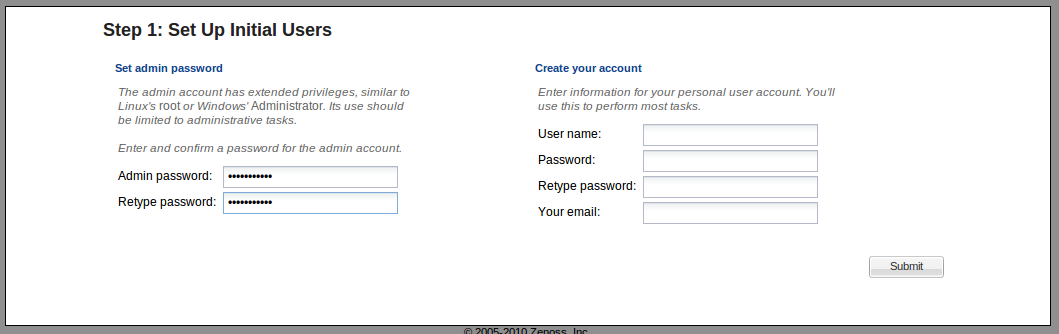
First step of the web installOnce you have successfully logged into Zenoss you will have to walk through a simple, two-step process of creating accounts and discovering devices. The first step (shown in Figure 1) requires you add a user account. This user account will be the account you will log in with and run most of the tasks. If you want to reset the admin password you can here.

The next step is where you will begin the process of detecting your network. There are two ways to do this:
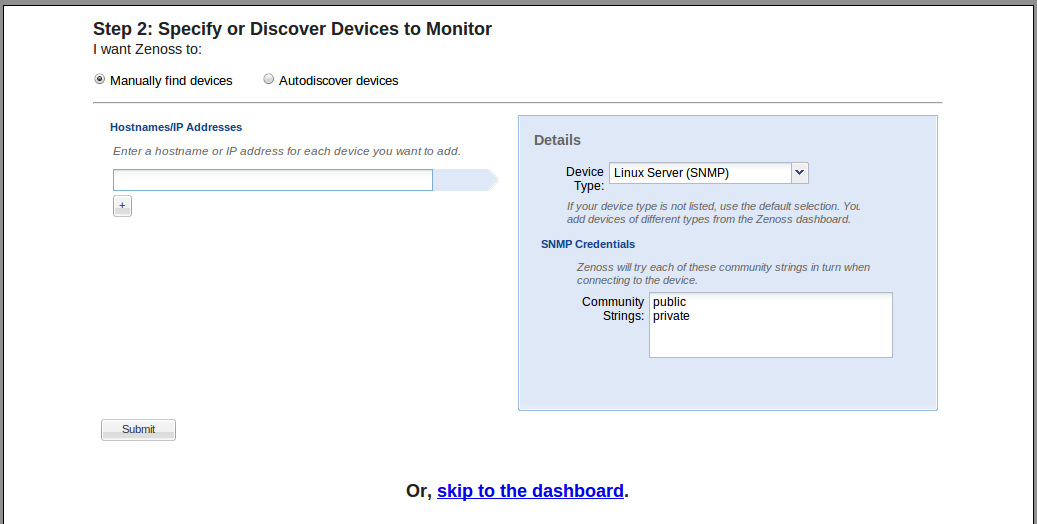
  • Manually enter your devices.
  • Auto-detect your devices.

If you have a small network you might want to enter devices manually.If you have a larger network, you will most likely want to have your devices auto-detected. Select Autodiscover devices (see Figure 2) and then click the Submit button.

The auto-discover of your devices can take a while (especially if you have a large network). So don’t expect to see those devices listed, right away, in the dashboard (see Figure 3). But even though all of the devices have not been discovered as soon as you hit the dashboard, there are still plenty of administration tasks that can be taken care of.
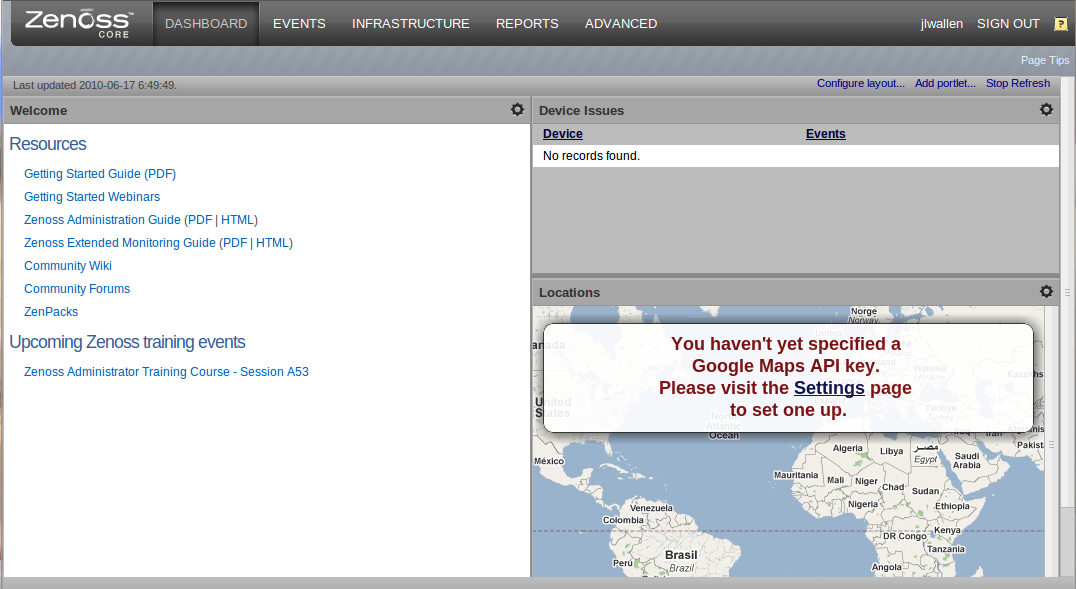
The Zenoss dashboardFinal Thoughts

You have now begun your journey with Zenoss. Be prepared to spend plenty of time looking around on the dashboard getting to know the system. Zenoss is incredibly powerful so also take the time to read up on the user documentation (click the Getting Started Guide link on your dashboard main page for starters).

Hopefully you will find Zenoss as powerful and useful as I have. Once installed, this tool can easily become your single point of contact for all of your network monitoring needs.
How To Reset Gnome From Command Line

When I get a new distribution, I always look for all the “super-duper-new and fashion” extensions, themes, icons, screenlets, desklets, and all the other things end in -lets, but after some install-delete-update commands, I always end with my Gnome messed up, a good, nice and clean way to wipe out all the things and restore your gnome is to use the command line, next time you messed up or when things go wrong, just type this is your shell:

rm -rf .gnome .gnome2 .gconf .gconfd .metacity

…and all go back to the “factory” settings. This thing has save my life several times.

Source: LifeHacker

Android 2.2 Better than iOS 4 in Javascript Performance

A tech site Ars Technica tested JavaScript performance on an iPhone 4 running iOS 4 and a Nexus One running Android 2.2. The results: Android 2.2 (Froyo) smokes iOS 4 when it comes to JavaScript, clocking in two to three times faster than iOS 4’s mobile Safari.

Well, the Nexus One has to beat the iPhone. Nexus one is faster (1GHz CPU, vs. 600MHz for 3Gs, and 600-800 for iPhone 4), and these tests are basically CPU performance tests.

Source: Gizmodo

LinuxCon Preview: Eben Moglen on Bilski and Online Privacy


After its sold-out debut last year, LinuxCon in year two is expected to be even better. My colleagues at The Linux Foundation have worked with the community to ensure this year’s program addresses all matters Linux and provides developers, operations managers and business executives with opportunities to discuss the most timely and relevant issues and opportunities for Linux in the enterprise.

The program is littered with the Who’s Who of Linux and open source. One of this year’s speakers truly stands out as a pioneer in helping to protect free and open source software and projects: the chairman of the Software Freedom Law Center, Eben Moglen. Eben is also a Columbia University Law School professor and one of the original authors of the world’s most widely used software license, the General Public License (under which the Linux kernel is licensed).

Eben’s perspectives on the legal landscape as it relates to software are highly sought after by the press, students and technology companies and projects of all sizes from around the world. At LinuxCon, he will explore the direction free software is taking over the next five years, a period that he refers to as “Stage 2.” (He speaks on Wednesday, August 11 at 4 p.m.)

I talked to Eben just prior to the Bilski vs Kappos ruling and asked him what the most pressing issue was for software development from a legal perspective. He told me that regardless of the outcome of the Bilski case, the issues between free software and the patent system “remain the most legally complex and strategically challenging part of the landscape.” But he contends that the free software community has demonstrated how copyright law that encourages sharing works and pointed to Creative Commons as an example.

“We have succeeded in showing both developers and commercial distributors that our method for using copyright law to encourage sharing works, legally and commercially. We have profoundly affected not only how software is made and acquired around the world, but also how cultural production of every other kind is distributed, thanks to the close relationship between free software and Creative Commons. In these respects, our legal arrangements are not only workable, they are superior to the much more costly and cumbersome machinery of proprietary exclusive rights. But the misuse of the patent system to produce ‘ownership’ of algorithms and other intangible mental processes continues to threaten our ability to innovate.”

The Supreme Court ruled on Bilski vs Kappos just last week and Eben commented publicly that “the landscape of patent law has been a cluttered, dangerous mess for almost two decades. The confusion and uncertainty behind today’s ruling guarantees that the issues involved in Bilski v. Kappos will have to return to the Supreme Court after much money has been wasted and much innovation obstructed.”

The SFLC filed a brief in the Bilski case arguing that software is not patentable subject matter. It is available on its website. I expect him to fervently use this case as an example when he speaks in Boston later this summer.

Eben has also been speaking and addressing the issues surrounding online privacy. He recently spoke at NYU about this very issue and it was reported that he inspired the Facebook alternative Diaspora. You can see notes from the speech published on the SFLC website, but it’s safe to say that he is concerned about what he calls the “online neighborhood” and the rights to privacy that the global community has so quickly forfeited. I wouldn’t expect a keynote from Eben to not mention this issue, so be prepared for a good mix of intellectual and practical insight on this very important topic at LinuxCon.

The SFLC was founded in 2005 and provides pro bono legal services to free and open source software projects. I worked with Eben when he launched the Center and since then it has seen significant increases in demand for its services. When asked about the Center, Eben focused on the important work that today it’s doing in countries around the world.

“Significant public policy discussions about patent law and competition/antitrust will be going on in the US, Europe, India and China in contexts that immediately concerns the Free World. Our sister organization, SFLC in India, began operating earlier this year and we will continue to expand our activities in the coming year to support burgeoning international free software communities in Russia, China, and elsewhere around the globe.”

Seeing Eben speak is a great opportunity as are the other chances to see insiders discuss the most important topics for Linux and open source this year. If you haven’t registered for LinuxCon yet, you better hurry! The early bird rate of $400 goes up to $500 after July 15. Just click here to register. 

Lastly, pick up your boarding pass for the LinuxCon Boston Harbor Cruise onsite at the Activities Desk. This evening event, sponsored by Intel, is from 7-10 p.m. on Wednesday, August 11th. Space is limited, so don’t forget to grab that pass for your place on the cruise, which includes food and drink. Can you say “party!?”


IBM Testing Hot Water to Cool Servers

IBM researchers in Switzerland are standing server cooling on its head, using water as warm as 140 degrees to cool processors that have an unusually high safe operating temperature.

Read more at internetnews.com