Home Blog Page 296

Bash Variables: Environmental and Otherwise

Bash variables, including those pesky environment variables, have popped up several times in previous articles, and it’s high time you get to know them better and how they can help you.

So, open your terminal window and let’s get started.

Environment Variables

Consider HOME. Apart from the cozy place where you lay down your hat, in Linux it is a variable that contains the path to the current user’s home directory. Try this:

echo $HOME

This will show the path to your home directory, usually /home/<your username>.

As the name indicates, variables can change according to the context. Indeed, each user on a Linux system will have a HOME variable containing a different value. You can also change the value of a variable by hand:

HOME=/home/<your username>/Documents

will make HOME point to your Documents/ folder.

There are three things to notice here:

  1. There are no spaces between the name of the variable and the = or between the = and the value you are putting into the variable. Spaces have their own meaning in the shell and cannot be used any old way you want.
  2. If you want to put a value into a variable or manipulate it in any way, you just have to write the name of the variable. If you want to see or use the contents of a variable, you put a $ in front of it.
  3. Changing HOME is risky! A lot programs rely on HOME to do stuff and changing it can have unforeseeable consequences. For example, just for laughs, change HOME as shown above and try typing cd and then [Enter]. As we have seen elsewhere in this series, you use cd to change to another directory. Without any parameters, cd takes you to your home directory. If you change the HOME variable, cd will take you to the new directory HOME points to.

Changes to environment variables like the one described in point 3 above are not permanent. If you close your terminal and open it back up, or even open a new tab in your terminal window and move there, echo $HOME will show its original value.

Before we go on to how you make changes permanent, let’s look at another environment variable that it does make sense changing.

PATH

The PATH variable lists directories that contain executable programs. If you ever wondered where your applications go when they are installed and how come the shell seems to magically know which programs it can run without you having to tell it where to look for them, PATH is the reason.

Have a look inside PATH and you will see something like this:

$ echo $PATH
/usr/local/sbin:/usr/local/bin:/usr/bin:/usr/sbin:/bin:/sbin

Each directory is separated by a colon (:) and if you want to run an application installed in any directory other than the ones listed in PATH, you will have to tell the shell where to find it:

/home/<user name>/bin/my_program.sh

This will run a program called my_program.sh you have copied into a bin/ directory in your home directory.

This is a common problem: you don’t want to clutter up your system’s bin/ directories, or you don’t want other users running your own personal scripts, but you don’t want to have to type out the complete path every time you need to run a script you use often. The solution is to create your own bin/ directory in your home directory:

mkdir $HOME/bin

And then tell PATH all about it:

PATH=$PATH:$HOME/bin

After that, your /home//bin will show up in your PATH variable. But… Wait! We said that the changes you make in a given shell will not last and will lose effect when that shell is closed.

To make changes permanent for your user, instead of running them directly in the shell, put them into a file that gets run every time a shell is started. That file already exists and lives in your home directory. It is called .bashrc and the dot in front of the name makes it a hidden file — a regular ls won’t show it, but ls -a will.

You can open it with a text editor like kate, gedit, nano, or vim (NOT LibreOffice Writer — that’s a word processor. Different beast entirely). You will see that .bashrc is full of shell commands the purpose of which are to set up the environment for your user.

Scroll to the bottom and add the following on a new, empty line:

export PATH=$PATH:$HOME/bin

Save and close the file. You’ll be seeing what export does presently. In the meantime, to make sure the changes take effect immediately, you need to source .bashrc:

source .bashrc

What source does is execute .bashrc for the current open shell, and all the ones that come after it. The alternative would be to log out and log back in again for the changes to take effect, and who has the time for that?

From now on, your shell will find every program you dump in /home//bin without you having to specify the whole path to the file.

DIY Variables

You can, of course, make your own variables. All the ones we have seen have been written with ALL CAPS, but you can call a variable more or less whatever you want.

Creating a new variables is straightforward: just set a value within it:

new_variable="Hello"

And you already know how to recover a value contained within a variable:

echo $new_variable

You often have a program that will require you set up a variable for things to work properly. The variable may set an option to “on”, or help the program find a library it needs, and so on. When you run a program in Bash, the shell spawns a daughter process. This means it is not exactly the same shell that executes your program, but a related mini-shell that inherits some of the mother’s characteristics. Unfortunately, variables, by default, are not one of them. This is because, by default again, variables are local. This means that, for security reasons, a variable set in one shell cannot be read in another, even if it is a daughter shell.

To see what I mean, set a variable:

robots="R2D2 & C3PO"

… and run:

bash

You just ran a Bash shell program within a Bash shell program.

Now see if you can read the contents of you variable with:

echo $robots

You should draw a blank.

Still inside your bash-within-bash shell, set robots to something different:

robots="These aren't the ones you are looking for"

Check robots‘ value:

$ echo $robots
These aren't the ones you are looking for

Exit the bash-within-bash shell:

exit

And re-check the value of robots:

$ echo $robots
R2D2 & C3P0

This is very useful to avoid all sorts of messed up configurations, but this presents a problem also: if a program requires you set up a variable, but the program can’t access it because Bash will execute it in a daughter process, what can you do? That is exactly what export is for.

Try doing the prior experiment, but, instead of just starting off by setting robots="R2D2 & C3PO", export it at the same time:

export robots="R2D2 & C3PO"

You’ll notice that, when you enter the bash-within-bash shell, robots still retains the same value it had at the outset.

Interesting fact: While the daughter process will “inherit” the value of an exported variable, if the variable is changed within the daughter process, changes will not flow upwards to the mother process. In other words, changing the value of an exported variable in a daughter process does not change the value of the original variable in the mother process.

You can see all exported variables by running

export -p

The variables you create should be at the end of the list. You will also notice some other interesting variables in the list: USER, for example, contains the current user’s user name; PWD points to the current directory; and OLDPWD contains the path to the last directory you visited and since left. That’s because, if you run:

cd -

You will go back to the last directory you visited and cd gets the information from OLDPWD.

You can also see all the environment variables using the env command.

To un-export a variable, use the -n option:

export -n robots

Next Time

You have now reached a level in which you are dangerous to yourself and others. It is time you learned how to protect yourself from yourself by making your environment safer and friendlier through the use of aliases, and that is exactly what we’ll be tackling in the next episode. See you then.

How to Bring Good Fortune to Your Linux Terminal

It’s December, and if you haven’t found a tech advent calendar that sparks your fancy yet, well, maybe this one will do the trick. Every day, from now to the 24th, we’re bringing you a different Linux command-line toy. What’s a command-line toy, you ask? It could be a game or any simple diversion to bring a little happiness to your terminal.

Today’s toy, fortune, is an old one. Versions of it date back to the 1980s when it was included with Unix. The version I installed in Fedora was available under a BSD license, and I grabbed it with the following.

sudo dnf install fortune-mod -y

Your distribution may be different. 

Read more at OpenSource.com

Living Open Source in Zambia

In a previous article I’ve announced my sponsorship project, where I offered to help a motivated young Linux Professional getting certified. I found an ideal candidate, and he has taken the RHCSA exam, and now we’re ready to take the next step.

Santos Chibenga from Zambia is so engaged in the local Linux community in Zambia that we decided to host an event together: https://www.vieo.tv/event/linux-event-lusaka-zambia. In this event we will have local speakers, and I will educate nearly 200 participants to become LFCS certified. 

We do have some very cool sponsors, including Linux Foundation who has contributed 100 exam vouchers for the LFCS exam. I’m very excited about that, because that means that at the end of the event we’re able to leave something real in Zambia.

Learn more at LinkedIn

Critical Vulnerability Allows Kubernetes Node Hacking

Kubernetes has received fixes for one of the most serious vulnerabilities ever found in the project to date. If left unpatched, the flaw could allow attackers to take over entire compute nodes.

“With a specially crafted request, users that are allowed to establish a connection through the Kubernetes API server to a backend server can then send arbitrary requests over the same connection directly to that backend, authenticated with the Kubernetes API server’s TLS credentials used to establish the backend connection,” the Kubernetes developers said in an advisory.

Furthermore, in default configurations, both authenticated and unauthenticated users are allowed to perform API discovery calls and could exploit this vulnerability to escalate their privileges. For example, attackers could list all pods on a node, could run arbitrary commands on those pods and could obtain the output of those commands.

Read more at The New Stack

Libcamera Aims to Make Embedded Cameras Easier

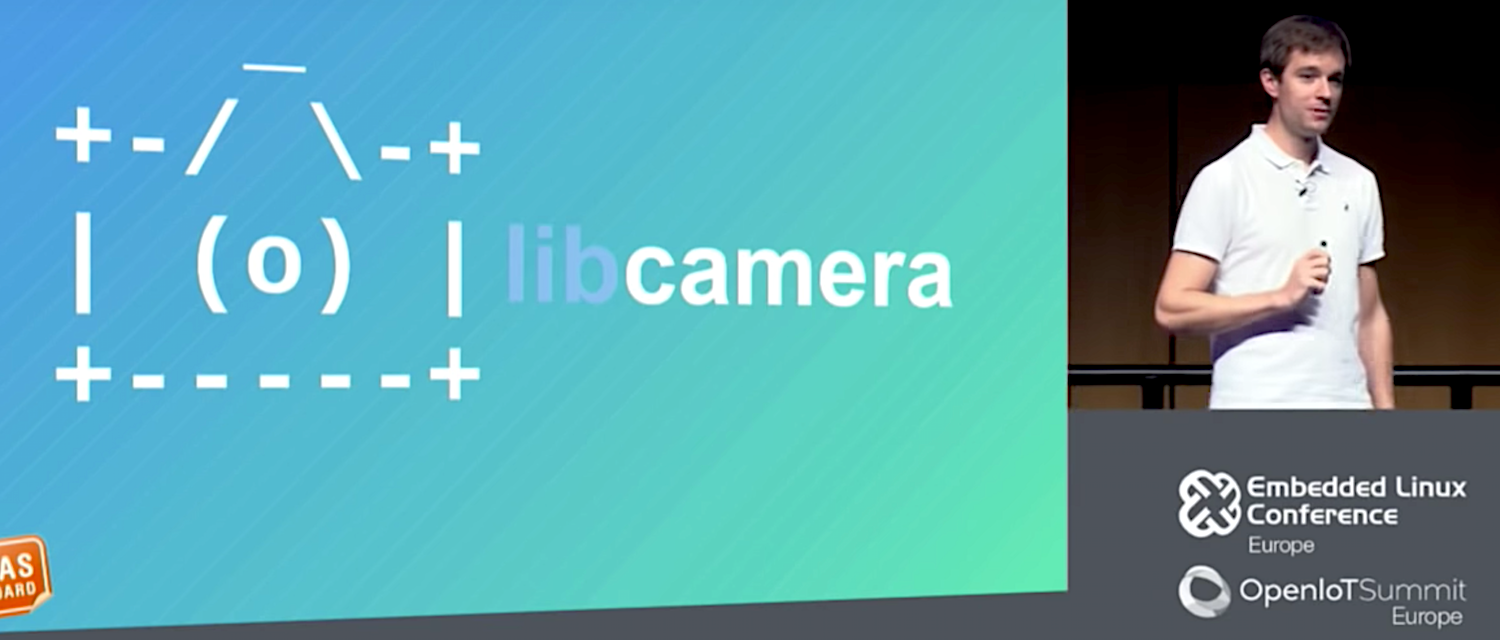
The V4L2 (Video for Linux 2) API has long offered an open source alternative to proprietary camera/computer interfaces, but it’s beginning to show its age. At the Embedded Linux Conference Europe in October, the V4L2 project unveiled a successor called libcamera. V4L2 co-creator and prolific Linux kernel contributor Laurent Pinchart outlined the early-stage libcamera project in a presentation called “Why Embedded Cameras are Difficult, and How to Make Them Easy.”

V4l and V4L2 were developed when camera-enabled embedded systems were far simpler. “Maybe you had a camera sensor connected to a SoC, with maybe a scaler, and everything was exposed via the API,” said Pinchart, who runs an embedded Linux firms called Ideas on Board and is currently working for Renesas. “But when hardware became more complex, we disposed of the traditional model. Instead of exposing a camera as a single device with a single API, we let userspace dive into the device and expose the technology to offer more fine-grained control.”

These improvements were extensively documented, enabling experienced developers implement more use cases than before. Yet, the spec placed much of the burden of controlling the complex API on developers, with few resources available to ease the learning curve. In other words, “V4L2 became more complex for userspace,” explained Pinchart.

The project planned to add a layer called libv4l to address this. The libv4l userspace library was designed to mimic the V4L2 kernel API and expose it to apps “so it could be completely transparent in tracking the code to libc,” said Pinchart. “The plan was to have device specific plugins provided by the vendor and it would all be part of the libv4l file, but it never happened. Even if it had, it would not have been enough.”

Libcamera, which Pinchart describes as “not only a camera library but a full camera stack in user space,” aims to ease embedded camera application development, improving both on V4L2 and libv4l. The core piece is a libcamera framework, written in C++, that exposes kernel driver APIs to userspace. On top of the framework are optional language bindings for languages such as C.

The next layer up is a libcamera application layer that translates to existing camera APIs, including V4L2, Gstreamer, and the Android Camera Framework, which Pinchart said would not contain the usual vendor specific Android HAL code. As for V4L2, “we will attempt to maintain compatibility as a best effort, but we won’t implement every feature,” said Pinchart. There will also be a native libcamera app format, as well as plans to support Chrome OS.

Libcamera keeps the kernel level hidden from the upper layers. The framework is built around the concept of a camera device, “which is what you would expect from a camera as an end user,” said Pinchart. “We will want to implement each camera’s capabilities, and we’ll also have a concept of profiles, which is a higher view of features. For example, you could choose a video or point-and-shoot profile.”

Libcamera will support multiple video streams from a single camera. “In videoconferencing, for example, you might want a different resolution and stream than what you encode over the network,” said Pinchart. “You may want to display the live stream on the screen and, at the same time, capture stills or record video, perhaps at different resolutions.”

Per-frame controls and a 3A API

One major new feature is per-frame controls. “Cameras provide controls for things like video stabilization, flash, or exposure time which may change under different lighting conditions,” said Pinchart. “V4L2 supports most of these controls but with one big limitation. Because you’re capturing a video stream with one frame after another, if you want to increase exposure time you never know precisely at what frame that will take effect. If you want to take a still image capture with flash, you don’t want to activate a flash and receive an image that is either before or after the flash.”

With libcamera’s per-frame controls, you can be more precise. “If you want to ensure you always have the right brightness and exposure time, you need to control those features in a way that is tied to the video stream,” explained Pinchart. “With per-frame controls you can modify all the frames that are being captured in a way that is synchronized with the stream.”

Libcamera also offers a novel approach to a given camera’s 3A controls, such as auto exposure, autofocus, and auto white balance. To provide a 3A control loop, “you can have a simple implementation with 100 lines of code that will give you barely usable results or an implementation based on two or three years of development by device vendors where they really try to optimize the image quality,” said Pinchart. Because most SoC vendors refuse to release the 3A algorithms that run in their ISPs with an open source license, “we want to create a framework and ecosystem in which open source re-implementations of proprietary 3A algorithms will be possible,” said Pinchart.

Libcamera will provide a 3A API that will translate between standard camera code and a vendor specific component. “The camera needs to communicate with kernel drivers, which is a security risk if the image processing code is closed source,” said Pinchart. “You’re running untrusted 3A vendor code, and even if they’re not doing something behind your back, it can be hacked. So we want to be able to isolate the closed source component and make it operate within a sandbox. The API can be marshaled and unmarshaled over IPC. We can limit the system calls that are available and prevent the sandboxed component from directly accessing the kernel driver. Sandboxing will ensure that all the controls will have to go through our API.”

The 3A API combined with libcamera’s sandboxing approach, may encourage more SoC vendors to further expose their ISPs just as some are have begun to open up their GPUs. “We want the vendors to publish open source camera drivers that expose and document every control on the device,” he said. “When you are interacting with a camera, a large part of that code is device agnostic. Vendors implement a completely closed source camera HAL and supply their own buffer management and memory location and other tasks that don’t add any value. It’s a waste of resources. We want as much code as possible that can be reused and shared with vendors.”

Pinchart went on to describe libcamera’s cam device manager, which will support hot plugging and unplugging of cameras. He also explained libcamera’s pipeline handler, which controls memory buffering and communications between MIPI-CSI or other camera receiver interfaces and the camera’s ISP.

“Our pipeline handler takes care of the details so the application doesn’t have to,” said Pinchart. “It handles scheduling, configuration, signal routing, the number of streams, and locating and passing buffers.” The pipeline handler is flexible enough to support an ISP with an integrated CSI receiver (and without a buffer pool) or other complicated ISPs that can have a direct pipeline to memory.

Watch Pinchart’s entire ELC talk below:

AI in 2019: 8 Trends to Watch

Forget the job-stealing robot predictions. Let’s focus on artificial intelligence trends – around talent, security, data analytics, and more – that will matter to IT leaders.

We decided to focus on the trends that matter most urgently to IT leaders – you don’t need another “AI is taking over the world” story; you need concrete insights for your team and business. So, let’s dig into the key trends in AI – as well as overlapping fields such as machine learning – that IT leaders should keep tabs on in 2019.

Open source AI communities will thrive

Many of the cloud and cloud-native technologies in use today were born out of open source projects: Consider Kubernetes Exhibit A in that argument. Expect the development of AI, machine learning, and related technologies to follow a similar path.

“Today, more leading-edge software development occurs inside open source communities than ever before, and it is becoming increasingly difficult for proprietary projects to keep up with the rapid pace of development that open source offers,” says Ibrahim Haddad, director of research at The Linux Foundation, which includes the LF Deep Learning Foundation. “AI is no different and is becoming dominated by open source software that brings together multiple collaborators and organizations.”

In particular, Haddad expects more cutting-edge technology companies and early adopters to open source their internal AI work to catalyze the next waves of development, not unlike how Google spun Kubernetes out from an internal system to an open source project.

Read more at Enterprisers Project

STIBP, Collaborate, and Listen: Linus Floats Linux Kernel That ‘Fixes’ Intel CPUs’ Spectre Slowdown

Linus Torvalds has stuck to his “no swearing” resolution with his regular Sunday night Linux kernel release candidate announcement.

Probably the most important aspect of the weekend’s release candidate is that it, in a way, improves the performance of STIBP, which is a mitigation that stops malware exploiting a Spectre security vulnerability variant in Intel processors.

In November, it emerged that STIBP (Single Thread Indirect Branch Predictors), which counters Spectre Variant 2 attacks, caused nightmare slowdowns in some cases. The mitigation didn’t play well with simultaneous multi-threading (SMT) aka Intel’s Hyper Threading, and software would take up to a 50 per cent performance hit when the security measure was enabled. Linux 4.20-rc5, emitted on Sunday, addresses this performance issue by making the security defense optional… 

Read more at The Register

How to do Basic Math in Linux Command Line

The Linux bash, or the command line, lets you perform both basic and complex arithmetic and boolean operations. The commands like expr, jot, bc and, factor etc, help you in finding optimal mathematical solutions to complex problems. In this article, we will describe these commands and present examples that will serve as a basis for you to move to more useful mathematical solutions.

We have run the commands and procedures mentioned in this article on a Ubuntu 18.04 LTS system.

We are using the Ubuntu command line, the Terminal, in order to perform all the mathematical operations. You can open the Terminal either through the system Dash or the Ctrl+Alt+T shortcut.

The expr command

The expr or the expression command in Linux is the most commonly used command that is used to perform mathematical calculations. You can use this command to perform functions like addition, subtraction, multiplication, division, incrementing a value and, even comparing two values. 

Read more at VITUX

Demystifying Kubernetes Operators with the Operator SDK: Part 1

You may have heard about the concept of custom Operators in Kubernetes. You may have even read about the CoreOS operator-sdk, or tried walking through the setup. The concept is cool: Operators can help you extend Kubernetes functionality to include managing any stateful applications your organization uses. At Kenzan, we see many possibilities for their use on stateful infrastructure apps, including upgrades, node recovery, and resizing a cluster. An ideal future for platform ops will inevitably include operators themselves maintaining stateful applications and keeping runtime intervention by a human to a bare minimum. We also admit the topic of operators and the operator-idk is a tad confusing. After reading a bit, you may secretly still be mystified as to what operators exactly do, and how all the components work together.

In this article, we will demystify what an operator is, and how the CoreOS operator-sdk translates its input to the code that is then run as an operator. In this step-by-step tutorial, we will create a general example of an operator, with a few bells and whistles beyond the functionality shown in the operator-sdk user guide. By the end, you will have a solid foundation for how to build a custom operator that can be applied to real-world use cases.

Hello Operator, could you tell me what an Operator is?

To describe what an operator does, let’s go back to Kubernetes architecture for a bit. Kubernetes is essentially a desired state manager. You give it a desired state for your application (number of instances, disk space, image to use, etc.) and it attempts to maintain that state should anything get out of wack. Kubernetes uses what’s called a control plane on it’s master node. The control plane includes a number of controllers whose job is to reconcile against the desired state in the following way:

  • Monitor existing K8s objects (Pods, Deployments, etc.) to determine their state

  • Compare it to the K8s yaml spec for the object

  • If the state is not the same as the spec, the controller will attempt to remedy this

A common scenario where reconciling takes place is a Pod is defined with three replicas. One goes down, and with K8s’ controller watching, it recognizes that there should be three Pods running, not two. It then works to create a new instance of the Pod.

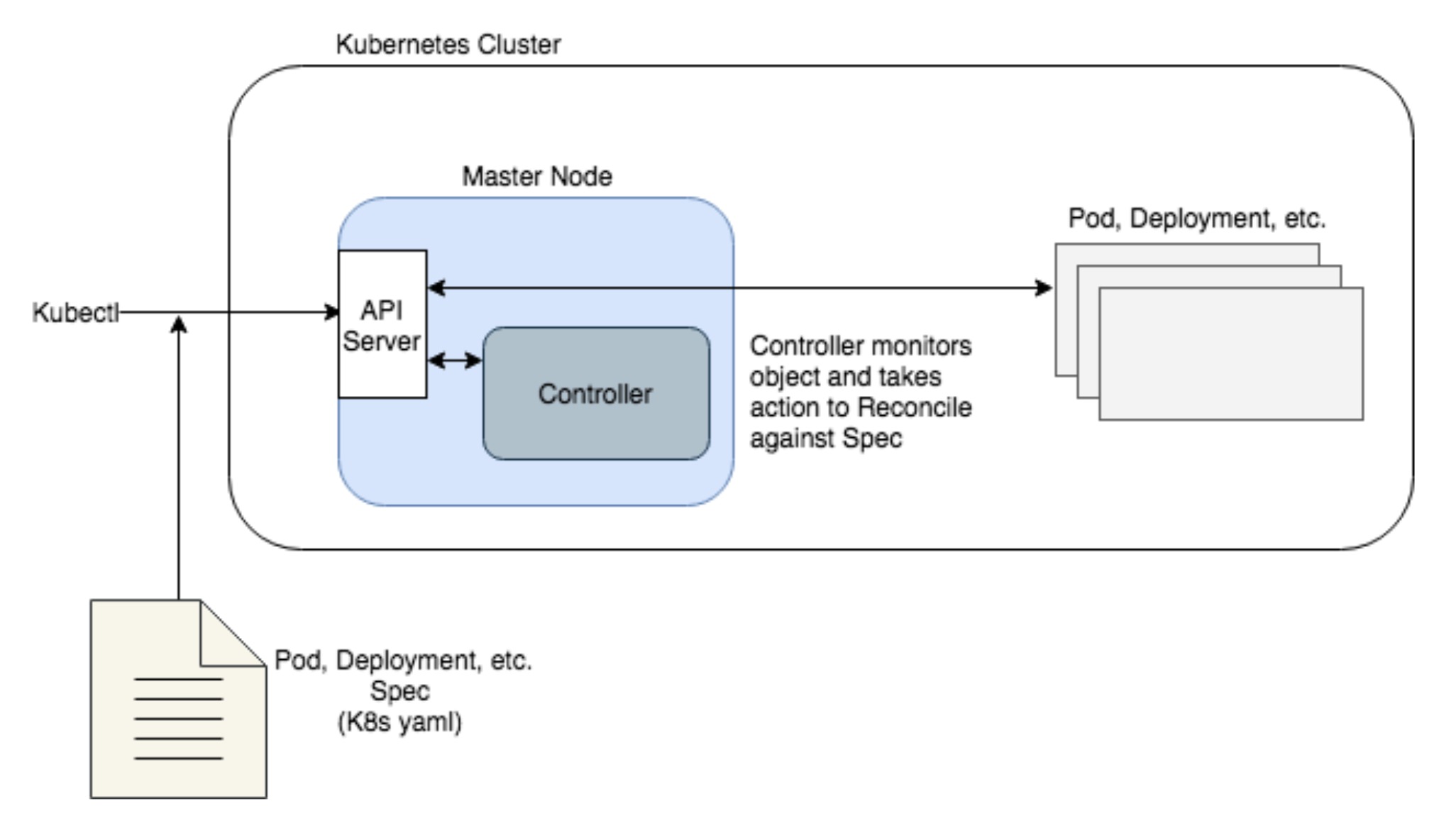
This simplified diagram shows the role of controllers in Kubernetes architecture as follows.


  • The Kubectl CLI sends an object spec (Pod, Deployment, etc.) to the API server on the Master Node to run on the cluster

  • The Master Node will schedule the object to run (not shown)

  • Once running, a Controller will continuously monitor the object and reconcile it against the spec

In this way, Kubernetes works great to take much of the manual work out of maintaining the runtime for stateless applications. Yet it is limited in the number of object types (Pods, Deployments, Namespaces, Services, DaemonSets, etc.) that it will natively maintain. Each of these object types has a predetermined behavior and way of reconciling against their spec should they break, without much deviation in how they are handled.

Now, what if your application has a bit more complexity and you need to perform a custom operation to bring it to a desired running state?

Think of a stateful application. You have a database application running on several nodes. If a majority of nodes go down, you’ll need to reload the database from a specific snapshot following specific steps. Using existing object types and controllers in Kubernetes, this would be impossible to achieve. Or think of scaling nodes up, or upgrading to a new version, or disaster recovery for our stateful application. These kinds of operations often need very specific steps, and typically require manual intervention.

Enter operators.

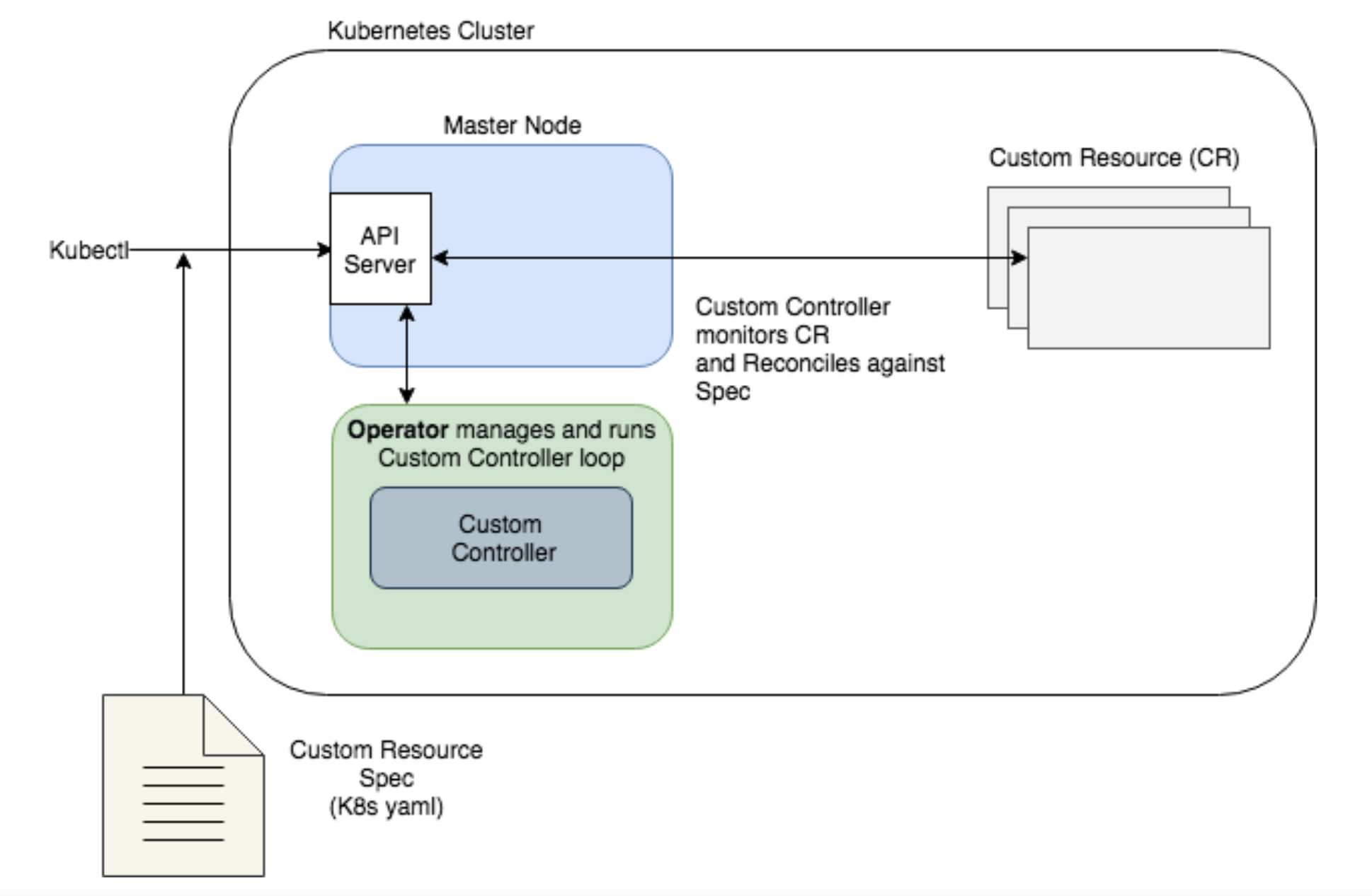
Operators extend Kubernetes by allowing you to define a Custom Controller to watch your application and perform custom tasks based on its state (a perfect fit to automate maintenance of the stateful application we described above). The application you want to watch is defined in Kubernetes as a new object: a Custom Resource (CR) that has its own yaml spec and object type (in K8s, a kind) that is understood by the API server. That way, you can define any specific criteria in the custom spec to watch out for, and reconcile the instance when it doesn’t match the spec. The way an operator’s controller reconciles against a spec is very similar to native Kubernetes’ controllers, though it is using mostly custom components.

Note the primary difference in our diagram from the previous one is that the Operator is now running the custom controller to reconcile the spec. While the API Server is aware of the custom controller, the Operator runs independently, and can run either inside or outside the cluster.


JMgJ3Q24igREHRCmKiX0UAhZVXH-arLxyyXWfKAmJMgJ3Q24igREHRCmKiX0UAhZVXH-arLxyyXWfKAm

Because Operators are a powerful tool for stateful applications, we are seeing a number of pre-built operators from CoreOS and other contributors for things like ectd, Vault, and Prometheus. And while these are a great starting point, the value of your operator really depends on what you do with it: what your best practice is for failed states, and how the operator functionality may have to work alongside manual intervention.


Dial it in: Yes, I’d like to try Building an Operator

Based on the above diagram, in order to create our custom Operator, we’ll need the following:

  1. A Custom Resource (CR) spec that defines the application we want to watch, as well as an API for the CR

  2. A Custom Controller to watch our application

  3. Custom code within the new controller that dictates how to reconcile our CR against the spec

  4. An Operator to manage the Custom Controller

  5. A deployment for the Operator and Custom Resource

All of the above could be created by writing Go code and specs by hand, or using a tool like kubebuilder to generate Kubernetes APIs. But the easiest route (and the method we’ll use here) is generating the boilerplate for these components using the CoreOS operator-sdk. It allows you to generate the skeleton for the spec, the controller, and the operator, all via a convenient CLI. Once generated, you define the custom fields in the spec and write the custom code to reconcile against the spec. We’ll walk through each of these steps in the next part of the tutorial.

Toye Idowu is a Platform Engineer at Kenzan Media.

What’s New in Bash Parameter Expansion

The bash man page is close to 40K words. It’s not quite War and Peace, but it could hold its own in a rack of cheap novels. Given the size of bash’s documentation, missing a useful feature is easy to do when looking through the man page. For that reason, as well as to look for new features, revisiting the man page occasionally can be a useful thing to do.

The sub-section of interest today is Parameter Expansion—that is, $var in its many forms. Don’t be confused by the name though, it’s really about parameter and variable expansion.

I’m not going to cover all the different forms of parameter expansion here, just some that I think may not be as widely known as others. If you’re completely new to parameter expansion, check out my ancient post or one of the many articles elsewhere on the internet.

Read more at The Linux Journal