Home Blog Page 300

A Closer Look at Voice-Assisted Speakers

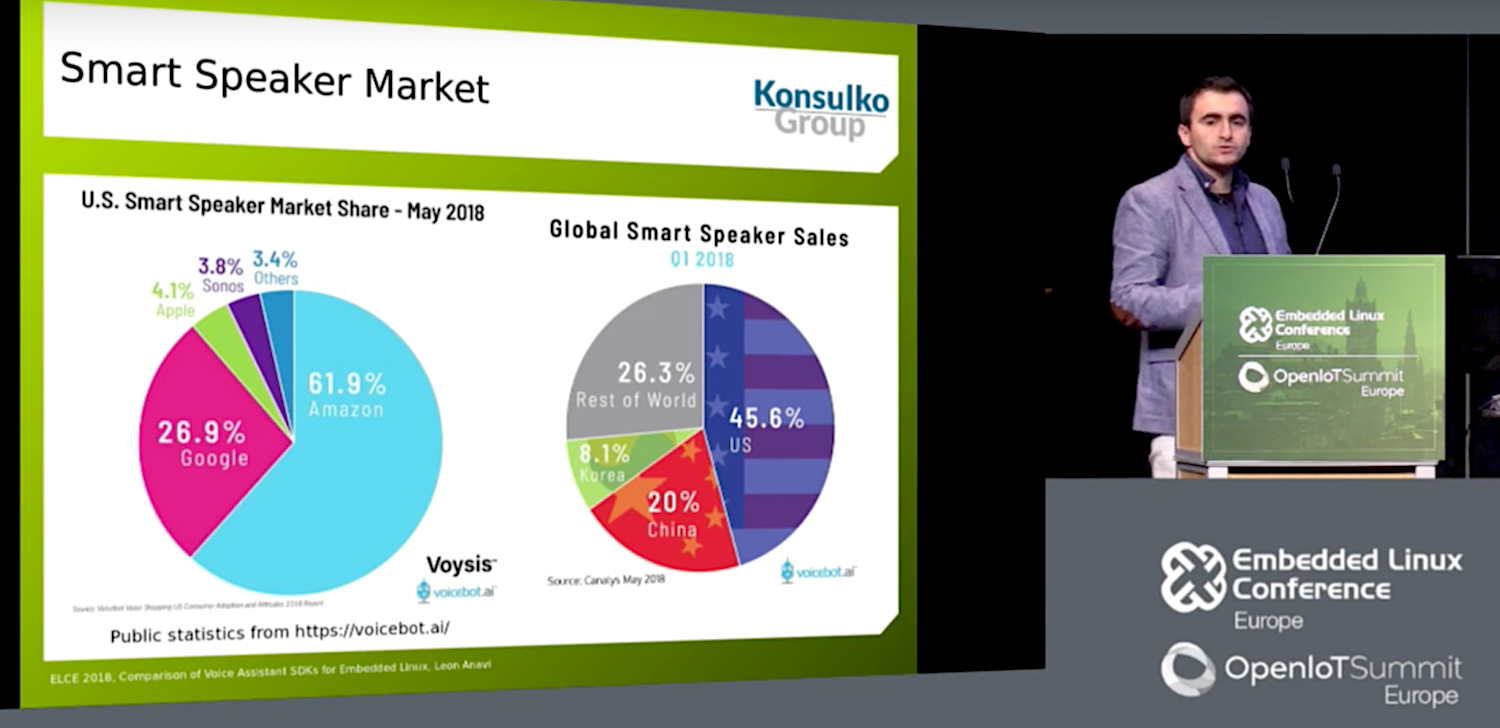
U.S. consumers are expected to drop a bundle this Black Friday on smart speakers and home hubs. A Nov. 15 Canalys report estimates that shipments of voice-assisted speakers grew 137 percent in Q3 2018 year-to-year and are on the way to 75 million-unit sales in 2018. At the recent Embedded Linux Conference and Open IoT Summit in Edinburgh, embedded Linux developer and Raspberry Pi HAT creator Leon Anavi of the Konsulko Group reported on the latest smart speaker trends.

As Anavi noted in his “Comparison of Voice Assistant SDKs for Embedded Linux Devices” talk, conversing with computers became a staple of science fiction over half a century ago. Voice technology is interesting “because it combines AI, big data, IoT, and application development,” said Anavi.

In Q3 2017, Amazon and Google owned the industry with 74.7 percent and 24.6 percent, respectively, said Canalys. A year later, the percentages were down to 31.9 and 29.8. China-based Alibaba and Xiaomi almost equally split another 21.8 percent share, followed by 17.4 percent for “others,” which mostly use Amazon Alexis, and increasingly, Google Assistant.

Despite the success of the mostly Linux-driven smart speaker market, Linux application developers have not jumped into voice app development in the numbers one might expect. In part, this is due to reservations about Google and Amazon privacy safeguards, as well as the proprietary nature of the hardware and cloud software.

“Privacy is a concern with smart speakers,” said Anavi. “You can’t fully trust a corporation if the product is not open source.”

Anavi summarized the Google and Amazon SDKs but spent more time on the fully open source Mycroft Mark. Although Anavi clearly prefers Mycroft, he encouraged developers to investigate all the platforms. “There is a huge demand in the market for these devices and a lot of opportunity for IoT integration, from writing new skills to integrating voice assistants in consumer electronics devices,” said Anavi.

Alexa/Echo

Amazon’s Alexa debuted in the Echo smart speaker four years ago. Amazon has since expanded to the Echo branded Dot, Spot, Tap, and Plus speakers, as well as the Echo Show and new Echo Show 2 display hubs.

The market leading Echo devices run on Amazon’s Linux- and Android-based Fire OS. The original Echo and Dot ran on the Cortex-A8-based TI DM3725 SoC while more recent devices have moved to an Armv8 MediaTek MT8163V SoC with 256MB RAM and 4GB flash.

Thanks to Amazon’s wise decision to release an Apache 2.0 licensed Alexa Voice Services (AVS) SDK, Alexa also runs on most third-party hubs. The SDK includes an Alexa Skills Kit for creating custom Skills. The cloud platform required to make Alexa devices work is not open source, however, and commercial vendors must sign an agreement and undergo a certification process.

Alexa runs on a variety of hardware including the Raspberry Pi, as well as smart devices ranging from the Ecobee4 Smart Thermostat to the LG Hub Robot. Microsoft recently began selling Echo devices, and earlier this year partnered with Amazon to integrate Alexa with its own Cortana voice agent in devices. This week, Microsoft announced that users can voice-activate Skype calls via Alexa on Echo devices.

Google Assistant/Home

The Google Assistant voice agent debuted on the Google Home smart speaker in 2016. It has since expanded to the Echo Dot-like Home Mini, which like the Home runs on a 1.2GHz dual-core Cortex-A7 Marvell Armada 1500 Mini Plus with 512MB RAM and 4GB flash. This year’s Home Max offered improved speakers and advanced to a 1.5GHz, quad-core Cortex-A53 processor. More recently, Google launched the touchscreen enabled Google Home Hub.

The Google Home devices run on a version of the Linux-based Google Cast OS. Like Alexa, the Python driven Google Assistant SDK lets you add the voice agent to third-party devices. However, it’s still in preview stage and lacks an open source license. Developers can create applications with Google Actions.

Last year, Google launched a version of its Google Assistant SDK for the Raspberry Pi 3 and began selling an AIY Voice Kit that runs on the Pi. There’s also a kit that runs on the Orange Pi, said Anavi.

This year, Google has aggressively courted hardware partners to produce home hub devices that combine Assistant with Google’s proprietary Android Things. The devices run on a variety of Arm-based SoCs led by the Qualcomm SD212 Home Hub Platform.

The SDK expansion has resulted in a variety of third-party devices running Assistant, including the Lenovo Smart Display and the just released LG XBOOM AI ThinQ WK9 touchscreen hubs. Sales of Google Home devices outpaced Echo earlier this year, although Amazon regained the lead in Q3, says Canalys.

Like Alexa, but unlike Mycroft, Google Assistant offers multilingual support. The latest version supports follow-up questions without having to repeat the activation word, and there’s a voice match feature that can recognize up to six users. A new Google Duplex feature accomplishes real-world tasks through natural phone conversations.

Mycroft/Mark

Anavi’s favorite smart speaker is the Linux-driven, open source (Apache 2.0 and CERN) Mycroft. The Raspberry Pi based Mycroft Mark 1 speaker was certified by the Open Source Hardware Association (OSHA).

The Mycroft Mark II launched on Kickstarter in January and has received $450,000 in funding. This Xilinx Zynq UltraScale+ MPSoC driven home hub integrates Aaware’s far-field Sound Capture technology. A Nov. 15 update post revealed that the Mark II will miss its December ship date.

Kansas City-based Mycroft has raised $2.5 million from institutional investors and is now seeking funding on StartEngine. Mycroft sees itself as a software company and is encouraging other companies to build the Mycroft Core platform and Mycroft AI voice agent into products. The company offers an enterprise server license to corporate customers for $1,500 a month, and there’s a free, Raspbian based Picroft application for the Raspberry Pi. A Picroft hardware kit is under consideration.

Mycroft promises that user data will never be saved without an opt-in (to improve machine learning algorithms), and that it will never be used for marketing purposes. Like Alexa and Assistant, however, it’s not available offline without a cloud service, a feature that would better ensure privacy. Anavi says the company is working on an offline option.

The Mycroft AI agent is enabled via a Python based Mycroft Pulse SDK, and a Mycroft Skills Manager is available for Skills development. Like Alexa and Assistant, Mycroft supports custom wake words. The new version uses its homegrown Precise wake-word listener technology in place of the earlier PocketSphinx. There’s also an optional device and account management stack called Mycroft Home.

For text-to-speech (TTS), Mycroft defaults to the open source Mimic, which is co-developed with VocaliD. It also supports eSpeak, MaryTTS, Google TTS, and FATTS.

Mycroft lacks its own speech to-text (STT) engine, which Anavi calls “the biggest challenge for an open source voice assistant.” Instead, it defaults to Google STT and supports IBM Watson STT and wit.ai.

Mycroft is collaborating with Mozilla on its open source DeepSpeech STT, an open source TensorFlow implementation of Baidu’s DeepSpeech platform. Baidu trails Alibaba and Xiaomi in the Chinese voice assistant market but is one of the fastest growing voice AI companies. Just as Alibaba uses its homegrown, Alexa-like AliGenie agent on its Tmall Genie speaker, Baidu loads its speakers with its DeepSpeech-driven DuerOS voice platform. Xiaomi has used Alexa and Cortana.

Mycroft is the most mature of several alternative voice AI projects that promise improved privacy safeguards. A recent VentureBeat article reported on emerging privacy-oriented technologies including Snips and SoundHound.

Anavi concluded with some demo videos showing off his soothing, Bulgarian AI whisperer vocal style. “I try to be polite with these things,” said Anavi. “Someday they may rule the world and I want to survive.”

Anavi’s video presentation can be seen here:
Schedule One-Time Commands with the Unix at Tool

Cron is nice and all, but don’t forget about its cousin at.

…even though I’ve been using Linux for 20 years, I still learn about new (to me) command-line tools all the time. In this “Back to Basics” article series, I plan to cover some of the command-line tools that those new to Linux may never have used before. For those of you who are more advanced, I’ll spread out this series, so you can expect future articles to be more technical. In this article, I describe how to use the at utility to schedule jobs to run at a later date.

at vs. Cron

at is one of those commands that isn’t discussed very much. When people talk about scheduling commands, typically cron gets the most coverage. Cron allows you to schedule commands to be run on a periodic basis. With cron, you can run a command as frequently as every minute or as seldom as once a day, week, month or even year. You also can define more sophisticated rules, so commands run, for example, every five minutes, every weekday, every other hour and many other combinations. System administrators sometimes will use cron to schedule a local script to collect metrics every minute or to schedule backups.

Read more at Linux Journal

Nabla on Kubernetes

A while back, we released a demo of the nabla containers runtime, runnc (v0.1). Most recently, we have improved our runtime in several aspects such as better start-up times and memory density. In addition to that (and also the focus of this blogpost), we have implemented Nabla support for kubernetes! In this blog post, we will show a simple local setup of kubernetes using the nabla containers runtime, runnc (v0.2), through containerd via the untrusted workload CRI plugin and pod annotation.

There will be several steps to achieve this on a local machine:

  1. Build and install Nabla runtime runnc
  2. Setup containerd with runnc
  3. Setup a CNI config
  4. Setup a local kubernetes cluster with containerd
  5. Running Nabla on k8s!

Read more at Nabla Containers

The Beginner’s Guide to Contributing to Open Source Projects

The practice of building and maintaining open source software works because people from all over the world, of all abilities and backgrounds, form communities to support the projects they care about. It’s not difficult to support the open source projects you use every day, and the efforts you make will have tangible effects on the quality of that software.

Most open source projects don’t have a dedicated staff to support them. Instead, developers and users from around the world work on them, often in their spare time. For many programmers, though, the thought of contributing to open source projects seems too difficult and time-consuming. They think that you have to be a programming genius blessed with unlimited free time to make a meaningful contribution.

That’s simply not true. Successful open source projects thrive on a wide variety of contributions from people with all levels of coding skills and commitment. 

Read more at New Relic

Home Assistant: The Python Approach to Home Automation

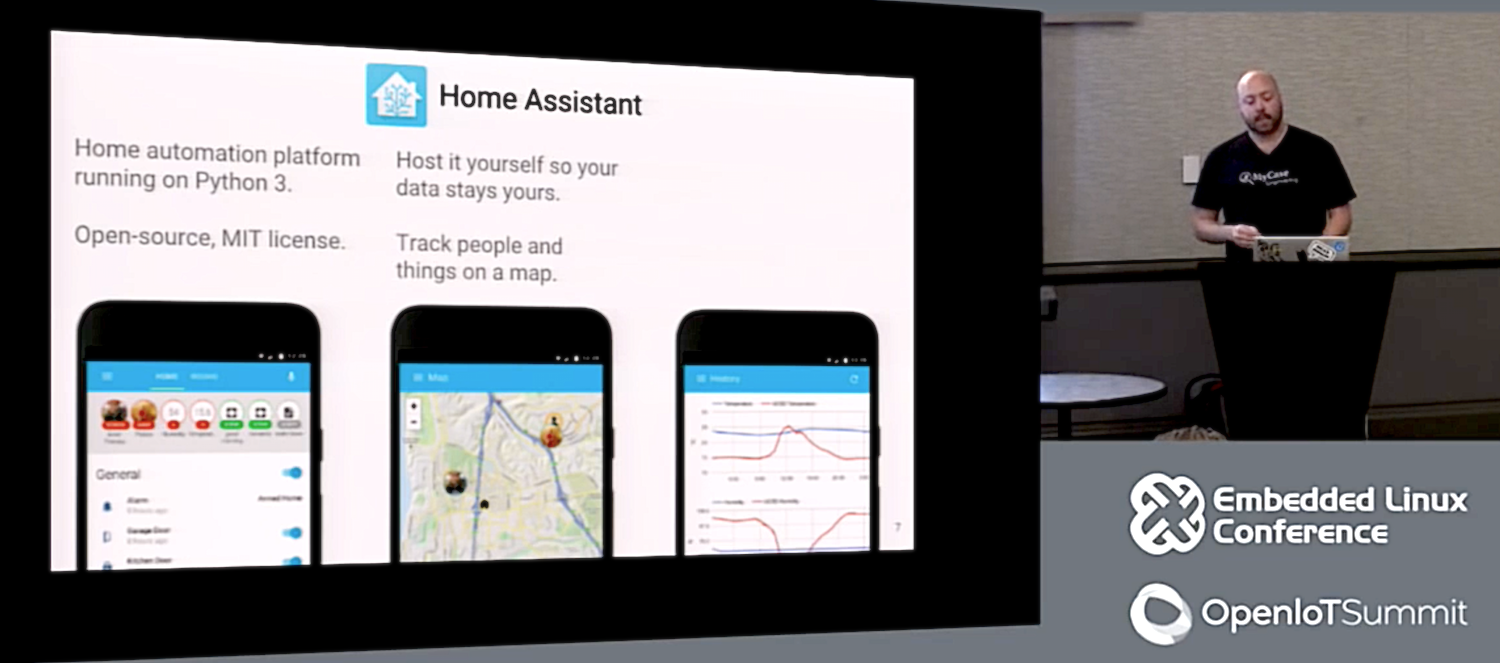
A number of home automation platforms support Python as an extension, but if you’re a real Python fiend, you’ll probably want Home Assistant, which places the programming language front and center. Paulus Schoutsen created Home Assistant in 2013 “as a simple script to turn on the lights when the sun was setting,” as he told attendees of his 2016 Embedded Linux Conference and Open IoT conference presentation. (You can watch the complete video below.)

Schoutsen, who works as a senior software engineer for AppFolio in San Diego, has attracted 20 active contributors to the project. Home Assistant is now fairly mature, with updates every two weeks and support for more than 240 different smart devices and services. The open source (MIT license) software runs on anything that can run Python 3, from desktop PCs to a Raspberry Pi, and counts thousands of users around the world.

Like most automation systems, Home Assistant offers mobile and desktop browser clients to control smart home devices from afar. It differs from most commercial offerings, however, in that it has no hub appliance, which means there are no built-in radios. You can add the precisely those radios you want, however, using USB sticks. There’s also no cloud component, but Schoutsen argues that any functionality you might sacrifice because of this is more than matched by better security, privacy, and resiliency.

“There is no dependency on a cloud provider,” said Schoutsen. “Even when the Internet goes down, the home doesn’t shut down, and your very private data stays in your home.”

Schoutsen did not offer much of a promo in his presentation, but quickly set to work explaining how the platform works. Since Home Assistant is not radically different from other IoT frameworks — one reason why it interfaces easily with platforms ranging from Nest to Arduino to Kodi — the presentation is a useful introduction to IoT concepts.

To get a better sense of Home Assistant’s strengths, I recently asked Schoutsen for his elevator pitch. He highlighted the free, open source nature of the software, as well as the privacy and security of a local solution. He also noted the ease of setup and discovery, and the strength of the underlying Python language.

Easy Extensions

“Python makes it very easy to extend the system,” Schoutsen told me. “As a dynamic language it allows a flexibility that Java developers can only dream off. It is very easy to test out and prototype new pieces on an existing installation without breaking things permanently. With the recent introduction of MicroPython, which runs on embedded systems as Arduino and ESP8266, we can offer a single language for all levels of IoT: from sensors to automation to integration with third-party services.”

In Schoutsen’s ELC 2016 presentation, he described how Home Assistant is an event-driven program that incorporates a state machine that keeps track of “entities” — all the selected devices and people you want to track. Each entity has an identifier, a state condition, and attributes. The latter describes more about the state, such as the color and intensity of the light on a Philips Hue smart bulb.

To integrate a Philips Hue into the system, for example, you would need to use a light “component,” which is aware of the bulb and how to read its state (off or on). Home Assistant offers components for every supported device or service, as well as easy access to component groups such as lights, thermostats, switches, and garage doors. Setup is eased with a network discovery component that scans the network and, if you have a supported device, sets it up automatically. 

The software is further equipped with a service registry, which provides services over the event bus. “We can register the turn-on command for a light, and have it send an email or SMS,” said Schoutsen. “A timer can send a time change event every second, and a component can ask to be notified at a particular time, or in intervals. Based on time change events, it will trigger the callback of the components.”

Each component writes its state to the state machine, emitting a state change event to the event bus. The light component would register its turn on service inside the service registry so that anyone could fire an event to the event bus to turn on the light,” said Schoutsen.

You can easily integrate a light component with a motion detector component using an automation component. This would listen to the motion detector events, and fire a “turn light on” event to the event bus, which in turn would be forwarded to the service registry. The registry would then check to see that the light component can handle the event. “Automation components can listen for events, observe certain attribute states or triggers, and act on them,” explained Schoutsen.

Another component type handles presence detection. The platform can check the router to see which phones are connected in order to see who is home,” said Schoutsen. “Other components are responsible for recording event and state history, or for entity organization — grouping multiple entities and summarizing their state.” Components are available for integrating third party services, such as MQTT or IFTTT, and other components export data to external databases and analysis tools.

Schoutsen went on to explain concepts such as a “platform” layer that sits above the entity components. Each platform integrates an “abstract base class,” which “acts as the glue between the real device and the one represented in Home Assistant,” said Schoutsen. Later, he ran through a code example for a basic switch and explored the use of trigger zones for geofencing.

As Schoutsen says, Home Assistant is “gaining a lot of traction.” Check out the complete video to see what happens when Python meets IoT.

https://www.youtube.com/watch?v=4-6rTwKl6ww

The State of the Octoverse: Top Programming Languages of 2018

At the core of every technology on GitHub is a programming language. In this year’s Octoverse report, we published a brief analysis of which ones were best represented or trending on GitHub. In this post, we’ll take a deeper dive into why—and where—top programming languages are popular.

There are dozens of ways to measure the popularity of a programming language. In our report, we used the number of unique contributors to public and private repositories tagged with the appropriate primary language. We also used the number of repositories created and tagged with the appropriate primary language.

Top programming languages by repositories created, 2008-2018

Top repositories, year over year, by number of repositories created

Read more at GitHub

Introducing the Non-Code Contributor’s Guide

It was May 2018 in Copenhagen, and the Kubernetes community was enjoying the contributor summit at KubeCon/CloudNativeCon, complete with the first run of the New Contributor Workshop. As a time of tremendous collaboration between contributors, the topics covered ranged from signing the CLA to deep technical conversations. Along with the vast exchange of information and ideas, however, came continued scrutiny of the topics at hand to ensure that the community was being as inclusive and accommodating as possible. Over that spring week, some of the pieces under the microscope included the many themes being covered, and how they were being presented, but also the overarching characteristics of the people contributing and the skill sets involved. From the discussions and analysis that followed grew the idea that the community was not benefiting as much as it could from the many people who wanted to contribute, but whose strengths were in areas other than writing code.

This all led to an effort called the Non-Code Contributor’s Guide.

Now, it’s important to note that Kubernetes is rare, if not unique, in the open source world, in that it was defined very early on as both a project and a community. While the project itself is focused on the codebase, it is the community of people driving it forward that makes the project successful. The community works together with an explicit set of community values, guiding the day-to-day behavior of contributors whether on GitHub, Slack, Discourse, or sitting together over tea or coffee.

By having a community that values people first, and explicitly values a diversity of people, the Kubernetes project is building a product to serve people with diverse needs. The different backgrounds of the contributors bring different approaches to the problem solving, with different methods of collaboration, and all those different viewpoints ultimately create a better project.

The Non-Code Contributor’s Guide aims to make it easy for anyone to contribute to the Kubernetes project in a way that makes sense for them. This can be in many forms, technical and non-technical, based on the person’s knowledge of the project and their available time. Most individuals are not developers, and most of the world’s developers are not paid to fully work on open source projects. Based on this we have started an ever-growing list of possible ways to contribute to the Kubernetes project in a Non-Code way!

Get Involved

Some of the ways that you can contribute to the Kubernetes community without writing a single line of code include:

The guide to get started with Kubernetes project contribution is documented on Github, and as the Non-Code Contributors Guide is a part of that Kubernetes Contributors Guide, it can be found here. As stated earlier, this list is not exhaustive and will continue to be a work in progress.

To date, the typical Non-Code contributions fall into the following categories:

  • Roles that are based on skill sets other than “software developer”
  • Non-Code contributions in primarily code-based roles
  • “Post-Code” roles, that are not code-based, but require knowledge of either the code base or management of the code base

If you, dear reader, have any additional ideas for a Non-Code way to contribute, whether or not it fits in an existing category, the team will always appreciate if you could help us expand the list.

If a contribution of the Non-Code nature appeals to you, please read the Non-Code Contributions document, and then check the Contributor Role Board to see if there are any open positions where your expertise could be best used! If there are no listed open positions that match your skill set, drop on by the #sig-contribex channel on Slack, and we’ll point you in the right direction.

We hope to see you contributing to the Kubernetes community soon!

This article originally appeared on the Kubernetes Blog.

Learn Node.js, Unit 3: A tour of Node.js

Node is often described as “JavaScript on the server”, but that doesn’t quite do it justice. In fact, any description of Node.js I can offer will be unfairly reductionist, so let me start with the one provided by the Node team:

“Node.js is a JavaScript runtime built on Chrome’s V8 JavaScript engine.” (Source)

That’s a fine description, but it kinda needs a picture, doesn’t it? If you look on the Node.js website, you’ll notice there are no high-level diagrams of the Node.js architecture. Yet, if you search for “Node.js architecture diagram” there are approximately 178 billion different diagrams that attempt to paint an overall picture of Node (I’ll refer to Node.js as Node from now on). After looking at a few of them, I just didn’t see one that fit with the way I’ve structured the material in this course, so I came up with this:

Node Architecture

Figure 1. The Node.js architecture stack

Read more at IBM Developers

What Is Machine Learning? We Drew You Another Flowchart

The vast majority of the AI advancements and applications you hear about refer to a category of algorithms known as machine learning. (For more background on AI, check out our first flowchart here.)

Machine-learning algorithms use statistics to find patterns in massive* amounts of data. And data, here, encompasses a lot of things—numbers, words, images, clicks, what have you. If it can be digitally stored, it can be fed into a machine-learning algorithm.

Machine learning is the process that powers many of the services we use today—recommendation systems like those on Netflix, YouTube, and Spotify; search engines like Google and Baidu; social-media feeds like Facebook and Twitter; voice assistants like Siri and Alexa. The list goes on.

Read more at MIT Technology Review

Practical Networking for Linux Admins: TCP/IP

Get to know networking basics with this tutorial from our archives.

Linux grew up with a networking stack as part of its core, and networking is one of its strongest features. Let’s take a practical look at some of the TCP/IP fundamentals we use every day.

It’s IP Address

I have a peeve. OK, more than one. But for this article just one, and that is using “IP” as a shortcut for “IP address”. They are not the same. IP = Internet Protocol. You’re not managing Internet Protocols, you’re managing Internet Protocol addresses. If you’re creating, managing, and deleting Internet Protocols, then you are an uber guru doing something entirely different.

Yes, OSI Model is Relevant

TCP is short for Transmission Control Protocol. TCP/IP is shorthand for describing the Internet Protocol Suite, which contains multiple networking protocols. You’re familiar with the Open Systems Interconnection (OSI) model, which categorizes networking into seven layers:

  • 7. Application layer
  • 6. Presentation layer
  • 5. Session layer
  • 4. Transport layer
  • 3. Network layer
  • 2. Data link layer
  • 1. Physical layer

The application layer includes the network protocols you use every day: SSH, TLS/SSL, HTTP, IMAP, SMTP, DNS, DHCP, streaming media protocols, and tons more.

TCP operates in the transport layer, along with its friend UDP, the User Datagram Protocol. TCP is more complex; it performs error-checking, and it tries very hard to deliver your packets. There is a lot of back-and-forth communication with TCP as it transmits and verifies transmission, and when packets get lost it resends them. UDP is simpler and has less overhead. It sends out datagrams once, and UDP neither knows nor cares if they reach their destination.

TCP is for ensuring that data is transferred completely and in order. If a file transfers with even one byte missing it’s no good. UDP is good for lightweight stateless transfers such NTP and DNS queries, and is efficient for streaming media. If your music or video has a blip or two it doesn’t render the whole stream unusable.

The physical layer refers to your networking hardware: Ethernet and wi-fi interfaces, cabling, switches, whatever gadgets it takes to move your bits and the electricity to operate them.

Ports and Sockets

Linux admins and users have to know about ports and sockets. A network socket is the combination of an IP address and port number. Remember back in the early days of Ubuntu, when the default installation did not include a firewall? No ports were open in the default installation, so there were no entry points for an attacker. “Opening a port” means starting a service, such as an HTTP, IMAP, or SSH server. Then the service opens a listening port to wait for incoming connections. “Opening a port” isn’t quite accurate because it’s really referring to a socket. You can see these with the netstat command. This example displays only listening sockets and the names of their services:

$ sudo netstat -plnt 
Active Internet connections (only servers)
Proto Recv-Q Send-Q Local Address     Foreign Address State  PID/Program name
tcp        0      0 127.0.0.1:3306    0.0.0.0:*       LISTEN 1583/mysqld     
tcp        0      0 127.0.0.1:5901    0.0.0.0:*       LISTEN 13951/qemu-system-x  
tcp        0      0 192.168.122.1:53  0.0.0.0:*       LISTEN 2101/dnsmasq
tcp        0      0 192.168.122.1:80  0.0.0.0:*       LISTEN 2001/apache2
tcp        0      0 192.168.122.1:443 0.0.0.0:*       LISTEN 2013/apache2
tcp        0      0 0.0.0.0:22        0.0.0.0:*       LISTEN 1200/sshd            
tcp6       0      0 :::80             :::*            LISTEN 2057/apache2    
tcp6       0      0 :::22             :::*            LISTEN 1200/sshd            
tcp6       0      0 :::443            :::*            LISTEN 2057/apache2

This shows that MariaDB (whose executable is mysqld) is listening only on localhost at port 3306, so it does not accept outside connections. Dnsmasq is listening on 192.168.122.1 at port 53, so it is accepting external requests. SSH is wide open for connections on any network interface. As you can see, you have control over exactly what network interfaces, ports, and addresses your services accept connections on.

Apache is listening on two IPv4 and two IPv6 ports, 80 and 443. Port 80 is the standard unencrypted HTTP port, and 443 is for encrypted TLS/SSL sessions. The foreign IPv6 address of :::* is the same as 0.0.0.0:* for IPv4. Those are wildcards accepting all requests from all ports and IP addresses. If there are certain addresses or address ranges you do not want to accept connections from, you can block them with firewall rules.

A network socket is a TCP/IP endpoint, and a TCP/IP connection needs two endpoints. A socket represents a single endpoint, and as our netstat example shows a single service can manage multiple endpoints at one time. A single IP address or network interface can manage multiple connections.

The example also shows the difference between a service and a process. apache2 is the service name, and it is running four processes. sshd is one service with one process listening on two different sockets.

Unix Sockets

Networking is so deeply embedded in Linux that its Unix domain sockets (also called inter-process communications, or IPC) behave like TCP/IP networking. Unix domain sockets are endpoints between processes in your Linux operating system, and they operate only inside the Linux kernel. You can see these with netstat:

$ netstat -lx     
Active UNIX domain sockets (only servers)
Proto RefCnt Flags       Type       State         I-Node   Path
unix  2      [ ACC ]     STREAM     LISTENING     988      /var/run/dbus/system_bus_socket
unix  2      [ ACC ]     STREAM     LISTENING     29730    /run/user/1000/systemd/private
unix  2      [ ACC ]     SEQPACKET  LISTENING     357      /run/udev/control
unix  2      [ ACC ]     STREAM     LISTENING     27233    /run/user/1000/keyring/control

It’s rather fascinating how they operate. The SOCK_STREAM socket type behaves like TCP with reliable delivery, and SOCK_DGRAM is similar to UDP, unordered and unreliable, but fast and low-overhead. You’ve heard how everything in Unix is a file? Instead of networking protocols and IP addresses and ports, Unix domain sockets use special files, which you can see in the above example. They have inodes, metadata, and permissions just like the regular files we use every day.

If you want to dig more deeply there are a lot of excellent books. Or, you might start with man tcp and man 2 socket. Next week, we’ll look at network configurations, and whatever happened to IPv6?

Learn more about Linux through the free “Introduction to Linux” course from The Linux Foundation and edX.