Some organizations might not include their Code of Conductin the software source code tree, but the Linux developers aren’t your ordinary group. In the Linux 4.19 announcement, Greg Kroah-Hartman, Linux’s leader for this release and maintainer of the stable branch, added in the Code of Conduct and some minor changes.
Kroah-Hartman explained why the Linux developers felt they needed to add a Code of Conduct:
We all need to remember that, every year new people enter our community with the goal, or requirement, to get stuff done for their job, their hobby, or just because they want to help contribute to the tool that has taken over the world and enabled everyone to have a solid operating system base on which to build their dreams.
.. That goal has been, is now, and will continue to be to produce the best possible code. Some in the community have feared that a Code of Conduct would force Linux to accept poor-quality code just to fulfill some kind of quota. In his keynote speech at the Open Source Europe Summit in Scotland, Jon Corbet, Linux kernel developer and editor of LWN, replied to this: “These fears will prove to be unfounded.”
Today was a gorgeous day in San Francisco. The temperature was in the mid-60’s, the sun was shining, and there was a light breeze. The forecast is for similar weather all week – just in time for Oracle OpenWorld 2018. I flew in to cloud cover, but it burned off between baggage, finding my ride, and the drive from SFO to the city. I…
Click to Read More at Oracle Linux Kernel Development
Today was a gorgeous day in San Francisco. The temperature was in the mid-60’s, the sun was shining, and there was a light breeze. The forecast is for similar weather all week – just in time for Oracle OpenWorld 2018. I flew in to cloud cover, but it burned off between baggage, finding my ride, and the drive from SFO to the city. I…
Click to Read More at Oracle Linux Kernel Development
Today was a gorgeous day in San Francisco. The temperature was in the mid-60’s, the sun was shining, and there was a light breeze. The forecast is for similar weather all week – just in time for Oracle OpenWorld 2018. I flew in to cloud cover, but it burned off between baggage, finding my ride, and the drive from SFO to the city. I…
Click to Read More at Oracle Linux Kernel Development
Back in 2001, a new operating system arrived that promised to change the way users worked with their computers. That platform was BeOS and I remember it well. What I remember most about it was the desktop, and how much it looked and felt like my favorite window manager (at the time) AfterStep. I also remember how awkward and overly complicated BeOS was to install and use. In fact, upon installation, it was never all too clear how to make the platform function well enough to use on a daily basis. That was fine, however, because BeOS seemed to live in a perpetual state of “alpha release.”
That was then. This is very much now.
Now we have haiku
Bringing BeOS to life
An AfterStep joy.
No, Haiku has nothing to do with AfterStep, but it fit perfectly with the haiku meter, so work with me.
The Haiku project released it’s R1 Alpha 4 six years ago. Back in September of 2018, it finally released it’s R1 Beta 1 and although it took them eons (in computer time), seeing Haiku installed (on a virtual machine) was worth the wait … even if only for the nostalgia aspect. The big difference between R1 Beta 1 and R1 Alpha 4 (and BeOS, for that matter), is that Haiku now works like a real operating system. It’s lighting fast (and I do mean fast), it finally enjoys a modicum of stability, and has a handful of useful apps. Before you get too excited, you’re not going to install Haiku and immediately become productive. In fact, the list of available apps is quite limiting (more on this later). Even so, Haiku is definitely worth installing, even if only to see how far the project has come.
Speaking of which, let’s do just that.
Installing Haiku
The installation isn’t quite as point and click as the standard Linux distribution. That doesn’t mean it’s a challenge. It’s not; in fact, the installation is handled completely through a GUI, so you won’t have to even touch the command line.
To install Haiku, you must first download an image. Download this file into your ~/Downloads directory. This image will be in a compressed format, so once it’s downloaded you’ll need to decompress it. Open a terminal window and issue the command unzip ~/Downloads/haiku*.zip. A new directory will be created, called haiku-r1beta1XXX-anyboot (Where XXX is the architecture for your hardware). Inside that directory you’ll find the ISO image to be used for installation.
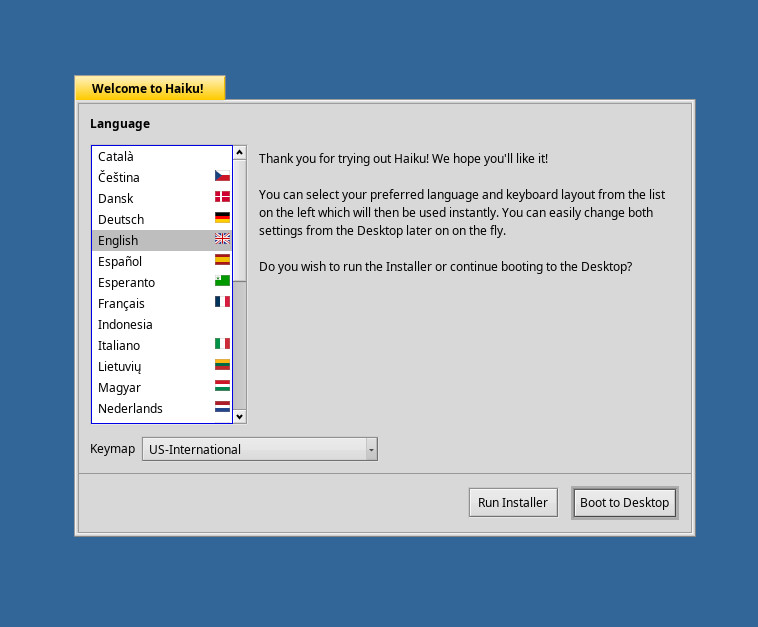
For my purposes, I installed Haiku as a VirtualBox virtual machine. I highly recommend going the same route, as you don’t want to have to worry about hardware detection. Creating Haiku as a virtual machine doesn’t require any special setup (beyond the standard). Once the live image has booted, you’ll be asked if you want to run the installer or boot directly to the desktop (Figure 1). Click Run Installer to begin the process.
Figure 1: Selecting to run the Haiku installer.
The next window is nothing more than a warning that Haiku is beta software and informing you that the installer will make the Haiku partition bootable, but doesn’t integrate with your existing boot menu (in other words, it will not set up dual booting). In this window, click the Continue button.
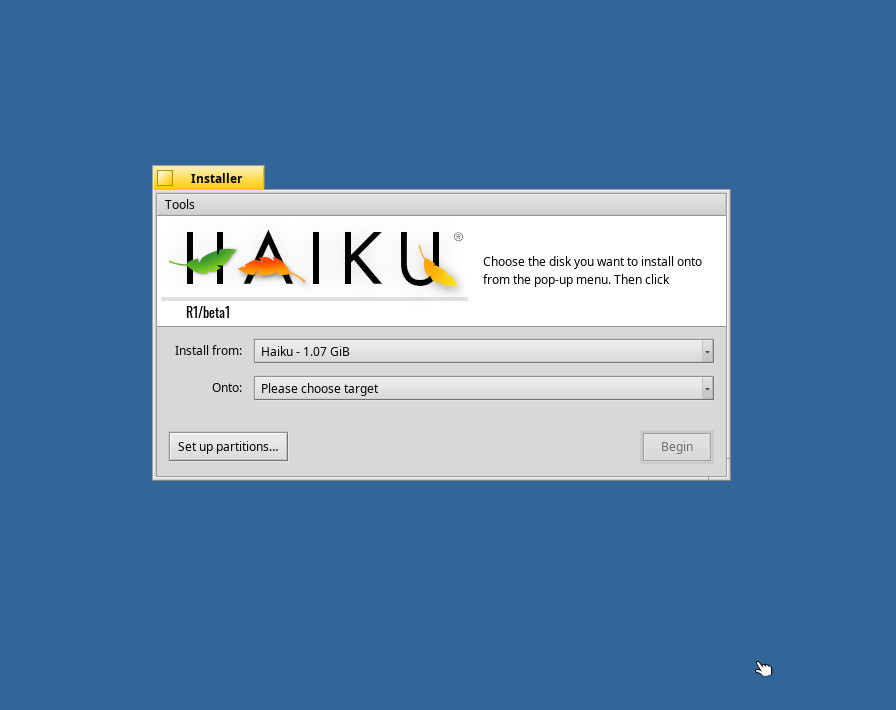
You will then be warned that no partitions have been found. Click the OK button, so you can create a partition table. In the remaining window (Figure 2), click the Set up partitions button.
Figure 2: The Haiku Installer in action.
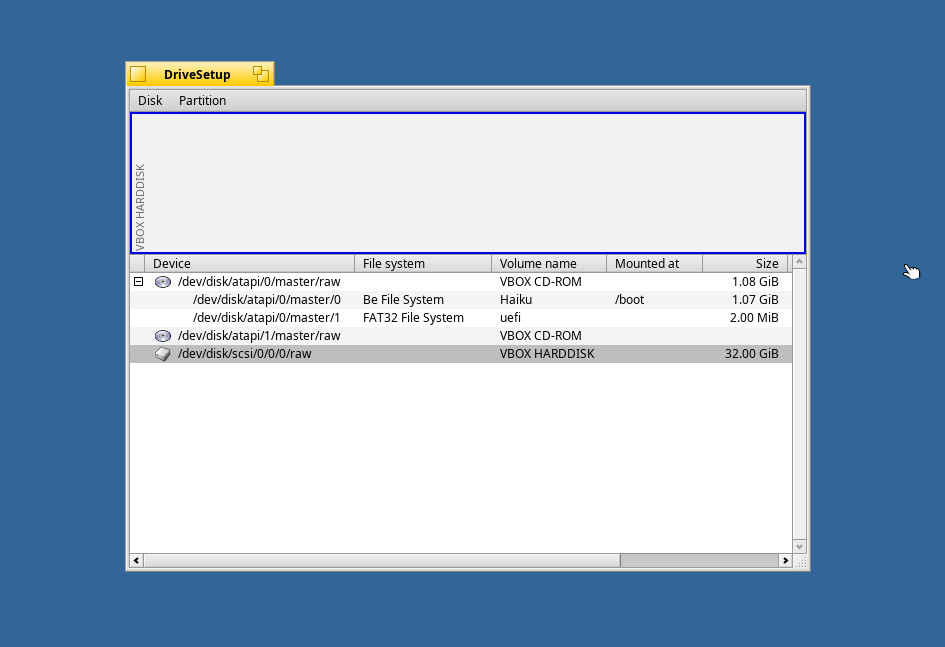
In the resulting window (Figure 3), select the partition to be used and then click Disk > Initialize > GUID Partition Map. You will be prompted to click Continue and then Write Changes.
Figure 3: Our target partition ready to be initialized.
Select the newly initialized partition and then click Partition > Format > Be File System. When prompted, click Continue. In the resulting window, leave everything default and click Initialize and then click Write changes.
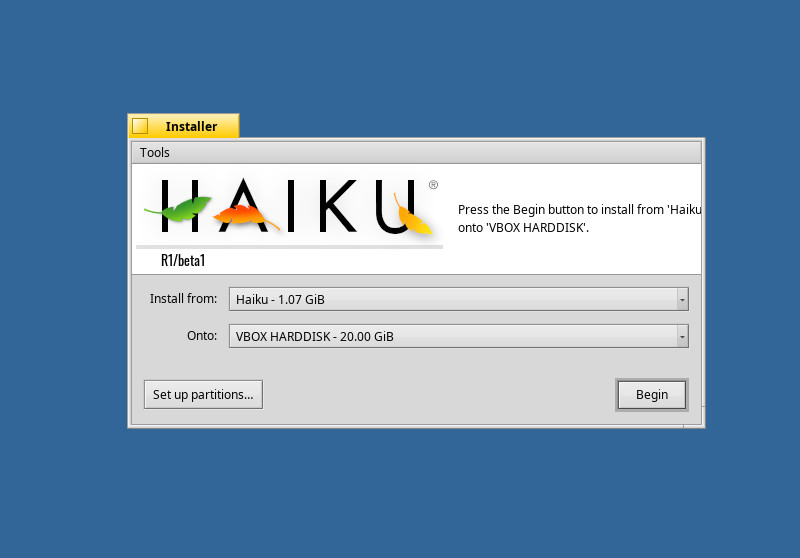
Close the DriveSetup window (click the square in the titlebar) to return to the Haiku Installer. You should now be able to select the newly formatted partition in the Onto drop-down (Figure 4).
Figure 4: Selecting our partition for installation.
After selecting the partition, click Begin and the installation will start. Don’t blink, as the entire installation takes less than 30 seconds. You read that correctly—the installation of Haiku takes less than 30 seconds. When it finishes, click Restart to boot your newly installed Haiku OS.
Usage
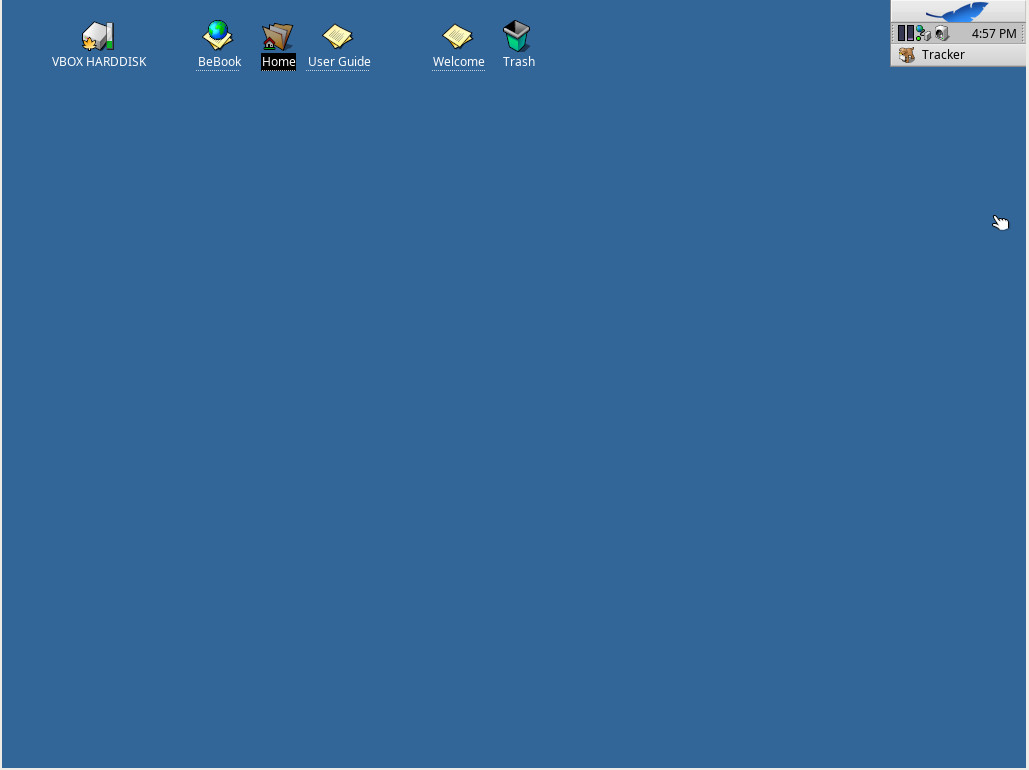
When Haiku boots, it’ll go directly to the desktop. There is no login screen (or even the means to log in). You’ll be greeted with a very simple desktop that includes a few clickable icons and what is called the Tracker(Figure 5).
Figure 5: The Haiku desktop.
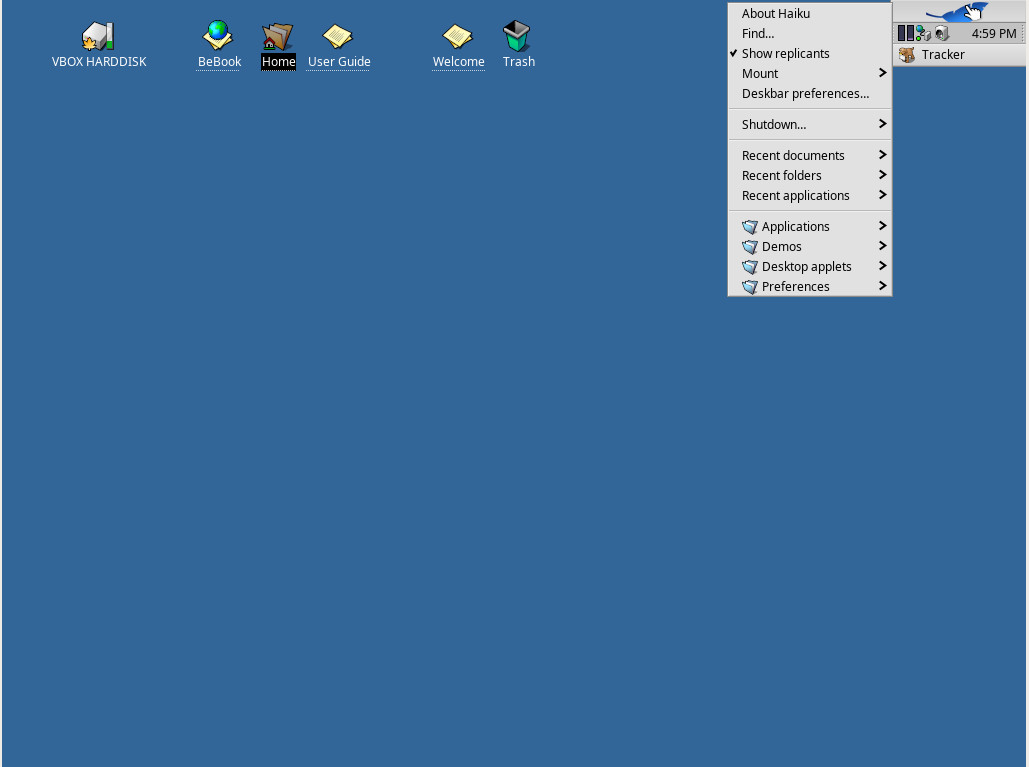
The Tracker includes any minimized application and a desktop menu that gives you access to all of the installed applications. Left click on the leaf icon in the Tracker to reveal the desktop menu (Figure 6).
Figure 6: The Haiku desktop menu.
From within the menu, click Applications and you’ll see all the available tools. In that menu you’ll find the likes of:
ActivityMonitor (Track system resources)
BePDF (PDF reader)
CodyCam (allows you to take pictures from a webcam)
DeskCalc (calculator)
Expander (unpack common archives)
HaikuDepot (app store)
Mail (email client)
MediaPlay (play audio files)
People (contact database)
PoorMan (simple web server)
SoftwareUpdater (update Haiku software)
StyledEdit (text editor)
Terminal (terminal emulator)
WebPositive (web browser)
You might find, in the HaikuDepot, a limited number of available applications. At first blush, what you won’t find are many productivity tools. Missing are office suites, image editors, and more. However, if you uncheck the “Show only featured packages”, you will find a large number of applications can be found. It would be my advice, that this feature be unchecked by default, otherwise users not in the know might seem to think Haiku has a very limited scope of applications available and that this beta version of Haiku is not a true desktop replacement, but a view into the work the developers have put into giving the now-defunct BoOS new life. Even with this tiny hiccup, this blast from the past is certainly worth checking out.
A positive step forward
Based on my experience with BeOS and the alpha of Haiku (all those years ago), the developers have taken a big, positive step forward. Hopefully, the next beta release won’t take as long and we might even see a final release in the coming years. Although Haiku won’t challenge the likes of Ubuntu, Mint, Arch, or Elementary OS, it could develop its own niche following. No matter its future, it’s good to see something new from the developers. Bravo to Haiku.
No matter how small your budget, there’s a Linux or open source conference you can afford—and should attend.
By the end of 2018, I’ll have spent nine weeks at one open source conference or another. Now, you don’t need to spend that much time on the road learning about Linux and open source software. But you can learn a lot and perhaps find a new job by cherry-picking from the many 2019 conferences you could attend.
Sometimes, a single how-to presentation can save you a week of work. A panel discussion can help you formulate an element of your corporate open source strategy. Sure, you can learn from booksor GitHub how-tos. But nothing is better than listening to the people who’ve done the work explain how they’ve solved the same problems you’re facing. With the way open source projects work, and the frequency with which they weave together to create great projects (such as cloud-native computing), you never know when a technology you may not have even heard of today can help you tomorrow.
So, I don’t know about you, but I’m already mapping which conferences I’m going to in 2019.
Open Source Summit & ELC + OpenIoT Summit Europe is taking place in Edinburgh, UK next week, October 22-24, 2018. Can’t make it? You’ll be missed, but you don’t have to miss out on the action. Tune into the free livestream to catch all of the keynotes live from your desktop, tablet or phone! Sign up now >>
Hear from the leading technologists in open source! Get an inside scoop on:
An update on the Linux kernel
Diversity & inclusion to fuel open source growth
How open source is changing banking
How to build an open source culture within organizations
Researchers at Black Hat Europe will detail denial-of-service and other flaws in MQTT, CoAP machine-to-machine communications protocols that imperil industrial and other IoT networks online.
Security researcher Federico Maggi had been collecting data – some of it sensitive in nature – from hundreds of thousands of Message Queuing Telemetry Transport (MQTT) servers he found sitting wide open on the public Internet via Shodan. “I would probe them and listen for 10 seconds or so, and just collect data from them,” he says.
He found data on sensors and other devices sitting in manufacturing and automotive networks, for instance, as well as typical consumer Internet of Things (IoT) gadgets.
The majority of data, Maggi says, came from consumer devices and sensors or was data he couldn’t identify. “There was a good amount of data from factories, and I was able to find data coming from pretty expensive industrial machines, including a robot,” he says.
MQTT and CoAP basically serve as the backbone of IoT and industrial IoT communications. As Maggi and Quarta discovered, the protocols often are deployed in devices insecurely, leaking sensitive information such as device details, user credentials, and network configuration information. The pair of researchers will present details and data from their findings in December at Black Hat Europe in London.
Version Control (revision control or source control) is a way of recording changes to a file or collection of files over time so that you can recall specific versions later. A version control system (or VCS in short) is a tool that records changes to files on a filesystem.
There are many version control systems out there, but Git is currently the most popular and frequently used, especially for source code management. Version control can actually be used for nearly any type of file on a computer, not only source code.
Version control systems/tools offer several features that allow individuals or a group of people to:
create versions of a project.
track changes accurately and resolve conflicts.
merge changes into a common version.
rollback and undo changes to selected files or an entire project.
access historical versions of a project to compare changes over time.
see who last modified something that might be causing a problem.
create a secure offsite backup of a project.
use multiple machines to work on a single project and so much more.
A project under a version control system such as Git will have mainly three sections, namely:
a repository: a database for recording the state of or changes to your project files. It contains all of the necessary Git metadata and objects for the new project. Note that this is normally what is copied when you clone a repository from another computer on a network or remote server.
a working directory or area: stores a copy of the project files which you can work on (make additions, deletions and other modification actions).
a staging area: a file (known as index under Git) within the Git directory, that stores information about changes, that you are ready to commit (save the state of a file or set of files) to the repository.
New distribution images for the Raspberry Pi’s Raspbian operating system appeared on their Download page a week or so ago. The dates of the new images are 2018-10-09 for the Raspbian-only version, and 2018-10-11 for the NOOBS (Raspbian and More) version.
In a nutshell, this release includes:
a number of changes to the “first-run/startup wizard”, which is not surprising since that was just introduced in the previous release
a couple of interesting changes which look to me like they are responses to potential security problems (password changes now work properly if the new password contains shell characters? Hmmm. I wonder if this came up simply because some users were having trouble changing passwords, or because some clever users found they could use this to attack the system? Oh, and who ever thought it was a good idea to display the WiFi password by default?)
updates to the Linux kernel (4.14.71) and Pi firmware
various other minor updates, bug fixes, new versions and such
removed Mathematica
Raspberry Pi PoE HAT support
Those last two are the ones that really produced some excitement in the Raspberry Pi community. Just look at that next to last one… so innocent looking… but then go and look at the discussion in the Pi Forums about it.