It’s an open secret that passwords aren’t the most effective way to protect online accounts. Alarmingly, three out of four people use duplicate passwords, and 21 percent of people use codes that are over 10 years old. (In 2014, among the five most popular passwords were “password,” “123456,” and “qwerty.”) Two-factor SMS authentication adds a layer of protection, but it isn’t foolproof — hackers can fairly easily redirect text messages to another number.
A much more secure alternative is hardware authentication keys, and there’s good news this week for folks looking to pick one up. During Microsoft’s Ignite conference in Orlando, Florida, Yubico unveiled the YubiKey 5 Series: The YubiKey 5C, YubiKey 5 NFC, YubiKey 5 Nano, and YubiKey 5C Nano. The company claims they’re the first multi-protocol security keys to support the FIDO2 (Fast IDentity Online 2) standard.
If you’re the type of person who uses the word “vuln” as a shorthand for code vulnerabilities, you should check out the presentation from the recent Linux Security Summit called “Security in Zephyr and Fuchsia.” In the talk, two researchers from the National Security Agency discuss their contributions to the nascent security stacks of two open source OS projects: Zephyr and Fuchsia.
If you’re worried about the fact that Edward Snowden’s old employer is helping to write next generation OSes that could run our lives in 10 years, consider the upsides. First, since these are open source projects, any nefarious backdoors would be clearly visible. Second, the NSA knows a thing or two about security. Stephen Smalley and James Carter, who discussed security in Zephyr and Fuchsia, respectively, are computer security researchers at the NSA’s Information Assurance Research group, which developed and maintains the security-enhanced SELinux and SE Android distributions. Smalley leads the NSA’s Security Enhancements (SE) for the Internet of Things project and is a kernel and userspace maintainer for SELinux.
The Linux Foundation hosted Zephyr Project, which is creating the IoT-oriented Zephyr RTOS, is the more mature of the two projects. Google’s Fuchsia OS has a longer way to go — especially if you believe that Fuchsia will replace Android and Chrome OS over the next decade.
The developers of Zephyr and Fuchsia have a rare opportunity to develop novel, up-to-date security stacks from scratch. One of the main reasons Google chose to build Fuchsia from a new microkernel was that it could avoid the hodgepodge of legacy code layered on top of Linux, thereby improving security. Attempts to boost security in Linux are always going to be like patching holes in a boat. Zephyr and Fuchsia aim to be the OS equivalents of hovercraft.
Zephyr and Fuchsia are very different OSes, and they implement security in different ways. Zephyr is designed for constrained devices running on microcontrollers, such as Cortex-M4 chips, whereas Fuchsia will target phones and desktops running on applications processors, such as Cortex-A53 and Intel Core.
“Zephyr and Fuchsia were both open sourced in 2016, but they have been developed for very different use cases,” said Smalley. “Their architectures are very different, and each is also very different from Linux.”
Zephyr security
Like Linux and Fuchsia, Zephyr has RO/NX memory protection, stack depth overflow prevention, and stack buffer overflow detection. However, there’s still no kernel or user space ASLR (address space layout randomization), which “will likely move to a build time randomization and a small boot time relocation,” said Smalley.
Among other architectural differences with Linux, “There’s no process isolation in Zephyr, only a userspace thread model,” explained Smalley. “The process abstraction model has yet to be implemented, and the kernel/user boundary is still being fleshed out.”
In Zephyr, “you’re generally working with a single application, and security is highly dependent on particular SoCs and kernel configurations,” said Smalley. By comparison, “In Linux, there are a number of core OS security features that are neutral and independent.”
The original Zephyr release had a single executable with a single address space with all threads in supervisor mode and no memory protection or virtual memory, said Smalley. “As Zephyr added OS protections, it sought to minimize changes to kernel APIs in order to be backward compatible,” he added. “A key Zephyr design philosophy is to do as much as possible at build time, and then as much as possible at last view time, thereby minimizing runtime overheads and ensuring bounded latency for real-time.”
Zephyr security is complicated by the fact that some of the MCUs it targets include memory protection units (MPUs) while others do not. Beginning in releases 1.8 and 1.9, Zephyr began to provide memory protections, with allowances for both types of MCUs.
The NSA team developed a set of kernel memory protection tests modeled on lkdtm tests from the Kernel Self Protection Project (KSPP) for Linux. “The tests were helpful in catching bugs in Zephyr MPU drivers, and they are now used for regression testing,” said Smalley.
Zephyr added userspace support in versions 1.10 and 1.11 that provided basic support for user mode threads with isolated memory. Smalley’s team developed a set of userspace tests “that sought to validate the security properties for user mode threads were being enforced.” Zephyr’s userspace memory model is still limited to a single executable and address space, and there’s no virtual memory. “It can support user mode threads but not full processes,” explained Smalley.
Sign up to receive updates on Open Source Summit and ELC+OpenIoT Europe:
Zephyr security features include an object permissions model in which user threads must first be granted permissions to an object to enable access. “A kernel mode thread can grant access to a user mode thread, and an inheritance mechanism allows those permissions to be propagated down,” explained Smalley. “It’s an all or nothing model — all user threads can access all app global variables.”
This all-or-nothing approach “poses a high burden on the application developer, who has to manually organize the application global variable memory layout to meet MPU restrictions,” said Smalley. To help compensate, the NSA team developed a feature due in release 1.13 that “supports a slightly more developer friendly way of grouping application globals based on desired protections. It’s a small step forward, not a panacea.”
Future Zephyr security work includes adding MPU virtualization, which “would allow us to support a larger number of regions instead of just eight that can be swapped in and out of the MPU on demand,” said Smalley. “We also hope to provide full support for multiple applications and program loading.”
In Zephyr, kernel code is fully trusted. “We would like to see Linux-like mitigations for kernel vulns using KSPP kernel self-protection features while minimizing runtime overheads,” said Smalley. Other wish-list items include leveraging armv8-m for Cortex-M MCUs, thereby enabling TrustZone security. There’s also a long-term plan to “develop a MAC suited to RTOSes that’s more oriented to build-time app partitioning.”
Fuchsia security
Fuchsia differs from Linux and Zephyr in that it’s a microkernel OS with security based on object capability. Like Linux it offers process isolation. In addition, “The plumbing for kernel or user space ASLR is there,” said the NSA’s James Carter.
Compared to the “large and monolithic” Linux, Fuchsia has a small, decomposed TCB (trusted computing base),” said Carter. “It also uses object capabilities instead of DAC and MAC.”
Fuchsia is based on the Zircon Microkernel, which is derived from the little kernel (lk), “an RTOS used in the Android bootloader,” explained Carter. Fuchsia extends lk to support 64-bit, user mode, processes, IPC, and other advanced features. “The lk is the only thing that runs in supervisor mode. Drivers, filesystem, and network all run in user mode.”
Fuchsia security mechanisms include regular handles and resource handles using Zircon object capabilities. “Regular handles are usually the only way that userspace can access kernel objects,” said Carter. “Fuchsia differs from most OSes in that it uses a push model in which a client creates the handle and pushes it to a server. Handles are per-process and unforgeable, and they identify both the object and a set of access rights to the object. Access rights include duplicating them with equal or lesser rights or passing them across IPC or using them to obtain handles to child objects with equal or lesser writes.”
Fuchsia handles “are good because they separate rights for propagation vs. use and separate rights for different operations,” said Carter. “You can also reduce rights through handle duplication.”
Handles still pose some problems, however. For example, “with object_get_child(), if you have a handle to a job, you can acquire a handle to anything in that job or any child jobs,” said Carter. “Also, a leak of root job handle is fatal to security. We’d like to see more work on making everything able to be least privilege, and more control over handle propagation and revocation. Not all operations currently check access rights and some rights are unimplemented.”
Resource handles, which are the type of handle used for platform resources like memory mapped I/O, I/O ports, and IRQs, let developers specify the type of resource and optional range. On the plus side, they offer “fine-grained, hierarchical resource restrictions,” said Carter. “However, right now the root resource check isn’t very granular, and as with regular handles, leaks can be fatal. We need to work on propagation, revocation, and refining to least privilege.”
Zircon security primitives include job policy and vDSO enforcement. “In Fuchsia everything is part of a job,” said Carter. “Processes don’t have child processes – jobs have child jobs. Jobs can be nested, containing jobs and other processes, and job policy is applied to all processes within the job. Policies are inherited from the parent and can only be made more restrictive.”
On the pro side, you can create fine-grained object creation policies, as well as hierarchical job policies that are mixed,” explained Carter. “However, the W^X policy is not yet implemented, and when it is it will cause problems with strict hierarchical policies because if a child needs to map something W^X, then all ancestors would need to beta map it W^X as well.”
In Fuchsia, the vDSO (virtual dynamic shared object) primitive “is only meant to invoke system calls,” said Carter. “It’s fully read-only and is mapping constrained by the kernel.”
Fuchsia’s vDSO makes the OS more secure by “limiting the kernel attack surface, enforcing the use of the public API, and supporting per process system call restrictions,” said Carter. “It’s also good that vDSO is not trusted by the kernel so its system call arguments are fully validated.” On the other hand, the current version offers the potential for tampering with or bypassing vDSO, added Carter.
Carter went on to explain Fuchsia namespaces and sandboxes. Advantages of the namespaces implementation include “the lack of a global namespace and the fact that object reachability is determined by initial namespace,” said Carter. “But we’d like to see more granularity.” For sandboxes, which are used for isolating applications, “We’d like to see an expansion to system services. There’s also no independent validation of the sandbox configuration.”
As with Zephyr, the NSA team recommends that Fuchsia eventually add a MAC framework, which would help to “control propagation, support revocation, and apply least privilege,” said Carter. “A MAC could support finer grained check and generalize job policy, as well as validate namespaces and sandboxes. It could also provide a unified framework for defining, enforcing, and validating security goals.”
Options for integrating a MAC with Fuchsia start with building it entirely in user space with no microkernel support, said Carter. Alternatively, you could “extend the existing mechanism” by building it “mostly in user space with limited microkernel support.” A third choice would be to “create security policy logic in user space with full microkernel enforcement for its objects, as we did with DTMach in SELinux.”
In conclusion, Carter emphasized that Fuchsia’s security stack is a work in progress. “We’re just trying to evaluate the thing.” You can watch the entire video below.
One best practice when running a container is to launch the process with a non root user. This is usually done through the usage of the USER instruction in the Dockerfile. But, if this instruction is not present it doesn’t necessary mean the process is run as root.
The rational
By default, root in a container is the same root (uid 0) as on the host machine. If a user manages to break out of an application running as root in a container, he may be able to gain access to the host with the same root user. This access would be ever easier to gain if the container was run with incorrect flags or with bind mouts of host folders in R/W.
Running a MongoDB container
If you do not it yet, I highly recommend to give Play With Docker a try.
Up to this point, my series on HPC fundamentals has covered PDSH, to run commands in parallel across the nodes of a cluster, and Lmod, to allow users to manage their environment so they can specify various versions of compilers, libraries, and tools for building and executing applications. One missing piece is how to share files across the nodes of a cluster.
File sharing is one of the cornerstones of client-server computing, HPC, and many other architectures. You can perhaps get away without it, but life just won’t be easy any more. This situation is true for clusters of two nodes or clusters of thousands of nodes. A shared filesystem allows all of the nodes to “see” the exact same data as all other nodes. For example, if a file is updated on cluster node03, the updates show up on all of the other cluster nodes, as well.
Fundamentally, being able to share the same data with a number of clients is very appealing because it saves space (capacity), ensures that every client has the latest data, improves data management, and, overall, makes your work a lot easier. The price, however, is that you now have to administer and manage a central file server, as well as the client tools that allow the data to be accessed.
Although you can find many shared filesystem solutions, I like to keep things simple until something more complex is needed. A great way to set up file sharing uses one of two solutions: the Network File System (NFS) or SSH File System (SSHFS).
Open Networking Summit Europe is taking place in Amsterdam, September 25-27. Can’t make it? You’ll be missed, but you don’t have to miss out on the action. Tune in to the free livestream to catch all of the keynotes live from your desktop, tablet or phone! Sign Up Now >>
Live video streaming of the keynote sessions from Open Networking Summit Europe 2018 will take place during the following times:
Tuesday, September 25
13:15 – 14:55 (CEST)
Watch keynotes from Cloud Native Computing Foundation, Red Hat, China Mobile, Intel, Orange Group Network and The Linux Foundation.
Wednesday, September 26
9:00 – 10:30 (CEST)
Watch keynotes from Türk Telekom, IBM, IHS/Infonetics Research, Huawei, China Mobile, and Vodafone Group.
Thursday, September 27
9:00 – 10:35 (CEST)
Watch keynotes from Deutsche Telekom AG, Imperial College London, China Mobile, AT&T, and Amdocs, Huawei, VMware and The Linux Foundation.
Deepin Linux. You may not have heard much about this distribution, and the fact that it’s often left out of the conversation is a shame. Why? Because Deepin Linux is as beautiful as it is user-friendly. This distribution has plenty of “wow” factor and very little disappointment.
For the longest time, Deepin Linux was based on Ubuntu. But with the release of 15.7, that all changed. Now, Deepin’s foundation is Debian, but the desktop is still that beautiful Deepin Desktop. And when I say it’s beautiful, it truly is one of the most gorgeous desktop environments you’ll find on any operating system. That desktop uses a custom-built QT5 toolkit, which runs as smoothly and with as much polish as any I’ve ever used. Along with that desktop, comes a few task-specific apps, built with the same toolkit, so the experience is consistent and integrated.
What makes the 15.7 release special is that it comes just two short months after the 15.6 release and is focused primarily on performance. Not only is the ISO download size smaller, many core components have been optimized with laptop battery performance in mind. To that end, the developers have gained up to 20 percent better battery life and a much-improved memory usage. Other additions to Deepin Linux are:
NVIDIA Prime support (for laptops with hybrid graphics).
On-screen notifications (for the likes of turning on or off the microphone and/or Wi-Fi).
New drag and drop animation.
Added power saving mode and auto-mode switching for laptops.
Application categories in mini mode.
Full disk installation.
For a full list of improvements and additions, check out the 15.7 Release notes.
Let’s install Deepin Linux and see just what makes this distribution so special.
Installation
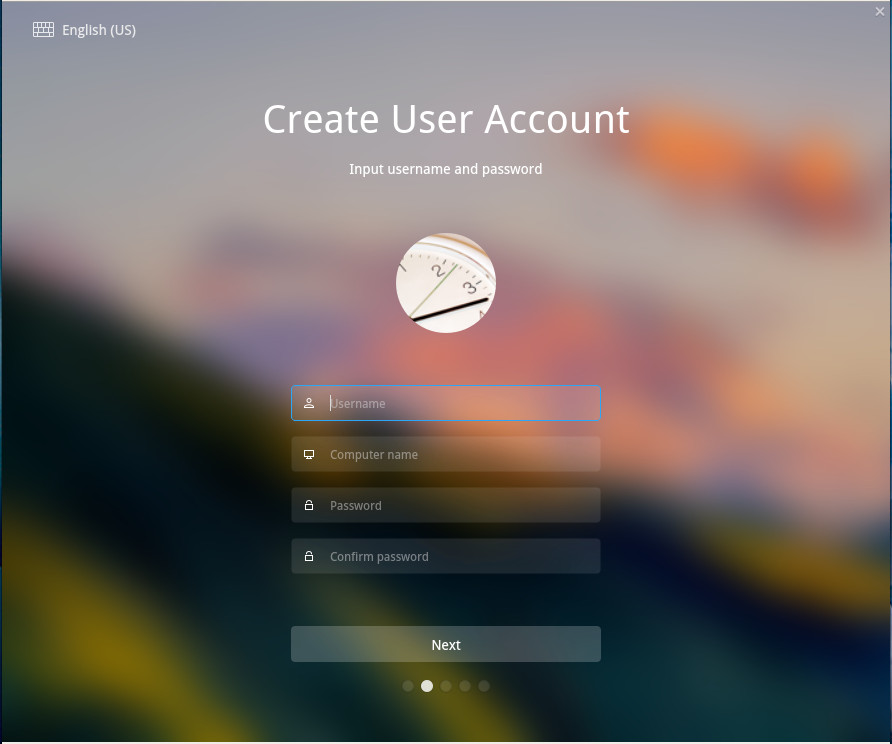
In similar fashion to the desktop, the Deepin Linux installer is one of the most beautiful OS installers you will find (Figure 1). Not only is the installer a work of art, it’s incredibly simple. As with most modern Linux distributions, installing Deepin is only a matter of answering a few questions and clicking Next a few times.
Figure 1: Installing Deepin Linux is as easy as it is beautiful.
Installation shouldn’t take more than 10 minutes tops. In fact, based on the download experience I had with the main download mirror, the installation will go faster than the ISO download. To that end, you might went to pick one of the following mirrors to snag a copy of Deepin Linux:
Once you’ve installed Deepin Linux, you can then log onto your new desktop.
First Steps
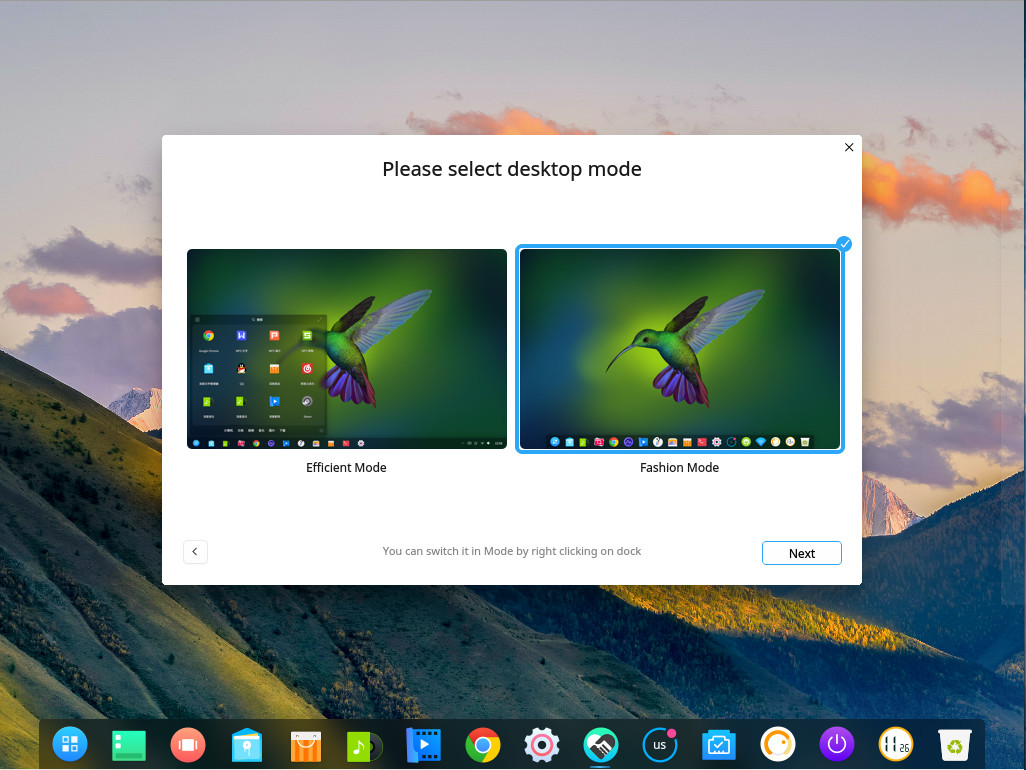
Upon first login, you’ll be greeted by a setup wizard that walks you through the configuration of the desktop (Figure 2).
Figure 2: The Deepin Desktop setup wizard.
In this wizard, you will be asked to configure the following:
Desktop Mode: Between Efficient (a more standard layout) and Fashion (a GNOME 3-like layout).
Window Effects: Enable or disable.
Icon theme.
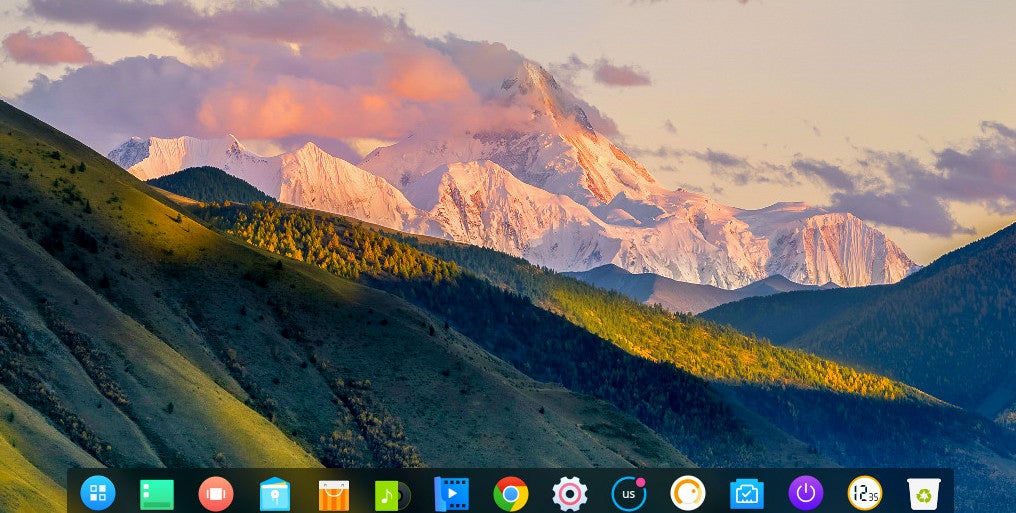
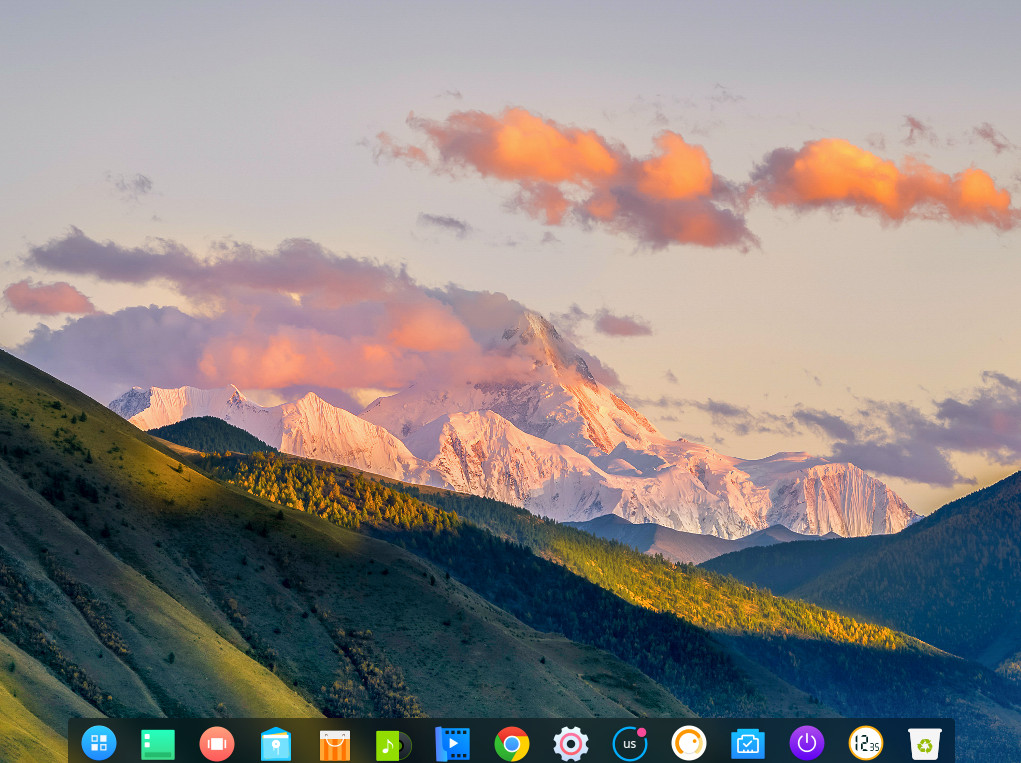
Once you’ve select those options, you’ll find yourself on the Deepin Desktop (Figure 3).
Figure 3: The Deepin Desktop is at the ready.
Applications
The application list might surprise some users, especially those who have grown accustomed to certain applications being installed by default. What you’ll find on Deepin Linux is a list of applications that includes:
WPS Office
Google Chrome
Spotify
Deepin Store
Deepin Music
Deepin Movie
Steam
Deepin Screenshot
Foxit Reader
Thunderbird Mail
Deepin Screen Recorder
Deepin Voice Recorder
Deepin Cloud Print
Deepin Cloud Scan
Deepin Font Installer
ChmSee
Gparted
What the developers have done is to ensure users have as complete a desktop experience as possible, out of the box. In other words, most every average user wouldn’t have to bother installing any extra software for some time. And for those who question the choice of WPS Office, I’ve used it on plenty of occasions and it is quite adept at not only creating stand-alone documents, but collaborating with those who work with other office suites. The one caveat to that is WPS Office isn’t open source. However, Deepin Linux doesn’t promote itself as a fully open desktop, so having closed-source applications (such as the Spotify client and WPS Office) should surprise no one.
Control Center
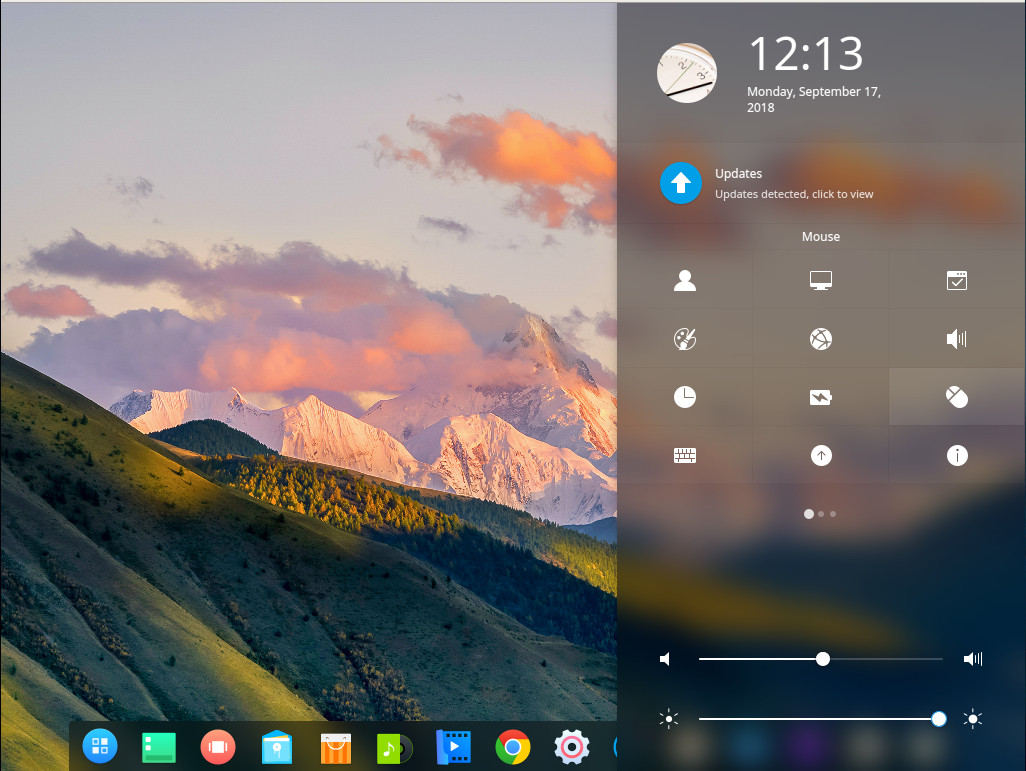
Deepin takes a slightly different approach to the Control Center. Instead of it being a stand-alone, windowed application, the Control Center serves as a sidebar (Figure 4), where you can configure users, display, default applications, personalization, network, sound, time/date, power, mouse, keyboard, updates, and more.
Figure 4: The Deepin Linux Control Center.
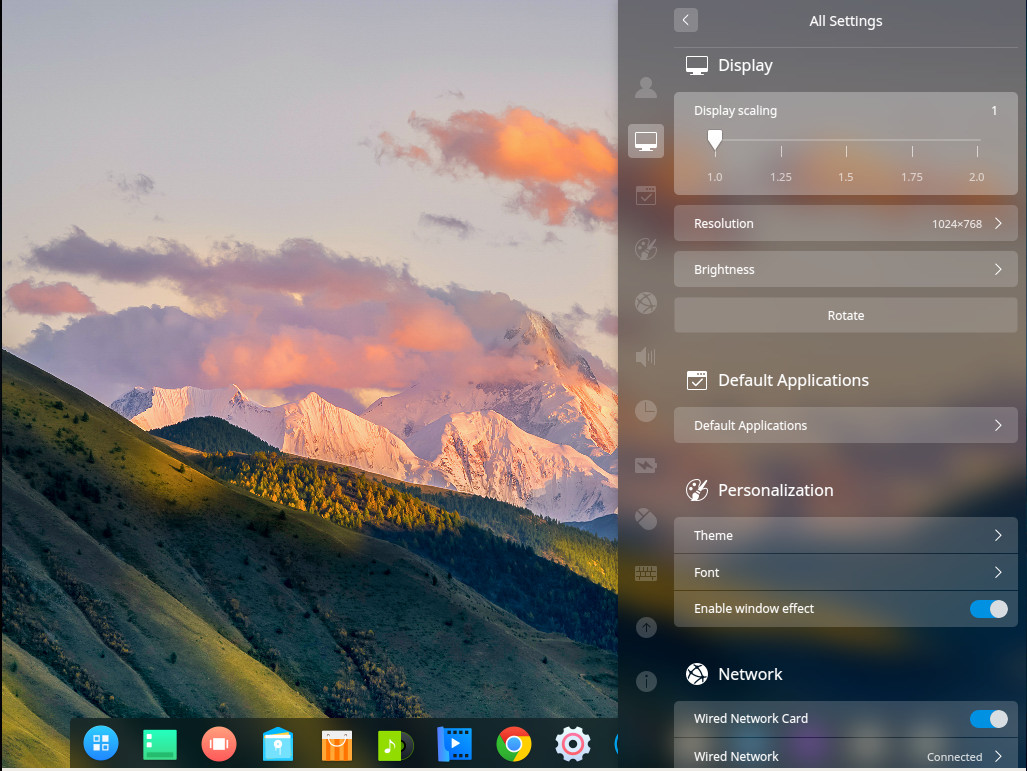
Click on any one of the Control Center categories and you can see how well the developers have thought out this new means of configuring the desktop (Figure 5).
Figure 5: The Control Center in action.
Hot Corners
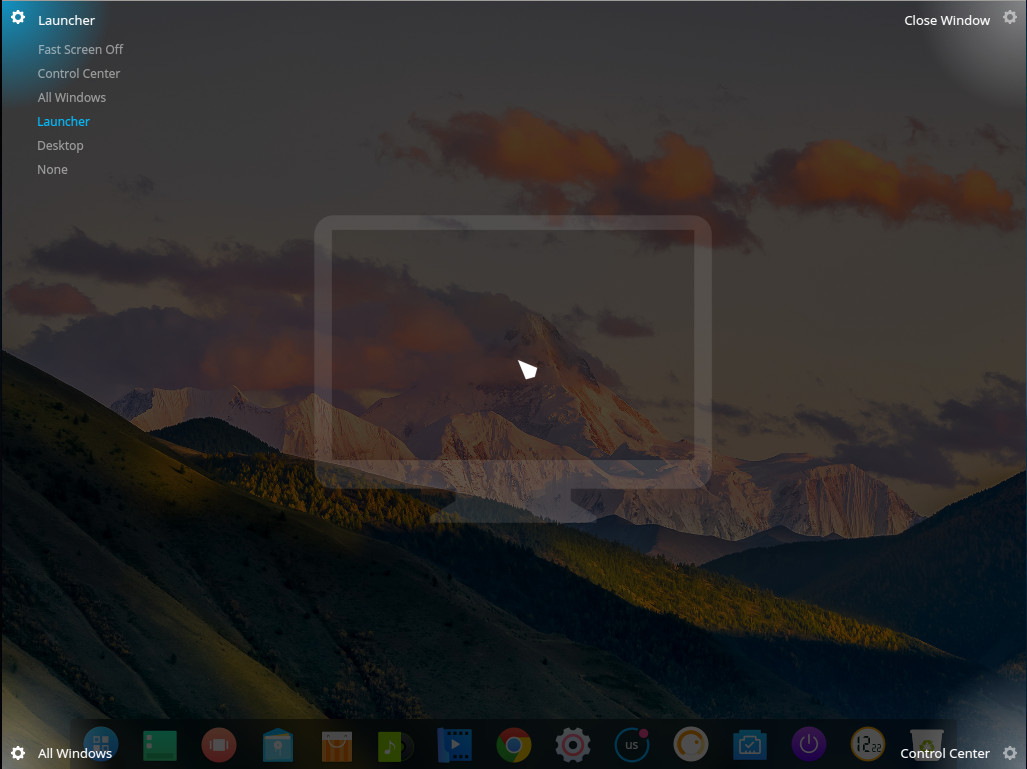
The Deepin Desktop also has a nifty hot corners feature on the desktop. With this feature, you can set each corner to a specific action, such that when you hover your mouse over a particular corner, the configured action will occur. Available actions are:
Launcher
Fast Screen Off
Control Center
All Windows
Desktop
None
To set the hot corners, right-click on the desktop and select Corner Settings from the pop-up menu. You can then hover your cursor over one of the four corners and select the action you want associated with that corner (Figure 6).
Figure 6: Setting hot corners on Deepin Desktop.
A Must-Try Distribution
If you’re looking for your next Linux desktop distribution, you’d be remiss if you didn’t give Deepin Linux 15.7 a try. Yes, it is beautiful, but it’s also very efficient, very user-friendly, and sits on top of a rock solid Debian foundation. It’s a serious win-win for everyone. In fact, Deepin 15.7 is the first distribution to come along in a while to make me wonder if there might finally be a contender to drag me away from my long-time favorite distro… Elementary OS.
Learn more about Linux through the free “Introduction to Linux” course from The Linux Foundation and edX.
Internet Corporation for Assigned Names and Numbers (ICANN) has voted to go ahead with the first-ever changing of the cryptographic key that helps protect the internet’s address book – the Domain Name System (DNS).
The ICANN Board at its meeting in Belgium this week, decided to proceed with its plans to change or “roll” the key for the DNS root on Oct. 11, 2018. It will mark the first time the key has been changed since it was first put in place in 2010.
The KSK rollover means generating a new cryptographic public and private key pair and distributing the new public component to parties who operate validating resolvers, according to ICANN.
At Node+JS Interactive, attendees collaborate face to face, network, and learn how to improve their skills with JS in serverless, IoT, and more. Stephanie Evans, Content Manager for Back-end Web Development at LinkedIn Learning, will be speaking at the upcoming conference about building a secure ecosystem for Node.js. Here she answers a few questions about teaching and learning basic security practices.
Linux.com: Your background is in tech education, can you provide more details on how you would define this and how you got into this area of expertise?
Stephanie Evans:It sounds cliché, but I’ve always been passionate about education and helping others. After college, I started out as an instructor of a thoroughly analog skill: reading. I worked my way up to hiring and training reading teachers and discovered my passion for helping people share their knowledge and refine their teaching craft. Later, I went to work for McGraw Hill Education, publishing self-study certification books on popular IT certs like CompTIA’s Network+ and Security+, ISAAP’s CISSP, etc. My job was to figure out who the biggest audiences in IT were; what they needed to know to succeed professionally; hire the right book author; and help develop the manuscript with them.
I moved into online learning/e-learning 4 years ago and shifted to video training courses geared towards developers. I enjoy working with people who spend their time building and solving complex problems. I now manage the video training library for back-end web developers at LinkedIn Learning/Lynda.com and figure out what developers need to know; hire instructors to create that content; and work together to figure out how best to teach it to them. And, then update those courses when they inevitably become out of date.
Linux.com: What initially drove you to use your skill set in education to help with security practices?
Evans:I attend a lot of conferences, watch a lot of talks, and chat to a lot of developers as part of my job. I distinctly remember attending a security best practices talk at a very large, enterprise-tech focused conference and was surprised by the rudimentary content being covered. Poor guy, I’d thought…he’s going to get panned by this audience. But then I looked around and most everyone was engaged. They were learning something new and compelling. And it hit me: I had been in a security echo chamber of my own making. Just like the mainstream developer isn’t working with the cutting-edge technology people are raving about on Twitter, they aren’t necessarily as fluent in basic security practices as I’d assumed. A mix of unawareness, intense time pressure, and perhaps some misplaced trust can lead to a “security later” mentality. But with the global cost of cybercrime up to 600 billion a year from 500 billion in 2014 as well as the exploding amount of data on the web. We can’t afford to be working around security or assuming everyone knows the basics.
Linux.com: What do you think are some common misconceptions about security with Node.js and in general with developers?
Evans:I think one of the biggest misconceptions is that security awareness and practices should come “later” in a developer’s career (and later in the development cycle). Yes, your first priority is to learn that Java and JavaScript are not the same thing—that’s obviously most important. And you do have to understand how to create a form before you can understand how to prevent cross-site -scripting attacks. But helping developers understand—at all stages of their career and learning journey—what the potential vulnerabilities are and how they can be exploited needs to be a much higher priority and come earlier than we may intuitively think.
I joke with my instructors that we have to sneak in the ‘eat your vegetables’ content to our courses. Security is an exciting, complex and challenging topic, but it can feel like you’re having to eat your vegetables as a developer when you dig into it. Often ‘security’ is a separate department (that can be perceived as ‘slowing things down’ or getting in the way of deploying code) and it can further distance developers from their role in securing their applications.
I also think that those who truly understand security can feel that it’s overwhelmingly complex to teach—but we have to start somewhere. I attended an introductory npm talk last year that talked about how to work with dependencies and packages…but never once mentioned the possibility of malicious code making it into your application through these packages. I’m all about teaching just enough at the right time and not throwing the kitchen sink of knowledge at new developers. We should stop thinking of security—or even just security awareness—as an intermediate or advanced skill and start bringing it up early and often.
Linux.com: How can we infuse tech education into our security practices? Where does this begin?
Evans:It definitely goes both ways. Clear documentation and practical resources right alongside security recommendations go a long way towards ensuring understanding and adoption. You have to make things as easy as possible if you want people to actually do it. And you have to make those best practices accessible enough to understand.
The 2018 Node User Survey Report from the Node.js Foundation showed that while learning resources around Node.js and JavaScript development improved, the availability and quality of learning resources for Node.js Security received the lowest scores across the board.
After documentation and Stack Overflow, many developers rely on online videos and tutorials—we need to push security education to the forefront, rather than expecting developers to seek it out. OWASP, the nodegoat project, and the Node.js Security Working Group are doing great work here to move the needle. I think tech education can do even more to bring security in earlier in the learning journey and create awareness about common exploits and important resources.
Learn more at Node+JS Interactive, coming up October 10-12, 2018 in Vancouver, Canada.
The following is the first in a series of posts from The Cloud Foundry Foundation on digital transformation, in preparation for the upcoming Cloud Foundry Summit in Basel, Switzerland.
Not so long ago, business leaders repeatedly asked: “What exactly is digital transformation and what will it do for my business?” Today we’re more likely to hear, “How do we chart a course?”
Our answer: the path to digital involves more than selecting a cloud application platform. Instead, digital, at its heart, is a human journey. It’s about cultivating a mindset, processes, organization and culture that encourages constant innovation to meet ever-changing customer expectations and business goals.
In this two-part blog series we’ll share seven guidelines for getting digital right. Read on for the first three.
1. Start with the End: Know What You Want
Whatever your objective, you’ll need to put together the people, technology and processes to release better software, faster. Execution velocity is a key differentiator in the digital economy, so think in terms of days, not weeks or months. Get there by creating a minimum viable product (MVP) and then iterating.