In the age of Big Data, we’ve had to come up with new terms to describe large-scale data storage. We have databases, data warehouses and now data lakes.
While they all contain data, these terms describe different ways of storing and using that data. Before we discuss data lakes and why they are important, let’s examine how they differ from databases and data warehouses.
Let’s start here: A data warehouse is not a database. Although you could argue that they’re both relational data systems, they serve different purposes. Data warehousing allows you to pull data together from a number of different sources for analysis and reportiong. Data warehouses store vast amounts of historical data for complex queries across all data types being pulled together.
Data lakes are centralized storage and data repositories that allow you to work with a variety of different types of data. The cool thing here is that you don’t need to structure the data and it can be imported “as-is.” This allows you to work with raw data and run analytics, data visualization, big data processing, machine learning tools, AI, and much more. This level of data agility can actually give you some pretty cool competitive advantages.
By lowering barriers to innovation, open source is superior to proprietary solutions for enabling continued positive economic growth. …
Successful open source software companies “discover” markets where transaction costs far outweigh all other costs, outcompete the proprietary alternatives for all the good reasons that even the economic nay-sayers already concede (e.g., open source is simply a better development model to create and maintain higher-quality, more rapidly innovative software than the finite limits of proprietary software), and then—and this is the important bit—help clients achieve strategic objectives using open source as a platform for their own innovation. With open source, better/faster/cheaper by itself is available for the low, low price of zero dollars.
As an open source company, we don’t cry about that. Instead, we look at how open source might create a new inflection point that fundamentally changes the economics of existing markets or how it might create entirely new and more valuable markets.
Dr. Angel Diaz is the face of open source at IBM as Vice President of Developer Technology, Open Source & Advocacy. At the recent Open Source Summit in Vancouver, we spoke with Diaz to talk about the importance of open source at IBM and how it’s changing the world around us.
LF: What’s the importance of open source in modern economy?
Angel Diaz: We are living in a technology-fueled business renaissance — cloud, data, artificial intelligence, and the redefinition of the transaction. There is constant democratization of technology. This democratization allows us as computer scientists to innovate higher orders of the stack. You don’t have to worry about compute, storage and network; you get that in the cloud for example, but what has been driving that democratization? Open source.
Open source has been the fuel, the innovation engine, the skills engine, the level playing field that allows us as a society to build more, to build faster and move forward and the rate and pace of that is increasing.
What’s really nice about that is we are doing it in a controlled way with open governance and leveraging the all the work that we do in consortia such as the Linux Foundation.
This week, we released the results of a survey on how companies are managing open source software and the benefits and challenges of formal policies and programs.
We surveyed more than 700 respondents, most of them developers and found that:
More than half of respondents (53 percent) across all industries say their organization has an open source software program or has plans to establish one.
But having a formal program is a best practice among large tech companies
And the number of program is growing: we expect that the number of large companies with open source programs will triple by 2020.
Quantum computing is a new way of computing — one that could allow humankind to perform computations that are simply impossible using today’s computing technologies. It allows for very fast searching, something that would break some of the encryption algorithms we use today. And it allows us to easily factor large numbers, something that would break the RSA cryptosystem for any key length.
This is why cryptographers are hard at work designing and analyzing “quantum-resistant” public-key algorithms. Currently, quantum computing is too nascent for cryptographers to be sure of what is secure and what isn’t. But even assuming aliens have developed the technology to its full potential, quantum computing doesn’t spell the end of the world for cryptography. Symmetric cryptography is easy to make quantum-resistant, and we’re working on quantum-resistant public-key algorithms. If public-key cryptography ends up being a temporary anomaly based on our mathematical knowledge and computational ability, we’ll still survive. And if some inconceivable alien technology can break all of cryptography, we still can have secrecy based on information theory — albeit with significant loss of capability.
At its core, cryptography relies on the mathematical quirk that some things are easier to do than to undo. Just as it’s easier to smash a plate than to glue all the pieces back together, it’s much easier to multiply two prime numbers together to obtain one large number than it is to factor that large number back into two prime numbers. Asymmetries of this kind — one-way functions and trap-door one-way functions — underlie all of cryptography.
As I continue my journey into the world of Linux, I’ve realized that one of its most distinct advantages over Windows and macOS can also be one of its most confusing hurdles for beginners. Choice has a tendency to be overwhelming, and Linux is all about choice. Let’s say you’ve set your sights on using Ubuntu. That’s a safe decision, but there are eight official “flavors” of Ubuntu that all look and behave differently. For the most part, that comes down to which desktop environment each distribution is using… Read more at Forbes.
Quick. Click on your Linux desktop menu and scan through the list of installed software. How much of that software is strictly open source? To make matters a bit more complicated, have you installed closed source media codecs (to play the likes of MP3 files perhaps)? Is everything fully open, or do you have a mixture of open and closed source tools?
If you’re a purist, you probably strive to only use open source tools on your desktop. But how do you know, for certain, that your distribution only includes open source software? Fortunately, a few distributions go out of their way to only include applications that are 100% open. One such distro is Freespire.
Does that name sound familiar? It should, as it is closely related to Linspire. Now we’re talking familiarity. Remember back in the early 2000s, when Walmart sold Linux desktop computers? Those computers were powered by the Linspire operating system. Linspire went above and beyond to create an experience that would be similar to that of Windows—even including the tools to install Windows apps on Linux. That experiment failed, mostly because consumers thought they were getting a Windows desktop machine for a dirt cheap price. After that debacle, Linspire went away for a while. It’s now back, thanks to PC/OpenSystems LLC. Their goal isn’t to recreate the past but to offer two different flavors of Linux:
Linspire—a commercial distribution of Linux that includes proprietary software and does have an associated cost ($39.99 USD for a single license).
Freespire—a non-commercial distribution of Linux that only includes open source software and is free to download.
We’re here to discuss Freespire and why it is an outstanding addition to the Linux community, especially those who strive to use only free and open source software. This version of Freespire (4.0) was released on August 20, 2018, so it’s fresh and ready to go.
Let’s dig into the operating system and see what makes this a viable candidate for open source fans.
Installation
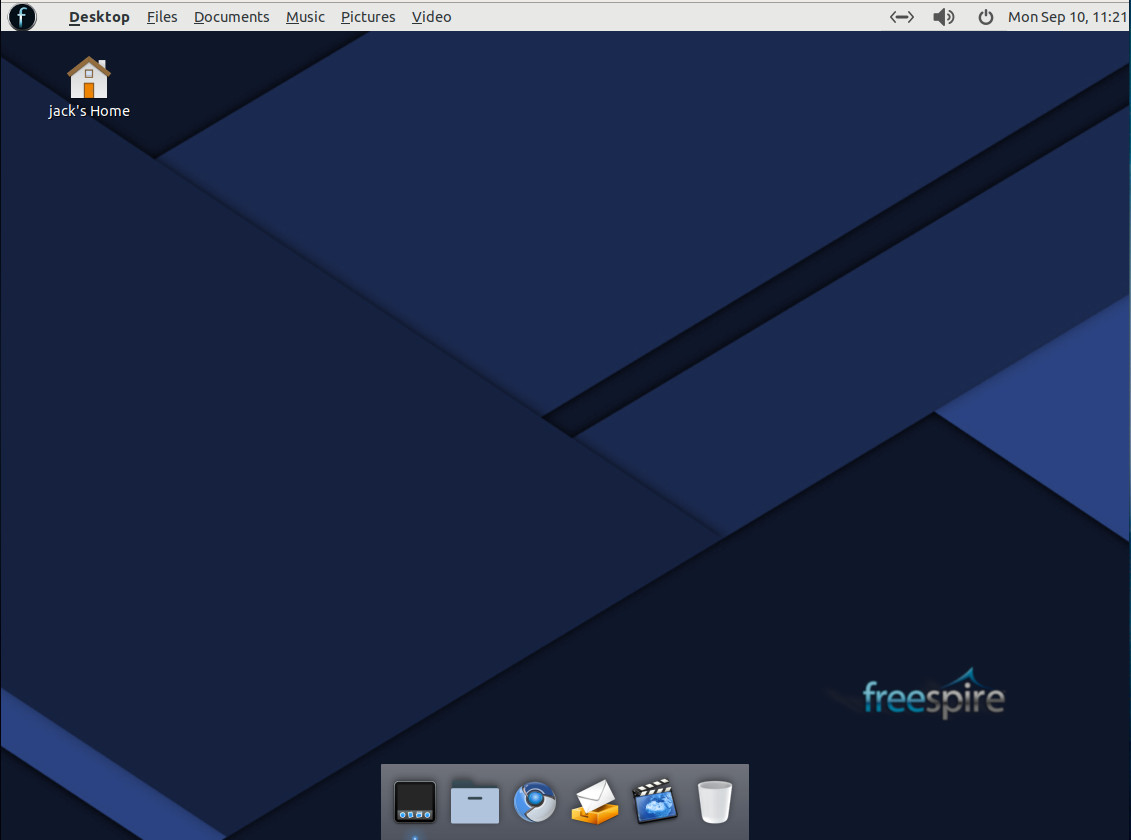
In keeping with my usual approach, there’s very little reason to even mention the installation of Freespire Linux. There is nothing out of the ordinary here. Download the ISO image, burn it to a USB Drive (or CD/DVD if you’re dealing with older hardware), boot the drive, click the Install icon, answer a few simple questions, and wait for the installation to prompt for a reboot. That’s how far we’ve come with Linux installations… they are simple, and rarely will you have a single issue with the process. In the end, you’ll be presented with a simple (modified) Mate desktop (Figure 1) that makes it easy for any user (of any skill level) to feel right at home.
Figure 1: The Freespire desktop.
Software Titles
Once you’ve logged into the desktop, you’ll find a main menu where you can view all of the installed applications. That list of software includes:
Geary
Chromium Browser
Abiword
Gnumeric
Calendar
Audacious
Totem Video Player
Software Center
Synaptic
G-Debi
Also rolled into the system is support for both Flatpak and Snap applications, so you shouldn’t miss out on any software you need, which brings me to the part when purists might want to look away.
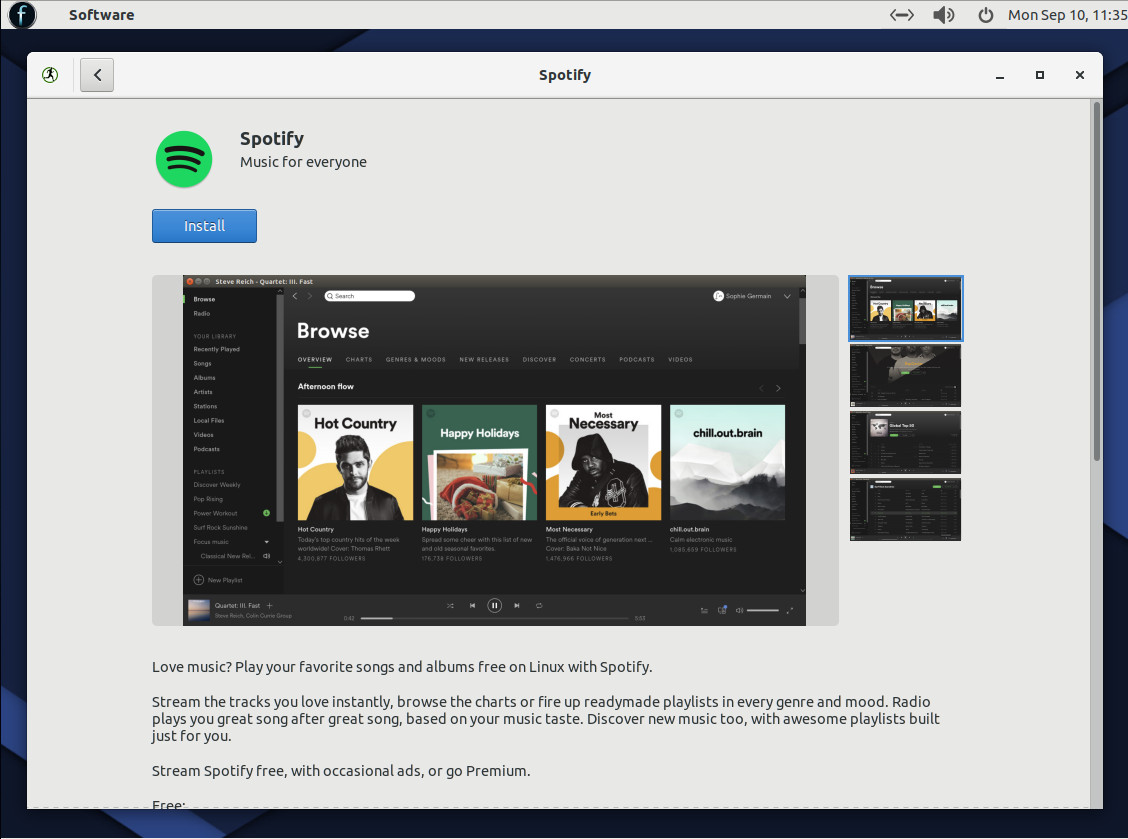
Just because Freespire is marketed as a purely open source distribution, it doesn’t mean users are locked down to only open source software. In fact, if you open the Software Center, you can do a quick search for Spotify (a closed source application with an available Linux desktop client) and there it is! (Figure 2).
Figure 2: The closed source Spotify client available for installation.
Fortunately, for those productive-minded folks, the likes of LibreOffice (which is not installed by default) is open source and can be installed easily from the Software Center. That doesn’t mean you must install other software, but those who need to do serious business-centric work (such as collaborating on documents), will likely want/need to install a more powerful office suite (as Abiword won’t cut it as a business-level word processor).
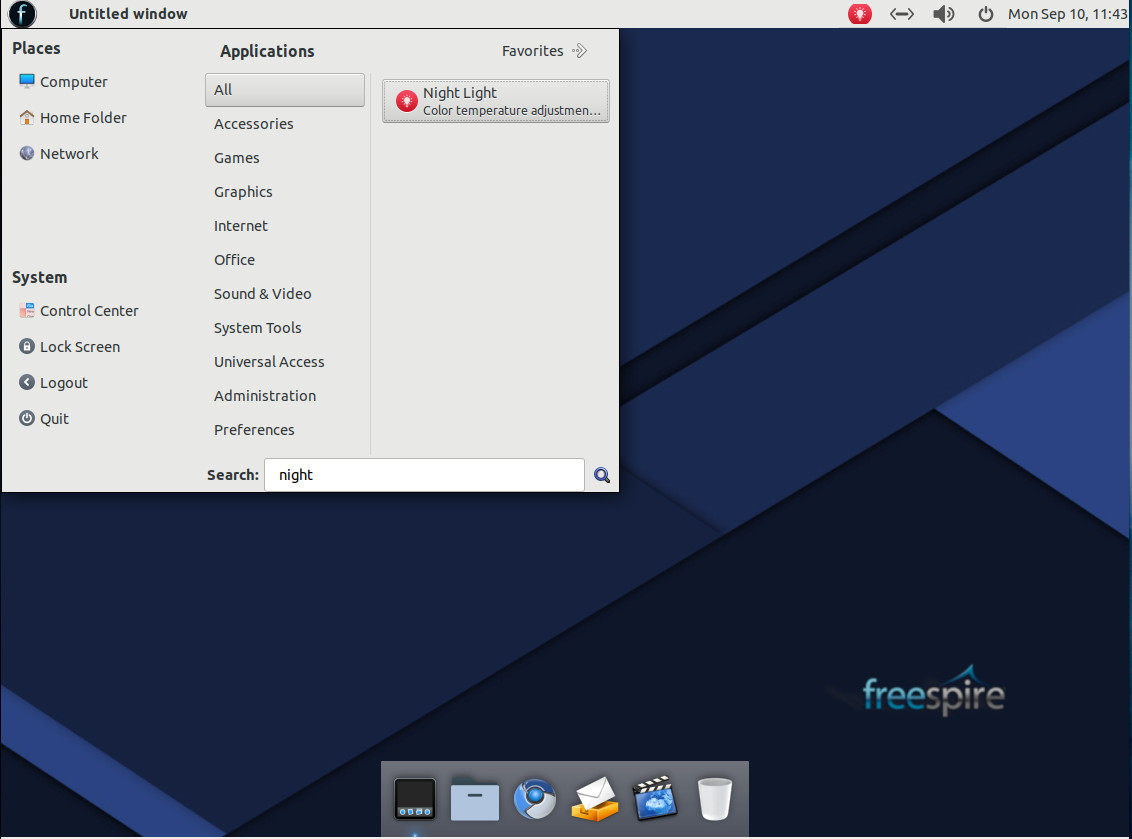
For those who tend to work long hours on the Linux desktop and want to protect their eyes from extended strain, Freespire does include a nightlight tool that can adjust the color temperature of the interface. To open this tool, click on the main desktop menu and type night in the Search bar (Figure 3).
Figure 3: Opening the Night Light tool.
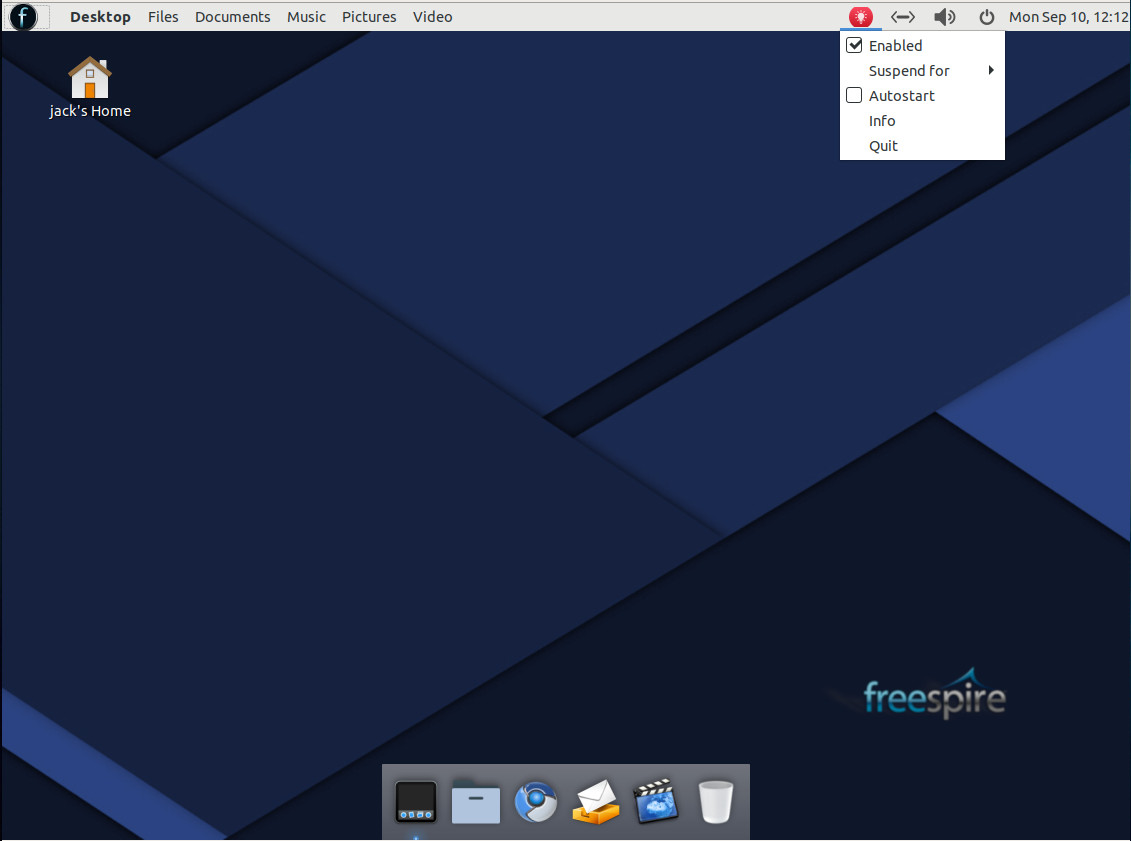
Once opened, Night Light will automatically adjust the color temperature, based on the time of day. From the notification tray, you can click the icon to suspend Night Light, set it to autostart, and close the service (Figure 4).
Figure 4: The Night Light controls.
Beyond the Mate Desktop
As is, Mate fans might not exactly recognize the Freespire desktop. The developers have clearly given Mate a significant set of tweaks to make it slightly resemble the Mac OS desktop. It’s not quite as elegant as, say, Elementary OS, but this is certainly an outstanding take on the Linux desktop. Whether you’re a fan of Mate or Mac OS, you should feel immediately at home on the desktop. On the top bar, the developers have included an appmenu that changes, based on what application you have open. Start any app and you’ll find that app’s menu appears in the top bar. This active menu makes the desktop quite efficient.
Are you ready for Freespire?
Every piece of the Freespire puzzle is equally as user-friendly as it is intuitive. The developers of Freespire have gone to great lengths to make this pure open source distribution a treat to use. Even if a 100% open source desktop isn’t your thing, Freespire is still a worthy contender in the world of desktop Linux. It’s clean and stable (as it’s based on Ubuntu 18.04) and able to help you be efficient and productive on the desktop.
Learn more about Linux through the free “Introduction to Linux” course from The Linux Foundation and edX.
GitLab is an open source GIT repository manager based on Rails and developed by GitLab Inc. It is a web-based GIT repository manager that allows your team to work on code, perform feature requests, track bugs, and test and implement applications. GitLab provides features such as a wiki, issue tracking, code reviews, activity feeds, and merge management. It is able to host multiple projects.
GitLab is available in four editions:
Gitlab CE (Community Edition) – self-hosted, free and support from the Community forum.
Gitlab EE (Enterprise Edition) – self-hosted, paid app, comes with additional features.
GitLab.com – SaaS, free.
GitLab.io – Private GitLab instance managed by GitLab Inc.
In this tutorial, I will show you step-by-step how to install GitLab CE (Community Edition) on your own Ubuntu 18.04 LTS (Bionic Beaver) server. I will be using the ‘omnibus’ package provided by GitLab for easy installation.
As we gear up the for the first ever Open Networking Summit Europe event, Amsterdam, September 25-27, it’s becoming clear to me just how far we’ve come this year since the formation of LF Networking. With new major operators joining, like Deutsche Telekom, and others requiring open source project automation tools in their RFPs, like Orange, it’s inspiring to witness just how much the networking industry is rallying around open source and incorporating it as a key element of their business strategies.
…For those who can’t make it to Amsterdam this time, I wanted to share the good news that the next three Open Source Networking Days (OSN Days) tours will be coming this fall to China, APAC, and North America. Here are confirmed cities and dates so far. Click on the links to learn more and register. Check back soon to main OSN Days website for updates on the others.
That said, the CFF also found that, “More and more, businesses are employing a polyglot and a multi-platform strategy to meet their exact needs.” The CFF discovered 77 percent of enterprises are using or evaluating Platforms-as-a-Service (PaaS); 72 percent are using or considering containers; and 46 percent are using or thinking about serverless computing. Simultaneously, more than a third (39 percent) are using all three technologies together.
For companies this “flexibility of cloud-native practices enables [companies to move] away from a monolithic approach and towards a world of computing that is flexible, portable and interoperable.” That means, while Java and JavaScript are only growing ever more popular, the larger the company, the more languages are used.