Slowlybutsurely, Google is bringing support for Linux applications to Chrome OS. Even though the feature is primarily aimed at developers, like those who want to get Android Studio running on a Pixelbook, there are plenty of apps that can benefit normal users. We already have a guide about installing Linux apps on Chrome OS, but if you’re not sure what to try, this post may point you in the right direction.
This isn’t a simple compilation of the best Linux apps, because plentyofthoseexistalready. Instead, the goal here is to recommend apps for tasks that cannot be adequately filled by web apps or Android applications. For example, serious photo editing isn’t really possible through the web, and options on the Play Store are limited, but Gimp is perfect for it.
Two surprising things happened this year in my personal tech life. Dell’s XPS 13 laptop became my daily driver, finally pulling me away from Apple’s MacBook Pro. Then I ditched Windows 10 in favor of Ubuntu. Now I’ve gone down the Linux rabbit hole and become fascinated with the wealth of open source (and commercial!) software available, the speed and elegance of system updates and the surprising turn of events when it comes to gaming on Linux. I’ve also seen a rising interest in Linux inside my community, so I wanted to craft a guide to help you install Ubuntu on your PC of choice. … Read more at Forbes.
For years Linux admins and users have configured their network interfaces in the same way. For instance, if you’re an Ubuntu user, you could either configure the network connection via the desktop GUI or from within the /etc/network/interfaces file. The configuration was incredibly easy and never failed to work. The configuration within that file looked something like this:
auto enp10s0iface enp10s0 inet staticaddress 192.168.1.162netmask 255.255.255.0gateway 192.168.1.100dns-nameservers 1.0.0.1,1.1.1.1
Save and close that file. Restart networking with the command:
sudo systemctl restart networking
Or, if you’re not using a non-systemd distribution, you could restart networking the old fashioned way like so:
sudo /etc/init.d/networking restart
Your network will restart and the newly configured interface is good to go.
That’s how it’s been done for years. Until now. With certain distributions (such as Ubuntu Linux 18.04), the configuration and control of networking has changed considerably. Instead of that interfaces file and using the /etc/init.d/networking script, we now turn to Netplan. Netplan is a command line utility for the configuration of networking on certain Linux distributions. Netplan uses YAML description files to configure network interfaces and, from those descriptions, will generate the necessary configuration options for any given renderer tool.
I want to show you how to use Netplan on Linux, to configure a static IP address and a DHCP address. I’ll be demonstrating on Ubuntu Server 18.04. I will give you one word of warning, the .yaml files you create for Netplan must be consistent in spacing, otherwise they’ll fail to work. You don’t have to use a specific spacing for each line, it just has to remain consistent.
The new configuration files
Open a terminal window (or log into your Ubuntu Server via SSH). You will find the new configuration files for Netplan in the /etc/netplan directory. Change into that directory with the command cd /etc/netplan. Once in that directory, you will probably only see a single file:
01-netcfg.yaml
You can create a new file or edit the default. If you opt to edit the default, I suggest making a copy with the command:
With your backup in place, you’re ready to configure.
Network Device Name
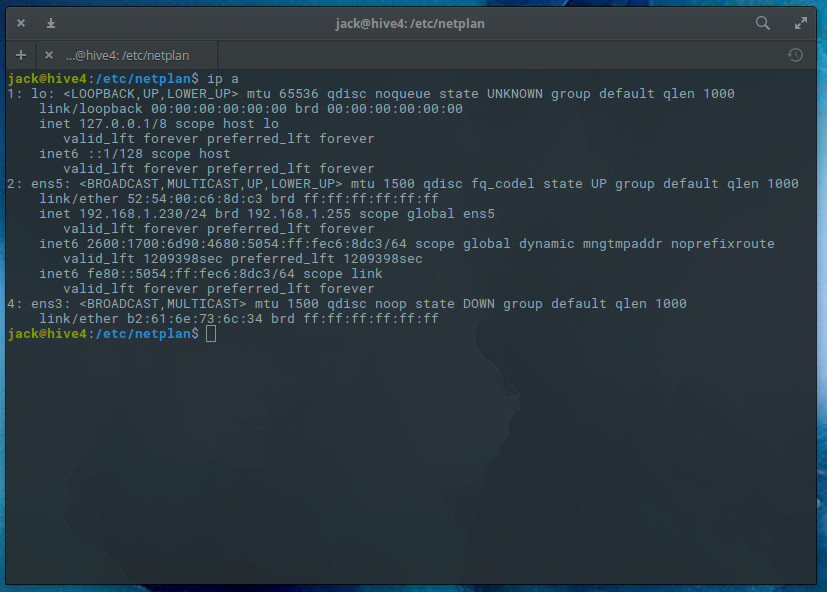
Before you configure your static IP address, you’ll need to know the name of device to be configured. To do that, you can issue the command ip a and find out which device is to be used (Figure 1).
Figure 1: Finding our device name with the ip a command.
I’ll be configuring ens5 for a static IP address.
Configuring a Static IP Address
Open the original .yaml file for editing with the command:
sudo nano /etc/netplan/01-netcfg.yaml
The layout of the file looks like this:
network:
Version: 2
Renderer: networkd
ethernets:
DEVICE_NAME:
Dhcp4: yes/no
Addresses: [IP/NETMASK]
Gateway: GATEWAY
Nameservers:
Addresses: [NAMESERVER, NAMESERVER]
Where:
DEVICE_NAME is the actual device name to be configured.
yes/no is an option to enable or disable dhcp4.
IP is the IP address for the device.
NETMASK is the netmask for the IP address.
GATEWAY is the address for your gateway.
NAMESERVER is the comma-separated list of DNS nameservers.
Edit the above to fit your networking needs. Save and close that file.
Notice the netmask is no longer configured in the form 255.255.255.0. Instead, the netmask is added to the IP address.
Testing the Configuration
Before we apply the change, let’s test the configuration. To do that, issue the command:
sudo netplan try
The above command will validate the configuration before applying it. If it succeeds, you will see Configuration accepted. In other words, Netplan will attempt to apply the new settings to a running system. Should the new configuration file fail, Netplan will automatically revert to the previous working configuration. Should the new configuration work, it will be applied.
Applying the New Configuration
If you are certain of your configuration file, you can skip the try option and go directly to applying the new options. The command for this is:
sudo netplan apply
At this point, you can issue the command ip a to see that your new address configurations are in place.
Configuring DHCP
Although you probably won’t be configuring your server for DHCP, it’s always good to know how to do this. For example, you might not know what static IP addresses are currently available on your network. You could configure the device for DHCP, get an IP address, and then reconfigure that address as static.
To use DHCP with Netplan, the configuration file would look something like this:
Netplan should succeed and apply the DHCP configuration. You could then issue theip a command, get the dynamically assigned address, and then reconfigure a static address. Or, you could leave it set to use DHCP (but seeing as how this is a server, you probably won’t want to do that).
Should you have more than one interface, you could name the second .yaml configuration file 02-netcfg.yaml. Netplan will apply the configuration files in numerical order, so 01 will be applied before 02. Create as many configuration files as needed for your server.
That’s All There Is
Believe it or not, that’s all there is to using Netplan. Although it is a significant change to how we’re accustomed to configuring network addresses, it’s not all that hard to get used to. But this style of configuration is here to stay… so you will need to get used to it.
Learn more about Linux through the free “Introduction to Linux” course from The Linux Foundation and edX.
Companies that contribute to open source software and use it in their own IT systems and applications can gain a competitive advantage—even though they may be helping their competitors in the short run.
Open source software is software whose code can be adopted, adapted and modified by anyone. As part of the open source ethos, it is expected that people or companies who use open source code will “give back” to the community in the form of code improvements and enhancements.
And that presents an interesting dilemma for firms that rely heavily on open source. Should they allow employees on company time to make updates and edits to the software for community use that could be used by competitors? New research by Assistant Professor Frank Nagle, a member of the Strategy Unit at Harvard Business School, shows that paying employees to contribute to such software boosts the company’s productivity from using the software by as much as 100 percent, when compared with free-riding competitors.
The Z shell known as zsh is a shell for Linux/Unix-like operating systems. It has similarities to other shells in the sh (Bourne shell) family, such as as bash and ksh, but it provides many advanced features and powerful command line editing options, such as enhanced Tab completion.
It would be impossible to cover all the options of zsh here; there are literally hundreds of pages documenting its many features. In this article, I’ll present five tips to make you more productive using the command line with zsh.
1. Themes and plugins
Through the years, the open source community has developed countless themes and plugins for zsh. A theme is a predefined prompt configuration, while a plugin is a set of useful aliases and functions that make it easier to use a specific command or programming language.
In his welcoming address in Vancouver, The Linux Foundation’s Executive Director, Jim Zemlin, explained that The Foundation’s job is to create engines of innovation and enable the gears of those engines to spin faster.
This acceleration can be seen in the remarkable growth of the Cloud Native Computing Foundation (CNCF) and in the Google Cloud announcement transferring ownership and management of the Kubernetes project’s cloud resources to the CNCF, along with a $9 million grant over three years to cover infrastructure costs.
Such investment underscores a strong belief in the power of open source technologies to speed innovation and solve problems, which was echoed by Zemlin, who encouraged the audience to go solve big problems, one person, one project, one industry at a time.
Empathy
In another conference keynote, Van Jones, President and founder of Dream Corps, best-selling author, and CNN contributor, spoke with Jamie Smith, Chief Marketing Officer at The Linux Foundation about the power of tech and related social responsibilities.
“There was a time when the future was written in law,” Jones said. “Now the future is written in Silicon Valley in code.” Jones went on to say that those working in technology today possess a new set of superpowers and they need to understand how to use those powers for good.
A big deficit that Jones sees, not just in technology but in politics and elsewhere, is an empathy gap. He noted, however, that listening and mentoring can help bridge this gap. “Each person has an opportunity to mentor one person… Don’t underestimate the one person in your life who gave you a shot; you can be that person,” he said.
Allies and advocates
Jennifer Cloer, founder and lead consultant at reTHINKit PR and co-founder of Wicked Flicks, also explored the power of mentors and supporters in her talk highlighting the “Chasing Grace” video project. Cloer offered a preview of the project in a short episode featuring Nithya Ruff, Senior Director, Open Source Practice at Comcast, and member of the Board of Directors for The Linux Foundation. In the video preview, Ruff described the important role that her father played in supporting her career.
Ruff also moderated a panel discussion at Open Source Summit examining issues of diversity and inclusion and exploring solid strategies for success. Ruff acknowledged that the efforts of open source communities to attract and retain diverse contributors with unique talent and perspectives have gathered momentum, but she said, “We cannot tackle these issues without the support of allies and advocates.”
Open development
On the last day of the conference, Linux creator Linus Torvalds sat down with Dirk Hohndel, VMware VP and chief open source officer, for their now-familiar fireside chat session. In the discussion, they touched on topics including hardware, quantum computing, kernel maintainership, and more.
In speaking of recent hardware vulnerabilities, Torvalds said, “These hardware issues were kept under wraps. Because it was secret and we were not allowed to talk about it, we were not allowed to use our usual open development model. That makes it way more painful than it should be.”
“When you’re doing a complex project, the only way to deal with complexity is to have the code out there,” Torvalds said. “There are so many layers. No one knows how all this works,” he continued, describing it as an “explosion of complexity.”
Nonetheless, Torvalds said he doesn’t worry so much about issues of technology within the kernel. “What I’m really worried about is the flow of patches. If you have the right workflow, the code will sort itself out.”
When asked whether he still understands the Linux kernel, Torvalds replied, “No. … Nobody knows the whole kernel. Having looked at patches for many, many years, I know the big picture, and I can tell by looking if it’s right or wrong.”
There is a lot of information out there regarding Continuous Integration (CI) and Continuous Delivery (CD). Multiple blog posts attempt to explain in technical terms what these methodologies do and how they can help your organization. Unfortunately, in several cases, both methodologies are usually associated with specific tools or even vendors. A very common conversation in the company cafeteria may be:
Do you use Continuous Integration in your team?
Yes, of course, we use X tool
Let me tell you a little secret. Continuous Integration and Delivery are both development approaches. They are not linked to a specific tool or vendor. Even though there are tools and solutions out there that DO help you with both (like Codefresh), in reality, a company could practice CI/CD using just bash scripts and Perl one-liners (not really practical, but certainly possible).
Therefore, rather than falling into the common trap of explaining CI/CD using tools and technical terms, we will explain CI/CD using what matters most: people!
GitHub uses MySQL as its main datastore for all things non-git, and its availability is critical to GitHub’s operation. The site itself, GitHub’s API, authentication and more, all require database access. We run multiple MySQL clusters serving our different services and tasks. Our clusters use classic master-replicas setup, where a single node in a cluster (the master) is able to accept writes. The rest of the cluster nodes (the replicas) asynchronously replay changes from the master and serve our read traffic.
The availability of master nodes is particularly critical. With no master, a cluster cannot accept writes: any writes that need to be persisted cannot be persisted. Any incoming changes such as commits, issues, user creation, reviews, new repositories, etc., would fail.
To support writes we clearly need to have an available writer node, a master of a cluster. But just as important, we need to be able to identify, or discover, that node.
On a failure, say a master box crash scenario, we must ensure the existence of a new master, as well as be able to quickly advertise its identity. The time it takes to detect a failure, run the failover and advertise the new master’s identity makes up the total outage time.
This post illustrates GitHub’s MySQL high availability and master service discovery solution, which allows us to reliably run a cross-data-center operation, be tolerant of data center isolation, and achieve short outage times on a failure.
Kubernetes was developed as a solution to manage and orchestrate containerized workloads. At the same time, managing the pure containers is not always enough. At the final end, Kubernetes is being used to run applications, and having a solution that will simplify the ability to run and deploy applications with Kubernetes, was a high demand. Helm was this solution.
Originally developed by Deis, Helm shortly became a de-facto open source standard for running and managing applications with Kubernetes.
Imagine Kubernetes as an Operating System (OS), Helm is the apt or yum for it. Any operating system is a great foundation, but the real value is in the applications. Package managers like apt, yum, or similar, simplify the operations so instead of building the application from the source files, you can easily install it with the package manager in a few clicks.