Kapitan (and presumably Ksonnet) is the more flexible and customizable (json and jsonnet)
Kustomize if the more straightforward, just released so we’ll need a bit more documentation on built-in functions (yaml only)
Helm combines a package approach and releases management that is powerful, with the caveats of Tiller for the release management part (additional source of truth)
During the implementation of https://www.weyv.com environments in Kubernetes, we went through various stages. From plain yaml files, to Helm charts releases and finally helm charts but with helm template output. Now with the announcement of Kustomize, I take the opportunity to re-evaluate our choice of tool vs our requirements with 3 contenders: Helm, Kapitan, Kustomize. I left out Ksonnet (https://github.com/ksonnet/ksonnet) it seems very close to Kapitan.
Digital twins are virtual replicas of physical devices that data scientists and IT pros can use to run simulations before actual devices are built and deployed. They are also changing how technologies such as IoT, AI and analytics are optimized.
Digital twin technology has moved beyond manufacturing and into the merging worlds of the Internet of Things, artificial intelligence and data analytics.
As more complex “things” become connected with the ability to produce data, having a digital equivalent gives data scientists and other IT professionals the ability to optimize deployments for peak efficiency and create other what-if scenarios.
Digital twins could be used in manufacturing, energy, transportation and construction. Large, complex items such as aircraft engines, trains, offshore platforms and turbines could be designed and tested digitally before being physically produced.
Join us in Vancouver in August for 250+ educational sessions covering the latest technologies and topics in open source, and hear from industry experts including keynotes from:
Ajay Agrawal, Artificial Intelligence & Machine Learning Expert, Author of Prediction Machines, and Founder, The Creative Destruction Lab
Jennifer Cloer, Founder of reTHINKit and Creator and Executive Producer, The Chasing Grace Project
Wim Coekaerts, Senior Vice President of Operating Systems and Virtualization Engineering, Oracle
Ben Golub, Executive Chairman and Interim CEO, and Shawn Wilkinson, Co-founder, Storj Labs
The landscape of applications is quickly changing. Many platforms are migrating to containerized applications… and with good cause. An application wrapped in a bundled container is easier to install, includes all the necessary dependencies, doesn’t directly affect the hosting platform libraries, automatically updates (in some cases), and (in most cases) is more secure than a standard application. Another benefit of these containerized applications is that they are universal (i.e., such an application would install on Ubuntu Linux or Fedora Linux, without having to convert a .deb package to an .rpm).
As of now, there are two main universal package systems: Snap and Flatpak. Both function in similar fashion, but one is found by default on Ubuntu-based systems (Snap) and one on Fedora-based systems (Flatpak). It should come as no surprise that both can be installed on either type of system. So if you want to run Snaps on Fedora, you can. If you want to run Flatpak on Ubuntu, you can.
I will walk you through the process of installing and using Flatpak on Ubuntu 18.04. If your platform of choice is Fedora (or a Fedora derivative), you can skip the installation process.
Installation
The first thing to do is install Flatpak. The process is simple. Open up a terminal window and follow these steps:
Add the necessary repository with the command sudo add-apt-repository ppa:alexlarsson/flatpak.
Update apt with the command sudo apt update.
Install Flatpak with the commandsudo apt install flatpak.
Install Flatpak support for GNOME Software with the command sudo apt install gnome-software-plugin-flatpak.
Reboot your system.
Usage
I’ll first show you how to install a Flatpak package from the command line, and then via the GUI. Let’s say you want to install the Spotify desktop client via Flatpak. To do this, you must first instruct Flatpak to retrieve the necessary app. The Spotify Flatpak (along with others) is hosted on Flathub. The first thing we’re going to do is add the Flathub remote repository with the following command:
Now you can install any Flatpak app found on Flathub. For example, to install Spotify, the command would be:
sudo flatpak install flathub com.spotify.Client
To find out the exact command for each install, you only have to visit the app’s page on Flathub and the installation command is listed beneath the description.
Running a Flatpak-installed app is a bit different than a standard app (at least from the command line). Head back to the terminal window and issue the command:
flatpak run com.spotify.Client
Of course, after you’ve re-started your machine (upon installing the GNOME Software Support), those apps should appear in your desktop menu, making it unnecessary to start them from the command line.
To uninstall a Flatpak from the command line, you would go back to the terminal and issue the command:
sudo flatpak uninstall NAME
where NAME is the name of the app to remove. In our Spotify case, that would be:
sudo flatpak uninstall com.spotify.Client
Now we want to update our Flatpak apps. To do this, first list all of your installed Flatpak apps by issuing the command:
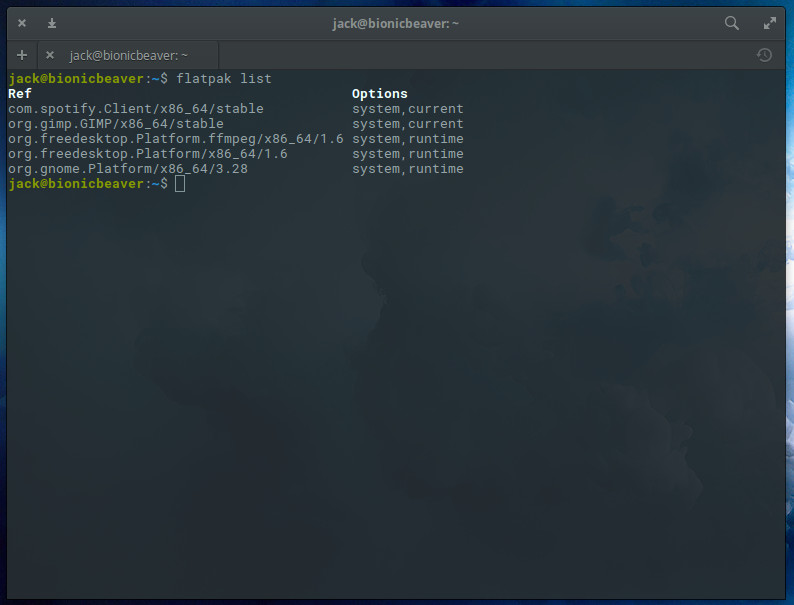
flatpak list
Now that we have our list of apps (Figure 1), we can update with the command sudo flatpak update NAME(where NAME is the name of our app to update).
Figure 1: Our list of updated Flatpak apps.
So if we want to update GIMP, we’d issue the command:
sudo flatpak update org.gimp.GIMP
If there are any updates to be applied, they’’ll be taken care of. If there are no updates to be applied, nothing will be reported.
Installing from GNOME Software
Let’s make this even easier. Since we installed GNOME Software support for flatpak, we don’t actually have to bother with the command line. Don’t be mistaken, unlike Snap support, you won’t actually find Flatpak apps listed within GNOME Software (even though we’ve installed Software support). Instead, you’ll find support through the web browser.
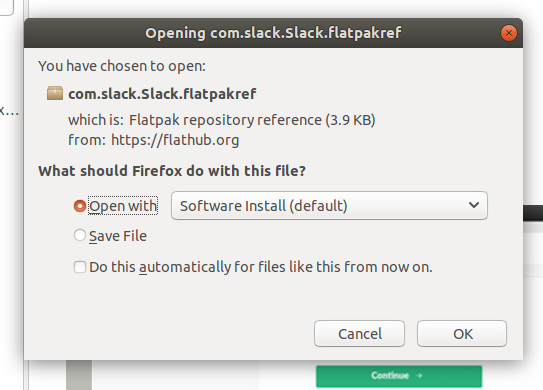
Figure 2: Installing a Flatpak app from the Firefox browser.
Let’s say you want to install Slack via Flatpak. Go to the Slack Flathub page and then click on the INSTALL button. Since we installed GNOME Software support, the standard browser dialog window will appear with an included option to open the file via Software Install (Figure 2).
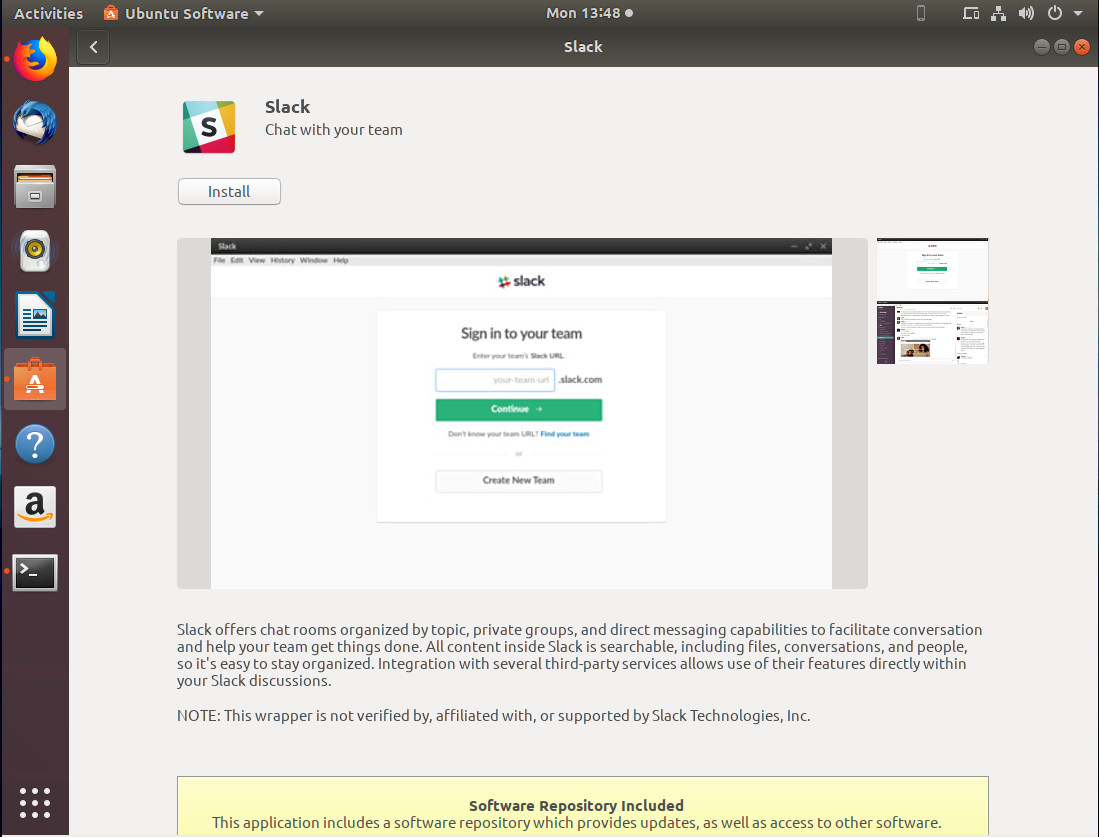
This action will then open GNOME Software (or, in the case of Ubuntu, Ubuntu Software), where you can click the Install button (Figure 3) to complete the process.
Figure 3: The installation process ready to go.
Once the installation completes, you can then either click the Launch button, or close GNOME Software and launch the application from the desktop menu (in the case of GNOME, the Dash).
After you’ve installed a Flatpak app via GNOME Software, it can also be removed from the same system (so there’s still not need to go through the command line).
What about KDE?
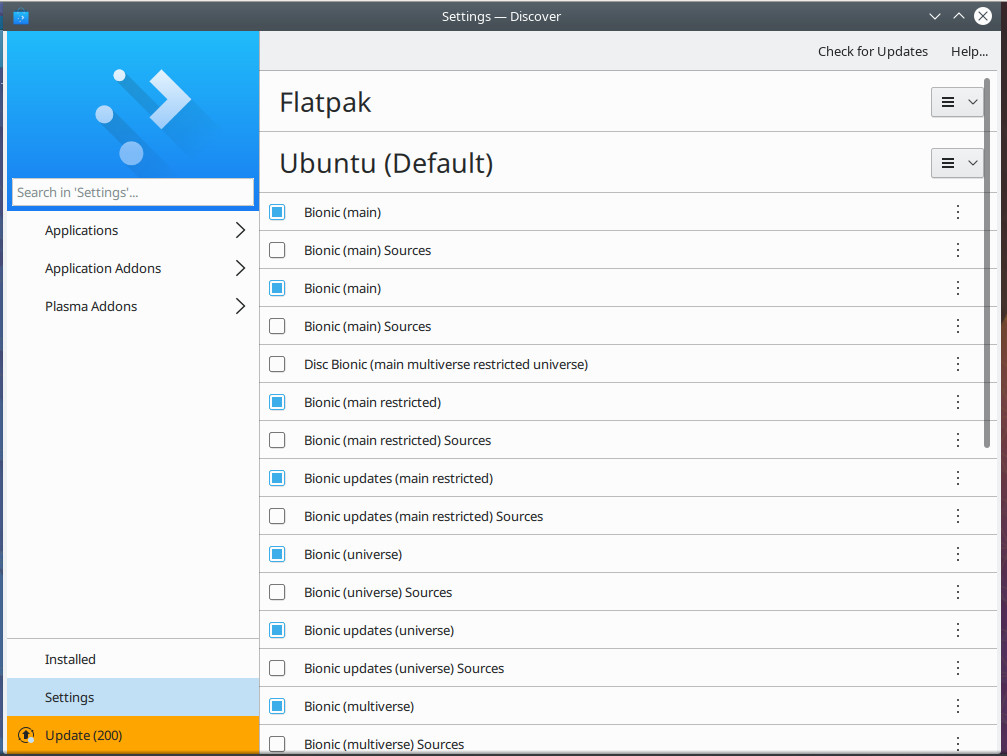
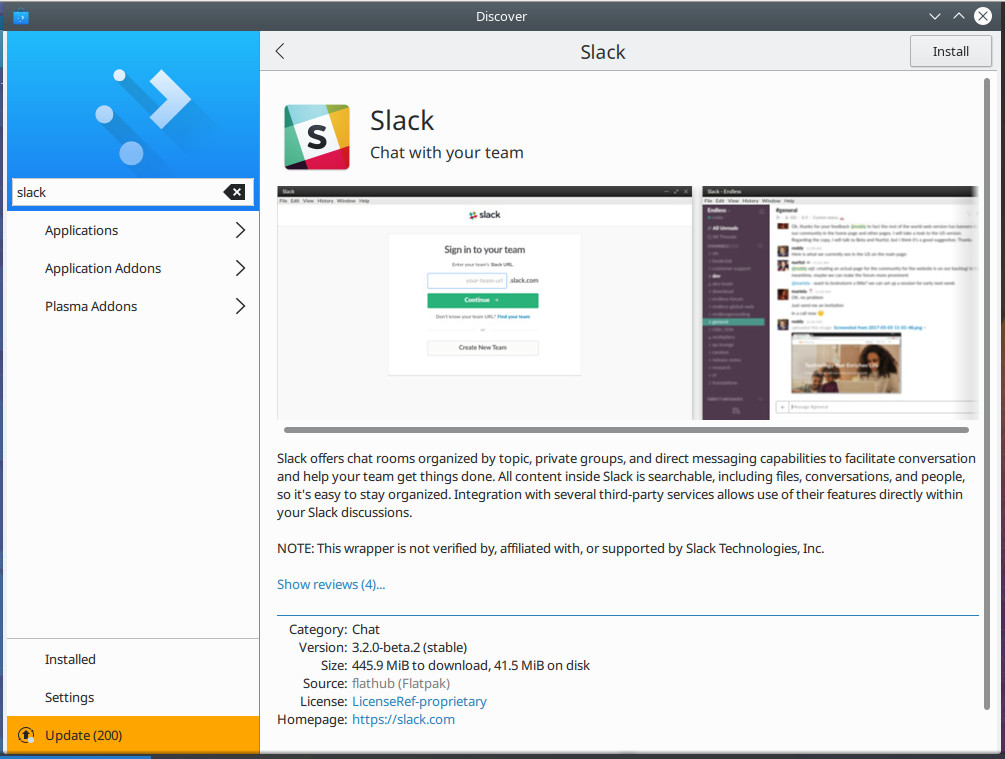
If you prefer using the KDE desktop environment, you’re in luck. If you issue the command sudo apt install plasma-discover-flatpak-backend, it’ll install Flatpak support for the KDE app store, Discover. Once you’ve added Flatpak support, you then need to add a repository. Open Discover and then click on Settings. In the settings window, you’ll now see a Flatpak listing (Figure 4).
Figure 4: Flatpak is now available in Discover.
Click on the Flatpak drop-down and then click Add Flathub. Click on the Applications tab (in the left navigation) and you can then search for (and install) any applications found on Flathub (Figure 5).
Figure 5: Slack can now be installed, from Flathub, via Discover.
Easy Flatpak management
And that’s the gist of using Flatpak. These universal packages can be used on most Linux distributions and can even be managed via the GUI on some desktop environments. I highly recommend you give Flatpak a try. With the combination of standard installation, Flatpak, and Snaps, you’ll find software management on Linux has become incredibly easy.
Learn more about Linux through the free “Introduction to Linux” course from The Linux Foundation and edX.
PLENTY OF PEOPLE around the world got new gadgets Friday, but one in Eastern Tennessee stands out. Summit, a new supercomputer unveiled at Oak Ridge National Lab is, unofficially for now, the most powerful calculating machine on the planet. It was designed in part to scale up the artificial intelligence techniques that power some of the recent tricks in your smartphone.
America hasn’t possessed the world’s most powerful supercomputer since June 2013, when a Chinese machine first claimed the title. Summit is expected to end that run when the official ranking of supercomputers, from Top500, is updated later this month.
Summit, built by IBM, occupies floor space equivalent to two tennis courts, and slurps 4,000 gallons of water a minute around a circulatory system to cool its 37,000 processors. Oak Ridge says its new baby can deliver a peak performance of 200 quadrillion calculations per second (that’s 200 followed by 15 zeros) using a standard measure used to rate supercomputers, or 200 petaflops. That’s about a million times faster than a typical laptop, and nearly twice the peak performance of China’s top-ranking Sunway TaihuLight.
There are a number of ways to compare files and directories on Linux systems. The diff, colordiff, and wdiff commands are just a sampling of commands that you’re likely to run into. Another is comm. The command (think “common”) lets you compare files in side-by-side columns the contents of individual files.
Where diff gives you a display like this showing the lines that are different and the location of the differences, comm offers some different options with a focus on common content. Let’s look at the default output and then some other features.
Here’s some diff output — displaying the lines that are different in the two files and using < and > signs to indicate which file each line came from.
Enterprise adoption of DevSecOps has surged in the past year, according to a study conducted at this year’s RSA Conference.
DevSecOps is a great portmanteau word, but is it a concept in wide use? According to a survey of attendees at this year’s RSA Conference, it’s not yet universal, but many more organizations are now embracing at least some DevSecOps principles than was the case even a year ago.
In all, 63% of the participants said they have a formal or informal DevSecOps team in place. According to Andy Feit, VP, go-to-market, at Aqua Security, the “informal” part is important.
Leap Motion has long been a proponent of immersive technology. When VR hardware began to emerge in the consumer market, Leap Motion quickly adapted its technology for VR input. Now it has turned its sights to the budding AR market, but instead of offering to license its tracking technology to hardware makers, the company created a full reference headset to help accelerate AR HMD design.
The roots of Mesos can be traced back to 2009 when Ben Hindman was a PhD student at the University of California, Berkeley working on parallel programming. They were doing massive parallel computations on 128-core chips, trying to solve multiple problems such as making software and libraries run more efficiently on those chips. He started talking with fellow students so see if they could borrow ideas from parallel processing and multiple threads and apply them to cluster management.
“Initially, our focus was on Big Data,” said Hindman. Back then, Big Data was really hot and Hadoop was one of the hottest technologies. “We recognized that the way people were running things like Hadoop on clusters was similar to the way that people were running multiple threaded applications and parallel applications,” said Hindman.
However, it was not very efficient, so they started thinking how it could be done better through cluster management and resource management. “We looked at many different technologies at that time,” Hindman recalled.
Hindman and his colleagues, however, decided to adopt a novel approach. “We decided to create a lower level of abstraction for resource management, and run other services on top to that to do scheduling and other things,” said Hindman, “That’s essentially the essence of Mesos — to separate out the resource management part from the scheduling part.”
It worked, and Mesos has been going strong ever since.
The project goes to Apache
The project was founded in 2009. In 2010 the team decided to donate the project to the Apache Software Foundation (ASF). It was incubated at Apache and in 2013, it became a Top-Level Project (TLP).
There were many reasons why the Mesos community chose Apache Software Foundation, such as the permissiveness of Apache licensing, and the fact that they already had a vibrant community of other such projects.
It was also about influence. A lot of people working on Mesos were also involved with Apache, and many people were working on projects like Hadoop. At the same time, many folks from the Mesos community were working on other Big Data projects like Spark. This cross-pollination led all three projects — Hadoop, Mesos, and Spark — to become ASF projects.
It was also about commerce. Many companies were interested in Mesos, and the developers wanted it to be maintained by a neutral body instead of being a privately owned project.
Who is using Mesos?
A better question would be, who isn’t? Everyone from Apple to Netflix is using Mesos. However, Mesos had its share of challenges that any technology faces in its early days. “Initially, I had to convince people that there was this new technology called ‘containers’ that could be interesting as there is no need to use virtual machines,” said Hindman.
The industry has changed a great deal since then, and now every conversation around infrastructure starts with ‘containers’ — thanks to the work done by Docker. Today convincing is not needed, but even in the early days of Mesos, companies like Apple, Netflix, and PayPal saw the potential. They knew they could take advantage of containerization technologies in lieu of virtual machines. “These companies understood the value of containers before it became a phenomenon,” said Hindman.
These companies saw that they could have a bunch of containers, instead of virtual machines. All they needed was something to manage and run these containers, and they embraced Mesos. Some of the early users of Mesos included Apple, Netflix, PayPal, Yelp, OpenTable, and Groupon.
“Most of these organizations are using Mesos for just running arbitrary services,” said Hindman, “But there are many that are using it for doing interesting things with data processing, streaming data, analytics workloads and applications.”
One of the reasons these companies adopted Mesos was the clear separation between the resource management layers. Mesos offers the flexibility that companies need when dealing with containerization.
“One of the things we tried to do with Mesos was to create a layering so that people could take advantage of our layer, but also build whatever they wanted to on top,” said Hindman. “I think that’s worked really well for the big organizations like Netflix and Apple.”
However, not every company is a tech company; not every company has or should have this expertise. To help those organizations, Hindman co-founded Mesosphere to offer services and solutions around Mesos. “We ultimately decided to build DC/OS for those organizations which didn’t have the technical expertise or didn’t want to spend their time building something like that on top.”
Mesos vs. Kubernetes?
People often think in terms of x versus y, but it’s not always a question of one technology versus another. Most technologies overlap in some areas, and they can also be complementary. “I don’t tend to see all these things as competition. I think some of them actually can work in complementary ways with one another,” said Hindman.
“In fact the name Mesos stands for ‘middle’; it’s kind of a middle OS,” said Hindman, “We have the notion of a container scheduler that can be run on top of something like Mesos. When Kubernetes first came out, we actually embraced it in the Mesos ecosystem and saw it as another way of running containers in DC/OS on top of Mesos.”
Mesos also resurrected a project called Marathon (a container orchestrator for Mesos and DC/OS), which they have made a first-class citizen in the Mesos ecosystem. However, Marathon does not really compare with Kubernetes. “Kubernetes does a lot more than what Marathon does, so you can’t swap them with each other,” said Hindman, “At the same time, we have done many things in Mesos that are not in Kubernetes. So, these technologies are complementary to each other.”
Instead of viewing such technologies as adversarial, they should be seen as beneficial to the industry. It’s not duplication of technologies; it’s diversity. According to Hindman, “it could be confusing for the end user in the open source space because it’s hard to know which technologies are suitable for what kind of workload, but that’s the nature of the beast called Open Source.”
That just means there are more choices, and everybody wins.
Today, most companies are using continuous integration and delivery (CI/CD) in one form or another – and this is of significance due to various reasons:
It increases the quality of the code base and the testing of that code base
It greatly increases team collaboration
It reduces the time in which new features reach the production environment
It reduces the number of bugs that in turn reach the production environment
As the DevOps movement becomes more popular, CI/CD does as well, since it is a major component. Not doing CI/CD means not doing DevOps.
From data centre to cloud
After reducing some terms and concepts, it is clear why CI/CD is so important. Since architectures and abstraction levels change when migrating a product from data centre into the cloud, it has become necessary to evaluate what is needed in the new ecosystem for two reasons:
To take advantage of what the cloud has to offer, in terms of the new paradigm and the plethora of options
To avoid making the mistake of treating the cloud as a data centre and building everything from scratch
Necessary considerations
The CI/CD implementation to use in the cloud must fulfil the majority of the following:
Provided as a service: The cloud is XaaS-centric, and avoiding building things from scratch is a must. In the case of building from scratch, if it is a non in-house component, nor a value-added product feature, I would suggest a review of the architecture in addition to a logical business justification