Home Blog Page 398

A Primer on Nvidia-Docker — Where Containers Meet GPUs

Traditional programs cannot access GPUs directly. They need a special parallel programming interface to move computations to GPU. Nvidia, the most popular graphics card manufacturer, has created Compute Unified Device Architecture (CUDA), as a parallel computing platform and programming model for general computing on GPUs. With CUDA, developers will be able to dramatically speed up computing applications by harnessing the power of GPUs.

In GPU-enabled applications, the sequential part of the workload continues to run on the CPU — which is optimized for single-threaded performance — while the parallelized compute intensive part of the application is offloaded to run on thousands of GPU cores in parallel. To integrate CUDA, developers program in popular languages such as C, C++, Fortran, Python and MATLAB by expressing parallelism through extensions in the form of a few basic keywords.

Read more at The New Stack

What Is Open Source Programming?

At the simplest level, open source programming is merely writing code that other people can freely use and modify. But you’ve heard the old chestnut about playing Go, right? “So simple it only takes a minute to learn the rules, but so complex it requires a lifetime to master.” Writing open source code is a pretty similar experience. It’s easy to chuck a few lines of code up on GitHub, Bitbucket, SourceForge, or your own blog or site. But doing it right requires some personal investment, effort, and forethought.

Let’s be clear up front about something: Just being on GitHub in a public repo does not make your code open source. Copyright in nearly all countries attaches automatically when a work is fixed in a medium, without need for any action by the author. For any code that has not been licensed by the author, it is only the author who can exercise the rights associated with copyright ownership. Unlicensed code—no matter how publicly accessible—is a ticking time bomb for anyone who is unwise enough to use it.

Read more at OpenSource.com

Multiversion Testing With Tox

In the Python world, tox (documentation) is a powerful testing tool that allows a project to test against many combinations of versioned environments. The django-coverage-plugin package (Github) uses tox to test against a matrix of Python versions (2.7, 3.4, 3.5, and 3.6) and Django versions (1.8, 1.9, 1.10, 1.11, 1.11tip, 2.0, 2.0tip), resulting in 25 valid combinations to test.

Preparing Your System Environments

tox needs to run from a virtual environment where it is installed and from which it’s run. As of Feb 2018, I would recommend a Python 2.7 environment so that you can use the detox package (see below) to parallelize your build’s workload. Installation of tox is usually into your base development environment and tox is usually included in your project’s requirements.txt file:

tox >= 1.8
detox

Read more at CloudCity

Migrating to Linux: Using Sudo

This article is the fifth in our series about migrating to Linux. If you missed earlier ones, you can catch up here:

Part 1 – An Introduction

Part 2 – Disks, Files, and Filesystems

Part 3 – Graphical Environments

Part 4 – The Command Line

You may have been wondering about Linux for a while. Perhaps it’s used in your workplace and you’d be more efficient at your job if you used it on a daily basis. Or, perhaps you’d like to install Linux on some computer equipment you have at home. Whatever the reason, this series of articles is here to make the transition easier.

Linux, like many other operating systems supports multiple users. It even supports multiple users being logged in simultaneously.

User accounts are typically assigned a home directory where files can be stored. Usually this home directory is in:

/home/<login name>

This way, each user has their own separate location for their documents and other files.

Admin Tasks

In a traditional Linux installation, regular user accounts don’t have permissions to perform administrative tasks on the system. And instead of assigning rights to each user to perform various tasks, a typical Linux installation will require a user to log in as the admin to do certain tasks.

The administrator account on Linux is called root.

Sudo Explained

Historically, to perform admin tasks, one would have to login as root, perform the task, and then log back out. This process was a bit tedious, so many folks logged in as root and worked all day long as the admin. This practice could lead to disastrous results, for example, accidentally deleting all the files in the system. The root user, of course, can do anything, so there are no protections to prevent someone from accidentally performing far-reaching actions.

The sudo facility was created to make it easier to login as your regular user account and occasionally perform admin tasks as root without having to login, do the task, and log back out.  Specifically, sudo allows you to run a command as a different user. If you don’t specify a specific user, it assumes you mean root.

Sudo can have complex settings to allow users certain permissions to use sudo for some commands but not for others. Typically, a desktop installation will make it so the first account created has full permissions in sudo, so you as the primary user can fully administer your Linux installation.

Using Sudo

Some Linux installations set up sudo so that you still need to know the password for the root account to perform admin tasks. Others, set up sudo so that you type in your own password. There are different philosophies here. 

When you try to perform an admin task in the graphical environment, it will usually open a dialog box asking for a password. Enter either your own password (e.g., on Ubuntu), or the root account’s password (e.g., Red Hat).

When you try to perform an admin task in the command line, it will usually just give you a “permission denied” error. Then you would re-run the command with sudo in front. For example:

systemctl start vsftpd
Failed to start vsftpd.service: Access denied

sudo systemctl start vsftpd
[sudo] password for user1:

When to Use Sudo

Running commands as root (under sudo or otherwise) is not always the best solution to get around permission errors. While will running as root will remove the “permission denied” errors, it’s sometimes best to look for the root cause rather than just addressing the symptom. Sometimes files have the wrong owner and permissions.

Use sudo when you are trying to perform a task or run a program and the program requires root privileges to perform the operation. Don’t use sudo if the file just happens to be owned by another user (including root). In this second case, it’s better to set the permission on the file correctly.

Learn more about Linux through the free “Introduction to Linux” course from The Linux Foundation and edX.

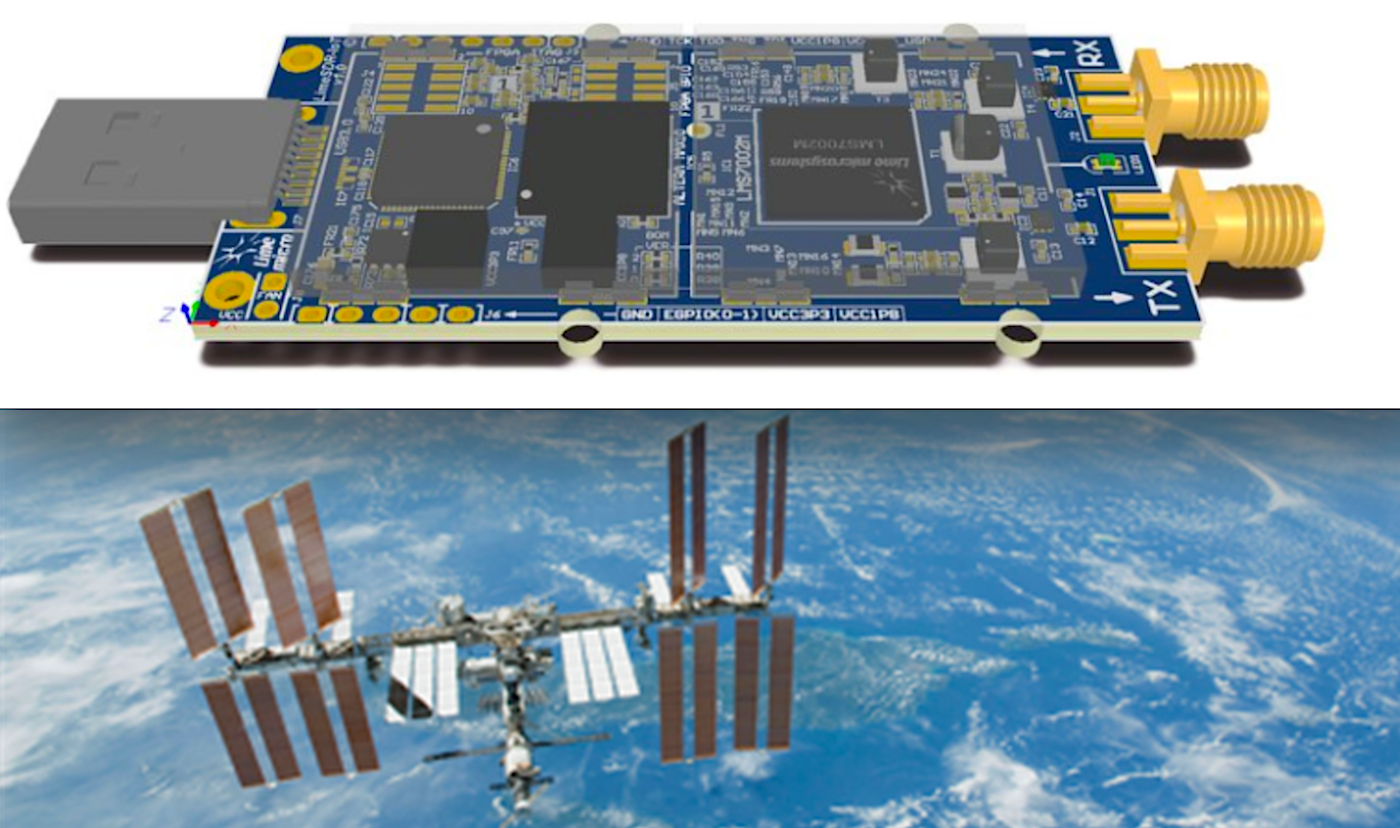
Open Source LimeSDR Mini Takes Off in Satellites

The topic of 5G mobile networks dominated the recent Mobile World Congress in Barcelona, despite the expectation that widespread usage may be years away. While 5G’s mind-boggling bandwidth captivates our attention, another interesting angle is found in the potential integration with software defined radio (SDR), as seen in OpenAirInterface’s proposed Cloud-RAN (C-RAN) software-defined radio access network.

As the leading purveyor of open source SDR solutions, UK-based Lime Microsystems is well positioned to play a key role in the development of 5G SDR. SDR enables the generation and augmentation of just about any wireless protocol without swapping hardware, thereby affordably enabling complex networks across a range of standards and frequencies.

In late February, Lime announced a collaboration with the European Space Agency (ESA) to make 200 of its Ubuntu Core-driven LimeSDR Mini boards available for developing applications running on ESA’s communications satellites, as part of ESA’s Advanced Research in Telecommunications Systems (ARTES) program. The Ubuntu Core-based, Snap-packaged satcom apps will include prototypes of SDR-enabled 5G satellite networks.

Other applications will include IoT networks controlled by fleets of small, low-cost CubeSat satellites. CubeSats, as well as smaller NanoSats, have been frequently used for open source experimentation. The applications will be shared in an upcoming SDR App Store for Satcom to be developed by Lime and Canonical.

LimeSDR Mini Starts Shipping

Lime Microsystems recently passed a major milestone when its ongoing Crowd Supply campaign for the LimeSDR Mini passed the $500,000 mark. On Mar. 4, the company reported it had shipped the first 300 boards to backers, with plans to soon ship 900 more.

At MWC, Lime demonstrated the LimeSDR Mini and related technologies working with Quortus’ cellular core and Amarisoft’s LTE stack. There was also a demonstration with Vodafone regarding the carrier’s plans to use Lime’s related LimeNET computers to help develop Vodafone’s Open RAN initiative.

Back in May 2016, Lime expanded beyond its business of building field programmable RF (FPRF) transceivers for wireless broadband systems when it successfully launched the $299, open spec LimeSDR board. The $139 LimeSDR Mini that was unveiled last September has a lower-end Intel/Altera FPGA — a MAX 10 instead of a Cyclone IV — but uses the same Lime LS7002 RF transceiver chip. At 69×31.4mm, it’s only a third the size of the LimeSDR.

The LimeSDR boards can send and receive using UMTS, LTE, GSM, WiFi, Bluetooth, Zigbee, LoRa, RFID, Digital Broadcasting, Sigfox, NB-IoT, LTE-M, Weightless, and any other wireless technology that can be programmed with SDR. The boards drive low-cost, multi-lingual cellular base stations and wireless IoT gateways, and are used for various academic, industrial, hobbyist, and scientific SDR applications, such as radio astronomy.

Raspberry Pi integration

Unlike the vast majority of open source Linux hacker boards, the LimeSDR boards don’t run Linux locally. Instead, their FPGAs manage DSP and interfacing tasks, while a USB 3.0-connected host system running Ubuntu Core provides the UI and high-level supervisory functions. Yet, the LimeSDR Mini can be driven by a Raspberry Pi or other low-cost hacker board that supports Ubuntu Core instead of requiring an x86-based desktop

In late January, the LimeSDR Mini campaign added a Raspberry Pi compatible Grove Starter Kit option with a GrovePi+ board, 15 Grove sensor and actuator modules, and dual antennas for 433/868/915MHz bands. Lime is supporting the kit with its LimeSDR optimized ScratchRadio extension.

Around the same time, Lime announced an open source prototype hack that combines a LimeSDR Mini board, a Raspberry Pi Zero, and a PiCam. Lime calls the DVB (digital video broadcasting) based prototype “one of the world’s smallest DVB transmitters.”

Compared to the LimeSDR, the LimeSDR Mini has a reduced frequency range, RF bandwidth, and sample rate. The board operates at 10MHz to 3.5 GHz compared to 100 kHz to 3.8 GHz for the original. Both models, however, can achieve up to 10 GHz frequencies with the help of an LMS8001 Companion board that was added as a LimeSDR Mini stretch goal project in October.

With Ubuntu Core’s Snap application packages and support for app marketplaces, LimeSDR apps can easily be downloaded, installed, developed, and shared. The drivers that run on the Ubuntu host system are developed with an open source Lime Suite library.

Lime was one of the earliest supporters of the lightweight, transactional Ubuntu Core, in part because it’s designed to ease OTA updates — a chief benefit of SDR. Ubuntu Core continues to steadily expand on hacker boards such as the Orange Pi, as well as on smart home hubs and IoT gateways like Rigado’s recently updated Vesta IoT gateways. The use of Ubuntu Core has helped to quickly expand the open LimeSDR development community.

LimeNET expands on the high end

In May 2017, Lime Microsystems launched three open source embedded LimeNET computers that don’t require a separate tethered computer. The LimeNET Mini, LimeNET Enterprise, and LimeNET Base Station, which range in price from $2,600 to over $17,000, run Ubuntu Core on various 14nm fabricated Intel Core processors. They offer a variety of ports, antennas, WiFi, Bluetooth, and other features that turn the underlying LimeSDR boards into wireless base stations.

The top-of-the-line LimeNET Base Station features dual RF transceiver chips, as well as a LimeNET QPCIe variant of the LimeSDR board with a faster PCIe interface instead of USB. It also adds an amplifier with dual MIMO units that greatly expands the range beyond the 15-meter limit of the other LimeNET systems. If you don’t want this separately available LimeNET Amplifier Chassis, you can buy LimeNET QPCIe board as part of a cheaper LimeNET Core system.

Lime’s boards and systems aren’t the only low-cost SDR solutions running on Linux. Last year, for example, Avnet launched a Linux- and Xilinx Zynq-7020 based PicoZed SDR computer-on-module. Earlier products include the Epiq Solutions Matchstiq Z1, a handheld system that runs Linux on an iVeia Atlas-I-Z7e module equipped with a Zynq Z-7020.

Sign up for ELC/OpenIoT Summit updates to get the latest information:

4 Themes From the Open Source Leadership Summit (OSLS)

This week we attended The Linux Foundation’s Open Source Leadership Summit (OSLS) in Sonoma. Over the past three decades infrastructure open source software (OSS) has evolved from Linux and the Apache web server to touching almost every component of the infrastructure stack. We see OSS’s widespread reach from MySQL and PostgreSQL for databases, OpenContrail and OpenDaylight for networking to Openstack and Kubernetes for cloud operating systems. Its increasing influence up and down the stack is best exemplified by the explosion of solutions included on the Cloud Native Landscape that Redpoint co-published with Amplify and the CNCF.

During the conference we heard four main themes: 1) OSS security, 2) serverless adoption, 3) public cloud vendors’ open source involvement, and 4) Kubernetes’ success.

Read more at Medium

Dell EMC: The Next Big Shift in Open Networking Is Here

This article was sponsored by Dell EMC and written by Linux.com.

Ahead of the much anticipated 2018 Open Networking Summit, we spoke to Jeff Baher, director, Dell EMC Networking and Service Provider Solutions, about what lies ahead for open networking in the data center and beyond.

Jeff Baher, Director of Marketing for Networking at Dell EMC

“For all that time that the client server world was gaining steam in decoupling hardware and software, networking was always in its own almost mainframe-like world, where the hardware and software were inextricably tied,” Baher explained. “Fast forward to today and there exists a critical need to usher networking into the modern world, like its server brethren, where independent decisions are made around hardware and software functions and services modules are assembled and invoked.”

Indeed, the decoupling is well on its way as is the expected rise of independent open network software vendors, such as Cumulus, Big Switch, IP Infusion and Pluribus, as well as Dell EMC’s OS10 Open Edition that are shaping a rapidly evolving ecosystem. Baher describes the progress in the industry thus far as Open Networking ‘1.0’, proving out the model successfully of decoupling networking hardware and software. And with this, the industry is forging ahead taking open networking to the next level.

Here are the insights Baher shared with us about where open networking is headed.

Linux.com: You refer to an industry shift around open networking, tell us about the shift that Dell EMC is talking about at ONS this year.

Jeff Baher:  Well, to date we and our partners have been working hard to prove out the viability of the basic premise of open networking, disaggregating or decoupling networking hardware and software to drive an increase in customer choice and capability. This first phase, or as we say Open Networking 1.0, is four years in the making, and I would say it has been a resounding success as evidenced by some of the pioneering Tier 1 service provider deployments we’ve enabled. There is a clear-cut market fit here as we’ve witnessed both significant innovation and investment. And the industry is not standing still as it moves quickly to its 2.0 version. In this next version, the focus is shifting from decoupling the basic elements of hardware and software, to a focus on disaggregating the software stack itself.

Disaggregating the software stack involves exposing both the silicon and system software for adaption and abstraction This level of disaggregation also assumes a decoupling of the network application (i.e., routing or switching) from the platform operating system (the software that makes lights blink and fans spin). In this manner, with all the software functional elements exposed and disaggregated, independent software decisions can be made and development communities can form around flexible software composition, assembly and delivery models.

Linux.com: Why do people want this level of disaggregation?

Baher: Ultimately, it’s about more control, choice and velocity. With traditional networking systems, there’s typically a lot of code that isn’t necessarily always used. By moving to this new model predicated on disaggregated software elements, users can scale back that unused code and run a highly optimized network operating system (NOS) and applications allowing them to get peak performance, with increased security. And this can all be done independent of the underlying silicon, allowing user to be able to make independent decisions around silicon technology and software adaptation.

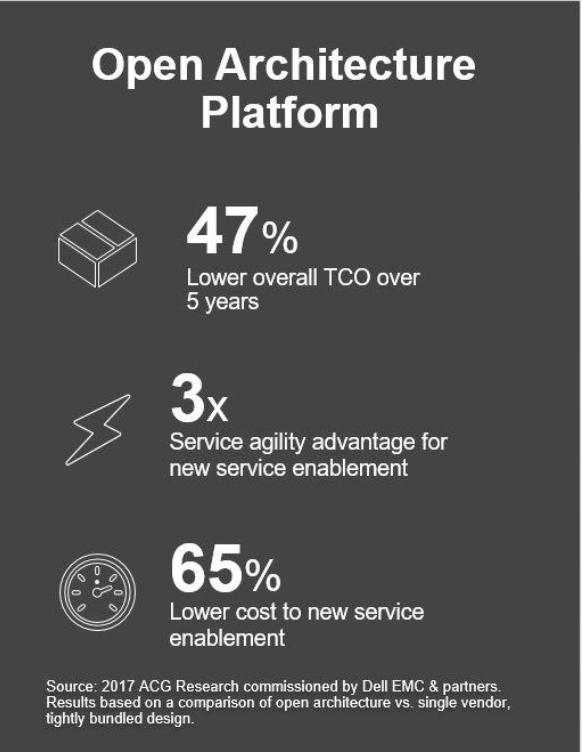
All of this, of course, is geared for a fairly savvy network department with most likely a large-scale operation to contend with. For the vast majority of IT shops, they won’t want to “crack the hood” of the network stack and disaggregate pieces. Instead, they will look for pre-packaged offerings derived from these larger “early adopter” experiences. For the larger early adopters, however, there can be virtually an immediate payback by customizing the networking stack, making any operational or technical hurdles well worth it.  These early adopters typically already live in a disaggregated world and hence will feel comfortable mixing and matching hardware, OS layers, and protocols to optimize their network infrastructure. A Tier 1 service provider deployment analysis by ACG Research estimates the realized gains with a disaggregated approach to be 47% lower for TCO, three time the service agility for new services at less than a third of the cost to enable them.

And it is worth noting the prominent role that open source technologies play in disaggregating the networking software stack. In fact, many would contend that open source technologies are foundational and critical to how this happens. This adds in a community aspect to innovation, arguably accelerating its pace along the way. Which brings us back full circle to why people want this level of disaggregation – to have more control over how networking software is architected and written, and how networks operate.

Linux.com: How does the disaggregation of the networking stack help fuel innovation in other areas, for example edge computing and IoT?

Baher: Edge computing is interesting as it really is the confluence of compute and networking. For some, it may look like a distributed data center, a few large hyperscale data centers with spokes out to the edge for IoT, 5G and other services. Each edge element is different in capability, form factor, software footprint and operating models. And when viewed through a compute lens, it will be assumed to be inherently a disaggregated, distributed element (with compute, networking and storage capabilities). In other words, hardware elements that are open, standards-based and without any software dependencies. And software for the IoT, 5G and enterprise edge that is also open and disaggregated such that it can be right-sized and optimized for that specific edge task. So if anything, I would say a disaggregated “composite” networking stack is a critical first step for enabling the next-generation edge.

We’re seeing this with mobile operators as they look to NFV solutions for 5G and IoT edge. We’re also seeing this at the enterprise edge, in particular with universal CPE (uCPE) solutions. Unlike previous generations where the enterprise edge meant a proprietary piece of hardware and monolithic software, it is now rapidly transforming into a compute-oriented open model where select networking functions are selected as needed. All of this is made possible by disaggregating the networking functions and applications from the underlying operating system. A ‘not so big a deal’ thing if from a server-minded vantage point, monumental if you come from “networking land”. Exciting times once again in the world of open networking!

Sign up to get the latest updates on ONS NA 2018!

Creating an Open Source Program for Your Company

The recent growth of open source has been phenomenal; the latest GitHub Octoverse survey reports the GitHub community reached 24 million developers working across 67 million repositories. Adoption of open source has also grown rapidly with studies showing that 65% of companies are using and contributing to open source. However, many decision makers in those organizations using and contributing to open source do not fully understand how it works. The collaborative development model utilized in open source is different from the closed, proprietary models many individuals are used to, requiring a change in thinking.

An ideal starting place is creating a formal open source program office, which is a best practice pioneered by Google and Facebook and can support a company’s open source strategy. Such an office helps explain to employees how open source works and its benefits, while providing supporting functions such as training, auditing, defining policies, developer relations and legal guidance. Although the office should be customized to a specific organization’s needs, there are still some standard steps everyone will go through.

Read more at Information Week

A Guide To Securing Docker and Kubernetes Containers With a Firewall

Before deploying any container-based applications, it’s crucial to first protect its security by ensuring a Docker, Kubernetes, or other container firewall is in place. There are two ways to implement your container firewall: manually or through the use of a commercial solution. However, manual firewall deployment is not recommended for Kubernetes-based container deployments. Regardless, with either strategy, creating a set of network firewall rules to safeguard your deployment is critical so that the containers are defended from unwanted access into your sensitive systems and data.

The accelerated discovery of new vulnerabilities and exploits reinforces the necessity of proper container security. The creativity of the hackers behind the Apache Struts, the Linux stack clash, and the dirty cow exploits – all made infamous by major data breaches and ransomware attacks – prove that businesses never know what is coming next. Furthermore, these attacks feature a sophistication that requires more than just vulnerability scanning and patching to address the threats.

Read more at SDxCentral

CNCF Webinar to Present New Data on Container Adoption and Kubernetes Users in China

Last year, the Cloud Native Computing Foundation (CNCF) conducted its first Mandarin-language survey of the Kubernetes community. While the organization published the early results of the English-language survey in a December blog post, the Mandarin survey results will be released on March 20 in a webinar with Huawei and The New Stack.

Many of China’s largest cloud providers and telecom companies — including Alibaba Cloud, Baidu, Ghostcloud, Huawei and ZTE — have joined the CNCF. And the first KubeCon + CloudNativeCon China will be held in Beijing later this year.

The Mandarin survey results, when they are released, will help illuminate container adoption trends and cloud-native ecosystem development…

Read more at The New Stack