This week in Linux and open source news, let it snow! Open source software is improving snow science, Linus Torvalds answers questions about the fix for Intel’s security vulnerability, and more! Read on to stay in the know.
1) “Snow science recently took an about-face, thanks to the open-source software [project] known as SnowPilot.”
3) “The cable industry is turning to OpenStack for the development of virtualized network functions, and it’s hoping to learn a lesson or two from earlier telco forays.”
Intel reports that company has developed and is rapidly issuing updates for all types of Intel-based computer systems — including personal computers and servers — that render those systems immune from “Spectre” and “Meltdown” exploits reported by Google Project Zero. Intel and its partners have made significant progress in deploying updates as both software patches and firmware updates.
Intel continues to believe that the performance impact of these updates is highly workload-dependent and, for the average computer user, should not be significant and will be mitigated over time.
No individual, no matter how adept, can successfully implement open source compliance across an entire organization. Keeping track of where and how open source code is used, approved, and shipped must be a cross-functional team effort.
From core engineering and product teams, to legal counsel and upper management, compliance involves individuals in many roles from various departments throughout the company.
In this article, highlighting a chapter of The Linux Foundation ebook Open Source Compliance in the Enterprise by Ibrahim Haddad, we’ll give an overview of the roles and responsibilities that any open source compliance program should include. Together, these are the individuals who will make sure your company stays current and compliant with the open source licenses in the code you use and ship.
In this tutorial, I will walk you through how to setup and configure Spinnaker on Minikube. Once it is up and running, we will deploy and scale a containerized application running in Kubernetes.
Spinnaker is usually installed in a VM running Ubuntu 14.04 LTS. Thanks to the Helm community, it is now available as a Chart to install with just one command.
Install and Configure Minikube
Spinnaker is architected as a cloud-native, microservices application. It comes with a set of containers that are resource intensive. Typical Minikube installation doesn’t provide enough power for Spinnaker to run locally. We will customize Minikube configuration to make it powerful enough to host Spinnaker.
Serverless computing is either the perfect answer to an application deployment problem or an expensive disaster waiting to happen.
VMs, containers and serverless architecture all have distinct pros and cons, but serverless might break everything if the applications aren’t suited for that deployment architecture. To prevent an implosion in IT, give developers an educated assessment of serverless vs. containers for new deployments.
To determine the suitability of containers or serverless, contrast what each architecture type does, the user base for the application it will host and what is required for successful deployment.
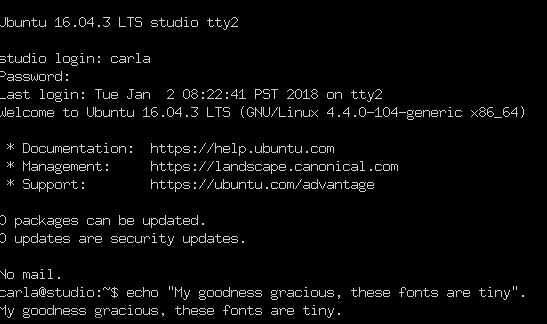
I try to be a peaceful soul, but some things make that difficult, like tiny console fonts. Mark my words, friends, someday your eyes will be decrepit and you won’t be able to read those tiny fonts you coded into everything, and then you’ll be sorry, and I will laugh.
Fortunately, Linux fans, you can change your console fonts. As always, the ever-changing Linux landscape makes this less than straightforward, and font management on Linux is non-existent, so we’ll muddle along as best we can. In this article, I’ll show what I’ve found to be the easiest approach.
What is the Linux Console?
Let us first clarify what we’re talking about. When I say Linux console, I mean TTY1-6, the virtual terminals that you access from your graphical desktop with Ctrl+Alt+F1 through F6. To get back to your graphical environment, press Alt+F7. (This is no longer universal, however, and your Linux distribution may have it mapped differently. You may have more or fewer TTYs, and your graphical session may not be at F7. For example, Fedora puts the default graphical session at F2, and an extra one at F1.) I think it is amazingly cool that we can have both X and console sessions running at the same time.
The Linux console is part of the kernel, and does not run in an X session. This is the same console you use on headless servers that have no graphical environments. I call the terminals in a graphical session X terminals, and terminal emulators is my catch-all name for both console and X terminals.
But that’s not all. The Linux console has come a long way from the early ANSI days, and thanks to the Linux framebuffer, it has Unicode and limited graphics support. There are also a number of console multimedia applications that we will talk about in a future article.
Console Screenshots
The easy way to get console screenshots is from inside a virtual machine. Then you can use your favorite graphical screen capture program from the host system. You may also make screen captures from your console with fbcat or fbgrab. fbcat creates a portable pixmap format (PPM) image; this is a highly portable uncompressed image format that should be readable on any operating system, and of course you can convert it to whatever format you want. fbgrab is a wrapper script to fbcat that creates a PNG file. There are multiple versions of fbgrab written by different people floating around. Both have limited options and make only a full-screen capture.
fbcat needs root permissions, and must redirect to a file. Do not specify a file extension, but only the filename:
$ sudo fbcat > Pictures/myfile
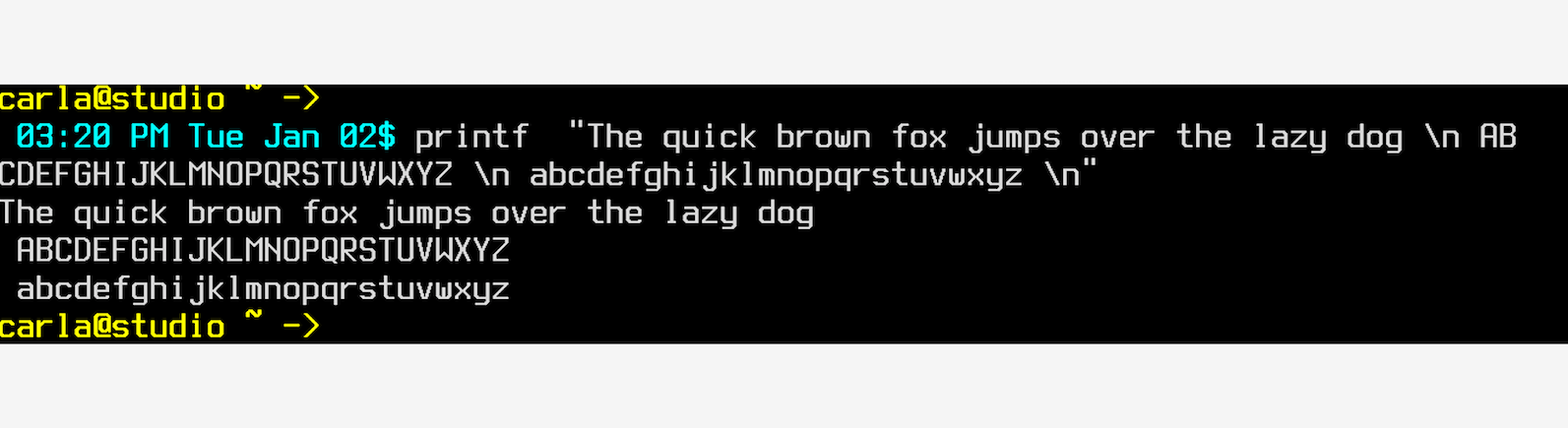
After cropping in GIMP, I get Figure 1.
Figure 1: View after cropping.
It would be nice to have a little padding on the left margin, so if any of you excellent readers know how to do this, please tell us in the comments.
fbgrab has a few more options that you can read about in man fbgrab, such as capturing a different console, and time delay. This example makes a screen grab just like fbcat, except you don’t have to explicitly redirect:
$ sudo fbgrab Pictures/myOtherfile
Finding Fonts
As far as I know, there is no way to list your installed kernel fonts other than looking in the directories they are stored in: /usr/share/consolefonts/ (Debian/etc.), /lib/kbd/consolefonts/ (Fedora), /usr/share/kbd/consolefonts (openSUSE)…you get the idea.
Changing Fonts
Readable fonts are not a new concept. Embrace the old! Readability matters. And so does configurability, which sometimes gets lost in the rush to the new-shiny.
On Debian/Ubuntu/etc. systems you can run sudo dpkg-reconfigure console-setup to set your console font, then run the setupcon command in your console to activate the changes. setupcon is part of the console-setup package. If your Linux distribution doesn’t include it, there might be a package for you at openSUSE.
You can also edit /etc/default/console-setup directly. This example sets the Terminus Bold font at 32 points, which is my favorite, and restricts the width to 80 columns.
The FONTFACE and FONTSIZE values come from the font’s filename, TerminusBold32x16.psf.gz. Yes, you have to know to reverse the order for FONTSIZE. Computers are so much fun. Run setupcon to apply the new configuration. You can see the whole character set for your active font with showconsolefont. Refer to man console-setup for complete options.
Systemd
Systemd is different from console-setup, and you don’t need to install anything, except maybe some extra font packages. All you do is edit /etc/vconsole.conf and then reboot. On my Fedora and openSUSE systems I had to install some extra Terminus packages to get the larger sizes as the installed fonts only went up to 16 points, and I wanted 32. This is the contents of /etc/vconsole.conf on both systems:
KEYMAP="us"
FONT="ter-v32b"
Come back next week to learn some more cool console hacks, and some multimedia console applications.
Learn more about Linux through the free “Introduction to Linux” course from The Linux Foundation and edX.
Things move fast in the realm of DevOps and containers, and serious system administrators need to keep up. The best way to do so may be to attend a conference or other tech event. This list helps you decide which ones are worth your time and money.
One way or the other, the world of enterprise software is changing and evolving. If you’re an IT professional, that means you need to keep a careful eye on trends, techniques, and technologies that can either help or hinder your career.
To help you stay in front of the looming tidal wave of changes sweeping across our industry, we compiled this list of conferences, summits, and events dedicated to DevOps and other critical elements of the rapidly transforming enterprise IT landscape.
Last year, Google’s Project Zero team discovered serious security flaws caused by “speculative execution,” a technique used by most modern processors (CPUs) to optimize performance.
The Project Zero researcher, Jann Horn, demonstrated that malicious actors could take advantage of speculative execution to read system memory that should have been inaccessible. For example, an unauthorized party may read sensitive information in the system’s memory such as passwords, encryption keys, or sensitive information open in applications. Testing also showed that an attack running on one virtual machine was able to access the physical memory of the host machine, and through that, gain read-access to the memory of a different virtual machine on the same host.
These vulnerabilities affect many CPUs, including those from AMD, ARM, and Intel, as well as the devices and operating systems running on them.
Hooking is a powerful programming technique for monitoring software behavior or extending functionality without altering the original code.The idea is to intercept certain events or system calls and use them to initiate your own custom code.
Hook splicing for Unix-like systems.
At Apriorit, we use hooking all the time when creating solutions for our clients, particularly in the areas of cybersecurity, data acquisition, and systems control. As part of our development efforts for Unix-like systems, we’ve created a custom solution for hooking based on the Linux splice technique (you can find decent description and splice Linux example here). We want to share it with you in this brief article.
Custom splice hooking technique for Unix-like systems
Our custom hooking technique for Unix-like systems was inspired by the popular Mhook library, the source code for which can be found on GitHub. This library is powerful for hooking, but supports only Windows platforms and includes surplus modules that aren’t acceptable for *nix.
To implement hooking in Unix, we took ideas from Mhook and modified them, increasing the flexibility and functionality of our tool in the process.
Splicing algorithm for *nix kernel
The general splicing hooking algorithm for *nix kernel hooks can be described as follows:
Store the memory from the required function pointer to the memory buffer (the size of stored memory should be equal to or greater than the jump instruction size). To get the identifier for a specific function in Linux, for example, you can use kprobes internals.
Rewrite the required function pointer with a jump instruction that contains a pointer to the hook function (“hook call” in Figure 1).
This stored buffer will be used for the original call, allowing to restore original call on the module removal or pause.
Executing an original call
Typically, we use the original function’s wrapping when replacing a function with a hook. But if an original call needs to be executed inside the hook or anywhere else, the algorithm’s approach should be modified to handle a larger buffer size.
After the original function pointer, analyze the memory via the disassembler. As a result of this analysis, you should retrieve the aligned instructions offset (the offset should be greater than the size of the jump instruction).
The memory buffer must have an executable flag (PAGE_KERNEL_EXEC). The size of the memory buffer should be calculated based on two parts: the calculated offset and the size of the jump back instruction to the memory from the original call, which stays after the inserted jump (“original call” in Figure 1).
Finally, the original function can be called by casting the stored buffer to the function’s signature and executing it.
This algorithm is visualized in Figure 1 for an x64 platform.
Advantages of this technique
Compared to existing solutions, this approach provides several advantages in terms of functionality:
Allows hooking of all available symbols in the kernel – this is especially useful if the kernel module in question works with internal kernel functions
Less noticeable to malware detectors – hooking can be used to create malware, and thus many Windows, macOS and Linux rootkit detection solutions often flag them as harmful, even if they are used legitimately. Since it’s impossible to test your hooks with all anti-malware software on the market, hooking techniques that don’t prompt false positives are all the more valuable.
Disadvantages of this technique
When we talk about disadvantages of this approach, we’re not talking about any flaws or limitations in terms of functionality, but rather about difficulties that arise in actual implementation. In this regard, there are two main disadvantages:
This technique requires a reliable disassembler, since libraries aren’t acceptable for *nix kernels.
This technique is architecture dependent, since each architecture has its own jump instructions.
Conclusion
We actively use the Unix splice hooking approach described above in projects we create for our clients here at Apriorit, particularly in the area of cybersecurity. We’ve implemented this hook type for a variety of architectures and kernel versions, including x86_64, x86, and ARM in Linux 2.6.32 to 4.10.
We hope that you find this approach useful and that you’ll be able to use some of the ideas presented in this article for your own hooking needs.
DevOps is a set of practices that automates the processes between software development and IT teams so they can build, test, and release software more quickly and reliably. The concept of DevOps is founded on building a culture of collaboration between IT and business teams, which have historically functioned in relative siloes. The promised benefits include increased trust, faster software releases, and the ability to solve critical issues quickly.
That said, implementing a successful DevOps organization requires IT leaders to think more broadly about how to spur a cultural and organizational shift within both their team and the broader organization, as opposed to simply deploying new technologies. A successful DevOps strategy requires a merged focus from both development teams and operational teams on what the company needs to meet its digital transformation objectives. Thus, it is about breaking down siloed groups of people and responsibilities, and—in their place—building teams that can multitask on technical issues and goals.