Just because we’re using containers doesn’t mean that we “do DevOps.” Docker is not some kind of fairy dust that you can sprinkle around your code and applications to deploy faster. It is only a tool, albeit a very powerful one. And like every tool, it can be misused. Guess what happens when we misuse a power tool? Power fuck-ups. Let’s talk about it.
I’m writing this because I have seen a few people expressing very deep frustrations about Docker, and I would like to extend a hand to show them that instead of being a giant pain in the neck, Docker can help them to work better, and (if that’s their goal) be an advantage rather than a burden in their journey (or their “digital transformation” if we want to speak fancy.)
Docker: hurting or helping the DevOps cause?
I recently attended a talk where the speaker tried to make the point that Docker was anti-devops, for a number of reasons (that I will list below.) However, each of these reasons was (in my opinion) not exactly a problem with Docker, but rather in the way that it was used (or sometimes, abused). Furthermore, all these reasons were, in fact, not specific to Docker, but generic to cloud deployment, immutable infrastructure, and other things that are generally touted as good things in the DevOps movement, along with cultural choices like cross-team collaboration. The speaker confirmed this when I asked at the end of the talk, “did you identify any issue that was specific to Docker and containers and not to cloud in general?” — there was none.
What are these “Docker problems?” Let’s view a few of them.
HTML, cascading stylesheets (CSS), and JavaScript have experienced massive growth and evolution over the past two decades, which should come as no surprise given the ever-expanding role of the internet in our lives. JavaScript development has come a long way since the early 1990s and IBM’s famous commercial depicting business’ early recognition of the internet’s significance. That commercial forever changed the role of the web developer. Before the business invasion, web developers were more artistic, but the influence of business and industry changed all of that.
More than 25 years have passed since the first web pages produced with JavaScript were developed, and things have improved immensely. Today, IDEs are well structured to validate your code, and self-contained environments help with testing and debugging web frontend logic. Now, learning JavaScript goes well beyond simply studying the language’s syntax.
Managing an open source project isn’t as easy as it sounds. A successful open source project is more than just making the source code available. In this article, Wayne Beaton and Gunnar Wagenknecht explain how you can make your open source project a runaway success.
Running an open source project is easy. All you have to do is make your source code available and you’re open source, right? Well, maybe. Ultimately, whether or not an open source project is successful depends on your definition of success. Regardless of your definition, creating an open source project can be a lot of work. If you have goals regarding adoption, for example, then you need to be prepared to invest. While open source software is “free as in beer”, it’s not really free: time and energy are valuable resources and these valuable resources need to be invested in the project.
With its open source Fn project, Oracle is looking to make a splash in serverless computing. The functions-based, open source serverless computing platform requires Docker and initially supports Java.
Fn is a container native serverless platform that can be run on-premises or in the cloud. It requires the use of Docker containers. Fn developers will be able to write functions in Java initially, with Go, Ruby, Python, PHP, and Node.js support planned for later. Applications can be built and run without users having to provision, scale, or manage servers, by using the cloud.
This week in open source news, CNCF made several announcements at CloudNativeCon+KubeCon including 1.0 releases from the containerd, Jaeger, CoreDNS and Fluentd projects.
1) CNCF releases a number of exciting updates at CloudNativeCon+KubeCon
3) OpenStack Foundation launches Kata Containers, which aims to combine the best of containers’ speed and flexibility with the best of virtual machines. The project is independent, but will be managed by OpenStack much like the way The Linux Foundation hosts its projects.
4) “Linus Torvalds last week rushed a patch into the Linux kernel, after researchers discovered the patch for 2016’s Dirty COW bug had a bug of its own.”
I’ve been a fan of SUSE and openSUSE for a long time. I’ve always wanted to call myself an openSUSE user, but things seemed to get in the way—mostly Elementary OS. But every time an openSUSE spin is released, I take notice. Most recently, I was made aware of GeckoLinux—a unique take (offering both Static and Rolling releases) that offers a few options that openSUSE does not. Consider this list of features:
Live DVD / USB image
Editions for the following desktops: Cinnamon, XFCE, GNOME, Plasma, Mate, Budgie, LXQt, Barebones
Plenty of pre-installed open source desktop programs and proprietary media codecs
Beautiful font rendering configured out of the box
Large amount of software available in the preconfigured repositories (preferring packages from the Packman repo—when available)
Based on openSUSE (with no repackaging or modification of packages)
Desktop programs can be uninstalled, along with all of their dependencies (whereas openSUSE’s patterns often cause uninstalled packages to be re-installed automatically)
Does not force the installation of additional recommended packages, after initial installation (whereas openSUSE pre-installs patterns that automatically installs recommended package dependencies the first time the package manager is used)
The choice of desktops alone makes for an intriguing proposition. Keeping a cleaner, lighter system is also something that would appeal to many users—especially in light of laptops running smaller, more efficient solid state drives.
Let’s dig into GeckoLinux and see if it might be your next Linux distribution.
Installation
I don’t want to say too much about the installation—as installing Linux has become such a no-brainer these days. I will say that GeckoLinux has streamlined the process to an impressive level. The installation of GeckoLinux took about three minutes total (granted I am running it as a virtual machine on a beast of a host—so resources were not an issue). The difference between installing GeckoLinux and openSUSE Tumbleweed was significant. Whereas GeckoLinux installed in single digits, openSUSE took more 10 minutes to install. Relatively speaking, that’s still not long. But we’re picking at nits here, so that amount of time should be noted.
The only hiccup to the installation was the live distro asking for a password for the live user. The live username is linux and the password is, as you probably already guessed, linux. That same password is also the same used for admin tasks (such as running the installer).
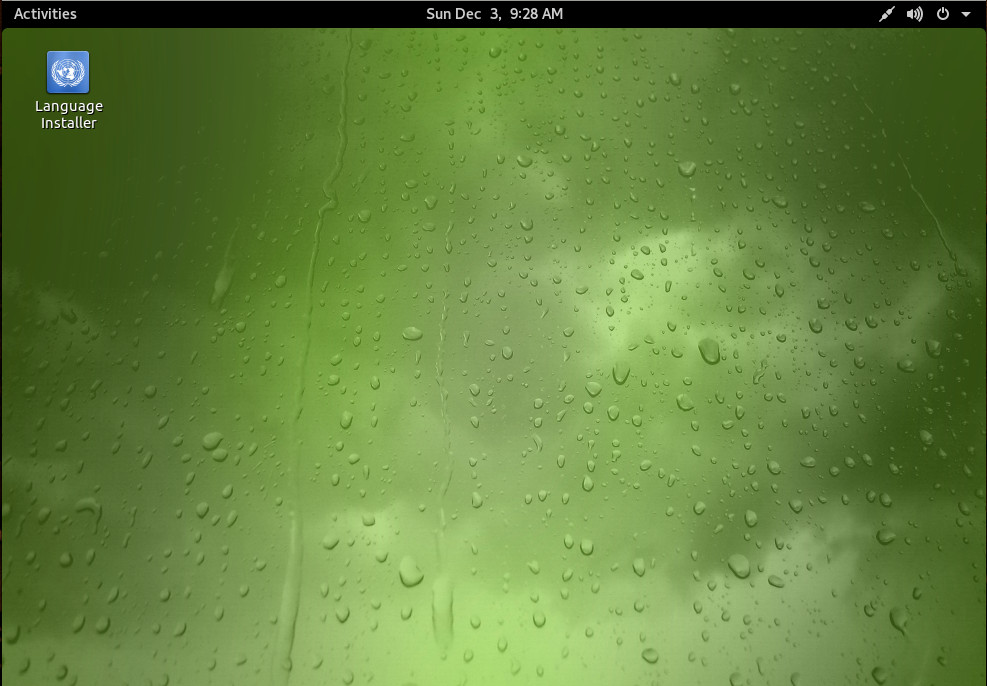
You will also note, there are two icons on the desktop—one to install the OS and another to install language packs. Run the OS installer. Once the installation is complete—and you’ve booted into your desktop—you can then run the Language installer (if you need the Language packs—Figure 1).
Figure 1: Clearly, I chose the GNOME desktop for testing purposes.
After the Language installer finished, you can then remove the installer icon from the desktop by right-clicking it and selecting Move to Trash.
Those fonts
The developer claims beautiful font rendering out of the box. In fact, the developer makes this very statement:
GeckoLinux comes preconfigured with what many would consider to be good font rendering, whereas many users find openSUSE’s default font configuration to be less than desirable.
Take a glance at Figure 2. Here you see a side by side comparison of openSUSE (on the left) and GeckLinux (on the right). The difference is very subtle, but GeckoLinux does, in fact, best openSUSE out of the box. It’s cleaner and easier to read. The developer claims are dead on. Although openSUSE does a very good job of rendering fonts out of the box, GeckoLinux improves on that enough to make a difference. In fact, I’d say it’s some of the cleanest (out of the box) looking fonts I’ve seen on a Linux distribution.
Figure 2: openSUSE on the left, GeckoLinux on the right.
I’ve worked with distributions that don’t render fonts well. After hours of writing, those fonts tend to put a strain on my eyes. For anyone that spends a good amount of time staring at words, well-rendered fonts can make the difference between having eye strain or not. The openSUSE font rendering is just slightly blurrier than that of GeckoLinux. That matters.
Installed applications
GeckoLinux does exactly what it claims—installs just what you need. After a complete installation (no post-install upgrading), GeckoLinux comes in at 1.5GB installed. On the other hand, openSUSE’s post-install footprint is 4.3GB. In defense of openSUSE, it does install things like GNOME Games, Evolution, GIMP, and more—so much of that space is taken up with added software and dependencies. But if you’re looking for a lighter weight take on openSUSE, GeckoLinux is your OS.
GeckoLinux does come pre-installed with a couple of nice additions—namely the Clementine Audio player (a favorite of mine), Thunderbird (instead of Evolution), PulseAudio Volume Control (a must for audio power users), Qt Configuration, GParted, Pidgen, and VLC.
If you’re a developer, you won’t find much in the way of development tools on GeckoLinux. But that’s no different than openSUSE (even the make command is missing on both). Naturally, all the developer tools you need (to work on Linux) are available to install (either from the command line or from with YaST2).
Performance
Between openSUSE and GeckoLinux, there is very little noticeable difference in performance. Opening Firefox on both resulted in maybe a second or two variation (in favor of GeckoLinux). It should be noted, however, that the installed Firefox on both was quite out of date (52 on GeckoLinux and 53 on openSUSE). Even after a full upgrade on both platforms, Firefox was still listed at release 52 on GeckoLinux, whereas openSUSE did pick up Firefox 57. After downloading the Firefox Quantum package on GeckoLinux, the application opened immediately—completely blowing away both out of the box experiences on openSUSE and GeckLinux. So the first thing you will want to do is get Firefox upgraded to 57.
If you’re hoping for a significant performance increase over openSUSE, look elsewhere. If you’re accustomed to the performance of openSUSE (it not being the sprightliest of platforms), you’ll feel right at home with GeckoLinux.
The conclusion
If you’re looking for an excuse to venture back into the realm of openSUSE, GeckoLinux might be a good reason. It’s slightly better looking, lighter weight, and with similar performance. It’s not perfect and, chances are, it won’t steal you away from your distribution of choice, but GeckoLinux is a solid entry in the realm of Linux desktops.
Learn more about Linux through the free “Introduction to Linux” course from The Linux Foundation and edX.
Open source programs are sparking innovation at organizations of all types, and if your program is up and running, you may have arrived at the point where maximizing the impact of your development is essential to continued success. Many open source program managers are now required to demonstrate the ROI of their technology development, and example open source report cards fromFacebookand Googletrack development milestones.
This is where the new, freeImproving Your Open Source Development Impactguide can help. The aim of the guide is to help you increase your development team’s efficacy through and with open source contributions. By implementing some of the best practices laid out in the guide, you can:
Reduce the amount of work needed from product teams
Minimize the cost to maintain source code and internal software branches
With the Kubernetes container orchestration engine, concepts and objects build on top of each other. An example we described previously is how deployments build on top of replica sets to ensure availability, and replica sets build on top of Pods to get scheduling for free.
What exactly happens when we delete a deployment? We would not only expect the deployment itself to be deleted, but also the replica sets and pods that are managed by the deployment.
Raspberry Pi users now have one more browser to choose from besides Chromium, Firefox, and Midori, with the newly-announced availability of an experimental version of power-user-focused Vivaldi.
The Blink-based browser from former Opera CEO Jon von Tetzchner is expanding beyond Windows, macOS, and Linux PCs to a range of ARM-based developer boards, including the Raspberry Pi, CubieBoard, Asus Tinker Board, and more.
The best way to celebrate the coldest, darkest time of year is to build fun Raspberry Pi and Arduino projects. These projects will light up the gloomiest gloom, fill your days with fun and your heart with joy, and all without draining your pocketbook. You can control lights and music, build a retro gaming console, build a cool weather station, build a photo frame, or just learn the basics and fiddle around randomly.
MicroPython on Arduino Smart Holiday Lights
When you want a versatile lighting project that you can tailor in all kinds of way, such as size, shape, animations, and colors, try MicroPython Smart Holiday Lights. It’s an advanced project that is great for learning a whole lot of cool stuff, like MicroPython, LED strip lights, and ESP8266 devices. ESP8266 is a 32-bit microcontroller with an embedded TCP stack, and ESP8266 boards are usually very small. This makes them a bit challenging to work with, which is a perfect reason to treat yourself to a good-quality lighted magnifier LED lamp. The small size also makes them quite versatile for easy embedding in all manner of objects.
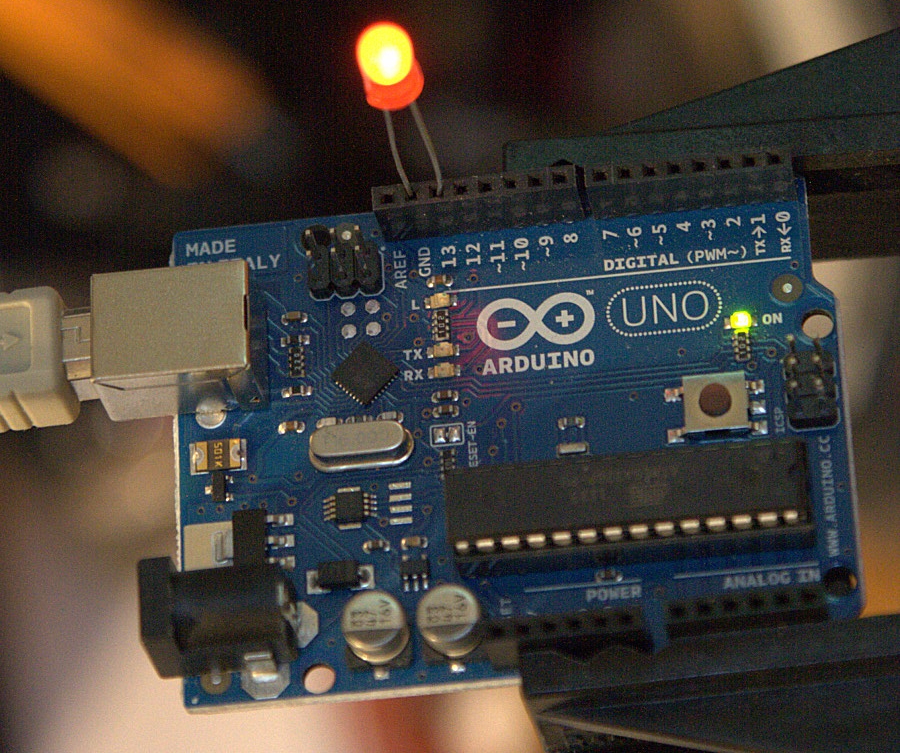
If you need something more basic to get started, try An Arduino Project: How To Make Flashy Christmas Lights Ornaments. This uses an Arduino Uno (Figure 1), a breadboard, and a pile of LEDs and resistors. The article links to a UK vendor for the parts, but any Arduino supplier has what you need. Breadboards are the bee’s knees for fast testing and learning, no soldering necessary.
5 Minute Christmas Neopixel Led Strip has minimal soldering, and gets right into the programming. (Remember, any soldered connections can also be made on a breadboard.) The xtmas_neopixel sketch is complete with 33 animations, which you can study and modify.
The parts links in are all for overseas vendors, but you can easily find them at any Arduino supplier.
Arduino Lights and Music
Christmas Lights to Music Using Arduino is a first-rate tutorial with loads of pictures and product links. Use it to control larger light projects, such as a great gob of lawn decorations. It is based on the Arduino Duemilanove, which has been superseded and improved by the Uno R3. The Uno R3 is a super-nice board with a reset button, USB interface chip, and a fuse.
This project uses a component you don’t often see in these projects, a solid-state relay board. SSRs are for projects that require a lot of high-speed switching, and they comes in many sizes, so you tailor it to your project.
It also uses an FM transmitter and landscape cables. When you successfully put all the pieces together you’ll have a flexible controller you can adapt for all kinds of scenarios.
Retro Gaming with Raspberry Pi
Holiday projects aren’t limited to lights and music. How about some classic gaming? Retro Gaming with Raspberry Pi builds a classic arcade game machine. It’s a fairly complicated project, but as always the Adafruit instructions are clear and complete, with extensive guidance on which hardware to use, such as game controllers, joysticks, and arcade buttons. Before you spend any money, you can download various emulators and test them first on your PC.
https://www.youtube.com/watch?v=tm6n126Mp5E?rel=0
Raspberry Weather
What’s the weather doing? You could look outside. Or you could build a Raspberry Weather station. This collects weather data over time and displays it in graphs on your web site. It’s a medium-complex project, but the tutorial is thorough and details all the steps, including how to set up a web site on WordPress.org to display your weather data.
Raspberry Pi Photo Frame
The Raspberry Pi Photo Frame is a good project for beginners. Your photos are stored on an SD card, and the screen is the Raspberry Pi 7″ touch screen. You could use a smaller screen and hang it on your Christmas tree.