Home Blog Page 443

Inside AGL: Familiar Open Source Components Ease Learning Curve

Among the sessions at the recent Embedded Linux Conference Europe (ELCE) 57 of which are available on YouTube — are several reports on the Linux Foundation’s Automotive Grade Linux project. These include an overview from AGL Community Manager Walt Miner showing how AGL’s Unified Code Base (UCB) Linux distribution is expanding from in-vehicle infotainment (IVI) to ADAS. There was even a presentation on using AGL to build a remote-controlled robot (see links below).

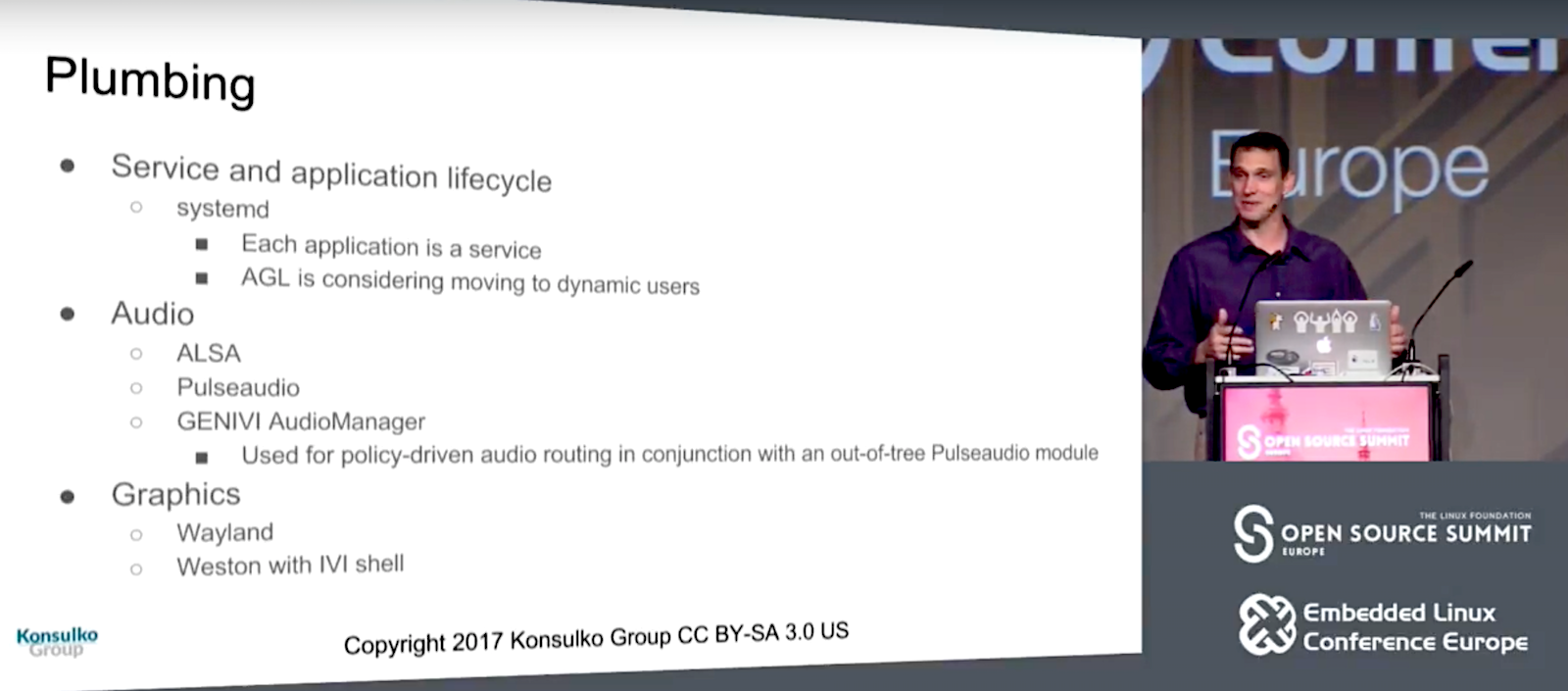
Here we look at the “State of AGL: Plumbing and Services,” from Konsulko Group’s CTO Matt Porter and senior staff software engineer Scott Murray. Porter and Murray ran through the components of the current UCB 4.0 “Daring Dab” and detailed major upstream components and API bindings, many of which will be appear in the Electric Eel release due in Jan. 2018.

Despite the automotive focus of the AGL stack, most of the components are already familiar to Linux developers. “It looks a lot like a desktop distro,” Porter told the ELCE attendees in Prague. “All these familiar friends.”

Some of those friends include the underlying Yocto Project “Poky” with OpenEmbedded foundation, which is topped with layers like oe-core, meta-openembedded, and metanetworking. Other components are based on familiar open source software like systemd (application control), Wayland and Weston (graphics), BlueZ (Bluetooth), oFono (telephony), PulseAudio and ALSA (audio), gpsd (location), ConnMan (Internet), and wpa-supplicant (WiFi), among others.

UCB’s application framework is controlled through a WebSocket interface to the API bindings, thereby enabling apps to talk to each other. There’s also a new W3C widget for an alternative application packaging scheme, as well as support for SmartDeviceLink, a technology developed at Ford that automatically syncs up IVI systems with mobile phones. 

AGL UCB’s Wayland/Weston graphics layer is augmented with an “IVI shell” that works with the layer manager. “One of the unique requirements of automotive is the ability to separate aspects of the application in the layers,” said Porter. “For example, in a navigation app, the graphics rendering for the map may be completely different than the engine used for the UI decorations. One engine layers to a surface in Wayland to expose the map while the decorations and controls are handled by another layer.”

For audio, ALSA and PulseAudio are joined by GENIVI AudioManager, which works together with PulseAudio. “We use AudioManager for policy driven audio routing,” explained Porter. “It allows you to write a very complex XML-based policy using a rules engine with audio routing.”

UCB leans primarily on the well-known Smack Project for security, and also incorporates Tizen’s Cynara safe policy-checker service. A Cynara-enabled D-Bus daemon is used to control Cynara security policies.

Porter and Murray went on to explain AGL’s API binding mechanism, which according to Murray “abstracts the UI from its back-end logic so you can replace it with your own custom UI.” You can re-use application logic with different UI implementations, such as moving from the default Qt to HTML5 or a native toolkit. Application binding requests and responses use JSON via HTTP or WebSocket. Binding calls can be made from applications or from other bindings, thereby enabling “stacking” of bindings.

Porter and Murray concluded with a detailed description of each binding. These include upstream bindings currently in various stages of development. The first is a Master binding that manages the application lifecycle, including tasks such as install, uninstall, start, and terminate. Other upstream bindings include the WiFi binding and the BlueZ-based Bluetooth binding, which in the future will be upgraded with Bluetooth PBAP (Phone Book Access Profile). PBAP can connect with contacts databases on your phone, and links to the Telephony binding to replicate caller ID.

The oFono-based Telephony binding also makes calls to the Bluetooth binding for Bluetooth Hands-Free-Profile (HFP) support. In the future, Telephony binding will add support for sent dial tones, call waiting, call forwarding, and voice modem support.

Support for AM/FM radio is not well developed in the Linux world, so for its Radio binding, AGL started by supporting RTL-SDR code for low-end radio dongles. Future plans call for supporting specific automotive tuner devices.

The MediaPlayer binding is in very early development, and is currently limited to GStreamer based audio playback and control. Future plans call for adding playlist controls, as well as one of the most actively sought features among manufacturers: video playback support.

Location bindings include the gpsd based GPS binding, as well as GeoClue and GeoFence. GeoClue, which is built around the GeoClue D-Bus geolocation service, “overlaps a little with GPS, which uses the same location data,” says Porter. GeoClue also gathers location data from WiFi AP databases, 3G/4G tower info, and the GeoIP database sources that are useful “if you’re inside or don’t have a good fix,” he added.

GeoFence depends on the GPS binding, as well. It lets you establish a bounding box, and then track ingress and egress events. GeoFence also tracks “dwell” status, which is determined by arriving at home and staying for 10 minutes. “It then triggers some behavior based on a timeout,” said Porter. Future plans call for a customizable dwell transition time.

While most of these Upstream bindings are well established, there are also Work in Progress (WIP) bindings that are still in the early stages, including CAN, HomeScreen, and WindowManager bindings. Farther out, there are plans to add speech recognition and text-to-speech bindings, as well as a WWAN modem binding.

In conclusion, Porter noted: “Like any open source project, we desperately need more developers.” The Automotive Grade Linux project may seem peripheral to some developers, but it offers a nice mix of familiarity grounded in many widely used open source projects — along with the excitement of expanding into a new and potentially game changing computing form factor: your automobile. AGL has also demonstrated success you can now check out AGL in action in the 2018 Toyota Camry, followed in the coming month by most Toyota and Lexus vehicles sold in North America.

Watch the complete video below:

Sign up for ELC/OpenIoT Summit & Open Source Summit updates to get the latest information:
Securing Helm

There are four steps you should take if you are running Tiller (Helm’s server-side component) in a cluster that has untrusted users or pods. These steps are done at installation time, and will substantially improve Helm’s security.

The easiest way to install Tiller is with the helm init command. Run just like that, it will install a version of Tiller into the cluster. But the version it installs has permissions equivalent to root (if the cluster does not have RBAC enabled). To configure Tiller with higher security, you will need to add some additional command line flags to the helm init call, and you will need to create some roles and role bindings.

Update: Since the original version, the official documentation on RBAC was revised, and the link changed. This post has been updated accordingly.

1. Enable RBAC on Your Cluster, and Create Roles, SericeAccounts, and Role Bindings

Many Kubernetes clusters still do not have Role Based Access Control (RBAC) enabled. For security reasons, you should enable this. Each Kubernetes distribution has its own mechanism for enabling RBAC. Consult your distribution’s documentation.

Read more at TechnoSophos

4 Ways to Engage Your Organization’s Various Stakeholders

I’ve spent most of my professional life helping organizations be more open to their stakeholders. I’m a partner in a consulting company in Chile, whose typical customer is a for-profit organization wishing to develop some kind of public works project (for example, an electricity generation station, a transmission line, a mine, a road, an airport, or something similar). Projects like these typically aim to fill a social need—but they’re often intended for locations where development and operation can have negative impacts (or, in economic terms, “externalities”).

Old school development theory, based on John Stuart Mill’s Utilitarianism, is willing to sacrifice local good for overall benefit to society. Recently, however, a number of factors (including improved communications and the growth of interest in rural tourism, as well as the non-essential “needs” that many of us hope to satisfy) have created a situation in which local interests are not at all willing to sacrifice any more of their immediate neighborhood to provide benefits to people who live and work far away. Today, we see a growing amount of well-coordinated and very visible resistance to this kind of development.

Read more at OpenSource.com

Linux Antivirus and Anti-Malware: 8 Top Tools

Malware and viruses on a Linux system? You weren’t operating under the illusion that using Linux meant you don’t have to worry about that, were you? Fake news!

We’ve pulled together this roundup of some of the best malware protection and antivirus programs to help keep your Linux box firmly in the safe zone.

Read more at CSO Online


Set Up a Raspberry Pi Wireless Access Point

Set up a wireless access point with a Raspberry Pi 3, Ubuntu Core, and snaps.

Router coverage gaps often have different causes, which repeaters and access points (APs) can remedy. A repeater usually connects to the router over WiFi and amplifies the signal into areas where the router alone is not sufficient, whereas an AP wired to the router by cable sets up a private WiFi network with its own network identifier (SSID). The AP therefore provides additional access to the local network.

A highly portable Raspberry Pi is ideal for setting up a small and cheap WiFi AP suitable for many applications. For example, you could stretch a network into the back garden or provide Internet to an awkwardly located conference room.

The easiest route is to use a Raspberry Pi 3 (RPi3), which already has a WiFi module. Previous models can be prepared for the new task with a dongle, available for just a few dollars. Even the Rasp Pi 3 could benefit from a WiFi stick, because the internal connections of the installed module do not deliver the performance of a good dongle.

Read more at LinuxPro

JavaScript and Functional Programming: An Introduction

I had this itching feeling that a better, cleaner approach to developing software had to exist. I had heard whispers about functional programming, and how it allows developers to write more concise and elegant code. I was unknowingly exposed to functional paradigms and patterns for the first time while working with React and Redux. They both incorporated some of the principles, and I liked them. I read about FP — to my initial dismay I saw its paradigms were based on abstract mathematical concepts and that it was very prevalent in academia. Being that my goal is to ship products as fast as possible, this seemed like a counterintuitive approach to what I was trying to achieve. After 4 years in engineering school, I was pretty set on the opinion that academia only tackled theoretical problems, and was unlikely to ever help me in my day-to-day of building things.

But FP kept haunting me. Elegant solutions and paradigms were sprinkled online in all my favorite open source projects, blog posts and tutorials. I put my skeptecism aside and started delving into FP.

Read more at HackerNoon

Installation Guide for Collectd and Collectd-Web to Monitor Server Resources in Linux

Collectd, a Unix daemon that collects statistics related to system performance and also provides means for storing the values in different formats like RRD (Round Robin Database) files. The statistics gathered by Collectd help to detect the current performance blocks and predict system load in future.

Collectd-web is a web-based front-end monitoring tool for RRD data gathered by Collectd. It is based on contrib/collection.cgi which is a demo CGI script included in Collectd.  It interprets and generates the statistics in the form of graphical HTML page that can be executed by the Apache CGI gateway with minimum configurations needed on Apache web server side.

The graphical web interface with the produced stats can also be executed by the standalone web server provided by Python CGI HTTP Server script, a pre-installed script with the main Git repository. 

In this tutorial, you will learn the installation process of Collectd service and Collectd-web interface on CentOS7/Fedora/RHEL and Ubuntu/Debian based systems with minimum configurations required to be done for running the services and enabling a Collectd service plug-in.

Step 1:- Install Collectd Service

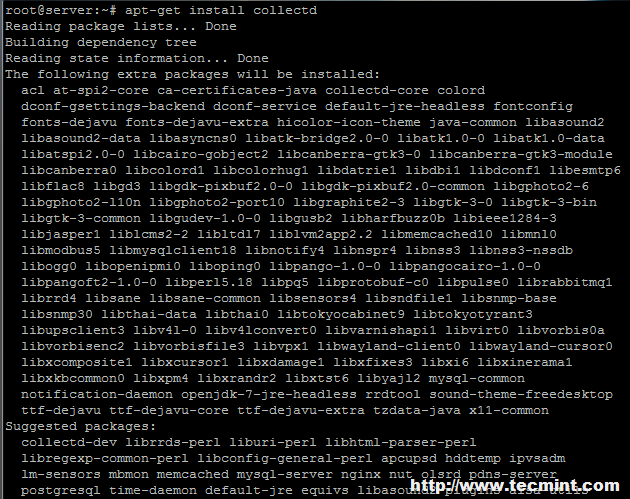
  1. The basic task of Collectd daemon is to collect and store data stats on the system that it runs on. You can download and install Collectd package from the default Debian based distribution repositories by running the following command –

On Ubuntu/Debian

# apt-get install collectd			[On Debian based Systems]

Image Source: tecmint.com

On RHEL/CentOS 6.x/5.x

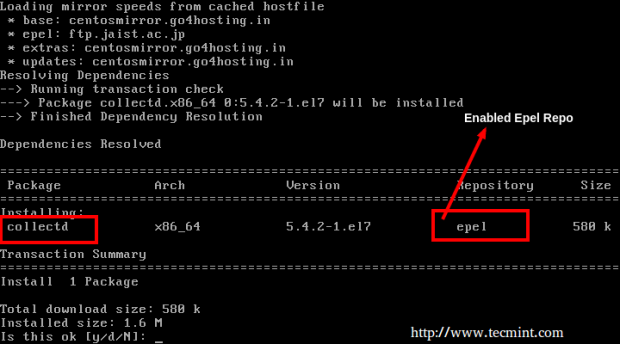
If you have older RedHat base systems like Fedora/CentOS, you need to enable EPEL repository first on your system and then install Collectd package from it.

# yum install collectd

On RHEL/CentOS 7.x

You can install and enable EPEL repository from default yum repos as displayed below –

# yum install epel-release
# yum install collectd


Image Source: tecmint.com

Note: If you are a Fedora user, there is no need to enable any third-party repositories. Only type yum, to get the Collectd package from default yum repositories.

2. Once the installation of package is done on your system, to start the service run the below command –

# service collectd start			[On Debian based Systems]
# service collectd start                        [On RHEL/CentOS 6.x/5.x Systems]
# systemctl start collectd.service              [On RHEL/CentOS 7.x Systems]

Step2: Install Collectd-Web and Other Dependencies

3. Ensure that the Git software package and the below required dependencies are installed on your machine prior to importing the Collectd-web Git repository.

----------------- On Debian / Ubuntu systems -----------------
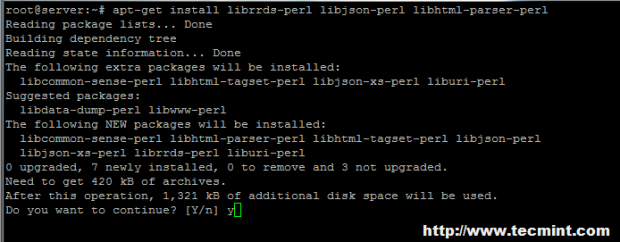
# apt-get install git
# apt-get install librrds-perl libjson-perl libhtml-parser-perl

Image Source: tecmint.com

----------------- On RedHat/CentOS/Fedora based systems -----------------
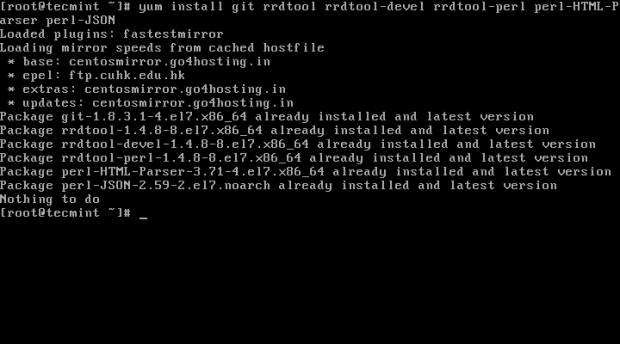
# yum install git
# yum install rrdtool rrdtool-devel rrdtool-perl perl-HTML-Parser perl-JSON

Image Source: tecmint.com

Step 3: Import Collectd-Web Git Repository and Modify Standalone Python Server

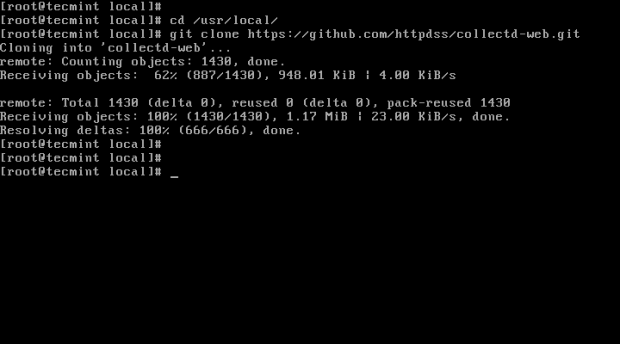
4. Next select and change the directory to a system path from the Linux tree hierarchy in order to import the Git project  and then run the command below for cloning Collectd-web git repository –

# cd /usr/local/
# git clone https://github.com/httpdss/collectd-web.git

Image Source: tecmint.com

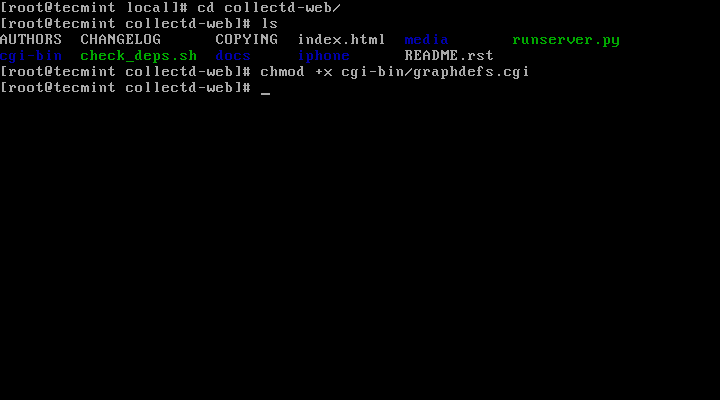
5. After the Git repository is imported on your system, enter the Collectd-web directory and list the contents for identifying the Python server script (runserver.py), which will be modified in the next step. Don’t miss to add execution permissions to the following CGI script: graphdefs.cgi.

# cd collectd-web/
# ls
# chmod +x cgi-bin/graphdefs.cgi

Image Source: tecmint.com

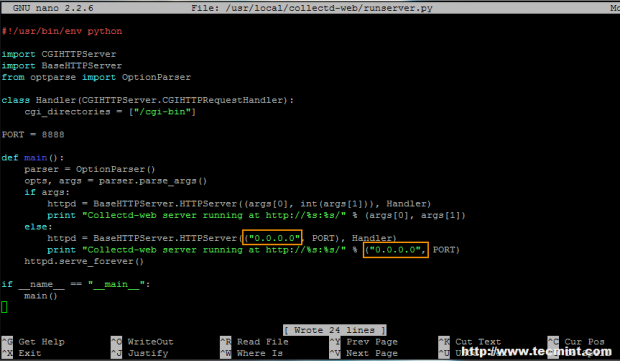
6. A by default configuration of Collectd-web standalone Python server script is set to run and bind only on loopback address (127.0.0.1).

If you want to access Colletd-web interface from a remote browser, edit the runserver.py script and change the above IP address to 0.0.0.0, to bind on all network interfaces IP addresses.

If you want to bind only to specific interface, use that interface’s IP address (don’t use this option if your network interface address is dynamically allocated by a DHCP server). Below is the screenshot for the appearance of the final runserver.py script –

# nano runserver.py

Image Source: tecmint.com

You can modify the PORT variable value in case you want to use another network port.

Step 4: Run Python CGI Standalone Server and Browse Collectd-web Interface

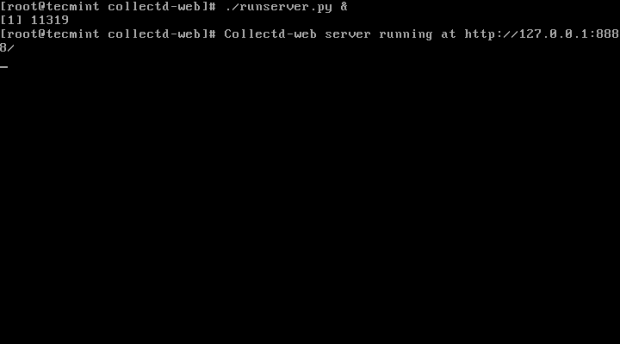
7. Once the standalone Python server script IP address binding is modified, start the server in the background with the below command –

# ./runserver.py &

Alternate method – Call the Python interpreter to start the server with the below command –

# python runserver.py &

Image Source: tecmint.com

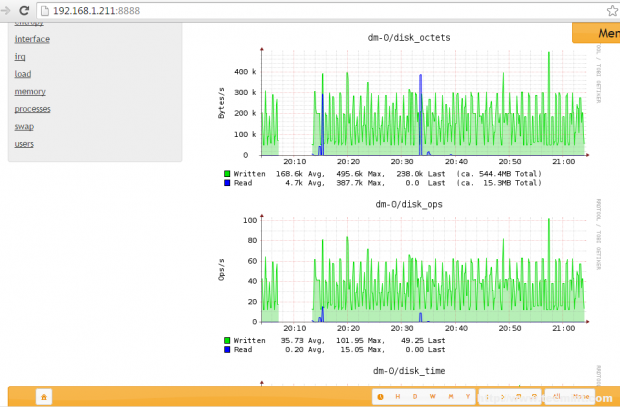
8. You can view the Collectd-web interface and statistics about your host by simply pointing the URL at your server IP address and port 8888 using HTTP protocol.

http://192.168.1.211:8888

You will by default see several graphics about disk usage, CPU, network traffic, processes, RAM and other system resources when you click on the host name displayed on Hosts form.

Image Source: tecmint.com

Image Source: tecmint.com

9. If you want to stop the standalone Python server, cancel or stop the script by hitting Ctrl+c key or simply use the command below –

# killall python

Check out more about linux servers here – https://www.eukhost.com/vps-hosting/linux.php

How to Manage Your Cloud Identities

The need to securely authenticate and authorize users and services is not restricted to the traditional IT infrastructure. In the cloud, where it takes just a few clicks to sign up to a new service and roll it out for the whole company, staying in control of your own identities is of particular importance. Only centralized user accounts allow you to keep control of all passwords and policies and keep you solely responsible for preventing leaks of authentication data. Luckily, centrally managed accounts are one of the things users like as well. It gives them the option to log in to many cloud services with one single identity that they use for their workstations anyway.

Therefore, let us first explore the benefits of running your IdM before stepping into the technologies used to connect some of the favorite cloud services.


Why Stay in Control of Your Identities

Today many identity management systems are offered to big and small companies. Some are based on open source software while others are based on proprietary software. However, many of them have in common that you cannot easily migrate your identities to a different service, for example, if you are not any more happy with it. Only if you have access to the backend, as you have with UCS or other Open Source Solutions, in addition to the shiny interface, can you genuinely choose where you want to store your identities. Having access to the backend and platform and being able to determine where your IdM runs, gives you distinct advantages over a closed management system that only provides you with a frontend and some connectors.

Firstly, an open platform and a directory allow you to connect your identities to the services of your choice instead of connecting them to the services approved by your IdM vendor. While in many cases all will use the same underlying open protocols to facilitate the connection, it is all too easy for a provider to block connections if a competing offer gives a considerable incentive to do it.

Just imagine, you successfully migrated all your emails to a new email provider, and suddenly your IdM provider decides not to support this provider anymore. You then have to choose whether to migrate your emails and your identities or to accept the management overhead of having two separate systems.

Secondly, if you are in control of the backend, it becomes possible to support further protocols by combining different open source projects. As an example, UCS currently offers, among others, connectors to quickly provision and manage identities used within Office 365 and G-Suite. As the backend is well documented and accessible to anyone running a UCS instance, it only will take a few lines of python code to provision Dropbox with the same information already in use. Without access to the backend, it becomes impossible to do these changes.

Technologies for a Connected Cloud

After looking at the reasons why you would like an open Linux based identity management system, let us focus on the technology used to create a central user identity management system.


Traditional Authentication and Authorization Stack

Traditional authentication and authorization protocols, such as LDAP and Kerberos, have been designed to work over both unreliable and untrusted connections. Thus, they can be used for authentication in the cloud as well. And often you find them when connecting your services, sometimes under the name AD services. LDAP connections can offer both authentication and authorization protocols. Or it can only provide the authorization and user management part, leaving the user authentication to Kerberos.

The reason to utilize the combination of LDAP and Kerberos is that an LDAP connection is established only between the authentication source and the service. The user enters his credentials thus with the service, and the service is then using the LDAP connection to authenticate the user. This process allows any service to phish the credentials of your users.

Kerberos, while offering a secure and trusted way to verify the password, has the disadvantage that the user needs to be able to reach the KDC on a protocol and ports that public networks most often block.

Thus, both protocols are more commonly used in on premises scenarios where the IT department is in control of both the systems and the network. Of course, both offer an excellent choice as a backend for the more purpose-built protocols, a scenario which can also be found in UCS.

Purpose-Built Authentication Protocols

Alternatives to the traditional protocols are purpose-built languages that utilize many of the design ideas behind Kerberos but are working with HTTP connections and cookies for the communication between the user, the authentication source, and the service. The three most popular ones are the Security Assertion Markup Language, commonly known as SAML, the Central Authentication Service, in short CAS, and OpenID.

OpenID has its origin in a more web-like approach. Many independent notes trust each other to authenticate their users and provide parts of their user identities without releasing their passwords. What differentiates OpenID from the other two protocols is that there is no needed trust between the identity provider and the service provider. The basic idea was that you provide a unique URL from your identity provider to authenticate yourself and any service provider will accept your identity.

SAML and CAS, in contrast, rely on a controlled federation of service providers and identity sources. Usually, the administrator of the identity provider has to establish a trust relationship to a particular service before the user can authenticate with his account at that specific service.

The authentication itself is similar in most cases. The user goes to the website of the service and enters his ID, in most cases as an email address. Afterwards, the service redirects the user to the particular identity provider that was identified to belong to the address or domain. The user enters his credentials at the identity provider website and gets a token that authenticates him at the services. This description is only a general overview. There are numerous minor differences and possible enhancements that set the different languages apart from each other, but all identify the user and authorize him to use a particular service.


User Defining Attributes

Identifying users is an essential but only small part of managing your users. However, it is the better defined and standardized part. The more significant challenge often is to provision the users in a particular service and to provide well-known attributes associated with an account such as the name of the user or his email address.

Just think about the following scenario. The company uses the first letter of your first name, the first letter of your last name and a random identifier, e.g., KK987654@idp.univention.com as the identifier for authenticating the users. G-Suite will at least need your email and name to create a professionally looking sender in every email. Dropbox, on the other hand, might need your group memberships to add you to a specified folder but might also want your email to be able to notify you when one of your folders changes.

Unfortunately, most services provide their custom API, making connectors, such as our G-Suite connector, necessary for provisioning users within the respective applications. Of course, most services offer their toolkits for the integration. However, there is little standardization between these APIs, thus the need for many different connectors.

For some time it seemed that OAuth appeared to gain traction in overcoming this particular issue. OAuth thereby represents a standardized set of APIs that allow a user to share its identity and attributes without sharing the actual login. It is still common today, whenever you hit a button “Log in to Google” or “Log in to LinkedIn”, there is an OAuth data transfer happening in the background. However, this convenience does not extend beyond the handful of providers in the customer space.

Conclusion

Providing centralized identities in the cloud to your users, enables you to manage your users in one convenient location and provision them to different cloud services. The same applies for changing or deleting a user, adding to the convenience of managing your user base in a cloud-centric world.

Most importantly, however, it increases the comfort of your users who only need a single username and password without needing to worry that one hacked service would compromise all other logins.

Accordingly, a central identity management system, such as UCS, which encompasses your cloud services, should be a fundamental part of any IT department.

Java Microservices, Resiliency, and Istio

This article is part of the KubeCon + CloudNativeCon North America 2017 series.

KubeCon + CloudNativeCon gathers all Cloud Native Computing Foundation (CNCF) projects under one roof to further the advancement of cloud native computing. At the upcoming event in Austin, Animesh Singh and Tommy Li of IBM will discuss how to build, deploy, and connect Java microservices with Istio service mesh. In this article, Singh offers a preview of their presentation.

Linux.com:  Microservices and Java are being mentioned together very frequently. What’s the current state?

Animesh Singh: Microservices, Java! These two terms go together very well: there are excellent frameworks in place to support building epic microservices in Java. Microservices are containerized in one way or another, and there’s some movement in the Java ecosystem around how those containers are built. The Java community has been using Java EE within a microservices architecture for quite a while now, and it has resulted in multiple approaches, both in product implementations and design patterns.

You can pack everything into one “uber-jar” that you shove into a more generic Java container, or you can deploy a thinner WAR file into a more tailored image. The end goal for either approach is similar — a lightweight container with simple configuration that boots quickly using only essential components. Some frameworks that are becoming popular in this space include MicroProfile and Spring Boot.

Linux.com:  Can you shed some light on MicroProfile microservices framework and where it is headed?

Singh: Sure. So what began as a collection of independent discussions and many innovative microservice efforts within existing Java EE projects — for example, WildFly Swarm, WebSphere Liberty, TomEE, and others — have finally coalesced around common ground to form MircoProfile. MicroProfile is a baseline platform definition that optimizes Enterprise Java for a microservices architecture.

Linux.com:  So with these proliferation of microservices, where you can have 100s and 1000s of instances running, would`t resiliency and fault tolerance become very important? Do these frameworks provide and resiliency features?

Singh: Yes. Since we are talking about MicroProfile, MicroProfile 1.2 had recently added a lot of resiliency features like Circuit breakers, Health checks,  Retries/Timeouts etc. which can be enabled by simple changes in code/configuration.

Linux.com:  Nice.  But what if you don’t want to change your application code? And if you are running polyglot microservices?

Singh: Great question. That`s where Service Mesh architecture shines. Istio provides an easy way to create this polyglot service mesh by deploying a control plane and injecting sidecar containers alongside your microservice. Istio adds fault-tolerance to your application without any changes to code. By injecting Envoy proxy servers into the network path between services, Istio provides sophisticated traffic management controls, such as load-balancing and fine-grained routing, as well resiliency and fault tolerant mechanisms

Linux.com:  And finally where can I learn more about these?

Singh: Join our talk at Kube Con in Austin, as well as visit the IBM Code site to try our pattern we have created for Java and Istio resiliency.

M64CZUce7BpBj72HWvd00xtixao8QJuiO1kOEQix
 

Animesh Singh
Animesh Singh is an STSM and Lead for IBM Cloud, Containers and InfrastructureDeveloper Technology. He has led major initiatives for IBM Cloud and Bluemix and currently works with developers to design and develop cloud-computing solutions around Kubernetes, Docker, Serverless, OpenWhisk, OpenStack and Cloud Foundry.

Long-Term Linux Support Future Clarified

In October 2017, the Linux kernel team agreed to extend the next version of Linux’s Long Term Support (LTS) from two years to six yearsLinux 4.14. This helps Android, embedded Linux, and Linux Internet of Things (IoT) developers. But this move did not mean all future Linux LTS versions will have a six-year lifespan.

As Konstantin Ryabitsev, The Linux Foundation‘s director of IT infrastructure security, explained in a Google+ post, “Despite what various news sites out there may have told you, kernel 4.14 LTS is not planned to be supported for 6 years. Just because Greg Kroah-Hartman is doing it for 4.4 does not mean that all LTS kernels from now on are going to be maintained for that long.”

Read more at ZDNet