Just when it seemed that the dream for an open source Linux phone had run its course, several new hardware and software projects have emerged, and some older projects have sought new life as aftermarket replacements. The biggest news in recent weeks was the endorsement by the KDE project and GNOME Foundation for Purism’s new open source Librem 5 phone. Also, Raspberry Pi lovers are anticipating the upcoming Crowd Supply campaign for RPi Zero based ZeroPhone project.
Projects focusing primarily on open source Linux firmware replacements for older Android phones include the Halium OS project, which is setting itself up as sort of a Yocto-style project for standardizing mobile Linux components. There’s also an early-stage PostmarketOS project focused on long lifecycle updates (see farther below).
Unlike many of the failed Linux phone projects that emerged earlier this decade, none of these projects are backed by major corporations. That lack of financial clout combined with the strength of the well-entrenched Android and iOS platforms, would seem to doom these projects from the start. Yet, boosters point to embedded hardware projects like the Raspberry Pi Foundation as a guiding light. Perhaps the Pi thrived in part due to its grassroots nature and the lack of a major corporation to screw it up.
Others argue that the battle has already been won. According to IDC, the Linux-based Android represented 85 percent of the global smartphone market in the first quarter. Android is more open source than almost any successful tech standard in consumer electronics history.
Yet, Android includes a lot of proprietary components, and there’s very little transparency or inclusiveness in the project’s governance. Google decides what it wants, and that’s that. True, their generally top-notch work pops out the other side as fully open source Android Open Source Project (AOSP) code, but it doesn’t come free with the cool stuff like Google Maps, Google Assistant, and especially Google Play. In addition, much of the codebase is out of step with mainstream Linux, and there are always the ongoing complaints about security, privacy, fragmentation, lack of timely updates, and corporate intrusion.
A decade ago, we began to see alternative, open source mobile Linux projects starting with OpenMoko and the related Greenphone, and then LiMo and the Moblin/MeeGo/Mer variants. These were followed by Firefox OS, Tizen, Sailfish, and Ubuntu Touch.
In recent years, most of these projects came crashing down. First, there was the collapse of Firefox OS, and then the death of the Ubuntu Phone. Between these two discontinuations, struggling Finnish firm Jolla gave up on its Sailfish based hardware and turned to software. Samsung is still selling Tizen phones in Asia, but the focus is increasingly on Tizen smartwatches and consumer electronics.
Can the new players do any better? Here’s a closer look at the new wave of open source mobile Linux projects:
Librem 5
Purism’s privacy-minded, 5-inch Librem 5 smartphone began crowdfunding in late August. With 24 days left, it’s more than halfway toward its ambitious $1.5 million goal.
The campaign got a boost in recent weeks from endorsements by the two major Linux desktop projects. First KDE announced it was working to bring its open source Plasma Mobile aftermarket distribution to the Librem 5, and then the GNOME Foundation said it was porting the GNOME/GTK desktop to the platform.
Assuming Purism gets its funding, the Librem 5 phone will ship as early as January with a version of the PureOS distribution that already runs on Purism’s Librem laptops. PureOS is a derivative of Debian that defaults to a GNOME 3 desktop with Wayland. The stack includes a homegrown PureBrowser with the Tor browser, the Duck Duck Go search engine, the EFF Privacy Badger, and HTTPS: Everywhere.
Promoted as the world’s first ever IP-native mobile handset, the unlocked Librem 5 offers end-to-end encrypted decentralized communication that covers calls, texts, and emails. The phone supports VPN services, and provides hardware kill switches for the front and back cameras, microphone, WiFi/Bluetooth radio, and baseband. The phone is equipped with 3GB of LPDDR3, 32GB eMMC, microSD, SIM, GPS, USB, and sensors.
Under the hood, you’ll find NXP’s quad-core Cortex-A9 i.MX6, which is far less powerful than mid-range Android phone SoCs. Yet, the i.MX6 has the advantages of low power consumption, widespread familiarity among developers, and a Vivante GPU supported by the open Etnaviv accelerated driver. Purism plans to move to the quad -A53 i.MX8, but the SoC has been delayed.
The Librem 5’s design separates the CPU from the baseband modem, letting developers “dig deeper and deeper to protect your privacy and isolate components for a strong security hardware stack,” says Purism. The company also plans to remove as many proprietary components as possible, and eventually open source the hardware.
ZeroPhone
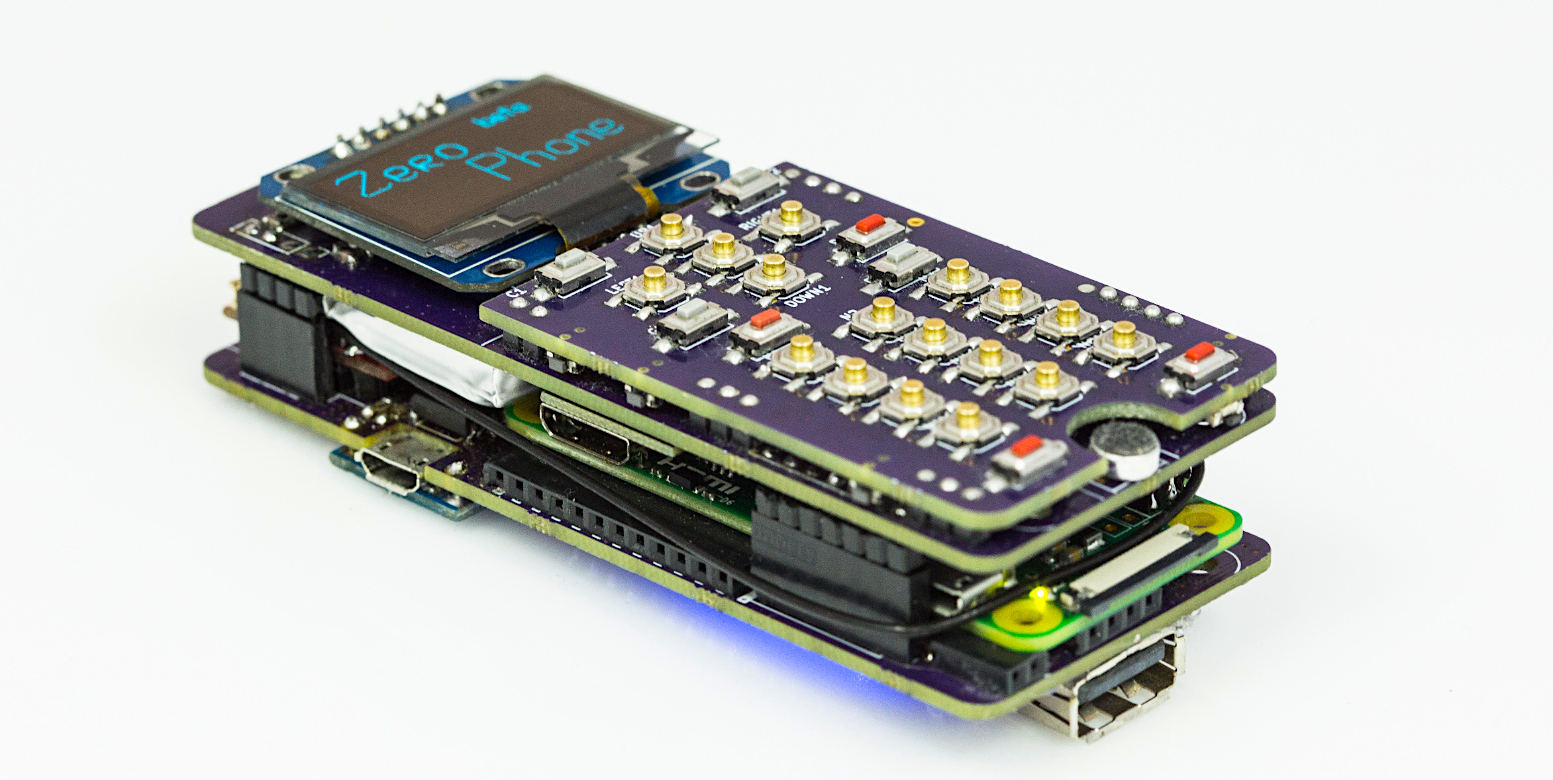
The ZeroPhone was announced in January as a DIY Hackaday project. It’s launching soon on Crowd Supply, which already has a landing page. The open hardware ZeroPhone is based on open source hardware including the Raspberry Pi Zero, Espressif’s ESP8266 WiFi module, and an ATMega328P MCU borrowed from an Arduino Pro Mini. Together with other off-the-shelf components, the parts add up to only $50.
The current design is limited to a 1.3-inch, 128×64-pixel screen, but you can attach a monitor, keyboard, and mouse. It’s also limited to 2G GSM, with plans to move soon to 3G. Like the Librem 5, the ZeroPhone offers hardware switches, in this case for GSM, WiFi, and mic. Other features include extended batteries, 5- and 8-megapixel cameras, sensors, GPS, microSD, IR, and even Ethernet.
The Python-built interface offers root access to Raspbian Linux, which opens up a wide variety of applications. The stack provides security features, as well as automatic updates.
Linux mobile software projects: LuneOS, Sailfish X, PostmarketOS, Halium OS, etc.
The advantage of open source is never having to accept total defeat. Firefox OS, Ubuntu Touch, and other mobile Linux distros are still available for tinkering, and conceivably a company could swoop in and back the projects with major funding. Even the old Palm/HP WebOS, which is used by LG in its smart TVs, is now available in an open source LuneOS distro backed by PivotCE.
Designed as an OS replacement for Android phones and legacy HP WebOS devices, LuneOS provides a WebOS-like GUI built on Linux, Android, and Qt. The project seems to have picked up where the defunct Open WebOS left off.
Meanwhile, Jolla may have given up on its Jolla phone and tablet, but it’s still pushing its Mer-based Sailfish OS. Recently, Jolla partnered with Sony to offer Sailfish on the Android-based Sony Xperia X phone. It’s part of a Sony Open Devices Program that emerged from Sony’s earlier collaborations with AOSP.
The final, flashable “Sailfish X” build was set for release on Sept. 27, but has been postponed to Oct. 4. The code for DIY development was extremely buggy, according to Sept. 24 XDA-Developers post.
Another major software project, called PostmarketOS, is building a lightweight, touchscreen-friendly distro based on Alpine Linux. The project aims to keep your old Android phone alive with a 10-year support lifecycle. By comparison, the AOSP-based Android mods from LineageOS — the fork of the discontinued CyanogenMod — offers updates only for up to three years — if you’re lucky.
To enable such updates across multiple devices, the early stage PostmarketOS project is attempting to build a single kernel for all supported Android devices. It’s currently limited to very basic boot functionality on eight Nexus phones and other major models.
Alpine Linux requires only 5-6MB, according to this recent PostmarketOS report from Fossbytes. The story notes that Google is working on fixing the update problem on old Android phones with its Project Treble, but that, too, is an early stage project, and it doesn’t fix the root problem. Besides, many users are looking to be free of Google’s reach beyond any desire for frequent updates.
Finally, a new Halium Project is taking a different tack on the related issue of fragmentation. As explained in this CIO story, the project’s early-stage Halium OS is not a distribution, but a mobile framework designed to reduce coding duplication and fragmentation in a variety of mobile Linux distros.
For example, LuneOS, Mer, Plasma Mobile, SailfishOS, Ubuntu Touch, and AsteroidOS (for smartwatches), are all Linux distributions that offer varying levels of Android support. To do this, they all use libhybris to interact with Android blobs, but they all deploy it differently.
The Halium Project aims to standardize these libhybris interactions, as well as a common mobile Linux kernel and Android HAL layer. This would enable each project to differentiate on a top layer that sits on standardized mobile middleware, the Android HAL, and the underlying Linux kernel.
In many ways, Halium OS has the same goals as the old LiMo framework, some of which forms the basis of Tizen. The difference is that LiMo was developed primarily by mobile carriers while Halium is being built by open source developers. More modern equivalents would be the Yocto Project and Linaro.
Finally, there are plenty of specialized Android phones — and open source Android replacement distributions like LineageOS or Replicant — to consider as alternatives to standard commercial phones. Most of the phones are “hardened” security phones that are in some cases even less open source than Android. Secure Android phones include Bittium’s Bittium Tough Mobile, Silent Circle’s Blackphone 2, Motorola Solutions’s LEX L10, Sikur’s GranitePhone, TRI’s Turing Phone, and Sonim’s XP7 Public Safety.
Connect with the embedded Linux community at Embedded Linux Conference in Prague. You can view the schedule here. Linux.com readers receive an additional $40 off with code OSSEULDC20. Register Now!