As open source becomes more pervasive, companies are consuming products that have open source components. Today you literally can’t use any piece of software that doesn’t have any open source code in it, making it very complicated for companies to keep a tab on what they are consuming and stay compliant with open source licenses.
To help simplify matters is a new Linux Foundation project called Software Package Data Exchange. With SPDX, the Foundation hosts the project and owns the copyright on the specification and trademark assets. It’s an open community of volunteers and as such has people participating across a broad spectrum of companies, academia and other foundations.
Web development is progressing at incredible speed these days and trends that were hot in 2016, today will be considered nothing less than archaic. Users are having more control and power and companies are shifting their services according to the user needs, which may be unpredictable. In this article we will cover the biggest and most promising trends of web development.
Artificial intelligence
AI is something that is shaking modern IT world and companies are competing against each other to hire and maintain the best professionals of the industry. Started by Facebook and Google, artificial intelligence is applied in more and more apps these days allowing devices to think and act more like humans. The basic AI example is face recognition, which is widely used in Facebook photo tagging.
Apache Kafka is on a roll. Last year it registered a 260 percent jump in developer popularity, as Redmonk’s Fintan Ryan highlights, a number that has only ballooned since then as IoT and other enterprise demands for real-time, streaming data become common. Hatched at LinkedIn, Kafka’s founding engineering team spun out to form Confluent, which has been a primary developer of the Apache project ever since.
But not the only one. Indeed, given the rising importance of Kafka, more companies than ever are committing code, including Eventador, started by Kenny Gorman and Erik Beebe, both co-founders of ObjectRocket (acquired by Rackspace). Whereas ObjectRocket provides the MongoDB database as a service, Eventador offers a fully managed Kafka service, further lowering the barriers to streaming data.
This week I learned a few more things about how the Kubernetes scheduler works so I wanted to share! This kind of gets into the weeds of how the scheduler works exactly.
It’s also an illustration of how to go from “how is this system even designed I don’t know anything about it?” to “okay I think I understand the basic design decisions here and why they were made” without actually.. asking anyone (because I don’t know any kubernetes contributors really, certainly not well enough to be like PLEASE EXPLAIN THE SCHEDULER TO ME THANKS).
This is a little stream of consciousness but hopefully it will be useful to someone anyway. The best most useful link I found while researching this was this Writing Controllers document from the amazing amazing amazing kubernetes developer documentation folder.
Credit for the initial concept that developed into the World Wide Web is typically given to Leonard Kleinrock. In 1961, he wrote about ARPANET, the predecessor of the Internet, in a paper entitled “Information Flow in Large Communication Nets.” Kleinrock, along with other innnovators such as J.C.R. Licklider, the first director of the Information Processing Technology Office (IPTO), provided the backbone for the ubiquitous stream of emails, media, Facebook postings and tweets that are now shared online every day. Here, then, is a brief history of the Internet:
The precursor to the Internet was jumpstarted in the early days of computing history, in 1969 with the U.S. Defense Department’s Advanced Research Projects Agency Network (ARPANET). ARPA-funded researchers developed many of the protocols used for Internet communication today. This timeline offers a brief history of the Internet’s evolution:
1965: Two computers at MIT Lincoln Lab communicate with one another using packet-switching technology.
As the technology industry evolves, today’s system administrators need command of an ever-expanding array of technical skills. However, many experts agree that skills like effective communication and collaboration are just as important. With that in mind, in this series we are highlighting essential skills for sysadmins to stay competitive in the job market. Over the next several weeks, we will delve into important technical requirements as well as non-technical skills that hiring managers see as crucial.
Linux.com has published several lists highlighting important skills for sysadmins. These lists correctly balance generalized skills like problem solving and collaboration with technical skills such as experience with security tools and network administration.
Today, sysadmins also need command of configuration management tools such as Puppet, cloud computing platforms such as OpenStack, and, in some cases, emerging data center administration platforms such as Mesosphere’s Data Center Operating System. Facility with open source tools is also a key differentiator for many sysadmins.
As Dice data scientist Yuri Bykov has noted, “Like many other tech positions, the role of the system administrator has evolved significantly over time due, in large part, to the shift from on-premise data centers to more cloud-based infrastructure and open source technologies. While some of the core responsibilities of a system administrator have not changed, the expectations and needs from employers have.”
Promising outlook
Additionally, “as businesses have begun relying more upon open source solutions to support their business needs, the sysadmin role has evolved, with employers looking for individuals with cloud computing and networking experience and a strong working knowledge of configuration management tools. … The future job outlook for system administrators looks promising, with current BLS research indicating employment for these professionals is expected to grow 8 percent from 2014 to 2024,” Bykov said.
Experience with emerging cloud infrastructure tools and open source technologies can also make a substantial compensation difference for sysadmins. According to a salary study from Puppet, “Sysadmins aren’t making as much as their peers. The most common salary range for sysadmins in the United States is $75,000-$100,000, while the four other most common practitioner titles (systems developer/engineer, DevOps engineer, software developer/engineer, and architect) are most likely to earn $100,000-$125,000.”
Sysadmins who have experience with OpenStack and Linux can also fare better in the hiring and salary pool. Fifty-one percent of surveyed hiring managers said that knowledge of cloud platforms has a big impact on open source hiring decisions, according to the 2016 Linux Foundation/Dice Open Source Jobs Report. There is also healthy hiring demand for sysadmins, with 48 percent of respondents in the same study reporting that they are actively looking for sysadmins.
The fact that fluency with Linux can make a big difference for sysadmins should come as no surprise. After all, Linux is the foundation for many servers and cloud deployments, as well as mobile devices. Several salary studies have shown that Linux-savvy sysadmins are better compensated than others.
More to come
In this series, we will look at the essential skills sysadmins need to stay relevant and competitive in the job market, well into the future, which include:
Networking essentials
Cloud infrastructure
Security and authentication
Configuration and automation
DevOps
Professional certification
Communication and collaboration
Open source participation
As we explore these topics, we’ll keep three guiding principles in mind:
Successful sysadmins are actively moving up the technology stack with their skillsets and embracing open source as rapidly as organizations are doing so.
Training for sysadmins is more readily available than ever — ranging from instructor-led courses to online, on-demand courses that allow the student to set the pace.
Sysadmins have an increasingly crucial role in keeping organizations performing at their best.
This week in Linux and open source, Microsoft’s new CNCF membership represents the company’s ongoing love for open source, Adobe Flash is the subject of enthusiast rescue mission, and much more
1) Microsoft continues its Linux lovefest with new CNCF membership.
3) A project intended to “develop open source technology and standards for “computational contracting” for the legal world that deploys blockchain technology” is getting ready for liftoff
Guy Martin, Director of the Open@ADSK initiative at Autodesk, had two dreams growing up — to be either an astronaut or a firefighter. Martin has realized his second dream through his work as a volunteer firefighter with Cal Fire, but his love for space is what led to “Aiming to Be an Open Source Zero,” the talk he will be delivering at Open Source Summit NA.
Martin has more than two decades of experience in the software industry, helping companies understand, contribute to, and better leverage open source software. He has held senior open source roles with Samsung Research, Red Hat, and Sun Microsystems, among others, and is a frequent speaker at conferences.
During his stint at Samsung, on a long flight to South Korea, Martin read An Astronaut’s Guide to Life on Earthby Chris Hadfield to pass the time. In the book, Hadfield talks about his philosophy for getting along and working with others. Simply put, in aiming to be a zero, Hadfield built credibility with others and was eventually able to show them that he was a +1. He recounts stories of fellow astronauts who never flew in space because they kept trying to show that they were +1s, but in reality their attitudes made them -1s.
“This made me realize that large companies who are getting into open source for the first time often think that they can ‘buy’ influence, or that their reputation in the industry means that open source projects/communities should listen to them. Now, we know that’s not the case, but until I read Hadfield’s book, I never knew how to effectively explain that to people,” said Martin.
Here, Martin explains more about this philosophy and how it applies to open source.
Linux.com: Can you explain the title of your talk? What does “being a zero” mean?
Martin: Aiming to be a zero means that you aren’t coming into a new situation (or open source community) intent on proving your value at the expense of understanding the dynamics of the people involved. Trying to be a +1 without sufficient understanding of what was done before you arrived can make you appear arrogant and out of touch, or worse, can make you an active detractor (-1) to that community.
Aiming to be a zero gives you the right balance between trying to do too much and doing too little. Once you have proven your value to the community, your ability to showcase +1 talents becomes easier.
Linux.com: What was the inspiration behind this philosophy?
Martin: I can’t take credit for that — Col. Chris Hadfield (the first Canadian astronaut to command an International Space Space mission) speaks about it in his amazing book An Astronaut’s Guide to Life on Earth. I read this book on an international flight, and it literally changed my perspective on working with communities and helping individuals and companies understand how to get the most out of (and contribute to) open source projects.
Linux.com: You have two passions — firefighting and space. How does aiming to be a zero fit in the firefighting scenario?
Martin: Despite the fact that fire departments are paramilitary organizations in nature, with clear chains of command and hierarchical organization, the bedrock of firefighting is community/family. We support each other in incredibly difficult times and celebrate in joyous times.
To do that, and to build up the trust needed to rely on each other in all situations, you have to start out as a zero — offer to do the dirty work, learn from others, and most importantly listen and understand the dynamics of the team. The fire ground, just like space, can be an unforgiving place. Thankfully, people are unlikely to die in open source communities, but the lessons learned from space travel and firefighting translate well when you are considering how to bring a diverse group of people together to solve big challenges.
Linux.com: What problems do you see in the open source world where you think being zero is the right approach?
Martin:Despite the prevalence of open source in all aspects of our lives, and in devices of all sizes and shapes, there are still companies and individuals who see open source projects and communities as something strictly to consume from, without necessarily giving back to.
Now, they aren’t obligated in most cases to give back, but, inevitably, someone finds a bug, or needs a feature, and all too often, the approach is to come in with requirements or assert their +1 status (usually related to their company’s size or market value) and expect the community to just kowtow to their demands. I’ve seen it throughout my career, and while I always understood that wasn’t a good approach, it wasn’t until I read Hadfield’s book that I truly understood how to talk about this and relate it to people and companies in a way that was likely to get results.
Linux.com: Can you give an example of how aiming for +1 damages companies and the community?
Martin: I won’t give specific company names (for obvious reasons :)), but I can say that I’ve witnessed engineers from large multinational companies being asked by their superiors to “just get this feature into the open source project” or to “land x number of patches in this community so that we can get influence.”
Although there is nothing wrong with landing patches to help gain strategic influence in a project, if the goal is to push in a ton of mediocre patches in hopes that the company’s name will sway the community to go in a particular direction, then that is a clear example of attempting to be a +1 before you’ve gained the trust of the community by being a zero and contributing in a way that benefits both the company and the community.
The Key to a Flourishing Career in the 21st Century
Some time ago, I noticed something missing in our discussions about open source software development. A few somethings, in fact. Nobody was talking about product management as it pertains to open source development. Admittedly, this was spurred by a question from a product management team member who was confronted for the first time by the reality of working with an engineering team that runs an open source project. Her question was simply, “So… what should we be doing?” Her question was born of a fear that product management had no role in this new regime and thus rendered her unnecessary. I had to think for a moment because I, experienced open source project hand that I was, wasn’t quite sure. For quite some time, my standard response had been for product management and other “corporate types” to stay the hell away from my open source project. But that didn’t feel right. In fact, it felt darn right anachronistic and counterproductive.
Over the next few weeks, I thought about that question and gradually realized that there was no defined role for product management in most open source projects. As I looked further, I found that there was startlingly little in the way of best practices for creating products from open source software. Red Hat had made a company by creating efficient processes designed to do just that, but most industry observers assumed (wrongly) that they were the only ones who could do it. Lots of companies, even large proprietary ones, had started to use open source software in their products and services, but there was very little in the way of sharing that came from them. Even so, many of them did a poor job of participating in the upstream communities that created the software they used. Shouldn’t these companies get the full benefit of open source participation? I also came across a few startups who wanted to participate in open source communities but were struggling with how to find the best approach for open source participation while creating great products that would fund their business. Most of them felt that these were separate processes with different aims, but I thought they were really part of the same thing. As I continued down this fact-finding path, I felt strongly that there needed to be more resources to help businesses get the most out of their open source forays.
This was the seed for creating the Open Source Entrepreneur Network, my personal passion for the past year. Yes, there have been a smattering of articles about business models and some words of advice for startups seeking funding, but there’s been no comprehensive resource for businesses who want to prioritize and optimize for open source participation. There’s also a false sense of security that comes from adopting modern tooling. While I’m glad that devops practitioners argue forcefully for better automation and better internal collaboration, it misses the larger point about external collaboration with upstream communities and how to optimize your engineering for such. Articles about licensing compliance are much-needed but are but one small part of the larger picture of building a business.
As I’ve spoken with many folks over the last few months, I would break down open source business, or entrepreneurship, into 4 basic components, which I’ll describe below. If you look at the diagram above, you already know their names: Automation, Collaboration, Community and Governance. You’ll find much that overlaps with methodologies and practices from InnerSource, devops, and community management, but I think that an open source entrepreneur needs to at least understand all of them to create a successful open source business. And I don’t mean only for startups – this applies equally well to those who lead teams in large companies. Either way, the principles are the same.
Automation
This part focuses on tooling and is probably the best covered in the literature of the four components. Even so, startlingly few enterprises have gone far in adopting it wholesale, for a variety of reasons, ranging from team members’ fears of becoming redundant, to middle management fears of same, to a perceived large one-time cost of changing out tools and procedures.
Collaboration
If you’re a devops or innersource practitioner, this will be your gospel. This is all about breaking down silos and laying the groundwork for teams to work together. I’m always astounded by how little teams work together in company settings, even small ones. So much would change if companies would simply adopt community management principles.
Community
One might think that this is the same as the above, but I’m thinking more in terms of external collaboration. To be sure, there are many differences between them, but companies that are bad at one of them tend to be awful at the other. The corollary is also true: companies good at one tend to be good at the other as well. There’s also the matter of how to structure engineering and product management teams to reduce technical debt and learn how to optimize for more upstream development.
Governance
This is all about licensing, supply chain management, regulatory compliance, and how to get your legal team to think like an open source entrepreneur. It’s not easy. In many companies, a lack of understanding from business affairs, legal, and software asset management serves as significant obstacles to open source collaboration.
So there you have it – open source entrepreneurship in a nutshell. A successful product owner, engineering manager, CIO, CTO, startup founder or investor will need to understand all of the above and demonstrate mastery in at least 1 or 2 areas. This is the subject matter for both my Linux Foundation Webinar on August 1 and the Open Source Entrepreneur Network Symposium, co-located with the Open Source Summit on September 14. The webinar will be an hour-long introduction to the concept. The symposium will feature talks from myself on open source product management that reduces technical debt, Stephen Walli on creating a business through better engineering process management, Shane Coghlan from the OpenChain project on building a compliance and software asset management model, and VM Brasseur on FOSS as an emerging market that companies need to master.
Updates are something that are often ignored for one reason or another. However, if you’re not making a daily (or at least weekly) habit of updating your systems, then you are doing yourself, your servers, and your company a disservice.
And, even if you are regularly updating your Ubuntu and Debian systems, you may be doing the bare minimum, thereby leaving out some rather important steps.
As with nearly every aspect of Linux, fortunately, there’s an app that does an outstanding job of taking care of those upgrading tasks. A single command will:
Update the list of available packages
Download and install all available updates for the system
Check for and remove any old Linux kernels (retaining the current running kernel and one previous version)
Clear the retrieved packages
Uninstall obsolete and orphaned packages
Delete package settings from previously uninstalled software
That’s a lot of jobs for one command—but ucaresystem-core handles all this with ease. Considering that one command takes the place of at least eight commands, that’s a big time saver.
In fact, here are the commands ucaresystem-core can take care of:
apt update
apt upgrade
apt autoremove
apt clean
uname -r (do NOT remove this kernel)
dpkg –list | grep linux-image
sudo apt-get purge linux-image-X.X.X-X-generic (Where X.X.X-X is the kernel to be removed)
sudo update-grub2
If you love spending time at a terminal window, that’s great. But if you have a lot of systems to update, you’re probably looking out for something to make your job a bit more efficient. That’s where ucaresystem-core comes in.
I’ve been using ucaresystem-core for more than a year now (with Elementary OS and Ubuntu) and have yet to encounter a single problem. In fact, this particular tool has become one of the first I install on all Ubuntu and Debian systems. I trust it…it works.
So, how can you get this incredibly handy tool? Let’s walk through the process of installing ucaresystem-core, how to use it, and how to automate it.
Installation
The first thing you must do is install ucaresystem-core. We’ll be downloading the .deb file (as the Utappia repository seems to no longer contain a release file). Here’s how:
Download the .deb file that matches your operating system release into your ~/Downloads directory
Change into the ~/Downloads directory with the command cd ~/Downloads
Install the deborphan dependency with the command sudo apt install deborphan
Install ucaresystem-core with the command sudo dpkg -i ucaresystem-core*.deb
That’s it for the installation; ucaresystem-core is ready to go.
Running ucaresystem-core
You might have guessed by now that running this all-in-one command is very simple, and you would be correct. To fire up ucaresystem-core, go back to your terminal and issue the command:
sudo ucaresystem-core
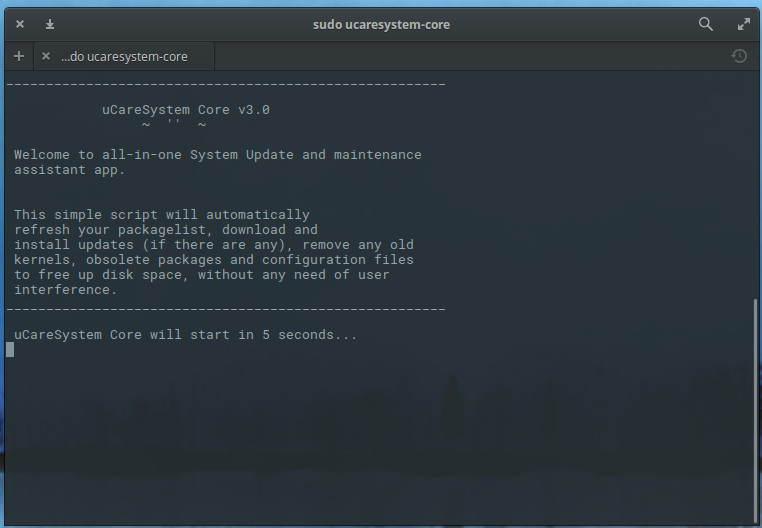
This will launch the tool, which will immediately warn you that it will kick off in five seconds (Figure 1).
Figure 1: You get a 5-second warning before the command launches.
As the command runs, it requires zero user input, so you can walk away and wait for the process to complete (how long it takes will depend upon how much needs to be updated, how much needs to be removed, the speed of your system, and the speed of your Internet connection).
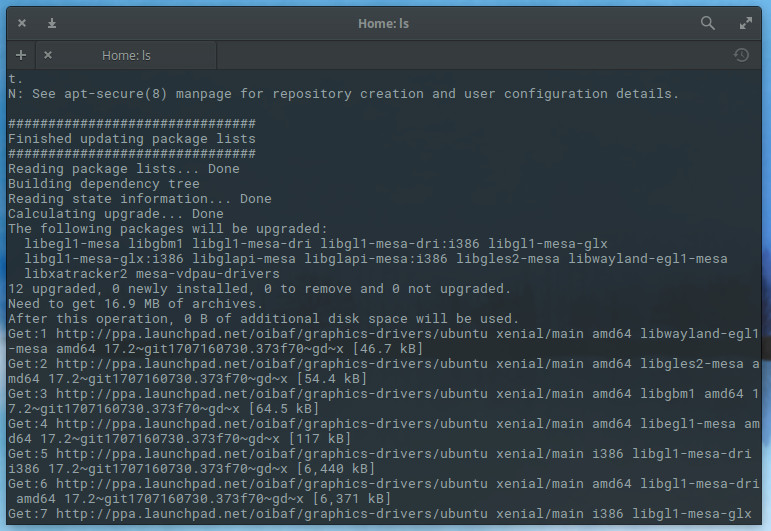
The one caveat to ucaresystem-core is that it does not warn you should you need to reboot your machine (if a newer kernel be installed). Instead, you have to scroll up to near the beginning of the output to see what has been upgraded (Figure 2).
Figure 2: No new kernel upgrades here.
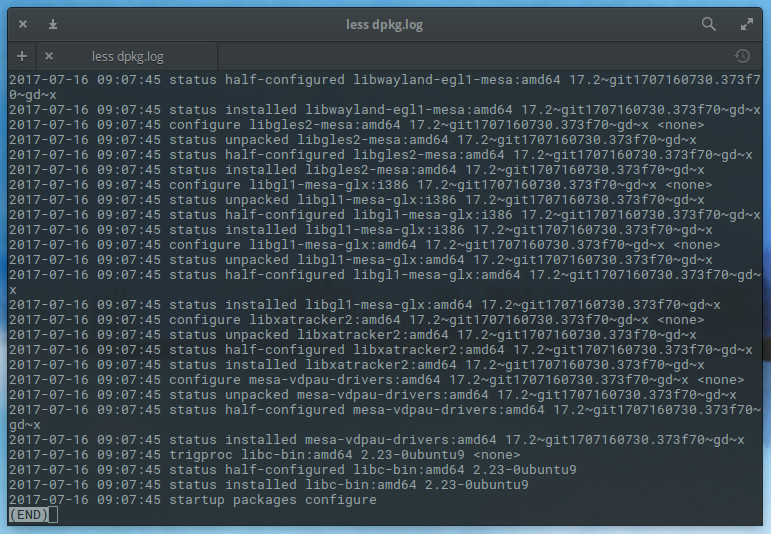
If you cannot scroll up in your terminal, you can always view the dpkg log found in /var/log/dpkg.log. In this file, you will see everything ucaresystem-core has upgraded (including a handy time-stamp — Figure 3).
Figure 3: Checking the dpkg log file.
How much space did we gain?
Since my Elementary OS is set up such that ucaresystem-core is run as a cron job, I installed a fresh instance on a Ubuntu 17.10 desktop to test how much space would be freed after a single run. This instance was a VirtualBox VM, so space was at a premium. Prior to running theucaresystem-corecommand the VM was using 6.8GB out of 12GB. After the run, the VM was using 6.2GB out of 12GB. Although that may not seem like a large amount, when you’re dealing with limited space, every bit counts. Plus, if you consider it went from 37 percent to 34 percent usage, it might seem like a better savings. On top of that, the system is now clean and running the most recent versions of all software…with the help of a single command.
Automating the task
Because ucaresystem-core doesn’t require user input, it is very easy to automate this, with the help of cron. Let’s say you want to run ucaresystem-core every night at midnight. To do this, open a terminal window and issue the command sudo crontab -e. Once you’re in your crontab editor, add the following to the bottom of the file:
0 0 * * * /usr/bin/ucaresystem-core
Save and close the crontab file. The command will now run every night at Midnight. Thanks to the dpkg log file, you can check to see the results.
Should you want to set up ucaresystem-core to run at a different time/day, I suggest using the Crontab Guru to help you know how to enter the time/date for your cron job.
Keep it simple, keep it clean
You will be hard-pressed to find a simpler method to keep your Ubuntu and Debian systems both updated and clean, than with ucaresystem-core. I highly recommend you employ this very handy tool for any system that you want always updated and free of the cruft that can be left behind by such a process.
Of course, if you prefer to do everything by hand, that is an even more reliable method. However, when you don’t always have time for that, there’s always ucaresystem-core.
Learn more about Linux through the free “Introduction to Linux” course from The Linux Foundation and edX.