Home Blog Page 504

10 Linux or Android Based Smart Eyewear Devices

Recently, Google umbrella firm Alphabet announced a new enterprise version of the Google Glass smart eyeglasses. Over the past two years, Glass Enterprise Edition (Glass EE) has been tested at more than 50 companies including Boeing, DHL, GE, and Volkswagen, and is now more widely available via a corporate partner program.

Glass EE has been under development since April 2014 when Google announced a Glass at Work project. This followed widespread criticism of the Android-based, camera-enabled Explorer Edition for consumers, which led to bans in bars and restaurants over privacy concerns. That same year, I compiled a survey of 11 smart eyewear devices that ran on Android or Linux. Here we update that Linux.com report with 10 of the latest models, including the Glass EE. Eight of the 11 vendors from the 2014 story are represented here with updated or new models. (For a longer version of this article, see LinuxGizmos.)

Like Glass EE, some offer voice-or touch-controlled video or GUI displays on one or both sides of your field of view (FOV). Others, like Laforge’s Shima, are limited to text displays sync’d to a companion smartphone, somewhat like an eyeglass version of a smartwatch. More advanced systems, sometimes housed in bulkier headsets, offer true augmented reality (AR) displays that overlay text in the FOV or even map AR displays to real-world objects.

Most of the products here are focused on the same enterprise market as Glass EE, such as field services, manufacturing, logistics, and healthcare. Having a hands-free, voice controlled computer with an AR display is useful to workers that are increasingly asked to consult computers. Rugged handhelds can do the job for some, but many workers need both hands free. The outliers here are Laforge’s consumer-oriented Shima glasses and Everysight’s Raptor, which is designed for cyclists and triathletes, as well as the Tobii Pro eye-tracking glasses, which are designed for market research.

Our list of 10 products is limited to those with onboard Linux or Android computers, and we do not include fully immersive VR headgear or video viewers. We also omit devices that require tethering to a laptop, such as the Meta2. Several of these products, however, are tethered to pocketable control or storage units.

Here’s a brief glance at 10 intriguing Linux and Android eyewear products. We highlight one per company, but in several cases mention other specialty or emerging models. More detailed summaries follow the list below.

Atheer Air Glasses ($3,950)

The enterprise-focused Atheer AiR Glasses run an Android OS on a quad-core Nvidia Tegra K1, and offers gesture control of AR components. The device includes dual 720p@60fps, 4-Mpx cameras with a wide, 50-degree field of view (FOV), as well as a 3D depth sensing camera. These inputs are combined with directional mic and a 9-axis IMU to offer precise tracking.

The AiR Glasses feature 2GB RAM, up to 128GB flash, WiFi-ac, Bluetooth 4.1, and USB Type-C and HDMI ports. There’s also a 3100mAH battery and optional 4G/LTE and GPS. The device is tethered to pocketable compute device.

The AiR Glasses can display video calls and real-time overlaid image annotations without obscuring one’s view. The SDK can adapt existing Android apps, and there’s an optional AiR Suite for Enterprise with collaboration, management, and task flow apps. A similar AiR Experience package is available to third-party eyewear manufacturers.

Daqri Smart Glasses ($4,995)

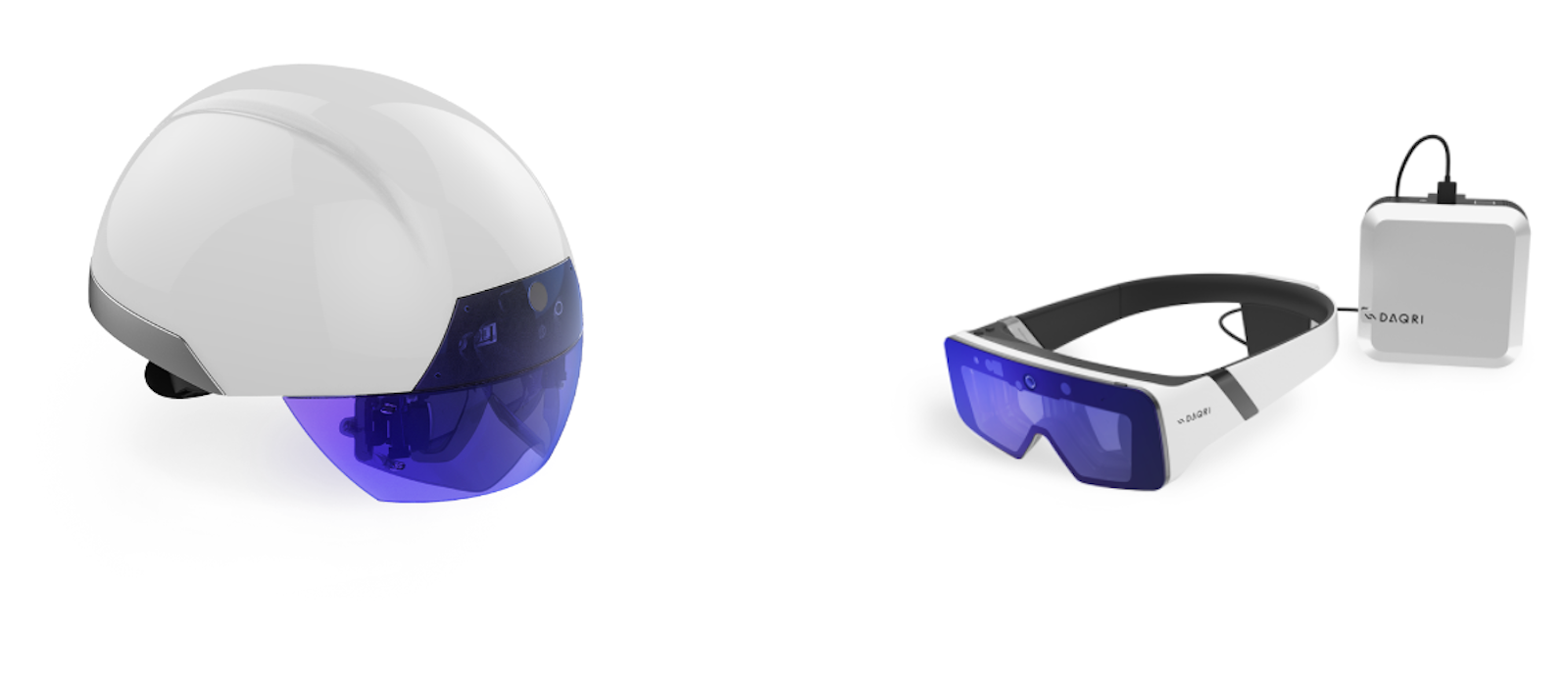
In 2014, we covered Daqri’s flagship, Daqri Smart Helmet, which ran Android on a Snapdragon. Earlier this year, a v2 model arrived that runs Linux on a faster 6th Gen Intel Core M7, and adds an Intel RealSense LR200 depth-sensing camera. This same basic features are available in the relatively lighter (400 grams), cheaper ($4,995), and less ruggedized Daqri Smart Glasses Developer Version, which is available for pre-order for shipment later this year. There’s a Linux SDK plus a Daqri 4D Studio augmented work instruction platform.

The Daqri Smart Glasses offer the same multimedia and AR displays as the Smart Helmet, with semi-transparent overlays displaying work instructions, safety information, and maps. A wide-angle AR tracking camera works in conjunction with the RealSense and several sensors to provide environmental awareness. The goggle-like eyewear features an adjustable, wrap-around headband tethered to a pocketable 12-hour video storage unit.

The pricier Daqri Smart Helmet is ruggedized for heavy industrial work, and offers extras such as a thermography camera to detect hotspots. Daqri also sells a Daqri Qube mini-PC version and a Daqri Smart HUD display for cars.

Glass EE (Price unstated)

Glass Enterprise Edition (EE) looks like the original Google Glass Explorer Edition, but is claimed to be lighter, faster, and more secure, with longer battery life and better WiFi. The device is now offered separately from the glasses, letting you clip it onto standard prescription or safety glasses.

The voice- and touch-controlled eyewear runs an Android-based OS. It has a 8-Mpx camera, up from the previous 5-Mpx model, plus an external green light that shows when the camera is on.

Glass EE lacks the semi-immersive AR overlays offered by some competitors, and instead offers video feeds and zoomable GUI displays. Numerous homegrown and third-party apps for a variety of industrial, logistics, and healthcare scenarios are available. No price or detailed specs are currently available for the device, which is available only to selected corporate partners.

GlassUp F4 (Price unstated)

In April, five years after the original, Android-based GlassUp appeared on Indiegogo, Italy-based GlassUp announced that it could not complete the project and was not yet able to refund the money.

The consumer-oriented GlassUp prototype, which displays notices from your smartphone, evolved into an Uno model that also seems to have gone nowhere. However, the company claims to have interested manufacturers in a new Linux-based, AR visor style GlassUp F4 model announced in March. The industrial focused GlassUp F4 features a multicolor, 21° FOV AR display, plus a video camera, a thermographic camera, voice controls, WiFi, and an “illumination system.”

Moverio BT-300 ($800)

Our 2014 roundup included the $700 Moverio BT-200, which ran Android on a dual-core TI OMAP SoC, and offered a 960 x 540 display for AR. Late last year, Epson released its Moverio BT-300, which runs Android 5.1 on a quad-core Intel Atom-x5. The new model is 20 percent lighter, and features a similarly binocular, Si-OLED based display, now updated to 1280 x 720. The 23-degree FOV 2D or 3D display floats in front of your eyes without obscuring the view.

The enterprise focused BT-300 features a 5-Mpx camera, earphones, mic, 802.11ac, Bluetooth 4.1, GPS, 2GB RAM, 16GB flash, and multiple sensors. A small, tethered, handheld control offers a trackpad, controls, and microSD and micro-USB ports. An almost identical BT-300FPV model targets DJI drone control.

Epson recently launched a BT-350 model selling for $1,399 that has the same basic specs as the BT-300, but with an adjustable design made to fit multiple sizes. It’s aimed at multi-user settings such as museums. There’s also a new Moverio Pro BT-2000/2200 headset aimed more directly at industrial applications. The unpriced BT-2000/2200 adds a forehead band and a 5-Mpx stereoscopic camera. It has lower resolution than the BT-300, but offers IP54 and drop protection, plus ANSI Z87.1 safety glass compliance.

M300 Smart Glasses ($1,499)

The enterprise-focused M300 is a more advanced version of Vusix’s M100 Smart Glasses. Both models are Android-based smart eyewear frames with a monocular display device that can fit over a standard pair of eyeglasses. The M300 features a dual-core Intel Atom with 2GB RAM and 64GB flash. There’s a 16.7-degree diagonal FOV equivalent to a 5-inch smartphone seen from 17 inches.

You interact with the ruggedized device via voice control, a gesture touchpad, four control buttons, proximity sensors, and a 3-DOF head tracker. Other features include a 13-Mpx HD camera, ear speaker, noise-cancelling mics, dual band WiFi-ac, Bluetooth 4.1, and GPS. The M300 supports thousands of existing Android apps, and offers an SDK to write custom apps. Pre-installed apps sync to companion Android or iOS apps.

Vusix is prepping an Atom-based M3000 model with thin waveguide optics and a custom WVGA linear DLP display engine. There’s also a similar new Blade 3000 Smart Sunglasses model. Future plans call for an AR3000 Smart Glasses device with stereoscopic cameras for full AR.

Raptor (Price unstated)

The Android-based Raptor AR glasses for bicyclists and triathletes was announced July 7, and is due to ship later this year. Everysight is a spin-off of Israeli defense contractor Elbit System. Everysight combined a stripped-down version of Elbit’s HUD technology for fighter pilots with the equivalent of an Android smartphone, and squeezed it into a sleek pair of cycling sunglasses. The impact resistant Grilamid TR-90 frame is IP55 protected against exposure, and supports swappable prescription lenses.

The system uses Elbit’s “BEAM” OLED-based projection technology, which projects color-coded dashboard readouts onto the inside of the lenses so they appear to be floating about 20 feet ahead of you. The Raptor displays information such as speed, distance, cadence, power, and turn-by-turn directions. It also shows sensor inputs including Bluetooth connected readouts from an optional heart-rate monitor wristband. Users interact via voice commands, a temple-mounted touchpad, or a handlebar-mounted controller unit.

The system runs Android on a quad-core CPU with 2GB RAM and 16GB to 32GB flash, and offers WiFi, Bluetooth, and GPS/GLONASS. The Raptor integrates a camera, 8-hour battery, speaker, mic, accelerometer, gyroscope, magnetometer, and barometer.You can sync music playback from your phone or stream video back to it, with an option to record the Raptor’s dashboard display. An SDK enables development of AR apps.

R-7/R-7HL (Price unstated)

Osterhout Design Group (ODG) still sells an updated version of the R-7 AR eyewear for $2,750, and you can now order a more ruggedized R-7HL (Hazardous Locations) model due later this year. Like the R-7, the HL version is an enterprise-focused eyewear product that runs a ReticleOS version of Android 6.0 on a quad-core Snapdragon 805.  Spec’d much like the R-7, the HL model adds impact eye protection, protections against drop, shock, vibration, low pressure, and temperature extremes, and ANSI Z87.1+ dustproof and splashproof certification.

Both models feature dual 720p stereoscopic displays at up to 80fps with a 30° FoV. There’s also a separate 4-Mpx camera, 3-DOF head tracking, 802.11ac, Bluetooth 4.1, GNSS, 3GB LP-DDR3, and 64GB storage. Other features include a trackpad, batteries, multiple sensors, removable earhorns, and an audio port.

Later this year, ODG plans to launch Android Nougat powered R-8 and R-9 models with octa-core Snapdragon 835 SoCs and 6-DOF tracking. The devices advance to dual 720p-60 and dual 1080p-60 stereoscopic displays with 40° and 50° FOVs, respectively. Other improvements include 4GB/64GB (R-8) and 6GB/128GB (R-9) memories, with separate dual 1080p or single 14-Mpx, 4K cameras, respectively.

Shima ($590)

Laforge’s Shima is one of the only smart eyeglasses aimed at the consumer market. You can order them with prescription lenses in different styles that look like typical glasses. This simple Bluetooth accessory beams a WQVGA display into your retina, and displays notices from your smartphone on the right side of your field of vision as transparent overlays. The glasses provide real-time updates from social networks and navigation apps linked to the GPS on your phone.

Our 2014 eyewear report included Laforge’s similar Icis smart glasses, which evolved into Shima in 2015. You can pre-order the Alpha version of Shima for $590 with shipments in a few months and a promise that you will later receive the Beta model as a free upgrade by the end of the year.

The Shima runs a new Linux-based ghOSt OS on a 180MHz Cortex-M4 STM32F439 MCU. Laforge has yet to reveal the processor for the upcoming Beta version or the future dual display Beta Bold. The Alpha is equipped with 16MB RAM and 1GB flash, which will move to 4GB on the Beta and 8GB on the Beta Bold. All three versions feature Bluetooth 4.1 with LE, a micro-USB port, a USB Type-C charger cable, and sensors including gyro, accelerometer, magnetometer, temperature, and ambient light. You also get an 18-hour battery, five buttons, and a touchpad.

The water resistant, lightweight (24 to 27 gram) Alpha and Beta will be followed by a Beta Bold model that adds a camera of at least 3 megapixels, along with a second WQVGA display. A development program and a SocialFlo app offer access to Shima mods such as fitness, meeting, and Alexa-enabled programs.

Tobii Pro Glasses 2 (Price unstated)

Tobii Pro Glasses 2, which updates the Tobii Glasses 2 model we covered in 2014, doesn’t display information. Instead, it uses four integrated eye-tracking cameras in conjunction with a front-facing camera to track your gaze for market and behavioral research applications. The video is stored along with tracking information on a tethered recording unit that fits in your pocket. This is later analyzed on desktop computers with algorithms including emotion detection.

The 45-gram Tobii Pro Glasses 2 eyewear offers HD video recording at 25fps with a wide 90°, 16:9 FOV, and a mic. The eye tracking cameras, which provide 50HZ or 100Hz gaze sampling frequency, use corneal reflection, binocular, and dark pupil tracking with automatic parallax compensation.

The WiFi-enabled recording unit can record up to two hours of video on an SD card, and offers HDMI, micro-USB, and audio connections. Premium live video options let researchers remotely analyze sessions in real time.

Learn more about embedded Linux at Open Source Summit North America — Sept. 11-14 in Los Angeles, CA. Register by July 30th and save $150! Linux.com readers receive a special discount. Use LINUXRD5 to save an additional $47.

Metaphors We Compute By

A well-known unattributed quote (often misattributed to Charles Baker) is, “To program is to write to another programmer about our solution to a problem.”2 A program is an explanation of how a problem might be solved; it’s a metaphor that stands in place of a person’s understanding. For metaphors to be effective, however, they need to convey meaning using concepts already known to us. The explanatory power of a particular program can be used as a measure of its own elegance.

Consider the following example. Say you could program a computer to command other computers to perform tasks, respecting their arrival order. This description is already hard to understand. On the other hand, you could describe the solution by describing a queue server that assigns jobs to workers based on a first come first served queue discipline.

A queue is a familiar concept from daily life, seen at the supermarket, the bank, airports, and train stations. People know how they work, so for someone reading your code, it might be easier to talk about queues, workers, and jobs than trying to explain this setting without using the queue metaphor.

Read more at ACM Queue

Email2git: Matching Linux Code with its Mailing List Discussions

TL;DR: Email2git is a patch retrieving system built for the Linux kernel.

It exists under two forms:

  1. As a cregit plugin: Retrieve patches of selected source code tokens

  2. As the email2git search tool: Retrieve patches for entered commit IDs

Email2git

The Linux project’s email-based reviewing process is highly effective in filtering open source contributions on their way from mailing list discussions towards Linus Torvalds’ Git repository. However, once integrated, it can be difficult to link Git commits back to their review comments in mailing list discussions, especially when considering commits that underwent multiple versions (and hence review rounds), that belong to a multi-patch series, or that were cherry-picked.

As an answer to these and other issues, we created email2git, a patch retrieving system built for the Linux kernel. For a given commit, the tool is capable of finding the email patch as well as the email conversation that took place during the review process. We are currently improving the system with support for multi-patch series and cherry-picking.

Email2git is available through two interfaces: as a cregit extension, and as a simple commit ID based search tool.

Email2git on cregit

https://cregit.linuxsources.org/

The online cregit interface displays the Linux source code with highly accurate contributor information. The source code is divided into “code tokens” and can return the author of each token with an increased accuracy compared to the current line-level granularity of git blame.

As of today, email2git extends cregit by linking the tokens in a particular kernel release with the original patch introducing them and the email discussions reviewing them.

In your browser, navigate to https://cregit.linuxsources.org, then navigate by clicking on the appropriate directories until you find a source code file of interest. Click on the file to open it.   Then simply click on a code token while browsing the source code to display the links to the patch / discussion.

arQiOyVFvGpAUqF14ZrrYhVFvRwnUKjkFgQcRCx-

Image 1: Linux source code as displayed on cregit.linuxsources.org.

The different colors in the source code represent the different contributors. The interface lets users hover over the “tokens” to display basic information such as commit date, commit message summary, and author.

jjZ6DzKxmKHOSr2KwpJqRMUvQeK0ubXF5TltYN1M

Image 2: Tooltip displaying detailed information about the commit that introduced the token.

Now, users can also click on the token to display a list of links to the reviewed patch versions and email discussions (reviews) that introduced that token into the main kernel tree.

S9-MhXoCpLo6YIAw1enraZHq--tf_fyMgDW6sq6W

Image 3: Links to patches being displayed after user clicks on a token.

Since patches are often sent to multiple different mailing lists, we provide the links with all the different patches (when available) to give you access to as much discussion as possible.

Email2git commit search

http://mcis.polymtl.ca/~courouble/email2git/

We believe that email2git is a great addition to cregit, since it provides easy access to in-depth authorship information to anyone browsing the source code.

However, we understand that developers may be looking for reviews and discussion about a specific commit ID instead of having to browse the full code base on cregit. To address this, we created a simple commit ID based search. Paste the commit ID into the search box to retrieve the patch and discussion.

p29bIji_j4mOQOaJOOqAfWSMtC_Nf2sw-6CnzJv3

Image 4: commit-based patch search.

More Information

The source code for this work can be found at: https://github.com/alexcourouble/email2git

Do not hesitate to email us at cregit-questions@lists.linuxfoundation.org if you have any questions.  We welcome any feedback and suggestions!

We will be presenting email2git at Linux Plumbers 2018 on September 13 in the following talk: “email2git: A Cregit Plugin to Link Reviews to Git Commits” if you would like to speak with us in person.

Alexandre Courouble is a Master’s student working under the supervision of Dr. Bram Adams at Polytechnique Montreal. As a part of his degree, he is working on email2git and on a research project aiming at measuring Linux developers’ expertise using dedicated metrics. Alex gave a related talk on cregit titled “Token-level git blame” at the 2016 Linux Plumbers Conference.

ODPi Webinar on Taking Apache Hadoop Enterprise-Wide: Your Questions Answered

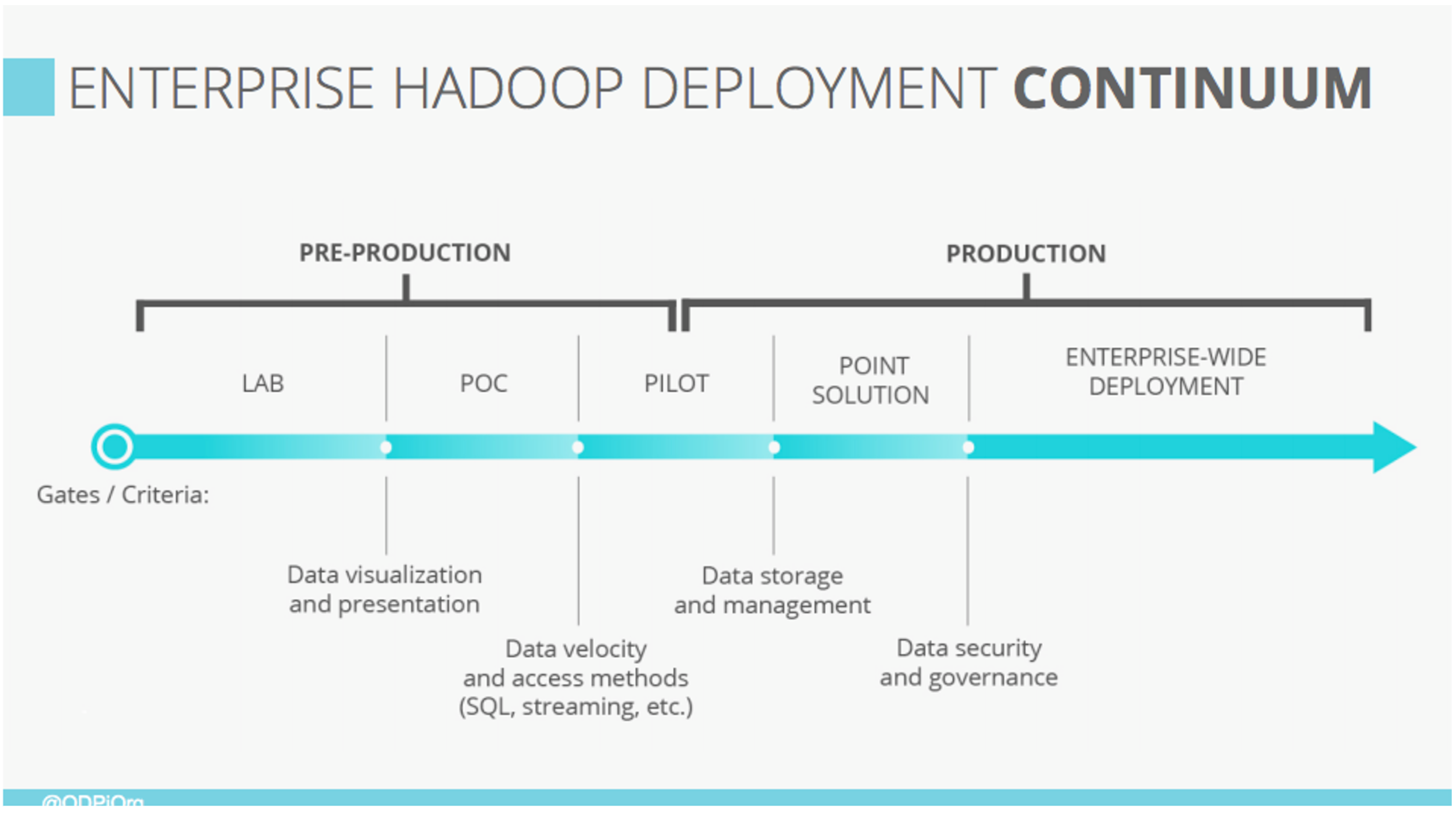
ODPi recently hosted a webinar with John Mertic, Director of ODPi at the Linux Foundation, and Tamara Dull, Director of Emerging Technologies at SAS Institute, to discuss ODPi’s recent 2017 Preview: The Year of Enterprise-wide Production Hadoop whitepaper and explore DataOps at Scale and the considerations businesses need to make as they move Apache Hadoop and Big Data out of Proof of Concepts (POC)s and into enterprise-wide production, hybrid deployments.

Watch Replay

Download Slides

The webinar dived into why hybrid deployments are the norm for businesses moving Apache Hadoop and Big Data out of Proof of Concepts (POC)s and into enterprise-wide production. Mertic and Dull went through several important considerations that these businesses must address and provided the step-change DataOps requirements that come when you take Hadoop into enterprise-wide production. The webinar also discussed why deployment and management techniques that work in limited production may not scale when you go enterprise wide.

Screen Shot 2017-07-24 at 10.46.44 AM.png

The webinar was so interactive with polls and questions, we unfortunately did not get to every question. This is why we sat down with Dull and Mertic to respond to them now.  

What are the top 3 considerations for data projects?

TD: I have four, not three, considerations if you want your big data project to be successful:

  • Strategy: Does this project address/solve a real business problem? Does it tie back to a corporate strategy? If the answer is “no” to either question, try again.

  • Integration: At the infrastructure level, how are your big data technologies going to fit into your current environment? This is where ODPi comes in. And at the data level, how are you going to integrate your data – structured, semi-structured, and unstructured? You must figure this out before you go production with Hadoop.

  • Privacy/Security: This is part of the data governance discussion. I highlight it because as we move into this newer Internet of Things era, if privacy and security are not included in the design phase of whatever you’re building (product or service), you can count on this one biting you in the butt later on.

  • People/Skills: Do you have the right people on your data team? Today’s big data team is an evolution of your existing BI or COE team that requires new, additional skills.

Why is Hadoop a good data strategy solution?

TD: Hadoop allows you to collect, store, and process any and all kinds of data at a fraction of the cost and time of more traditional solutions. If you want to give all your data a voice at the table, then Hadoop makes it possible.

Why are some companies looking to de-emphasize Hadoop?

TD: See the “top 3 considerations” question. If any of these considerations are missed, your Hadoop project will be at risk. No company wants to emphasize risky projects.

How will a stable, standardized Hadoop benefit other big data projects like Spark?

JM: By helping grow innovation in those projects. It’s a commonly seen side effect that stabilizing the commodity core areas of a technology stack ( look at Linux for a great example ) enables R&D efforts to focus at higher levels in the stack.

How is Enterprise Hadoop challenges different for different verticals (healthcare, telco, banking, etc.)?

JM: Each vertical has very specific industry regulations and practices in how data is used and classified. This makes efforts around data governance that much more crucial – sharable templates and guidelines streamline data usage and enable focus on insight and discovery.

Is Hadoop adoption different around the world (i.e., EU, APAC, South America, etc.)?

JM: Each geo definitely has unique adoptions patterns depending on local business culture, the technology sector maturity and how technology is adopted and implemented in those regions. For example, we see China as a huge area of Hadoop growth that looks to adopt more full stack solutions as the next step from the EDW days. EU tends to lag a bit more behind in data analytics in general as they implement technology in a more thoughtful approach, and NA companies tend to implement technologies and then look how to connect to business problems.

What recent movements/impact in this space are you most excited about?

TD: We’ve been talking about “data-driven decision making” for decades. We now have the technologies to make it a reality – much quicker and without breaking the bank.

Where do you see the state of big data environments two years from now?

TD: Big data environments will be more stable and standardized. There will be less technical discussion about the infrastructure – i.e., the data plumbing – and more business discussion about analyzing the data and figuring out how to make or save money with it.

What impact does AR have on IoT and Big Data?

TD: I see this the other way around: Big data and IoT are fueling AR. Because of big data and IoT, AR can provide us with more context and a richer experience no matter where we are. 

Can you recommend a resource that explains the hadoop ecosystem? People in this space seem to assume knowledge of the different open source project names and what they do, and explain what one component does in terms of the others. For me, it has been very difficult to figure out, i.e., “spark is like storm except in memory and less focused on streaming.”

TD: This is a very good question. What makes it more challenging is that the Hadoop ecosystem is growing and evolving, so you can count on today’s popular projects getting bumped to the side as newer projects come into play. I often refer to The Hadoop Ecosystem Table to understand the bigger picture and then drill down from there if I want to understand more.

We invite you to get involved with ODPi and learn more by visiting the ODPi website at https://www.odpi.org/.

We hope to see you again at an upcoming Linux Foundation webinar. Visit Linux.com to view the upcoming webinar schedule: https://www.linux.com/blog/upcoming-free-webinars-linux-foundation

Building IPv6 Firewalls: IPv6 Security Myths

We’ve been trundling along nicely in IPv6, and now it is time to keep my promise to teach some iptables rules for IPv6. In this two-part series, we’ll start by examining some common IPv6 security myths. Every time I teach firewalls I have to start with debunking myths because there are a lot of persistent weird ideas about the so-called built-in IPv6 security. In part 2 next week, you will have a nice pile of example rules to use.

Security yeah, no

You might recall the optimistic claims back in the early IPv6 days of all manner of built-in security that would cure the flaws in IPv4, and we would all live happily ever after. As usual, ’tisn’t exactly so. Let’s take a look at a few of these.

IPsec is built-in to IPv6, rather than added on as in IPv4. This is true, but it’s not particularly significant. IPsec, IP Security, is a set of network protocols for encrypting and authenticating network traffic. IPsec operates at the Network layer. Other encryption protocols that we use every day, such as TLS/SSL and SSH, operate higher up in the Transport Layer, and are application-specific.

IPsec operates similarly to TLS/SSL and SSH with encryption key exchanges, authentication headers, payload encryption, and complete packet encryption in encrypted tunnels. It works pretty much the same in IPv6 and IPv4 networks; patching code isn’t like sewing patches on clothing, with visible lumps and seams. IPv6 is approaching 20 years old, so whether certain features are built-in or bolted-on isn’t relevant anyway.

The promise of IPsec is automatic end-to-end security protecting all traffic over an IP network. However, implementing and managing it is so challenging we’re still relying on our old favorites like OpenVPN, which uses TLS/SSL, and SSH to create encrypted tunnels.

IPsec in IPv6 is mandatory. No. The original specification required that all IPv6 devices support IPsec. This was changed in 2011 RFC 6434 Section 11 from MUST to SHOULD. In any case, having it available is not the same as using it.

IPsec in IPv6 is better than in IPv4. Nah. Pretty much the same.

NAT = Security. No no no no no no, and NO. NAT is not and never has been about security. It is an ingenious hack that has extended the lifespan of IPv4 many years beyond its expiration date. The little bit of obfuscation provided by address masquerading doesn’t provide any meaningful protection, and it adds considerable complexity by requiring applications and protocols to be NAT-aware. It requires a stateful firewall which must inspect all traffic, keep track of which packets go to your internal hosts, and rewrite multiple private internal addresses to a single external address. It gets in the way of IPsec, geolocation, DNSSEC, and many other security applications. It creates a single point of failure at your external gateway and provides an easy target for a Denial of Service (DoS) attack. NAT has its merits, but security is not one of them.

Source routing is built-in. This is true; whether it is desirable is debatable. Source routing allows the sender to control forwarding, instead of leaving it up to whatever routers the packets travel through, which is usually Open Shortest Path First (OSPF). Source routing is sometimes useful for load balancing, and managing virtual private networks (VPNs); again, whether it is an original feature or added later isn’t meaningful.

Source routing presents a number of security problems. You can use it to probe networks and gain information and bypass security devices. Routing Header Type 0 (RH0) is an IPv6 extension header for enabling source routing. It has been deprecated because it enables a clever DoS attack called amplification, which is bouncing packets between two routers until they are overloaded and their bandwidth exhausted.

IPv6 networks are protected by their huge size. Some people have the idea that because the IPv6 address space is so large this provides a defense against network scanning. Sorry but noooo. Hardware is cheap and powerful, and even when we have literally quintillions of potential addresses to use (an IPv6 /64 network segment is 18.4 quintillion addresses) we tend to organize our networks in predictable clumps.

The difficulties of foiling malicious network scanning are compounded by the fact that certain communications are required for computer networks to operate. The problem of controlling access is beyond the abilities of any protocol to manage for us. Read Network Reconnaissance in IPv6 Networks for a lot of interesting information on scanning IPv6 networks, which attacks require local access and which don’t, and some ways to mitigate hostile scans.

Multitudes of Attack Vectors

Attacks on our networks come from all manner of sources: social engineering, carelessness, spam, phishing, operating system vulnerabilities, application vulnerabilities, ad networks, tracking and data collection, snooping by service providers… going all tunnel vision on an innocent networking protocol misses almost everything.

Come back next week for some nice example IPv6 firewall rules.

You might want to review the previous installments in our meandering IPv6 series:

Learn more about Linux through the free “Introduction to Linux” course from The Linux Foundation and edX.

Why Kubernetes, OpenStack and OPNFV Are a Match Made in Heaven

Chris Price, open source strategist for SDN, cloud and NFV at Ericsson, says there’s plenty of love in the air between Kubernetes, OpenStack and OPNFV.

“Kubernetes provides us with a very simple way of very quickly onboarding workloads and that’s something that we want in the network, that’s something we want in our platform,” Price said, speaking about what he called “a match made in heaven” between Kubernetes, OpenStack and NFV at the recent OPNFV Summit.

Price believes the Euphrates release is the right time to integrate more tightly with Kubernetes and OpenStack, finding ways of making the capabilities from each available to the NFV environment and community.

Read more at SuperUser

Using Prototypes to Explore Project Ideas, Part 1

Imagine that you work for an agency that helps clients navigate the early stages of product design and project planning.

No matter what problem space you are working in, the first step is always to get ideas out of a client’s head and into the world as quickly as you possibly can. Conversations and wireframes can be useful for finding a starting point, but exploratory programming soon follows because words and pictures alone can only take you so far.

By getting working software into the mix early in the process, product design becomes an interactive collaboration. Fast feedback loops allow stumbling blocks to be quickly identified and dealt with before they can burn up too much time and energy in the later (and more expensive) stages of development.

Read more at Practicing Developer

The Biggest Shift in Supercomputing Since GPU Acceleration

If you followed what was underway at the International Supercomputing Conference (ISC) this week, you will already know this shift is deep learning. Just two years ago, we were fitting this into the broader HPC picture from separate hardware and algorithmic points of view. Today, we are convinced it will cause a fundamental rethink of how the largest supercomputers are built and how the simulations they host are executed. After all, the pressures on efficiency, performance, scalability, and programmability are mounting—and relatively little in the way of new thinking has been able to penetrate those challenges.

The early applications of deep learning in using approximation approach to HPC—taking experimental or supercomputer simulation data and using it to train a neural network, then turning that network around in inference mode to replace or augment a traditional simulation—are incredibly promising. This work in using the traditional HPC simulation as the basis for training is happening fast and broadly, which means a major shift is coming to HPC applications and hardware far quicker than some centers may be ready for. What is potentially at stake, at least for some application areas, is far-reaching. Overall compute resource usage goes down compared to traditional simulations, which drives efficiency, and in some cases, accuracy is improved. Ultimately, by allowing the simulation to become the training set, the exascale-capable resources can be used to scale a more informed simulation, or simply be used as the hardware base for a massively scalable neural network.

Read more at The Next Platform

New GitHub Features Focus on Open Source Community

GitHub is adding new features and improvements to help build and grow open source communities. According to the organization, open source thrives on teamwork, and members need to be able to easily contribute and give back. The new features are centered around contributing, open source licensing, blocking, and privacy.

To make open source licensing easier, the organization has introduced a new license picker that provides an overview of the license, the full text, and the ability to customize fields.

Read more at SDTimes

Azure Container Instances: No Kubernetes Required

Microsoft has introduced a new container service, Azure Container Instances (ACI), that is intended to provide a more lightweight and granular way to run containerized applications than its Azure Container Service (ACS).

ACI runs individual containers that you can configure with specific amounts of virtual CPU and memory, and that are billed by the second. Containers can be pulled from various sources – Docker Hub, the Azure Container Registry, or a private repository – and deployed from the CLI or by way of an Azure template.

Read more at InfoWorld