Home Blog Page 526

Getting Started with Open Source Licenses

With proprietary software, it’s easy for a developer to know where he or she stands. Unless you or the company for which you’re working owns the copyright to the code, it’s off limits — end of story. There’s usually not even any temptation to use the code, because the source code is usually not available.

Moving into open source opens up a whole new world that can make things a lot easier. Suddenly, you’re not constantly having to reinvent the wheel by writing code for processes where there’s code already written and waiting at the ready. In some circumstances, you can even use open source code inside a proprietary project.

Read more at WindowsITPro

DevOps Q&A with Nicole Forsgren

We’ve recently welcomed two new additions to our Advisory Board – with Nicole Forsgren and John Willis, joining Gene Kim and Gary Gruver as Electric Cloud’s strategic advisors.

As we set to work with each of the advisors, we also took the opportunity to pick their brains about where DevOps is heading, what are the key things we should know as we set out on this journey, and what are some of the emerging technologies and patterns they have their eye on. We’re excited to share the tips and insights from these DevOps luminaries in this short Q&A series – starting off with Dr. Nicole Forsgren!

In your experience, what is the biggest challenge for adopting and scaling DevOps in the enterprise?

Right now, I think the biggest challenge for organizations is focusing on prioritization and doing the right things to accelerate their technology transformations. So often, companies and organizations want to take the easy way out and just “buy” their DevOps solution – which usually means buying a technology or automation tool. At the same time, the DevOps crowd sings from the rooftops that DevOps is all about culture. And then the agile and lean practitioners chime in that process is important.

Read more at Electric Cloud.

How to Determine and Fix Boot Issues in Linux

The Linux system boots so fast that most of the output scrolls by too quickly to read the text (showing services being started) sent to the console. Therefore observing boot issues/errors becomes a little of a challenge for us.

In this article, we will briefly explain the different stages in a Linux system boot process, then learn how to establish and get to the bottom of boot issues: in terms files to look into or commands to view system boot messages.

Summary Of Linux Boot Process

In summary, once we press the Power On button, the BIOS (Basic Input Output System) a program integrated in a motherboard performs a POST (Power on Self Test) – where hardware such as disks, RAM (Random Access Memory), keyboard, etc are scanned. In case of an error (missing/malfunctioning hardware), it is reported on the screen.

Read more at Tecmint

DevOps Success: A New Team Model Emerges

When DevOps began, so did a shorthand description for the model: It broke down the wall between dev and ops. The teams communicated better and operated with a shared set of objectives and concerns. At the extreme, there were no longer devs and ops people, but DevOps skill sets. But now, another view of DevOps has emerged: It’s about enabling ops to provide an environment for developers, then get out of the way as much as possible.

Is this model a good fit for your business needs – and do you understand what the dev and ops teams inside your organization would need to make it work? Let’s take a look.

Definition of DevOps evolves

DevOps widened Agile principles to encompass the entire application lifecycle including production operations. Thus operations (and security) skills needed to be added to the cross-functional teams that included designers, testers, and developers.

Read more at The Enterprisers

Shippable Delivers a Continuous Integration Platform for the Enterprise

The container-based Shippable continuous integration platform has been a popular tool for developers and the company behind the DevOps software is now aiming the product squarely at the enterprise as well.

The newly released Shippable Server offers the same features as the existing software but with additional security and software features.

“We packaged all of Shippable into one server product,” said Avi Cavale, Shippable CEO, “We needed to add a few things to make it suitable for the enterprise: things like better control and a whole bunch of new integrations.”

One of the main challenges facing teams within enterprise is the diversity of the tools that are being used in those organizations, said Cavale. IT has gone down a similar route to the way that car manufacturers did away with specialist positions.

Read more at The New Stack

A Few Things I’ve Learned about Kubernetes

I’ve been learning about Kubernetes at work recently. I only started seriously thinking about it maybe 6 months ago – my partner Kamal has been excited about Kubernetes for a few years (him: “julia! you can run programs without worrying what computers they run on! it is so cool!“, me: “I don’t get it, how is that even possible”), but I understand it a lot better now.

This isn’t a comprehensive explanation or anything, it’s some things I learned along the way that have helped me understand what’s going on.

These days I am actually setting up a cluster instead of just reading about it on the internet and being like “what is that??” so I am learning much faster 🙂

I’m not going to try to explain what Kubernetes is. I liked Kelsey Hightower’s introductory talk at Strange Loop called “Managing Containers at Scale with CoreOS and Kubernetes”, and Kelsey has given TONS of great Kubernetes talks over the years if you want an intro.

Read more at Julia Evans

Google Open-Sources Mobile-First Computer Vision Models for TensorFlow

Google is helping smartphones better recognize images without requiring massive power consumption, thanks to a new set of models the company released today. Called MobileNets, the pre-trained image recognition models let developers pick between a set of models that vary in size and accuracy to best suit what their application needs.

Right now, a lot of the machine learning inside mobile apps works by passing data off to cloud services for processing and then providing the resulting insights to users once they return over the network. That means it’s possible to use very powerful computers in a data center and alleviate the burden for processing information on a smartphone. The drawback to that approach is that latency and privacy suffer.

Read more at VentureBeat

9 Shell Tips Every Developer Should Know

The shell is your friend. But many developers don’t really know the shell, the Unix or Linux command-line environment available in several operating systems. (Bash is the best known, but there are others.)

Some of you, when you transitioned from Windows to Mac, took your (slow) clickety habits with you, not realizing that the power laid in that app called Terminal hidden under Applications somewhere. Some of you have been shelling into “the server” to tweak a setting or two without realizing that you could automate your life away without even cracking a devops tool.

Read more at InfoWorld

Attempt to Upgrade OVS to 2.7 on HA Overcloud Topology RDO Ocata

This test is inspired by [1], however it has been done on stable 
Ocata branch 15.0.6 (versus master in link mentioned above.) 
So, it allows after OVS upgrade launch completely functional
VM in overcloud.Obviously, no ovn* packages got installed. 
Same step on Master is awaiting complete functionality of
TripleO QS deployment of Master branch.

:Complete text may bee seen here:

http://dbaxps.blogspot.com/2017/06/attempt-to-upgrade-ovs-to-27-on-ha.html


Open Source TurtleBot 3 Robot Kit Runs Ubuntu and ROS on Raspberry Pi

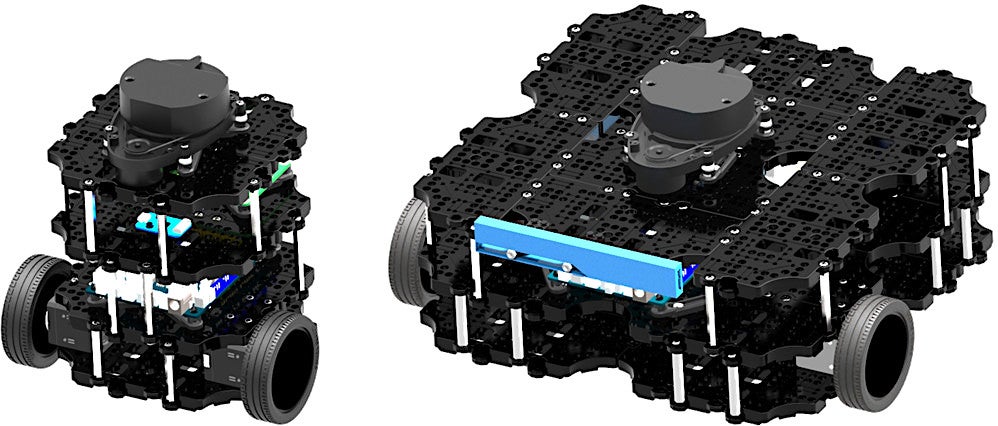
The TurtleBot 2, which Open Robotics calls the “world’s most popular open source robot for education and research,” has long been the de facto development platform for the open source Robot Operating System (ROS). Many TurtleBot developers run ROS from Ubuntu, but Windows is also available on the netbook “brain” nestled inside the two-wheeled bot. The newly shipping TurtleBot 3 replaces the Intel Core based netbook with a choice of two embedded Linux computers running Ubuntu with ROS: the TurtleBot 3 Burger runs Ubuntu on a Raspberry Pi 3 while the larger TurtleBot 3 Waffle instead integrates a more powerful, Atom-based Intel Joule computer-on-module.

The Robotis-built TurtleBot3 is smaller, cheaper, simpler, and more powerful than the TurtleBot 2. The kit design is also “the most affordable robot among the SLAM-able mobile robots equipped with a general 360-degree LiDAR,” says Open Robotics, a subsidiary of Open Source Robotics Foundation (OSRF), which first developed ROS.

SLAM (simultaneous localization and mapping) algorithms work with laser-based LiDAR and other depth-imaging systems to help the robot map an unknown environment while keeping track of its position within it. Both the $549 Burger and the $1,799 Waffle integrate 360-degree HLS-LFCD LDS LiDAR systems, thereby enabling autonomous navigation. The Waffle also provides Intel’s RealSense depth-finding camera as an alternative to LiDAR.

The Raspberry Pi or Intel Joule boards work together with a fully open source OpenCR control board built by Robotis that runs Arduino IDE code on a Cortex-M7 STM32F7 MCU. The board controls sensors including a built-in IMU and optional touch, IR, color, and other sensors. It also controls one of the other major innovations on the TurtleBot 3: the integration of high-end Robotis Dynamixel actuators.

Located in the TurtleBot’s two sprocket wheel joints, the Dyamixels provide velocity control for the wheels, as well as torque or position control for the joints. The Burger’s Dynamixel XL420 supports four operating modes while the Waffle’s Dynamixel XM430 supports six modes, providing even greater flexibility.

The TurtleBot3 is equipped with an 1800mAh battery, and can be remotely operated with a variety of wireless devices, including keyboards, gaming joysticks, and the LEAP Motion controller. The design is highly modular, and Robotis sells optional sensor and chassis components, as well as a variety of Robotis arms and grippers.  

Between the Raspberry Pi and Joule on the one hand and the I/O studded OpenCR control board on the other, there should be plenty of opportunities for hardware hacking with different cameras, sensors, and other gizmos. The TurtleBot3 design ships with 3D CAD files for mechanical parts, as well as schematics, PCB Gerber, and BOM for the OpenCR board.

Although the TurtleBot 3 defaults to Ubuntu 16.04.2 with ROS Kinetic, you can likely use any ROS-compatible Linux distro that runs on the Raspberry Pi or Intel Joule. An Ubuntu Insights announcement of the robot noted that both the Pi and Joule support Ubuntu Core. Conceivably, experienced hackers could also swap out the Pi and Joule for another embedded Linux computer that supports ROS.

Other Pi- and Linux-Based Robots

Most robots that run on the Raspberry Pi are less sophisticated devices that lack LiDAR, such as the mobile GoPiGo and Piborg’s six-wheeled DiddyBorg. Other choices include the open source, Raspberry Pi and Arduino-based FarmBot Genesis farming robot. Some additional Pi-based kits are summarized here, but there are many more designs posted online.

A variety of higher end robots integrate other embedded Linux boards, such as the ambulatory, humanoid Poppy Humanoid, which runs Ubuntu 14.04 on an Odroid XU4. The most famous tuxified humanoid bot these days is the Softbank/Aldeberan Pepper hospitality robot. Linux robots have also entered the industrial space with models like Rethink’s Sawyer manipulation bot.

More information on the TurtleBot 3 may be found in this LinuxGizmos post and IEEE Spectrum hands-on story, as well as the TurtleBot3 shopping page and TurtleBot community site.

Connect with the Linux community at Open Source Summit North America on September 11-13. Linux.com readers can register now with the discount code, LINUXRD5, for 5% off the all-access attendee registration price. Register now to save over $300!