Traditionally, Linux has relied on two main package formats, .deb (Debian) and .rpm (Red Hat). Although structured differently, both .deb and .rpm packages consist of upstream software customized for a particular distribution, plus the scripts to install any dependencies — that is, required libraries, utilities, and other packages — not already installed on the system. This arrangement restricts the required hard drive space to a minimum, and both formats have served Linux well for almost two decades.
However, in recent years, these traditional formats have come under increasing criticism. “Linux users are increasingly expecting more of a consumer experience for application — much like the app experience on a smartphone, for example,” says Thibaut Rouffineau, Canonical’s head of Internet of Things marketing. Rouffineau criticizes the distributions that use .deb or .rpm for having “strict and complicated” requirements that slow the introduction of new versions and complicate the support of Linux by requiring a separate version of the package for almost every distribution.
Many large organizations see their IT engine separated by many floors from the executive penthouse, which also separates business and digital strategy from the vital work of carrying it out. The primary role of an architect is to ride the elevators between the penthouse and engine room, stopping wherever is needed to support these digital efforts: automating software manufacturing, minimizing up-front decision making, and influencing the organization alongside technology evolution.
“Most of what architects have traditionally done should be done by developers, by tools, or not at all” proclaimed Martin Fowler and Erik Doernenburg at a recent meetup. This may come as a surprise to many architects who are proud to carry their hard-earned title. As Chief Architect of a large financial services company, I do actually agree with their statement – the keyword being “traditionally”.
Traditionally, architects were considered to be those folks who make major design decisions on a project, draw architecture diagrams, and direct developers. Those tasks are in fact better handled by the development team and modern tooling than by a single person. Many modern companies therefore eschew software architect as a separate job title, even though they highly value software architecture. The good news is that many new tasks await architects in large organizations. And they are far more interesting and impactful than drawing class diagrams. However, they require architects to engage at the upper floors of their organization.
When last we met, we learned the basics of creating new virtual machines in Creating Virtual Machines in KVM: Part 1. Now we’re going to learn how to control Internet access for our virtual machines, network VMs with each other, and create new virtual networks.
Internet Access
Some Linux distributions, such as CentOS 7 and Red Hat Enterprise Linux 7, do not start networking by default, so you have to enable it. If you don’t have networking in a virtual machine, first check whether it is enabled.
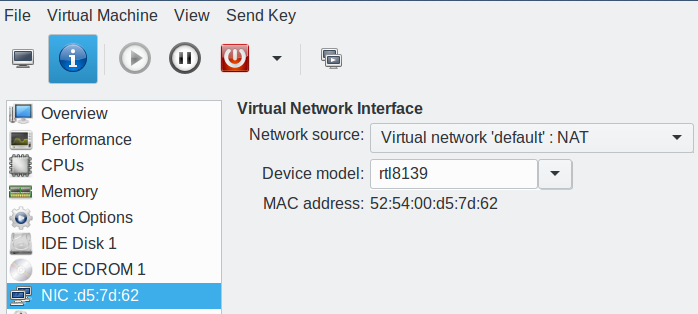
The default network is NAT (network address transation) when you create a new virtual machine — assuming your particular Linux distribution has not mucked with this. This forwards network traffic through your host system; if the host is connected to the Internet, then your virtual machines have Internet access.
The virtual machine manager also creates an Ethernet bridge between the host and virtual network, so you can ping the IP addresses of your VMs from the host, and your VMs can ping the IP address of the host.
Confirm your virtual network type by opening the information tab on any running VM; this is the little white “i” in a blue circle on the top left of your virtual machine console (Figure 1).
Figure 1: Network information.
Your virtual machines have their own virtual network, which is on a different subnet than the host. Your VMs should be able to ping each other by IP address and by hostname, because your virtual network has its own name server. When your ping tests succeed, then you can set up services such as web, email, SSH, and so on, just like on any Linux machine.
Virtual Networks
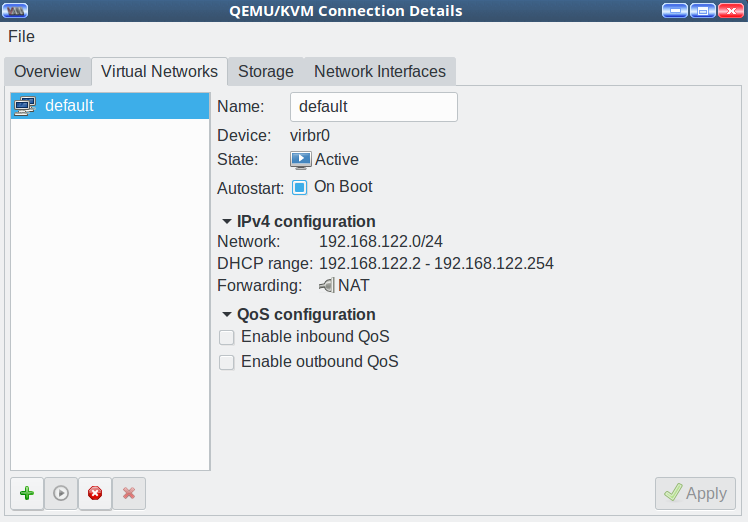
Go to Edit > Connection Details > Virtual Networks in your virtual machine manager to view the details of your virtual network (Figure 2).
Figure 2: Connection details.
This shows the network name, Ethernet bridge name, the DHCP address range, and status. As your collection of VMs grows you may wish to give them separate subnets. How to do this? With ease. Click the little green “Add network” button at the bottom left of the Virtual Networks tab.
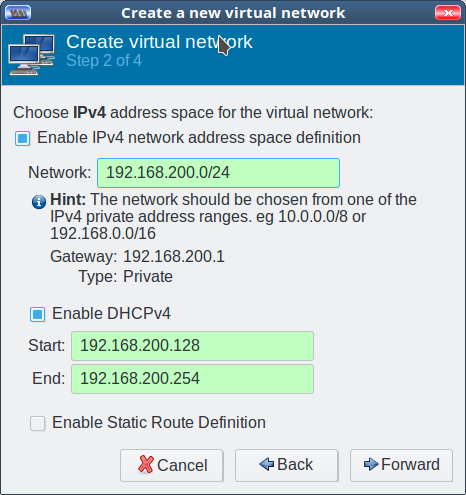
Figure 3: Green means go.
In step 1, enter your new network name, which is anything you want.
In step 2, enter your new network address. The field background changes to green when you enter a non-colliding address (Figure 3). Enable DHCP with a click. How easy is that?
In step 3, enable IPv6. Or not.
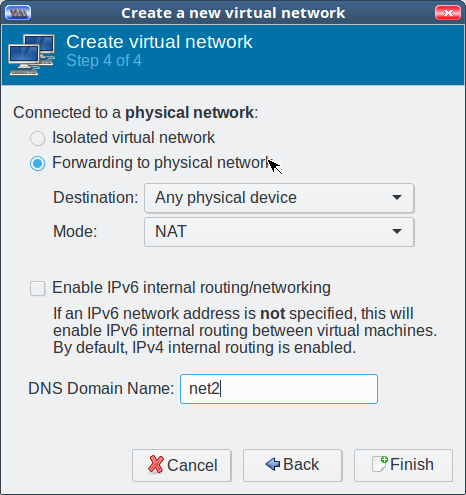
In step 4, you have the option to either create an isolated network with no external access or one with external access via NAT or routing. NAT is the easiest (Figure 4).
Figure 4: NAT is easiest.
Click Finish. This returns you to the Connection Details screen, where you can admire your networks list.
Using Your New Virtual Network
Open the information tab on a running VM and delete your existing network configuration. Look for the “NIC :[mac address]” entry in the left pane, where all of your hardware is listed, and right-click/Remove Hardware to remove it.
Next, click the Add Hardware button at the bottom. Select Network and choose your new network from the Network Source dropdown.
Distributions that use Network Manager should pick up the new assignment automatically. If you’re not using Network Manager, then renew your DHCP lease or reboot.
Useful Commands
The virtual machine manager is a nice tool, but it is complex. It is usually faster to run command-line queries to get answers. brctl, bridge control, lists your Ethernet bridges and their status:
$ brctl show
bridge name bridge id           STP enabled  interfaces
virbr0      8000.000000000000   yes
virbr1      8000.000000000000   yes
virbr2      8000.fe540075e883   yes           vnet0
                                              vnet1
The virsh command is very useful for querying and managing virtual machines. List all of your virtual networks and their status:
$ virsh net-list --all
 Name                 State      Autostart     Persistent
----------------------------------------------------------
 default              active     yes           yes
 net2                 inactive   no            yes
 net3                 active     yes           yes
List all of your virtual machines and their status:
$ virsh list --all
 Id    Name                           State
----------------------------------------------------
 1     Ubuntu-1604                    running
 2     centos7.0                      running
 -     opensuse-leap                  shut off
Domains and hostnames are not the same thing, although they can be the same if you desire. Virtual machine hostnames are the standard Linux hostnames, and you manage them just like any Linux.
The virsh list command returns a list of your virtual machine names, also called domains. These are the names that you configured at creation. Look on the information > Overview tab of a running VM to see its domain name. This has nothing to do with DNS domain names; they’re just arbitrary names for our VMs.
Learn more about Linux through the free “Introduction to Linux” course from The Linux Foundation and edX.
Quantum computers have long held the promise of performing certain calculations that are impossible—or at least, entirely impractical—for even the most powerful conventional computers to perform. Now, researchers at a Google laboratory in Goleta, Calif., may finally be on the cusp of proving it, using the same kinds of quantum bits, or qubits, that one day could make up large-scale quantum machines.
By the end of this year, the team aims to increase the number of superconducting qubits it builds on integrated circuits to create a 7-by-7 array. With this quantum IC, the Google researchers aim to perform operations at the edge of what’s possible with even the best supercomputers, and so demonstrate “quantum supremacy.”
Microservices, that is, breaking larger applications into small parts that communicate over APIs, is increasingly becoming the architectural style of choice for many developers (especially when coupled with containers). Managing this fleet of services introduces its own set of challenges, though. To help developers and DevOps professionals manage and secure their microservice-based applications, Google, IBM and Lyft today announced Istio, a new open platform that allows you to create a network of deployed services, and which includes tools for load balancing, service-to-service authentication and monitoring, among others.
It can do all of this without requiring any changes to the actual applications. That’s because Istio sits at the network level and uses a proxy to intercept all network communication between your microservices. At its core, Istio uses the Envoy proxy (which was developed by Lyft) and its built-in service discovery and load balancing tools, among other things.
What exactly is the web? It seems like a stupid question because we all know the answer: the web is the thing Tim Berners-Lee invented in 1989. It’s not the same thing as “the internet,” which is what we use to access the web, apps, and streaming video. It’s what we visit every day with our web browsers on our phones and laptops. Simple, right?
Well, no. Traditionally, we think of the web as a combination of a set of specific technologies paired with some core philosophical principles. The problem — the reason this question even matters — is that there are a lot of potential replacements for the parts of the web that fix what’s broken with technology, while undermining the principles that ought to go with it.
Joining any new company—with an established culture and programming practices—can be a daunting experience. When I joined the Ansible team, I decided to write up the software engineering practices and principles I’ve learned over the years and to which I strive to work. This is a non-definitive, non-exhaustive list of principles that should be applied with wisdom and flexibility.
My passion is for testing, as I believe that good testing practices can both ensure a minimum quality standard (sadly lacking in many software products), and can guide and shape development itself. Many of these principles relate to testing practices and ideals. Some of these principles are Python-specific, but most are not. (For Python developers, PEP 8 should be your first stop for programming style and guidelines.)
The Linux Foundation hired Sheryl Chamberlain to fill the newly-created position of chief of staff. She’ll oversee operational activities for the foundation and be the point of contact between executive management and stakeholders in its numerous open sourceprojects.
Previously, Chamberlain was a partner VP at the consulting company Capgemini where she led activities to assist Dell Technologies. Prior to joining Capgemini, she worked at EMC in a variety of roles, including chief operations officer in the corporate office of the CTO.
At the Linux Foundation, Chamberlain will help take the organization’s knowledge on topics such as governance, development processes, community outreach, and intellectual property management and share it across projects.
The Xen Developer and Design Summit schedule is now live! This conference combines the formats of the Xen Project Developer Summits with the Xen Project Hackathons. If you are part of the Xen Project’s community of developers and power users, come join us in Budapest, Hungary, July 11 – 13 for this must-attend event!
The conference will cover many different topic areas including community, embedded/automotive, performance, tooling, hardware, security and more. The format will include traditional panels and presentation, as well as design and problem solving sessions.
Design and problem solving session proposals will be accepteduntil July 7. This is a great way to meet other developers face-to-face to:
Discuss and advance the design and architecture of future functionality
Coordinate and plan upcoming features
Discuss and share best practices and ideas on how to improve community collaboration
Hear interactive sessions covering lessons learned from contributors, users and vendor
Submit your design and problem solving ideas here.
Keynotes this year are coming from Lars Kurth, Xen Project Chairperson and Director of Open Source Solutions at Citrix; Oleksandr Andrushchenko, Lead Software Engineer at EPAM Systems; Stefano Stabellini, Virtualization Architect at Aporeto; and Wei Liu, Senior Software Engineer at Citrix.
Here’s a small sampling of other speaking sessions during the conference:
Automotive
Dedicated Secure Domain as an Approach for Certification of Automotive Sector Solutions from Iurii Mykhalskyi of GlobalLogic
Harmony of CPU Scheduling Between RT Guest OS and Rich Guest OS in Automotive Virtualization from Sangyun Lee of LG Electronics
Security
Hypervisor-Based Security: Bringing Virtualized Exceptions Into the Game from Mihai Dontu of Bitdefender
Uniprof: Transparent Unikernel Performance Profiling and Debugging from Florian Schmidt of NEC
Future of Xen
Intel GVT-g: From Production to Upstream from Zhi Wang of Intel
Recent and Ongoing Xen Related Work in the Linux Kernel from Jürgen Groß of SUSE
General Hypervisor
Bring up PCI Passthrough on ARM from Julien Grall of ARM
EFI Secure Boot, Shim and Xen: Current Status of Developments from Daniel Kiper of Oracle
You can view the entire schedule here. Early bird specials for tickets (price is $250) are available until May 31st.
A special thank you to our Diamond Sponsor Citrix and Gold sponsors ARM, Intel and Superfluidity. We look forward to seeing you at the event in July, and please stay informed on Xen Project updates by following us on social (Twitter and Facebook) and registering to our xen-announce mailing list.
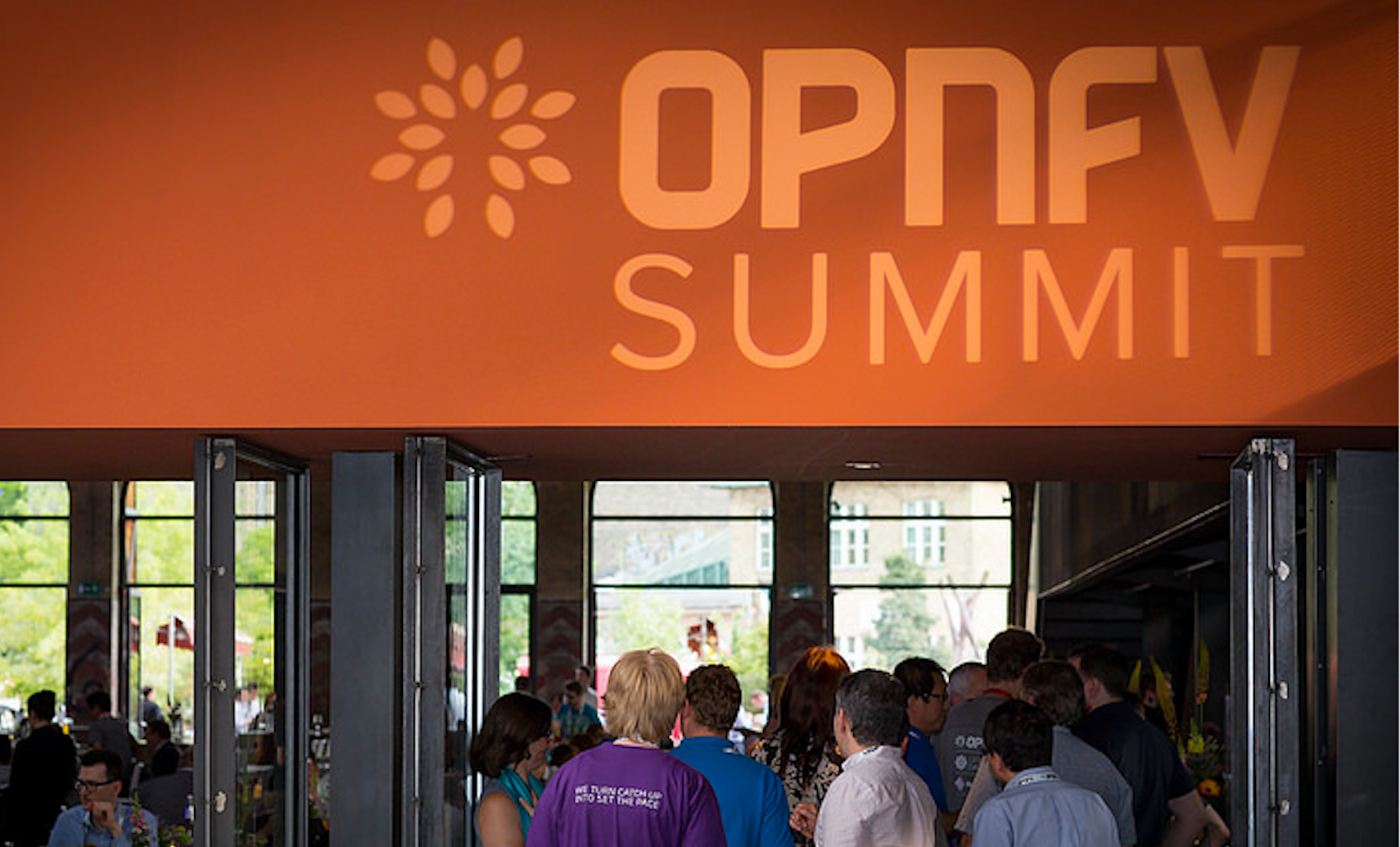
The countdown to this year’s OPNFV Summit is on! We’re headed to Beijing June 12-15 for four days of connecting global communities via tutorials, sessions, demos and keynotes targeted toward a diverse set of industry attendees. The largest gathering of OPNFV developers and community members from across the globe, OPNFV Summit is an annual conference to collaborate, innovate and explore the latest developments in open source Network Functions Virtualization (NFV). OPNFV is The Linux Foundation’s open source project for integrated testing of the full, next-generation networking stack. Will you join us? As a special offer to Linux.com readers, you can register here using code LNXCNOPNFV17 for 15% off.
With just a few weeks to go, we are pleased to announce our preliminary lineup of expert keynote speakers ready to share their insights and perspectives along the NFV journey.
The keynote presentations will cover a wide range of topics, including:
Accelerating the maturity and adoption of NFV
Turning networks to meet the needs of global communities
Deployment experience of vEPC in commercial networks
Cloudification of the telco network
Here are a few of the industry leaders participating as keynote speakers/panelists:
Heather Kirksey, Director, OPNFV
Zhang Fan, Chief Architect of Packet Core, ZTE
John Healy, VP, Data Center Group, GM, Datacenter Network Solutions Group, Intel
Susan James, Head of Product Line NFV Infrastructure, Ericsson
Forrest Lee, OPNFV Open Source Development Team Director, Huawei
Prodip Sen, CTO of NFV, HPE
Lingli Deng, Principal Engineer, China Mobile Research Institute
Chongfeng Xie, Director, IP and Future Network Research Center, CTBR
Eric Debeau, Head of R&D Team, Orange
Wei Leping, China SDN/NFV Alliance
Along with our featured keynote presentations, this year’s event will feature a diverse set of more than 65 presentations and demos spanning session tracks that include: Community and Upstream; Futures and Research; NFV Applications and Orchestration; NFV Platform Requirements; NFV Strategy and End User Stories; and Testing, Infrastructure and DevOps. You can view the full Summit agenda, including keynotes, breakout sessions, and demos, here: http://events.linuxfoundation.org/events/opnfv-summit/program/schedule
OPNFV Summit 2017 will be here in just a few weeks! Make your plans to join us now.
To register for the OPNFV Summit — including information on traveling, accomodations, and visas — please visit http://events.linuxfoundation.org/events/opnfv-summit/attend/registration(use codeLNXCNOPNFV17 for 15% off). Members of the media who would like to reserve a complimentary press pass to OPNFV Summit should contactpr@opnfv.org.