Home Blog Page 559

Building a Wearable Device with Zephyr

The Linux Foundation’s open source Zephyr Project received considerable attention at this February’s Embedded Linux Conference (ELC). Although there are still no shipping products running this lightweight real-time operating system (RTOS) for microcontrollers, Fabien Parent and Neil Armstrong of the French embedded firm BayLibre shared their experiences in developing a wearable device that may end up being the first Zephyr-based consumer electronics product.

BayLibre’s device has an ARM Cortex-A SoC connected via an SPI bus to a Cortex-M4 STM32L4xx. This is linked via I2C to other, more lightweight Cortex-M cores. Parent and Armstrong could say no more about the design, but they explained why they chose Zephyr and discussed the project’s pros and cons.

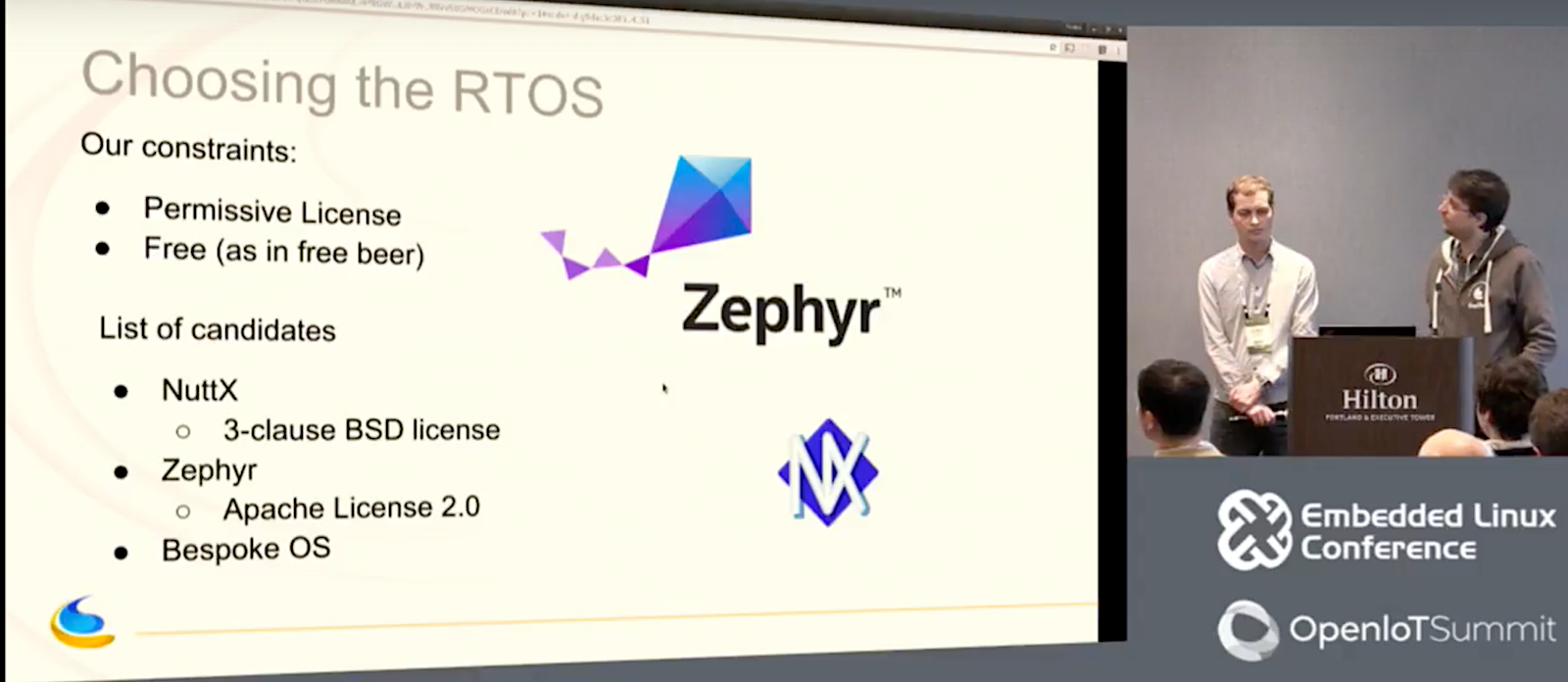
Parent and Armstrong needed a free, permissively licensed RTOS for a small-footprint wearable device, and they required drivers for UART, I2C master, and SPI slave. They also needed features like a scheduler, timers, tasks, threads, and locks. The list was quickly narrowed down to the Apache 2.0 licensed Zephyr, the 3-clause BSD licensed NuttX, or rolling an OS of their own. After having already committed to Zephyr, Apache myNewt launched, and they realized this might have worked, as well.

Parent and Armstrong first considered the DIY approach. “Developing our own OS had the advantage of being fun,” said Armstrong. “It could be tailored to our needs and our development process, and we would better understand the entire code base. The drawback is that it takes time, and there is no community to help. It would be hard to maintain, and there would be little time to mature and fix the bugs.”

With BayLibre’s customer deadline essentially negating the homegrown option, the developers looked into NuttX, which had the advantage of being around longer than Zephyr. Although Parent and Armstrong were embedded Linux developers and fairly new to RTOSes, Parent had become familiar with NuttX from working for two years at Google’s recently abandoned Project Ara. NuttX is best known for running on Pixhawk drone controllers.

“NuttX had the advantage of being familiar, and it already supported our STM32L4xx SoC,” said Parent. “But the build system is completely unreliable. At Project Ara, whenever we changed the configuration, we could not be sure it would work. Also, there’s no real NuttX community — it’s basically one guy who wrote almost everything, and there is basically no peer review.” Finally, despite NuttX’s BSD license, “inside its repository there is a lot of code with licenses such as GPL, so there’s a chance you might accidentally include some, which is scary,” added Parent.

Zephyr pros and cons

Zephyr had only been announced a few weeks before they began the project, yet it already had several appealing features. “It’s much like Linux in the coding style, build system, and the concept of maintainers,” said Armstrong. “Zephyr also has great documentation, and they are quickly growing a strong community. Zephyr supports low memory usage, and it’s highly configurable and modular. It offers modern cooperative and preemptive threading, and will eventually add security pre-certification.”

At the time, Zephyr’s biggest drawback was its immaturity, and the fact that it did not support the STM32L4xx SoC, only an older STM32F1xx model. The latter turned out to be a much easier challenge than they had imagined. The SoCs turned out to be very similar, so updating the port took only a day and a half, with testing finished within a week. “Most of the time was spent on I2C and SPI, and debugging a stupid register issue,” said Armstrong.

The challenges came with the upstreaming process itself, and the fact that Zephyr was changing so quickly. “We made the bad choice of waiting a month before upstreaming the code,” said Parent. “When we did the first rebase, nothing worked, and we had to rewrite the power management code three times. As soon as you have clean code, try to upstream it. Otherwise, you will spend hours rebasing everything.”

The upstream patch review process, which is now undergoing revision, was also more cumbersome compared to Linux. “Zephyr uses Gerrit for patch review, and JIRA for the feature requests, and there’s also a mailing list,” said Parent. “Sometimes you don’t know where to look for answers.”

Gerrit makes it easy to not forget patches, but “it’s really slow, and is very complicated,” said Parent. “One of the biggest issues is that you have to individually select the reviewers instead of broadcasting. There is no concept of patch series, so you have to add topics to your patch series, which makes sending patches more complicated. Its archive search is really bad, and it’s really hard to get a full view of a patch.”

JIRA also posed some challenges. “JIRA is manager friendly and makes it easy to do graphs, but it’s not developer friendly, and there’s no good information on how to use it,” said Parent. “It’s yet another communication medium that is overlapping with mailing lists and Gerrit.”

A HAL of a surprise

Parent and Armstrong uploaded the ST port patches to Gerrit and waited for reviews. There was no response, but they kept pinging the maintainer on IRC. They waited almost a month for a review response, and when it came it was rather vague.

They also received a discouraging note from a Zephyr developer from a large corporation. “He said please stop your work because we want to push our own HAL to Zephyr based on the STM32 Cube SDK,” related Armstrong. “He said that after he did his proposal we could redo our patch.”

They were surprised about the acceptance of HAL (Hardware Abstraction Layer) technology. “Our patch was fully rewritten in native code with no external links to anything,” said Armstrong. “We were used to the Linux kernel, where you can only have native, maintainable code. And the maintainers never told us from the start about HALs.”

“There was a discussion on the Zephyr mailing list as to whether we should use HALs before moving to native code,” added Parent. “Input was requested from the maintainers, but there was no reply. Right now, most of the Zephyr maintainers are from SoC companies. The result is that vendor HALs are slowly replacing native drivers, or at least for ST. Personally, I would love to not have HALs.”

Parent noted that the Linux kernel project prefers that their top-level maintainers do not work for SoC companies. He asked Linux DRM maintainer Dave Airlie about the situation, and Airlie was quoted as saying: “The reason the top-level maintainer (me) doesn’t work for Intel or AMD or any vendors it that I can say NO when your maintainers can’t or won’t say it.”

Parent also suggested that the Zephyr Project is not as transparent as some other open source projects. The technical leadership is determined by voting members of the Zephyr Technical Steering Committee (TSC). The TSC is open to community members to participate, but you must be invited to attend the meetings.

“Most meeting minutes require permission to access, and it can take up to two weeks,” he said. “Decisions are spread across JIRA, Gerrit, and the mailing lists, and blog posts are controlled through a separate committee, which makes it kind of hard to post a blog.”

There are also challenges in working with a new project driven by “top-down development,” said Parent. The priorities appear to be planned features like a Unified Kernel, a new IP stack, and Thread protocol support, he added. “They need to clarify their priorities and let us know if planned features have priority vs. community contributions.”

In conclusion, Armstrong summed up their first Zephyr experience. “We don’t like the HALs, and the review tools made us really sad,” he said. “The code is still really young and the APIs change fast, so you need to test your code for every release to see if it’s still working.”

Yet, Armstrong also emphasized Zephyr’s advantages, not least of which is the fact that it’s one of the few open source RTOSes optimized for wearables. “Zephyr is a good design for low memory or low performance on small CPUs,” said Armstrong. “It’s really similar to Linux, and the APIs are simple and well documented. There’s a real and active community, and the flaws are getting fixed very quickly.”

Armstrong also noted a possible improvement on the reviews front: “There was a rumor this morning that Zephyr is moving from Gerrit to GitHub,” he said. “It’s not perfect. but it’s better than Gerrit for sure.”

Other Zephyr sessions from ELC 2017 now available on YouTube include:

Intel’s Anas Nashif summarizes Zephyr’s progress, as well as plans for next year.

Linaro’s Andy Gross talks about plans to integrate device tree in Zephyr.

Intel’s Marcel Holtmann discusses using Zephyr on the BBC micro:bit board.

Intel’s Sakari Poussa explains how to jumpstart Zephyr development by using JavaScript Runtime for Zephyr, including a “shell” developer mode and Web USB.

ARM’s Vincenzo Frascino, who works on the Linaro LITE group, describes how Zephyr runs on the ARM Beetle test-chip implementation of the IoT subsystem for Cortex-M processors.

Intel’s Johan Hedberg discusses Zephyr’s Bluetooth support, including its IPv6/6LoWPAN stack for implementing IPv6 over BLE and the emerging Bluetooth Mesh.

You can watch the full “War Story” video on Zephyr development below:

https://www.youtube.com/watch?v=XUJK2htXxKw?list=PLbzoR-pLrL6pSlkQDW7RpnNLuxPq6WVUR

Connect with the Linux community at Open Source Summit North America on September 11-13. Linux.com readers can register now with the discount code, LINUXRD5, for 5% off the all-access attendee registration price. Register now to save over $300!

Probe Your Linux Sockets With ss

We all know and love netstat (network statistics), because it is a wonderful tool for viewing detailed network connection information. An interesting alternative is ss, socket statistics. ss is part of the iproute2 suite of network tools.

ss displays statistics about your network sockets, which includes TCP, UDP, RAW, and UNIX domain sockets. Let us briefly review what these are.

Transmission Control Protocol (TCP) is a fundamental networking protocol. It is part of the Internet protocol suite and operates in the transport layer. All networking transmissions are broken up into packets. TCP guarantees that all packets arrive, in order, and without errors. This requires a lot of back-and-forth communication, as this joke illustrates:

“Hi, I’d like to hear a TCP joke.”
“Hello, would you like to hear a TCP joke?”
“Yes, I’d like to hear a TCP joke.”
“OK, I’ll tell you a TCP joke.”
“Ok, I will hear a TCP joke.”
“Are you ready to hear a TCP joke?”
“Yes, I am ready to hear a TCP joke.”
“Ok, I am about to send the TCP joke. It will last 10 seconds, it has two characters, it does not have a setting, it ends with a punchline.”
“Ok, I am ready to get your TCP joke that will last 10 seconds, has two characters, does not have an explicit setting, and ends with a punchline.”
“I’m sorry, your connection has timed out. Hello, would you like to hear a TCP joke?”

User Datagram Protocol (UDP is simpler and has less overhead. It is a connection-less protocol with no error checking or correction mechanisms, and does not guarantee delivery. There are UDP jokes, too:

I would tell you a UDP joke but you might not get it.

A UDP packet walks into a bar.

RAW sockets are naked. TCP and UDP encapsulate their payloads, and the kernel manages all the packets. RAW sockets transport packets without encapsulating them in any particular protocol, so we can write applications that manage network packets. Some applications that take advantage of RAW sockets are tcpdump and nmap.

UNIX sockets, also called inter-process communication (IPC) sockets, are internal sockets that processes use to communicate with each other on your Linux computer.

Dumping Sockets

Now we get to the fun part, dumping sockets! This is not quite as much fun as dumping a load from a backhoe, but it has its charms. These commands print the current state of TCP, UDP, RAW, and UNIX sockets respectively:

$ ss -ta
$ ss -ua
$ ss -wa
$ ss -xa

See how your UNIX sockets are verbose and numerous. If your Linux distribution uses systemd you’ll see it all over the place. This little incantation counts all the systemd lines:

$ ss -xa | grep systemd | wc -l
53

ss -a dumps everything. Let’s take a look at what the columns mean.

$ ss | less
Netid State    Recv-Q Send-Q Local Address:Port           Peer Address:Port                
u_seq ESTAB    0      0      @0002b 25461                 * 25462                
u_str ESTAB    0      0      @/tmp/dbus-C3OhS7lOOc 28053             * 22283   
udp   ESTAB    0      0      127.0.0.1:45509              127.0.1.1:domain               
tcp   ESTAB    0      0      192.168.0.135:40778          151.101.52.249:http 
tcp   LAST-ACK 1      1      192.168.0.135:60078          192.229.173.136:http
tcp   LISTEN   0      80     127.0.0.1:mysql                 *:*
tcp   LISTEN   0      128    :::ssh                         :::*

Netid displays the socket type and transport protocol.

State is the socket state, which are the standard TCP states. You’ll see ESTAB and LISTEN the most.

Recv-Q and Send-Q display the amount of data queued for receiving and sending, in bytes.

Local Address:Port is the open socket on your computer, and Peer is the address of the remote connection, if there is one.

Cool Examples

It’s always good to check for open ports. This shows all listening sockets:

$ ss -l

Seeing all the UNIX sockets isn’t necessary when you’re concerned about anything that might be open to the outside world, so this displays only listening TCP, UDP, and RAW sockets:

$ ss -tuwl
Netid  State      Recv-Q Send-Q  Local Address:Port    Peer Address:Port                
raw    UNCONN     0      0              :::ipv6-icmp   :::*                                                                                             
udp    UNCONN     0      0               *:bootpc      *:* 
tcp    LISTEN     0      80      127.0.0.1:mysql       *:*                                      
tcp    LISTEN     0      128             *:ssh         *:*                                       
tcp    LISTEN     0      128            :::http        :::*                    

UNCONN, unconnected, is the same as LISTEN. This example shows that pings are not blocked, bootpc is listening for DHCP assignments, MySQL is listening for local connections only, and SSH and HTTP are open to all requests, including external. *:* means all IPv4 addresses, and :::* means all IPv6 addresses.

You can see which processes are using sockets, which can be quite enlightening. This example shows the activity generated by a bit of Web surfing:

$ ss -tp
State      Recv-Q Send-Q         Local Address:Port       Peer Address:Port                
ESTAB      0      918            192.168.0.135:49882      31.13.76.68:https 
users:(("chromium-browse",pid=2933,fd=77))
ESTAB      0      0              192.168.0.135:60274      108.177.98.189:https 
users:(("chromium-browse",pid=2933,fd=114))
FIN-WAIT-1 0      619            192.168.0.135:57666      208.85.40.50:https                
ESTAB      0      0              192.168.0.135:52086      31.13.76.102:https                 
users:(("chromium-browse",pid=2933,fd=108))
SYN-SENT   0      1              192.168.0.135:46660      52.84.50.246:http                  
users:(("firefox",pid=3663,fd=55))
SYN-SENT   0      1              192.168.0.135:46662      52.84.50.246:http                  
users:(("firefox",pid=3663,fd=66))

Want to see the domain names? Add -r, for “resolve”:

$ ss -tpr
State      Recv-Q Send-Q    Local Address:Port     Peer Address:Port                
ESTAB      0      0         studio:48720           ec2-50-18-192-250.
us-west-1.compute.amazonaws.com:https   users:(("firefox",pid=3663,fd=71))
ESTAB      0      0         studio:57706            www.pandora.com:https                 
users:(("firefox",pid=3663,fd=69))
ESTAB      0      0          studio:49992           edge-star-mini-shv-01-
sea1.facebook.com:https      users:(("chromium-browse",pid=2933,fd=77))

Use the -D [filename] to dump your results into a text file, or use tee so you can see the output in your terminal and also store it in a file:

$ ss -tpr | tee ssoutput.txt

The more you know about TCP/IP, the more tools like ss will work effectively for you. The fine man ss contains a lot of useful examples, and if you install the iproute2-doc package you’ll find more help.

Learn more about Linux through the free “Introduction to Linux” course from The Linux Foundation and edX.

How to Manage the Computer Security Threat

It is tempting to believe that the security problem can be solved with yet more technical wizardry and a call for heightened vigilance. And it is certainly true that many firms still fail to take security seriously enough. That requires a kind of cultivated paranoia which does not come naturally to non-tech firms. Companies of all stripes should embrace initiatives like “bug bounty” programmes, whereby firms reward ethical hackers for discovering flaws so that they can be fixed before they are taken advantage of.

But there is no way to make computers completely safe. Software is hugely complex. Across its products, Google must manage around 2bn lines of source code—errors are inevitable. The average program has 14 separate vulnerabilities, each of them a potential point of illicit entry. Such weaknesses are compounded by the history of the internet, in which security was an afterthought (see article).

Read more at The Economist

Watson Service Chaining With OpenWhisk (Part 1 of 3)

OpenWhisk can merge the power of Watson with the simple beauty of serverless computing. As we delve into Watson services, we’ll cover the building blocks here.

This three-part series will help you understand the in-depth features of Serverless Computing via OpenWhisk. OpenWhisk offers an easy way to chain services where an output of the first action acts as an input to the second action and so on in a sequence.

OpenWhisk achieves the chaining of services via sequences on Bluemix. By the end of Part 3, You will be chaining Watson services and exposing the sequence as a REST API via OpenWhisk API Gateway.

This post describes the resource requirements for performing this lab. The two sub-sections are:

  • Bluemix account
  • Locally installed software

Read more at DZone

How Docker Is Growing Its Container Business

Docker is a name that has become synonymous with the application container revolution in recent years. At the helm of Docker Inc. is CEO Ben Golub who is tasked with leading the company forward and making sure that containers aren’t just a good idea for developers, but are also a good idea for paying customers.

In a video interview with eWEEK at the DockerCon 17 conference, Golub details how Docker Inc. has developed its business model and what lies ahead.

“We have built up a subscription business model,” Golub said. “What we have seen over the course of the past year, since we have introduced our more serious commercial products is a great ramp in terms of the number of customers.”

Read more at eWeek

Mirantis Launches its New OpenStack and Kubernetes Cloud Platform

Mirantis, one of the earliest players in the OpenStack ecosystem, today announced that it will end-of-life Mirantis OpenStack support in September 2019. The Mirantis Cloud Platform, which combines OpenStack with the Kubernetes container platform (or which could even be used to run Kubernetes separately), is going to take its place.

While Mirantis is obviously not getting out of the OpenStack game, this move clearly shows that there is a growing interest in the Kubernetes container platform and that Mirantis’ customers are now starting to look at this as a way to modernize their software deployment strategies without going to OpenStack. The new platform allows users to deploy multiple Kubernetes clusters side-by-side with OpenStack — or separately.

The company is also changing how it delivers its new platform. 

Read more at TechCrunch

Software Heritage Backed By UNESCO

UNESCO and INRIA signed last Monday an agreement to contribute to the preservation of the technological and scientific knowledge contained in software. This includes promoting universal access to software source code.

The agreement, signed by UNESCO’s Director-General, Irina Bokova, and INRIA’s Chief Executive Officer, Antoine Petit, and in the presence of the President of the French Republic, François Hollande, focuses especially on Software Heritage. Software Heritage is an INRIA project that strives to collect, preserve and make accessible the source code of all available software.  The Software Heritage project aims to build a universal and perennial archive of software accessible for future generations.

“We are expected to be able to control, to be able to transmit, to be able to put these technologies, this information, these elements that become of the heritage at the service of the humanity” said M Hollande during the event. The FSFE was involved with Software Heritage’s early success, by offering support and helping publicise its creation and activities. Matthias Kirschner, President of FSFE, says “It is important to preserve our collective knowledge about how software has influenced humankind. Collecting source code makes Software Heritage a valuable resource to understand how our society worked at certain times, and to build upon knowledge from humankind’s past.”

Software Heritage is the brainchild of Roberto Di Cosmo (founder and CEO) and Stefano Zacchiroli (founder and CTO), two long-time Free Software advocates and activists.

See more at UNESCO

Update on the Exascale Computing Project (ECP)

In this video from the HPC User Forum, Paul Messina from Argonne presents: Update on the Exascale Computing Project.

“The Exascale Computing Project (ECP) was established with the goals of maximizing the benefits of high-performance computing (HPC) for the United States and accelerating the development of a capable exascale computing ecosystem. Exascale refers to computing systems at least 50 times faster than the nation’s most powerful supercomputers in use today.The ECP is a collaborative effort of two U.S. Department of Energy organizations – the Office of Science (DOE-SC) and the National Nuclear Security Administration (NNSA).”

Read more at insideHPC

How to Look at Mission-Critical Safety in the Internet of Cars

Alex Agizim is CTO of Automotive and Embedded Systems at EPAM.

The autonomous car will redefine how we travel, ship inventory, and design infrastructure. As physical objects become more deeply integrated into the Internet of Things, the connected car will soon become an essential component of the IoT ecosystem.

An important element as we look towards actually implementing the autonomous car is understanding how mission-critical safety software and the Internet of Cars will operate within the car ecosystem. This is a blog that tries to explain what is happening currently; the importance of creating a security-first approach with open source software; and how we at EPAM are approach and solving some of the common problems.

If you are interested in learning more about this, Alex will be at the Automotive Linux Summit happening in Tokyo from May 31 – June 2. His talk will be all about the cloud connected vehicle based on open source software. Linux.com readers get to save 5% off the “attendee” pass to Automotive Linux Summit. Register now with code LINUXRD5.

What is the current problem?

The Internet of Cars ecosystem and shared economy model require the vehicle to become part of the Cloud. Service vendors should own the end-to-end service software stack including the part of the software executed in the vehicle. The deployment, upgrades and development of the in-vehicle part of the service should be completely independent from the Car OEM development lifecycle.

Currently, service vendors don’t have the ability to update or deploy the in-vehicle part of the software. It can only be done by the Car OEM that owns the complete software that runs on onboard computers.

Protecting Your Vehicle on the Cloud

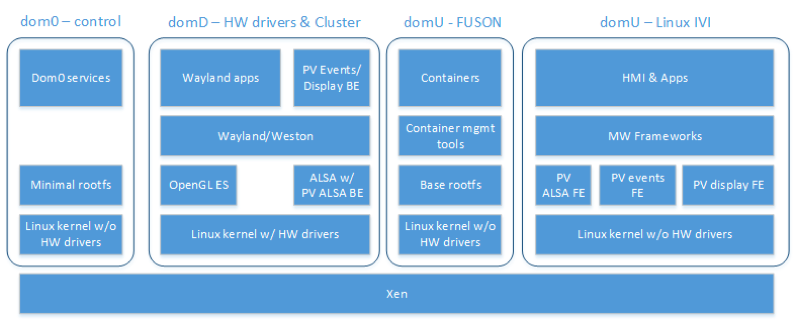
No matter which solution will be used for cloud integration, it still opens the system for potential intrusions through the exploitation of connection vulnerabilities. Thus, some level of isolation from the rest of the safety-critical software is needed. Here is how we envision the Xen hypervisor-based solution for isolation of different subsystems (soft ADAS & cluster, HMI, cloud apps):

This infrastructure (including containers and Docker to deploy service software with the same approach as regular cloud-based services to the EPAM Fusion domain) allows service vendors to develop and deploy services without any special knowledge of embedded/automotive software. The domain provided by the Car OEM would ensure the full control of APIs and policies that might be used by the service. The domain would not have access to the hardware because of hardware virtualization isolation.

The autonomous car is slowly upon us, but there are many challenges that lie ahead, especially when it comes to critical software functions on the cloud. The way the technology industry approaches this will be imperative to innovation.

If you are curious to learn more about EPAM Fusion, see our demo video below:

https://www.youtube.com/watch?v=jMmz1odBZb8

Secure Web Apps with JavaEE and Apache Fortress

ApacheCon is just a couple weeks away — coming up May 16-18 in Miami. We asked Shawn McKinney, Software Architect at Symas Corporation,  to share some details about his talk at ApacheCon. His presentation, “The Anatomy of a Secure Web Application Using Java EE, Spring Security, and Apache Fortress” will focus on an end-to-end application security architecture for an Apache Wicket Web app running in Tomcat. McKinney explains more in this interview.

Linux.com: Tell us about your inspiration for this talk.

Shawn McKinney: The idea for this talk started several years back, when I first began working full-time with Symas. I was working on a project that spanned multiple companies with my friend and colleague, John Field, who’s a security architect at EMC, now Pivotal.

At the time, we were working on a process to migrate legacy Cobalt apps from running on their native IBM z Series mainframe platform to run on top of open systems architectures, i.e. Linux.

These were massive programs with millions of lines of code, built over decades. Their conversion processes required mimicking the mainframe’s legendary security controls onto Linux platforms, using what was available to us via native and non-native security controls.

This meant dealing with a multitude of security concerns across every tier of the system and into many of its sub-layers as well. Mandatory access controls were enforced on every node in the system.

Linux systems had to be hardened to the nth degree and at the same time, multiple grades of authorization were required within the platform layers. Fortunately, everything we needed to do all this was already readily available and usable, and easily found within the public domain.

Only open, established, and timeworn practices were being targeted. That is, technologies released under permissible licenses, like the Apache software license, and these things were allowed into the final design. Our problem wasn’t with how to design the security system, per se, nor how to build it. Strangely, those were the easy parts.

The hard part for us was how do we convey the contents of its complex design to others in a way that is understandable? Because, many of us are not, shall we say, security afflicted, so despite recommending only best practices, their concepts remain arcane, complicated, and generally not known to the masses.

To break through this complexity barrier, John and I borrowed an idea remembered from our youth, and that is those science textbooks that depict the human anatomy. You remember the ones that use translucent pages, each with a particular organ, all overlaying together comprising the comprehensive image of the human body, complete with all of its sub-systems?

We thought this a good way to communicate our complicated security system design to others. We adapted this idea for our end-to-end security design layout. Each image corresponds with an individual security component contained within a typical web app from it’s outer to innermost layers.

What’s unique about this particular talk is that it started with those initial visual images of a typical web security system architecture.

Next, a test application was created to go along with those anatomy images. The test app mimicked a typical web system, complete with test pages, links, buttons, database tables, et cetera, all of which are under tight security controls of various types.

The goal of the test app was to create a comprehensive tutorial demonstrating all of the pertinent security controls that were contained within the anatomy diagram. Finally, we added instructions to install, deploy, and run the test app and published it all to GitHub.

The project is called The Apache Fortress Demo, and we used it in our live demos and it could also be used by anyone else who wants to try it out at home. During our live demos, we would simultaneously dissect and discuss the web system security functionality, switching between the Power Point slides visually depicting the images and into the concrete demo to show how it all worked in a live system.

Linux.com: Who should attend this talk?

McKinney: It is a Java security demonstration, so anyone who’s working in Java platform that’s in security would be particularly interested. The demo’s going to cover security protocol interplays, including TLS in its various forms and flavors, so LDAPS, for example, HPS. So, I’m going to say anyone who’s interested in security-related topics should get something from it.

Linux.com: What technical background will you assume the audience has?

McKinney: I’m going to assume basic conceptual understanding of security concepts like authentication, authorization, and encryption of data. So, understand those abstract concepts, and then we will then make them concrete for this specific platform in the demo.

Learn first-hand from the largest collection of global Apache communities at ApacheCon 2017 May 16-18 in Miami, Florida. ApacheCon features 120+ sessions including five sub-conferences: Apache: IoT, Apache Traffic Server Control Summit, CloudStack Collaboration Conference, FlexJS Summit and TomcatCon. Secure your spot now! Linux.com readers get $30 off their pass to ApacheCon. Select “attendee” and enter code LINUXRD5. Register now >>