Home Blog Page 558

Your CEO’s Obliviousness about Open Source is Endangering Your Business

By Jeff Luszcz, Vice President of Product Management at Flexera Software

The consequences are easily recognizable; you remember the lucrative software product whose vendor was compelled to shelf it.  You probably also remember the insidious software vulnerability that harmed millions of unsuspecting users (Heartbleed, anyone?).

But what caused these issues?  Itis what happens when an open source component is integrated into a commercial software product and violates its open source license, or when it contains a vulnerability that was previously unknown.  As technology evolves, open source security and compliance risk are reaching a critical apex that if not addressed, will threaten the entire software supply chain.

 So who is responsible if you are not prepared, and your company is affected?  The CEO.

Up to 50 percent of code in commercial software can be defined as open source, while the majority of software engineers use open source to accelerate their work.  The problem with this is that most engineers do not track what they are using.  They also tend not to grasp the legal ramifications for using that code, nor the potential software vulnerability risk they are inviting once adopting it.

The most startling aspect of it all is that most software executives are not aware of this risk either.  If you do not know what open source software is being used, you can’t guarantee that the appropriate methods and automation are established to reduce OSS and compliance risk.  That said, it is imperative for software CEOs to deliberate with CTOs, security officers and engineers to gain a vast comprehension of the key areas of their open source compliance and security operation.

An Open Source Explosion

The way we build software products has greatly changed in the last 10 years.  It used to be the case that even the CEO would be highly aware of the third-party dependences their company had on the outside world.  The dependencies were often commercial in nature and required non-disclosure agreements (NDAs), contracts, payments and other highly visible activities related to acquiring and licensing the technology.  Then slowly at first, and with an ever-increasing pace seemingly overnight, the open source world exploded with millions of extremely high quality, easy-to-acquire, free-of-licensing fee components.  The open source business model, combined with a fast always-on-network and the social effects of open source use, created a perfect environment for hundreds – and even thousands – of OSS components to be brought in and added to a software product.

In some cases, there is more open source than homegrown, proprietary code in a company’s product.  Unfortunately, most companies, while taking advantage of open source in order to create products faster, are not respecting the open source licenses associated with the software components they use.  What is sometimes surprising to CEOs and other executives is that while open source is free of cost, it is not free of obligations.  These obligations run the gamut from passing along a copyright statement or a copy of license text, to providing the entire source code for the company’s product.  Data shows that most companies are aware of only a small percentage of the open source they depend on.  By not knowing what you are using, it is impossible to comply with the obligations specified in the license.  Additionally, software can have bugs or vulnerabilities which may affect your product.  By not keeping track of what you are using, it can make it possible to be far behind on upgrades or patches that fix discovered software vulnerabilities.

As with most business processes, if they are not seen as important or required by senior leadership they will not get done.  Open source license compliance is not an optional part of using open source, but it has been treated that way by most of the tech industry.  It is important for CEOs and other business leaders to show the importance of respecting the legal and security obligations that are part and parcel of using open source.

Basic Training

The technical debt that exists around open source compliance requires a multi-prong process, in order to create a climate and a set of expectations that the processes are being followed.  The most important of these is education.  Everyone in the company should be aware of the basics of open source licensing and compliance.  This is because open source is being used in pretty much every business process and job at a modern tech company.  Graphic designers are using open source art work, IT is installing and maintaining open source applications, marketing is editing and creating content based on existing open source content, as well as countless other examples.  By being trained on the basics, and knowing that compliance is expected, you can make the remaining job much easier.  Employees will be more mindful in their choices, be able to respect the open source content they use – and in many cases – be able to give back to the community in an acceptable manner.

Senior Leadership Mandates

After education, comes time management and the process of building open source compliance and vulnerability management into the technical and business processes that a company creates and follows.  If no time or resources are provided to comply with the open source obligations, it is not a surprise to see those obligations ignored.  While potential legal, security and reputational risk concerns should be enough to bake this into your processes, it is often only after senior leadership mandates that time be created that compliance occurs.

Open a Review Board

It is also recommended that an internal team of open source experts be assembled as part of an Open Source Review Board.  This team should be made up of technical, legal and business representatives who can help create policies and act as a clearing house for open source and third-party usage questions.

Questions that Need Answering

CEOs should make it a priority to see how easy it is to check for signs of proper open source license and security compliance from the outside. Is it easy to find the third-party license notices for your products?  Is it easy to get any source code distributions required due to our use of Copyleft style open source licenses?  Do you have a process and plan for upgrading and patching your products due to open source and third-party software vulnerabilities?  Have you asked for spot checks of your compliance documents to confirm that the processes are being respected?  Are you providing material support to the open source projects you are using?  Have you required your commercial vendors to provide open source disclosures and compliance documents?

These important questions are a useful way to gauge how responsible your company is about proper open source practices.  By asking these questions and demanding suppliers comply with these policies, companies can best protect themselves and their customers from the disadvantages of being a laggard when it comes to technology.
Getting to Know GNOME (From a Unity Perspective)

Unless you’ve lost all network connections over the past couple of weeks, you know the big news: Canonical announced it was dropping Ubuntu Unity and returning to its GNOME roots. Whether you think this is good or bad news, it’s happening. When the official Ubuntu 18.04 is released, it will be all GNOME. For those that have been happily using Unity for years, will this translate to a lesser experience and a learning curve for the new Ubuntu desktop?

Not completely. Yes, there will be features missing (some of which you may have grown to love), but the GNOME desktop has become an incredibly solid and user-friendly experience, one that can go a long way to help you be productive… and do so in style.

I want to compare some of the similarities (and differences) between Unity and GNOME, so anyone concerned they’ll soon be on the market for a new Linux distribution can be rid of those fears. Hopefully, by the time you finish reading this, you’ll be excited for the upcoming changes to the Ubuntu desktop.

The Dash

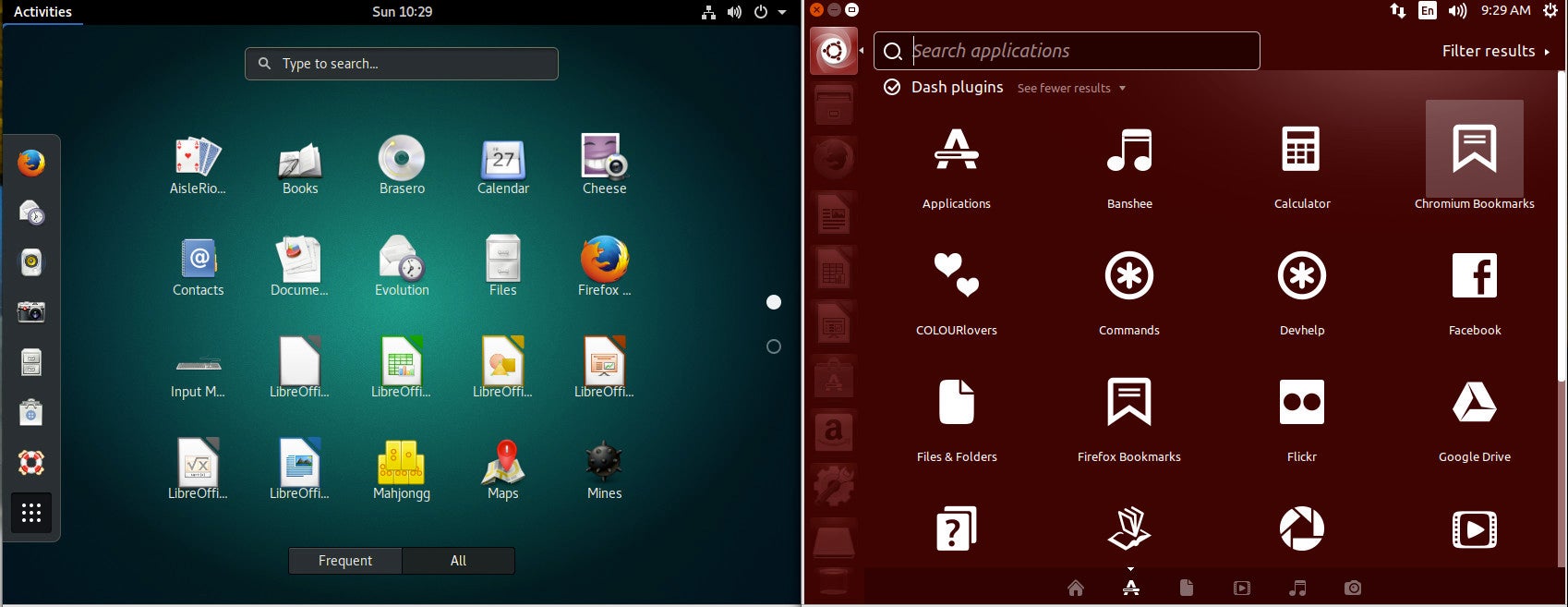
We’ll start off with some good news. Both Unity and GNOME have a feature called the Dash. For those that have been working with the Unity Dash, you’ll be happy to know the GNOME Dash is just as powerful. Not only can you launch and manage all of your apps from the GNOME Dash, you can also search for documents, locate software to install (with GNOME Software integration), work with dynamic workspaces, and even add apps to a special Favorites launcher (that functions in similar fashion to the Unity Launcher). Even better, you can extend the functionality of the GNOME Dash by addings extensions (more on that in a bit).

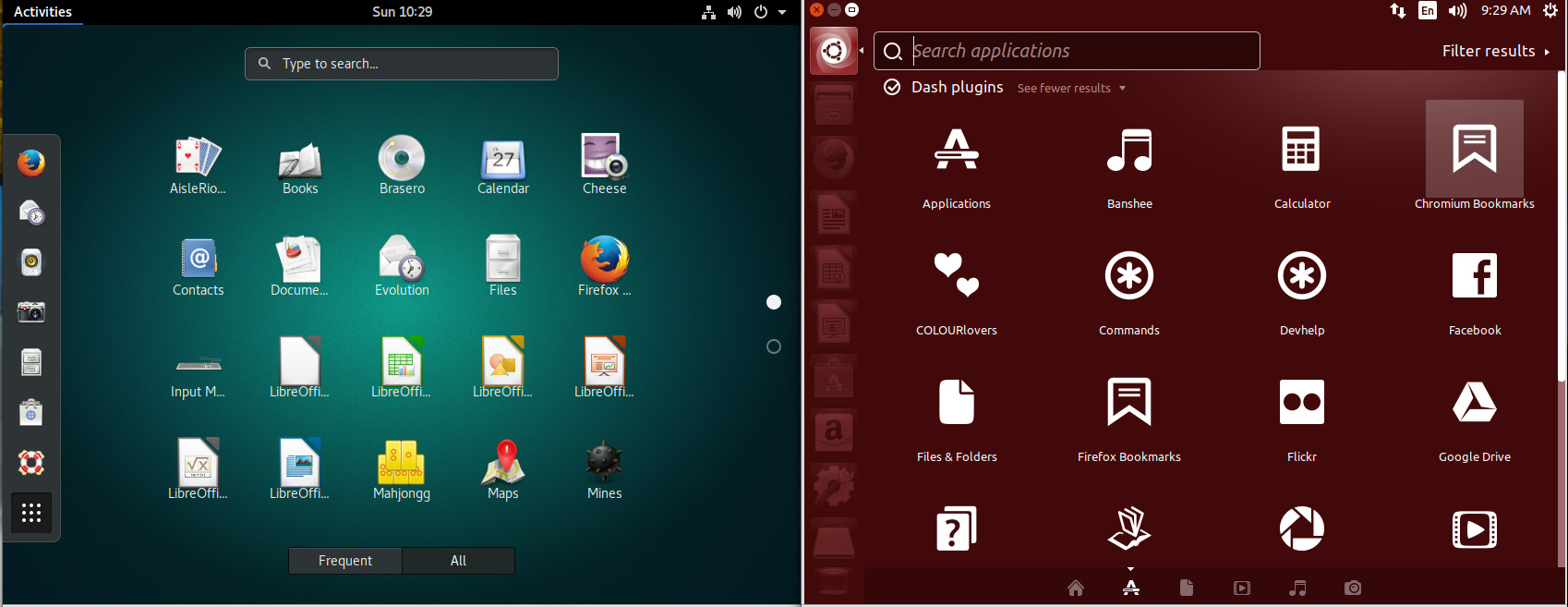
A quick visual comparison of the two different Dashes (Figure 1) seems to point to the Unity’s Dash offering quite a bit more in the feature department (such as a very powerful search filtering tool). To some, those added features were one of Unity’s biggest failings; it tried to do too much. With GNOME, you get a simpler experience.

Figure 1: The Unity and GNOME Dash side by side.

Launcher

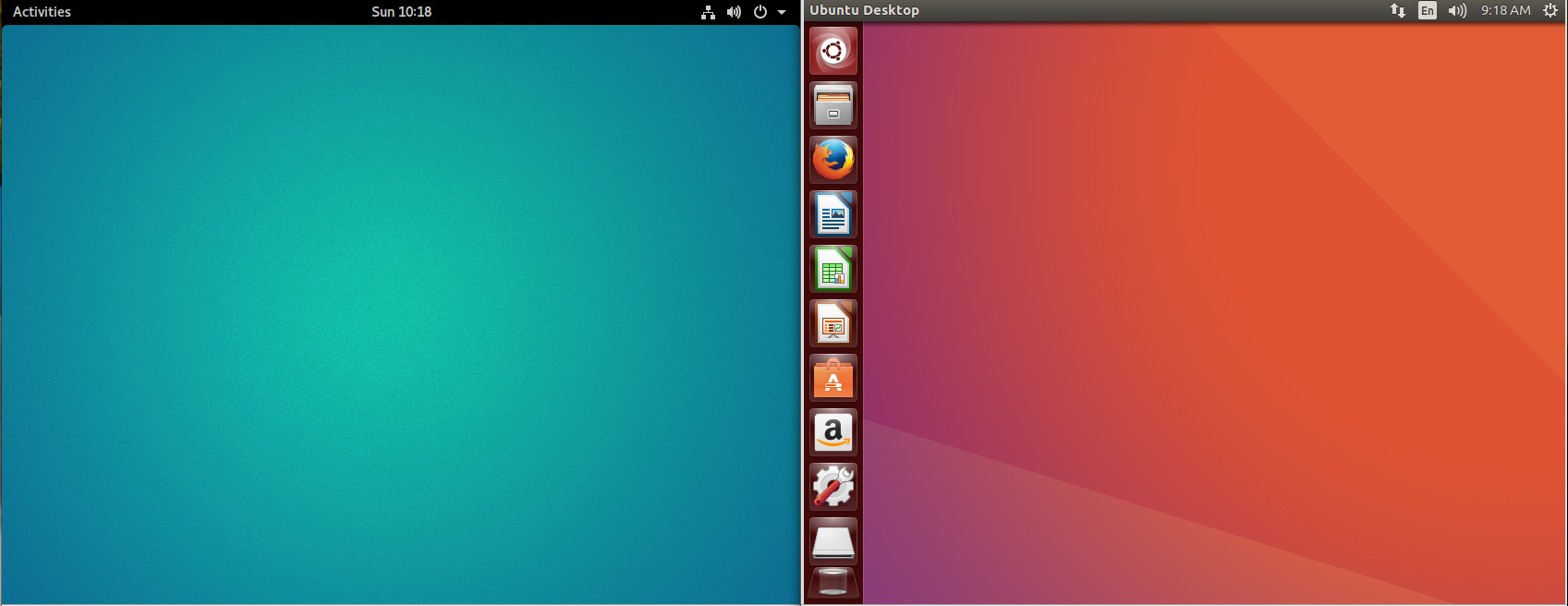
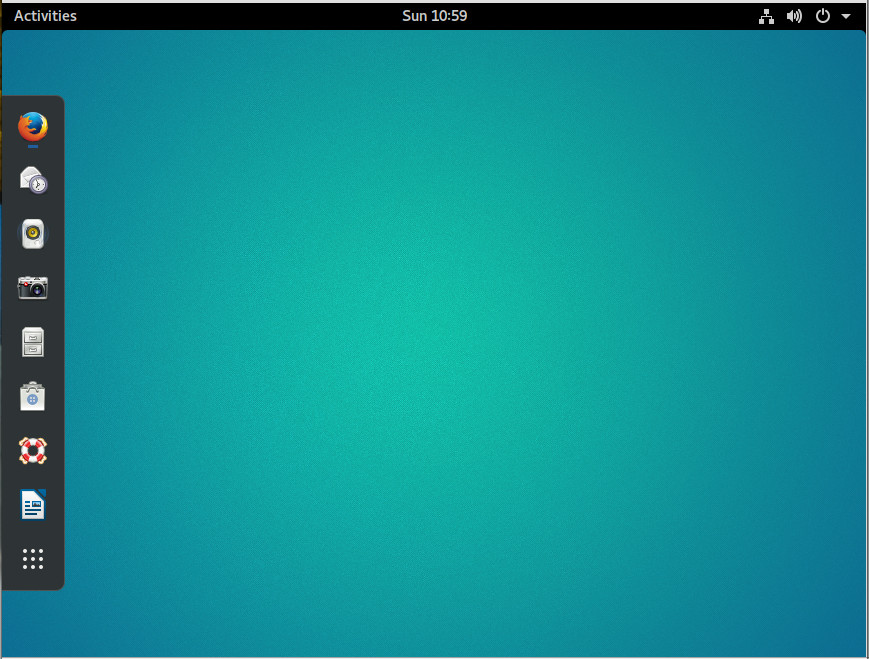
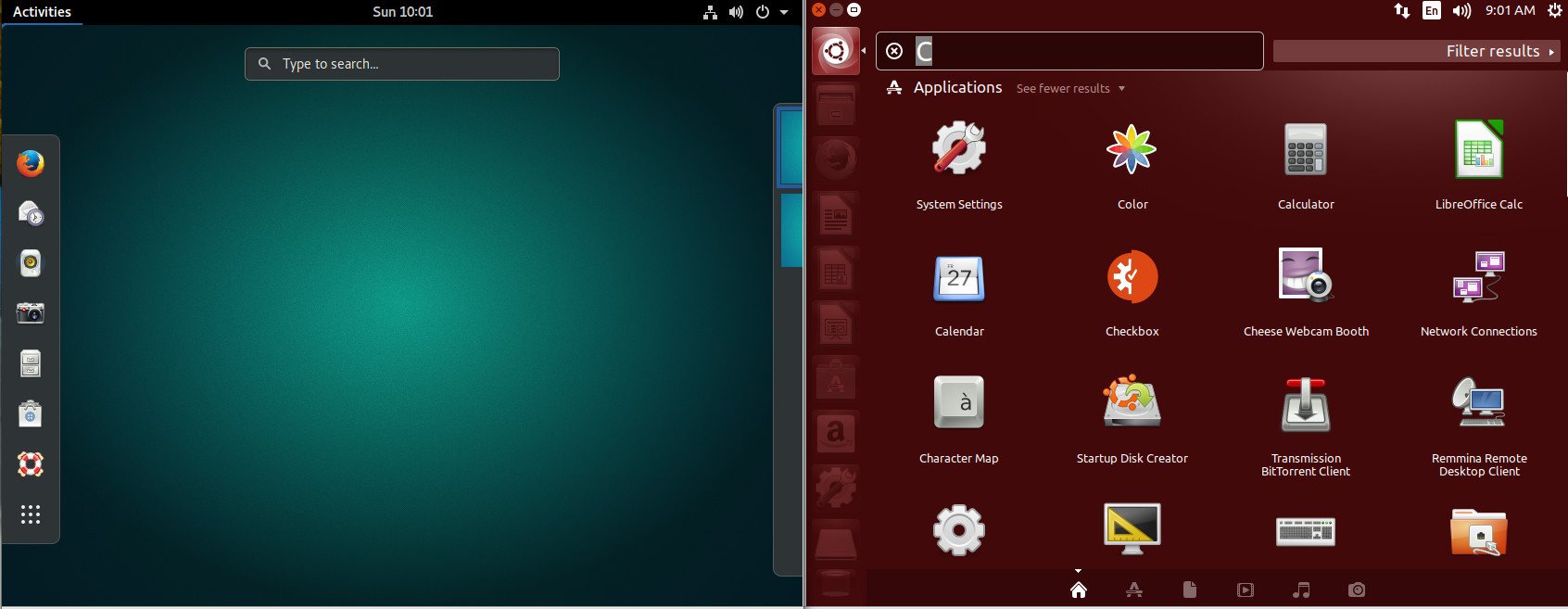
If we take a look at default desktops, driven by both Unity and GNOME, we see a fairly stark difference (Figure 2). With the Unity desktop, you have a Launcher, where you can open the Dash and add application launchers. With GNOME, that feature is tucked within the Dash (in the form of the Favorites bar).

Figure 2: GNOME (left) doesn’t include a default app launcher as does Unity.

This being GNOME, of course, we can actually add a dock-like-feature with the help of an extension (more on that later). However, without that extension, to get to all of your applications, you must open the Dash (click on Applications in the upper left corner or clicking the Super key on your keyboard) and then click on the grid of dots at the bottom of the Favorites bar. As you can see (Figure 3), the GNOME Dash application listing offers a somewhat similar experience to that of Unity. The biggest difference is the inability to filter results (beyond All or Frequent).

Figure 3: The GNOME Dash application listing (left) is just as user-friendly as is the Unity Dash.

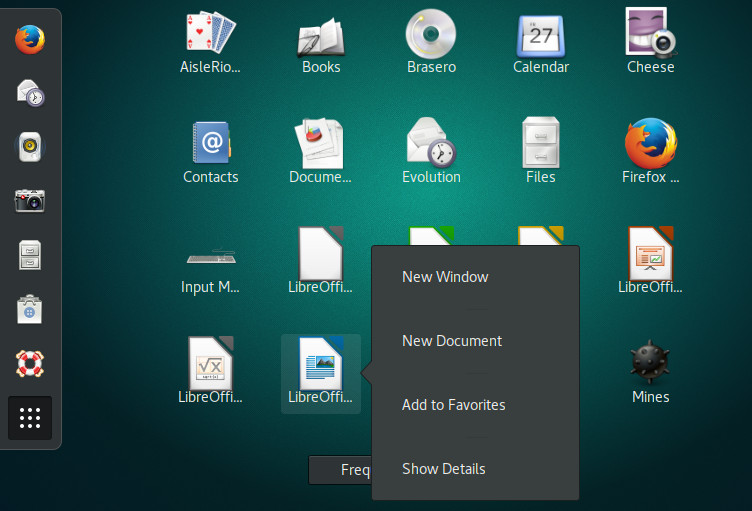
While in the application listing, you can right-click an application icon and click Add to Favorites (Figure 4) to include that launcher in the Favorites bar.

Figure 4: Adding an application launcher to the Favorites bar.

Global and Heads Up Menu

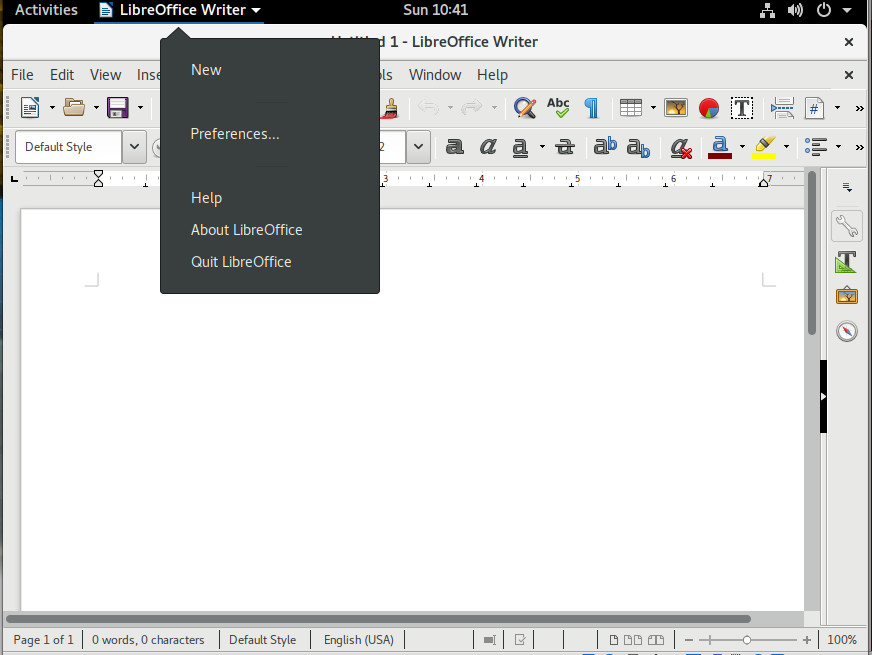
We’re about to find out one of GNOME’s shortcomings. I’ll begin this by saying GNOME’s take on menus can be a bit confusing at first. With some applications, you’ll find two menus: The application menu and the Global menu. The application menu is the standard, straightforward menu found within an application. The Global menu is a menu found in the titlebar of an app. Sometimes that Global menu is the only menu for an app. Depending upon the application support for Global menu, that menu will either offer only options for various elements of the application window (such as New, Preferences, About), or it will serve as the full-blown application menu (in lieu of the standard toolbar menu). To make this a bit more clear, open up LibreOffice, and you’ll see a standard menu toolbar, as well as a Global menu (Figure 5).

Figure 5: LibreOffice showing both standard and Global menus.

In the above image, I’ve opened the Global menu associated with LibreOffice, where you can open a new file, gain access to the LibreOffice preferences window, get help with and quit the application.

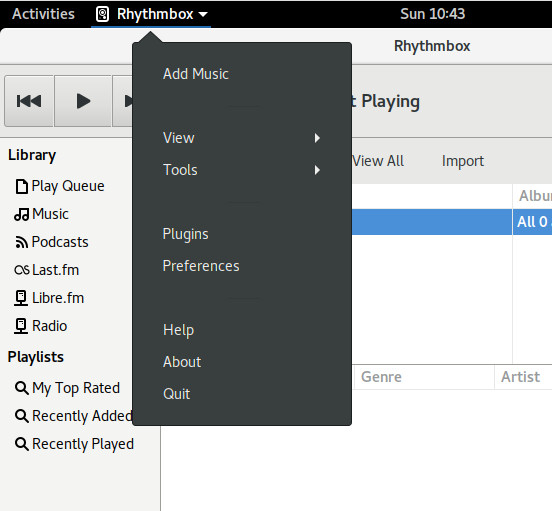
However, open Rhythmbox (the default music player in GNOME) and you’ll see there is only one menu—the Global menu—which contains all of the Rhythmbox menu options (Figure 6).

Figure 6: The Rhythmbox Global menu.

The reason for this confusion is that not all applications have come on board with the Global menu system. I hope, now that Ubuntu is shifting back to GNOME, this will change so we’ll see a more consistent menu system for the desktop.

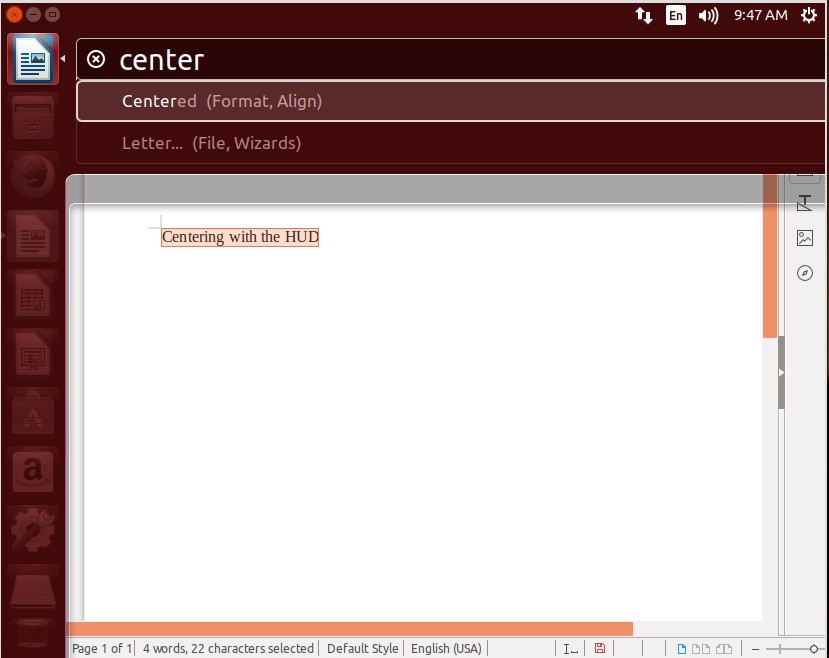
If there is one feature that power users will miss from Unity, it’s the Heads Up Display (HUD) menu. This allowed the user to hit the Alt key and bring up an overlay that would search an application’s menu. This made it incredibly easy to find the exact menu entry you wanted. Say, for example, you wanted to center text in a LibreOffice document. Type your text, highlight it, click the Alt key, type center, and then select Centered (Figure 7).

Figure 7: The HUD made working with an application incredibly efficient.

With the HUD, you could work within an application without having to take your hands from the keyboard—something quite important to those who regard efficiency over all else.

Extensions

Now we come to a part of the program where GNOME clearly outshines Unity: extendability. This has always been an issue with Unity—a certain lack of configuration options. With GNOME comes extensions. GNOME Extensions are small pieces of code, written by third-party developers, that extend the desktop in many and varied ways.

Let me show you how to easily gain a dock (similar to the Unity Launcher) with the help of the Dash To Dock extension. To do this, open up the Firefox browser and head over to the Dash To Dock page click the ON/OFF slider to the ON position and click Install (when prompted). The Dash To Dock extension will be added and you can now enjoy the Favorites bar as a standard desktop launcher (Figure 8).

Figure 8: The Dash To Dock extension ready to serve.

Whenever you add an app launcher to Favorites, it will automatically show up on the Dock.

You’ll find a vast number of Extensions that can be added to the GNOME desktop.

Prepare for the change

At this point, it’s just a matter of waiting. April 2018 will see the first release of Ubuntu with GNOME as its official desktop. Of course, if you don’t want to wait, you can always download and install Ubuntu GNOME; however, I would not be surprised if, when Ubuntu releases 18.04, we’ll see a few added features to GNOME. My fingers are crossed for a HUD-like menu system. What about you?

Learn more about Linux through the free “Introduction to Linux” course from The Linux Foundation and edX.

Q&A with Mark Hinkle, the New Executive Director for the Node.js Foundation

These days, Node.js is under the hood of everything from the web, the Internet of Things and desktop applications to microservice architectures. Node’s 15 million-plus downloads per month, and more than a billion package downloads per week, render it the world’s biggest open source platform.

The Node.js Foundation was started in 2016, under the aegis of the Linux Foundation, to support Node’s ongoing growth and evolution. The foundation represents an open governance of the Node ecosystem, with a steadily growing roster of members from every cohort, from Fortune 500 companies to sole proprietor freelancers.

Just last week the foundation’s board of directors officially named Mark Hinkle as executive director of the organization. Or, as Hinkle described it, “I’ve taken the mask of the Dread Pirate Roberts …

Read more at The New Stack 

The Companies That Support Linux and Open Source: Doky

Doky is a Linux-based online operating system that provides cloud collaboration and storage and a quickly growing, fully integrated set of virtual desktop apps. Its free web and mobile platform can replace the functions of a local computer, allowing users to access their desktop, data, tabs and more securely from any computer, anywhere, anytime.

Francesco Tripepi is Founder and CEO of Doky Inc.
“Linux and open source have a big positive impact on the culture we are building around ‘openness,’” says Francesco Tripepi, founder and CEO of Doky. “We are building a service with no walled gardens. We believe that an open ecosystem that innovates in a collaborative fashion will win. So openness is a key ingredient to our current and future success. We learned that trait from the Linux community.”

Here, Francesco, a serial entrepreneur with 20 years of global B2B and B2C experience, tells us more about Doky; how Linux and open source are integral to their business; and some of the industry trends they’re witnessing as a result of open source technologies.

Linux.com: What does Doky do?

Francesco Tripepi: Doky provides the ability to access and use a large number of apps and collaborative tools in a single place from any device anywhere. Doky’s mission is to provide an open and trusted network that empowers people and organizations to collaborate in a seamless experience. Doky offers a free and paid web and mobile platform that can replace the functions of a local computer, allowing users to access their desktop, data, tabs, storage and virtual desktop apps securely from any computer, anywhere, anytime… We call our service “fluid computing.”

Linux.com: How and why do you use Linux and open source?

Francesco: Open source continues to encourage and drive innovation globally, and Doky’s offerings are a perfect example of the positive loop created by open source projects leading to new products. Similar to how Linux forever changed the operating system landscape, Doky sees itself as a major catalyst for open source based software that users can access, use and collaborate with their favorite apps easily and in truly seamless and integrated way as never possible before.

At the core of Doky is a lightweight, Linux-based OS that allows us to virtualize any app on application layer, offering high performance in speed, availability and security. This open architecture allows the user to work from anywhere on any device seamlessly.

So not only do we use open source and Linux to build Doky as a service and platform, but we also empower other developers to bring their assets to users in a super-fast cloud environment that works across any screen and device through a unique way of app streaming.

Linux.com: Why did you join The Linux Foundation?

Francesco: Open source is at the core of what we do at Doky, so becoming a Gold member of The Linux Foundation is a logical step for us in order to “do well while doing good.” We do well because the assets and software tools that are developed as open source software form a core element of our product as we make those apps available as a super fast and reliable cloud service. We do good as our Gold membership is one way we are giving back to and supporting the community. By further collaborating with open source cloud projects, we hope to improve those projects, and make our own products better in the process.

The Gold membership with The Linux Foundation will enable Doky to leverage The Linux Foundation’s experience and expertise to further increase their contributions to open source. The company already contributes to open source projects such as Docker and Node.js, in addition to offering full Linux support for its cloud computing offering.

Linux.com: What interesting or innovative trends in your industry are you witnessing and what role do Linux and open source play in them?  

Francesco: We see big interest on a global level for our service. Our user base was global from day one and we are already represented on every continent. We feel this is a good reflection of what is happening with Linux and open source as well given what we provide as a service.

We also see a fair amount of inbound leads from large corporations and governments who are interested in open source software. This also mirrors recent industry growth trends around open source and Linux. Linux isn’t just geeky anymore; it increasingly plays big roles in areas such as business intelligence, IoT (supporting the trend of miniaturization), cloud computing in general and mobile.

Leading cloud services such as Google, AWS and Microsoft have set up Linux machines as well and as that trend continues already high security standards will even get better. We feel that the most exciting times for open source and Linux are ahead of us.

Linux.com: How is your company participating in that innovation?

Francesco: Doky enables complete virtualization of tools, enabling faster access and use of apps without the need to switch between cloud services or additional apps. In addition, Doky wraps that platform around a powerful collaboration layer that provides best-practice-based services in regards to email, messaging, calling, and other communication and collaboration channels. Everything we do really builds on the foundation of what Linux and open source created and the better the innovation of the community will be, the better Doky will be.

Linux.com: How has participating in the Linux and open source communities changed your company?

Francesco: Doky did not really change, as the team grew up with open source and Linux. However, as a Founder & CEO in charge of product and engineering as well, I understand that Linux and open source have a big positive impact on the culture we are building around “openness.” We are building a service with no walled gardens. We believe that an open ecosystem that innovates in a collaborative fashion will win. So openness is a key ingredient to our current and future success. We learned that trait from the Linux community.

Linux.com: Is there anything else important or upcoming that you’d like to share?

Francesco: We also realize the power of our platform and impact it can have on one of our passion themes; education. We are in the process of establishing the Doky Foundation, which offers a free platform for ‘education in need.’

As we run a service that can bring any app to anybody who has Internet or mobile access we feel we have a responsibility to make that service available wherever it can impact the world in a positive way. We partnered with Pledge1% and will announce more on this topic later in 2017. You can visit the Doky Foundation’s website here.

Learn more about Linux Foundation corporate membership and see a full list of members at https://www.linuxfoundation.org/members/join.

Read More:

The Companies That Support Linux and Open Source: Pinterest

The Companies That Support Linux and Open Source: VMware

The Companies That Support Linux and Open Source: Hart

Introducing Moby Project

Since Docker democratized software containers four years ago, a whole ecosystem grew around containerization and in this compressed time period it has gone through two distinct phases of growth. In each of these two phases, the model for producing container systems evolved to adapt to the size and needs of the user community as well as the project and the growing contributor ecosystem.

The Moby Project is a new open-source project to advance the software containerization movement and help the ecosystem take containers mainstream. It provides a library of components, a framework for assembling them into custom container-based systems and a place for all container enthusiasts to experiment and exchange ideas.

Let’s review how we got where we are today. In 2013-2014 pioneers started to use containers and collaborate in a monolithic open source codebase, Docker and few other projects, to help tools mature.

Read more at Docker Blog

5 Ways to Succeed at Learning a Programming Language

Whether you’re taking up programming for the first time, or learning your 50th language, you might ask, “What’s the best way to learn to program?” I surveyed dozens of people who taught themselves to program in Rust as part of my OSCON talk in 2016, and asked the expert autodidacts what advice they would give to others for picking up a new language. I found that despite their diverse backgrounds, all of my interviewees shared five common approaches to building new programming skills.

1. Learn by doing.

Predicting what will happen when your code runs is, perhaps, the essence of programming. The best way to find out what will happen when a piece of code gets modified is to run it before and after that change, and compare the results.

Read more at OpenSource.com

Lessons Learned with Docker

I’ve been working with Docker on a semi-regular basis for a couple months now. I am the technical lead for a product that not only has the usual dev and test, but multiple user-facing deployments. These deployments may have 5 or 50 users (or more), and may be accessed over the internet by external users, or available​ only on a company intranet with no outside connectivity. Docker seemed to be a good way to streamline the deployments – anywhere Docker can be installed, our software stack can be installed as well.

Some lessons I’ve learned along the way:

Read more at dev.to

The Architecture of the Web Is Unsafe for Today’s World

Twenty-eight years ago, British computer scientist Tim Berners-Lee proposed a system to link text documents across a computer network. It changed the way the world communicates and does business. From its humble beginnings, the Internet has become a complex, dynamic, and heterogeneous environment.

Today, the Internet revolution’s main instrument, the Web browser, exposes users to unbounded malicious content and has become unmanageable.

How did browsers become such a liability? Because they’re based on an ancient set of communication rules, protocols that assume connections are secure and content is safe. The openness and utility of the protocols led to enormous innovation. But today, with all its sophistication, the Web is still based on protocols that weren’t designed for security or enterprise-class management.

Read more at Dark Reading

Nano: CLI Text Editor For Everyone

nano is a Command Line Interface text editor for GNU/Linux designed to emulate Pico text editor. It is the standard de facto text editor of Linux for system maintainers, comes pre-installed on Ubuntu and its derivative including Linux Mint. It’s fairly advanced for newbies but not too hard to get accustomed to. Well, there is a saying that everything has a learning curve.
 
Read more at LinuxAndUbuntu

Share Your Apache Mesos Expertise and Best Practices at MesosCon Events in 2017

MesosCon is an annual conference held in three locations around the globe and organized by the Apache Mesos community in partnership with The Linux Foundation. The events bring together users and developers of the open source orchestration framework to share and learn about the project and its growing ecosystem.

The MesosCon program committee is now seeking proposals for MesosCon North America and MesosCon Europe from speakers with fresh ideas, enlightening case studies, best practices, or deep technical knowledge.

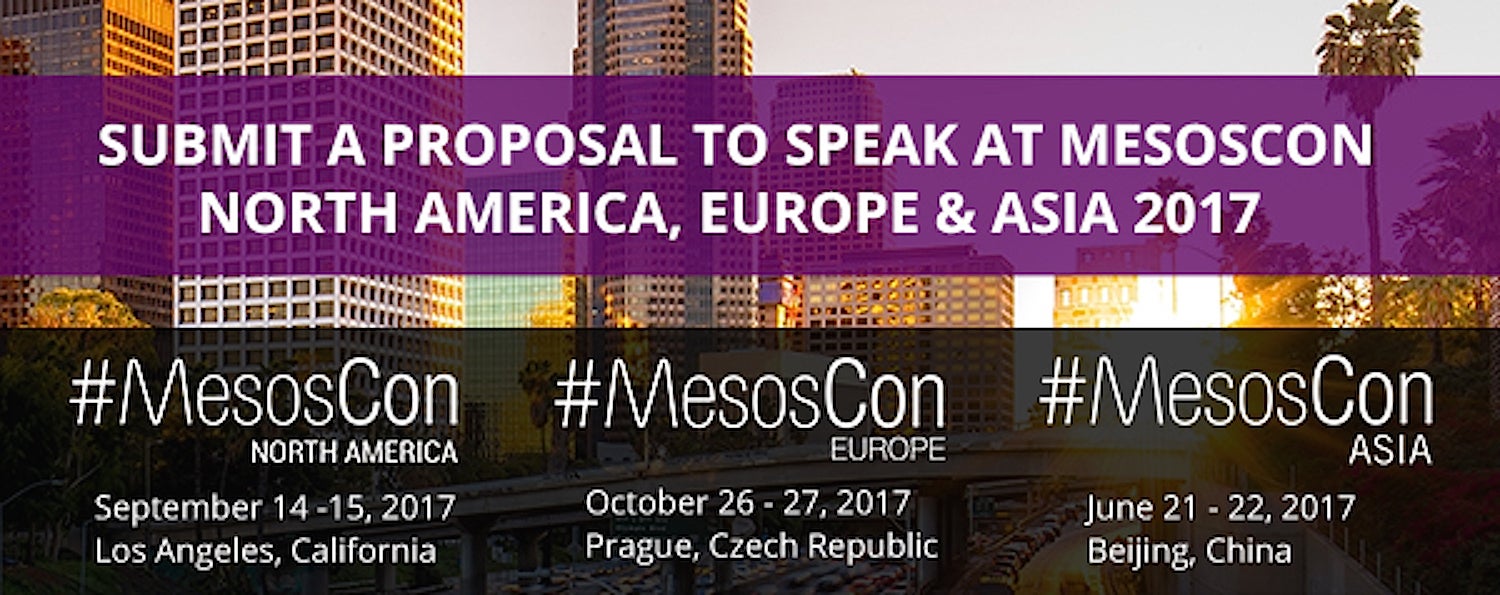
All MesosCon events this year will be held directly following Open Source Summit in China, North America, and Europe. Event dates and locations are as follows:

MesosCon Asia June 21 – 22, 2017 in Beijing, China

MesosCon North America September 14 – 15, 2017 in Los Angeles, California, USA

MesosCon Europe October 26 – 27, 2017 in Prague, Czech Republic

Last year, experts from Uber, Twitter, PayPal, and Hubspot, among many others shared how they use Apache Mesos at MesosCon North America.

Best practices, lessons learned, and case studies are again among the topics the program committee is seeking for 2017. Some sample proposal topics include:  

  • Best practices and lessons on deploying and running Mesos at scale

  • Deep dives and tutorials into Mesos

  • Interesting extensions to Mesos (e.g., new communication models, support for new containerizers, new resource types and allocation models, etc.)

  • Improvements/additions to the Mesos ecosystem (packaging systems, monitoring, log aggregation, load balancing, service discovery)

  • New frameworks

  • Microservices design

  • Continuous Delivery / DevOps (automating into production)

Submit a proposal to speak at MesosCon North America » The deadline is May 20.

Submit a proposal to speak at MesosCon Europe » The deadline is July 8.

The deadline has passed for submitting proposals for MesosCon Asia.

Not interested in speaking but want to attend? Linux.com readers receive 5% off the “attendee” registration with code LINUXRD5.

Register for MesosCon Asia » Save $125 through April 30.

Register for MesosCon North America » Save $200 through July 2.

Register for MesosCon Europe » Save $200 through August 27.

Apache, Apache Mesos, and Mesos are either registered trademarks or trademarks of the Apache Software Foundation (ASF) in the United States and/or other countries. MesosCon is run in partnership with the ASF.