Kubernetes is a big project with many contributors. Unfortunately, to contribute the bootstrap for compiling and testing the code with an actual kubernetes server up is not easy. The documentation is complex, not always working, and somewhat outdated. Moreover, it does not give all the details for you to start from zero into a working local kubernets cluster with code, with an example of a source file change and compile and run. This is exactly what we are going to do here!
Step 1: Create a VM and Access It
We have promised to start from zero, right? So, we are going to create a new, clean VM and run it in this first step.
If for some reason you have decided to comprehend the asynchronous part of Python, welcome to our “Asyncio How-to”.
Note: you can successfully use Python without knowing that asynchronous paradigm even exists. However, if you are interested in how things work under the hood, asyncio is absolutely worth checking.
What Asynchronous is All About?
In a classic sequential programming, all the instructions you send to the interpreter will be executed one by one. It is easy to visualize and predict the output of such a code. But…
Say you have a script that requests data from 3 different servers. Sometimes, depending on who knows what, the request to one of those servers may take unexpectedly too much time to execute. Imagine that it takes 10 seconds to get data from the second server. While you are waiting, the whole script is actually doing nothing. What if you could write a script that could instead of waiting for the second request, simply skip it and start executing the third request, then go back to the second one, and proceed from where it left. That’s it. You minimize idle time by switching tasks.
Still, you don’t want to use an asynchronous code when you need a simple script, with little to no I/O.
One more important thing to mention is that all the code is running in a single thread. So if you expect that one part of the program will be executed in the background while your program will be doing something else, this won’t happen.
Getting Started
Here are the most basic definitions of asyncio main concepts:
Coroutine — generator that consumes data, but doesn’t generate it. Python 2.5 introduced a new syntax that made it possible to send a value to a generator. I recommend checking David Beazley “A Curious Course on Coroutines and Concurrency” for a detailed description of coroutines.
Tasks — schedulers for coroutines. If you check a source code below, you’ll see that it just says event_loop to run its _step as soon as possible, meanwhile _step just calls next step of coroutine.
classTask(futures.Future):
def__init__(self, coro, loop=None):
super().__init__(loop=loop)
...
self._loop.call_soon(self._step)
def_step(self):
...
try:
...
result =next(self._coro)
except StopIteration as exc:
self.set_result(exc.value)
except BaseException as exc:
self.set_exception(exc)
raise
else:
...
self._loop.call_soon(self._step)
Event Loop — think of it as the central executor in asyncio.
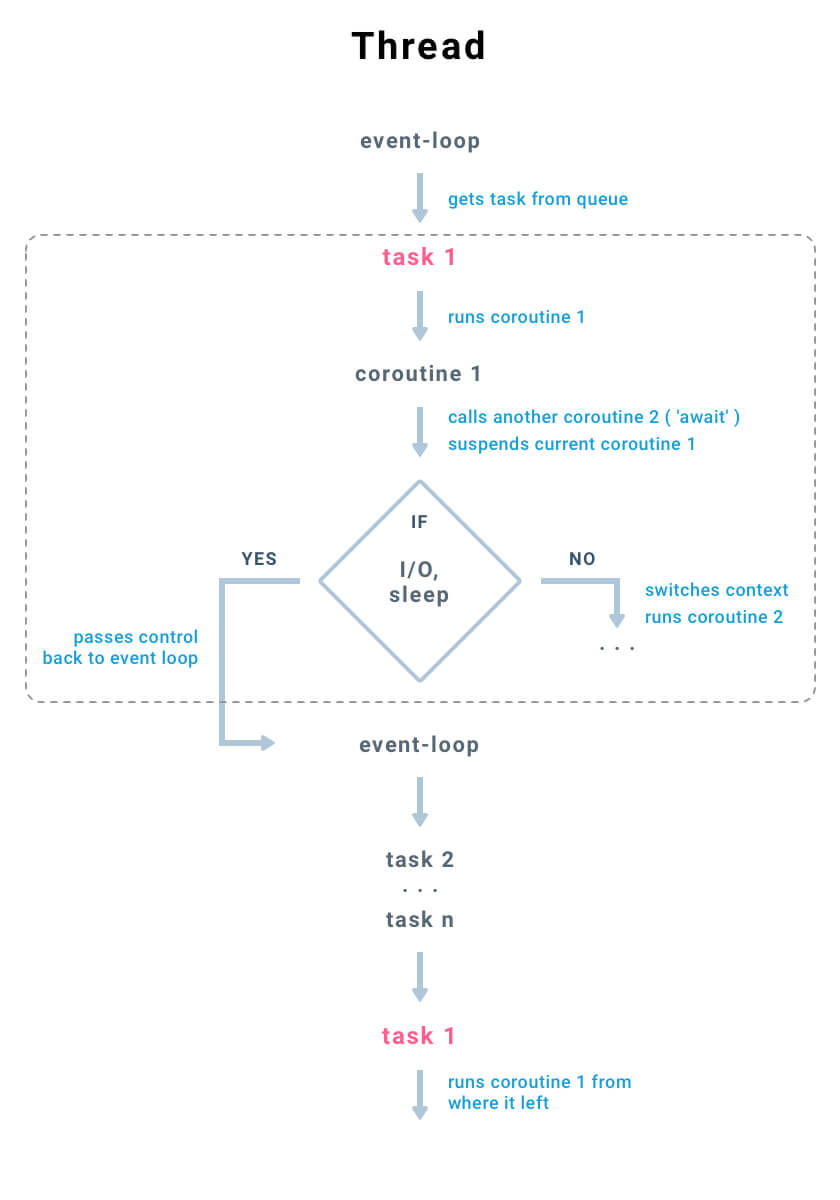
As you can see from the chart:
The event loop is running in a thread
It gets tasks from the queue
Each task calls next step of a coroutine
If coroutine calls another coroutine (await <coroutine_name> ), current coroutine gets suspended and context switch occurs. Context of the current coroutine(variables, state) is saved and context of a called coroutine is loaded
If coroutine comes across a blocking code(I/O, sleep), the current coroutine gets suspended and control is passed back to the event loop
Event loop gets next tasks from the queue 2, …n
Then the event loop goes back to task 1 from where it left
Asynchronous vs Synchronous Code
Let’s try to prove that asynchronous approach really works. I will compare two scripts, that are nearly identical, except the sleep method. In the first one I am going to use a standard time.sleep, and in the second one — asyncio.sleep
Here we use synchronous sleep inside async code:
import asyncio
import time
from datetime import datetime
async defcustom_sleep():
print('SLEEP', datetime.now())
time.sleep(1)
async deffactorial(name, number):
f =1for i in range(2, number+1):
print('Task {}: Compute factorial({})'.format(name, i))
await custom_sleep()
f *= i
print('Task {}: factorial({}) is {}n'.format(name, number, f))
start = time.time()
loop = asyncio.get_event_loop()
tasks = [
asyncio.ensure_future(factorial("A", 3)),
asyncio.ensure_future(factorial("B", 4)),
]
loop.run_until_complete(asyncio.wait(tasks))
loop.close()
end = time.time()
print("Total time: {}".format(end - start))
As you can see, the asynchronous version is 2 seconds faster. When async sleep is used (each time we call await asyncio.sleep(1)), control is passed back to the event loop, that runs another task from the queue(either Task A or Task B).
In a case of standard sleep – nothing happens, a thread just hangs out. In fact, because of a standard sleep, current thread releases a python interpreter, and it can work with other threads if they exist, but it is another topic.
Several Reasons to Stick to Asynchronous Programming
Companies like Facebook use asynchronous a lot. Facebook’s React Native and RocksDB think asynchronous. How do think it is possible for, let’s say, Twitter to handle more than five billion sessions a day?
So, why not refactor the code or change the approach so that software could work faster?
This article originally posted in Django Stars Blog. Join the discussion if you have any questions
APIStrat2017, to be held Oct. 31 – Nov. 2 in Portland, OR, will bring together everyone — from developers and IT teams, business users and executives to the API curious — to discuss opportunities and challenges in the API space. The event is now seeking speaking proposals from developers, industry thought leaders, and technical experts.
For the past seven years, APIStrat was organized by 3Scale, acquired by Red Hat in June 2016, which has donated the event to The Linux Foundation. This year, the eighth edition of the conference will once again provide a vendor-neutral space for discussion of the latest API topics.
“Like the Open API Initiative, (APIstrat) shares a commitment to a standard common format for API definitions, and see the transition for the event as a good fit,” said Steven Willmott, senior director and head of API Infrastructure, Red Hat.
“Linux Foundation events aim to bring together more than 20,000 members of the open source community this year alone,” said Linux Foundation Executive Director Jim Zemlin. “We’re pleased to team with OAI members and contributors to bring an already vibrant and well-regarded event to a broader open source community.”
At last year’s Embedded Linux Conference Europe, Sony’s Tim Bird warned that the stalled progress in reducing Linux kernel size meant that Linux was ceding the huge market in IoT edge nodes to real-time operating systems (RTOSes). At this February’s ELC North America event, another figure who has long been at the center of the ELC scene — Free Electrons’ Michael Opdenacker — summed up the latest kernel shrinkage schemes as well as future possibilities. Due perhaps to Tim Bird’s exhortations, ELC 2017 had several presentations on reducing footprint, including Rob Landley’s Tutorial: Building the Simplest Possible Linux System.
Like Bird, Opdenacker bemoaned the lack of progress, but said there are plenty of ways for embedded Linux developers to reduce footprint. These range from using newer technologies such as musl, toybox, and Clang to revisiting other approaches that developers sometimes overlook.
In his talk, Opdenacker explained that the traditional motivator for shrinking the kernel was to speed boot time or copy a Linux image from low-capacity storage. In today’s IoT world, this has been joined with meeting the requirement for very small endpoints with limited resources. These aren’t the only reasons, however. “Some want to run Linux as a bootloader so they don’t have to re-create bootloader drivers, and some want to run to the whole system in internal RAM or cache,” said Opdenacker. “A small kernel can also reduce the attack surface to improve security.”
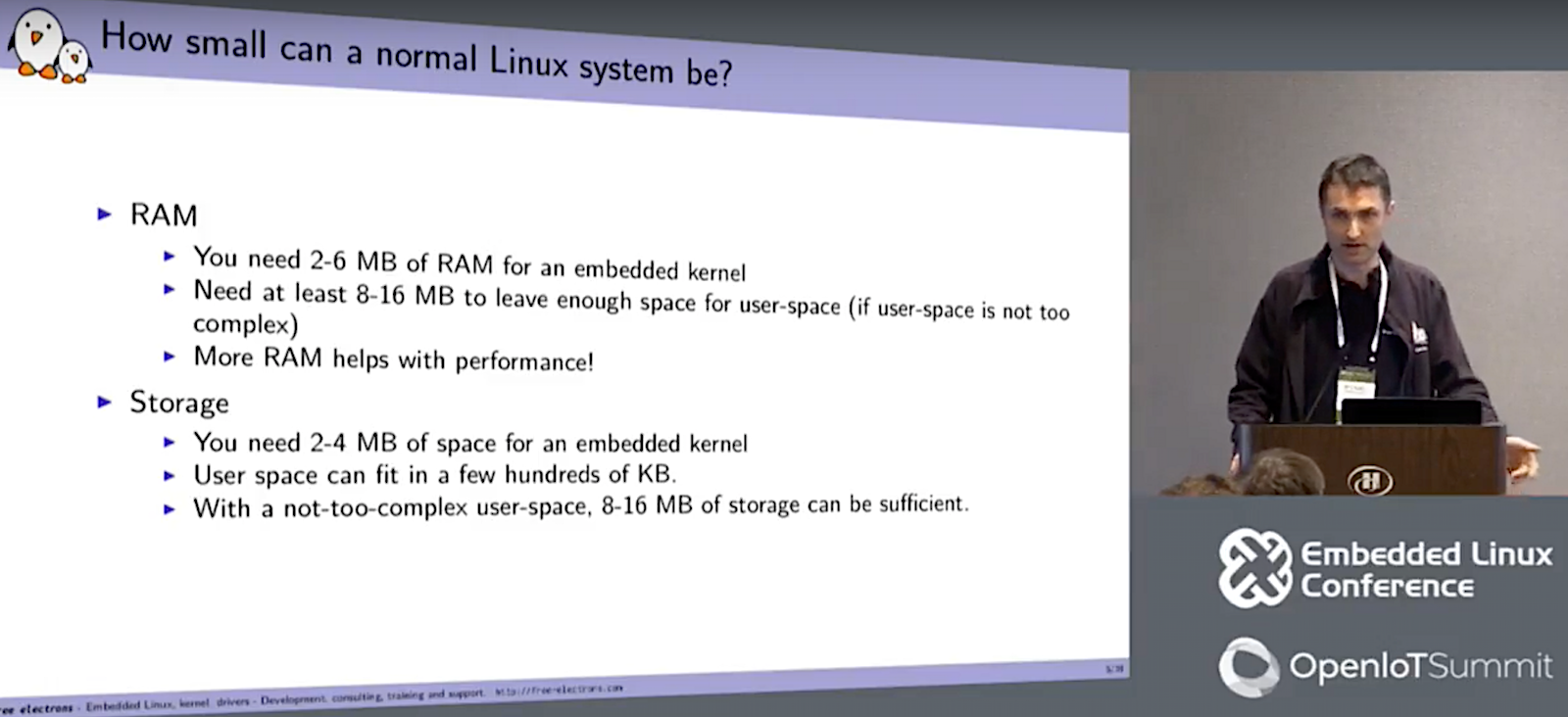
Stalled efforts such as the Linux Kernel Tinification project have largely done their job, said Opdenacker. Although size has edged up slightly over the years, you can still call upon a variety of techniques to run your kernel in as little as 4MB of RAM.
“You’d think that since the Tinification project is not that active that the kernel would grow exponentially, but it’s still under control, so maybe we could reverse the trend,” said Opdenacker. “With more aggressive work, 2-3MB may be achievable. Still, there has not been much new in this area since ELC Europe 2015.”
Although Josh Triplett’s Tinification patches, which remove functionality via configuration settings, have themselves been removed from the linux-next tree, they are still available for experimentation. The main reason: Kernel developers are hesitant to rip out too much plumbing due to the potential for bugs.
“Removing functionality may no longer be the way to go, as the complexity of kernel configuration parameters is already difficult to manage,” said Opdenacker. “Kernel developers don’t like to remove features. In the future, we may see new approaches that automatically detect and remove unused features like system calls, command-line options, /proc contents, and kernel command-line parameters. You would trace your system and see what you use at runtime and then remove the code you don’t need.”
Shrinking the kernel
Meanwhile, there are still plenty of ways to reduce footprint. One of the easiest is to shrink kernel size during compile. First, use a recent compiler, said Opdenacker. For example, gcc 6.2 gives you almost a half percentage point reduction over gcc 4.7 with ARM versatile Linux 4.10. That may not be much, but, “every byte can count,” he added.
Then there are compiler optimizations. With gcc, for example, you can use the -Os option to reduce size. Since gcc 4.7, users have also been able to run optional Link Time Optimizations that can reduce unused code when applied at the end of the compile “when linking all the object files together to optimize things like inlining across various objects,” said Opdenacker. In one test, running gcc 6.2 with LTO reduced the size of the stripped variable by 2.6 percent (x86_64) to 2.8 percent (32-bit ARM).
A few years ago, there was keen interest in an LLVM Linux project that used the Clang front end to the LLVM compiler to compile the Linux kernel for performance and size optimizations. “It is possibly better than what you can get with gcc LTO today, but the project has been stalled since 2015,” said Opdenacker. In response, an audience member suggested the project was still alive.
Using the Clang front end for the LLVM compiler brings even more footprint savings than gcc LTO. Opdenacker ran some tests using a program called OggEnc that consists of a single C program. He then compared Clang 3.8.1 with gcc 6.2 on x86_64, and saw a 5 percent reduction “out of the box without doing anything.” Gcc, however, can offer greater reductions when compiling very small programs, he added.
Opdenacker also mentioned some patches proposed by Andi Kleen in 2012 built around gcc LTO. They promised performance improvements and a reduction of as much as 6 percent of unused code on ARM systems. “Unfortunately, the patches caused some new problems so it wasn’t accepted,” he added. “The kernel developers were afraid of creating new bugs that were hard to track down. But maybe it’s worth trying again.”
Another compiler technique available to ARM users is to compile with the thumb (-mthumb), which offers a mix of 16- and 32-bit instructions instead of the all 32-bit ARM (-marm) instruction set. Some compilers, such as Ubuntu’s, will compile to thumb by default, said Opdenacker. Using OggEnc, the thumb compile was 6.8 percent smaller than the ARM compile. He conceded, however, that this was not a definitive test, as his compiler also compiled parts of the program using the ARM set.
Since Linux 3.18, developers have been able to reduce kernel size by using the “make tinyconfig” command, which combines “make allnoconfig” with a few adding settings that reduce size. “It uses gcc optimize for size, so the code may be slower but it’s smaller,” said Opdenacker. “You turn on kernel XZIP compression, and you save about 6 to 10KB.”
The kernel now has several tinification options you can choose from, like adding obj-y in kernel Makefiles. “In other words, you can compile the kernel without needing ptrace on all the time, which on ARM takes up 14KB.” You can find several tinification opportunities in the Linux kernel by looking for obj-y in kernelMakefiles, corresponding to code that is always included in thekernel binary. “For example, you may be able to compile the kernelwithout ptrace support, which on ARM takes up 14KB,” said Opdenacker.
It’s a good idea to “study your compile logs and see if everything is really needed,” said Opdenacker. “You can decide how useful it is and how difficult it is to remove. You can also look for size regressions using the bloat-o-meter command, which compares with vmlinux to see what has increased in size between versions.”
User space reductions
To reduce user space footprint on simpler programs, Opdenacker suggests that instead of busybox, developers should try the toybox set of Linux command line utilities, which is now baked into Android. “Toybox has the same applications and mostly the same features as busybox, but uses only 84KB instead of 100KB,” he added. “If you just want a shell with just a few command line utilities, toybox could save you a few thousands of bytes, though it’s less configurable.”
Another technique is to switch C/POSIX standard library implementations. The newer musl libc uses less space than uclibc and glibc. Opdenacker described one test on the hello.c program under gcc 6.3 and busybox in which musl used only 7.3KB vs. 67KB for uclibc-ng 1.0.22 vs. 49KB using glibc with with gcc 6.2.
For reducing file system size, Opdenacker recommends booting on initramfs for small file systems. “It lets you boot earlier because you don’t have to initialize file-system and storage drivers.” For bigger RAM sizes, he suggests using compression file systems such as SquashFS, JFFS2, or ZRAM.
“There’s still significant room for improvement in user and kernel space reduction,” concluded Opdenacker. However, when he asked if the community should resurrect the Kernel Tinification project, he was met with a somewhat tepid response.
“These days you can’t even buy an 8MB RAM card,” said one attendee. “It’s an interesting exercise, but I don’t know that there’s a whole lot of payback.” Another developer noted that one problem with the Tinification project was that it “removed things that weren’t needed in really small memory configurations, but the minute you go to the cloud all that stuff is required.”
If Linux has indeed run into some practical limits to reducing footprint, there will be new opportunities for simpler RTOSes, including several open source platforms like Zephyr and FreeRTOS, to operate small footprint endpoints on microcontrollers. Yet that does not mean Linux is only useful for IoT gateways. With the growth of AI- and multimedia-related IoT nodes, Linux may be the only game in town. Meanwhile, it’s good to know there are some new tricks available to create the minimalist embedded masterpiece of your dreams.
Connect with the Linux community at Open Source Summit North America on September 11-13. Linux.com readers can register now with the discount code, LINUXRD5, for 5% off the all-access attendee registration price. Register now to save over $300!
A roundup of the fun and little-known utilities termsaver, pv, and calendar. termsaver is an ASCII screensaver for the console, and pv measures data throughput and simulates typing. Debian’s calendar comes with a batch of different calendars, and instructions for making your own.
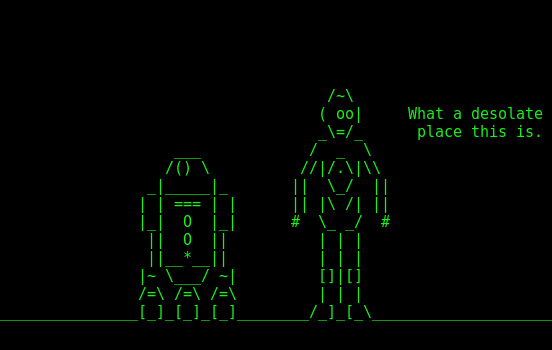
Figure 1: Star Wars screensaver.
Terminal Screensaver
Why should graphical desktops have all the fun with fancy screensavers? Install termsaver to enjoy fancy ASCII screensavers like matrix, clock, starwars, and a couple of not-safe-for-work screens. More on the NSFW screens in a moment.
termsaver is included in Debian/Ubuntu, and if you’re using a boring distro that doesn’t package fun things (like CentOS), you can download it from termsaver.brunobraga.net and follow the simple installation instructions.
Run termsaver -h to see a list of screens:
 randtxt        displays word in random places on screen
 starwars       runs the asciimation Star Wars movie
 urlfetcher     displays url contents with typing animation
 quotes4all     displays recent quotes from quotes4all.net
 rssfeed        displays rss feed information
 matrix         displays a matrix movie alike screensaver
 clock          displays a digital clock on screen
 rfc            randomly displays RFC contents
 jokes4all      displays recent jokes from jokes4all.net (NSFW)
 asciiartfarts  displays ascii images from asciiartfarts.com (NSFW)
 programmer     displays source code in typing animation
 sysmon         displays a graphical system monitor
Then run your chosen screen with termsaver [screen name], e.g. termsaver matrix, and stop it with Ctrl+c. Get information on individual screens by running termsaver [screen name] -h. Figure 1 is from the starwars screen, which runs our old favorite Asciimation Wars.
The not-safe-for-work screens pull in online feeds. They’re not my cup of tea, but the good news is termsaver is a gaggle of Python scripts, so they’re easy to hack to connect to any RSS feed you desire.
pv
The pv command is one of those funny little utilities that lends itself to creative uses. Its intended use is monitoring data copying progress, like when you run rsync or create a tar archive. When you run pv without options the defaults are:
-p progress.
-t timer, total elapsed time.
-e, ETA, time to completion. This is often inaccurate as pv cannot always know the size of the data you are moving.
Somewhere on the Internet I stumbled across a most entertaining way to use pv to echo back what I type:
$ echo "typing random stuff to pipe through pv" | pv -qL 8
typing random stuff to pipe through pv
The normal echo command prints the whole line at once. Piping it through pv makes it appear as though it is being re-typed. I have no idea if this has any practical value, but I like it. The -L controls the speed of the playback, in bytes per second.
pv is one of those funny little old commands that has acquired a giant batch of options over the years, including fancy formatting options, multiple output options, and transfer speed modifiers. man pv reveals all.
/usr/bin/calendar
It’s amazing what you can learn by browsing /usr/bin and other commands directories, and reading man pages. /usr/bin/calendar on Debian/Ubuntu is a modification of the BSD calendar, but it omits the moon and sun phases. It retains multiple calendars including calendar.computer, calendar.discordian, calendar.music, and calendar.lotr. On my system the man page lists different calendars than exist in /usr/bin/calendar. This example displays the Lord of the Rings calendar for the next 60 days:
$ calendar -f /usr/share/calendar/calendar.lotr  -A 60
Apr 17  An unexpected party
Apr 23  Crowning of King Ellesar
May 19  Arwen leaves Lorian to wed King Ellesar
Jun 11  Sauron attacks Osgilliath
The calendars are plain text files so you can easily create your own. The easy way is to copy the format of the existing calendar files. man calendar contains detailed instructions for creating your own calendar file.
Once again we come to the end too quickly. Take some time to cruise your own filesystem to dig up interesting commands to play with.
Learn more about Linux through the free “Introduction to Linux” course from The Linux Foundation and edX.
Kubernetes is in, container registries are a dime a dozen, and maximum container density isn’t the only thing that matters when running containers.
Those are some of the insights gleaned by Sysdig, maker of on-prem and in-cloud monitoring solutions, from customers for how they’re using containers in 2017.
Using a snapshot of Sysdig’s services that encompassed 45,000 running containers, Sysdig’s 2017 Docker Usage Report shows that container adoption is getting diversified by workload, and it covers some of the hot-or-not aspects of the new container stack.
While 2016 saw U.S. tech salaries remain essentially flat year-over-year, key skills, especially in the areas of storage and networking, did warrant increases, according to the annual tech salary report from careers site Dice.com.
Their recent survey polled 12,907 employed technology professionals online between October 26, 2016 and January 24, 2017. The survey found that, overall, technology salaries in the U.S. were essentially flat year-over-year (-1 percent) at $92,081 in 2016, a slight dip from $93,328 in 2015. However, there are some notable exceptions across the country and for specific skills areas like storage and networking seeing increases, says Bob Melk, president, Dice.com.
Both the storage and networking sectors, the categories where Dice has found the most salary increases overall, are undergoing major disruption that’s fueling the salary increases, Melk says.
The twelve-factor app manifesto recommends that you pass application configs as ENV variables. However, if your application requires a password, SSH private key, TLS Certificate, or any other kind of sensitive data, you shouldn’t pass it alongside your configs.
When you store your secret keys in an environment variable, you are prone to accidentally exposing them—exactly what we want to avoid. Here are a few reasons why ENV variables are bad for secrets:
Gathering operational data about a system is common practice, particularly metrics that indicate system load and performance such as CPU and memory usage. This data has been used for years to help teams who support a system learn when an outage is happening or imminent. When things become slow, a code profiler might be enabled in order to determine which part of the system is causing a bottleneck, for example a slow-running database query.
I’ve observed a recent trend that combines the meticulousness of this traditional operational monitoring with a much broader view of the quality of a system. While operational data is an essential part of supporting a system, it is also valuable to gather data that helps provide a picture of whether the system as a whole is behaving as expected. I define “QA in production” as an approach where teams pay closer attention to the behaviour of their production systems in order to improve the overall quality of the function these systems serve.
In a few months, publicly trusted certificate authorities will have to start honoring a special Domain Name System (DNS) record that allows domain owners to specify who is allowed to issue SSL certificates for their domains.
The record allows a domain owner to list the CAs that are allowed to issue SSL/TLS certificates for that domain. The reason for this is to limit cases of unauthorized certificate issuance, which can be accidental or intentional, if a CA is compromised or has a rogue employee.