Google is out with its April 2017 Android security update, patching 102 different vulnerabilities in the mobile operating system. Of the vulnerabilities patched by Google this month, only 15 are rated as having critical impact.
Not surprisingly, the mediasever component is once again being patched by Google. The Android mediasever has been patched in every Android security update issued by Google since August 2015. In the new April update, mediaserver accounts for 15 flaws in total, including six rated as critical, five as high and four with only moderate impact.
Following news of Ubuntu abandoning Unity 8 there are now reports of headcount reductions happening at Canonical and Mark Shuttleworth eyeing possible outside investments into the company…
If you ever need to validate certificates or certificate chains before deploying them, Golang provides a near foolproof test method. In this article, I will explain our use case that brought about the need for testing certificate chains, review appropriate web server security settings, and break down the Go code used for testing.
Recently I took on a project at work that has turned into quite the adventure. It’s a small application that seems to cost a lot more money than it should. A third-party constructed this application, which is now maintained in-house. This project lives in Amazon Web Services and makes use of Elastic Load Balancers (ELBs).
Starting from version 4.0, Samba is able to run as an Active Directory (AD) domain controller (DC). In this tutorial, I will show you how to configure Samba 4 as a domain controller with Windows 10, CentOS 7 and CentOS 6 clients.
I will be using 3 Systems, one CentOS 7 server and a Windows 10 client for remote management, a CentOS 7 and CentOS 6 client.
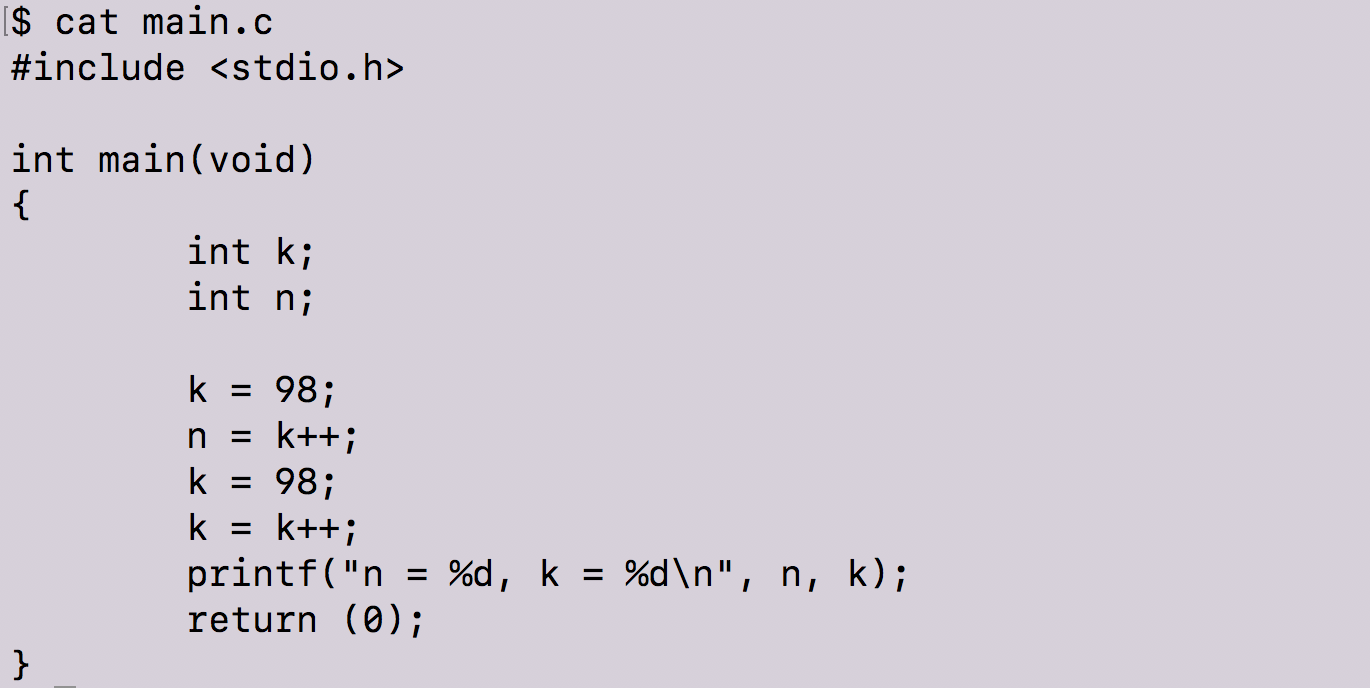
Looking at this code, what would you anticipate the respective values of variables ’n’ and ‘k’ to be?
Despite the confidence expressed in the blogosphere and forums, a number of software engineers would be incorrect….
To understand why ‘k’ increments in this way, we need an abbreviated understanding of how the function’s operations are managed.
For these examples, we are using a 64 bit machine, Ubuntu 14.04 LTS, GCC 4.8.4, and 3.13.0–107-generic GNU/Linux.
As we’ve covered in priorposts, when you compile a program (obviously, comprised of arguments and variables), it goes through a multitude of steps to be executable. The executable arguments and variables need a place to be stored, so that it can be managed and manipulated — resulting in the fulfillment of the function’s requests and directives. This is where the loader comes into play; the loader creates a space of virtual memory addresses where our stack — as well as many other things — will be located. The stack is a data structure that has “last in first out” (LIFO) data storage; the first information entering the stack has a higher memory address, whereas the addition of subsequent information “grows” downward — having a lower memory address.
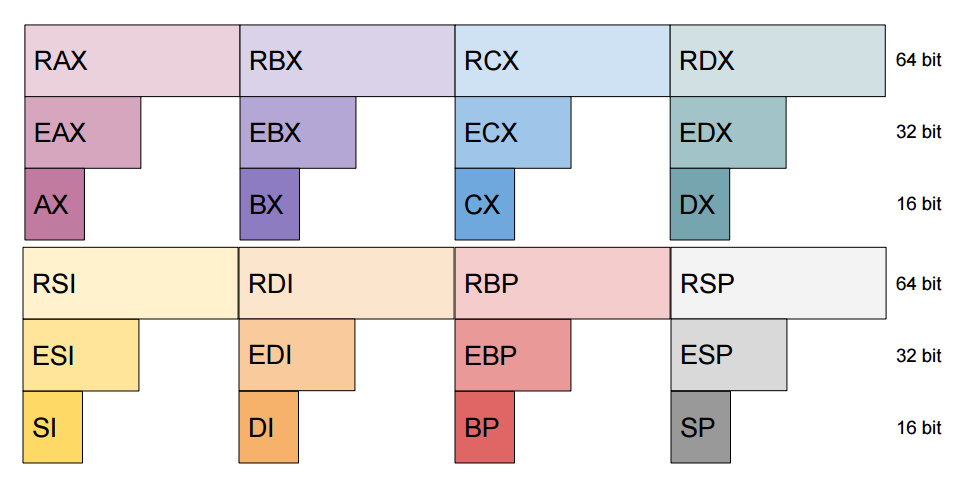
The stack’s data is navigated and controlled by registers. Registers allow for fast processing and internal memory storage without having to access the physical memory. There are eight 16 bit general registers — ax, bp, bx, cx, di, dx, si, and sp (they are case insensitive) — that handle respective tasks. Depending on the operation, program, or processor different register size is required. Extended 32 bit versions can be accessed with the prefix “e”, and the long 64 bit size by prefixing with an “r”.
These are the basics (starting with the two most fundamental); having a reference for their utility will help you understand some object code…
BP, EBP, RBP is the base pointer which points to the address of the bottom of the stack; it’s a fixed reference point for the corresponding function’s parameters and variables within that stack frame.
SP, ESP, RSP on the other hand, is the stack pointer to the address of the top of the stack.
AX, EAX, RAX alongside DX, is responsible for arithmetic operations. It aids with transferring data.
BX, EBX, RBX is a data pointer — only register capable of indirect addressing.
CX, ECX, RCX does loop counting.
DI, EDI, RDI is the pointer to destination in string and memory operations.
DX, EDX, RDX handles input/output as well as arithmetic operations.
SI, ESI, RSI is the pointer to source in string and memory operations.
Moving forward (with all that in mind), what exactly is happening when we initialize k as k++? What exactly is happening in the machine code (or assembly code) that results in this output? Finding the answer to this question inches us closer to the exciting realm of reverse engineering.
In order to fully investigate this, there is a program called objdump we can use within the Linux shell that allows us to “see” inside the machine code. Before jumping into my explanation, let’s review this program:
objdumpis a program for displaying various information about object files. As you will recall from our previous posts, object code is generated during the third stage of compilation, also called assembly. In order to help us parse through the information displayed using objdump we will run it with several options:
-j Display information only for a specified section — today we will only be reviewing two sections: .rodata — this is where read-only data is stored .text this is the program’s actual code (the assembly) — _start and main are both part of this section
-s Displays the full contents of any sections requested. By default all non-empty sections are displayed.
-M Assembly has two versions of syntax — AT&T or Intel. We use -M intel to tell objdump to display output in intel format.
-d Display the assembler mnemonics for the machine instructions from objfile. This option only disassembles those sections which are expected to contain instructions.
-S Display source code intermixed with disassembly, if possible. This is helpful because it will show the lines from our program.
Now that we’ve reviewed objdump — let’s combine that with our investigation into what happens when we specify that k=k++.
The above tells us where the read-only data is stored.
Objdump program ran with flags introduced above
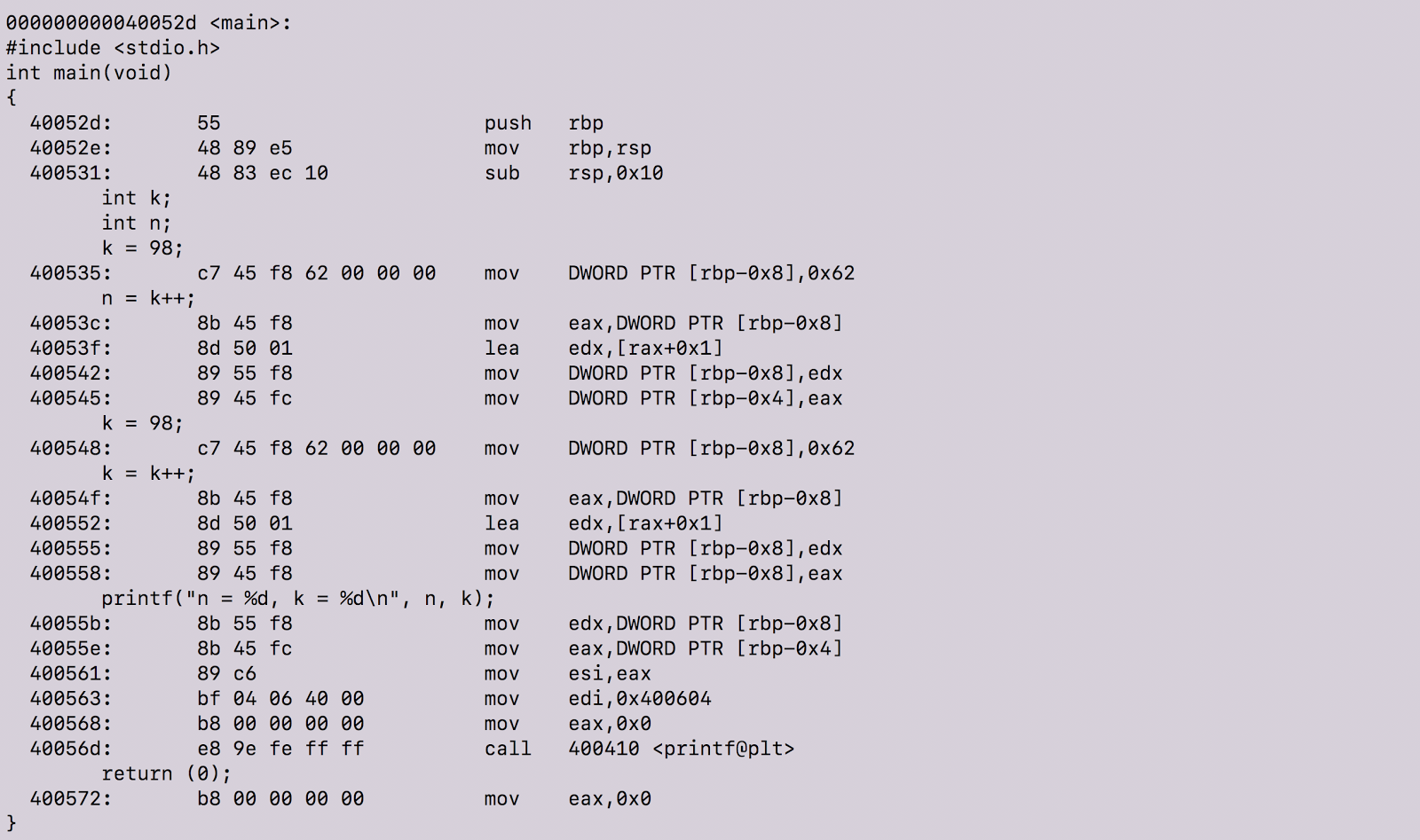
objdump with the above option flags produces our object code with our source code intermixed in the output. In fact, many lines of object code are produced and we are only referencing the section with our source code. To view all of the object code, click here.
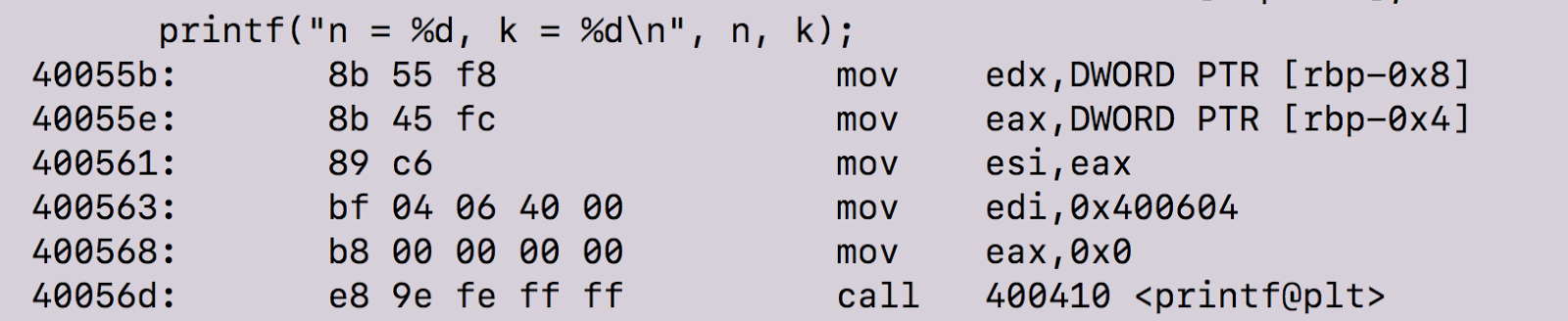
There are definitely lots of cool things happening there. Before we proceed, let’s review machine instructions. According to this guide, “machine instructions generally fall into three categories: data movement, arithmetic/logic, and control-flow.” In the above screenshot, the data movement instructions occur in the second to last column.
A short summary of data movement instructions:
mov — Move — this instruction copies data item referred to by its second operand into the location referred to by its first operand. For example: mov eax, ebx— copy the value in ebx into eax
push — push stack — this instruction places its operand onto the top of the hardware supported stack in memory. For example: push eax— push eax on the stack
pop — pop stack — this instruction removes the 4-byte data element from the top of the hardware-support stack into the specified operand. For example: pop edi — pop the top element of the stack into EDI
lea — Load effective address — the instruction places the address specified by its second operand into the register specified by its first operand. Keep in mind, the contents of the memory location are not loaded, but only the effective address is computed and placed into the register. For example: lea eax, [var] — the value [var] is placed in EAX
There are arithmetic, logic and control flow instructions that I will not delve into more — for the purposes of this post, you will need to only know the above as well as one more:
call subroutine call — this control flow instruction pushes the current code location onto the hardware support stack in memory and then performs an unconditional jump to the code location indicated by the label operand. This instruction saves the location to return to when the subroutine completes.
Size directives
BYTE PTR indicates size of 1 byte
WORD PTR indicates size of 2 bytes
DWORD PTR indicates size of 4 bytes
Now that we know what machine instructions are, let’s step in and see what’s happening at a granular level in our program.
The instructions here tell the machine to copy the 32-bit integer representation of 0x62 into the stack at the address rbp-0x8. Remember, since we are compiling our program on a 64-bits machine running Ubuntu 14.04 LTS our integers will be 4 bytes long.
In case you were wondering what in the world 0x62 has to do with k = 98, a simple Google search reveals that 0x62 is the hexadecimal representation of the number 98.
So, at this moment, k = 98 — we know this because the machine instructions above corresponds to the C code k = 98 and the equivalent of k is stored at address rbp-0x8 in our assembly code.
Now, when we initialize our variable n to equal k++ we see the following happen in this order:
The value 98 is taken from rbp-8 (the equivalent of k in our C code) — 98 — and copied to the register eax
eax is a subregister of rax. Since eax contains 98, this line of machine instruction indicates that we are adding 98+1 and storing the result into edx
The value in edx (99) is copied to the location referred to by rbp-0x8. Since rbp-0x8 is the equivalent of k , now k = 99.
The value in eax (98) is copied to the location referenced by rbp-0x4. This means by the end of this line of instruction, n = 98.
As you can see, by the end of the fourth machine instruction, the original value of 98 is called. Similarly, we see the same as above instructions happen in the next two lines of code.
The only part where this is different from the above code is that the value of eax(98) is copied to the location referenced by rbp-0x8.
At this point, we know that both rbp-0x8 and rbp-0x4 carry the value of 98. From here the values are stored and then the call instruction tells program to use printf function to print the stored values to standard output.
Lastly, we see that the value of 0x0 is copied into eax — eax will store the return value of the functions. The return value of main will be 0, meaning that the program successfully ran.
So, from this, we can conclude that k = k++ returns k. Why? Well, k++ does in fact increment 98 to 99. The stored value resets the value of k to 98 by the end of the program. In other words, the iteration is only performed on a value stored in temporary location and that location was not called by the program.
Authors
Elaine Yeung is an elementary school dean turned software engineering student at Holberton School.
Naomi Sorrell is an enthusiastic tech newbie at Holberton School that enjoys man pages, fitness, and traveling
Resources
“Assembly Language Tutorial.” Assembly Language Tutorial. N.p., n.d. Web. 11 Mar. 2017.
Bacon, Jason W. “10.7. The Stack Frame.” 10.7. The Stack Frame. N.p., Mar. 2011. Web. 23 Mar. 2017.
Dang, Bruce, Alexandre Gazet, Elias Bachaalany, and SeÌbastien Josse. Practical Reverse Engineering: X86, X64, ARM, Windows Kernel, Reversing Tools, and Obfuscation. Indianapolis, IN: Wiley, 2014. Print.
Koopman, Phillip. “Stack Computers: 9.2 VIRTUAL MEMORY AND MEMORY PROTECTION.” Stack Computers: 9.2 VIRTUAL MEMORY AND MEMORY PROTECTION. N.p., 1989. Web. 11 Mar. 2017.
“Memory Layout of C Programs.” GeeksforGeeks. N.p., 30 Nov. 2016. Web. 11 Mar. 2017.
Milea, Andrea. “Dynamic Memory Allocation and Virtual Memory.” Understanding Virtual Memory and the Free Store (heap) — Cprogramming.com. C Programming, n.d. Web. 11 Mar. 2017.
“Stack (abstract Data Type).” Wikipedia. Wikimedia Foundation, 11 Mar. 2017. Web. 11 Mar. 2017.
Tutorialspoint.com. “Operating System — Virtual Memory.” www.tutorialspoint.com. N.p., n.d. Web. 11 Mar. 2017.
Tutorialspoint.com. “Assembly Registers.” www.tutorialspoint.com. N.p., n.d. Web. 11 Mar. 2017.
“Virtual Memory.” Wikipedia. Wikimedia Foundation, 10 Mar. 2017. Web. 11 Mar. 2017.
The talk will cover qm-bootloader design and implementation, focusing on its Firmware Management functionality and discussing possible security extensions.
Pinterest — “the world’s catalog of ideas” — is built on open source, according to Jon Parise, technical architecture lead and open source program lead at the company. In this interview, Parise explains how adopting open source has changed the company and helped the company’s engineers design software that is more modular, reusable, and well-documented from the outset.
Pinterest also frequently open sources technology they build “as both a way to give back to communities and because it’s the right thing to do,” Parise says. Read on to learn more about how Pinterest uses and contributes to open source.
Jon Parise, technical architecture lead and Open Source program lead, Pinterest
Linux.com: What does Pinterest do?
Jon Parise: Pinterest is the world’s catalog of ideas, used by 150 million people every month to discover and do things they love.
Linux.com: How and why do you use Linux and open source?
Parise: Pinterest is built on open source. From our first lines of Django code over six years ago to the release of Rocksplicator, our latest open source project, we’ve directly benefited from open source projects and the supportive communities surrounding them. In turn, we’ve made significant contributions to the open source technologies we use and have pushed the limits of technologies like HBase. Internally, open source is part of a product cycle. We frequently open source the technologies we build as both a way to give back to communities and because it’s the right thing to do.
Linux.com: Why did you join The Linux Foundation?
Parise: The Linux Foundation is home to Linux, Node.js and other mission critical projects that form the backbone of modern internet services, including Pinterest. Joining the Linux Foundation is great way for established companies like ours to support those communities.
Linux.com: What interesting or innovative trends in your industry are you witnessing and what role do Linux and open source play in them?
Parise: We’re excited about three big technology trends: machine learning, computer vision and rich media.
Almost all machine learning efforts at Pinterest rely on open source components to some extent. Our data processing pipelines run on Hadoop, Cascading and Scalding. We use TensorFlow, Caffe and XGBoost to train our models, and R and Python are widely used for analyzing the results produced.
Our Visual Search team uses open source libraries for deep learning and computer vision. Caffe, TensorFlow and OpenCV are critical building blocks at Pinterest and allow us to actively publish our algorithmic and implementation findings for building performant visual search systems.
Lastly, our video and image platform leverages libraries like FFmpeg, GraphicsMagick, and ExoPlayer to power efficient media processing and playback.
Linux.com: How has participating in open source communities changed your company?
Parise: As we’ve grown and are better resourced, we can now be a better contributor to open source by designing our software to be modular, reusable and well-documented from the beginning. In addition to making it easier for us to open source parts of our software down the road, that mindset benefits us in our day-to-day work as engineers inside the company, too.
We also strive to be additive to the greater open source community by filing bug reports, contributing patches, publishing papers, hosting tech talks and meetups, and speaking at conferences. Those are important things everyone can do, both as individuals and as employees of companies that benefit from open source.
Linux.com: How do you participate in the TODO Group and what have you learned from the experience?
Parise: It’s early for us as members, but we’re excited to participate in a group of like-minded companies committed to open source. In particular, TODO focuses on how companies can run effective open source programs both internally and externally. Pinterest has already released over 30 open source projects, and with untold more to come, the benefit of TODO’s collective experience has already proven invaluable.
Years after Intel released the low-power, Linux-compatible Quark X1000 processor, which runs on the Intel Galileo and numerous IoT gateways, the chipmaker last year launched three microcontroller-like Quarks that do not run Linux. Like the original Quarks, the Quark D1000 is limited to Pentium ISA compatibility and supports only bare metal implementations. The Quark D2000 and similar Quark SE C1000, which drives the Intel Curie module, also supply full Intel x86 ISA. They lack an x86 FPU but can still run RTOSes like Zephyr.
Considering the minimal MCU footprint, and lack of Linux-associated technologies like U-Boot, Intel had to develop a Quark D2000/SE bootloader from scratch. At the Embedded Linux Conference in February, Intel software engineer Daniele Alessandrelli detailed the inner workings of the Intel Quark Microcontroller Bootloader (QM-Bootloader). In his presentation, Alessandrelli also described security extensions added to version 1.4 of the BSD-licensed QM-Bootloader.
Designed for the D2000 and SE C1000, the QM-Bootloader offers typical bootstrap features such as system initialization, trim code computation, and restore context from sleep. It also provides Firmware Management (FM) functionality based on the DFU (Device Firmware Update) protocol and its most popular host tool, dfu-util.
Alessandrelli and his team needed to adapt dfu-util to work over UART as well as USB. This would provide a uniform firmware-upgrade experience whether developers were working with the USB 1.1-enabled SE or the standard D2000, which lacks USB support.
The D2000 and SE Quarks both feature 32MHz, x86-based Lakemont cores, but only the SE offers a 32MHz ARC sensor subsystem core. Further complicating the QM-Bootloader development process was the fact that the SE provides more memory: 80kB SRAM and 384kB flash. Both models, however, conveniently share an 8kB allotment of OTP (one-time programmable) SRAM.
“From the bootloader point of view the two Quarks are quite similar because we put our bootloader in OTP,” said Alessandrelli, who, together with Jesus Sanchez-Palencia, is the maintainer of the project. “The 8kB limitation was a restraint, but we were still able to implement a modular approach so we could add new transports and potentially OTA updates in future.”
The foundation of the QM-Bootloader is the DFU protocol, which provides a way to transfer data to the device with DFU_DNLOAD for FM, as well as extract data with DFU_UPLOAD. Both are block-based mechanisms: All blocks except the last must have the same size.
“We decided to use DFU because it is open source, well documented, and designed for resource constrained devices,” said Alessandrelli. “Also, DFU doesn’t define any specific image format, and we wanted to do our own image format with its own metadata and authentication mechanism. We don’t have enough RAM or flash to store a full image, so we needed to develop our own block-wise transfer/flashing protocol to allow us to write an image a block at a time.”
To adapt DFU for UART, the Intel team created a Quark DFU Adaptation (QDA) protocol. “QDA makes DFU available over any message transport,” said Alessandrelli. “Because UART is stream oriented, we added the old XMODEM-CRC protocol layer to transport QDA packets. QDA provides all DFU request/response messages, such as DFU_UPLOAD, and also mimics some generic USB functionality, including active alternate settings. We needed a different host code for QDA/UART, so we modified dfu-util to replace the USB layer with QDA/UART.” The resulting qm-dfu-util code is available on GitHub, licensed under GPLv2.
On top of the QDA layer, the Intel team defined a Quark Format Upgrade (QFU) image format that works with generic DFU tools and supports firmware authentication. This “very simple block-wise format” adds a header to the first block of the binary, “so it’s processed before the image,” said Alessandrelli. The header is subdivided into a base header, which contains information like the target device and the vendor and product ID, as well as an extended header used for authentication.
“We do not add any specific memory address to the header, but instead assume the flash is divided into partitions, and that every image is targeting a partition,” said Alessandrelli. This setup enables the bootloader to support a single partition on the D2000, and two partitions on the ARC-enabled SE model. This also enables future schemes such as multiple partitions per core, which might come in handy for OTA.
Finally, the Quark Firmware Management (QFM) protocol runs on top of the DFU layers, thereby enabling functionality beyond firmware upgrade, such as key provisioning, application erase, and system/firmware information retrieval. QFM is basically a request (DFU_DNLOAD ) or response (upload) protocol.
QM-Bootloader 1.4 adds security features
Alessandrelli went on to describe new Secure Firmware Upgrade extensions that have been added to QM-Bootloader 1.4’s QFM layer to enable authenticated firmware upgrades. Due to the Quark’s limitations, he could not use a public key scheme. Instead, he chose a simple symmetric key scheme called HMAC256.
“With HMAC, the image is verified using the same key that is used to sign it, and the key must be located within the device,” said Alessandrelli. “We decided not to hard-code the key, but instead provided users with the key management functionality so at runtime they can provide the key.”
The QFU header is extended with an HMAC extended header. “We don’t compute the HMAC for the entire image, but we authenticate the header, adding an array of hashes, one for each block that composes the image,” said Alessandrelli. “We authenticate the header using HMAC, then start receiving blocks of images.We compute the SHA of every block and compare it with the SHA in the header.”
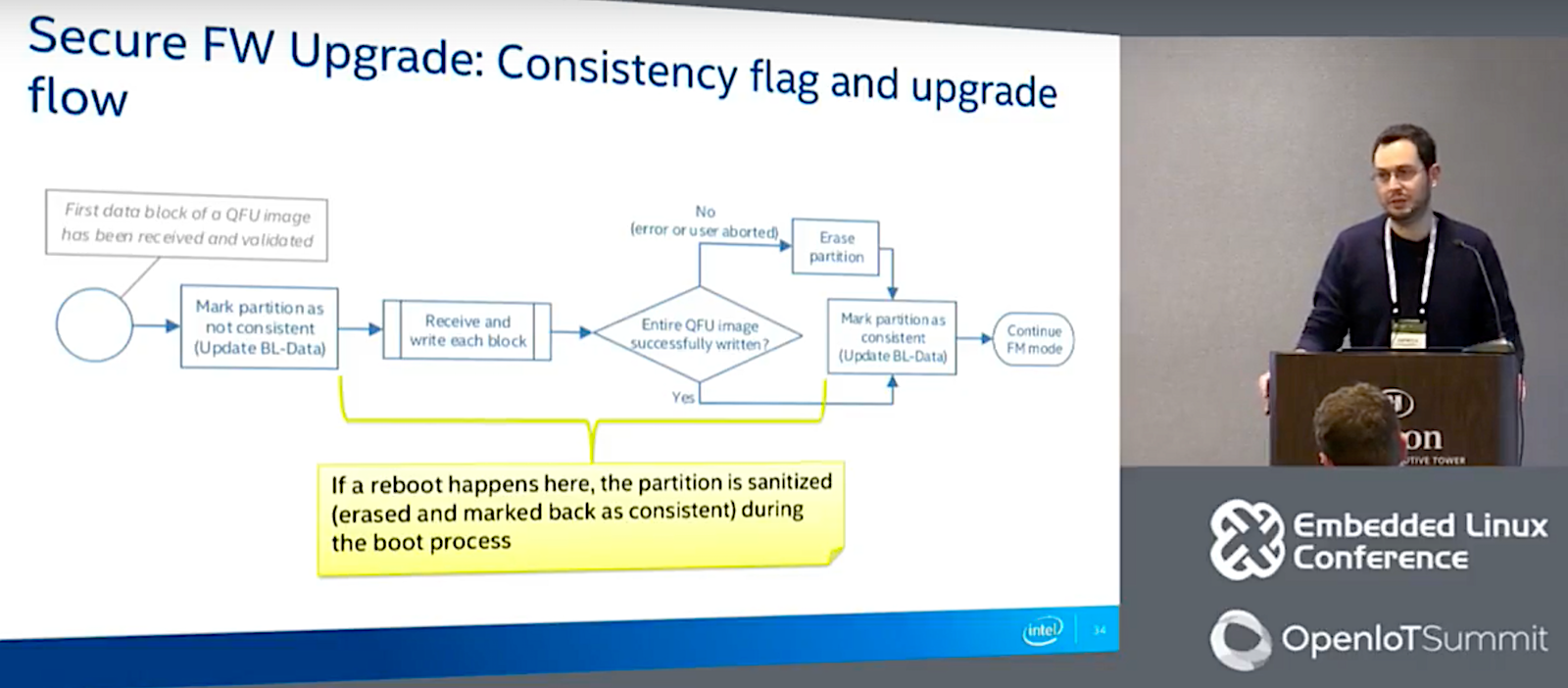
The security enhancements address the challenge of ensuring partition consistency — how to handle failures that can leave partitions in an inconsistent state, for example, due to a reset during a firmware update. The new code associates a consistency flag to every partition and stores this metadata in a bootloader file called BL-Data.
The updated bootloader also adds key management. “We basically define and authenticate a key update request, an extension of QFM,” said Alessandrelli. “We use double-signing, providing both the firmware key, which is used to authenticate an image, as well as a revocation key.” Although this scheme will need to be modified if they add OTA support in the future, “since right now we’re only supporting wired and point to point USB or UART transfer, a man in the middle attack is defeatable,” he noted.
Alessandrelli also described security enhancements used to protect BL-DATA using CRC and further explained how partitions are related to targets. The enhancements are designed to support future upgrades to OTA and other additions, such as BLE modules with their own firmware.
Alessandrelli concluded with some lessons learned, such as the importance of reusing existing open source code and using a modular approach. “By not pre-optimizing for footprint, we can adapt to changing requirements,” he said. “By using link-time optimization, we could offset most of the overhead from the modular approach, giving us 15 to 20 percent savings in flash footprint saving.”
Connect with the Linux community at Open Source Summit North America on September 11-13. Linux.com readers can register now with the discount code, LINUXRD5, for 5% off the all-access attendee registration price. Register now to save over $300!
Today we all read the announcement of Ubuntu’s decision to refocus on cloud and IoT activities, dropping Unity 8 to move back to a GNOME-based desktop for the 17.04 LTS. This marks a return to the fold, with Ubuntu having originally shipped GNOME all those years ago, and lest we forget, having contributed to early Wayland discussions.
Written by Daniel Stone, Graphics Lead at Collabora.
This is obviously a large, and undoubtedly difficult, decision that will have ramifications for years to come. Particularly in the user-facing aspects, unifying the desktops will help combine forces and be much more productive. For developers, a lot of the differentials in desktop technology (e.g. indicators, menus, scrollbars) between the two may now be at an end, making generic Linux an easier target for ISVs. And, assuming a GNOME Shell port to Mir is not underway, we are back at only supporting two window systems: X11 and Wayland.
Fedora has already been shipping the GNOME Wayland session by default since Fedora 25, with broadly positive reception. (My personal favourite review: ‘the transition to Wayland has been totally transparent … GNOME 3.22 feels considerably smoother with Wayland’.) Should Ubuntu follow Fedora’s lead and ship a Wayland-based GNOME session by default, then developers across all platforms will get all the benefits of the work done to Wayland in general, as well as EGL and Vulkan enablement, across the board for free. And we’ll undoubtedly see more focus on it.
Even for developers targeting X11, given that it’s still shipped by older versions of Fedora and current versions of Ubuntu desktop, the XWayland compatibility server has seen a great deal of work recently. Specifically for gaming usecases, the relative and confined pointer protocols from the Fedora team allows proper gaming-style mouse input. Our own Pekka Paalanen has done much work on making window resize as smooth and flicker-free as possible. And there is much more in the pipeline.
But enough of the differences. A major reason for reassurance is just how much of the graphics infrastructure was shared. When I started working on X11 nearly 15 years ago, the idea of a fork, or an alternate window system (remember Berlin/Fresco, KGI/GGI, DirectFB?), was unthinkable. Not just because all the drivers and platform specifics were tied up in the XFree86/X.Org servers, but the toolkits too: a lot of the big breaks between GTK+ 2.x and 3.x were about removing details of X11 that were exposed as core parts of the toolkit API.
The world in 2017, however, is a very different place. KMS provides us truly device-independent display control, Vulkan and EGL provide us GPU acceleration independent of window system, xkbcommon provides shared keyboard mechanics, and logind lets us do all these things without ever being root. GBM allocates our buffers, and the universal allocator, borne out of discussions with the whole community including NVIDIA, will soon join the family.
Mir leans heavily on all these technologies, so the change is a bit less seismic than you might think. Even this month, one of the Mir developers fixed display of cross-GPU imported buffers in KMS – thus for Mir, Wayland, and X11 – and after he landed the fix in the kernel, we continued to discuss future API changes around this. From this point of view, nothing changes, because we all share the same bedrock infrastructure, borne of X.Org’s incredibly long-sighted view that it had a duty to make itself replaceable.
GTK+, scene graphs, and Vulkan
Also positively, I was able to attend the GTK+ hackfest in London last month – not least as it was a short stroll from my office – with many thanks to Red Hat and Endless for hosting. I was particularly interested in discussing the GTK+ Scene Kit, which overhauls the core GTK+ rendering system.
GTK+ 3 performs rendering effectively through a chain of callbacks: at the appropriate time, it walks through all the widgets and asks them to render their content into the pre-allocated buffer. This already is a huge improvement over GTK+ 2, which lacked the ‘at the appropriate time’ qualification.
GTK+ 4 with GSK will take this a step further, asking each widget to instead _describe_ how it would render itself, with the actual rendering being performed in a single step at the end. This approach allows the rendering to be much smarter: shared assets can be cached and used once, similar operations can be performed together in a batch operation, and the core renderer can broadly make much more smart scheduling decisions. (Those with a sharp sense of history may remember some of these principles from Clutter 2.x.)
OpenGL users should see large improvements. One of the biggest bottlenecks with OpenGL performance is usually related to state changes. Every change such as enabling or disabling alpha blending, switching textures, et al, causes a flurry of state-change requests through the GL API, all of which have to be individually validated. With GSK making batching possible, state thrashing can be avoided as much as possible.
On the other hand, Benjamin Otte has been working on a Vulkan backend for GSK. Vulkan is also a natural fit for GSK. Vulkan encapsulates all this state into pipeline objects, which are expensive to create ahead of time, but virtually free to switch between. We had some excellent discussions around the APIs and how to make this possible, and whilst the initial implementation is far from optimal, I really look forward to seeing this mature, and seeing GTK+ be able to really make the most of modern GPU performance.
Of course, the GTK+ hackfest was not all about graphics. Simon McVittie was also there, having very different discussions to me, and has an excellent write-up of the discussions on how best to secure D-Bus for containerised applications. Matthias Clasen, who did a fantastic job organising the hackfest, also has a more general hackfest write-up.
With all the progress being made here, and Ubuntu rejoining the fold to not only help push these efforts forward but also bring their own focus and sizeable desktop userbase, the future seems about as sunny as an early spring day. Welcome back, Ubuntu!
The latest update to the ONOS open networking operating system should make it easier to automatically configure devices and services on a network.
ONOS Junco, demonstrated at the Linux Foundation’s Open Networking Summit on Monday and available now, adds dynamic configuration and new virtualization capabilities. ONOS is designed to be a scalable controller for vast, software-defined service-provider and enterprise networks.
The new release is the first one that works with YANG, a language defined by the Internet Engineering Task Force for specifying network devices and services.