
The talk will cover qm-bootloader design and implementation, focusing on its Firmware Management functionality and discussing possible security extensions.

Pinterest — “the world’s catalog of ideas” — is built on open source, according to Jon Parise, technical architecture lead and open source program lead at the company. In this interview, Parise explains how adopting open source has changed the company and helped the company’s engineers design software that is more modular, reusable, and well-documented from the outset.
Pinterest also frequently open sources technology they build “as both a way to give back to communities and because it’s the right thing to do,” Parise says. Read on to learn more about how Pinterest uses and contributes to open source.

Linux.com: What does Pinterest do?
Jon Parise: Pinterest is the world’s catalog of ideas, used by 150 million people every month to discover and do things they love.
Linux.com: How and why do you use Linux and open source?
Parise: Pinterest is built on open source. From our first lines of Django code over six years ago to the release of Rocksplicator, our latest open source project, we’ve directly benefited from open source projects and the supportive communities surrounding them. In turn, we’ve made significant contributions to the open source technologies we use and have pushed the limits of technologies like HBase. Internally, open source is part of a product cycle. We frequently open source the technologies we build as both a way to give back to communities and because it’s the right thing to do.
Linux.com: Why did you join The Linux Foundation?
Parise: The Linux Foundation is home to Linux, Node.js and other mission critical projects that form the backbone of modern internet services, including Pinterest. Joining the Linux Foundation is great way for established companies like ours to support those communities.
Linux.com: What interesting or innovative trends in your industry are you witnessing and what role do Linux and open source play in them?
Parise: We’re excited about three big technology trends: machine learning, computer vision and rich media.
Almost all machine learning efforts at Pinterest rely on open source components to some extent. Our data processing pipelines run on Hadoop, Cascading and Scalding. We use TensorFlow, Caffe and XGBoost to train our models, and R and Python are widely used for analyzing the results produced.
Our Visual Search team uses open source libraries for deep learning and computer vision. Caffe, TensorFlow and OpenCV are critical building blocks at Pinterest and allow us to actively publish our algorithmic and implementation findings for building performant visual search systems.
Lastly, our video and image platform leverages libraries like FFmpeg, GraphicsMagick, and ExoPlayer to power efficient media processing and playback.
Linux.com: How has participating in open source communities changed your company?
Parise: As we’ve grown and are better resourced, we can now be a better contributor to open source by designing our software to be modular, reusable and well-documented from the beginning. In addition to making it easier for us to open source parts of our software down the road, that mindset benefits us in our day-to-day work as engineers inside the company, too.
We also strive to be additive to the greater open source community by filing bug reports, contributing patches, publishing papers, hosting tech talks and meetups, and speaking at conferences. Those are important things everyone can do, both as individuals and as employees of companies that benefit from open source.
Linux.com: How do you participate in the TODO Group and what have you learned from the experience?
Parise: It’s early for us as members, but we’re excited to participate in a group of like-minded companies committed to open source. In particular, TODO focuses on how companies can run effective open source programs both internally and externally. Pinterest has already released over 30 open source projects, and with untold more to come, the benefit of TODO’s collective experience has already proven invaluable.
Learn more about Linux Foundation corporate membership and see a full list of members at https://www.linuxfoundation.org/members/join.
Years after Intel released the low-power, Linux-compatible Quark X1000 processor, which runs on the Intel Galileo and numerous IoT gateways, the chipmaker last year launched three microcontroller-like Quarks that do not run Linux. Like the original Quarks, the Quark D1000 is limited to Pentium ISA compatibility and supports only bare metal implementations. The Quark D2000 and similar Quark SE C1000, which drives the Intel Curie module, also supply full Intel x86 ISA. They lack an x86 FPU but can still run RTOSes like Zephyr.
Considering the minimal MCU footprint, and lack of Linux-associated technologies like U-Boot, Intel had to develop a Quark D2000/SE bootloader from scratch. At the Embedded Linux Conference in February, Intel software engineer Daniele Alessandrelli detailed the inner workings of the Intel Quark Microcontroller Bootloader (QM-Bootloader). In his presentation, Alessandrelli also described security extensions added to version 1.4 of the BSD-licensed QM-Bootloader.
Designed for the D2000 and SE C1000, the QM-Bootloader offers typical bootstrap features such as system initialization, trim code computation, and restore context from sleep. It also provides Firmware Management (FM) functionality based on the DFU (Device Firmware Update) protocol and its most popular host tool, dfu-util.
Alessandrelli and his team needed to adapt dfu-util to work over UART as well as USB. This would provide a uniform firmware-upgrade experience whether developers were working with the USB 1.1-enabled SE or the standard D2000, which lacks USB support.
The D2000 and SE Quarks both feature 32MHz, x86-based Lakemont cores, but only the SE offers a 32MHz ARC sensor subsystem core. Further complicating the QM-Bootloader development process was the fact that the SE provides more memory: 80kB SRAM and 384kB flash. Both models, however, conveniently share an 8kB allotment of OTP (one-time programmable) SRAM.
“From the bootloader point of view the two Quarks are quite similar because we put our bootloader in OTP,” said Alessandrelli, who, together with Jesus Sanchez-Palencia, is the
maintainer of the project. “The 8kB limitation was a restraint, but we were still able to implement a modular approach so we could add new transports and potentially OTA updates in future.”
The foundation of the QM-Bootloader is the DFU protocol, which provides a way to transfer data to the device with DFU_DNLOAD for FM, as well as extract data with DFU_UPLOAD. Both are block-based mechanisms: All blocks except the last must have the same size.
“We decided to use DFU because it is open source, well documented, and designed for resource constrained devices,” said Alessandrelli. “Also, DFU doesn’t define any specific image format, and we wanted to do our own image format with its own metadata and authentication mechanism. We don’t have enough RAM or flash to store a full image, so we needed to develop our own block-wise transfer/flashing protocol to allow us to write an image a block at a time.”
To adapt DFU for UART, the Intel team created a Quark DFU Adaptation (QDA) protocol. “QDA makes DFU available over any message transport,” said Alessandrelli. “Because UART is stream oriented, we added the old XMODEM-CRC protocol layer to transport QDA packets. QDA provides all DFU request/response messages, such as DFU_UPLOAD, and also mimics some generic USB functionality, including active alternate settings. We needed a different host code for QDA/UART, so we modified dfu-util to replace the USB layer with QDA/UART.” The resulting qm-dfu-util code is available on GitHub, licensed under GPLv2.
On top of the QDA layer, the Intel team defined a Quark Format Upgrade (QFU) image format that works with generic DFU tools and supports firmware authentication. This “very simple block-wise format” adds a header to the first block of the binary, “so it’s processed before the image,” said Alessandrelli. The header is subdivided into a base header, which contains information like the target device and the vendor and product ID, as well as an extended header used for authentication.
“We do not add any specific memory address to the header, but instead assume the flash is divided into partitions, and that every image is targeting a partition,” said Alessandrelli. This setup enables the bootloader to support a single partition on the D2000, and two partitions on the ARC-enabled SE model. This also enables future schemes such as multiple partitions per core, which might come in handy for OTA.
Finally, the Quark Firmware Management (QFM) protocol runs on top of the DFU layers, thereby enabling functionality beyond firmware upgrade, such as key provisioning, application erase, and system/firmware information retrieval. QFM is basically a request (DFU_DNLOAD ) or response (upload) protocol.
Alessandrelli went on to describe new Secure Firmware Upgrade extensions that have been added to QM-Bootloader 1.4’s QFM layer to enable authenticated firmware upgrades. Due to the Quark’s limitations, he could not use a public key scheme. Instead, he chose a simple symmetric key scheme called HMAC256.
“With HMAC, the image is verified using the same key that is used to sign it, and the key must be located within the device,” said Alessandrelli. “We decided not to hard-code the key, but instead provided users with the key management functionality so at runtime they can provide the key.”
The QFU header is extended with an HMAC extended header. “We don’t compute the HMAC for the entire image, but we authenticate the header, adding an array of hashes, one for each block that composes the image,” said Alessandrelli. “We authenticate the header using HMAC, then start receiving blocks of images.We compute the SHA of every block and compare it with the SHA in the header.”
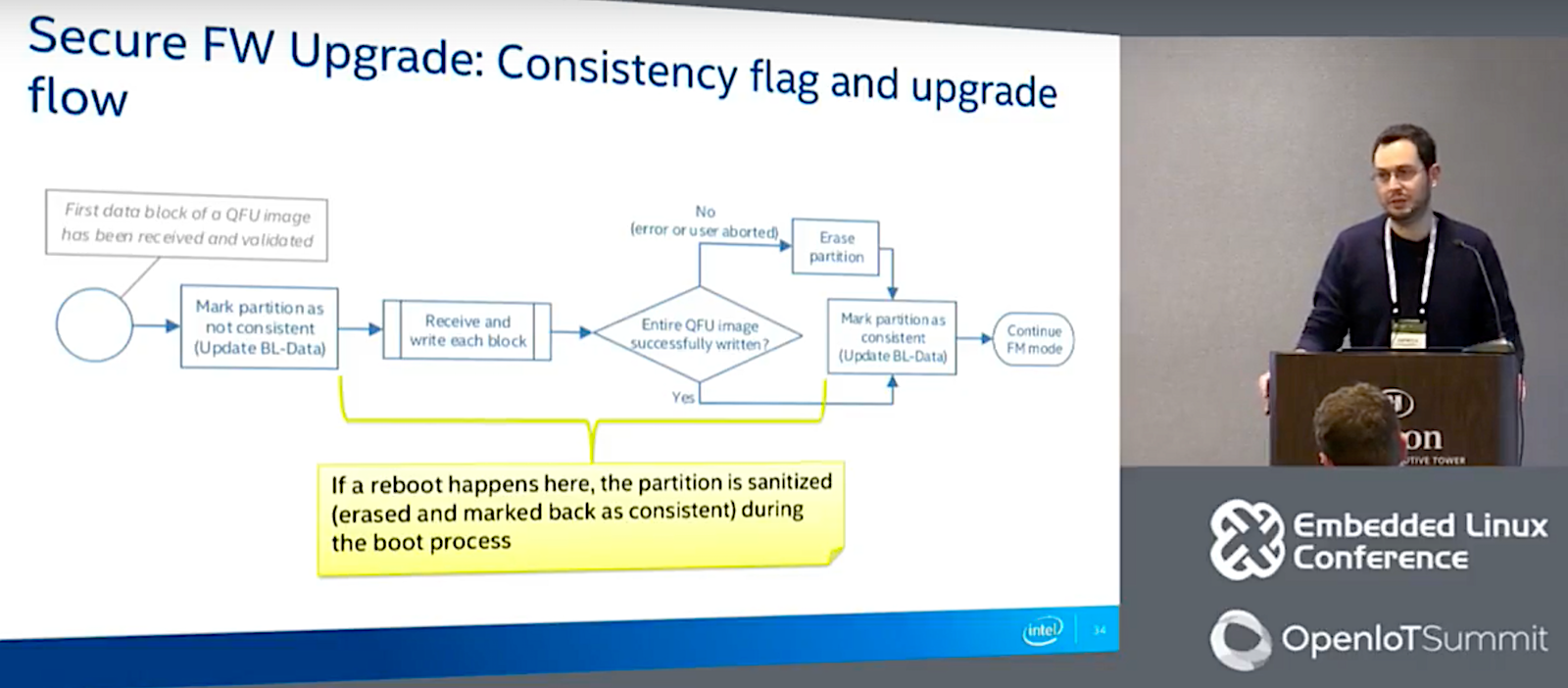
The security enhancements address the challenge of ensuring partition consistency — how to handle failures that can leave partitions in an inconsistent state, for example, due to a reset during a firmware update. The new code associates a consistency flag to every partition and stores this metadata in a bootloader file called BL-Data.
The updated bootloader also adds key management. “We basically define and authenticate a key update request, an extension of QFM,” said Alessandrelli. “We use double-signing, providing both the firmware key, which is used to authenticate an image, as well as a revocation key.” Although this scheme will need to be modified if they add OTA support in the future, “since right now we’re only supporting wired and point to point USB or UART transfer, a man in the middle attack is defeatable,” he noted.
Alessandrelli also described security enhancements used to protect BL-DATA using CRC and further explained how partitions are related to targets. The enhancements are designed to support future upgrades to OTA and other additions, such as BLE modules with their own firmware.
Alessandrelli concluded with some lessons learned, such as the importance of reusing existing open source code and using a modular approach. “By not pre-optimizing for footprint, we can adapt to changing requirements,” he said. “By using link-time optimization, we could offset most of the overhead from the modular approach, giving us 15 to 20 percent savings in flash footprint saving.”
Watch the complete presentation below.
Connect with the Linux community at Open Source Summit North America on September 11-13. Linux.com readers can register now with the discount code, LINUXRD5, for 5% off the all-access attendee registration price. Register now to save over $300!

In the first article of this series, we looked at some of the, admittedly limited, features of TFTP along with some reasons why you might want to use it. Here, we take a look at the main config file and how to enable and disable services for improved security.
The following config for our Debian package won’t apply directly to Red Hat, but much of it should make sense at least. It’s important to pay attention to the openbsd-inetd package, which is provided because that’s how systemd interacts with starting and stopping the tftpd daemon via the old-school inetd service.
If you query Debian Jessie’s installation, then the README file offers the following version information: “This is netkit-tftp-0.17 for Linux.”
The server manual (viewed with the command man in.tftpd) also dutifully informs us that tftpd supports the DARPA Trivial File Transfer Protocol and respects which port it operates on by looking up the /etc/services file. In other words, to move it off of port 69, you can simply edit entries found within that file.
The Debian way of getting your TFTP server to start up after a reboot would look like this (assuming you installed the tftpd package of course and not the one offered as an alternative on Red Hat systems):
# systemctl enable openbsd-inetd
Our main config file (I can hear some of those cobwebs being blown away as you read the location of this file) can be found at: /etc/inetd.conf. This controls all things inetd related, but the helpful tftpd has included a line for us luckily.
Indeed an abbreviated version of that file, for the sake of simplicity, might look like that found in Listing 1:
# Packages should modify this file by using update-inetd(8)
#
# <service_name> <sock_type> <proto> <flags> <user> <server_path> <args>


#:BOOT: TFTP service is provided primarily for booting.  Most sites
#       run this only on machines acting as "boot servers."

tftp            dgram   udp     wait    nobody  /usr/sbin/tcpd  /usr/sbin/in.tftpd /srv/tftp
Listing 1: Our (abbreviated) main config file for “inetd” under which tftpd runs.
The first entry (on the first line) we should pay attention to in Listing 1 refers to update-inetd. This command needs to be run to enable and disable any tftpd services after we make changes to this file.
For example, if you wanted to change something like the directory of where files reside, then edit the last line in our abbreviated config file, altering “/srv/tftp” in this case, and then run the update-inetd command to set that change live.
There’s a nice old-school way of quickly commenting out all of the unencrypted access services with one fell swoop in the /etc/inetd.conf file by using the update-inetd command. It’s described in the manual and looks like this:
# update-inetd --comment-chars '#' --disable login,shell,exec,telnet
As you can see, we’re prepending comments to each line supporting these services to disable them by running this command. There’s are other useful options in the manual if you want to explore:
# man update-inetd
Again, in Listing 1, we can see that these days most people just use the TFTP protocol for boot server scripts. On a LAN, however, tftpd still has its place for other services, too, such as common read-only configs — for example, to reflect changes in NTP servers or other widely used services.
The eagle-eyed among you might have spotted /usr/bin/tcpd being mentioned inside the newly installed, old-timer, config file that is /etc/inetd.conf. This refers to TCP Wrappers, which allow us to control the IP address ranges or domain names that can connect to any service that links in with the library libwrap. It’s an excellent addition to any network-facing service and tftpd is no exception. Incidentally, if you wanted to check if a particular item has been configured to use the functionality provided by TCP Wrappers, you could run a command such as this:
# ldd /usr/sbin/sshd | grep libwrap

libwrap.so.0 => /lib64/libwrap.so.0 (0x00007f07e3066000)
The test above does indeed prove that our OpenSSH Server uses libwrap.so.0. To check another program, such as a mail server, simply replace the /usr/sbin/sshd with the path to the binary file that you wish to query.
To enable TCP Wrappers for your tftpd service you can quickly edit the /etc/hosts.deny file and add the following line:
tftpd: ALL
Then, inside /etc/hosts.allow, you can add a few rules of who can connect to the small file repository being served by your TFTP daemon. An example of an IP address might be:
tftpd: 10.10.10.
Note the trailing dot, which opens up all 254 hosts under the Class C “10.10.10.0” network. Additionally, it’s possible to allow specific hosts by using DNS names such as this example:
tftpd: .workstations.chrisbinnie.tld
Here we allow any workstation host (note the leading dot this time) under our Domain Name to connect without having to put an entry for each. There’s much more information available on the highly recommended TCP Wrappers here:
# man hosts_access
If you felt the need to tinker with your existing IPtables scripts (provided courtesy of the excellent kernel-based firewall Netfilter), then you would add a line similar to this one below:
# iptables -I INPUT -p udp --dport 69 -j ACCEPT
This opens up UDP port 69 for inbound traffic as we can see.
If you run the command below to see if anything is listening on UDP port 69, then you can tell whether inetd has fired up tftpd’s daemon already.
# lsof -i :69

COMMAND  PID USER   FD   TYPE DEVICE SIZE/OFF NODE NAME

inetd   9571 root    4u  IPv4 139447      0t0  UDP *:tftp
Lo and behold, there is a service listening intently already, without any prompting right after our installation. Take that as a warning to secure your access immediately or stop the service right after the installation if you can’t spend time securing the service as soon as it is installed.
Next time, we’ll wrap up this series with more options to consider along with several examples of moving files around.
Chris Binnie is a Technical Consultant with 20 years of Linux experience and a writer for Linux Magazine and Admin Magazine. His new book Linux Server Security: Hack and Defend teaches you how to launch sophisticated attacks, make your servers invisible and crack complex passwords.
Advance your career in Linux System Administration! Check out the Essentials of System Administration course from The Linux Foundation.