Home Blog Page 574

Slaying Monoliths at Netflix with Node.js

The growing number of Netflix subscribers — nearing 85 million at the time of this Node.js Interactive talk — has generated a number of scaling challenges for the company. In his talk, Yunong Xiao, Principal Software Engineer at Netflix, describes these challenges and explains how the company went from delivering content to a global audience on an ever-growing number of platforms, to supporting all modern browsers, gaming consoles, smart TVs, and beyond. He also looks at how this led to radically modifying their delivery framework to make it more flexible and resilient.

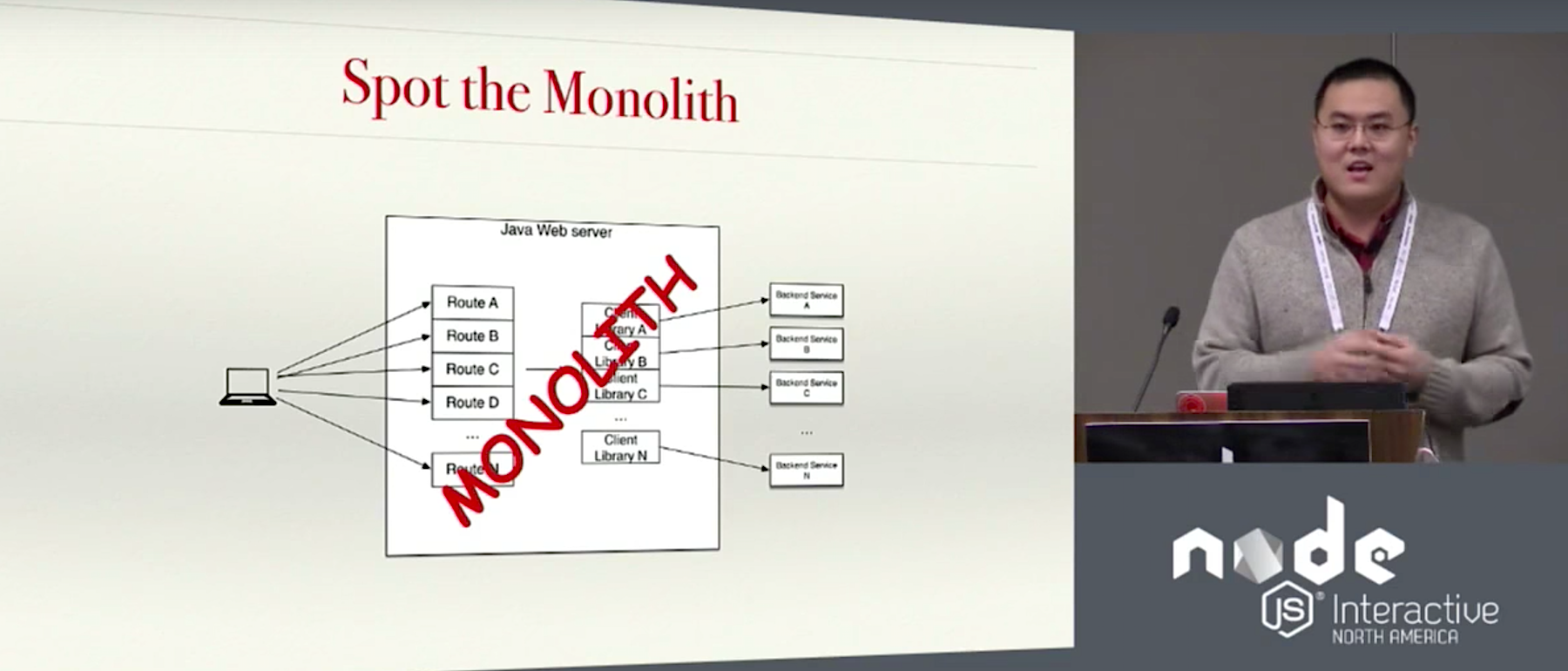
One of the first steps Netflix took to cope with their swelling subscriber base was to migrate all their infrastructure to the cloud. But somehow, Xiao says, that didn’t mean that once the migration complete, the developers could “just sit around and watch TV shows.” The cloud, after all, is just somebody else’s computer, and scaling for the number of users is just part of the problem. As the number of users increased, so did the number of platforms they had to deliver to. In its first iteration, Netflix only worked on the browsers, and the framework was simply a Java web server that managed everything. The server did more or less everything, both rendering the UI and accessing the data.

Netflix relies on microservices to provide a diverse range of features. For each microservice there is a team of developers that more or less owns the service and provides a client to the Java server to use. The Java server — the monolith in this story — suffered from several issues. To begin with, it was very slow to push and innovate. Every time a new show launched and they wanted to add a new roll title to the UI, they had to push the service. If one of the development teams launched a new and improved version of a client, they had to push the service. When a new microservice was added to the existing ones, they had to push the service. Furthermore, increasing the number of supported devices was nearly impossible in any practical sense.

So in the next iteration, the development team migrated to a REST API. This unlocked the ability to support more devices. The new framework also separated the rendering of the UI and the accessing of data processes. However, the REST API also came with its fair share of disadvantages. For one it was inflexible, as it was originally designed for one kind of device and adding new devices was painful. Also, as a different team owned the REST API, the microservices teams were often waiting weeks for API changes to support their own new services.

It also proved inefficient. REST is resource based and every little element on the Netflix UI is a resource. So, in order to, for example, fetch all of a customer’s favorite movies, the services had to make multiple round trips to the back end. Ultimately, it proved difficult to maintain, because the API became more complex and bloated as developers tried to retrofit it with more features.

The different developer teams needed flexibility to innovate for the platforms they were supporting, and the resulting REST API was too clunky and restrictive for this. Another evolution of the Netflix framework was required.

The API.NEXT allowed each team to upload their own custom APIs to the servers. The teams could change the scripts (written in Groovy) as much as they liked without affecting other teams. The API service itself could also be updated independently from the APIs that it was serving. The problem was the Monolith was back again, and that led to scaling problems. Netflix has literally thousands of scripts sharing the same space, serving millions of clients. It was common, says, Xiao, to “run out of headspace,” be that memory, CPU, or I/O bandwidth. This led to expensive upgrades when more resources were needed. Another thing that even led to outages were errors in the scripts themselves: If a script had a memory leak, for example, it could bring down the system for everyone.

Another problem was what Xiao calls “Developer Ergonomics.” The NEXT.API server was a very complex piece of software with multiple moving parts. Scripts could not be tested locally. To test a script, the team had to upload it to a test site, run it, test it, and, if there were any problems, go through the whole process again after troubleshooting the issues. This process was slow and inconvenient and led to the current iteration of the Netflix framework, one in which scalability and availability, and developer productivity are taken into account.

While designing the new framework, it was established that, on the scalability/availability front, one of the goals was to achieve process isolation to avoid the problems the NEXT.API suffered from. It also required that the data access scripts and API servers were kept separate to reduce infrastructure costs. The designers also wanted to reduce the startup time and have immutable deployment artifacts, which would allow to reproduce the different builds.

As for developer productivity, most developers wanted to use the same language (preferably JavaScript) on the server and the client, and not deal with two distinct technologies. They also needed to be able to run tests locally, have faster incremental builds, and an environment that as closely mirrored the production as possible.

The new framework, called New Generation Data Access API, has moved all the data accessing APIs into separate apps running Node.js. Each app is now isolated running in a Docker container. The back-end services are now contained within a Java-based server the Netflix development team calls the Remote Service Layer. The RSL integrates all back-end services under one consistent API. Whenever developers want to deploy a new APIs, they push JavaScript to the server in the form of a Node.js container.

Overall, Netflix’s current combined Java/Node-based platform allows for a quicker and easier deployment, with fewer of the issues that plagued prior monolithic approaches.

Watch the complete presentation below:

https://www.youtube.com/watch?v=H_iK7jww_j8?list=PLfMzBWSH11xYaaHMalNKqcEurBH8LstB8

If you’re interested in speaking at or attending Node.js Interactive North America 2017 – happening October 4-6 in Vancouver, Canada – please subscribe to the Node.js community newsletter to keep abreast of dates and deadlines.

Amadeus: Redefining Travel Industry Tech Through Open Source and SDN

Travel tech giant Amadeus has been moving toward a fully software-defined data center strategy over the past few years — one based on open source and software-defined networking (SDN).

Rashesh Jethi, SVP of Engineering at Amadeus, will speak at Open Networking Summit 2017, April 3-6, in Santa Clara, CA.
“We are actively leveraging software-defined networking in our existing data centers and all new infrastructure projects,” says Rashesh Jethi, SVP of Engineering and head of Research & Development for Amadeus in the North America and Latin America regions.

Jethi leads the teams responsible for developing and maintaining distribution software and airline passenger support systems at Amadeus — a multi-billion dollar technology company that connects and enables the entire travel industry – as well as travel — around the world.

On Tuesday, April 4 he will speak at Open Networking Summit in Santa Clara about how software-defined networking and data centers are redefining the travel industry and moving millions of people every day. Here, he discusses how Amadeus uses open source software and SDN, the best way for companies to get involved in the SDN revolution, and how networking affects adjacent industries such as IoT, cloud, and big data.

Want to learn more? Register now for Open Networking Summit 2017! Linux.com readers can use code LINUXRD5 for 5% off the attendee registration.

Linux.com:  Which open source networking projects does your organization use and contribute to? Why do you participate? How are you contributing?

Jethi: Amadeus primarily uses OpenStack. Other open source projects we use that indirectly contribute to SDN include Github, Jenkins, Ansible, Puppet, and Chef. Amadeus is an active member in the open source community and regularly contributes code to open source libraries.

Linux.com: What’s your advice to individuals and companies getting started in SDN?

Jethi: SDN should be viewed as a means to an end. What’s important is to first understand why you want to embrace SDN and how you will get the organizational buy-in and technical talent behind the project.

Talk to other individuals and companies who have gone through it. Don’t readily believe the hype from equipment manufacturers or the promised positive outcomes at large from the community. It’s important to set realistic goals and be pragmatic along the way!

Linux.com:  How can companies and individuals best participate in the ‘Open Revolution’ in networking?

Jethi: The best participation comes from three things: learning, contributing and getting started – even if in a small way – rather than endless debates and analysis.

Linux.com: How has networking had a profound impact on adjacent “hot” industries like Cloud, Big Data, IoT, Analytics, Security, Intelligence, and others?

Jethi: They are all very interconnected in some ways. The growth of hyperscale computing platforms – whether public clouds or private clouds – would not be possible without the enabling software-defined infrastructure provisioning, deployment, and automation capabilities. (The cost and complexity in legacy models is too high). The availability of these hyperscale computing platforms has, in turn, facilitated the development of data, analytics and IoT solutions.

How to Set Up External Service Discovery with Docker Swarm Mode and Træfik

In my previous post, I showed how to use service discovery built into Docker Swarm Mode to allow containers to find other services in a cluster of hosts. This time, I’ll show you how to allow services outside the Swarm Mode cluster to discover services running in the cluster.

It turns out this isn’t as easy as it used to be. But first, allow me to talk about why one would want external service discovery, and why this has become more difficult to achieve.

Why External Service Discovery?

For most of us, we are not running 100 percent of our applications and services in containers. Maybe some are, but they’re running them in two or more Swarm Mode clusters. Perhaps a large group are constantly deploying and working on containers. In these situations, it can become trying to have to update configuration files or DNS entries every time a service is published or changes location.

What changed?

Those of us who use Docker heavily are familiar with Docker’s “move fast and break things” philosophy. While the “break” part happens less frequently than in Docker’s early days, rollouts of significant new features such as Swarm Mode can be accompanied by a requirement to retool how one uses Docker. With earlier versions of Docker, my company used a mixture of HashiCorp’s Consul as a key/value pair, along with Gilder Labs’ Registrator to detect and publish container-based service information into Consul. With this setup, Consul provided us DNS-based service discovery – both within and external to the Swarm (note: Swarm, not Swarm Mode) cluster.

While Docker 1.12 brought Swarm Mode and extreme ease of use to building a cluster of Docker hosts, Swarm Mode architecture is not really compatible with Registrator. There are some workarounds to get Registrator working on Swarm Mode, and after a good amount of experimentation I felt the effort didn’t justify the result.

Taking a step back, what’s wanted out of external service discovery? Basically, the ability to allow an application or person to easily and reliably access a published service, even as the service moves from host to host, or cluster to cluster (or across geographic areas, but we’ll cover that in a later post). The question I asked myself was “how can I combine Swarm Mode’s built-in service discovery with something else so I could perform name-based discovery outside the cluster?” One answer to this question would be to use a proxy that can do name-based HTTP routing, such as Træfik.

Using Træfik

For this tutorial, we’ll build up a swarm cluster using the same Vagrant setup from my previous post. I’ve added a new branch with some more exposed TCP ports for this post. To grab a copy, switch to the proper branch and start the cluster, follow below:

$ git clone https://github.com/jlk/docker-swarm-mode-vagrant.git

Cloning into 'docker-swarm-mode-vagrant'...

remote: Counting objects: 23, done.

remote: Total 23 (delta 0), reused 0 (delta 0), pack-reused 23

Unpacking objects: 100% (23/23), done.

$ cd docker-swarm-mode-vagrant/

$ git checkout -b traefik_proxy origin/traefik_proxy

$ vagrant up

If this is the first time you’re starting this cluster, this takes about 5 minutes to update and install packages as needed.

Next, let’s fire up a few WordPress containers – again, similar to the last post, but this time we’re going to launch two individual WordPress containers for different websites. While they both use the same database, you’ll notice in the docker-compose.yml file I specify different table prefixes for each site. Also in the YML you’ll see a definition for a Træfik container, and a Træfik network that’s shared with the two WordPress containers.

Let’s connect into the master node, check out the code from GitHub, switch to the appropriate branch, and then start the stack up:

$ vagrant ssh node-1

$ git clone http://github.com/jlk/traefiked-wordpress.git

$ cd traefiked-wordpress

$ docker stack deploy --compose-file docker-compose.yml  traefiked-wordpress

Finally, as this example has Træfik using hostname-based routing, you will need to create a mapping for beluga and humpback to an IP address in your hosts file. If you’re not familiar with how to do this, Rackspace has a good page covering how to do this for various operating systems. If you’re running this example locally, 127.0.0.1 should work for the IP address.

Once that’s set up, you should be able to browse to http://beluga or http://humpback in your browser, and see two separate WordPress setup pages. Also, you can hit http://beluga:8090 (or humpback, localhost, etc) and see the dashboard for Træfik.

NDVq3Jiai4T9CSvBqx3Kyt9wOa3K_p4mC0bAxyxB

jdBff81VuyDesgkYenpyCv0VdIoDEcYtnMYT_9QY

An Added Benefit, But with a Big Caveat

One of the things which drew me to Træfik is it comes with Let’s Encrypt built in. This allows free, automatic TLS certificate generation, authorization, and renewal. So, if beluga had a public DNS record, you could hit https://beluga.test.com and after a few seconds, have a valid, signed TLS certificate on the domain. Details for setting up Let’s Encrypt in Træfik can be found here.

One important caveat that I learned the hard way: When Træfik receives a signed certificate from Let’s Encrypt, it is stored in the container. Unless specified in the Træfik configuration, this file will be stored on ephemeral storage, being destroyed when the container is recreated. If that’s the case, each time the Træfik container is re-created and a proxied TLS site is accessed, it will send a new certificate signing request to Let’s Encrypt, and receive a newly signed certificate. If this happens often enough within a small period of time, Let’s Encrypt will stop signing requests from that top-level domain for 7 days. If this happens in production, you will be left scrambling. The important line you need to have in your traefik.toml is…

       storage = "/etc/traefik/acme.json"

…and then make sure /etc/traefik is a volume you mount in the container.

Now we understand external, DNS-based service discovery for Swarm Mode. In the final part of this series, we’ll add high availability and failover to this mixture.

Learn more about container networking at Open Networking Summit 2017. Linux.com readers can register now with code LINUXRD5 for 5% off the attendee registration.

John Kinsella has long been active in open source projects – first using Linux in 1992, recently as a member of the PMC and security team for Apache CloudStack, and now active in the container community. He enjoys mentoring and advising people in the information security and startup communities. At the beginning of 2016 he co-founded Layered Insight, a container security startup based in Silicon Valley where he is the CTO. His nearly 20-year professional background includes datacenter, security and network operations, software development, and consulting.

Stack Overflow Developer Survey Results 2017

Each year since 2011, Stack Overflow has asked developers about their favorite technologies, coding habits, and work preferences, as well as how they learn, share, and level up. This year represents the largest group of respondents in our history: 64,000 developers took our annual survey in January.

As the world’s largest and most trusted community of software developers, we run this survey and share these results to improve developers’ lives: We want to empower developers by providing them with rich information about themselves, their industry, and their peers. And we want to use this information to educate employers about who developers are and what they need.

We learn something new every time we run our survey. This year is no exception:

  • A common misconception about developers is that they’ve all been programming since childhood. In fact, we see a wide range of experience levels. Among professional developers, 11.3% got their first coding jobs within a year of first learning how to program. A further 36.9% learned to program between one and four years before beginning their careers as developers.
  • Only 13.1% of developers are actively looking for a job. But 75.2% of developers are interested in hearing about new job opportunities.

Read more at StackOverflow

A Beginner-Friendly Introduction to Containers, VMs and Docker

If you’re a programmer or techie, chances are you’ve at least heard of Docker: a helpful tool for packing, shipping, and running applications within “containers.” It’d be hard not to, with all the attention it’s getting these days — from developers and system admins alike. Even the big dogs like Google, VMware and Amazon are building services to support it.

Regardless of whether or not you have an immediate use-case in mind for Docker, I still think it’s important to understand some of the fundamental concepts around what a “container” is and how it compares to a Virtual Machine (VM). While the Internet is full of excellent usage guides for Docker, I couldn’t find many beginner-friendly conceptual guides, particularly on what a container is made up of. So, hopefully, this post will solve that problem 🙂

Let’s start by understanding what VMs and containers even are.

Read more at FreeCodeCamp

8 Practical Examples of Linux Xargs Command for Beginners

The Linux xargs command may not be a hugely popular command line tool, but this doesn’t take away the fact that it’s extremely useful, especially when combined with other commands like find and grep. If you are new to xargs, and want to understand its usage, you’ll be glad to know that’s exactly what we’ll be doing here.

Before we proceed, please keep in mind that all the examples presented in this tutorial have been tested on Ubuntu 14.04 LTS. Shell used is Bash, and version is 4.3.11.

Read more at HowtoForge

Open Source JavaScript, Node.js Devs Get NPM Orgs for Free

NPM Inc.’s NPM Orgs tool, which has been available as a paid service for JavaScript and Node.js development teams collaborating on private code, is now available for free use by teams working on open source code.

The SaaS-based tool, which features capabilities like role-based access control, semantic versioning, and package discovery, now can be used on public code on the NPM registry, NPM Inc. said on Wednesday. Developers can transition between solo projects, public group projects, and commercial projects, and users with private registries can use Orgs to combine code from public and private packages into a single project. 

Read more at InfoWorld

Bash Scripting Quirks & Safety Tips

Yesterday I was talking to some friends about Bash and I realized that, even though I’ve been using Bash for more than 10 years now there are still a few basic quirks about it that are not totally obvious to me. So as usual I thought I’d write a blog post.

We’ll cover

  • some bash basics (“how do you write a for loop”)
  • quirky things (“always quote your bash variables”)
  • and bash scripting safety tips (“always use set -u”)

If you write shell scripts and you don’t read anything else in this post, you should know that there is a shell script linter called shellcheck. Use it to make your shell scripts better!

Read more at Julia Evans

TripleO QuickStart Master Branch Deployment with Feature Sets and Nodes Configuration (topology) Separated

Quoting currently posted release notes :-

  Configuration files in general_config were separated
    into feature sets (to be specified with –config
    argument ) and nodes configuration (to be specified with
    –nodes configuration)

    Featureset files should contain only the list of flags
    that enable features we want to test in the deployment,
    the overcloud nodes configuration, and all that involves
    their set up, should be put into nodes configuration
    files.

end quote

Copmplete text may seen here http://dbaxps.blogspot.com/2017/03/tripleo-quickstart-master-branch.html

This Week in Open Source News: Blockchain Helps China Go Green, Old Linux Vulnerability Exposed, and More

This week in Linux and open source news, The Linux Foundation’s Hyperledger Project to help China get greener, an old Linux vulnerability surfaces, and more! Read on to stay in the OSS know!

1) IBM and Energy-Blockchain Labs announced a blockchain-based trading platform for “green assets” that’s based on Hyperledger.

How Blockchain Is Helping China Go Greener– Fox Business

2) “A Linux developer discovered a serious security hole that’s been hiding for years in an out-of-date driver.”

Old Linux Kernel Security Bug Bites– ZDNet

3) Gates’ Radiant Earth Project hopes to “encourage the creation of more open source technologies and innovation that can help ‘solve societies’ most pressing issues.'”

Bill Gates Has Started a New Crusade to Save the World– Fortune

4) Containerd to become a CNCF project

Docker and Core OS Plan to Donate Their Container Technologies to CNCF– CIO

5) “IBM’s public cloud will run Red Hat’s OpenStack and Ceph storage products”

IBM + Red Hat = An Open Source Hybrid Cloud– NetworkWorld