3 suggestions on how to stay simple and avoid complexity.
“You don’t understand — as soon as I install consul, set up service discovery for my microservices, build my own containerized continuous integration pipeline to build my code from source using my custom language-specific Dockerfile and set up my highly available production database my system for deploying code to production will be so simple.”
“How many people are in my team? Oh, it’s just me. But one day..”
Sigh ;-).
There’s a lot of complexity in things we use to reduce complexity. This is worth noticing. Three examples:
The HPC community is trying to solve the critical compute challenges of next generation high performance computing and ARM considers itself well-positioned to act as a catalyst in this regard. Applications like machine learning and scientific computing are driving demands for orders of magnitude improvements in capacity, capability and efficiency to achieve exascale computing for next generation deployments.
ARM has been taking a co-design approach with the ecosystem from silicon to system design to application development to provide innovative solutions that address this challenge.
This morning IBM announced the next logical step in its work with Docker containers: Kubernetes support on its Bluemix Container Service. Currently available in a limited beta, its feature set should match Google’s and Microsoft’s offerings.
Kubernetes, the Bluemix way
Previously, the default for managing Docker containers on Bluemix Container Service was to spin them up individually by hand or to use Bluemix’s container groups metaphor, where Bluemix directly managed multiple containers running the same image.
The Apache Camel community introduced a new release a few months ago with a set of components for building microservices. The new key component for microservices support is ServiceCall EIP, which allows calling a remote service in a distributed system where the service is looked up from a service registry on Kubernetes, Openshift, Cloud Foundry, Zuul, Consul, Zookeeper, etc. In addition, it is worth mentioning that now Apache Camel compiles against Java 8 and has improved support for Spring Boot. A full list of changes is available on Camel community site.
The main purpose of this article is to show how to create microservices with Apache Camel in the most common way using its new features available from release 2.18.
IT virtualization has radically changed the face of compute, storage, and network services in data centers and beyond. In response, Colt — a network and communications service provider — back in 2015 began developing a program that has transformed the way the company offers network services to customers, says Javier Benitez, Senior Network Architect, Colt Technology Services, who will be speaking at Open Networking Summit.
According to Benitez, the aim was to move away from a traditional consumption model to one where network services are consumed through an on-demand model based on software defined networking (SDN) and network function virtualization (NFV) technologies. Here, Benitez explains more about Colt’s SDN and NFV solutions, focusing on current development efforts and future plans.
Linux.com: What prompted Colt’s adoption of NFV and SDN?
Javier Benitez: Our transformation toward network virtualization started long ago, in 2010, when we defined Colt’s Ethernet and IP integration strategy which included the virtualization of the L3 CPE router used to deliver managed Internet access and IPVPN services. This virtualization was launched in production early 2012 and pre-dated the ETSI NFV group. The same year Colt joined the Open Networking Foundation (ONF) with special interest in the potential use of OpenFlow in the data center (DC) as well as in the transport network.
Javier Benitez, Senior Network Architect, Colt Technology Services
In a very organic way, we began to evaluate these new technologies whenever an area of the network needed to be replaced or evolved. This was the case with Colt data centers when in 2012 we evaluated a new architecture for the next generation switching infrastructure. OpenFlow technology and SDN overlay approaches were considered and, following a trial in one of our DCs in Paris, we deployed a Nicira SDN overlay solution in 2014. Around the same time, we also launched an RFI to evaluate NFV vendors capable of delivering virtual CPE solutions, and selected Versa Networks.
From 2014/2015, we started to observe a real interest and demand from customers, first to understand what the new technology was capable of, and second to request new services to be developed that would make use of SDN and NFV to solve some of their business requirements. Following several focused workshops with key Colt customers, we identified that their top priority was for a new on-demand consumption model, initially for basic Ethernet connectivity with the view to extend to other technology domains (e.g., IPVPN, Internet access, optical) in the future and up the stack to deliver added value services (e.g., virtualized firewall, DPI, application optimization, etc.) on demand on top of basic connectivity. This led to the creation of Colt’s Novitas program.
Linux.com: What is Novitas, and what role does it play within Colt?
Benitez: Novitas, branded Colt On Demand, is a company transformation programme created in 2015 with strong support from Colt’s executive team to completely change the way network services are offered and consumed by our customers. The vision is to move away from a traditional, slow, manual and paper-work based consumption model to one aligned with the IT/Cloud world where network services are consumed through an on-demand model, in real time, either through a web portal or API and based on the use of SDN and NFV technologies.
Novitas is having a profound impact internally, as it is transforming the entire organization. One of the most significant changes has been the need to adapt an agile development process as opposed to the traditional waterfall approach. The development framework is based on rapid development cycles, with a dynamic roadmap that is frequently updated based on both internal and customer feedback. At the same time, new product development processes, new operating models and new commercial models have been defined as new services and products are targeted by the On Demand roadmap.
Linux.com: Can you give us some examples of Colt’s development efforts? What issues are you currently focusing on?
Benitez: Based on the feedback received from our customers, our initial focus was delivering Ethernet On Demand. The value proposition gives customers a portal and/or an API so that they can reserve ports, create point to point Ethernet services, change the bandwidth of an existing service, and finally cease a service, all in real-time. And, all of that can happen across Colt’s Ethernet network deployed across more than 40 metro networks in Europe, to be expanded worldwide (US and Asia) in subsequent phases. The technical solution is based on Cyan (today Ciena) BluePlanet SDN controller controlling Colt’s Modular MSP, an integrated IP/Ethernet, multi-vendor packet network. We initially focused on a service proposition known as DCNet delivering the capability between key data centers in Europe, but it has now been extended and launched to cover any business on-net site, as well as Direct Cloud Access On Demand to Microsoft Azure as well as Amazon AWS.
The second development, also based on customers’ priorities, is the introduction of SD WAN as an evolution to the traditional MPLS IPVPN technology. Customers are interested in a new IPVPN proposition that would allow seamless support of multiple access technologies (MPLS, Internet), dynamic patch selection based on customer on demand configuration and value-added services activation. Another key development is Colt’s SD WAN proposition, based on Versa Networks and an initial NFV platform to virtualize some of the components (e.g., SD VPN-MPLS Gateway, SDN Controller).
At the moment, the Novitas Programme continues with both the Ethernet On Demand development as well as SD WAN, delivering features in a phased approach. At the same time, new products are being added into the roadmap, such as Internet Access On Demand.
Linux.com: What are some challenges you’ve encountered in deploying SDN & NFV solutions and how have you handled them?
Benitez: Probably the biggest challenge initially when trying to bring SDN/NFV services in production has been dealing with the integration to existing OSS and BSS systems. Those systems will obviously evolve and potentially be replaced as we progress the development, but in the initial phases we have to use the systems already in place, and that integration task has been quite important.
Another industry wide challenge is the lack of standards, or maybe even better these days, de facto standards of reference implementations. Some of the areas are quite new and there is still a lot of work and industry convergence that needs to happen. A clear example is NFV orchestration, where a number of open source initiatives as well as commercial solutions are trying to lead the way following the directions given by the ETSI NFV ISG. Standards are also missing when we try to interoperate SDN commercial vendors, as we initially see vendor-proprietary implementations, as well when it comes to interconnecting service providers to extend SDN/NFV services beyond a single operator’s domain. Colt is trying to address this last challenge by actively collaborating in industry forums and engaging with other operators.
Another challenge is product maturity and performance. Unfortunately, here there is no other alternative than testing, testing, and feeding back to vendors to work together in improving the initial products.
Linux.com: What development areas would you like to address in the future?
Benitez: There are three research areas that we are working on at the moment in the context of the Novitas program:
1. Target NFV Platform: Further to the initial deployment of an NFV platform to support the SD WAN development, plus other individual network virtualization needs, we are now evaluating a complete, unified, and distributed NFV platform across Colt including NFV Infrastructure and MANO.
2. Standard SDN/NFV API: Colt is fully committed to help the industry agree on standard APIs that can be used to extend SDN and NFV services across different service providers. We are currently engaged in a collaboration with MEF, TM Forum, and other service providers like AT&T and Orange to deliver an initial set of standard APIS for Ethernet On Demand. This initiative uses MEF’s LSO (Lifecycle Service Orchestration) framework and TM Forum’s Open API framework
3. Optical SDN: We have started to research Optical SDN technologies that could extend Colt’s on demand offering to our optical portfolio. The main objective here is to explore SDN for the Optical layer to enable a fully disaggregated, software-controllable optical transport network, both at the Photonic/WDM layer as well as OTN.
Open Networking Summit April 3-6 in Santa Clara, CA features over 75 sessions, workshops, and free training! Get in-depth training on up-and-coming technologies including AR/VR/IoT, orchestration, containers, and more.
Linux.com readers can register now with code LINUXRD5 for 5% off the attendee registration. Register now!
If you operate within the open source galaxy or the tech industry in general, you’ve likely run across the phrase “cloud-native” with increasing frequency — and you may be wondering what all the buzz is about.
Cloud-native refers to the model in which applications are built expressly for and run exclusively in the cloud — rather than designed and run on-prem, as enterprises historically have done. Cloud computing architecture, which leans heavily on open source code, promises on-demand computing power at lower cost, with no need to spend excessively on data center equipment, staffing and upkeep. Creating cloud-native applications and services is the natural next step for developers accustomed to working entirely in the cloud.
But enterprise-level cloud-native applications require a platform like Cloud Foundry to get up and running in the cloud. Platforms drastically reduce the resource drains associated with “snowflake” infrastructure, and in fact, they automate and integrate the concepts of continuous delivery, microservices, containers and more, to make deploying an application as easy and fast as possible — in any cloud you want, meaning you can operate in a truly multi-cloud environment.
On March 29 at 11 a.m. PST, join Pivotal’s Bridget Kromhout and Michael Coté for a free webinar that will take a deep dive into how cloud-native is the wave of the future and get answers to questions like:
What is the cloud-native approach? How will it benefit your software product team?
How does cloud-native enable cloud application platforms like Cloud Foundry to standardize production, accelerate cycles and create a multi-cloud environment?
Which companies are cloud-native? What lessons can we take from their new model?
Join Cloud Foundry and The Linux Foundation for “Better Software Through Cloud Platforms Like Cloud Foundry” on Wednesday, March 29, 2017 at 11:00am Pacific. Register Now! >>
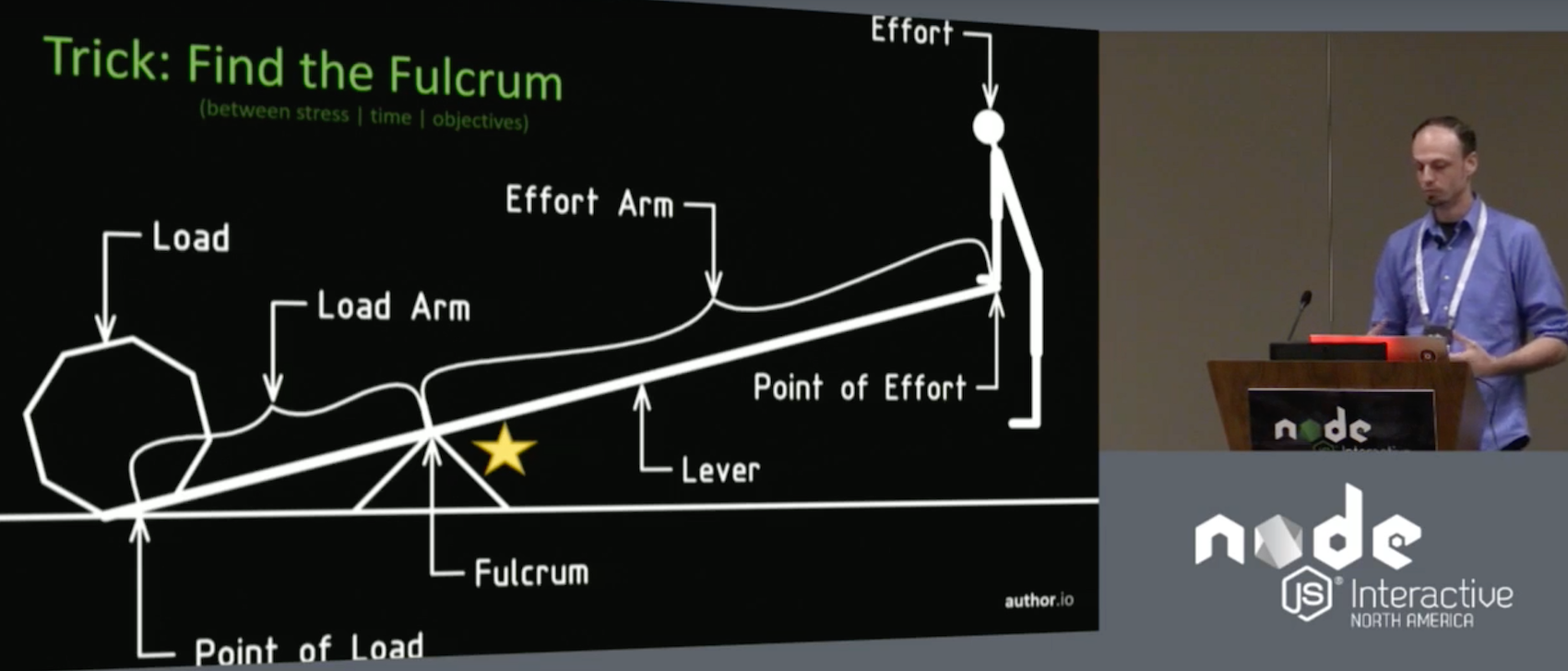
In his talk at Node.js Interactive, Butler said there are two things that stand in the way of achieving a state of development nirvana: one is the time spent coding and thinking about code, and the other is stress.
pm2 is a process manager for Node.js applications, it allows you to keep your apps alive and has a built-in load balancer. It’s simple and powerful, you can always restart or reload your node application with zero downtime and it allows you to create a cluster of your node app.
In this tutorial, I will show you how to install and configure pm2 for the simple ‘Express’ application and then configure Nginx as a reverse proxy for the node application that is running under pm2.
Nirvana, in this plane of existence at least, is a state of contentment, according to Corey A. Butler, creator of the Fenix Web Server and Author.io, a venture that provides software and services for developers. In his talk at Node.js Interactive, Butler said there are two things that stand in the way of achieving a state of development nirvana: one is the time spent coding and thinking about code, and the other is stress. Of course, you can never reach a state of perfect contentment, because you will always have to spend some time coding, and there will always be a certain degree of stress in your work.
Butler, however, says that you can control your workflow to such an extent as to make your time spent coding at least a little more enjoyable. However, there are also forces that oppose changes in workflow, too. For one thing, workflows tend to become invisible over time, turning into something few people think about and never think of changing. Additionally, as creatures of habit, humans tend to oppose change per se. And, many think people developers are smart. Developers tend to think so, too, and it may be true, but that doesn’t mean the workflows they have devised are smart.
Butler advises developers to “target continual change” to overcome these problems. By experimenting with different workflows, and then experimenting some more, you are less likely to fall into the rut of a suboptimal workflow.
This became apparent to Butler while creating NVM for Windows. NVM for Windows is a Node Version Manager for… well, Windows. Because the Node environment is constantly changing, Butler set himself the task of creating something that could handle that.
Butler’s expectations for the NVM, as with any other version manager, were that he would be able to save time — that is, reduce the time spent coding. This characteristic is what gave NVM use and value, but, he says, it is not what made it popular. Instead, NVM for Windows’ popularity, Butler reckons, stemmed from the fact that, because it included a graphical installer, it reduced stress.
The lesson that Butler learned from this is that it is often a small, nitpicky thing that contributes most to your overall stress. You should always look for the small annoying things and try and solve those, he says.
This idea is related to why people choose certain technology. The main motivator in preferring one tool or technology over another, says Butler, is trust. This means people don’t necessarily use the best technology, but will use the one they think they can rely on. Butler recommends piggybacking your own products off of technologies that people already trust. This approach led him to develop the node-windows, node-mac, and node-linux.
Because different developers trust different operating systems, each of the three projects allows developers to set up background daemons and services to run native Node scripts. Butler says this approach combines the trust a developer has in their operating system of choice, with the trust they have in their ability to code in Node. It also alleviates the stress of having to understand the intricacies of how each of these operating systems work.
However, Butler attributes his most recent steps toward contentment to Fenix, a visual web server he developed for setting up and deploying static websites on Windows and Mac. For one thing, Fenix allows you to deploy websites simply, quickly and visually. And, because Fenix also comes with a sharing system, it has allowed Butler to create libraries and projects alongside other developers by sharing quick links to websites running the code. Fenix afforded an instant infrastructure and sharing. It gave the team faster feedback loops and was much more intuitive for people who were not back-end developers. This reduced time and stress and boosted trust. Because Butler and his team spent less time on infrastructure and administration, they were able to spend more time on unit testing and documentation.
In other words, it brought them closer to development nirvana.
If you’re interested in speaking at or attending Node.js Interactive North America 2017 – happening October 4-6 in Vancouver, Canada – please subscribe to the Node.js community newsletter to keep abreast of dates and deadlines.
The Intel Edison is a physically tiny computer that draws a small amount of power and breaks out plenty of connections to allow it to interact with other electronics. It begs to be the brain of your next electronics tinkering project, with all the basics in a tiny package and an easy way to connect other things you might need.
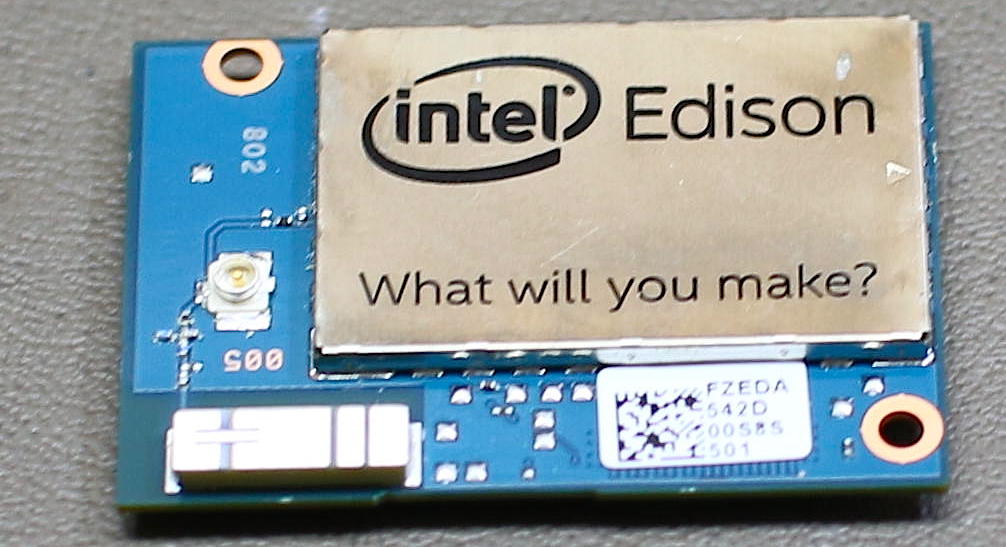
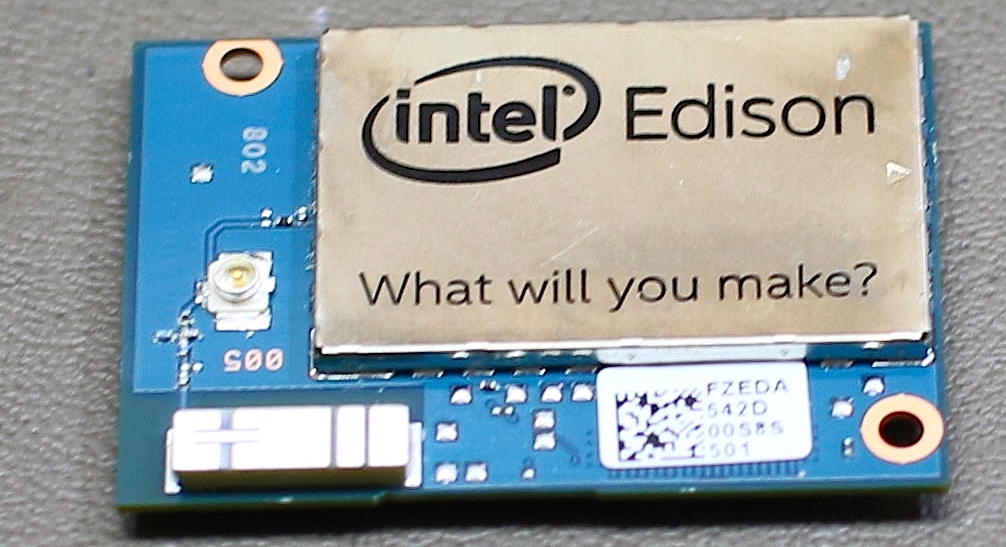
The Intel Edison measures about 1×1.5 inches but packs a dual core Atom CPU, 1GB of RAM, 4GB of storage, dual band WiFi-n, and Bluetooth (Figure 1). On the bottom of the machine is a small rectangular connector that breaks out GPIO pins, TWI, SPI, and other goodies and allows the Edison to get its power from somewhere. The Edison costs about $50, plus whatever base board you plan to power the Edison from.
Figure 1: Intel Edison board.
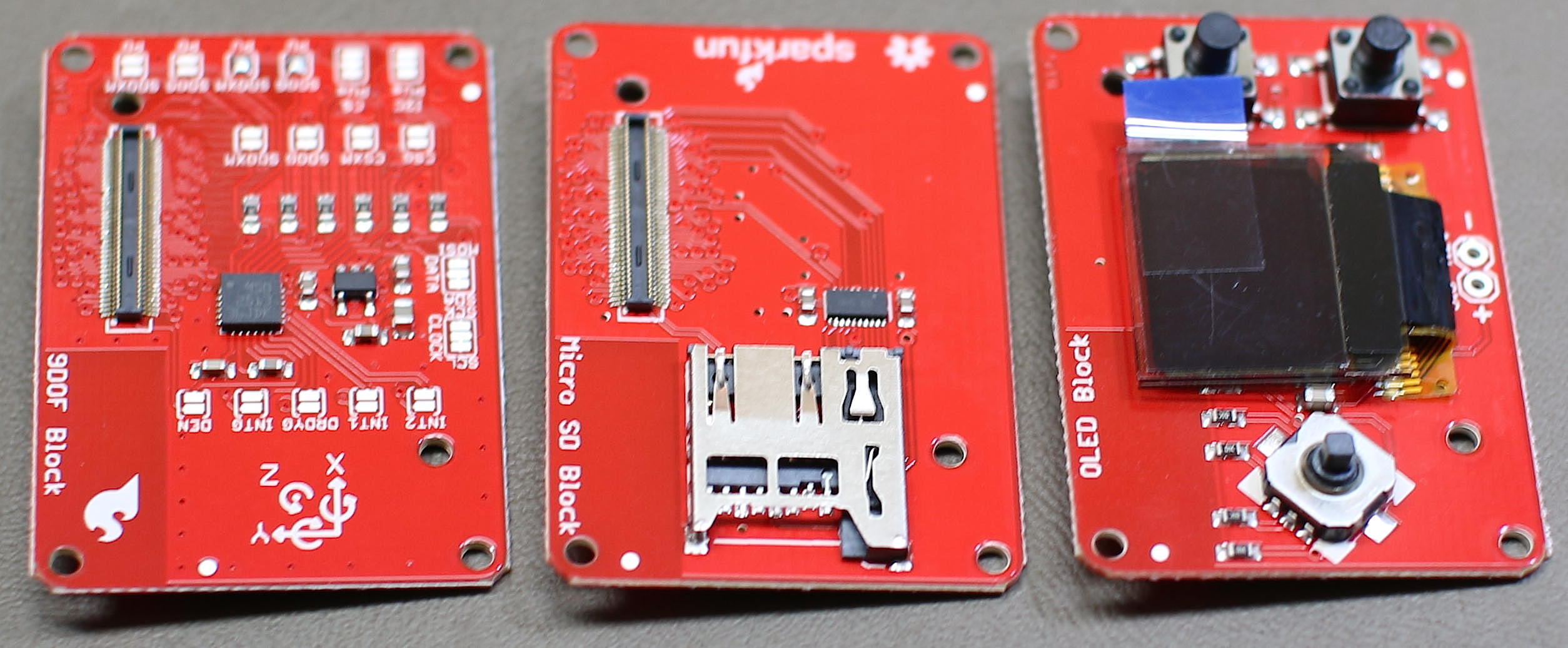
Although the little header on the bottom of the Edison helps keep things tiny, it is not the easiest thing to deal with when prototyping. SparkFun Electronics has created a collection of small break out boards for the Edison, called “Blocks” (Figure 2). Each block provides a specific feature such as an accelerometer, battery, or screen. Most blocks have an input header on one side and an output header on the other side so you can quickly stack blocks together to build a working creation. One example block that has no output is the OLED screen, because if you stacked another block above the screen you wouldn’t be able to see it anymore.
Figure 2: Blocks.
Unlike platforms such as Arduino which operate their GPIO and other pins at 5 or 3.3 volts, the Edison runs them at 1.8v. So you might need to do some voltage level shifting if you need to talk to higher voltage components from the Edison. Note that there is no HDMI or composite video on the Edison. It is fairly straightforward to connect a small screen and drive it from the Edison using SPI if you need that sort of thing.
Getting Started
The Edison does not come with an easy way to directly power it up. You have to connect the Edison using its small header to something that can offer it power. In this series, I will be using the SparkFun base block to power the Edison.
The console is a great place to start to see if the Edison is up and running. Connect the micro USB labeled console on the Base Block breakout to your desktop Linux machine and check dmesg to see something like the below to discover where the console is. The Base Block has power, TX, and RX LEDs on board so you can get some feedback from the hardware if things are working. If things go as they should, you will be presented with a root console to the Edison. There is no default password, you should just get right onto the console.
$ dmesg|tail...FTDI USB Serial Device converter now attached to ttyUSB0$ screen /dev/ttyUSB0 115200Poky (Yocto Project Reference Distro) 1.7.2 edison ttyMFD2edison login: rootroot@edison:~# df -h/dev/root 1.4G 446.4M 913.5M 33% /.../dev/mmcblk0p10 1.3G 2.0M 1.3G 0% /homeroot@edison:~# cat /etc/release EDISON-3.0Copyright Intel 2015
The 4GB of on chip storage is broken up to allow a generous file system in the home directory and a good amount of space for the Edison itself to use for the Yocto Linux installation and applications in /usr. You can also switch over to running Debian on the Edison fairly easily.
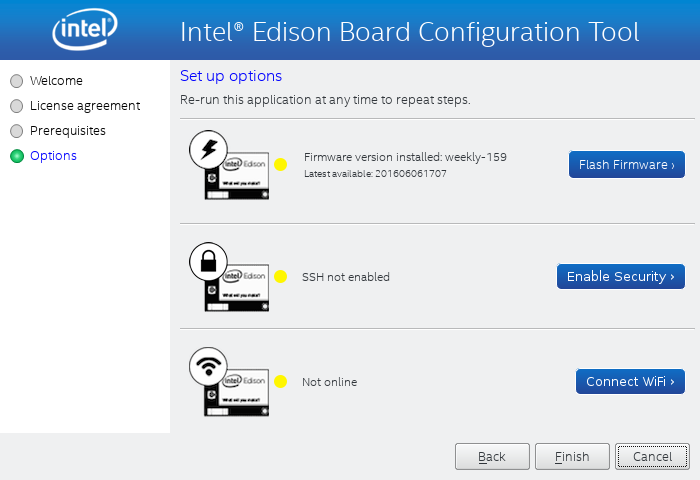
It is always a good idea to make sure you are running the newest version of the firmware for a product. There are many ways to update the Yocto Linux image on the Edison, but the Intel Edison Setup wizard is a good starting point (Figure 3).
Figure 3: Intel Edison configuration.
The Intel Edison Setup wizard can be used for many useful things such as updating the Linux distribution on the Edison, setting the root password, and connecting the Edison to WiFi.
$ tar xzvf Intel_Edison_Setup_Lin_2016.2.002.tar.gz$ cd Intel_Edison_Setup_Lin_2016.2.002$ ./install_GUI.sh...$ su -l# ./install_GUI.sh
The wizard lists supported operating systems as the 64-bit versions of Ubuntu 12.04, 13.04, 14.04, and 15.04. I was using 64-bit Fedora Linux and decided to proceed anyway.
Moving ahead, I found the Edison not detected. So I connected the USB OTG port and nothing changed. Clicking back and next in the GUI showed the versions of the Edison that was connected. So, it seems that the wizard doesn’t poll for a connected Edison, you have to force it to retry. The firmware update download is in the range of 300MB in size. I attempted to update the firmware as a non-root user, which did not work. Running the Intel Edison Setup as root allowed the Yocto image to update. So there must have been some permission issue trying to do the firmware update as a regular user.
After updating the firmware click “Enable Security” to set a hostname for the Edison and set the root password. The last option will let you set up the Edison to connect to your WiFi. Connecting to WiFi is very simple, the Edison will scan for networks and you’ll need to enter your WiFi password to complete the setup. At this stage, you will either have to check your DHCP server records or use the console on the Edison to find out the IP address it was given. Once you know that, you can ssh into the Edison over WiFi.
The Yocto Linux image for Edison was using opkg for package management. This will come in handy as the default image is quite cut down, and you will likely find yourself wanting to install an additional sprinkling of your favourite GNU/Linux software.
One thing that can make or break the experience of Linux on a small machine is the storage speed. Many Raspberry Pi machines limp along on a budget SD card until the card finally gives up. The Edison comes with 4GB of onboard storage and I used Bonnie++ to get an idea of how quickly you can interact with that storage.
The Linux kernel will use RAM to try to cache data so that processes run faster. To test the storage rather than the RAM cache, Bonnie++ tries to use files that are twice the size of your RAM. Unfortunately, the /home partition is only 1.3GB and the Edison has 1GB of RAM, so I couldn’t use filesystem storage twice the RAM size. This means the sequential input performance results shown below are likely incorrect as they would be coming from a RAM cache instead of off flash storage. The block level write performance at almost 19mb/s is quite impressive.
As shown below, it takes around 5 seconds to create 1000 files in the home directory on the embedded flash storage.
edison:~$ cat ./test.sh#!/bin/bashmkdir dcd ./d/for i in `seq 1 1000`; do touch file$idonesyncedison:~$ time ./test.shreal 0m4.928suser 0m0.230ssys 0m0.660s
I tried to use the OpenSSL 1.0.1e compile and run that I have used on other machines in the past to test CPU performance. Although this is a very old version of OpenSSL, it is the same version that I have used on many other boards allowing some direct comparison of the hardware performance. Compiling OpenSSL took almost 20 minutes and, unfortunately, did not link a working output executable.
I downloaded the latest sysbench to test the relative performance of the Edison. Testing was done at commit f46298eb66c05c753c152a24072def935104d806. As I was not really interested in database performance I disabled it using the –without-mysql configure option. It is interesting that the Edison is around twice the speed of a Raspberry Pi 2 on CPU tests but is slower in RAM testing.
Machine
CPU
Memory
Intel Core i5 (M 430 @ 2.27GHz)
7,337
31,612,673
Edison
520
1,179,654
Raspberry Pi 2
272
2,518,525
 $ ./configure  --without-mysql  && make
 $ ./src/sysbench cpu run
 $ ./src/sysbench memory run
For a raw test of CPU performance I expanded the Linux kernel file linux-4.9.10.tar.xz on all machines. The Core I5 M430 desktop machine took around 17 seconds, the Edison took 83 seconds, and the Raspberry Pi took 53 seconds. Going the other way and recompressing the Linux kernel tarball using gzip, the Core i5 took around 41 seconds, the Edison needed 3 minutes, and 27 seconds, and the Raspberry Pi 2 took 2 minutes and 52 seconds. Perhaps the compression tests are bound by both memory and CPU so the Edison and Raspberry Pi 2 are closer overall.
Power
Given the small physical size of the Edison, it will fit right into mobile applications running off battery power. I connected only the SparkFun Base Block and provided power via USB to the console port on the base block. Using a USB power meter the Edison used 0.12A with rare peaks to 0.16A during boot. Once booted, things settled at around 0.06A at idle. Both of these readings were at 5.16 volts. So, at idle the Edison used a little over 0.3 watts of power, including the rather bright blue power LED on the base board. Note that the idle reading was taken with Edison connected to WiFi.
Running sysbench cpu with two threads increased power usage up to 0.1 amps, so somewhere over half a watt.
A conservative estimate for a single AAA battery is 0.8 amp hours. Using four AAA to get into the voltage range, you might expect the Edison to run for a few hours at idle or closer to one hour if you are loading the CPU. Using LiPo batteries should give you a smaller lighter footprint with decent runtime on the Edison.
Wrap up, next time around
Although the Raspberry Pi 2 and 3 machines are fairly small, the Edison takes things to a new level with a footprint about 1/6 the size of a Pi. Having onboard storage on the Edison is great, and with WiFi and Bluetooth on board you should have connectivity under control. The stackable blocks take away the fiddly wiring and you can build quite a bit of functionality into the size of a matchbox.
Next time, we will start to dig into what we can do with some of the other SparkFun Blocks and how to use them from Yocto Linux on the Edison.
Learn more about Linux through the free “Introduction to Linux” course from The Linux Foundation and edX.