Home Blog Page 591

GNU ddrescue – The Best Damaged Drive Rescue

When you rescue your data from a dying hard drive, time is of the essence. The longer it takes to copy your data, the more you risk losing. GNU ddrescue is the premium tool for copying dying hard drives, and any block device such as CDs, DVDs, USB sticks, Compact Flash, SD cards — anything that is recognized by your Linux system as /dev/foo. You can even copy Windows and Mac OS X storage devices because GNU ddrescue operates at the block level, rather than the filesystem level, so it doesn’t matter what filesystem is on the device.

Before you run any kind of file recovery or forensic tools on a damaged volume it is a best practice to first make a copy, and then operate on the copy.

I like to keep a SystemRescueCD handy, and also on a USB stick. (Remember the bad old days before USB devices? However did we survive?) SystemRescueCD has a small footprint and is specialized for rescue operations. These days most Linux distributions have live bootable versions so you can use whatever you are comfortable with, provided you add GNU ddrescue and any other rescue software you need.

Don’t confuse GNU ddrescue with dd-rescue by Kurt Garloff. dd-rescue is older, and the design of GNU ddrescue probably benefited from it. GNU ddrescue is fast and reliable: it skips bad blocks and copies the good blocks, and then comes back to try copying the bad blocks, tracking their location with a simple logfile.

Rescue Hardware

You need a Linux system with GNU ddrescue (gddrescue on Ubuntu), the drive you are rescuing, and a device with an empty partition at least 1.5 times as large as the partition you are rescuing, so you have plenty of headroom. If you run out of room, even if it’s just a few bytes, GNU ddrescue will fail at the very end.

There are a couple of ways to set this up. One way is to mount the sick drive on your Linux system, which is easy if it’s an optical disk or USB device. For SATA and SDD drives, USB adapters are inexpensive and easy to use. I prefer bringing the sick device to my good reliable Linux system and not hassling with bootloaders and strange hardware. I keep a spare SATA drive in a portable USB enclosure for storing the rescued data.

Another way is to boot up the system that hosts the dying drive with your SystemRescueCD (or whatever rescue distro you prefer), and connect your rescue storage drive.

If you don’t have enough USB ports, a powered USB hub is a lovely thing to have.

Identify Drive Names

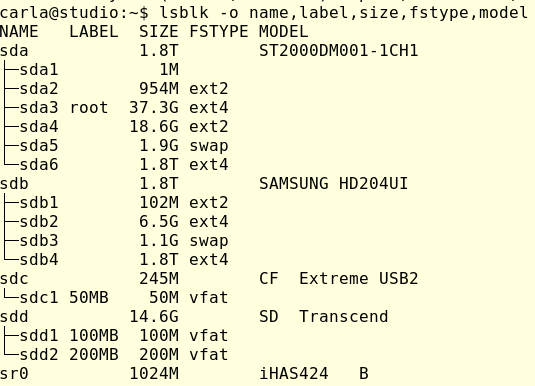
You want to make sure you have the correct device names. Connect everything and then run lsblk:

As this shows, it is possible to make mistakes. I have two 1.8TB drives. One has the root filesystem and my home directory, and the other is an extra data storage drive. lsblk accurately identifies the Compact Flash drive, an SD card, and the optical drive (sr0, iHAS424 identifies a Lite-On optical drive). If this doesn’t help you identify your drives then try findmnt:

$ findmnt -D
SOURCE     FSTYPE            SIZE   USED  AVAIL USE% TARGET
udev       devtmpfs          7.7G      0   7.7G   0% /dev
tmpfs      tmpfs             1.5G   9.6M   1.5G   1% /run
/dev/sda3  ext4             36.6G  12.2G  22.4G  33% /
tmpfs      tmpfs             7.7G   1.2M   7.7G   0% /dev/shm
tmpfs      tmpfs               5M     4K     5M   0% /run/lock
tmpfs      tmpfs             7.7G      0   7.7G   0% /sys/fs/cgroup
/dev/sda4  ext2             18.3G    46M  17.4G   0% /tmp
/dev/sda2  ext2              939M 119.1M 772.2M  13% /boot
/dev/sda6  ext4              1.8T 505.4G   1.2T  28% /home
tmpfs      tmpfs             1.5G    44K   1.5G   0% /run/user/1000
gvfsd-fuse fuse.gvfsd-fuse      0      0      0    - /run/user/1000/gvfs
/dev/sdd1  vfat             14.6G     8K  14.6G   0% /media/carla/100MB
/dev/sdc1  vfat            243.8M    40K 243.7M   0% /media/carla/50MB
/dev/sdb4  ext4              1.8T   874G 859.3G  48% /media/carla/8c670f2e-
   dae3-4594-9063-07e2b36e609e

This shows that /dev/sda3 is my root filesystem, and everything in /media is external to my root filesystem.

/media/carla/100MB2 and /media/carla/50MB have labels instead of UUIDs like /media/carla/8c670f2e-dae3-4594-9063-07e2b36e609e because I always give my USB sticks descriptive filesystem labels. You can do this for any filesystem, for example I could label the root filesystem this way:

$ sudo e2label /dev/sda3 rootdonthurtmeplz

Run sudo e2label [device] to see your nice new label. e2label is for ext2/ext3/ext4, and XFS, JFS, BtrFS, and other filesystems have different commands. The easy way is to use GParted; unmount the filesystem and then you can apply or change the label without having to look up the command for each filesystem.

Basic Rescue

Allrightythen, we’ve spent enough time figuring out how to know which drive is which. Let’s say that GNU ddrescue is on /dev/sda1, the damaged drive is /dev/sdb1, and we are copying it to /dev/sdc1. The first command copies as much as possible, without retries. The second command goes over the damaged filesystem again, and makes three retries to copy everything. The logfile is on the root filesystem, which I think is a better place than the removable media, but you can put it anywhere you want:

$ sudo ddrescue -f --no-split /dev/sdb1 /dev/sdc1 logfile
$ sudo ddrescue -f -r3 /dev/sdb1 /dev/sdc1 logfile

To copy an entire drive use just the drive name, for example /dev/sdb and don’t specify a partition.

If you have any damaged files that ddrescue could not completely recover you’ll need other tools to try to recover them, such as Testdisk, Photorec, Foremost, or Scalpel. The Arch Linux wiki has a nice overview of file recovery tools.

Learn more about Linux through the free “Introduction to Linux” course from The Linux Foundation and edX.

Editor’s Note: The article has been modified from the original version. We previously gave instructions on how to restore the damaged volume, but of course you don’t want to do that!

Elasticsearch and Kibana: Installation and Basic Usage on Ubuntu 16.04

Elasticsearch is a production-ready search engine written in Java and is extremely powerful. It can be used as a standalone search engine for the web or as a search engine for e-commerce web applications. 

eBay, Facebook, Netflix is some of the companies that use this platform. This is popular because it is more than just a search engine. It is also a powerful analytics engine and a logs management and retrieval system. The best part about this is that it is Open Source, free to use always. Kibana is the visualization tool provided by elastic.

In this tutorial, we will be going through the installation steps for Elasticsearch followed by the installation of Kibana and then we will use Kibana to store and retrieve data. 

Read more at HowtoForge

Adapt or Die: The New Pattern of Software Delivery

Companies need to get many different versions of their software out in quick succession, often running more than one version at once in order to test their assumptions in the marketplace and learn where to focus their energies next.

In short, companies need to be highly adaptable, so their software needs to be highly adaptable too.

An enthusiastic proponent of microservices, Adrian Cockcroft, former cloud architect at Netflix and currently with Amazon Web Services, has described the need to adapt like this: “Everything basically is subservient to the need to be able to make decisions, and build things, faster than anyone else.”

But speed isn’t the only factor here,…

Read more at The New Stack

Keeping Docker Containers Safe

Docker containers introduce serious security problems, but you can employ a number of methods to deploy them securely.

Few debate that the destiny of a hosting infrastructure is running applications across multiple containers. Containers are a genuinely fantastic, highly performant technology ideal for deploying software updates to applications. Whether you’re working in an enterprise with a number of critical microservices, tightly coupled with a pipeline that continuously deploys your latest software, or you’re running a single LEMP (Linux, Nginx, MySQL, PHP) website that sometimes needs to scale up for busy periods, containers can provide with relative ease the software dependencies you need across all stages of your development life cycle.

Containers are far from being a new addition to server hosting. I was using Linux containers (OpenVZ) in production in 2009 and automatically backing up container images of around 250MB to Amazon’s S3 storage very effectively. A number of successful container technologies have been used extensively in the past, including LXC, Solaris Zones, and FreeBSD jails, to name but a few.

Suffice to say, however, that the brand currently synonymous with container technology is the venerable Docker. 

Read more at ADMIN

Most Useful Linux Command Line Tricks

We use many Linux command lines every day. We know some tricks from the web, but if we don’t practice them, we may forget them. I’ve decided to make a list of tips and tricks that you may have forgotten or that may be entirely new to you.

Display Output as a Table

Sometimes, when you see the output of a command, it can be overwhelming to identify the output due to overcrowded strings (for example, the output of the mount command). How about viewing it like a table? This is easy to do!

Read more at DZone

How Embedded Linux Accelerates IoT Development

You’ll find that the quickest way to build components of an IoT ecosystem is to use embedded Linux, whether you’re augmenting existing devices or designing a new device or system from the beginning. Embedded Linux shares the same source code base as desktop Linux, but it is coupled with different user interface tools and other high-level components. The base of the system is essentially the same.

Let’s look at a few common cases.

Read more at OpenSource.com

Faster Data Center Transfers with InfiniBand Network Block Device

The storage team of ProfitBricks has been looking for a way to speed transfers between VMs on compute nodes and physical devices on storage servers, connected via InfiniBand, in their data centers. As a solution, they developed the IBNBD driver, which presents itself as a block device on the client side and transmits the block requests to the server side, according to Danil Kipnis, Software Developer at ProfitBricks GmbH.

“Any application requiring block IO transfer over InfiniBand network can benefit from the IBNBD driver,” says Kipnis.

Danil Kipnis, Software Developer at Profitbricks GmbH
In his presentation at the upcoming Vault conference, Kipnis will describe the design of the driver and discuss its application in cloud infrastructure. We spoke with Kipnis to get a preview of his talk.

Linux.com: Please give our readers a brief overview of the IBNBD driver project.

Danil Kipnis: IBNBD (InfiniBand network block device) allows for an RDMA transfer of block IO over InfiniBand network. The driver presents itself as a block device on client side and transmits the block requests in a zero-copy fashion to the server-side via InfiniBand. The server part of the driver converts the incoming buffers back into BIOs and hands them down to the underlying block device. As soon as IO responses come back from the drive, they are being transmitted back to the client.

Linux.com: What has motivated your work in this area? What problem(s) are you aiming to solve?

Kipnis: ProfitBricks is an IaaS company. Internally, our data centers consist of compute nodes (where customer VMs are running) and storage servers (where the hard drives are) connected via InfiniBand network. The storage team of ProfitBricks has been looking for a solution for a fast transfer of customer IOs from the VM on a compute node to the physical device on the storage server. We developed the driver in order to take advantage of the high bandwidth and low latency of the InfiniBand RDMA for IO transfer without introducing the overhead of an intermediate transport protocol layer.

Linux.com: Are there existing solutions? How do they differ?

Kipnis: The SRP driver serves the same purpose while using SCSI as an intermediate protocol. Same goes for the ISER. A very similar project to ours is accelio/nbdx by Mellanox. It is different from IBNBD in that it operates in user-space on server side and its development is currently on hold/given up in favor of NVMe over Fabrics to the best of my knowledge. While NVMEoF solutions do simplify the overall storage stack, they also sacrifice the flexibility on the storage side, which can be required in a distributed replication approach.

Linux.com: What applications are likely to benefit most from the approach you describe?  

Kipnis: Any application requiring block IO transfer over InfiniBand network can benefit from the IBNBD driver. The most obvious area is the cloud context, where customer volumes are scattered across a server cluster. Here one often wants to start a VM on one machine and then attach a block device physically situated on a different machine to it.

Linux.com: What further work are you focusing on?

Kipnis: Currently, we are working on integrating the IBNBD driver into a new replication solution for our DCs. There we want to take advantage of the InfiniBand multicast feature as a way to deliver IOs to different legs of a RAID setup. This would require among other things extending the driver with a “reliable multicast” feature.

Interested in attending the Vault conference? Linux.com readers can register now with the discount code, LINUXRD5, to save $35 off the attendee registration price.

4 Security Steps to Take Before You Install Linux

Learn how to work from anywhere and keep your data, identity, and sanityDOWNLOAD NOW

Systems administrators who use a Linux workstation to access and manage IT infrastructure — whether from home or at work —  are at risk of becoming attack vectors against the rest of the infrastructure.

In this blog series, we’re laying out a set of baseline recommendations for Linux workstation security to help systems administrators avoid most glaring security errors without introducing too much inconvenience. Last week, we covered security considerations for choosing your hardware.

Now, before you even start with your operating system installation, there are a few things you should consider to ensure your pre-boot environment is up to snuff. You will want to make sure:

  • UEFI boot mode is used (not legacy BIOS) (ESSENTIAL)

  • A password is required to enter UEFI configuration (ESSENTIAL)

  • SecureBoot is enabled (ESSENTIAL)

  • A UEFI-level password is required to boot the system (NICE-to-HAVE)

UEFI and SecureBoot

UEFI, with all its warts, offers a lot of goodies that legacy BIOS doesn’t, such as SecureBoot. Most modern systems come with UEFI mode on by default.

Make sure a strong password is required to enter UEFI configuration mode. Pay attention, as many manufacturers quietly limit the length of the password you are allowed to use, so you may need to choose high- entropy short passwords vs. long passphrases (see the full ebook for more on passphrases).

Depending on the Linux distribution you decide to use, you may or may not have to jump through additional hoops in order to import your distribution’s SecureBoot key that would allow you to boot the distro. Many distributions have partnered with Microsoft to sign their released kernels with a key that is already recognized by most system manufacturers, therefore saving you the trouble of having to deal with key importing.

As an extra measure, before someone is allowed to even get to the boot partition and try some badness there, let’s make them enter a password. This password should be different from your UEFI management password, in order to prevent shoulder-surfing. If you shut down and start a lot, you may choose to not bother with this, as you will already have to enter a LUKS passphrase and this will save you a few extra keystrokes.

Once you’ve mastered the hardware and pre-boot considerations, you’re ready to choose a distro. Chances are you’ll stick with a fairly widely-used distribution such as Fedora, Ubuntu, Arch, Debian, or one of their close spin-offs. In any case, we’ll tell you what to consider when picking a distribution to use in our next article in this series.

Whether you work from home, log in for after-hours emergency support, or simply prefer to work from a laptop in your office, you can use A SysAdmin’s Essential Guide to Linux Workstation Security to do it securely. Download the free ebook and checklist now!

Read more:

3 Security Features to Consider When Choosing a Linux Workstation

A Flurry of Open Source Graphics Milestones

Written by Daniel Stone, Graphics Lead at Collabora.

The past few months have been busy ones on the open-source graphics front, bringing with them Wayland 1.13, Weston 2.0, Mesa 17.0, and Linux 4.10. These releases have been quite interesting in and of themselves, but the biggest news must be that with Mesa 17.0, recent Intel platforms are fully conformant with the most recent Khronos rendering APIs: OpenGL 4.5, OpenGL ES 3.2, and Vulkan 1.0. This is an enormous step forward for open-source graphics: huge congratulations to everyone involved!

Mesa 17.0 also includes the Etnaviv driver, supporting the Vivante GPUs found in NXP/Freescale i.MX SoCs, amongst others. The Etnaviv driver brings with it a ‘renderonly’ framework for Mesa, explicitly providing support for systems with a separate display controller and 3D GPU. Etnaviv joins Mesa as the sixth hardware vendor to have a supported, fully open-source, driver.

Extending buffer modifier support

Though we were proud to participate in some of the new feature enablement work in Mesa to lift it to conformance (including arrays-of-arrays, enhanced UBO layouts, much shader cache work, etc), much of our work recently has been focused on behind-the-scenes performance improvements. Varad Gautam blogged about buffer modifiers and their importance; we continue to work on buffer modifier support both in Wayland/Weston and Mesa. With Wayland and Weston now re-opened for development after their release, we should see this support merged into the respective protocols soon.

We have also worked with Ben Widawsky at Intel and Kristian Høgsberg at Google to enable rendering and direct display of buffers with modifiers. Respectively, their patchsets extend the GBM API (used to enable GPU rendering for direct display to KMS) to accept a list of supported modifiers for rendering, and extend the KMS API to advertise a list of supported modifiers for each plane. With both allocation and advertisement solved, we are getting closer to a fully end-to-end-optimal pipeline.

An atomic Weston, and its little helpers

Weston is currently being used as a testbed/showcase for the new GBM and KMS API. The large patchset for Weston to support atomic modesetting is in the process of review and merge. In addition to numerous bugfixes found in the DRM backend during development, the atomic series delivers on the basic premise of atomic modesetting: that clients will be able to have their content displayed directly on hardware overlay planes, with no specific hardware knowledge required to achieve this.

Implementing this and having it fully correct exposed a number of design issues with Weston’s DRM backend, which long predates atomic. The legacy and atomic KMS APIs are substantially different, and the premise at the time was that Weston would use a hardware-specific component which would generate plane configurations for it.

Instead, the KMS atomic modesetting API provides an incremental approach: userspace builds up display state one by one, asking the kernel to validate the proposed configuration. In this, Weston attempts to place on-screen objects into display planes one by one, which requires repeatedly proposing, modifying, and tearing down internal state objects. The resulting patchset is the largest development in the DRM backend since 1.0, and one which should substantially improve the stability, quality, and extensibility of the DRM backend.

Bringing this up on new hardware has worked almost flawlessly, thanks to the kernel’s helper library design. In the old legacy-API world of KMS, each driver implemented extremely varied semantics, and trying to run generic userspace for all but the most basic tasks was an exercise in frustration. Instead, with atomic drivers, there is very little to go wrong: for the only one driver I’ve found out of nine which didn’t work out of the box with Weston, the fix was to remove driver-specific code and move more work to generic helpers.

The varying capabilities and implementations between platforms has long been a huge bone of frustration for us, as it makes more difficult for our customers to port their offerings between platforms in response to commercial/logistical, performance, or other issues. The work with atomic to make drivers as consistent as possible narrows this gap, and narrows the NRE investment required to change hardware platforms.

A reusable Weston

Speaking of large developments in Weston, its 2.0 version number was the result of developments in libweston, the API enabling external window managers and desktop environments to reuse our solid and complete core code. The original premise behind Weston was that compositors should be so small that everyone could write their own.

Unfortunately, experience has not borne this out: in order to deliver predictable repaint timings, support for mechanisms like dmabuf and modifiers, atomic modesetting and full use of hardware overlay planes, and so on, quite a lot of core code is required. However, tying Weston to one particular window manager or desktop environment would limit our scope and our reach.

The solution chosen was libweston: to expose Weston’s scene graph, protocol and hardware support, as a library for external users. Some environments such as Orbital are already making use of libweston, but we hope to see more in the future.

Towards this end, Weston 2.0 contains the work of Armin Krezović, a Google Summer of Code 2016 student who worked tirelessly on backend and output configuration. His work allows the environment to have more control over the configuration and placement of monitors and outputs, which we will absolutely need in full desktop environments. We’re immensely grateful to Armin for his work throughout the summer, Google for their annual support of the program, and to Pekka and Kat for mentoring Armin and dealing with the organisational side of GSoC, respectively.

Ever onwards

But we’re not done yet. Following on from the atomic Weston and dmabuf-modifier work, we plan to continue Gustavo Padovan’s work bringing Android fences to mainline Linux, and bring explicit fencing support into Wayland. The support for this is beginning to land properly in Mesa and the kernel, and we plan to make this available to Wayland, for direct clients as well as through the Vulkan WSI.

GDC also brought a new Vulkan release, support for which is being worked on in Mesa by Jason Ekstrand of Intel and Chad Versace of Google. Of particular note for window systems was the long-awaited external memory/image support, making it possible to write Vulkan-based compositors for the first time.

Collabora was also very pleased to announce our involvement in the OpenXR working group, as we explore the AR/VR space together with Khronos and our partners in the industry; watch this space.

Elie Tournier also joined our team, bravely moving to Cambridge during the darkest months of the year. You may recognise the name from his GSoC work developing a pure GLSL library to support double-precision floating-point (FP64) operations on GPUs which otherwise lack native support. Elie has been working with us to bring this to upstream Mesa, integrating it with Mesa’s low-level GLSL IR / NIR to provide transparent support, rather than requiring explicit app support. Welcome Elie!

The X.Org Foundation is also participating in GSoC again this year, offering students the chance to work all throughout the graphics stack (X.Org itself, Mesa, Wayland, and DRM). We look forward to welcoming even more students – and new developers – into the fold.

We’re here to help

The world of open-source graphics can be confusing, and despite some recent stellar efforts, somewhat underdocumented. We pride ourselves in our knowledge of the landscape – including others such as multimedia and core kernel development and hardware enablement – and are always happy to discuss it with you. If you would like to discuss any work or are even just seeking advice, please contact us: our friendly and knowledgable staff are standing by to take your call.

As the Software Supply Chain Shifts, Enterprise Open Source Programs Ramp Up

Today’s software supply chain is fundamentally different than it was only a few years ago, and open source programs at large enterprises are helping to drive that trend. According to Sonatype’s 2016 State of the Software Supply Chain enterprises are both turning to existing open source projects to decrease the amount of code they have to write, and increasingly creating their own open source tools.

Countless organizations have rolled out professional, in-house programs focused on advancing open source and encouraging its adoption. Some of the companies doing so may surprise you. Here are a few such companies that may not be top-of-mind when thinking about engagement with open source:

Walmart’s Open Source Mojo Spreads Out. Is Walmart a major player in open source? It absolutely is, and the company is expanding its open source engagement in 2017. The company’s Walmart Labs division, located in Silicon Valley, has released a slew of open source projects, including a notable project called Electrode, which is a product of Walmart’s migration to a React/Node.js platform. It gives developers templated code to build universal React apps that incorporate modules that developers can leverage to add functionality to Node apps. It’s also a key part of how Walmart’s site runs, and you can believe that that site runs at scale.

Additionally, after more than two years of development and testing within Walmart, the company has announced that OneOps is available to the open source community. If you have any type of cloud deployment, take note. According to Walmart: “OneOps is a cloud management and application lifecycle management platform that developers can use to both develop and launch new products faster, and more easily maintain them throughout their entire lifecycle. OneOps enables developers to code their products in a hybrid, multi-cloud environment. This means they can test and switch between different cloud providers to take advantage of better pricing, technology and scalability – without being locked into one cloud provider.”

General Electric? Yes, General Electric. Odds are that General Electric isn’t the first company that you think of when it comes to moving the open source needle, but GE is actually a  powerful player in open source. GE Software has an “Industrial Dojo” run in collaboration with the Cloud Foundry Foundation  to strengthen its efforts to solve the world’s biggest industrial challenges. According to GE: “The Cloud Foundry Dojo program allows software developers to immerse themselves in open source projects to quickly learn the inner workings of the core technology and the unique agile development environment, as well as recommended methodologies for contributing code. GE also works with the Cloud Foundry community to develop and contribute open source code to the Cloud Foundry Foundation that will route all industrial messaging protocols.

Telecoms are Opening Up. A number of telecom companies are rapidly increasing their engagement with the open source community. Ericsson, for example, regularly contributes projects and is a champion of several key open source initiatives. You can browse through the company’s open source hub here. The company is also one of the most active telecom-focused participants in the effort to advance open NFV and other open technologies that can eliminate historically proprietary components in telecom technology stacks. Ericsson works directly with The Linux Foundation on these efforts, and engineers and developers are encouraged to interface with the open source community.

Other organizations in the telecom space who are deeply involved with NFV and open source projects include AT&T, Bloomberg LP, China Mobile, Deutsche Telekom, NTT Group, SK Telekom and Verizon.

In a previous post, we also looked at growing enterprise open source programs from Microsoft, Netflix, Facebook, and Google. Many other organizations have active internal open source programs, and we will provide additional coverage of the most notable examples.

Learn more in the Fundamentals of Professional Open Source Management training course from The Linux Foundation. Download a sample chapter now.