…PHP and JavaScript, two partners who once ruled the internet together but now duke it out for the mind share of developers.
In the old days, the partnership was simple. JavaScript handled little details on the browser, while PHP managed all the server-side tasks between port 80 and MySQL. It was a happy union that continues to support many crucial parts of the internet. Between WordPress, Drupal, and Facebook, people can hardly go a minute on the web without running into PHP.
Then some clever kid discovered he could get JavaScript running on the server. Suddenly, there was no need to use PHP to build the next generation of server stacks. One language was all it took to build Node.js and the frameworks running on the client. “JavaScript everywhere” became the mantra for some.
For engineers working on wireless-enabled IoT system designs, a variety of design challenges and tradeoffs transpire from start to finish. Moving efficiently through the process requires a good test-and-measurement strategy and proper instrumentation to ensure that you make timely and correct design decisions and can overcome potential roadblocks. Not only that, you need to deliver your project on time and on budget. IoT designers face six key challenges where test and measurement is a critical part of the project’s ultimate success:
This page shows examples of performance analysis tools using enhancements to BPF (Berkeley Packet Filter) which were added to the Linux 4.x series kernels, allowing BPF to do much more than just filtering packets. These enhancements allow custom analysis programs to be executed on Linux dynamic tracing, static tracing, and profiling events.
Python is a popular and a powerful scripting language that can do everything — web crawling, networking tools, scientific tools, Raspberry PI programming, web development, video games, and much more. With Python programming, you can do even do system programming regardless of the platform you are using.
We will discuss basic Python programming in this post. In future posts, we will build tools and see Python programming in action.
If you find the content of this post is a little tricky, tell me so that I can start from the bottom level of Python programming in the upcoming posts.
Zorin OS is an Ubuntu-based Linux distro that seeks to stand out amongst the many Linux distros around. It is touted as “a replacement for Windows and MacOS, designed to make your computer faster, more powerful and secure”. So what’s the deal with Zorin? Is it worth your attention in the sea of distros? Let us take a look at what makes this distro stand apart.
The somewhat long-awaited report on OPNFV’s December Plugfest emerged this morning, revealing no major surprises but taking some steps forward on integration with other open source projects, namely the Open Compute Project and Open Orchestrator.
It also signals a stage where the OPNFV Project’s software platform could be ready for commercial deployment — dates for which the organization is not setting directly. “We’ll defer to the vendors on that,” says Heather Kirksey, OPNFV director. But she expects to start collecting deployment data this year. Queries to a couple of the involved vendors have not yet produced responses, but stay tuned.
This week in Linux and open source news, CNCF announces purchase of RethinkDB’s source code, SnapRoute boasts new, industry-leading backers, and more! Use our weekly digest to round out your OSS news monitoring.
1) CNCF announces purchase of RethinkDB’s source code and donation to The Linux Foundation, where it will “live on under an Apache license.”
One thing about Linux is that it’s very coder-friendly. Why? Simple: Nearly any developer can have every tool they need at their fingertips with ease and little to no cost. Tools like gcc, make, Bluefish, Atom, vi, emacs… the list goes on and on and on. Many of these tools are ready to serve, via a quick install from either your package manager or by downloading them, individually, from their respected websites. But what if you wanted all of those tools, at the ready, on a single, programmer-friendly platform? If the thought of having every tool you need to develop, pre-installed on a Linux distribution, appeals to you, there’s a new platform in the works that might fit your needs to perfection. That distribution is SemiCode OS.
SemiCode OS is an operating system geared specifically toward programmers and web developers, and it includes most of the programming languages, compilers, editors and Integrated Developer Environments (IDEs) that you’ve grown accustomed to using. With tools like:
As for compliers, you’ll find OpenJDK for Java, Ruby compiler, .NET with Mono Runtime, and many more.
All of these packages are ready to work on a well-appointed, slightly tricked-out GNOME desktop (you’ll find the Dash To Dock extension enabled as well as a couple of handy desktop menus — Figure 1).
Figure 1: The SemiCode OS desktop is a perfect UI to help you get your work done.
What is interesting about the programming landscape for Linux is that you’ll find an abundance of tools, but when it comes to a programming-specific distribution, the choices become significantly slimmer. This is partly due to the fact that nearly every Linux distribution can, with just a bit of work, be easily reworked to be a programmer’s Nirvana. However, if you could have a distribution at the ready, with no extra work involved, you’d most likely jump at the chance.
That is where SemiCode OS comes in; a platform perfectly geared toward developers.
Very much in beta
Before you head directly to the SemiCode OS website, know that the platform is very much in heavy development. In fact, the distribution is so new, it doesn’t even ship with the ability to install. That’s right, the only way to run SemiCode OS is as a live distribution. Search all you want on the SemiCode OS live desktop and you will not find any means to install. If you want to kick the tires of this very promising platform, I suggest you download the beta and run it as a virtual machine. Read the SemiCode OS blog post about why they don’t include an installer (yet). The minimum requirements for running SemiCode OS as a live instance are:
CPU – 1GHz single core
RAM – 1.5GB
Storage – 20GB
SemiCode OS is based on, not surprisingly, Ubuntu. It is surprising, however, that SemiCode is based on Ubuntu 14.04. Considering 16.04 is an LTS release, it would seem to me the more logical foundation would be the most recent. But I’m not the one making those calls (and I’m sure there are reasons for sticking with the out-of-date 14.04).
What makes SemiCode OS stand out? Let’s take a look at the inclusion of two tools.
Scratch
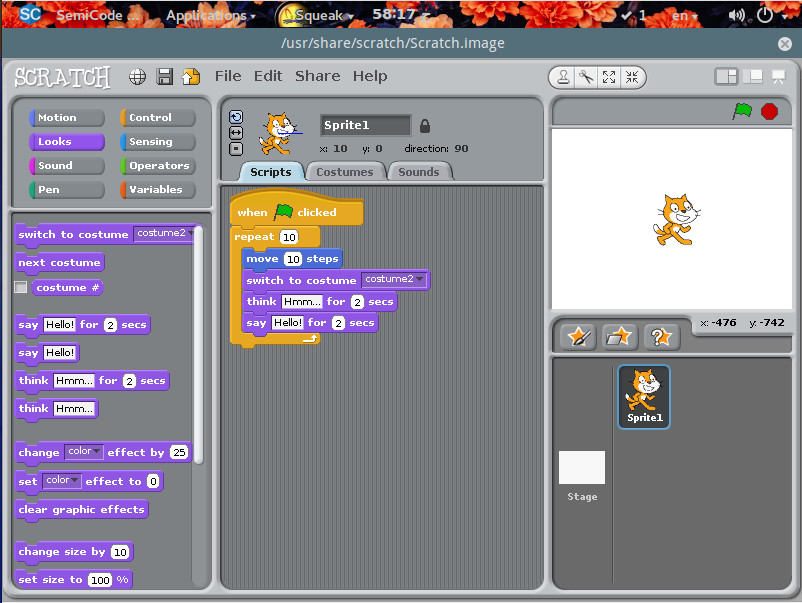
Not a coder, but want to learn? That’s why SemiCode OS ships with the Scratch application. Scratch is a fun way to help people, new to programming, learn the craft. It is geared more toward younger users, but anyone can take advantage of the simple to use, drag and drop interface (Figure 2).
Figure 2: The Scratch IDE in action.
Scratch makes learning to code fun and simple for any level of user.
Sarah
Most of the applications found on SemiCode OS are fairly pedestrian, everyday tools that have been available for nearly any distribution. There is, however, one new tool that’s pretty exciting (and will hopefully make its way to other distribution repositories). The application in question is called Sarah.
Sarah is a command-line AI tool that allows you to ask it questions and it will do its best to answer. With Sarah, you can do things like ask every day questions (sarah what is linux?), run a speedtest (sarah speedtest), view the weather (sarah weather), get information about a movie (sarah watch Hackers), view lyrics to a song (sarah lyrics DevinTownsendProject Kingdom), download a file (sarah download http://link_to_file), download site for offline viewing (sarah grab http://link_to_download), generate an “Hello World” application in nearly any language (sudo sarah first python). Sarah was originally written in Python, but the developers realized they’d eventually want to extend the feature set, so they migrated to to the Vala language. Thanks to that change, the developers were able to create a plugin system for Sarah. Now any developer can extend the feature set of Sarah.
As with the whole of SemiCode OS, Sarah is in beta and doesn’t offer full functionality (and some of the functionality doesn’t work as expected; but the idea is sound and my guess is that, when SemiCode OS comes out of beta, Sarah will offer quite a bit more in the way of features. If you want to test Sarah (outside of SemiCode OS), you can grab the code from the Sarah GitHub Page.
Keep SemiCode OS on your radar
If I were to speculate about the future of SemiCode OS, I’d have to say it looks quite bright. The Linux landscape needs a distribution exactly like this and the addition of Sarah makes SemiCode OS a no-brainer. Although SemiCode OS is still very much in beta, it is definitely worth checking out. Run a live instance of this new platform and you will immediately be enamoured of the available tools, the GNOME layout, and Sarah.
Hopefully, we won’t have to wait too long before SemiCode OS is available for installation. Once it is released, I hope we see serious plugin development on Sarah, as this has the making of something Linux could really use.
Learn more about Linux through the free “Introduction to Linux” course from The Linux Foundation and edX.
The security of IoT devices is a high priority these days, as attackers can use Distributed Denial of Service (DDoS) attacks to target them and wreak havoc on a system.
“Due to the sheer volume of unconnected devices, it can take hours and often days to mitigate such an attack,” says Adam Englander, who is a Senior Engineer of the LaunchKey product at iovation.
Adam Englander, Senior Engineer of the LaunchKey product at iovation
In his upcoming talk at ELC + OpenIot Summit, titled “IoT Lockdown — Battling Bot Net Builders,” Englander will discuss some practical steps developers can take to make their devices less vulnerable to attackers. We talked with Englander to learn more about these basic security techniques.
Linux.com: What are some common ways that IoT devices are targeted by bot net builders?
Adam Englander: IoT devices are commonly used for a few purposes. One use is as a proxy server which allows attackers to masquerade their identity and location via the compromised device. This proxy allows the attackers to reach targeted systems with a lower level of defense as the IoT device will not be identified as high risk by standard criteria. Another use of compromised IoT devices is for sending spam or phishing emails.
Email providers work very hard at identifying spam and phishing SMTP servers. These efforts are thwarted by the randomness and scale of compromised IoT devices providing the ability to circumvent blacklists. Finally, the most well-known usage for bot nets is Distributed Denial of Service, or DDOS, attacks. Attackers use devices to flood targets with networking requests.
Due to the sheer volume of unconnected devices, it can take hours and often days to mitigate such an attack. The most famous being the October 2016 attack on Dyn, which caused Internet disruption for several hours across a large percentage of the United States. A lesser known DDOS attack was launched against Krebs on Security, a security news site. The Krebs on Security site used well-known Content Deliver Network (CDN) provider Akamai. According to Akamai, the attack was nearly twice the volume of their previously recorded level for a DDOS attack.
Linux.com: What basic steps can developers take to ensure that their applications or devices are protected?
Englander: A great basic resource for developers would be the Open Web Application Security Project, or OWASP, IoT Project. The OWASP group has been providing similar information and resources for web application developers for over a decade.
Linux.com: Are there tools that you recommend? Or other specific strategies?
Englander: IoT security, like any other, is best handled by via Defense in Depth. Defense in depth is based on the premise that any security protocol can fail. You must use the highest level of security at every vulnerable point, or layer, of your system. Adding each layer to the system makes a formidable fortress for attackers to penetrate.
Linux.com: What’s the most important thing for developers to be aware of when securing devices from bot net builders?
Englander: Writing good software is not enough. Architecting the most secure solution requires layers of protection at the Linux level. Many of the bot nets being built today are utilizing poor Linux hardening. A few simple changes to the Linux OS configuration can make all of the difference.
Embedded Linux Conference + OpenIoT Summit North America will be held on February 21-23, 2017 in Portland, Oregon. Check out over 130 sessions on the Linux kernel, embedded development & systems, and the latest on the open Internet of Things.
Linux.com readers can register now with the discount code, LINUXRD5, for 5% off the attendee registration price. Register now>>
Red Hat Enterprise Linux, in the grand tradition of enterprise software vendors, packages and supports old mold long after it should be dead and buried. They don’t do this out of laziness, but because that is what their customers want. A lot of businesses view software the same way they see furniture: you buy a desk once and keep it forever, and software is just like a desk.
CentOS, as a RHEL clone, suffers from this as well. Red Hat supports deprecated software that is no longer supported by upstream — presumably patching security holes and keeping it working. But that is not good enough when you are running a software stack that requires newer versions. I have bumped into this numerous times running web servers on RHEL and CentOS. LAMP stacks are not forgiving, and every piece of the stack must be compatible with all of the others. For example, last year I had ongoing drama with RHEL/CentOS because version 6 shipped with PHP 5.3, and version 7 had PHP 5.4. PHP 5.3 was end-of-life in August, 2014 and unsupported by upstream. PHP 5.4 went EOL in Sept. 2015, and 5.5 in July 2016. MySQL, Python, and many other ancient packages that should be on display in museums as mummies also ship in these releases.
So, what’s a despairing admin to do? If you run both RHEL and CentOS turn first to the Software Collections, as this is only Red Hat-supported source of updated packages. There is a Software Collections repository for CentOS, and installing and managing it is similar to any third-party repository, with a couple of unique twists. (If you’re running RHEL, the procedure is different, as it is for all software management; you must do it the RHEL way.) Software Collections also supports Fedora and Scientific Linux.
Installing Software Collections
Install Software Collections on CentOS 6 and 7 with this command:
$ sudo yum install centos-release-scl
Then use Yum to search for and install packages in the usual way:
This may also pull in centos-release-scl-rh as a dependency.
There is one more step, and that is enabling your new packages:
$ scl enable rh-php70 bash
$ php -v
PHP 7.0.10
This runs a script that loads the new package and changes your environment, and you should see a change in your prompt. You must also install the appropriate connectors for the new package if necessary, for example for Python, PHP, and MySQL, and update configuration files (e.g., Apache) to use the new version.
The SCL package will not be active after reboot. SCL is designed to run your old and new versions side-by-side and not overwrite your existing configurations. You can start your new packages automatically by sourcing their enable scripts in .bashrc. SCL installs everything into opt, so add this line to .bashrc for our PHP 7 example:
source /opt/rh/rh-php70/enable
It will automatically load and be available at startup, and you can go about your business cloaked in the warm glow of fresh up-to-date software.
Listing Available Packages
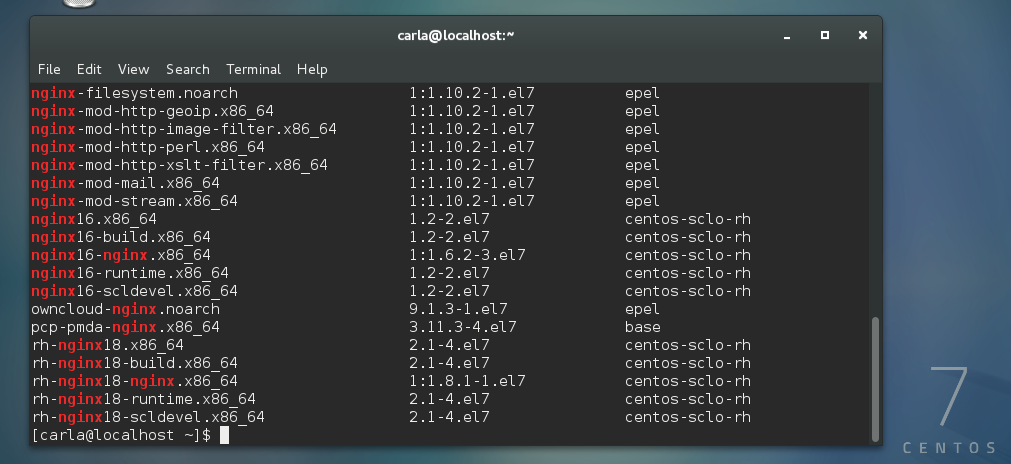
So, what exactly do you get in Software Collections on CentOS? There are some extra community-maintained packages in centos-release-scl. You can see package lists in the CentOS Wiki, or use Yum. First, let’s see all our installed repos:
$ yum repolist
[...]
repo id                  repo name
base/7/x86_64            CentOS-7 - Base
centos-sclo-rh/x86_64    CentOS-7 - SCLo rh
centos-sclo-sclo/x86_64  CentOS-7 - SCLo sclo
extras/7/x86_64          CentOS-7 - Extras
updates/7/x86_64         CentOS-7 - Updates
Yum does not have a simple command to list packages in a single repo, so you have to do this:
$ yum --disablerepo "*" --enablerepo centos-sclo-rh
 list available | less
This use of the --disablerepo and --enablerepo options is not well documented. You’re not really disabling or enabling anything, but only limiting your search query to a single repo. It spits out a giant list of packages, and that is why we pipe it through less.
EPEL
The excellent Fedora peoples maintain the EPEL, Extra Packages for Enterprise Linux repository for Fedora and all RHEL-compatible distributions. This contains updated package versions and software that is not included in the stock distributions. Install software from EPEL in the usual way, without having to bother with enable scripts. Specify that you want packages from EPEL using the --disablerepo and --enablerepo options: