This week in Linux and open source news, CNCF announces purchase of RethinkDB’s source code, SnapRoute boasts new, industry-leading backers, and more! Use our weekly digest to round out your OSS news monitoring.
1) CNCF announces purchase of RethinkDB’s source code and donation to The Linux Foundation, where it will “live on under an Apache license.”
One thing about Linux is that it’s very coder-friendly. Why? Simple: Nearly any developer can have every tool they need at their fingertips with ease and little to no cost. Tools like gcc, make, Bluefish, Atom, vi, emacs… the list goes on and on and on. Many of these tools are ready to serve, via a quick install from either your package manager or by downloading them, individually, from their respected websites. But what if you wanted all of those tools, at the ready, on a single, programmer-friendly platform? If the thought of having every tool you need to develop, pre-installed on a Linux distribution, appeals to you, there’s a new platform in the works that might fit your needs to perfection. That distribution is SemiCode OS.
SemiCode OS is an operating system geared specifically toward programmers and web developers, and it includes most of the programming languages, compilers, editors and Integrated Developer Environments (IDEs) that you’ve grown accustomed to using. With tools like:
As for compliers, you’ll find OpenJDK for Java, Ruby compiler, .NET with Mono Runtime, and many more.
All of these packages are ready to work on a well-appointed, slightly tricked-out GNOME desktop (you’ll find the Dash To Dock extension enabled as well as a couple of handy desktop menus — Figure 1).
Figure 1: The SemiCode OS desktop is a perfect UI to help you get your work done.
What is interesting about the programming landscape for Linux is that you’ll find an abundance of tools, but when it comes to a programming-specific distribution, the choices become significantly slimmer. This is partly due to the fact that nearly every Linux distribution can, with just a bit of work, be easily reworked to be a programmer’s Nirvana. However, if you could have a distribution at the ready, with no extra work involved, you’d most likely jump at the chance.
That is where SemiCode OS comes in; a platform perfectly geared toward developers.
Very much in beta
Before you head directly to the SemiCode OS website, know that the platform is very much in heavy development. In fact, the distribution is so new, it doesn’t even ship with the ability to install. That’s right, the only way to run SemiCode OS is as a live distribution. Search all you want on the SemiCode OS live desktop and you will not find any means to install. If you want to kick the tires of this very promising platform, I suggest you download the beta and run it as a virtual machine. Read the SemiCode OS blog post about why they don’t include an installer (yet). The minimum requirements for running SemiCode OS as a live instance are:
CPU – 1GHz single core
RAM – 1.5GB
Storage – 20GB
SemiCode OS is based on, not surprisingly, Ubuntu. It is surprising, however, that SemiCode is based on Ubuntu 14.04. Considering 16.04 is an LTS release, it would seem to me the more logical foundation would be the most recent. But I’m not the one making those calls (and I’m sure there are reasons for sticking with the out-of-date 14.04).
What makes SemiCode OS stand out? Let’s take a look at the inclusion of two tools.
Scratch
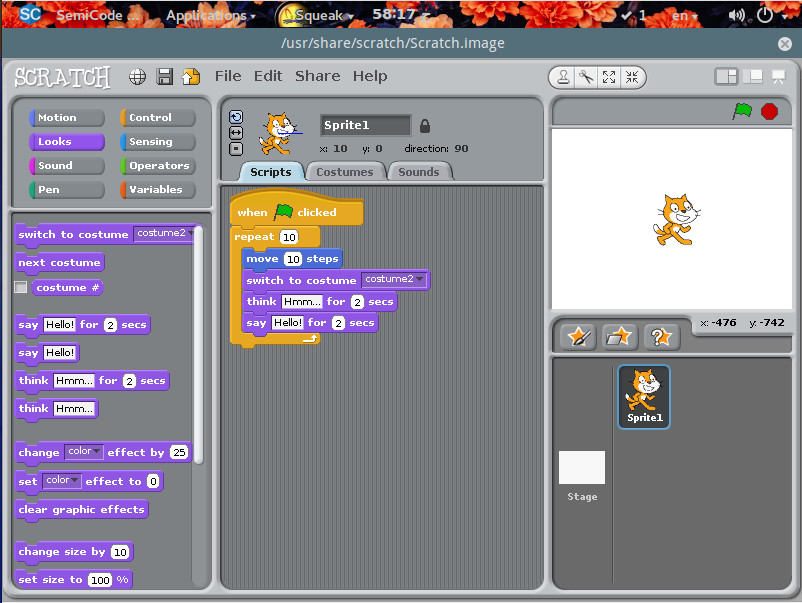
Not a coder, but want to learn? That’s why SemiCode OS ships with the Scratch application. Scratch is a fun way to help people, new to programming, learn the craft. It is geared more toward younger users, but anyone can take advantage of the simple to use, drag and drop interface (Figure 2).
Figure 2: The Scratch IDE in action.
Scratch makes learning to code fun and simple for any level of user.
Sarah
Most of the applications found on SemiCode OS are fairly pedestrian, everyday tools that have been available for nearly any distribution. There is, however, one new tool that’s pretty exciting (and will hopefully make its way to other distribution repositories). The application in question is called Sarah.
Sarah is a command-line AI tool that allows you to ask it questions and it will do its best to answer. With Sarah, you can do things like ask every day questions (sarah what is linux?), run a speedtest (sarah speedtest), view the weather (sarah weather), get information about a movie (sarah watch Hackers), view lyrics to a song (sarah lyrics DevinTownsendProject Kingdom), download a file (sarah download http://link_to_file), download site for offline viewing (sarah grab http://link_to_download), generate an “Hello World” application in nearly any language (sudo sarah first python). Sarah was originally written in Python, but the developers realized they’d eventually want to extend the feature set, so they migrated to to the Vala language. Thanks to that change, the developers were able to create a plugin system for Sarah. Now any developer can extend the feature set of Sarah.
As with the whole of SemiCode OS, Sarah is in beta and doesn’t offer full functionality (and some of the functionality doesn’t work as expected; but the idea is sound and my guess is that, when SemiCode OS comes out of beta, Sarah will offer quite a bit more in the way of features. If you want to test Sarah (outside of SemiCode OS), you can grab the code from the Sarah GitHub Page.
Keep SemiCode OS on your radar
If I were to speculate about the future of SemiCode OS, I’d have to say it looks quite bright. The Linux landscape needs a distribution exactly like this and the addition of Sarah makes SemiCode OS a no-brainer. Although SemiCode OS is still very much in beta, it is definitely worth checking out. Run a live instance of this new platform and you will immediately be enamoured of the available tools, the GNOME layout, and Sarah.
Hopefully, we won’t have to wait too long before SemiCode OS is available for installation. Once it is released, I hope we see serious plugin development on Sarah, as this has the making of something Linux could really use.
Learn more about Linux through the free “Introduction to Linux” course from The Linux Foundation and edX.
The security of IoT devices is a high priority these days, as attackers can use Distributed Denial of Service (DDoS) attacks to target them and wreak havoc on a system.
“Due to the sheer volume of unconnected devices, it can take hours and often days to mitigate such an attack,” says Adam Englander, who is a Senior Engineer of the LaunchKey product at iovation.
Adam Englander, Senior Engineer of the LaunchKey product at iovation
In his upcoming talk at ELC + OpenIot Summit, titled “IoT Lockdown — Battling Bot Net Builders,” Englander will discuss some practical steps developers can take to make their devices less vulnerable to attackers. We talked with Englander to learn more about these basic security techniques.
Linux.com: What are some common ways that IoT devices are targeted by bot net builders?
Adam Englander: IoT devices are commonly used for a few purposes. One use is as a proxy server which allows attackers to masquerade their identity and location via the compromised device. This proxy allows the attackers to reach targeted systems with a lower level of defense as the IoT device will not be identified as high risk by standard criteria. Another use of compromised IoT devices is for sending spam or phishing emails.
Email providers work very hard at identifying spam and phishing SMTP servers. These efforts are thwarted by the randomness and scale of compromised IoT devices providing the ability to circumvent blacklists. Finally, the most well-known usage for bot nets is Distributed Denial of Service, or DDOS, attacks. Attackers use devices to flood targets with networking requests.
Due to the sheer volume of unconnected devices, it can take hours and often days to mitigate such an attack. The most famous being the October 2016 attack on Dyn, which caused Internet disruption for several hours across a large percentage of the United States. A lesser known DDOS attack was launched against Krebs on Security, a security news site. The Krebs on Security site used well-known Content Deliver Network (CDN) provider Akamai. According to Akamai, the attack was nearly twice the volume of their previously recorded level for a DDOS attack.
Linux.com: What basic steps can developers take to ensure that their applications or devices are protected?
Englander: A great basic resource for developers would be the Open Web Application Security Project, or OWASP, IoT Project. The OWASP group has been providing similar information and resources for web application developers for over a decade.
Linux.com: Are there tools that you recommend? Or other specific strategies?
Englander: IoT security, like any other, is best handled by via Defense in Depth. Defense in depth is based on the premise that any security protocol can fail. You must use the highest level of security at every vulnerable point, or layer, of your system. Adding each layer to the system makes a formidable fortress for attackers to penetrate.
Linux.com: What’s the most important thing for developers to be aware of when securing devices from bot net builders?
Englander: Writing good software is not enough. Architecting the most secure solution requires layers of protection at the Linux level. Many of the bot nets being built today are utilizing poor Linux hardening. A few simple changes to the Linux OS configuration can make all of the difference.
Embedded Linux Conference + OpenIoT Summit North America will be held on February 21-23, 2017 in Portland, Oregon. Check out over 130 sessions on the Linux kernel, embedded development & systems, and the latest on the open Internet of Things.
Linux.com readers can register now with the discount code, LINUXRD5, for 5% off the attendee registration price. Register now>>
Red Hat Enterprise Linux, in the grand tradition of enterprise software vendors, packages and supports old mold long after it should be dead and buried. They don’t do this out of laziness, but because that is what their customers want. A lot of businesses view software the same way they see furniture: you buy a desk once and keep it forever, and software is just like a desk.
CentOS, as a RHEL clone, suffers from this as well. Red Hat supports deprecated software that is no longer supported by upstream — presumably patching security holes and keeping it working. But that is not good enough when you are running a software stack that requires newer versions. I have bumped into this numerous times running web servers on RHEL and CentOS. LAMP stacks are not forgiving, and every piece of the stack must be compatible with all of the others. For example, last year I had ongoing drama with RHEL/CentOS because version 6 shipped with PHP 5.3, and version 7 had PHP 5.4. PHP 5.3 was end-of-life in August, 2014 and unsupported by upstream. PHP 5.4 went EOL in Sept. 2015, and 5.5 in July 2016. MySQL, Python, and many other ancient packages that should be on display in museums as mummies also ship in these releases.
So, what’s a despairing admin to do? If you run both RHEL and CentOS turn first to the Software Collections, as this is only Red Hat-supported source of updated packages. There is a Software Collections repository for CentOS, and installing and managing it is similar to any third-party repository, with a couple of unique twists. (If you’re running RHEL, the procedure is different, as it is for all software management; you must do it the RHEL way.) Software Collections also supports Fedora and Scientific Linux.
Installing Software Collections
Install Software Collections on CentOS 6 and 7 with this command:
$ sudo yum install centos-release-scl
Then use Yum to search for and install packages in the usual way:
This may also pull in centos-release-scl-rh as a dependency.
There is one more step, and that is enabling your new packages:
$ scl enable rh-php70 bash
$ php -v
PHP 7.0.10
This runs a script that loads the new package and changes your environment, and you should see a change in your prompt. You must also install the appropriate connectors for the new package if necessary, for example for Python, PHP, and MySQL, and update configuration files (e.g., Apache) to use the new version.
The SCL package will not be active after reboot. SCL is designed to run your old and new versions side-by-side and not overwrite your existing configurations. You can start your new packages automatically by sourcing their enable scripts in .bashrc. SCL installs everything into opt, so add this line to .bashrc for our PHP 7 example:
source /opt/rh/rh-php70/enable
It will automatically load and be available at startup, and you can go about your business cloaked in the warm glow of fresh up-to-date software.
Listing Available Packages
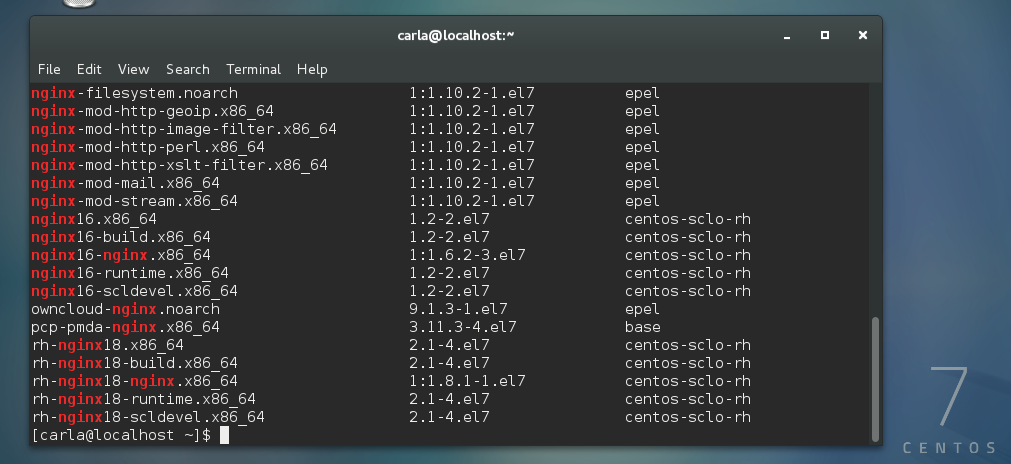
So, what exactly do you get in Software Collections on CentOS? There are some extra community-maintained packages in centos-release-scl. You can see package lists in the CentOS Wiki, or use Yum. First, let’s see all our installed repos:
$ yum repolist
[...]
repo id                  repo name
base/7/x86_64            CentOS-7 - Base
centos-sclo-rh/x86_64    CentOS-7 - SCLo rh
centos-sclo-sclo/x86_64  CentOS-7 - SCLo sclo
extras/7/x86_64          CentOS-7 - Extras
updates/7/x86_64         CentOS-7 - Updates
Yum does not have a simple command to list packages in a single repo, so you have to do this:
$ yum --disablerepo "*" --enablerepo centos-sclo-rh
 list available | less
This use of the --disablerepo and --enablerepo options is not well documented. You’re not really disabling or enabling anything, but only limiting your search query to a single repo. It spits out a giant list of packages, and that is why we pipe it through less.
EPEL
The excellent Fedora peoples maintain the EPEL, Extra Packages for Enterprise Linux repository for Fedora and all RHEL-compatible distributions. This contains updated package versions and software that is not included in the stock distributions. Install software from EPEL in the usual way, without having to bother with enable scripts. Specify that you want packages from EPEL using the --disablerepo and --enablerepo options:
Everyone has a list of customizations that they absolutely must make when they first set up a new computer. Maybe it’s switching desktop environment, installing a different terminal shell, or something as simple as installing a favorite browser or picking out the perfect desktop wallpaper.
For me, towards the top of my list when setting up a new Linux machine is installing a few extensions to the GNOME desktop environment to fix a few quirks and allow it to better serve my daily use. I was originally a slow and reluctant GNOME 3 convert, but once I found the right combination of extensions to meet my needs, and found the GNOME Tweak Tool settings that changed a few other basic behaviors, I’ve been a happy GNOME 3 user for a few years now.
The biggest audience for my Node.js workshops, courses and books (especially when I’m teaching live) is Java developers. You see, it used to be that Java was the only language professional software developers/engineers had to know. Not anymore. Node.js as well as other languages like Go, Elixir, Python, Clojure, dictate a polyglot environment in which the best tool for the job is picked.
Node.js, which is basically a JavaScript run-time on the server, is getting more and more popular in the places where Java dominated because Node is fast and easy to setup. This post will help Java developers to transition to Node in a few short sections:
There are numerous IoT-related associations working to promote different segments of IoT and streamline the fragmentation that exists in the industry. However, this is the first group to focus solely on security. AT&T, which was an early advocate for IoT, said it has seen a 3,198 percent increase in attackers scanning for vulnerabilities in IoT devices.
Engineering teams face a common challenge when building software: they eventually need to redesign the data models they use to support clean abstractions and more complex features. In production environments, this might mean migrating millions of active objects and refactoring thousands of lines of code.
Stripe users expect availability and consistency from our API. This means that when we do migrations, we need to be extra careful: objects stored in our systems need to have accurate values, and Stripe’s services need to remain available at all times.
In this post, we’ll explain how we safely did one large migration of our hundreds of millions of Subscriptions objects.
Security, deployment, and updates for thousands of nodes prove challenging in practice, but with CoreOS and Kubernetes, you can orchestrate container-based web applications in large landscapes.
Since the release of Docker [1] three years ago, containers have not only been a perennial favorite in the Linux universe, but native ports for Windows and OS X also garner great interest. Where developers were initially only interested in testing their applications in containers as microservices [2], market players now have initial production experience with the use of containers in large setups – beyond Google and other major portals.
In this article, I look at how containers behave in large herds, what advantages arise from this, and what you need to watch out for.
Jan Altenberg gives an overview of the history of realtime Linux, the different approaches, and the advantages of the PREEMPT_RT patch in comparison to other approaches.