Home Blog Page 611

NFV Interoperability Testing Needs to Accelerate

Many service providers have deployed network function virtualization (NFV) software but few have the tools in place to orchestrate and manage NFV software from multiple vendors. To foster interoperability, a series of initiatives and services have been launched to help organizations determine what NFV software is compatible with a specific management and network orchestration (MANO) platforms.

Here is a list of some of the NFV interoperability initiatives:

  • ETSI has launched a series of “plug-fest” events as part of its role in defining standards for the telecommunications industry. Participants include nearly 30 leading vendors.
  • Canonical has launched a VNF Performance Interoperability Lab that is an extension of the interoperability work is performs for the OpenStack community.

Read more at SDx Central

Click Here to Kill Everyone: Security and the Internet of Things

All computers are hackable. This has as much to do with the computer market as it does with the technologies. We prefer our software full of features and inexpensive, at the expense of security and reliability. That your computer can affect the security of Twitter is a market failure. The industry is filled with market failures that, until now, have been largely ignorable. As computers continue to permeate our homes, cars, businesses, these market failures will no longer be tolerable. Our only solution will be regulation, and that regulation will be foisted on us by a government desperate to “do something” in the face of disaster.

In this article I want to outline the problems, both technical and political, and point to some regulatory solutions. Regulation might be a dirty word in today’s political climate, but security is the exception to our small-government bias. And as the threats posed by computers become greater and more catastrophic, regulation will be inevitable. So now’s the time to start thinking about it.

We also need to reverse the trend to connect everything to the internet. And if we risk harm and even death, we need to think twice about what we connect and what we deliberately leave uncomputerized.

Read the article by Bruce Schneier at NYMag

bmon – A Powerful Network Bandwidth Monitoring and Debugging Tool for Linux

bmon is a simple yet powerful, text-based network monitoring and debugging tool for Unix-like systems, which captures networking related statistics and displays them visually in a human friendly format. It is a reliable and effective real-time bandwidth monitor and rate estimator.

It can read input using an assortment of input modules and presents output in various output modes, including an interactive curses user interface as well as a programmable text output for scripting purposes.

Read the complete article
 

How to Capture and Stream your Gaming Session on Linux

There may not be many hardcore gamers who use Linux, but there certainly are quite a lot Linux users who like to play a game now and then. If you are one of them and would like to show the world that Linux gaming isn’t a joke anymore, then you will find the following quick tutorial on how to capture and/or stream your gaming session interesting.

The software tool that I will be using for this purpose is called “Open Broadcaster Software Studio” and it is maybe the best of the kind that we have at our disposal.

Read the complete article

Automated Testing Laboratory for Embedded Linux Distributions

Paweł Wieczorek describes how he and his colleagues at the Samsung R&D Institute Poland developed an Automated Testing Laboratory to streamline testing of Tizen Common on community-backed SBCs at ELC.

The 7 Elements of an Open Source Management Program: Strategy and Process

The following is adapted from Open Source Compliance in the Enterprise by Ibrahim Haddad, PhD.

An open source management program provides a structure around all aspects of open source software. This includes a strategy and processes around software selection, approval, use, distribution, audit, inventory, training, community engagement, and public communication.

This series of articles will provide a high-level overview of the various elements in an open source management program, survey the challenges in establishing a new open source license compliance program, and provide advice on how to overcome those challenges.

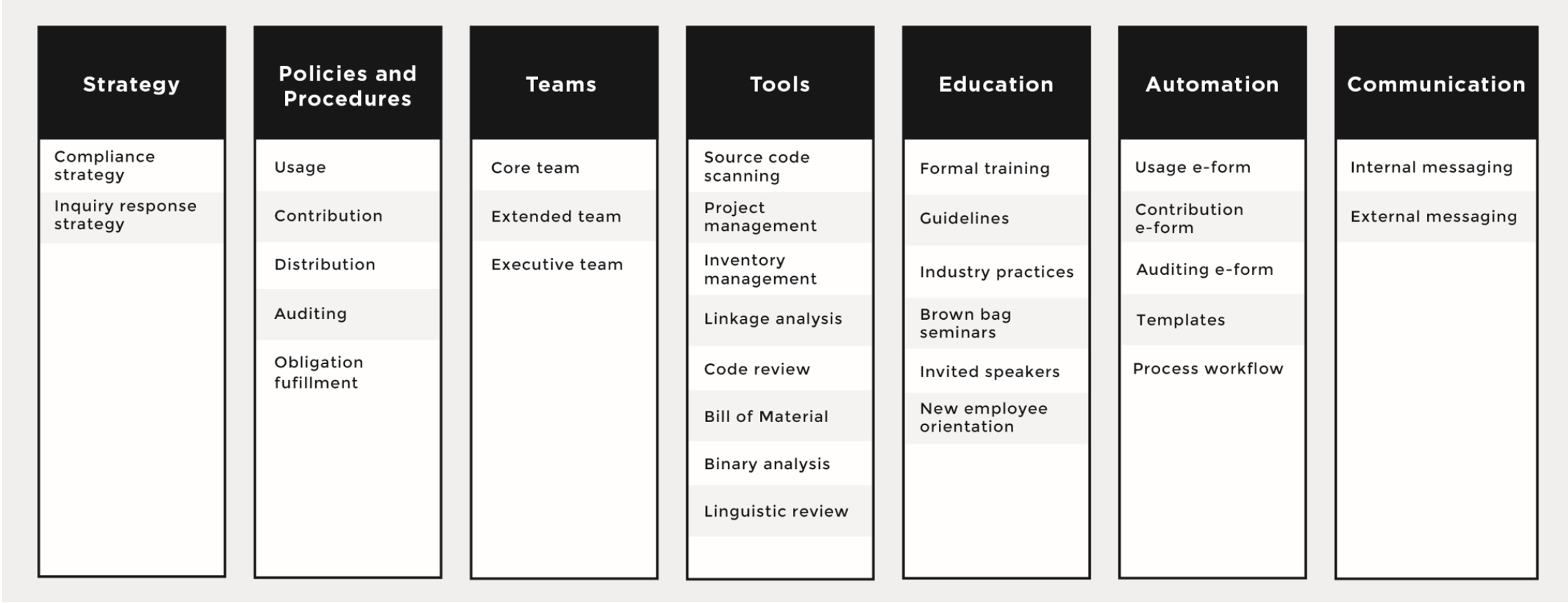
We’ll begin with an overview of open source strategy and processes, two of the seven core elements needed in a successful open source compliance program, seen in the figure above.

Compliance strategy

The open source compliance strategy drives the business-based consensus on the main aspects of the policy and process implementation. If you do not start with that high-level consensus, driving agreement on the details of the policy and on investments in the process tends to be very hard, if not impossible.

The strategy establishes what must be done to ensure compliance and offers a governing set of principles for how personnel interact with open source software. It includes a formal process for the approval, acquisition, and use of open source, and a method for releasing software that contains open source or that’s licensed under an open source license.

Inquiry Response Strategy

The inquiry response strategy establishes what must be done when the company’s compliance efforts are challenged. Several companies have received negative publicity — and some were formally challenged — because they ignored requests to provide additional compliance information, did not know how to handle compliance inquires, lacked or had a poor open source compliance program, or simply refused to cooperate with the inquirer. None of these approaches is fruitful or beneficial to any of the parties involved.

Therefore, companies should have a process in place to deal with incoming inquiries, acknowledge their receipt, inform the inquirer that they will be looking into it, and provide a realistic date for follow-up.

Policies and Processes

An open source compliance policy is a set of rules that govern the management of open source software (both use of and contribution to). Processes are detailed specifications as to how a company will implement these rules on a daily basis.

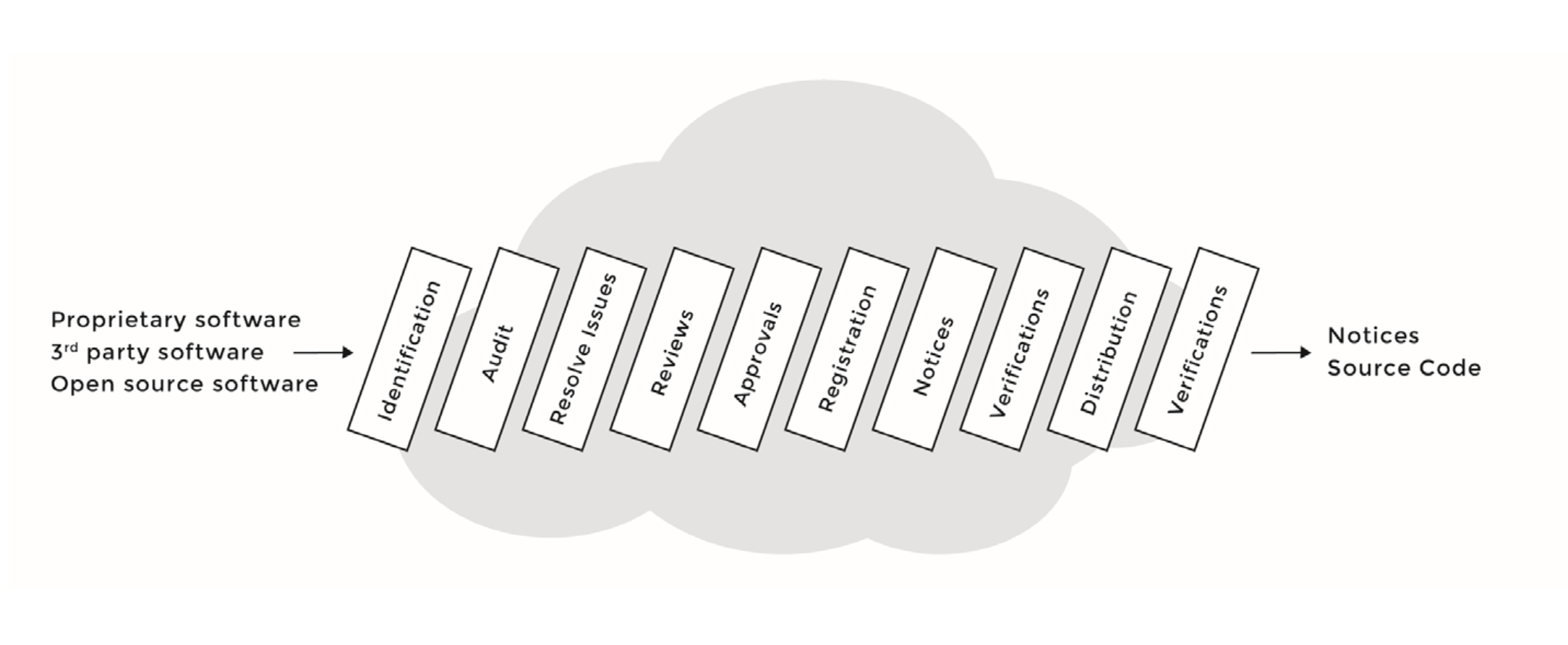
Compliance policies and processes govern the various aspects of using, contributing, auditing, and distribution of open source software. See the figure below for a sample compliance process, with the various steps each software component will go through as part of the due diligence.

Next week, we’ll cover two more key elements to an open source management program: staffing a compliance team and the tools they use to automate and audit open source code.

Open Source Compliance

Automating Software Testing on Linux SBCs

Demand is increasing for embedded software projects to support a variety of Linux hacker boards — and that requires time consuming hardware testing to prove that your software works reliably. Fortunately, you can integrate test automation tools into your software development process to streamline the task, as explained by release engineer Paweł Wieczorek at last October’s Embedded Linux Conference Europe.

In the talk, Wieczorek described how he and his colleagues at the Samsung R&D Institute Poland developed an Automated Testing Laboratory to streamline testing of Tizen Common on community-backed SBCs. Their test lab automates and integrates processes performed primarily in the open source Jenkins automation server and Open Build Service (OBS) binary package build and distribution service. The solution is applicable to many other Linux software platforms beyond Tizen.

“For most developers, once a patch is merged to the Git repository, the work is done, but from the release engineer’s point of view, the journey has just begun,” said Wieczorek. “In our process, once the change is merged, the integrator must create a submit request — a simple tag linked to an object in Git. The tag is then read from the Gerrit event stream and passed to Jenkins, which orders a rebuild of a corresponding package in OBS. Then OBS contributes the package and all of its dependencies, and a new image is created so it can be tested, and then accepted or rejected in the next release.”

The test lab runs Tizen on multiple instances of the Linux-driven, community-backed MinnowBoard Turbot, Odroid-U3+, and 96Boards compatible HiKey SBCs. Although the process was partially automated, certain steps still required daily human interaction by the release engineer.

“When build failures occur, release engineers need to investigate the possible causes,” said Wieczorek. “They need to check whether new images introduce any regressions, such as undocumented changes in the API, or if there are changes in connectivity. These tasks are time consuming and monotonous, and yet require precision and focus.”

The process was especially tedious because Jenkins and OBS are not designed to interoperate easily. The release engineer was required to download multiple images for the target devices from the main Tizen server, and then flash all the targets and run the tests. To avoid this repetitive process, “we considered testing less frequently, or maybe only for major releases, or maybe run simpler tests,” said Wieczorek. “But we decided those steps would violate our principles.”

The only solution was to further automate the system, and that required modifications to the software, communications infrastructure, and hardware. In software, the key problem was that “OBS lacks an event mechanism in its default installation, and enabling one requires considerable configuration,” said Wieczorek. “Also, the naming conventions are designed to be easily readable by humans, so these needed to be parsed. For scheduling and queueing of tasks, “we experimented with some lighter alternatives like Task Spooler or Buildbot, but decided to stick with what we knew: Jenkins.”

The second challenge was to establish reliable automated communications with all devices in the testing farm. Wieczorek considered OpenSSH and serial console, but found they both had drawbacks. “OpenSSH depends on network services, and we would like to detect network connectivity before we try to communicate with an actual device,” said Wieczorek. “Serial console is much less flexible, and offers a lower rate of data transfer.”

Instead, the team turned to the Tizen SDK’s Smart Development Bridge (SDB) device management tool, which “combines the best of both worlds,” said Wieczorek. “It depends on a single service and it’s flexible like SSH, and provides us with decent file transfer rates.”

To automate the creation and maintenance of the test servers, the test team found that their simple Testlab-handbook for newcomers, based on the Python Sphinx tool, was not enough. “The pace of the changes was too high for maintaining a separate handbook so we decided to maintain a Git repository with configuration for our Testlab-host,” said Wieczorek.

To accomplish this, they chose the Ansible Python configuration management tool. The team also implemented a system to share and publish test results on Tizen.org wikis, based on MediaWiki. Here, they used MediaWiki’s Pywikibot tool, which automates editing and information gathering.

Developing a custom microSD demultiplexer

The biggest challenge was on the hardware side: automating the delivery of Tizen images onto target devices. “Most of the boards required different procedures, most of which were architecture specific,” said Wieczorek. “They were designed for a single device per host, not a build farm, and there were often conflicts if too many devices were connected.”

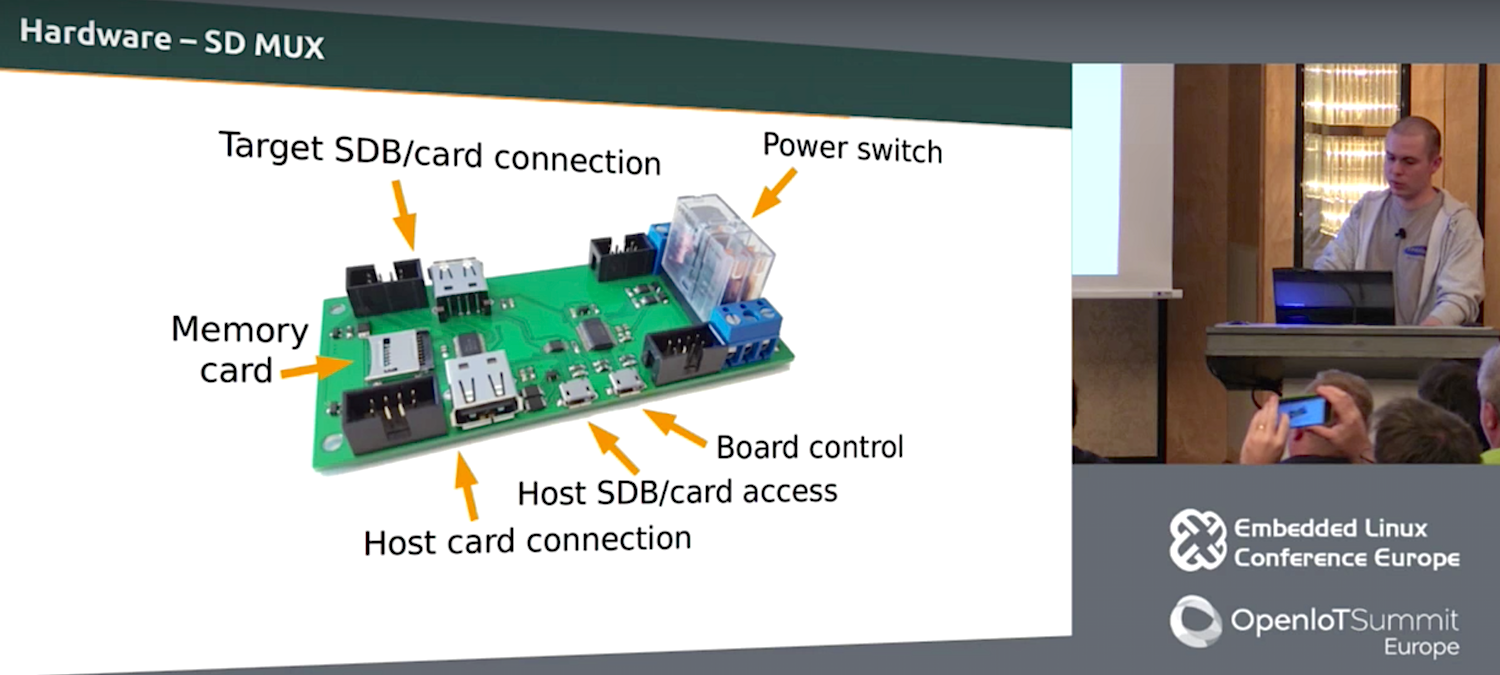
The solution was to exploit the one common denominator on all the SBCs: bootable microSD cards. Wieczorek’s team custom designed a microSD card demultiplexer board that provides access between the testing host and the device. The board includes a power switch, as well as “ports for board control and connections for controlling the target device and the corresponding slots on the host.” The test farm comprises multiple device nodes, each of which consists of six multiplexer boards and several USB hubs.

The Tizen team published the schematics for the boards and connectors and posted them with sources on the Tizen.org Git repository. Meanwhile, there are plans to monitor changes between tested images in a more detailed way and to enable the retrieval of partial information from failed test runs. Other plans call for improved resource management and a distributed setup scheme so testing won’t be bound to a single location.

In summing up, Wieczorek offered a few basic recommendations. “First, there’s no need to reinvent the wheel,” he said. “All the building blocks are already there — they just need configuration. Second, consider designing custom hardware to simplify tasks. Finally, remember that automation pays off in the long term.”

Watch the complete presentation below:

Embedded Linux Conference + OpenIoT Summit North America will be held on February 21-23, 2017 in Portland, Oregon. Check out over 130 sessions on the Linux kernel, embedded development & systems, and the latest on the open Internet of Things.

Linux.com readers can register now with the discount code, LINUXRD5, for 5% off the attendee registration price. Register now>>

Arch Linux: The Simple Linux

Arch Linux is called the simple Linux because it eschews the layers of abstraction and “helper” apps that come with so many Linux distributions. It as close to vanilla Linux as a packaged distribution can get.

Consequently, you need to be more comfortable with do-it-yourself than with most modern distributions, and more comfortable with the command line and editing text files. I would rather take 10 seconds to edit a text configuration file than spend all kinds of time wading through graphical configuration menus. You know what would make me like graphical configurations more? Batch operations. Sometimes I like to change more than one thing at a time. No, really, it’s true.

But I digress. Arch’s being simpler means more work for you. Installation is a lengthy manual process, and you’ll have a lot of post-installation chores such as creating a non-root user, setting up networking, configuring software repositories, configuring mountpoints, and installing whatever software you want. The main reason I see for using Arch is to have more control over your Linux system than other distros give you. You can use Arch for anything you want, just like any other Linux: server, laptop, desktop. I had Arch on an ancient Thinkpad that was left behind by modern Linux distributions.

Arch is a rolling release, so updating your installation regularly keeps it current. It has its own dependency-resolving package manager, pacman. Arch’s standout features are the superb documentation, stellar maintenance, and stability.

Arch does not try to be all things to all users. The maintainers are phasing out the i686 version by November 2017 and supporting only x86_64, so anyone who needs a 32-bit Linux won’t be able to use Arch. The installer doesn’t include ready-made multimedia functionality, wireless drivers, Java, or Adobe Flash. These are all available post-installation. The Arch team does not support ARM devices, but the Arch Linux ARM project does.

Installation

The Arch installation image is a live bootable image. After you download it, refer to the installation page for complete instructions. Installing it to your hard disk is a manual process: you will manually partition your drive, install the base system, create /etc/fstab, set your locale and time zone, hostname, and configure networking.

When the live image starts, you’ll be looking at a root Zsh prompt. If you have wired Ethernet, then you’ll automatically have networking, with DHCP enabled. If you have a wireless networking interface, then you’ll have to configure networking manually. Fortunately, Arch provides a thorough document on how to do this; hang on to the installation guide because it links to numerous howtos.

Press Shift+Page Up/Page Down to page up and down your console screen.

Partitioning is a bit of a bugaboo, so I’ll walk through a simple partitioning scheme using gdisk. You may use fdisk for the old-fashioned MS-DOS partitioning, or the newfangled GUID Partition Table, GPT. I prefer GPT because you can have as many partitions as you want, numbered sequentially and are not limited to four primary partitions.

These commands create a new partition table on /dev/sda (be sure to use your own hard disk designation!), a 1MB BIOS boot partition that is required if you use the GRUB bootloader, a root partition, and a swap partition.

# gdisk /dev/sda
Command (? for help): o
This option deletes all partitions and creates a new protective MBR.
Proceed? (Y/N): y

Command (? for help): n
Partition number (1-128, default 1): 1
First sector (34-26580030, default = 2048) or {+-size KMGTP}: 2048
Last sector (2048-26580030, default = 26580030) or {+-size KMGTP}: +1M
Current type is 'Linux filesystem'
Hex code or GUID (L to show codes, Enter = 8300): ef02
Changed type of partition to 'BIOS boot partition'

Command (? for help): n
Partition number (2-128, default 2): 2
First sector (34-26580030, default = 4096) or {+-size KMGTP}: 4096
Last sector (4096-26580030, default = 26580030) or {+-size KMGTP}: +10G
Current type is 'Linux filesystem'                                                                         
Hex code or GUID (L to show codes, Enter = 8300):
Changed type of partition to 'Linux filesystem'

Command (? for help): n
Partition number (3-128, default 3): 3
First sector (34-26580030, default = 20975616) or {+-size KMGTP}:
Last sector (20975616-26580030, default = 26580030) or {+-size KMGTP}:
Hex code or GUID (L to show codes, Enter = 8300): 8200
Changed type of partition to 'Linux swap'

Command (? for help): w

Final checks complete. About to write GPT data. THIS WILL OVERWRITE EXISTING
PARTITIONS!!

Do you want to proceed? (Y/N): y
OK; writing new GUID partition table (GPT) to /dev/sda.
The operation has completed successfully.

Then you must create your filesystem. In my example only /dev/sda2 needs this, which I create with mkfs.ext4 /dev/sda2.

You do not mount the BIOS boot partition, but you need to mount your other filesystems. Check out the swap howto to set up your swap partition correctly.

Lean and Mean

If you followed all the steps correctly, you will reboot to a nice new Arch Linux system. If you didn’t, then you will get an exercise in debugging.

Assuming your nice new Arch system boots, which it should, log in as root using the password you created during installation, and your reward is a plain shell prompt. I ran du -sh / on my test system to see how much disk space it used immediately after installation. It showed 1.1 GB. free revealed memory usage of 41K. Kilobytes, friends, remember what those are? Of course, the more additional software you install the more system resources it will use.

You should create at least one non-root user, especially if you will log in remotely to your Arch system or install a graphical desktop.

Building Your System

So, what the heck do you do now? Why, all sorts of things. You can install and run servers; it’s a lean installation at 1.1 gigabytes so if you are cruft-averse, you won’t have much to remove. You could install SSH for secure remote logins. You can install a graphical desktop. Let’s take a quick look at pacman, the dependency-resolving package manager.

Search for packages to install:

$ pacman -Ss [name]

Install a package:

# pacman -S [packagename]

Update your repositories and upgrade the whole system:

# pacman -Syu

Remove a package and retain dependencies:

# pacman -R [packagename]

Remove a package and dependencies if they not required by other packages:

# pacman -Rs [packagename]

List files installed by package:

# pacman -Ql [packagename]

What package installed this file?

$ pacman -Qo /path/to/file

I like Arch as a nice clean distro that sometimes vexes me by making me do more work than I want to, that stays relatively free of cruft, and I especially like it for headless servers. Give it a try; see the installation page to get started, and see Installation steps for Arch Linux guests for instructions on running it in VirtualBox.

Learn more about Linux through the free “Introduction to Linux” course from The Linux Foundation and edX.

How to Use One Time Pad Cryptography with a Raspberry Pi

What if, however, there were a way to be certain that your personal emails, pictures of your pet kitten, backups of your tax returns for the past decade and so on were safe even if intercepted? Enter the One Time Pad.

The Notorious OTP

In simplest terms, a One Time Pad is a series of random numbers which you agree upon with someone with whom you wish to communicate, usually by meeting in person and exchanging pads.

Read more at TechRadar

Dissecting an SSL Certificate

I think it’s interesting to know what it means to “issue a SSL certificate” and I can talk about that a little.

TLS: newer version of SSL

I was confused about what this “TLS” thing was for a long time. Basically newer versions of SSL are called TLS (the version after SSL 3.0 is TLS 1.0). I’m going to just call it “SSL” throughout because that is less confusing to me.

What’s a certificate?

Suppose I’m checking my email at https://mail.google.com

mail.google.com is running a HTTPS server on port 443. I want to make sure that I’m actually talking to mail.google.com and not some other random server on the internet owned by EVIL PEOPLE.

Read more at Julia Evans