

Home Blog Page 614

Vault Linux Storage & Filesystems Conference Includes Talks By Alluxio, Facebook, LinkedIn, Red Hat, and More

The Linux Foundation today announced the speaker lineup for the Vault Linux Storage & Filesystems Conference, taking place March 22-23 in Cambridge, MA.

Vault is the leading technical event dedicated to Linux storage and filesystems where developers and operators in the filesystems and storage space can advance computing for data storage. Linux has been at the center of the advances in data, filesystems and storage with its widespread use in cloud computing, big data and other data-intensive computing workloads. At Vault, hardware vendors collaborate within the Linux community to develop cutting-edge storage hardware, helping transform Linux into a leader in the storage industry.

Haoyuan Li, CEO of Alluxio (formerly Tachyon), will present a keynote on the San Mateo-based startup’s journey thus far and the road ahead. The open source, software-only storage company, which focuses on big data analytics jobs with Apache Spark, recently struck up a partnership with Dell EMC’s private cloud. And last year Alluxio announced an integration with Huawei’s big data storage solution.

Facebook’s Josef Bacik, Oracle’s Martin Petersen, and Red Hat’s Rik van Riel will also give a keynote recap of the invitation-only Linux Storage, Filesystem & Memory Management Summit, which will be held directly preceding Vault in the same venue. The summit gathers foremost development and research experts and kernel subsystem maintainers to map out and implement improvements to the Linux filesystem, storage and memory management subsystems that will make their way into the mainline kernel in the coming years.

Other speakers at Vault include:

  • Ahmed El-Shimi from Minima will provide insight into using machine learning to predict storage failures.

  • Felix GV from LinkedIn will explore how they refresh 100TB of data per day across multiple datacenters using Project Voldemort.

  • Kernel hacker Christoph Hellwig will illuminate filesystem and block storage optimizations in his talk, “Improving block discard support throughout the Linux Storage Stack.”

  • Kevin Vigor from Facebook will examine how NFS is critical infrastructure and lessons they’ve learned from running it at very large scale in his talk: “NFS @ scale: worst. protocol. evar. (except for all the others)“.

  • Sage Weil from Red Hat will discuss a new storage backend for Ceph named “Bluestore.”

View the full schedule of sessions.

Registration for Vault is discounted to $500 through February 4. Discounted academic rates are also available. Applications for diversity scholarships are currently being accepted. For information on eligibility and how to apply, please click here.

Linux.com readers can register now with the discount code, LINUXRD5, for 5% off the registration price. Save $225 by registering before February 4.
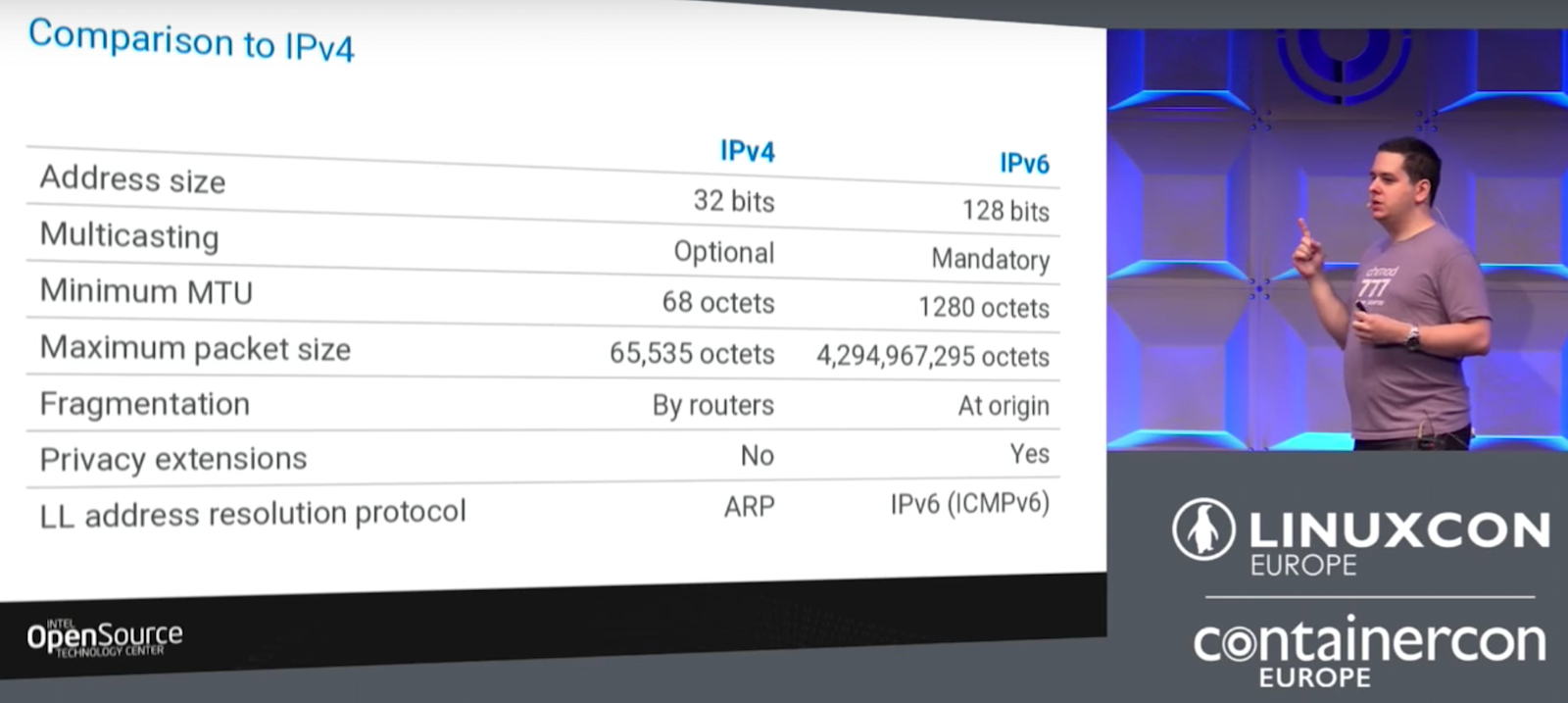

IPv6 for Server Admins and Client Developers by Thiago Macieira, Intel

Thiago Macieira from the Intel Open Source Technology Center began his talk at LinuxCon Europe by saying many people have not yet made the switch to IPv6, so his talk contained a brief introduction to IPv6 and some of the differences compared to IPv4. 

IPv6 for Server Admins and Client Developers

IPv6 has been around for a long time. The first IPv6 RFC was released more than 20 years ago, and we began exhausting the IPv4 address space in 2011. Thiago Macieira from the Intel Open Source Technology Center began his talk at LinuxCon Europe by saying that he didn’t think he would still need to be talking about this today, and he wished we had already solved this problem. But, many people have not yet made the switch to IPv6, so his talk contained a brief introduction to IPv6 and some of the differences compared to IPv4. 

Macieira says that one of the reasons things haven’t completely fallen apart yet is because we’ve created some workarounds, but they are just workarounds, and we still need to plan our move to IPv6. The biggest difference is the address size, with IPv4 containing only 32 bits of address space compared to 128 bits for IPv6. To put this in perspective, IPv6 would give us many trillions of addresses for every square centimeter on the planet. Another difference is that multicasting goes from optional in IPv4 to mandatory in IPv6 allowing one-to-many communication commonly used for things like Multicast DNS, which is what, for example, Apple uses to discover other devices on your home network. Other differences include a higher minimum Maximum Transmission Unit (MTU) and maximum packet size along with fragmentation at the origin (instead of at the router) and privacy extensions.

StateLess Address Auto-Configuration (SLAAC) in IPv6 provides a way for devices to configure themselves, even over the Internet, and communicate with each other without requiring a DHCP server. This is accomplished securely, while still protecting privacy, by using temporary addresses or stable, but opaque addresses, Macieira explained. However, you still need to make sure that your firewall is correctly configured using ip6tables, not iptables keeping in mind that addressable from the world does not mean that your device is reachable from the world.

Macieira points out that when using an API, there are two things to keep in mind. First, always use an IPv6 API. They are actually simpler to use and will still support IPv4, so if an API doesn’t support IPv6 already, stop using it. Second, don’t assume anything about the address.

The talk concluded with a number of interesting things that you can do with IPv6. Watch the entire video of the talk to learn more about how and why to use IPv6.

5 DevOps Tools for Logging and Monitoring

In the cloud, open source tools and applications produce many kinds of DevOps efficiencies, and that’s especially true for logging and monitoring solutions. Monitoring cloud platforms, applications and components — along with processing and analyzing logs — is essential for ensuring high availability, top performance, low latency, and more. In fact, RightScale’s most recent State of the Cloud Survey reports that the most common cloud optimization action, focused on by 45 percent of enterprises and SMBs, is monitoring.

However, proprietary logging and monitoring solutions are expensive. Even worse, they are often bundled into even more expensive managed service offerings.

Enter the new wave of powerful open logging and monitoring solutions. Some of these focus on targeted tasks, such as container cluster monitoring and performance analysis, while others qualify as holistic monitoring and alerting toolkits, capable of multi-dimensional data collection and querying.

The Linux Foundation recently announced the release of its report Guide to the Open Cloud: Current Trends and Open Source Projects. This third annual report provides a comprehensive look at the state of open cloud computing, and includes a section on logging and monitoring for the DevOps community. The report, which you can download now, aggregates and analyzes research, illustrating how trends in containers, monitoring, and more are reshaping cloud computing. The report provides descriptions and links to categorized projects central to today’s open cloud environment. It takes special note of the fact that DevOps has emerged as the most effective method for application delivery and maintenance in the cloud.

In a series of posts appearing here, we are calling out many of these projects from the guide, by category, providing extra insights on how the overall category is evolving. Below, you’ll find a collection of several important DevOps tools for logging and monitoring and the impact that they are having, along with links to their GitHub repositories, all gathered from the Guide to the Open Cloud:

Logging and monitoring

Fluentd

Fluentd is an open source data collector for unified logging layer, sponsored by Treasure Data. It structures data as JSON to unify all facets of processing log data: collecting, filtering, buffering, and outputting logs across multiple sources and destinations. Fluentd on GitHub

Heapster

Heapster is a container cluster monitoring and performance analysis tool in Kubernetes. It supports Kubernetes and CoreOS natively and can be adapted to run on OpenShift. It also supports a pluggable storage backend: InfluxDB with Grafana, Google Cloud Monitoring, Google Cloud Logging, Hawkular, Riemann and Kafka. Heapster on GitHub

Logstash

Logstash is Elastic’s open source data pipeline to help process logs and other event data from a variety of systems. Its plugins can connect to a variety of sources and stream data at scale to a central analytics system. LogStash on GitHub

Prometheus

Prometheus is an open source systems monitoring and alerting toolkit, originally built at SoundCloud and now a Cloud-Native Computing Foundation project at The Linux Foundation. It fits both machine-centric and microservices architectures and supports multi-dimensional data collection and querying. Prometheus on GitHub

Weave Scope

Weave Scope is Weaveworks’ open source tool to monitor distributed applications and their containers in real time. It integrates with Kubernetes and AWS ECS. Weave Scope on GitHub

Learn more about trends in open source cloud computing and see the full list of the top open source cloud computing projects. Download The Linux Foundation’s Guide to the Open Cloud report today!

Deploying Docker Compose Services in a Swarm

Docker 1.13 introduced a new version of Docker Compose. The main feature of this release is that it allows services defined using Docker Compose files to be directly deployed to Docker Engine, enabled with Swarm mode. This enables simplified deployment of multi-container applications on multi-host setups.

This article will use a simple Docker Compose file to show how services are created and deployed in Docker 1.13.

Read more at DZone

Open Source Software Tools of DevOps

DevOps, once a small cultural movement, is driving demand for experienced professionals who can improve IT agility as they try to move at “cloud speed”. Mark Hinkle, VP at The Linux Foundation, talks about what’s next for the effort to improve coordination between software developers and operations personnel.

Nowadays, we see an almost desperate call for DevOps engineers. Indeed.com, a job search site, shows that DevOps job postings have more than doubled year-over-year. A quick perusal of these jobs posts indicates a degree of confusion around the definition: do we all mean the same thing when we talk about DevOps? Is it a job, a methodology, a trend, or a just a buzzword?

Read more at JaxEnter

Google Will Open-Source its Earth Enterprise On-Premises Software in March

Google today announced that in March it will open-source its Google Earth Enterprise software, which lets organizations deploy Google Maps and Google Earth in their on-premises data center infrastructure.

Google unveiled the software back in 2006 and stopped selling it nearly two years ago. Since then, Google has released updates and provided support to organizations with existing licenses. Once it pops up online — on GitHub, under an Apache 2.0 license — organizations will be free to collaboratively or independently modify it for their own needs as open-source software.

Read more at VentureBeat


4 Ways to Improve your Security Online Right Now

The last few years have seen a massive jump in the frequency of reports about digital security breaches and personal privacy issues, and no doubt this trend will continue. We hear about scammers moving to social media, nations using cyberattacks as part of coordinated offensive strategies, and the rise of companies making millions tracking our online behavior. 

Feeling apathetic about these events is all too easy, but you can do a great deal to improve your online security so that when you are caught up by a security event, you can mitigate the risk to yourself and quickly protect yourself from further risk. Security consciousness is surprisingly easy to learn, and many open source projects exist that can help you.

Read more at OpenSource.com

How to Install PowerDNS DNS Server on Ubuntu

PowerDNS is a powerful DNS server like Bind9. But PowerDNS is much more flexible because PowerDNS uses a database such as MySQL, PostgreSQL, SQLite etc to store it’s DNS entries.

So it’s very flexible and you can easily write custom web apps with PHP, Python, Node.js, Ruby etc to add, remove, and modify DNS entries.

In this article, I am going to show you how to install PowerDNS DNS server on Ubuntu and configure it to use MySQL database.

To follow this tutorial, you need,

    – A computer or virtual machine with Ubuntu server or Desktop installed.

    – Internet connection for downloading MySQL server and PowerDNS server packages.

    – Basic understanding of Linux command line.

Installing MySQL Server:

Before you install PowerDNS, you must install MySQL server if you want to use it as a database backend. Otherwise the installation won’t go smoothly. In this case, I do want to use MySQL as the database backend. So I am going to install MySQL server first for the sake of simplicity.

To install MySQL, run the following command.

$ sudo apt-get update

$ sudo apt-get -y install mysql-server mysql-client

MySQL server should ask you for the root password. Give it the password. Remember this password is not the same as your operating systems root password. So you can give it anything. I gave it, 123 as the root password of MySQL. It’s not the most secure password, but for a demo it works.

Installing PowerDNS

Now that the MySQL server is installed, we can install PowerDNS.

To install PowerDNS, run the following command.

$ sudo apt-get -y install pdns-server pdns-backend-mysql

PowerDNS should show you this dialog while installation.

Just press “Enter”.

Then you should see prompt.

It asks you whether you want to configure MySQL server for PowerDNS now. Yes we do. Select “Yes” and press “Enter“.

Now you should be prompted for your MySQL password. It’s 123 if you’re following along. Type in the password, select “Ok” and press “Enter”.

Now confirm your password by re-typing it.

Now PowerDNS is installed successfully. 

You can check if the DNS server is running with the following command.

$ sudo service pdns status

That’s it. Now you can add DNS entries to PowerDNS using MySQL. You can login to your MySQL database as user ‘pdns’ and host ‘localhost’ with the password ‘123’ and select the database ‘pdns’ and insert data to it. For more information, go to the official website of PowerDNS at https://doc.powerdns.com/md/authoritative/ .

Netflix’s Open Source Orchestrator, Conductor, May Prove the Limits of Ordinary Scalability

It’s one thing to imagine your data center running a little bit, or a lot, like Google. It’s another thing entirely to imagine it working like Netflix. Nevertheless, for anyone who is so inclined, Netflix released into open source last month the orchestration engine its engineers developed for running its entire operation in the cloud — specifically, on Amazon’s cloud. It could very well be the engine for the world’s single most sophisticated distributed processing system.

So the question, for our sake, becomes, does it scale down? More to the point, if Netflix’ good ideas remain just as good on a smaller scale, then does Conductor hold an advantage over little ol’ Kubernetes open source container orchestration engine to which we need to be paying attention?

Read more at The New Stack