
Home Blog Page 616

TrentaOS Is an Elegant Desktop Linux with a Few Rough Edges

It appears we have another Linux desktop renaissance on our hands. Back in the late 1990s, it seemed like everyone was creating a new Linux distribution—each with its own unique take on the platform—until there were so many to choose from, one never knew where to begin. This time around, we have a growing number of distributions, each making slight variations to something already in existence. And that, I believe, is a good thing. Why? Refinement and specificity.
Consider TrentaOS, for example. Here we have a new platform (still very much in alpha), based on Ubuntu, with a decidedly Mac feel, by way of GNOME. If you look at the landscape of Linux, you’ll find several distributions already doing the Mac-like desktop quite well  (Elementary OS and ZorinOS immediately come to mind). So why another? What can TrentaOS offer that differs from what others are doing?

First off, the similarities to Mac exist only on the surface. Click on the Applications menu and your experience veers back toward the GNOME side of things (thanks to the GNOME Dash). This is where you start to see the weakness of TrentaOS, wherein the developers/designers have added a beautiful icon set/theme and a dock to GNOME. Beyond that, it’s pretty much Ubuntu GNOME. Even so, the look of the TrentaOS desktop is quite lovely (Figure 1), but what happens when you go to work? Let’s take a look.
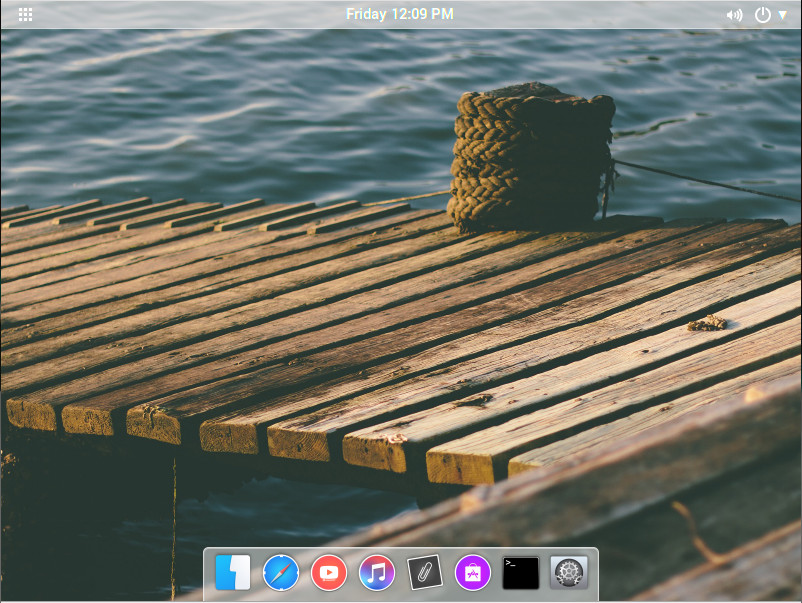
Figure 1: The default TrentaOS desktop.

The good

Before we dive into what might be wrong with TrentaOS, let’s take a look at what’s right. You must first remember that, as I mentioned, we’re talking about an alpha release, so it’s very rough and there’s plenty of room to grow. In fact, I would guess that what we’ll see when the official first release lands will be quite different from what we’re looking at now.

Even so, let’s start with the good bits that make TrentaOS something you should put on your radar.

To begin, the TrentaOS desktop offers a simplistic elegance that is very MacOS-like, with a bit more transparency tossed into the mix. As well, the developers have done a great job rolling in a very tasteful flat theme (Figure 2).
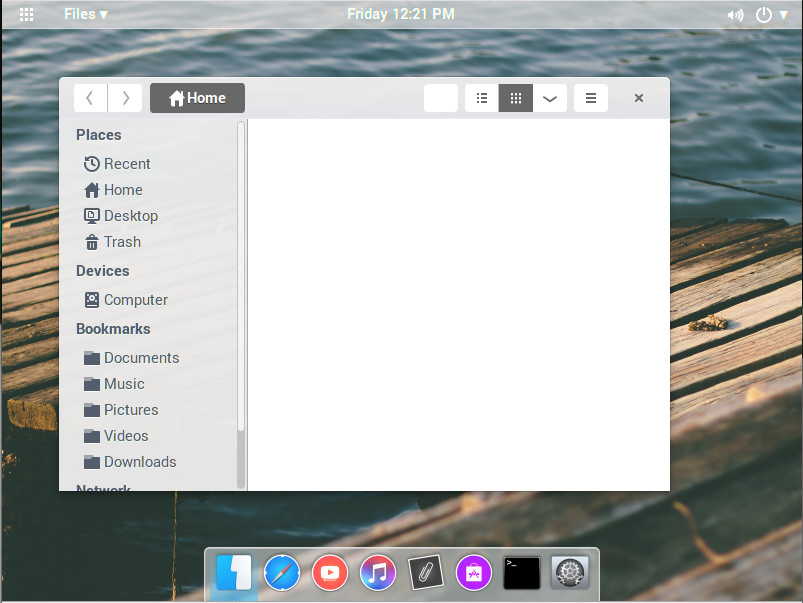
Figure 2: The TrentaOS flat theme perfectly illustrated by the file manager.

With the file manager open, you should notice something else the developers have enabled on the desktop—a global menu. This, of course, comes by way of the GNOME Application Menu, but it was a good choice for the developers to have it enabled by default. Why? Because it clears up in-app real estate and allows the flat theme to be more cohesive throughout.

Another plus (at least for the moment) was the intentional retention of the GNOME Dash. This take on the Application menu is one of the finest on the market. It makes for simple application searching and launching, while keeping with the minimalism of TrentaOS.

The inclusion of VLC media player is a definite step in the right direction that all desktops should consider. VLC is, by far, the superior video player and should be considered the de facto standard. Why other distributions do not do this is beyond me.


TrentaOS also opts to go for the very minimal Musique music player (as opposed to the GNOME default Rhythmbox). Musique is a wise choice for this distribution because it not only fits well with the theme, it’s also a very simple player that anyone could use. Musique offers only the features you need to play your music and not much more. It’s simple and elegant.

Finally, kudos for including GIMP. I understand why some distributions leave that application out (to save space), but every time I install a distribution that doesn’t include the flagship, open source image editing tool, I feel as if something is missing (and immediately install GIMP).

The bad

Again, you should remember that TrentaOS is still in alpha, so much of the bad will hopefully vanish as the distribution migrates toward beta and official release. Nevertheless, I would be remiss to not point out certain issues. I will also not address stability issues, as this is part and parcel to TrentaOS being in alpha. Issues such as title bars all of a sudden going missing and lagging transitions will all sort themselves out. So we’ll stick with those issues that have nothing to do with the growing pains associated with being alpha.
The first issue is fairly glaring. Shortly after installing TrentaOS, I was prompted to do a distribution upgrade. I decided no harm could come of that and proceeded (as this was a brand new virtual machine install). Upon reboot, I was greeted with a stock Ubuntu GNOME desktop…all signs of TrentaOS had been stripped away. To solve that issue, I reinstalled the OS. The next time I did a standard upgrade, I immediately noticed that TrentaOS was still relying on the now-defunct Ubuntu Software Center. Considering that GNOME has already migrated to GNOME Software, this seems quite out of place. The Ubuntu Software Center has been left behind for good reason, and the TrentaOS developers would be wise to make this change.

Another issue occurred when doing a standard update. The updater locked up in the middle of the process. I’d like to toss this off as an alpha issue, but I’ve seen it happen in non-alpha releases. After having to force-quit the updater, I had to issue the sudo dpgk –configure -a twice; even then, more issues appeared such that I had to manually delete folders in /var/lib/dpkg/updates in order to get the update to successfully run (done from the command line).

Finally, after running sudo apt-get update && sudo apt-get upgrade && sudo apt-get autoremove, I was able to restart the system and boot back into an improved experience. Unfortunately, the Ubuntu Software Center was still front and center. It seems the only way to jettison that package from TrentaOS is to run a distribution upgrade, which then removes all traces of TrentaOS and replaces it with a stock Ubuntu GNOME.

Finally, TrentaOS ships with a much outdated version of LibreOffice. Even after the update, LibreOffice was running at version 4.2.8.2. Yes, you can download the latest version of the office suite, remove the currently installed version, and install the 5.x iteration of LibreOffice, but this isn’t a process that should be required to gain the latest stable release of a crucial piece of software.

The conclusion

TrentaOS is a project I certainly hope will continue. It has a lot of possibility to stand alongside the likes of Elementary OS as a modern, Mac-like take on the Linux desktop. And if there’s one thing Linux needs, it’s more such desktop environments that build upon what is already working to attract new users by way of elegant, simple solutions. TrentaOS is a beautiful desktop that could be one such solution.

Learn more about Linux through the free “Introduction to Linux” course from The Linux Foundation and edX.
Rethinking Monitoring for Container Operations

Monitoring is not a new concept, but a lot has changed about the systems that need monitoring and which teams are responsible for it. In the past, monitoring used to be as simple as checking if a computer was still running. Dave Charles, chief technology officer of Cobe.ioremembers monitoring as simple instrumentation that came alongside a product.

As James Turnbull explains in “The Art of Monitoring,” most small organizations didn’t have automated monitoring — they instead focused on minimizing downtime and managing physical assets. At companies that actually had IT staff, operations teams used simple tools to check on disk, central processing unit (CPU) and memory usage, but focused mostly on dealing with emergencies related to availability. Larger organizations eventually replaced the manual approach with automated monitoring systems that utilized dashboards. The common thread for all these organizations was that being able to read and receive metrics meant that the service was operational.

Read more at The New Stack

IBM Adds TensorFlow Support for PowerAI Deep Learning

Today IBM announced that its PowerAI distribution for popular open source Machine Learning and Deep Learning frameworks on the POWER8 architecture now supports the TensorFlow 0.12 framework that was originally created by Google. TensorFlow support through IBM PowerAI provides enterprises with another option for fast, flexible, and production-ready tools and support for developing advanced machine learning products and systems.

Read more at insideHPC

Apache Eagle Keeps an Eye on Big Data Usage

Apache Eagle, originally developed at eBay, then donated to the Apache Software Foundation, fills a big data security niche that remains thinly populated, if not bare: It sniffs out possible security and performance issues with big data frameworks.

To do so, Eagle uses other Apache open source components, such as Kafka, Spark, and Storm, to generate and analyze machine learning models from the behavioral data of big data clusters.

Read more at InfoWorld

An Even Easier Introduction to CUDA

This post is a super simple introduction to CUDA, the popular parallel computing platform and programming model from NVIDIA. I wrote a previous “Easy Introduction” to CUDA in 2013 that has been very popular over the years. But CUDA programming has gotten easier, and GPUs have gotten much faster, so it’s time for an updated (and even easier) introduction.

CUDA C++ is just one of the ways you can create massively parallel applications with CUDA. It lets you use the powerful C++ programming language to develop high performance algorithms accelerated by thousands of parallel threads running on GPUs.  Many developers have accelerated their computation- and bandwidth-hungry applications this way, including the libraries and frameworks that underpin the ongoing revolution in artificial intelligence known as Deep Learning.

Read more at Nvidia

Open Source Serverless Computing Frameworks, and Why They Matter

erverless computing is fast becoming one of the hottest trends in the channel since the cloud. What is the open source ecosystem doing to keep pace with the serverless trend, and why does it matter? Here’s a look.

Serverless computing is a paradigm in which developers deploy and run code on demand, without having to maintain a backend server at all. The term is a little misleading; serverless computing does not mean there is no server involved. A server still runs your code, but you don’t have to think about the server when deploying it.

When it comes to deploying apps, serverless computing offers some key advantages. It eliminates the need to set up and maintain a virtual server in the cloud. 

Read more at The VAR Guy

5 Highly Promising Terminal Emulators

The terminal emulator is a venerable but essential tool for computer users. The reason why Linux offers so much power is due to the command line. The Linux shell can do so much, and this power can be accessed on the desktop by using a terminal emulator. There are so many available for Linux that the choice is bewildering.

The terminal window allows users to access a console and all its applications such as command line interfaces (CLI) and text user interface software. Even with the sophistication of modern desktop environments packed with administrative tools, other utilities, and productivity software all sporting attractive graphical user interfaces, it remains the case that some tasks are still best performed with the command line.

Read complete article at OSS Blog

Camille Fournier, Donna Dillenberger, William ‘whurley’ Hurley to Speak at Open Source Leadership Summit Next Month

Executives, experts, analysts, and leaders in open source at some of the world’s largest and most successful companies will speak at the invitation-only Open Source Leadership Summit next month in Lake Tahoe, The Linux Foundation has announced.

AT&T, Cloud Foundry Foundation, Goldman Sachs, Google, IBM, IDC, Leading Edge Forum, Mozilla, and VMware are among the many organizations that will share insights on how to start, build, participate in and advance open source strategy and development.  

The event, set to take place Feb. 14-16, will feature keynotes by Camille Fournier, former CTO of Rent the Runway and author of O’Reilly’s forthcoming book The Manager’s Path: A Guide for Tech Leaders Navigating Growth and Change; Dan Lyons, New York Times best-selling author of Disrupted; Donna Dillenberger, IBM Fellow at the Watson Research Center; and entrepreneur William Hurley aka ‘whurley’ whose retirement savings startup Honest Dollar was acquired last year by Goldman Sachs.

Other featured keynotes include:

  • Katharina Borchert, Chief Innovation Officer, and Patrick Finch, Strategy Director, Mozilla who will discuss community innovation.

  • Al Gillen, GVP of Software Development and Open Source at IDC, will provide an analysis of open source in 2017 and beyond.

  • Abby Kearns, Executive Director of Cloud Foundry Foundation, will share how cross-foundation collaboration is a win for open source.

  • Chris Rice, SVP at AT&T Labs and Domain 2.0 Design and Architecture at AT&T, will talk about the future of networking and orchestration.

  • And more.

Open Source Leadership Summit is where open source leaders and visionaries come together, share best practices, and get the latest information on open source for business advantage. This conference is the place to be if your business is among the many companies across diverse industries that are discovering the strategic benefits of using open source software and participating in its development.

The event will also feature more than 50 educational sessions covering best practices, the future of open source, leadership strategy, open source project updates, compliance and standards, professional open source management, and more. Attendees can also take part in Open Spaces unconference sessions, pre and post summit activities and evening events geared towards small group collaboration and networking. See the full schedule.

Open source collaboration is a strong economic force that’s transforming diverse industries. No area of technology is untouched. Open Source Leadership Summit is the place to learn how this transformation is happening and how your company can be involved and benefit from it.

How mature is your organization’s open source software management? Take our short sample POSMA (Professional Open Source Management Assessment) survey for a ballpark score. Take the survey!

Learn Kubernetes Container Management In New Linux Foundation Course

The Linux Foundation’s new Kubernetes training course is now available for developers and system administrators who want to learn container orchestration using this popular open source tool.

Kubernetes is quickly becoming the de facto standard to operate containerized applications at scale in the data center. As its popularity surges, so does demand for IT practitioners skilled in Kubernetes.

“Kubernetes is rapidly maturing in development tests and trials and within production settings, where its use has nearly tripled in the last eight months,” said Dan Kohn, executive director, the Cloud Native Computing Foundation.

Kubernetes Fundamentals (LFS258) is a self-paced, online course that teaches students how to use Kubernetes to manage their application infrastructure. Topics covered include:

  • Kubernetes architecture

  • Deployment

  • How to access the cluster

  • Tips and tricks

  • ConfigMaps, and more.

Developed by The Linux Foundation and the Cloud Native Computing Foundation, home of the Kubernetes open source project, developers and admins will learn the technology straight from the source.

Students will learn the fundamentals needed to understand Kubernetes and get quickly up to speed to start building distributed applications that will scale, be fault-tolerant, and simple to manage.

The course distills key principles, such as pods, deployments, replicasets and services, and give students enough information to start using Kubernetes on their own. And it’s designed to work with a wide range of Linux distributions, so students will be able to apply the concepts learned regardless of their distribution of choice.

LFS258 also will help prepare those planning to take the Kubernetes certification exam, which will launch later this year. Updates are planned for the course ahead of the certification exam launch, which will be specifically designed to assist with preparation for the exam.

The course, which has been available for pre-registration since November, is available to begin immediately. The $199 course fee provides unlimited access to the course for one year to all content and labs. Sign up now!

Running an Undersea, Robotic Laboratory on a Fixed Energy Budget – Brent Roman

Brent Roman describes the Environmental Sampler Processor (ESP),  which performs a variety of chemical and genetic assays on samples it takes directly from its position moored 2 to 30 meters underwater. This Linux controlled “lab in a can” was developed to identify health hazards, such as toxic algae blooms, in hours rather than days or weeks.