Home Blog Page 617

Trimming Power on Remote IoT Projects

At last October’s Embedded Linux Conference Europe, Brent Roman, an embedded software engineer at the Monterey Bay Aquarium Research Institute (MBARI), described the two decade-long evolution of MBARI’s Linux-controlled Environmental Sampler Processor (ESP). Roman’s lessons in reducing power consumption on the remotely deployed, sensor-driven device are applicable to a wide range of remote Internet of Things projects. The take-home lesson: It’s not only about saving power on the device but also about the communications links.

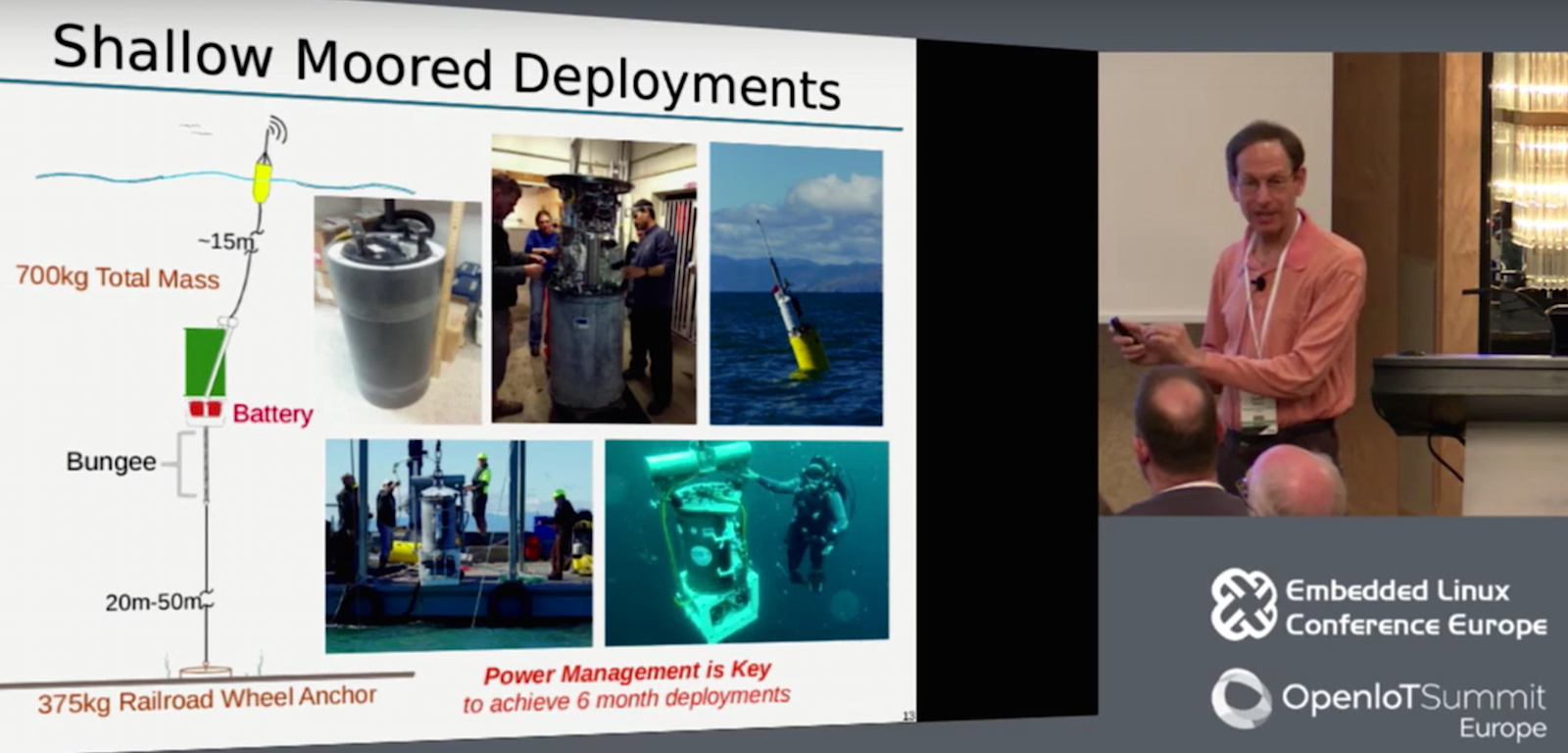
The ESP is designed to quickly identify potential health hazards, such as toxic algae blooms. The microbiological analysis device is anchored offshore and moored at a position between two and 30 meters underwater where algae is typically found. It then performs chemical and genetic assays on water samples. Results are transferred over cable using RS-232 to a 2G modem mounted on a float, which transmits the data back to shore. There are 25 ESP units in existence at oceanographic labs around the world, with four currently deployed.

Over the years, Roman and his team have tried to reduce power consumption to extend the duration between costly site visits. Initially, the batteries lasted only about a month, but over time, this was extended to up to six months.

Before the ESP, the only way to determine the quantity and types of algae in Monterey Bay — and whether they were secreting neurotoxins — was to take samples from a boat and then return to shore for study. The analysis took several days from the point of sampling, by which time the ecosystem, including humans, might already be at risk. The ESP’s wirelessly connected automated sampling system provides a much earlier warning while also enabling more extensive oceanographic research.

Development on the ESP began in 1996, with the initial testing in 2002. The key innovation was the development of a system that coordinates the handling of identically sized filter pucks stored on a carousel. “Some pucks filter raw water, some preserve samples, and others facilitate processing for genetic identification,” said Roman “We built a robot that acts as a jukebox for shifting these pucks around.”

The data transmitted back to headquarters consists of monochrome images of the samples. “Fiduciary marks allow us to correlate spots with specific algae and other species such as deep water bacteria and human pathogens,” said Roman.

The ESP unit consists of 10 small servo motors to control the jukebox, plus eight rotary valves and 20 solenoid valves. It runs entirely on 360 D Cell batteries. “D Cells are really energy dense, with as much energy per Watt as Li-Ion, but are much safer, cheaper, and more recyclable,” said Roman. But the total energy budget was still 6kW hours.

The original system launched in 2002 ran Linux 2.4 on a Technologic Systems TS-7200 computer-on-module with a 200MHz ARM9 processor, 64MB RAM, and 16MB NOR flash. To extend battery life, Roman first focused on reducing the power load of a separate microcontroller that drove the servo motors.

“When we started building the system in 2002 we discovered that the microcontrollers that were designed for DC servos required buses like CAN and RS-485 with quiescent power draw in the Watt range,” said Roman. “With 10 servos, we would have a 10W quiescent load, which would quickly blow our energy budget. So we developed our own microcontroller using a multi-master I2C bus that we got down to 70mW per every two motors, or less than half a Watt for motor control.”

Even then, the ESP’s total 3W idle power draw limited the device to 70 days between recharge instead of their initial 180-day goal. At first, 70 days was plenty. “We were lucky if we lasted a few weeks before something jammed or leaked and we had to go out and repair it,” said Roman. “But after a few years it became more reliable, and we needed longer battery life.”

The core problem was that the device used up considerable power to keep the system partially awake. “We have to wait for the algae to come to the ESP, which means waiting until the sensors tell us we should take a sample.” said Roman. “Also, if the scientists spot a possible algae bloom in a satellite photo, they may want to radio the device to fire off a sample. The waiting game was killing us.”

In 2014, MBARI updated the system to run Linux 2.6 on a lower power PC/104 carrier board they designed in house. The board integrated a more efficient Embedded Artists LPC3141 module with a 270MHz ARM9 CPU, 64MB RAM, and 256MB NAND.

The ESP design remained the same. An I2C serial bus links to the servo controllers, which are turned off during idle. Three RS-232 links connect to the sensors, and also communicate with the float’s 500mW cell modem. “RS-232 uses very little power and you can run it beyond recommended limits at up to 20 meters,” said Roman.

In 2014, when they mounted the more power-efficient LPC3141 enabled carrier as a drop-in replacement, the computer’s idle time draw was reduced from almost 2.5W to 0.25W. Overall, the ESP system dropped from 3W to 1W idle power, which extended battery life to 205 days, or almost seven months.

The ESP enters rougher water

Monterey Bay is sufficiently sheltered to permit mooring the ESP about 10 meters below the surface. In more exposed ocean locations, however, the device needs to sit deeper to avoid “being pummeled by the waves,” said Roman.

MBARI has collaborated with other oceanographic research institutions to modify the device accordingly. Woods Hole Oceanographic Institution (WHOI), for example, began deploying ESPs off the coast of Maine. “WHOI needed a larger mooring about 25 meters below the surface,” said Roman. “The problem was that the algae were still way up above it, so they used a stretch rubber hose to pump the water down to the ESP.”

The greater distance required a switch from RS-232 to DSL, which boosted idle power draw to more than 8W. “Even when we retrofitted these units with the lower power CPU board, they only dropped from 8W to 6W, or only 60 days duration,” said Roman.

The Scripps Institute in La Jolla, California had a similar problem, as they were launching the ESP in the exposed coastal waters of the Pacific. Scripps similarly opted for a stretch hose, but used more power efficient RS-422 instead of DSL. This traveled farther than RS-232, supporting both the 10-meter stretch hose and the 65-meter link to the float.

RS-422 draws more current than RS-232, however, limiting them to 85 days. Roman considered a plan to suspend the CPU image to RAM. However, since the CPU was already very power efficient, “the energy you’re using to keep the RAM image refreshed is a fairly big part of the total, so we would have only gained 15 days,” said Roman. He also considered suspending to disk, but decided against it due to flash wear issues, and the fact that the Linux 2.6 ARM kernel they used did not support disk hibernation.

Ultimately, tradeoffs in functionality were required. “For Scripps, we made the whole system power on based on time rather than sensor input, so we could shut down the power until it received a radio command,” said Roman.

Due to the need to keep the radio on, even this yielded only enough power for 140 days. Roman dug into the AT command set of the 2G modems and found a deep sleep standby option that essentially uses the modems as pagers. The solution reduced power from 500Mw to 100Mw for the modem, or 200Mw overall.

The University of Washington came up with an entirely different solution to enable a deeper ESP mooring. “Rather than using an expensive stretch hose, they tried a 40-meter Cat5 cable to the surface, enabling an Ethernet connection that was more than 100 times faster than RS-232,” said Roman. This setup required a computer at both ends, however, as well as a cellular router that added 2-3 Watts.

Roman then came up with the idea to run USB signals over Cat5, avoiding the need for additional computers and routers while still enabling high-bandwidth communications. For this deployment, he used an Icron 1850 Cat5 USB extender, which he says works reliably at over 50 meters. The extender adds 400mW, plus another 150mW for the hub on the ESP.

Roman also described future plans to add energy harvesting to recharge the batteries. So far, putting a solar panel on the float seems to be the best solution due to the ease of maintenance. The downside to a solar panel is that the wind can more easily tip over the float. A larger float might help.

In summarizing all these projects, Roman concluded that reducing power consumption was a more complex problem than they had imagined. “We worried a lot about active consumption, but should have spent more time on passive, which we finally addressed,” said Roman. “But the real lesson was how important it was to look at the communications power consumption.”

For additional details, watch the full video below:

Embedded Linux Conference + OpenIoT Summit North America will be held on February 21-23, 2017 in Portland, Oregon. Check out over 130 sessions on the Linux kernel, embedded development & systems, and the latest on the open Internet of Things.

Linux.com readers can register now with the discount code, LINUXRD5, for 5% off the attendee registration price. Register now>>

Tracking Environmental Data with TPS and Keen.IO

About the Application

  • Keen.IO is a cloud platform that provides data collection and analysis services via the REST API. Keen offers SDKs for many programming languages, including browser-side JavaScript and Node.js.

  • In this tutorial we used Tibbit #30 (ambient humidity and temperature meter) for collecting environmental data and storing it on the Keen.IO server.

  • A very simple in-browser application is used for fetching data from Keen.IO and displaying charts in the browser window (the charts below have been received from Keen.IO, they are not static).

  • Data collection and representation are separated into device.js and server.js applications.

What you need

Hardware

Proposed Tibbit configuration

Onboard Software

  • Node.js V6.x.x (pre-installed during production)

External Services

  • Keen.IO (you should create an account)

GitHub Repository

Name: keenio-tutorial

Repository page: https://github.com/tibbotech/keenio-tutorial

Clone URL: https://github.com/tibbotech/keenio-tutorial.git

Updated At: Fri Oct 14 2016

Setting Up External Services

  • Create a Keen.IO account (free for up to 50000 events per month);
  • Add your project;
  • Click on the title of the project to open an overview tab:

keenio-screen-create-project.png

  • Receive your projectID and API keys (you need read and write keys):

Store the keys securely, especially the master one

keenio-screen-get-keys.png

Node.js Application

Configuration and Installation

git clone https://github.com/tibbotech/keenio-tutorial.git
cd keenio-tutorial
npm install .
  • Launch the app:
node device

Comments in the code explain how it works

// requires Keen.IO client module
const Keen = require('keen.io');

// requires Tibbo's humidity/temperature meter and sets it up to work with I2C line 4
const humTempMeter = require('@tibbo-tps/tibbit-30').init("S5");

// Binds the client to your account
const client = Keen.configure({
    projectId: "57066...........fe6a1279",
    writeKey: "0d2b95d4aa686e8274aa40604109d59c5..............4501378b3c193c3286608"
});

// Every minute..
setInterval(function(){
    // ..reads the environmental data from the meter..
    var data = humTempMeter.getData();

    // ..checks out if everything's correct..
    if(data.status === 1){
        var payload = {
            hum: data.humidity,
            temp: data.temperature
        };

        // ..and submits them to your event collection.
        client.addEvent("humtemp",  payload, function(err){
            if(err !== null){
                console.log(err);
            }
        });
    }
},60000);

Web Interface

Installation

  • The web interface application can be installed on your PC, a remote server, or executed on the same LTPS device (as a separate process)
  • Install the application (skip if running on the same LTPS):
git clone https://github.com/tibbotech/keenio-tutorial.git
cd keenio-tutorial
npm install .
  • Launch:
node server

Comments in the code explain how it works

browser.js

angular
    .module('tutorials',['nvd3'])
    .controller("nodejs-keen",['$scope',function($scope){
        var client = new Keen({
            projectId: "5706............fe6a1279",
            readKey: "29ec96c5e..........746871b0923"
        });

        // Configures NVD3 charting engine
        $scope.options = {
            chart: {
                type: 'lineChart',
                height: 300,
                margin: {
                    top: 20,
                    right: 20,
                    bottom: 40,
                    left: 55
                },
                x: function (d) {
                    return d.x;
                },
                y: function (d) {
                    return d.y;
                },
                useInteractiveGuideline: true,
                xAxis: {
                    axisLabel: 'Time',
                    tickFormat: function (d) {
                        return d3.time.format("%X")(new Date(d));
                    }
                }
            }
        };

        $scope.temperature = [
            {
                values: [],
                key: 'Temperature',
                color: 'red'
            }
        ];

        $scope.humidity = [
            {
                values: [],
                key: 'Humidity',
                color: 'blue'
            }
        ];

        // Defines Keen.IO query
        var query = new Keen.Query("multi_analysis", {
            event_collection: "humtemp",
            timeframe: {
                start : "2016-04-09T00:00:00.000Z",
                end : "2016-04-11T00:00:00.000Z"
            },
            interval: "hourly",
            analyses: {
                temp : {
                    analysis_type : "average",
                    target_property: "temp"
                },
                hum : {
                    analysis_type : "average",
                    target_property: "hum"
                }
            }
        });

        Keen.ready(function(){
            // Executes the query..
            client.run(query, function(err, res){

                // ..transforms the received data to be accepted by NVD3..
                res.result.forEach(function(record){
                    var timestamp = new Date(record.timeframe.end);
                    $scope.temperature[0].values.push({
                        x: timestamp,
                        y: record.value.temp.toFixed(2)
                    });
                    $scope.humidity[0].values.push({
                        x: timestamp,
                        y: record.value.hum.toFixed(2)
                    });
                });

                // ..and does rendering
                $scope.$apply();
            });
        });
    }]);

index.html

<html>
    <head>
        <link href="http://cdnjs.cloudflare.com/ajax/libs/nvd3/1.8.2/nv.d3.min.css" rel="stylesheet" type="text/css">

        <script src="https://ajax.googleapis.com/ajax/libs/angularjs/1.4.2/angular.min.js"/>
        <script src="https://cdnjs.cloudflare.com/ajax/libs/angular-nvd3/1.0.6/angular-nvd3.min.js" type="text/javascript"/>
        <script src="http://cdnjs.cloudflare.com/ajax/libs/keen-js/3.4.0/keen.min.js" type="text/javascript"/>
        <script src="http://cdnjs.cloudflare.com/ajax/libs/d3/3.5.16/d3.min.js" type="text/javascript"/>
        <script src="http://cdnjs.cloudflare.com/ajax/libs/nvd3/1.8.2/nv.d3.min.js" type="text/javascript"/>

        <script src="browser.js" type="text/javascript"/>
    </head>

    <body ng-app="chart" ng-controller="nodejs-keen">
        <h3>Temperature, C</h3>
        <nvd3 options="options" data="temperature">

        <h3>Humidity, %</h3>
        <nvd3 options="options" data="humidity">
    </body>
</html>

To learn more click here

Automation Is the Key for Agile API Documentation

The very idea of documentation often invokes yawns followed by images of old-school, top-down Waterfall project management. Documentation is often seen an albatross to an agile project management process built with rapid iterations, learning from customers, and pivoting.

Yet, particularly with the API space, the most important thing that developers are considering is the documentation….

Read more at The New Stack

The First Steps to Analyzing Data in R

Analyzing the right data is crucial for an analytics project’s success. Most of the times, data from transactional systems or other data sources such as surveys, social media, and sensors are not ready to be analyzed directly. Data has to mix and matched, massaged and preprocessed to transform it into a proper form which can be analyzed. Without this, the data being analyzed and reported on becomes meaningless. And these small discrepancies can make a significant difference in the outcomes that can affect an organization’s bottom line performance.

With R being one of the most preferred tools for Data Science and Machine Learning, we’ll discuss some data management techniques using it.

Read more at DZone

The Growing Ecosystem Around Open Networking Hardware

At Facebook, we believe that hardware and software should be decoupled and evolve independently. We create hardware that can run multiple software options, and we develop software that supports a variety of hardware devices — enabling us to build more efficient, flexible, and scalable infrastructure. By building our data centers with fully open and disaggregated devices, we can upgrade the hardware and software at any time and evolve quickly.

We contribute these hardware designs to the Open Compute Project and the Telecom Infra Project, and we open-source many of our software components. We want to share technologies like Wedge 100BackpackVoyagerFBOSS, and OpenBMC, because we know that openness and collaboration helps everyone move faster. This ethos also led us to open a lab space for companies to validate their software on open hardware, which can help smaller companies without resources to develop custom solutions choose the hardware and software that work best for them. We’ve seen a lot of traction over the past five months, and there are now more options at every layer of the stack.

Read more at Code Facebook 

What You Need to Know About the Tech Pay Gap and Job Posts

There’s a long tradition in which employers ask candidates in job posts and applications for salary requirements or for their salary history. The practice is so common, most professionals don’t give the question a second thought. But asking for salary history in a job post can actually perpetuate the wage gap.

That’s why Massachusetts signed a new equal pay act into law that prohibits employers from asking job candidates about salary history in application materials and the interview. The reasoning behind the act is that when compensation is based on past numbers, it only perpetuates past disparities, especially because women typically earn less than men in their first job.

In addition, people tend to make judgments and assumptions about a candidate’s value based on what they earned in a previous position, whether they mean to or not. 

Read more at TechCrunch

Tips and Tricks for Making VM Migration More Secure

A challenge for any cloud installation is the constant tradeoff of availability versus security. In general, the more fluid your cloud system (i.e., making virtualized resources available on demand more quickly and easily), the more your system becomes open to certain cyberattacks. This tradeoff is perhaps most acute during active virtual machine (VM) migration, when a VM is moved from one physical host to another transparently, without disruption of the VM’s operations. Live virtual machine migration is a crucial operation in the day-to-day management of modern cloud environment.

For the most part, VM migration executed by modern hypervisors, both commercial proprietary and open source, satisfy the security requirements of a typical private cloud. Certain cloud systems, however, may require additional security. For example, consider a system that must provide greater guarantees that the virtual resources and virtual machine operations on a single platform are isolated between different (and possible competing) organizations. For these more restrictive cloud installations, VM migration becomes a potential weak link in a company’s security profile. What do these advanced security threats look like?

Advanced cyberattacks that are specific to VM migration

  • Spoofing: Mimicking a server to gain unauthorized access. This is essentially a variation of the traditional man-in-the-middle (MITM) attack.

  • Thrashing: A sophisticated denial-of-service (DOS) attack. In this case, the attacker deliberately disrupts the migration process at calculated intervals, so the migration is continually restarted over and over, consuming extra compute and network resources as a result. An alternative attack, for systems with automatic migration as part of an orchestration-level load balancing strategy, the DOS attack attempts to force repeated VM migration to burden system resources.

  • Smash and Grab: Forcing a VM image, either at the source or destination server host, into a bad state for the purpose of disrupting operations or exfiltrating data.

  • Bait and Switch: Creating a deliberate failure at a precise moment in the migration process so that a valid copy of a virtual machine is present on both the source and destination host servers simultaneously. The intent of this attack is to exfiltrate information without detection.

Before addressing a possible remedy to each of these attacks, a few more details regarding VM migration are necessary. First, in this context we are only concerned about active VM migration, or migration that does not interrupt the operation of migrating VMs. Migration of a VM that has been halted or powered down is not considered here. Also, the approaches we describe here are limited to the hypervisor and its associated toolstack. Any security profile must also include the hardware platform and network infrastructure, of course, but for this discussion these facets of the system are out of scope.

Lastly, the type of storage employed by the cloud has a big impact on VM migration. Networked storage, via protocols such as iSCSI, NFS, or FibreChannel, are more complicated to configure and maintain than local server storage, but simplify (and speed up) migration because the VM image itself typically does not need to be copied across a network to a separate physical storage device.

Note, however, that the attacks listed above are not solved by using networked storage. While the risk is somewhat alleviated by reducing exposure of the VM image to the network, and the timing window to exploit the migration process is significantly shortened with shared storage, these attacks remain viable. State data and VM metadata still must be passed over the network between server hosts, and the attacks outlined above rely on the corruption of the migration process itself.

With the ground rules understood, let’s dive into a basic approach to address each of the migration cyberattacks.

How to address VM migration cyberattacks

Spoofing: Man-in-the-middle attacks are well studied, and modern hypervisors should already utilize the proper authentication protocols integrated within its migration process to prevent this class of attack. The most common variations of Xen, for example, include public key infrastructure support for mutual authentication via certificate authorities or shared keys to guard against MITM attacks. For any new installation, it is worth verifying that proper authentication is available and configured properly.

Thrashing: External DOS attacks are usually best addressed outside of the hypervisor, within the network infrastructure. Systems that use orchestration software to automate VM migration for load balancing, or even defensive purposes, should be configured to guard against DOS attacks as well. Automated migration requests should be throttled to prevent network contention and avoid overloading a single host.

Smash and Grab: This attack attempts to disrupt the migration process at an opportune moment so that the VM state data is corrupted or forced out of sync with the VM image at the source or destination server, rendering the VM either temporarily or permanently disabled. A smash-and-grab attack could behave like DOS attack over the network, or could be enacted by malware in the hypervisor. In both incarnations, this attack tests how well the migration process recovers from intermittent failures, and how well the migration process can be rolled back to a prior stable state.

The robustness of a migration recovery scheme varies greatly from one hypervisor toolstack to another. Regardless, there are a few steps that can minimize this type of threat:

  • First, before initiating a migration, you should regularly create snapshots of the important VM images, so that you always have a stable image to go back to in case disaster strikes. This is common practice but bears repeating because it is often forgotten.

  • Second, many hypervisor toolstacks support customization of the migration process via scripts. For example the XAPI toolstack has hooks for pre- and post-migration scripts, where an industrious system designer or admin can insert their own recovery support at both the source and destination hosts. Support can be added to validate that the migration is successful, for instance, and bolster recovery procedures if a failure has occurred. These scripts also provide a means of adding special configuration support for specific VMs after a successful migration, such as adjusting permissions, or updating runtime parameters.

  • Third, and perhaps most importantly, when a VM migration completes, either successfully or unsuccessfully, it is likely that an old footprint of the migrated image is still hanging around. For successful migrations, a footprint will remain on the source server, while failed migration attempts often result in a residual footprint remaining on the destination server. While the hypervisor toolstack may delete the old VM image file after completion, very few toolstacks actually erase the image from disk storage. The bits representing the VM image are still on disk, and are vulnerable to exfiltration by malware. For systems with high security requirements, it is therefore necessary to extend the toolstack to zeroize (i.e., fill with zeroes) the blocks on disk previously representing an old VM image, or fill the blocks with random values. Depending on the storage device, hardware support may exist for this as well.

Bait and Switch: We can approach the bait-and-switch attack as a variation of the smash-and-grab attack, and the mitigation of this threat is the same. For the bait-and-switch attack to succeed, a residual copy of the aborted VM migration attempt must remain on the destination server. If the VM footprint is immediately scrubbed from the disk, the risk of this attack is also greatly reduced.

In summary, it is important to understand the security implications of active migration. The system behavior under specific attack scenarios and failure conditions during the migration process must be taken into full account when designing and configuring a modern cloud environment. Luckily, if you follow the steps above, you maybe be able to avoid the security risks associated with VM migration.

John Shackleton is a principal research scientist at Adventium Labs, where he is the technical lead for a series of research and development projects focused on virtualization and system security, in both commercial and government computing environments.

Stay one step ahead of malicious hackers with The Linux Foundation’s Linux Security Fundamentals course. Download the sample chapter today!

Hitachi Increases Investment in Open Source With Linux Foundation Platinum Membership

We are thrilled to announce that Hitachi has become the latest Linux Foundation Platinum member, joining existing Platinum members Cisco, Fujitsu, Huawei, IBM, Intel, Microsoft, NEC, Oracle, Qualcomm and Samsung. Hitachi has been a supporter of The Linux Foundation and Linux since 2000, and was previously a Linux Foundation Gold member. The company decided to upgrade its membership to Platinum in order to further support The Linux Foundation’s work, and open source development in general.

Hitachi is already a member of numerous Linux Foundation projects, such as Automotive Grade Linux, Civil Infrastructure Platform, Cloud Foundry Foundation, Core Infrastructure Initiative, Hyperledger and OpenDaylight. Platinum membership will enable Hitachi to help contribute further to these and other important open source projects.

Linux Foundation Platinum members have demonstrated a sincere dedication to open source by joining at the highest level. As a Platinum member, Hitachi will pay a $500,000 annual membership fee to support The Linux Foundation’s open source projects and initiatives. The company will also now occupy one of 14 seats on the Linux Foundation Board of Directors that are reserved for Platinum members.


Compiling to Containers by Brendan Burns, Microsoft

In this talk, Brendan Burns shows how a general purpose programming language (in this case JavaScript) can be used to write programs that compile to a distributed system of containers that is then deployed onto Docker containers.

Arrive On Time With NTP — Part 2: Security Options

In the first article in this series, I provided a brief overview of NTP and explained why NTP services are critical to a healthy infrastructure. Now, let’s get our hands dirty and look at some security concerns and important NTP options to lock down your servers.

Attacks On NTP

One nasty attack that recently caused the Internet community to sit up and take note involved what’s called a Reflection Attack. In essence, by spoofing IP addresses, it was possible to ask a third-party machine to respond to an unsuspecting victim with a barrage of unwelcome data. Multiplied by thousands of machines, it was possible to slow down, or even bring to a halt, some of the largest Internet Service Providers’ (ISPs) and enterprises’ infrastructure. These Distributed Denial of Service (DDoS) attacks forced some rapid patching along with some community hand-holding to keep services up and running while hundreds of thousands of machines were patched, reconfigured, or upgraded out of necessity.

This particular attack took advantage of a command referred to as monlist or MON_GETLIST. This command is found in older versions of NTP and allows a machine to query up to the last 600 hosts that have requested the time from that NTP server. Clearly, the monlist functionality is an ideal route to generating a great deal of traffic off of a very small initial request.

Thankfully, newer versions of NTP no longer respect these requests, and it’s relatively easy — if you have access to the file /etc/ntp/conf on your NTP server — to add the following line to disable it:

disable monitor

Firewalling

There’s little doubt that it is a worthwhile pursuit to harden your NTP servers. To what extent you go to however is obviously up to you. If you are using the kernel-based Netfilter’s IPtables then you would allow access to your NTP Servers by punching a hole through your firewall as so:

# iptables -A INPUT -p udp --dport 123 -j ACCEPT 

# iptables -A OUTPUT -p udp --sport 123 -j ACCEPT

This configuration is not the best solution by any means as any machine can connect to your NTP servers if you haven’t locked down the relevant NTP configuration. We will look at tightening this up with a little more detail shortly.

Configuration

Fully understanding all of the configuration options that NTP can offer — including authentication, peering, and monitoring — might be considered a Herculean task, but let’s continue with our overview of the subject matter in hand.

It’s probably helpful to distinguish a little between two common tools. The interactive ntpdc program is a “special” query tool, which can be used to probe an NTP server about its current configuration and additionally make changes to that config.

With a somewhat similar name, the ntpq tool is for standard queries, however, such as looking up any of your upstream machines (like printing a list of peers by typing “peer” for example) from which you are receiving the latest time. It tends to be mostly used to monitor your NTP infrastructure to help you keep an eye on its performance as opposed to making changes and special queries.

Back to IPtables for a moment: if you wanted to allow your NTP client to look up NTP queries from an upstream server, you could use rules such as these:

# iptables -A OUTPUT -p udp --dport 123 -j ACCEPT 

# iptables -A INPUT -p udp --sport 123 -j ACCEPT

On your NTP client, you can test which servers you have connected to, like so:

# ntpq -p

The results of which can be seen in the example below:   

remote              refid              st t when poll reach   delay   offset    jitter

=====================================================

10.10.10.100    .STEP.          16 u    -  1024    0    0.000    0.000     0.000

clock.ubuntu.   .STEP.          16 u   63 1024   34    0.870   70.168   3.725

time.ntp.orgl     10.1.1.1          3 u   71 1024   37    0.811  -35.751  26.362

As you can see, we’re connecting to three NTP servers for reliability. These are known as our “peers.” The “STEP” entries are “kiss codes” and show that our client has updated (and corrected) its time having connected to the pertinent servers. Under the “st” field, we can see the Stratum number allocated to each server.

Restrict

It is the NTP daemon, ntpd, option called restrict that offers a way of configuring access controls as to who can set the time on their wristwatches using our server. Be warned that initially at least its syntax may seem a little counterintuitive. If you get lost at any point, thankfully there’s a hillock-sized number of man pages available to you. Simply prepend the man command to any of these manuals on the command line, such as man ntp_mon, to view them:

ntpd, ntp_auth, ntp_mon, ntp_acc, ntp_clock, ntp_misc

Under the manual for ntp_acc, we can see a multitude of restrict options. Along the lines of traditional Access Control Lists (ACLs), the clever ntpd will allow you to grow a list of IP addresses and ranges that you want to permit. To fully harden your NTP infrastructure, however, authentication should be employed, which is a subject for another day.

I mentioned that restrict was a little counterintuitive as far as options go, here is what ntpd expects to see if we want to open up NTP server to our localhost (with IP address “127.0.0.1”). This allows the localhost to have full access without any restrictions and not, as you might think, restrict its access:

restrict 127.0.0.1

The above assists with IPv4 addressing and the IPv6 equivalent would look like this:

restrict -6 ::1

Conversely, when we want to subjugate one or several hosts, we add options to the end of that command, like so:

restrict 10.10.10.0 mask 255.255.255.0 nomodify notrap

The example above deals with 254 hosts on a Class C subnet. Let’s look at some of the many other options available to the restrict option and how they manipulate NTP. It’s worth mentioning that DNS names can also be used instead of IP addresses; however, be warned that poorly maintained domain name services can cause havoc with your NTP infrastructure. In the UK, for example, it’s recommended to configure your NTP servers and clients to look upstream to these DNS names inside the /etc/ntp.conf file:

server 0.uk.pool.ntp.org
server 1.uk.pool.ntp.org
server 2.uk.pool.ntp.org
server 3.uk.pool.ntp.org

You may well ask why. There’s very good reason, as we can see from this DNS lookup, on just the first entry in the list, for public NTP servers available to the United Kingdom:

# host 0.uk.pool.ntp.org


85.119.80.232

178.18.118.13

217.114.59.3

176.126.242.239

In our abbreviated DNS lookup results, even the first DNS name “0.uk.pool.ntp.org” offers the resilience of four unique IP addresses, some of which may also be several machines and be hosted on resilient network links too perhaps.

Next time, I’ll finish up this NTP series with more configuration options for a secure setup.  

Chris Binnie is a Technical Consultant with 20 years of Linux experience and a writer for Linux Magazine and Admin Magazine. His new book Linux Server Security: Hack and Defend teaches you how to launch sophisticated attacks, make your servers invisible and crack complex passwords.

Advance your career in Linux System Administration! Check out the Essentials of System Administration course from The Linux Foundation.