Home Blog Page 619

4 Open Source Configuration Management Tools for DevOps

In the past, maintaining technology infrastructure, deploying applications, and provisioning environments involved many manual, iterative tasks. But in today’s DevOps arena, true automation of these tasks has arrived. The benefits of automated configuration management range from time savings to elimination of human error.

Meanwhile, configuration management platforms and tools have converged directly with the world of open source. In fact, several of the very best tools are fully free and open source. From server orchestration to securely delivering high-availability applications, open source tools ranging from Chef to Puppet can bring organizations enormous efficiency boosts.

The prevalence of cloud computing, and the open platforms that facilitate it, have contributed to the benefits organizations can reap from configuration management tools. Cloud platforms allow teams to deploy and maintain applications serving thousands of users, and the leading open source configuration management tools have wrapped in ways to automate all relevant processes.

The Linux Foundation recently announced the release of its 2016 report “Guide to the Open Cloud: Current Trends and Open Source Projects.” This third annual report provides a comprehensive look at the state of open cloud computing, and includes a section on configuration management tools for DevOps. You can download the report now, and one of the first things to notice is that it aggregates and analyzes research, illustrating how trends in containers, configuration managers, and more are reshaping cloud computing. The report provides descriptions and links to categorized projects central to today’s open cloud environment.

In this series, we are calling out many of these projects from the guide, by category, providing extra insights on how the overall category is evolving. Below, you’ll find a collection of several important configuration tools for DevOps and the impact that they are having, along with links to their GitHub repositories, all gathered from the Guide to the Open Cloud:

Configuration Management

Ansible

Ansible is Red Hat’s open source IT automation engine for cloud provisioning, configuration management, application deployment, intra-service orchestration, and other IT needs on multi-tier architectures. Ansible on GitHub

Chef

Chef is a configuration management tool to automate infrastructure. It manages servers in the cloud, on-premises, or in a hybrid environment. Chef on GitHub

Puppet

Puppet is an open source server automation tool for configuration and management. It works on Linux, Unix, and Windows systems and performs administrative tasks (such as adding users, installing packages, and updating server configurations) based on a centralized specification. Puppet on GitHub

Salt Open

Salt Open is orchestration and configuration management software to manage infrastructure and applications at scale. It’s the upstream open source project for SaltStack and runs on Linux and Windows. Salt on GitHub

Learn more about trends in open source cloud computing and see the full list of the top open source cloud computing projects. Download The Linux Foundation’s Guide to the Open Cloud report today!

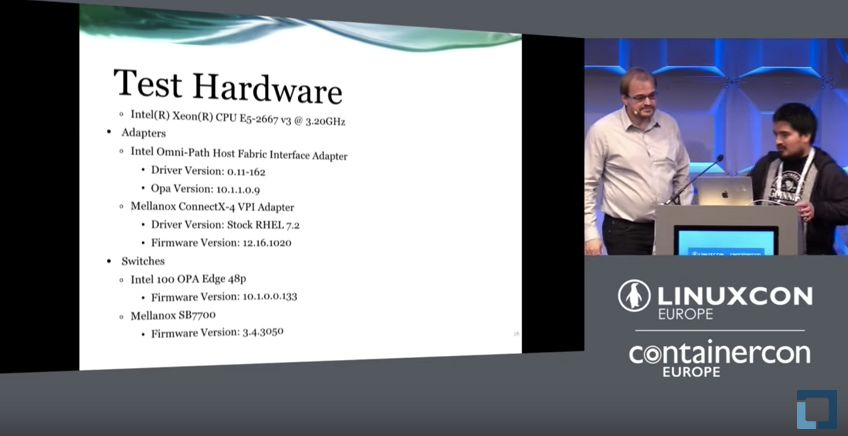
The World of 100G Networking by Christoph Lameter

The idea of 100G networking is becoming feasible and cost effective. This talk gives an overview about the competing technologies in terms of technological differences and capabilities and then discusses the challenges of using various kernel interfaces to communicate at these high speeds.

9 Tips to Properly Configure your OpenStack Instance

In OpenStack jargon, an Instance is a Virtual Machine, the guest workload. It boots from an operating system image, and it is configured with a certain amount of CPU, RAM and disk space, amongst other parameters such as networking or security settings.

In this blog post kindly contributed by Marko Myllynen we’ll explore nine configuration and optimization options that will help you achieve the required performance, reliability and security that you need for your workloads.

Some of the optimizations can be done inside a guest regardless of what has the OpenStack Cloud Administrator enabled in your cloud.

Read more at Red Hat blog

Shell Scripting: An Introduction to the Shift Method and Custom Functions

In Getting started with shell scripting, I covered the basics of shell scripting by creating a pretty handy “despacer” script to remove bothersome spaces from file names. Now I’ll expand that idea to an application that can swap out other characters, too. This introduces the shift method of parsing options as well as creating custom functions.

This article is valid for the bashksh, and zsh shells. Most principles in it hold true for tcsh, but there are significant differences in tcsh syntax and flow of logic that it deserves its own article. If you’re using tcsh and want to adapt this lesson for yourself, go study function hacks (tcsh hacks) and the syntax of conditional statements, and then give it a go. Bonus points shall be rewarded.

Read more at OpenSource.com

GPIO: Displaying currency exchange rate on 7-segment indicators

About the Application

This tutorial is dedicated to the control of 7-segment LED indicators by means of a single Tibbit #00_1 and several shift register ICs (daisy-chained together).

  • 7-segment indicators are reliable and cheap LED devices which can display decimal digits and some characters. Every segment of the indicator is monitored through an allocated input. To drive all these inputs from the LPTS, you need many wires (32 lines for a 4-digit display). A more pragmatic solution is to use shift registers.

  • Simply put, a shift register is a converter between parallel and serial interfaces. This tutorial uses 74HC595 — a very common 8-bit shift register. This IC is monitored by three lines (clock, data, and latch) and has eight outputs to drive one indicator. Shift registers can be daisy-chained to maximize the number of outputs. To drive such a chain, only three control lines are required.

  • The project uses four shift registers connected to four 7-segment indicators to print currency exchange rates granted by the fixer.io JSON API.

  • The app has a plain web interface for selecting the currency to be displayed.

7-segment Indicator

https://vimeo.com/187562341


What you need

Hardware

* Common anode devices require a different connection scheme.

Onboard Software

  • Node.js V6.x.x (pre-installed during production)

External Services

GitHub Repository

Name: gpio-indicators

Repository page: https://github.com/tibbotech/gpio-indicators

Clone URL: https://github.com/tibbotech/gpio-indicators.git

Updated At: Tue Oct 18 2016

The Hardware

  • Configure the LTPS (see the Tibbit layout diagram below).

  • Assemble the shift register chain and 7-segment indicators in accordance with the wiring diagram below (wires connecting the 2nd, 3rd, and the 4th resistor blocks to their respective indicators are not shown).

Note: when the power is first applied the indicators may display a random pattern.

Wiring diagramTibbit configuration                                                 74HC595 pinout

Node.js Application

  • The app utilizes the Request package to fetch data from fixer.io, the Express package to serve static files, and socket.io to enable the link between the onboard app and the web interface.

  • The app requests USD exchange rates for a number of currencies. Requests are performed every ten minutes. The rates at Fixer.io are updated daily, around 4 pm CET.

  • The USDEUR rate will be displayed on the indicators by default.

  • The App’s web server listens on port 3000.

Configuration and Installation

git clone https://github.com/tibbotech/gpio-indicators.git
cd gpio-indicators
npm install .
  • Launch:
node rates

Controlling shift registers

The code that controls 7-segment indicators can be found in /modules/indicate.js.

Comments in the code explain how it works:

const gpio = require("@tibbo-tps/gpio");

class indicator {
    constructor(socket, length){
        this.length = length;


        this.digits = {
            1: [0,1,0,0,1,0,0,0],
            2: [0,0,1,1,1,1,0,1],
            3: [0,1,1,0,1,1,0,1],
            4: [0,1,0,0,1,0,1,1],
            5: [0,1,1,0,0,1,1,1],
            6: [0,1,1,1,0,1,1,1],
            7: [0,1,0,0,1,1,0,0],
            8: [0,1,1,1,1,1,1,1],
            9: [0,1,1,0,1,1,1,1],
            0: [0,1,1,1,1,1,1,0],
            N: [0,0,0,0,0,0,0,1], // Dash symbol
            B: [0,0,0,0,0,0,0,0] // Blank symbol
        };

        // Sets up pins
        this.dataPin = gpio.init(socket+"A");
        this.dataPin.setDirection("output");
        this.dataPin.setValue(0);

        this.clockPin = gpio.init(socket+"B");
        this.clockPin.setDirection("output");
        this.clockPin.setValue(0);

        this.latchPin = gpio.init(socket+"C");
        this.latchPin.setDirection("output");
        this.latchPin.setValue(0);
    }

    indicate(number){
        var inst = this;

        // Converts number to the array of signals to be sent
        const numberToSignals = function(number){
            var output =[];
            number
                .toString()
                .split("")
                .forEach(function(current, index, array){
                    if(current !== "."){
                        var symbol = inst.digits[current];
                        if (symbol === undefined){
                            symbol = Array.from(inst.digits["N"])
                        }else if(array[index+1] === "."){
                            symbol = Array.from(symbol);
                            symbol[0] = 1;
                        }
                        output.unshift(symbol);
                    }
                },[]);

            // crops number to the first "length" digits, if needed
            output = output.slice(-inst.length);

            // pads the number with spaces if it's shorter than 4 digits
            while (output.length < inst.length){
                output.push(inst.digits["B"])
            }

            return output.reduce(function(prev, current){
                return prev.concat(current)
            });
        };

        var signals = numberToSignals(number);

        // Sets ST_CP (latch) to LOW
        // This operation sets shift registers into "programming" mode.
        // When latch is LOW, shift register doesn't change output states,
        // but reads and "remembers" data from DS pin.
        inst.latchPin.setValue(0);

        signals.forEach(function(value){
            // sets value to be pushed into the register on DS pin
            inst.dataPin.setValue(value);

            // sets SH_CP (clock) to HIGH and then to LOW
            // on rising edge of the clock shift register reads state from DS pin, and prepares it for setting on Q0 output.
            // Each of the previously SET values will be shifted to the next pin.
            inst.clockPin.setValue(1);
            inst.clockPin.setValue(0);
        });

        // then all signals are sent, sets ST_CP (latch) to HIGH
        // If latch is HIGH, all the read values will be simultaneously set to the outputs.
        inst.latchPin.setValue(1);
    };
}

module.exports = indicator;

Web Interface

The web interface files can be found in the -/static folder.

  • The web interface app requests data from fixer.io independently from the onboard app.

  • The Angular toolset is utilized to display an exchange rates table.

  • The Socket.IO library is used to identify the board’s status (the table is hidden if the board is offline) and send the currency data to the board.

Intro to Linux Log Files and How to Manage Them with Logrotate

The first thing someone should learn when trying to debug something in Linux is finding and reading logs. Our intro to log files will help you with finding and reading the most common log files of the most used applications and services on Linux.

If you want to manage the log files on Ubuntu, you can use the Logrotate tool

The log files are a great source of information that can help you with solving any issues you’re having with your Linux instance. You can even use the log files to find out how the services work.

Read the complete article here.

How I Manage My Work and Personal GitHub Accounts

I have two accounts on GitHub: Personal and work. How do I access both from the same computer without getting them confused? I have two different ssh keys and use .ssh/config to do the right thing. Some bash aliases also help.

Why?

Why is it important to me that I keep these two accounts separate?

First, certain repos can only be accessed from one account or the other. Public repos can be accessed from either, but private repos are not so lucky.

Second, I want the commit logs for different projects should reflect whether I am “Tom the person” or “Tom the employee”. My work-related repos shouldn’t be littered with my personal email address. 

Posted by Tom Limoncelli in Technical Tips 

Read more at Everything Sysadmin

How Node.js Is Transforming Today’s Enterprises

On today’s episode of The New Stack Makers, we sat down with NodeSource Solutions Architect Manager Joe Doyle and NodeSource Chief Technology Officer and co-founder Dan Shaw to hear more about how today’s enterprises are approaching working with Node.js. 

“There are two things happening. We need to move faster, and everyone’s become a tech company. Yes, Node in isolation is simple, but Node is being used as a tool to solve incredibly hard problems. In the enterprise, you have the blessing and the curse of your legacy that you value,” said Shaw.  

Agile development practices and working at scale often go hand-in-hand, particularly when coupled with microservices. 

Read more at The New Stack

Linkerd Project Joins the Cloud Native Computing Foundation

Today, the Cloud Native Computing Foundation’s (CNCF) Technical Oversight Committee (TOC) voted to accept Linkerd as the fifth hosted project alongside Kubernetes, Prometheus, OpenTracing and Fluentd. You can find more information on the project on their GitHub page.

As with every project accepted by the CNCF — and by extension, The Linux Foundation —  Linkerd is another great example of how open source technologies, both new and more established, are driving and participating in the transformation of enterprise IT.

Linkerd is an open source, resilient service mesh for cloud-native applications. Created by Buoyant founders William Morgan and Oliver Gould in 2015, Linkerd builds on Finagle, the scalable microservice library that powers companies like Twitter, Soundcloud, Pinterest and ING. Linkerd brings scalable, production-tested reliability to cloud-native applications in the form of a service mesh, a dedicated infrastructure layer for service communication that adds resilience, visibility and control to applications without requiring complex application integration.

“As companies continue the move to cloud native deployment models, they are grappling with a new set of challenges running large scale production environments with complex service interactions,” said Fintan Ryan, Industry Analyst at Redmonk. “The service mesh concept in Linkerd provided a consistent abstraction layer for these challenges, allowing developers to deliver on the promise of microservices and cloud native applications at scale. In bringing linkerd under the auspices of CNCF, Buoyant are providing an important building block for to the wider cloud native community to use with confidence.”

Enabling Resilient and Responsive Microservice Architectures

Linkerd enables a consistent, uniform layer of visibility and control across services and adds features critical for reliability at scale, including latency-aware load balancing, connection pooling, automatic retries and circuit breaking. As a service mesh, Linkerd also provides transparent TLS encryption, distributed tracing and request-level routing. These features combine to make applications scalable, performant, and resilient. Linkerd integrates directly with orchestrated environments such as Kubernetes (example) and DC/OS (demo), and supports a variety of service discovery systems such as ZooKeeper, Consul, and etcd. It recently added HTTP/2 and gRPC support and can provide metrics in Prometheus format.

tgdRBUBANNH8EveiQv6rPGMupfJaYUthOOKWyFGC

“The service mesh is becoming a critical part of building scalable, reliable cloud native applications,” said William Morgan, CEO of Buoyant and co-creator of Linkerd. “Our experience at Twitter showed that, in the face of unpredictable traffic, unreliable hardware, and a rapid pace of production iteration, uptime and site reliability for large microservice applications is a function of how the services that comprise that application communicate. Linkerd allows operators to manage that communication at scale, improving application reliability without tying it to a particular set of libraries or implementations.

Companies around the world use Linkerd in production to power their software infrastructure; including Monzo, Zooz, Foresee, Olark, Houghton Mifflin Harcourt, the National Center for Biotechnology Information, Douban and more, and it’s featured as a default part of cloud-native distributions such as Apprenda’s Kismatic Enterprise Toolkit and StackPointCloud.

Notable Milestones:

  • 29 Releases

  • 28 contributors and 400 Slack members

  • 1,370 Github stars

“Linkerd was built based on real world developer experiences in solving problems found when building large production systems at web scale companies like Twitter and Google,” said Chris Aniszczyk, COO of Cloud Native Computing Foundation. “It brings these expertise to the masses, allowing a greater number of companies to benefit from microservices. I’m thrilled to have Linkerd as a CNCF inception project and for them to share their knowledge of building a cloud native service mesh with scalable observability systems to the wider CNCF community.”

As CNCF’s first inception level project, under the CNCF Graduation Criteria v1.0, Linkerd will receive mentoring from the TOC, priority access to the CNCF Community Cluster, and international awareness at CNCF events like CloudNativeCon/KubeCon Europe. The CNCF Graduation Criteria was recently voted in by the TOC to provide every CNCF project an associated maturity level of either inception, incubating or graduated, which allows CNCF to review projects at different maturity levels to advance the development of cloud native technology and services.

For more on Linkerd, listen to an interview with Alex Williams of The New Stack and Morgan here, or stay tuned for Morgan’s upcoming blog post on the project’s roots and why Linkerd joined CNCF.

Open Source Software Strategies for Enterprise IT

Enterprises using open source code in infrastructure must understand both the risks and benefits of community-developed software. Professional open source management is a discipline that focuses on minimizing risk and delivering the benefits of open source software as efficiently as possible.

For successful open source management, enterprises must adopt clear strategies, well-defined policies, and efficient processes. Nobody gets all this right the first time, so it’s also important to review and audit your policies for continuous improvement. Additionally, successful open source initiatives for enterprise IT must provide real ROI in acquisition, integration, and management.

To examine these concepts in detail, The Linux Foundation is hosting a free webinar called “Open Source Strategy for Enterprise IT” on Thursday, Jan. 26 at 10:00 a.m. Pacific time. In this webinar, presented by Bill Weinberg, Sr. Director and Analyst, Open Source Strategy, and Greg Olson, Sr. Director, Open Source Consulting Services, you will learn about:

  • The elements of enterprise-level open source strategy

  • Using OSS as a secret weapon for innovation and differentiation

  • Current and new use cases for OSS

  • Attracting and retaining talent with OSS use and contribution

  • OSS security and compliance in the enterprise context

In a previous webinar (called “When Open Source Becomes Mission Critical”), Weinberg and Olson covered other topics related to managing open source software and talked specifically about the risks of under-management. Such risks include legal factors involving non-compliance of licenses, operational risks involving the ability of the software to meet enterprise needs over time, and security-related risks involving vulnerabilities that companies must stay on top of.

Weinberg said the moral here is that managing open source software shouldn’t be an afterthought; it should be part and parcel of using and integrating open source software.

Learn more in the free webinar “Open Source Strategy for Enterprise IT, on Thursday, January 26, at 10:00 AM Pacific time. Register Now>>