
Home Blog Page 619

How to Keep Hackers out of Your Linux Machine Part 3: Your Questions Answered

Articles one and two in this series covered the five easiest ways to keep hackers out of your Linux machine, and know if they have made it in. This time, I’ll answer some of the excellent security questions I received during my recent Linux Foundation webinar. Watch the free webinar on-demand.

How can I store a passphrase for a private key if private key authentication is used by automated systems?

This is tough. This is something that we struggle with on our end, especially when we are doing Red Teams because we have stuff that calls back automatically. I use Expect but I tend to be old-school on that. You are going to have to script it and, yes, storing that passphrase on the system is going to be tough; you are going to have to encrypt it when you store it.

My Expect script encrypts the passphrase stored and then decrypts, sends the passphrase, and re-encrypts it when it’s done. I do realize there are some flaws in that, but it’s better than having a no-passphrase key.

If you do have a no-passphrase key, and you do need to use it. Then I would suggest limiting the user that requires that to almost nothing. For instance, if you are doing some automated log transfers or automated software installs, limit the access to only what it requires to perform those functions.

You can run commands by SSH, so don’t give them a shell, make it so they just run that command and it will actually prevent somebody from stealing that key and doing something other than just that one command.

What do you think of password managers such as KeePass2?

Password managers, for me, are a very juicy target. With the advent of GPU cracking and some of the cracking capabilities in EC2, they become pretty easy to get past.  I steal password vaults all the time.

Now, our success rate at cracking those, that’s a different story. We are still in about the 10 percent range of crack versus no crack. If a person doesn’t do a good job at keeping a secure passphrase on their password vault, then we tend to get into it and we have a large amount of success. It’s better than nothing but still you need to protect those assets. Protect the password vault as you would protect any other passwords.

Do you think it is worthwhile from a security perspective to create a new Diffie-Hellman moduli and limit them to 2048 bit or higher in addition to creating host keys with higher key lengths?

Yeah. There have been weaknesses in SSH products in the past where you could actually decrypt the packet stream. With that, you can pull all kinds of data across. People use this safes to transfer files and passwords and they do it thoughtlessly as an encryption mechanism. Doing what you can to use strong encryption and changing your keys and whatnot is important. I rotate my SSH keys — not as often as I do my passwords — but I rotate them about once a year. And, yeah, it’s a pain, but it gives me peace of mind. I would recommend doing everything you can to make your encryption technology as strong as you possibly can.

Is using four completely random English words (around 100k words) for a passphrase okay?

Sure. My passphrase is actually a full phrase. It’s a sentence. With punctuation and capitalization. I don’t use anything longer than that.

I am a big proponent of having passwords that you can remember that you don’t have to write down or store in a password vault. A password that you can remember that you don’t have to write down is more secure than one that you have to write down because it’s funky.

Using a phrase or using four random words that you will remember is much more secure than having a string of numbers and characters and having to hit shift a bunch of times. My current passphrase is roughly 200 characters long. It’s something that I can type quickly and that I remember.

Any advice for protecting Linux-based embedded systems in an IoT scenario?

IoT is a new space, this is the frontier of systems and security. It is starting to be different every single day. Right now, I try to keep as much offline as I possibly can. I don’t like people messing with my lights and my refrigerator. I purposely did not buy a connected refrigerator because I have friends that are hackers, and I know that I would wake up to inappropriate pictures every morning. Keep them locked down. Keep them locked up. Keep them isolated.

The current malware for IoT devices is dependent on default passwords and backdoors, so just do some research into what devices you have and make sure that there’s nothing there that somebody could particularly access by default. Then make sure that the management interfaces for those devices are well protected by a firewall or another such device.

Can you name a firewall/UTM (OS or application) to use in SMB and large environments?

I use pfSense; it’s a BSD derivative. I like it a lot. There’s a lot of modules, and there’s actually commercial support for it now, which is pretty fantastic for small business. For larger devices, larger environments, it depends on what admins you can get a hold of.

I have been a CheckPoint admin for most of my life, but Palo Alto is getting really popular, too. Those types of installations are going to be much different from a small business or home use. I use pfSense for any small networks.

Is there an inherent problem with cloud services?

There is no cloud; there are only other people’s computers. There are inherent issues with cloud services. Just know who has access to your data and know what you are putting out there. Realize that when you give something to Amazon or Google or Microsoft, then you no longer have full control over it and the privacy of that data is in question.

What preparation would you suggest to get an OSCP?

I am actually going through that certification right now. My whole team is. Read their materials. Keep in mind that OSCP is going to be the offensive security baseline. You are going to use Kali for everything. If you don’t — if you decide not to use Kali — make sure that you have all the tools installed to emulate a Kali instance.

It’s going to be a heavily tools-based certification. It’s a good look into methodologies. Take a look at something called the Penetration Testing Framework because that would give you a good flow of how to do your test and their lab seems to be great. It’s very similar to the lab that I have here at the house.

Watch the full webinar on demand, for free. And see parts one and two of this series for five easy tips to keep your Linux machine secure.

Mike Guthrie works for the Department of Energy doing Red Team engagements and penetration testing.

The World of 100G Networking

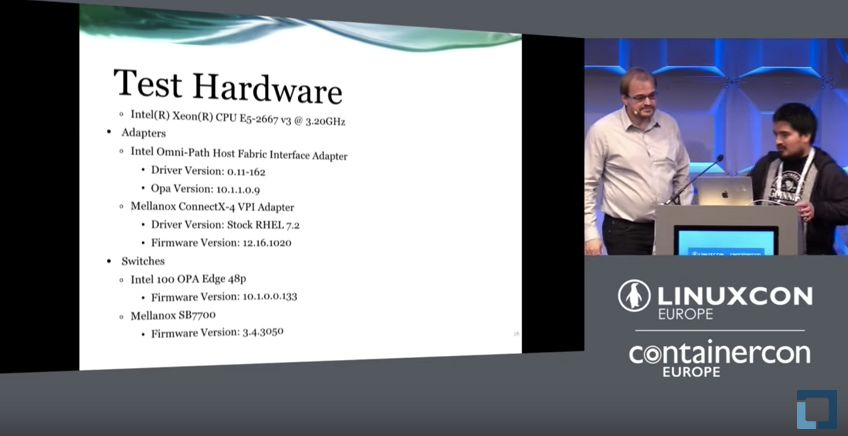
Capacity and speed requirements keep increasing for networking, but going from where are now to 100G networking isn’t a trivial matter, as Christopher Lameter and Fernando Garcia discussed recently in their LinuxCon Europe talk about the world of 100G networking. It may not be easy, but with recently developed machine learning algorithms combined with new, more powerful servers, the idea of 100G networking is becoming feasible and cost effective.

Lameter talked about the challenge of processing the massive amount of data generated by a 100G network. He says that “a 1500 bit packet takes 115 nanoseconds. There is no time for you to process that. You can get 60 of those maximum packets within the 10 microsecond window. You will never be able to process this stuff at full speed, so this means the existing mechanism that can compensate for this in the 10G timeframe must either become more sophisticated or you must find other ways to process this data.”

One thing making 100G possible now is hardware with processors like Intel Skylake and IBM Power8 that are capable of sustaining 100G to memory. In addition to server resources, Lameter mentioned that we have also development of a large amount of machine learning, artificial intelligence, and algorithms that can help process the data more quickly. There is also funding from the U.S. Department of Education for new developments in the computer industry with the intent to build a much more powerful supercomputer that can do an extra petaflop of computation.

Moving forward, 100G is maturing, but the software, including the operating system network stack needs to mature to handle these speeds. In particular, Lameter said that in addition to memory throughput, ongoing issues like proper APIs and deeper integration of cpu, memory, and IO are required to make 100G networking a reality.

For all of the technical details, including Garcia’s section on testing and measurement, watch the entire video of the talk. 

Interested in speaking at Open Source Summit North America on September 11-13? Submit your proposal by May 6, 2017. Submit now>>

Not interested in speaking but want to attend? Linux.com readers can register now with the discount code, LINUXRD5, for 5% off the all-access attendee registration price. Register now to save over $300!

4 Open Source Configuration Management Tools for DevOps

In the past, maintaining technology infrastructure, deploying applications, and provisioning environments involved many manual, iterative tasks. But in today’s DevOps arena, true automation of these tasks has arrived. The benefits of automated configuration management range from time savings to elimination of human error.

Meanwhile, configuration management platforms and tools have converged directly with the world of open source. In fact, several of the very best tools are fully free and open source. From server orchestration to securely delivering high-availability applications, open source tools ranging from Chef to Puppet can bring organizations enormous efficiency boosts.

The prevalence of cloud computing, and the open platforms that facilitate it, have contributed to the benefits organizations can reap from configuration management tools. Cloud platforms allow teams to deploy and maintain applications serving thousands of users, and the leading open source configuration management tools have wrapped in ways to automate all relevant processes.

The Linux Foundation recently announced the release of its 2016 report “Guide to the Open Cloud: Current Trends and Open Source Projects.” This third annual report provides a comprehensive look at the state of open cloud computing, and includes a section on configuration management tools for DevOps. You can download the report now, and one of the first things to notice is that it aggregates and analyzes research, illustrating how trends in containers, configuration managers, and more are reshaping cloud computing. The report provides descriptions and links to categorized projects central to today’s open cloud environment.

In this series, we are calling out many of these projects from the guide, by category, providing extra insights on how the overall category is evolving. Below, you’ll find a collection of several important configuration tools for DevOps and the impact that they are having, along with links to their GitHub repositories, all gathered from the Guide to the Open Cloud:

Configuration Management

Ansible

Ansible is Red Hat’s open source IT automation engine for cloud provisioning, configuration management, application deployment, intra-service orchestration, and other IT needs on multi-tier architectures. Ansible on GitHub

Chef

Chef is a configuration management tool to automate infrastructure. It manages servers in the cloud, on-premises, or in a hybrid environment. Chef on GitHub

Puppet

Puppet is an open source server automation tool for configuration and management. It works on Linux, Unix, and Windows systems and performs administrative tasks (such as adding users, installing packages, and updating server configurations) based on a centralized specification. Puppet on GitHub

Salt Open

Salt Open is orchestration and configuration management software to manage infrastructure and applications at scale. It’s the upstream open source project for SaltStack and runs on Linux and Windows. Salt on GitHub

Learn more about trends in open source cloud computing and see the full list of the top open source cloud computing projects. Download The Linux Foundation’s Guide to the Open Cloud report today!

The World of 100G Networking by Christoph Lameter

The idea of 100G networking is becoming feasible and cost effective. This talk gives an overview about the competing technologies in terms of technological differences and capabilities and then discusses the challenges of using various kernel interfaces to communicate at these high speeds.

9 Tips to Properly Configure your OpenStack Instance

In OpenStack jargon, an Instance is a Virtual Machine, the guest workload. It boots from an operating system image, and it is configured with a certain amount of CPU, RAM and disk space, amongst other parameters such as networking or security settings.

In this blog post kindly contributed by Marko Myllynen we’ll explore nine configuration and optimization options that will help you achieve the required performance, reliability and security that you need for your workloads.

Some of the optimizations can be done inside a guest regardless of what has the OpenStack Cloud Administrator enabled in your cloud.

Read more at Red Hat blog

Shell Scripting: An Introduction to the Shift Method and Custom Functions

In Getting started with shell scripting, I covered the basics of shell scripting by creating a pretty handy “despacer” script to remove bothersome spaces from file names. Now I’ll expand that idea to an application that can swap out other characters, too. This introduces the shift method of parsing options as well as creating custom functions.

This article is valid for the bashksh, and zsh shells. Most principles in it hold true for tcsh, but there are significant differences in tcsh syntax and flow of logic that it deserves its own article. If you’re using tcsh and want to adapt this lesson for yourself, go study function hacks (tcsh hacks) and the syntax of conditional statements, and then give it a go. Bonus points shall be rewarded.

Read more at OpenSource.com

GPIO: Displaying currency exchange rate on 7-segment indicators

About the Application

This tutorial is dedicated to the control of 7-segment LED indicators by means of a single Tibbit #00_1 and several shift register ICs (daisy-chained together).

  • 7-segment indicators are reliable and cheap LED devices which can display decimal digits and some characters. Every segment of the indicator is monitored through an allocated input. To drive all these inputs from the LPTS, you need many wires (32 lines for a 4-digit display). A more pragmatic solution is to use shift registers.

  • Simply put, a shift register is a converter between parallel and serial interfaces. This tutorial uses 74HC595 — a very common 8-bit shift register. This IC is monitored by three lines (clock, data, and latch) and has eight outputs to drive one indicator. Shift registers can be daisy-chained to maximize the number of outputs. To drive such a chain, only three control lines are required.

  • The project uses four shift registers connected to four 7-segment indicators to print currency exchange rates granted by the fixer.io JSON API.

  • The app has a plain web interface for selecting the currency to be displayed.

7-segment Indicator

https://vimeo.com/187562341


What you need

Hardware

* Common anode devices require a different connection scheme.

Onboard Software

  • Node.js V6.x.x (pre-installed during production)

External Services

GitHub Repository

Name: gpio-indicators

Repository page: https://github.com/tibbotech/gpio-indicators

Clone URL: https://github.com/tibbotech/gpio-indicators.git

Updated At: Tue Oct 18 2016

The Hardware

  • Configure the LTPS (see the Tibbit layout diagram below).

  • Assemble the shift register chain and 7-segment indicators in accordance with the wiring diagram below (wires connecting the 2nd, 3rd, and the 4th resistor blocks to their respective indicators are not shown).

Note: when the power is first applied the indicators may display a random pattern.

Wiring diagramTibbit configuration                                                 74HC595 pinout

Node.js Application

  • The app utilizes the Request package to fetch data from fixer.io, the Express package to serve static files, and socket.io to enable the link between the onboard app and the web interface.

  • The app requests USD exchange rates for a number of currencies. Requests are performed every ten minutes. The rates at Fixer.io are updated daily, around 4 pm CET.

  • The USDEUR rate will be displayed on the indicators by default.

  • The App’s web server listens on port 3000.

Configuration and Installation

git clone https://github.com/tibbotech/gpio-indicators.git
cd gpio-indicators
npm install .
  • Launch:
node rates

Controlling shift registers

The code that controls 7-segment indicators can be found in /modules/indicate.js.

Comments in the code explain how it works:

const gpio = require("@tibbo-tps/gpio");

class indicator {
    constructor(socket, length){
        this.length = length;


        this.digits = {
            1: [0,1,0,0,1,0,0,0],
            2: [0,0,1,1,1,1,0,1],
            3: [0,1,1,0,1,1,0,1],
            4: [0,1,0,0,1,0,1,1],
            5: [0,1,1,0,0,1,1,1],
            6: [0,1,1,1,0,1,1,1],
            7: [0,1,0,0,1,1,0,0],
            8: [0,1,1,1,1,1,1,1],
            9: [0,1,1,0,1,1,1,1],
            0: [0,1,1,1,1,1,1,0],
            N: [0,0,0,0,0,0,0,1], // Dash symbol
            B: [0,0,0,0,0,0,0,0] // Blank symbol
        };

        // Sets up pins
        this.dataPin = gpio.init(socket+"A");
        this.dataPin.setDirection("output");
        this.dataPin.setValue(0);

        this.clockPin = gpio.init(socket+"B");
        this.clockPin.setDirection("output");
        this.clockPin.setValue(0);

        this.latchPin = gpio.init(socket+"C");
        this.latchPin.setDirection("output");
        this.latchPin.setValue(0);
    }

    indicate(number){
        var inst = this;

        // Converts number to the array of signals to be sent
        const numberToSignals = function(number){
            var output =[];
            number
                .toString()
                .split("")
                .forEach(function(current, index, array){
                    if(current !== "."){
                        var symbol = inst.digits[current];
                        if (symbol === undefined){
                            symbol = Array.from(inst.digits["N"])
                        }else if(array[index+1] === "."){
                            symbol = Array.from(symbol);
                            symbol[0] = 1;
                        }
                        output.unshift(symbol);
                    }
                },[]);

            // crops number to the first "length" digits, if needed
            output = output.slice(-inst.length);

            // pads the number with spaces if it's shorter than 4 digits
            while (output.length < inst.length){
                output.push(inst.digits["B"])
            }

            return output.reduce(function(prev, current){
                return prev.concat(current)
            });
        };

        var signals = numberToSignals(number);

        // Sets ST_CP (latch) to LOW
        // This operation sets shift registers into "programming" mode.
        // When latch is LOW, shift register doesn't change output states,
        // but reads and "remembers" data from DS pin.
        inst.latchPin.setValue(0);

        signals.forEach(function(value){
            // sets value to be pushed into the register on DS pin
            inst.dataPin.setValue(value);

            // sets SH_CP (clock) to HIGH and then to LOW
            // on rising edge of the clock shift register reads state from DS pin, and prepares it for setting on Q0 output.
            // Each of the previously SET values will be shifted to the next pin.
            inst.clockPin.setValue(1);
            inst.clockPin.setValue(0);
        });

        // then all signals are sent, sets ST_CP (latch) to HIGH
        // If latch is HIGH, all the read values will be simultaneously set to the outputs.
        inst.latchPin.setValue(1);
    };
}

module.exports = indicator;

Web Interface

The web interface files can be found in the -/static folder.

  • The web interface app requests data from fixer.io independently from the onboard app.

  • The Angular toolset is utilized to display an exchange rates table.

  • The Socket.IO library is used to identify the board’s status (the table is hidden if the board is offline) and send the currency data to the board.

Intro to Linux Log Files and How to Manage Them with Logrotate

The first thing someone should learn when trying to debug something in Linux is finding and reading logs. Our intro to log files will help you with finding and reading the most common log files of the most used applications and services on Linux.

If you want to manage the log files on Ubuntu, you can use the Logrotate tool

The log files are a great source of information that can help you with solving any issues you’re having with your Linux instance. You can even use the log files to find out how the services work.

Read the complete article here.

How I Manage My Work and Personal GitHub Accounts

I have two accounts on GitHub: Personal and work. How do I access both from the same computer without getting them confused? I have two different ssh keys and use .ssh/config to do the right thing. Some bash aliases also help.

Why?

Why is it important to me that I keep these two accounts separate?

First, certain repos can only be accessed from one account or the other. Public repos can be accessed from either, but private repos are not so lucky.

Second, I want the commit logs for different projects should reflect whether I am “Tom the person” or “Tom the employee”. My work-related repos shouldn’t be littered with my personal email address. 

Posted by Tom Limoncelli in Technical Tips 

Read more at Everything Sysadmin

How Node.js Is Transforming Today’s Enterprises

On today’s episode of The New Stack Makers, we sat down with NodeSource Solutions Architect Manager Joe Doyle and NodeSource Chief Technology Officer and co-founder Dan Shaw to hear more about how today’s enterprises are approaching working with Node.js. 

“There are two things happening. We need to move faster, and everyone’s become a tech company. Yes, Node in isolation is simple, but Node is being used as a tool to solve incredibly hard problems. In the enterprise, you have the blessing and the curse of your legacy that you value,” said Shaw.  

Agile development practices and working at scale often go hand-in-hand, particularly when coupled with microservices. 

Read more at The New Stack