
Home Blog Page 627

OpenSSL For Apache and Dovecot: Part 2

Last week, as part of our meandering OpenSSL series, we learned how to configure Apache to use OpenSSL and to force all sessions to use HTTPS. Today, we’ll protect our Postfix/Dovecot mail server with OpenSSL. The examples build on the previous tutorials; see the Resources section at the end for links to all previous tutorials in this series.

You will have to configure both Postfix and Dovecot to use OpenSSL, and we’ll use the key and certificate that we created in OpenSSL For Apache and Dovecot .

Postfix Configuration

You must edit /etc/postfix/main.cf and /etc/postfix/master.cf. The main.cf example is the complete configuration, building on our previous tutorials. Substitute your own OpenSSL key and certificate names, and local network:

compatibility_level=2
smtpd_banner = $myhostname ESMTP $mail_name (Ubuntu/GNU)
biff = no
append_dot_mydomain = no

myhostname = localhost
alias_maps = hash:/etc/aliases
alias_database = hash:/etc/aliases
myorigin = $myhostname
mynetworks = 127.0.0.0/8 [::ffff:127.0.0.0]/104 [::1]/128 192.168.0.0/24
mailbox_size_limit = 0
recipient_delimiter = +
inet_interfaces = all

virtual_mailbox_domains = /etc/postfix/vhosts.txt
virtual_mailbox_base = /home/vmail
virtual_mailbox_maps = hash:/etc/postfix/vmaps.txt
virtual_minimum_uid = 1000
virtual_uid_maps = static:5000
virtual_gid_maps = static:5000
virtual_transport = lmtp:unix:private/dovecot-lmtp

smtpd_tls_cert_file=/etc/ssl/certs/test-com.pem
smtpd_tls_key_file=/etc/ssl/private/test-com.key
smtpd_use_tls=yes

smtpd_sasl_auth_enable = yes
smtpd_sasl_type = dovecot
smtpd_sasl_path = private/auth
smtpd_sasl_authenticated_header = yes

In master.cf un-comment the following lines in the submission inet section, and edit smtpd_recipient_restrictions as shown:

#submission inet n  -  y  -  - smtpd
  -o syslog_name=postfix/submission
  -o smtpd_tls_security_level=encrypt
  -o smtpd_sasl_auth_enable=yes
  -o milter_macro_daemon_name=ORIGINATING
  -o smtpd_recipient_restrictions=permit_mynetworks,permit_sasl_authenticated,reject
  -o smtpd_tls_wrappermode=no

Reload Postfix and you’re finished:

$ sudo service postfix reload

Dovecot Configuration

In our previous tutorials we made a single configuration file for Dovecot, /etc/dovecot/dovecot.conf, rather than using the default giant herd of multiple configuration files. This is a complete configuration that builds on our previous tutorials. Again, use your own OpenSSL key and certificate, and your own userdb home file:

protocols = imap pop3 lmtp
log_path = /var/log/dovecot.log
info_log_path = /var/log/dovecot-info.log
disable_plaintext_auth = no
mail_location = maildir:~/.Mail
pop3_uidl_format = %g
auth_mechanisms = plain

passdb {
  driver = passwd-file
  args = /etc/dovecot/passwd
}

userdb {
  driver = static
  args = uid=vmail gid=vmail home=/home/vmail/studio/%u
}

service lmtp {
 unix_listener /var/spool/postfix/private/dovecot-lmtp {
   group = postfix
   mode = 0600
   user = postfix
  }
}

protocol lmtp {
  postmaster_address = postmaster@studio
}

service lmtp {
  user = vmail
}

service auth {
  unix_listener /var/spool/postfix/private/auth {
    mode = 0660
        user=postfix
        group=postfix
  }
 }

ssl=required
ssl_cert = </etc/ssl/certs/test-com.pem
ssl_key = </etc/ssl/private/test-com.key

Restart Dovecot:

$ sudo service postfix reload

Testing With Telnet

Now we can test our setup by sending a message with telnet, just like we did before. But wait, you say, telnet does not support TLS/SSL, so how can this be so? By opening an encrypted session with openssl s_client first is how. The openssl s_client output will display your certificate, fingerprint, and a ton of other information so you’ll know that your server is using the correct certificate. Commands that you type after the session is established are in bold:

$ openssl s_client -starttls smtp -connect studio:25
CONNECTED(00000003)
[masses of output snipped]
    Verify return code: 0 (ok)
---
250 SMTPUTF8
EHLO studio
250-localhost
250-PIPELINING
250-SIZE 10240000
250-VRFY
250-ETRN
250-AUTH PLAIN
250-ENHANCEDSTATUSCODES
250-8BITMIME
250-DSN
250 SMTPUTF8
mail from: <carla@domain.com>
250 2.1.0 Ok
rcpt to: <alrac@studio>
250 2.1.5 Ok
data
354 End data with .subject: TLS/SSL test
Hello, we are testing TLS/SSL. Looking good so far.
.
250 2.0.0 Ok: queued as B9B529FE59
quit
221 2.0.0 Bye

You should see a new message in your mail client, and it will ask you to verify your SSL certificate when you open it. You may also use openssl s_client to test your Dovecot POP3 and IMAP services. This example tests encrypted POP3, and message #5 is the one we created in telnet (above):

$ openssl s_client -connect studio:995
CONNECTED(00000003)
[masses of output snipped]
    Verify return code: 0 (ok)
---
+OK Dovecot ready
user alrac@studio 
+OK
pass password
+OK Logged in.
list
+OK 5 messages:
1 499
2 504
3 514
4 513
5 565
.
retr 5
+OK 565 octets
Return-Path: <carla@domain.com>
Delivered-To: alrac@studio
Received: from localhost
        by studio.alrac.net (Dovecot) with LMTP id y8G5C8aablgKIQAAYelYQA
        for <alrac@studio>; Thu, 05 Jan 2017 11:13:10 -0800
Received: from studio (localhost [127.0.0.1])
        by localhost (Postfix) with ESMTPS id B9B529FE59
        for <alrac@studio>; Thu,  5 Jan 2017 11:12:13 -0800 (PST)
subject: TLS/SSL test
Message-Id: <20170105191240.B9B529FE59@localhost>
Date: Thu,  5 Jan 2017 11:12:13 -0800 (PST)
From: carla@domain.com

Hello, we are testing TLS/SSL. Looking good so far.
.
quit
+OK Logging out.
closed

Now What?

Now you have a nice functioning mail server with proper TLS/SSL protection. I encourage you to study Postfix and Dovecot in-depth; the examples in these tutorials are as simple as I could make them, and don’t include fine-tuning for security, anti-virus scanners, spam filters, or any other advanced functionality. I think it’s easier to learn the advanced features when you have a basic working system to use.

Come back next week for an openSUSE package management cheat sheet.

Resources

Learn more about Linux through the free “Introduction to Linux” course from The Linux Foundation and edX.
How to Make the Most of the Free Intro to DevOps Course on edX

John Willis — a leader in the DevOps movement — is hosting a series of webinars to accompany the free Introduction to DevOps: Transforming and Improving Operations training course from The Linux Foundation and edX. Last month, he provided a thorough introduction to the course and offered tips and tricks on how to get the most out of it. If you missed this introduction, you can watch the complete webinar replay on demand.
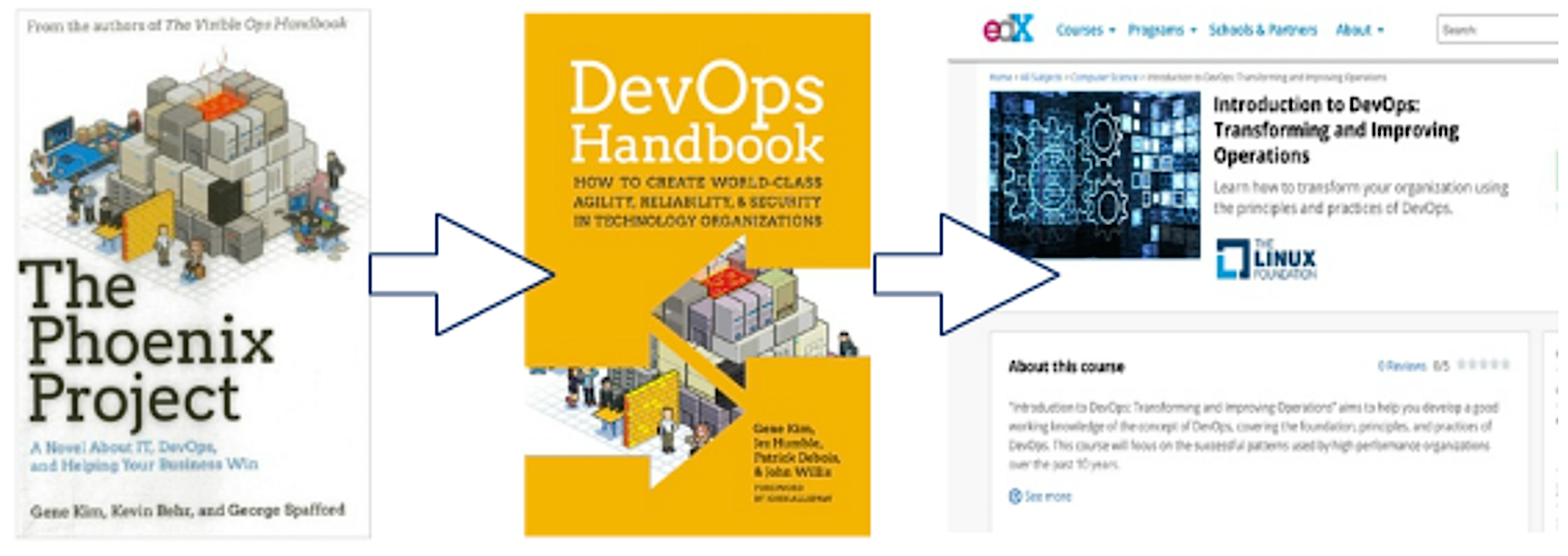
There are several ways to approach this course. Willis described four different approaches to consider depending on your needs and interests:

  1. Watch just the included videos in the free course (15 hours)

  2. Read the following suggested books and then do Step 1 (30 hours total)

    1. The Phoenix Project — a novel by Gene Kim about bottlenecks, constraints, theory of constraints, importance of flow, a modern day re-imagining of the book The Goal

    2. DevOps Handbook (co-authored by John Willis)

  3. Steps 1 & 2 + watch the additional suggested videos, read suggested blogs, and white papers (50-60 hours total, including 15 hours of videos, 15 hours of suggested advanced research, two books, and 10 advanced reading recommendations)

  4. Treat it like a college course doing all of the above and all the recommended reading (estimated 120 hours)

Hear Willis’s advice in the video clip below:

Attend Office Hours Webinars

Attending Willis’s office hours webinar to get your DevOps questions answered is another great way to make the most of this free course. Throughout this multi-webinar series, Willis will share his insights and guide participants through the course. In each upcoming webinar, he will provide a quick chapter summary, leaving plenty of time to answer your questions and enhance your training experience.

In the first session, presented in December, Willis explained the DevOps concept, which he says can help organizations develop and deliver services more quickly and reliably. In session two, earlier this month, Willis covered Chapter 1 of the DevOps course then opened up the session to answer questions in the style of college office hours. You can watch the replay of session two on demand.

In session three, Willis will briefly cover Chapter 2 of the training course and address your questions.

Join us on January 31, 2017 for the next installment of this webinar series: Intro to DevOps with Course Author John Willis, in which Willis will provide a brief overview of Chapter 2 and take your DevOps questions! Register Now >>

John Willis is the cohost of DevOps Cafe Podcast (Devopscafe.org) and a co-author of the DevOps Handbook. He is also the course author of Introduction to DevOps: Transforming and Improving Operations, a free course from The Linux Foundation and hosted on edX.org.

New Linux WiFi Daemon Streamlines Networking Stack

If you’ve ever used an embedded Linux development device with wireless networking, you’ve likely benefited from the work of Marcel Holtmann, the maintainer of the BlueZ Bluetooth daemon since 2004, who spoke at an Embedded Linux Conference Europe panel in October.

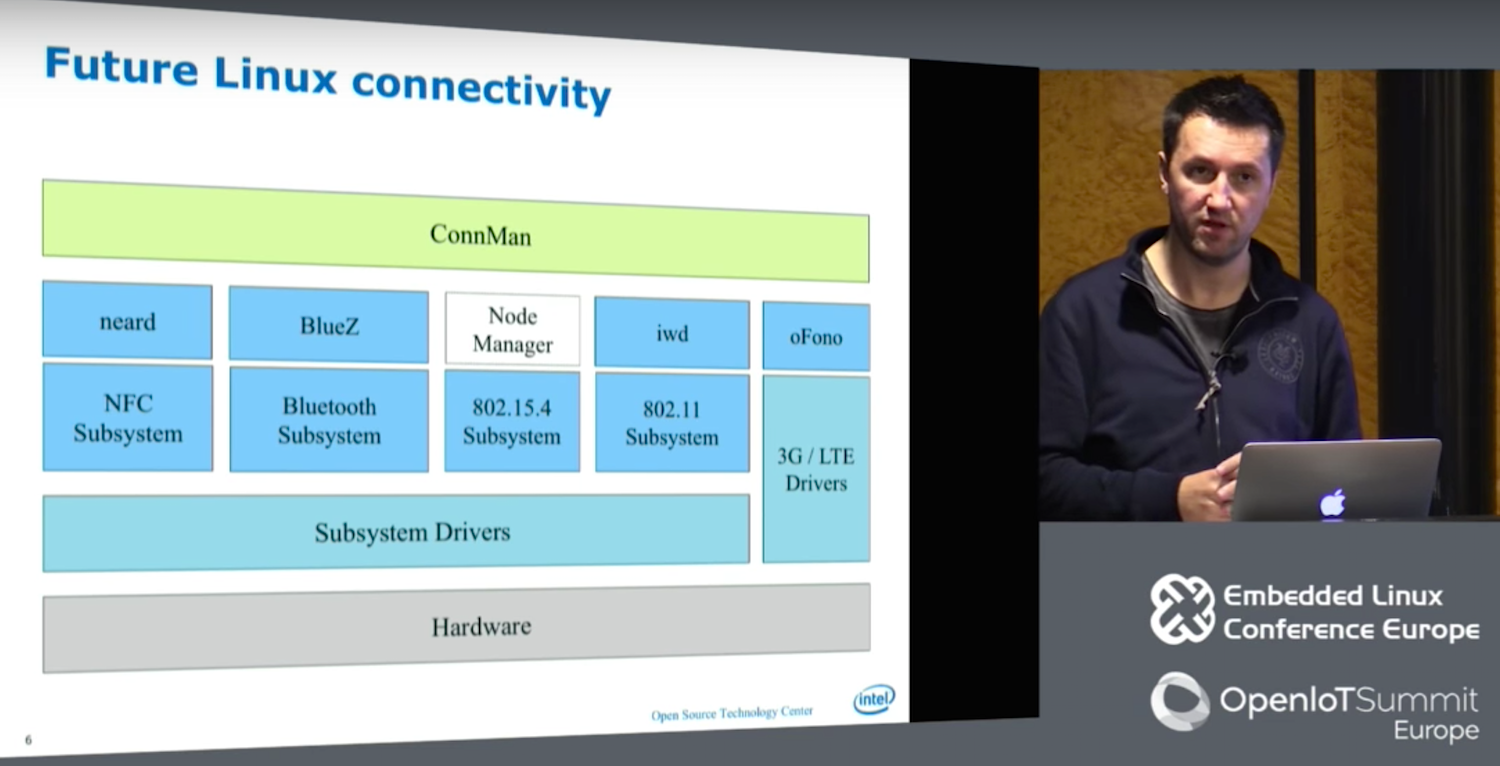
In 2007 Holtmann joined Intel’s Open Source Technology Center (OTC), where he created ConnMan (Internet connectivity), oFono (cellular telephony), and PACrunner (proxy handling). Over the last year, Holtmann and other OTC developers have been developing a replacement for the wpa_supplicant WiFi daemon called IWD (Internet Wireless Daemon). In the process, they have streamlined the entire Linux communications stack.

“We decided to create a wireless daemon that actually works on IoT devices,” said Holtmann in the presentation called “New Wireless Daemon for Linux.”

The IWD is now mostly complete, featuring a smaller footprint and more streamlined workflow than wpa_supplicant while adding support for the latest wireless technologies. The daemon was also developed with the help of the OTC’s Denis Kenzior, Andrew Zaborowski, Tim Kourt, Rahul Rahul, and Mat Martineau.

IWD aims to solve problems in wpa_supplicant including lack of persistence and limited feedback. “Wpa-supplicant doesn’t remember anything,” Holtmann told the ELCE audience in Berlin. “By comparison, like BlueZ, oFono, and neard [NFC], IWD is stateful, so whenever you repair the device, it remembers and restarts when you reboot. Wpa_supplicant does have a function that lets you redo the configuration network, but it’s so hackish and problematic that nobody uses it. Everyone stores this information at a higher layer, which complicates things and creates an imbalance.”

Wpa_supplicant manages to be overly comprehensive while also failing to reveal key information. The daemon is difficult to use because it adds support for “just about every OS or wireless extension,” including many things that are never actually used, says Holtmann. “The abstraction system actually gets in your way.”

Despite its capacity to “abstract everything,” wpa_supplicant does not expose much information. “You have to know a lot about WiFi and how things like parsing are done,” said Holtmann. “I just want to connect, not read a 2,000-page document to find out I have to use a pushbutton method to gain my credentials.”

Other limitations with wpa-supplicant include its dependence on blocking operations, in which the system must ask each peripheral for confirmation of operations before it moves on to ask other systems. This leads to “a system just waiting for something to happen,” says Holtmann.

Wpa-supplicant has other complications like “exposing itself to user space in a least four different ways,” said Holtmann. These include the antiquated D-Bus v1 and still problematic D-Bus v2, which “swallows states,” as well as a binder interface and CTL, “which is great for users, but for a daemon is horrible.”

To make up for the limitations of D-Bus v2, the overall wireless stack long ago spawned an abstraction layer above D-Bus and below ConnMan called gSupplicant, While this helped offload work from ConnMan, the latter was still overloaded.

Reducing Complexity

With the addition of IWD, Holtmann and his team removed GSupplicant entirely. It also replaced other user space interfaces with a single updated D-Bus layer. In addition, the new stack removed inoctl and lib Netlink (libnl), which Holtmann called “a blocking design that can’t track family changes.” Libnl was replaced with Generic Netlink, which does offer family discovery.

Holtmann also eliminated wireless extensions (wext) because “they’re broken and hopefully they will someday be removed from the kernel,” he said. The new wireless stack retains cfg80211 and nl80211 (Netlink), although the latter has been upgraded and pushed upstream.

The OTC team developed a new Embedded Linux Library (ELL) that features tables, queues, and ring buffers to reduce the complexity of IWD while still providing basic building blocks for netlink and D-Bus. “We extended ELL with cryptographic support libraries instead of using OpenSSL, which is huge, and is not an easy interface,” said Holtmann. “In a lot of cases you need only 10 percent of OpenSSL, so we went a different route and used random numbers using the getandom() system call, with no problems with boot up time.”

Finally, for ciphers and hashes Holtmann used AF_ALG, which he defined as “an encrypt interface for symmetric ciphers into the kernel.” With ELL and AF_ALG in place, the developers could eliminate OpenSSL, as well as gnuTLS and InternalTLS. The team also added tracing support for nl80211 with the help of a tool called iwmon.

“Now we can start scanning and selecting networks,” said Holtmann. “We can do active and passing scanning and SSDID grouping, and support open networks, We can connect to open access points and W2 and WPA/RSN protected access points. We have simple roaming, experimental D-Bus APIs, and EAPol, and ELL logging for D-Bus and Generic Netlink.”

Holtmann went on to discuss new support for enterprise WiFi technologies like X.509 certificates and TLS. Recent kernels have improved X.509 support, so the OTC team is exploiting the kernel’s keyrings to better manage certificates.

Future tasks include finishing up enterprise WiFi and developing a debug API. The developers are also looking at possible integrations with Passpoint 2.0, P2P, Miracast, and Neighborhood Aware Networking (NAN). Once IWD is complete, Holtmann and the OTC will address 802.15.4, bringing improvements to 802.15.4 compliant wireless protocols like ZigBee, 6LowPAN, and Thread.

Watch the complete video below:

Embedded Linux Conference + OpenIoT Summit North America will be held on February 21 – 23, 2017 in Portland, Oregon. Check out over 130 sessions on the Linux kernel, embedded development & systems, and the latest on the open Internet of Things.


Linux.com readers can register now with the discount code, LINUXRD5, for 5% off the attendee registration price. Register now>>

Continuous Delivery of a Microservice Architecture using Concourse.ci, Cloud Foundry and Artifactory

This comprehensive tutorial takes a simple microservice architecture and explains how to setup a concourse pipeline in order to test and deploy single microservices independently without affecting the overall microservice system. Cloud Foundry will be used as a platform to which the microservices are deployed to.

Along the way all basic concourse.ci concepts are explained.

The goal of the concourse pipeline – which is build during this tutorial – is to automatically trigger and execute the following steps whenever a developer pushes a change to a git repository…
Read more at Specify.io

The Basics of Web Application Security

We discussed how authentication establishes the identity of a user or system (sometimes referred to as a principal or actor). Until that identity is used to assess whether an operation should be permitted or denied, it doesn’t provide much value. This process of enforcing what is and is not permitted is authorization. Authorization is generally expressed as permission to take a particular action against a particular resource, where a resource is a page, a file on the files system, a REST resource, or even the entire system.

Authorize on the Server

Among the most critical mistakes a programmer can make is hiding capabilities rather than explicitly enforcing authorization on the server. For example, it is not sufficient to simply hide the “delete user” button from users that are not administrators. The request coming from the user cannot be trusted, so the server code must perform the authorization of the delete.

Read more at Martin Fowler blog

Report: Agile and DevOps Provide More Benefits Together Than Alone

DevOps and agile are two of the most popular ways businesses try to stay ahead of the market, but put them together and they provide even more benefits. A new report, Accelerating Velocity and Customer Value with Agile and DevOps, from CA Technologies revealed businesses experienced greater customer satisfaction and brand loyalty when integrating agile with DevOps.

According to the report, about 75% of respondents reported improved employee recruitment and retention when using agile with DevOps, compared to 30% who only used agile. In addition, businesses saw a 45% increase in employee productivity, a 29% increase in customer satisfaction, and a 78% increase in customer experience when using the two. 

Read more at SDTimes

The Hard Truths about Microservices and Software Delivery

Everybody’s talking about Microservices right now. But are you having trouble figuring out what it means for you? 

At the recent LISA conference, I had the pleasure of giving a joint talk with Avan Mathur, Product Manager of ElectricFlow, on Microservices.

With Microservices, what was once one application, with self-contained processes, is now a complex set of independent services that connect via the network. Each microservice is developed and deployed independently, often using different languages, technology stacks, and tools.

While Microservices support agility—particularly on the development side—they come with many technical challenges that greatly impact your software delivery pipelines, as well as other operations downstream.

During our session, Avan and I discussed some use cases that lend themselves well for microservices, and the implications of microservices on the architecture and design of your application, infrastructure, delivery pipeline, and operations. We discussed increased pipeline variations, complexities in integration, testing and monitoring, governance, and more. We also shared best practices on how to avoid these challenges when implementing microservices and designing your pipelines to support microservices-driven applications.

Read the full article here

Understanding Docker Networking Drivers And Their Use Cases

Applications requirements and networking environments are diverse and sometimes opposing forces. In between applications and the network sits Docker networking, affectionately called the Container Network Model or CNM. It’s CNM that brokers connectivity for your Docker containers and also what abstracts away the diversity and complexity so common in networking. The result is portability and it comes from CNM’s powerful network drivers. These are pluggable interfaces for the Docker Engine, Swarm, and UCP that provide special capabilities like multi-host networking, network layer encryption, and service discovery.

Naturally, the next question is which network driver should I useEach driver offers tradeoffs and has different advantages depending on the use case.

Read more at Docker 

Microservices Design: Get Scale, Availability Right

The promise of microservices is that you can divide and conquer the problem of a large application by breaking it down into its constituent services and what each one actually accomplishes. Each can be supported by an independent team. You get to the point where you can break the limits on productivity that Fred Brooks described in his book, The Mythical Man-month.

Aside from being able to throw more people at the problem and—unlike what Brooks observed—actually become more efficient once you get a microservices-based application into production, you can quickly start thinking about how to scale it. Think resiliency and high-availability. And you can easily determine what services don’t need scaling, or high availability.

These things become easier than with a large, monolithic application, because each microservice can scale in its own way. Here are my insights about these variables, and the decisions you may face in designing your own microservices platform.

Read the full article here

Why Open Source is Rising Up the Networking Stack in 2017

With 2016 behind us, we can reflect on a landmark year where open source migrated up the stack. As a result a new breed of open service orchestration projects were announced, including ECOMP, OSM, OpenBaton, and The Linux Foundation  project OPEN-O, among them. While the scope varies between orchestrating Virtualized Network Functions (VNFs) in a Cloud Data Center, and more comprehensive end-to-end service delivery platforms, the new open service orchestration initiatives enable carriers and cable operators to automate end-to-end service delivery, ultimately minimizing the software development required for new services.

Open orchestration was propelled into the limelight as major operators have gained considerable experience over the past years with open source platforms, such as OpenStack and OpenDaylight. Many operators have announced ambitious network virtualization strategies, that are moving from proofs of concept (PoCs) into the field, including AT&T (Domain 2.0), Deutsche Telekom (TeraStream), Vodafone (Ocean), Telefonica (Unica), NTT Communications (O3), China Mobile (NovoNet), China Telecom (CTNet2025), among them.

Traditional Standards Development Organizations (SDOs) and open source projects have paved the way for the emergence of open orchestration. For instance, OPNFV (open NFV reference platform) expanded its charter to address NFV Management and Orchestration (MANO). Similarly, MEF is pursuing the Lifecycle Services Orchestration (LSO) initiative to standardize service orchestration, and intends to accelerate deployment with the OpenLSO open reference platform. Other efforts such as the TMForum Zero-touch Orchestration, Operations and Management (ZOOM) project area addressing the operational aspects as well.

Standards efforts are guiding the open source orchestration projects, which set the stage for 2017 to become The Year of Orchestration.

One notable example is the OPEN-O project, which delivered its initial release less than six months from the project formation. OPEN-O enables operators to deliver end-to-end composite services over NFV Infrastructure along with SDN and legacy networks. In addition to addressing the NFV MANO, OPEN-O integrates a model-driven automation framework, service design front-end, and connectivity services orchestration.

OPEN-O is backed by some of the world’s largest and innovative SDN/NFV market leaders, including China Mobile, China Telecom, Ericsson, Huawei, Intel, and VMware among them. The project is also breaking new ground in evolving how open source can be successfully adopted for large scale, carrier-grade platforms.

To learn more about OPEN-O and rapidly evolving open orchestration landscape, please join us for our upcoming Webinar:

Title: Introduction to Open Orchestration and OPEN-O

Date/Time: Tue January 17, 2017  10:00a – 11:00a PST

Presenter: Marc Cohn, Executive Director, OPEN-O

Register today to save your spot in this engaging and interactive webinar. Can’t make it on the 17th? Registering will also ensure you get a copy of the recording via email after the presentation is over.

For additional details on OPEN-O, visit: www.open-o.org