Home Blog Page 631

Node.js: The State of the Union

By all metrics, it has been a good year for Node.js. During his keynote at Node.js Interactive in November, Rod Vagg, Technical Steering Committee Director at the Node.js Foundation talked about the progress that the project made during 2016.

Node.js. Foundation is now sponsored by nearly 30 companies, including heavyweights such as IBM, PayPal, and Red Hat. The community of developers is also looking healthy. Within the Technical Group, currently 90 core collaborators have commit access to the Node.js repository; 48 of these core collaborators were active in the last year. Since 2009, when Node.js was born, the total number contributors — that is, the number of people who have made changes in the Node Git repository — has grown over time. In fact, 2016 saw twice as many people per month contributing to the code base as in 2015.

State of the Core Code

In 2016, the number of commits increased 125 percent relative to 2015, said Vagg. Despite this, the core stayed more or less stable. 37 percent of JavaScript and C++ code received minor changes in the src/ and lib/ directories. 58 percent of the test code was also tweaked. However, the majority of commits went into documentation. More than 90 percent of the lines in the API documents were changed. Vagg thinks documentation is probably the easiest way to get into contributing to Node and is therefore acting as a gateway for first-time contributors.

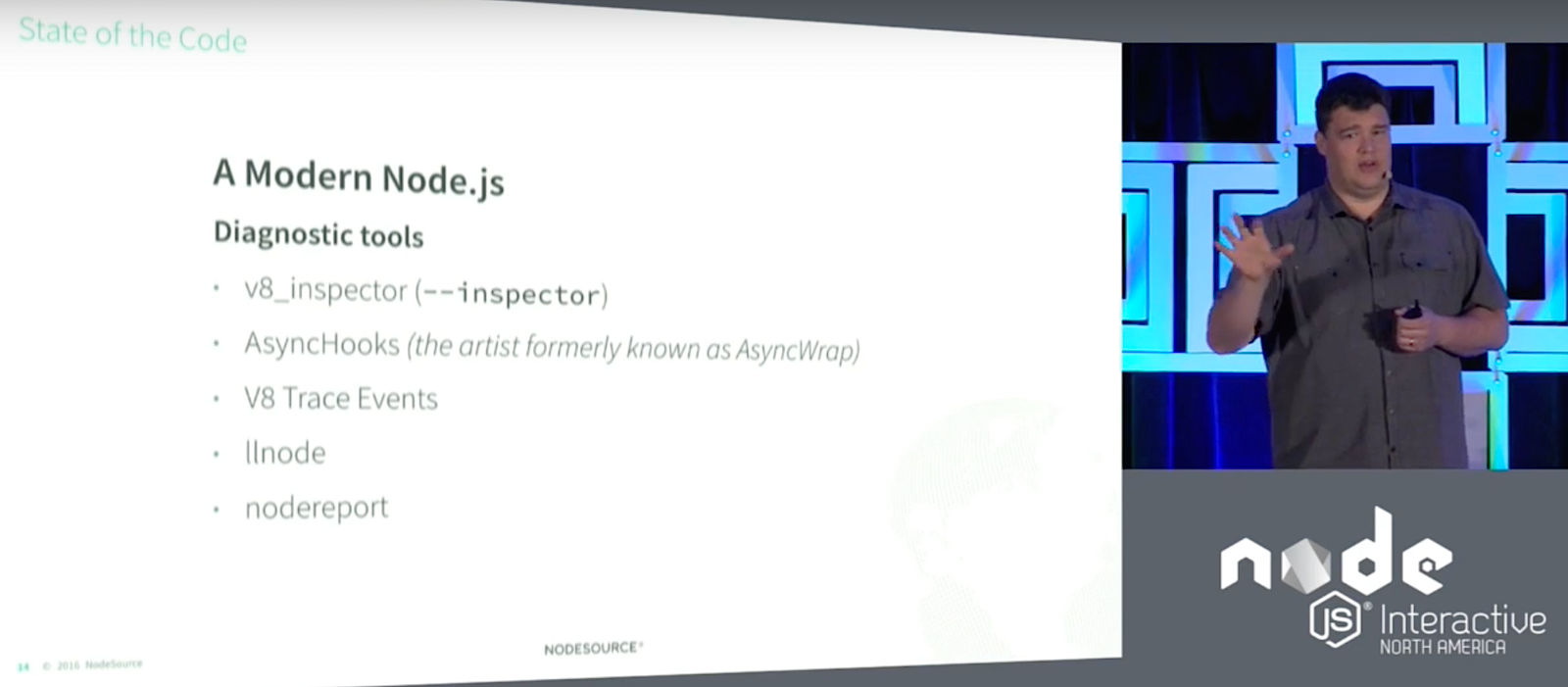
Vagg said developers can now count on more tools to help them with their tasks if they decide to tackle programming issues. Node has been traditionally hard to debug, but new utilities, such as the V8_inspector extension for Chrome allows a developer to attach Chrome’s DevTools to your application. This extension will probably supersede the old debugger in the near future. Other tools, such as AsyncHooks (previously AsyncWrap), V8 Trace Events, llnode, and nodereport also contribute to making Node.js applications easier to debug.

This hard work is paying off. Version 6, an LTS version, now implements 96 percent of EcmaScript 6/2015, for example. And, it works both ways: Node now has contributors representing the community in the Ecma technical committee that evolves and regulates the development of JavaScript (TC39), so Node.js will have a say in the future of the base language, too.

State of Releases & LTS

To understand how Node releases and versions work, Vagg explained that in 2016 there were 63 releases covering four different versions: 0.12, 4, 5, and 6. From version 4 onwards, versions with even numbers are LTS and are supported for three years. Versions with odd numbers are supported for 3 months. Hence, Vagg recommended that shops with large deployments always implement even numbered versions.

Version 0.10, what Vagg described as the “Windows XP of Node.js,” is still being used “because it was the first ‘ready’ version. However 0.10 received no support in 2016, having reached its end of life in 2015. Version 0.12 reached its end of life in 2016. Hence, Vagg urged people using either of these versions to update to something more current, such as version 4 (code named “Argon“).

Argon is an LTS version and will be maintained until April 2018. Version 5, however, as a non-LTS version, reached its end of life in June 2016. The most current non-LTS at the moment of writing is version 7, which will be maintained until April 2017. There is also another LTS version apart from version 4 available and which is also current: version 6 (code name “Boron“). Boron started life in April 2016 and will be maintained until 2019. A new LTS version, version 8, will be coming out in April 2017 and will be maintained until 2020.

Ever since version 4, Vagg says upgrading has been pretty painless. Currently, a whole crew of release managers guarantees a smooth transition between versions. If you are using Node in a large environment, Vagg recommends implementing a migration strategy to avoid “getting stuck” on an unsupported version.

State of the Build

Vagg used the State of the Build segment of his presentation to mention the companies and individual users that make development possible within Node.js. Digital Ocean and Rackspace, for example, have donated resources and funds from the very beginning. The foundation also counts on an ARM cluster made up largely by Raspberry Pis, many of which have been donated by individuals.

These resources are configured to test Node.js core, libuv, V8, full release builds and more. the cluster itself contains 141 build, text and release cluster nodes connected full-time. Each build is compiled for 25 different operating systems and eight different architectures. Every build is painstakingly tested before releasing a new version.

State of Security

In discussing the state of security, Vagg said that security reports should be sent to security@nodejs.org; it is the task of the CTC and domain experts to discuss and solve issues. When an issue is confirmed, it is notified to the nodejs.org and nodejs-sec Google Groups, following Node.js’ “full disclosure” policy. LTS release lines receive as few changes as possible to ensure the platform remains stable. Overall, there were seven security releases during 2016, none of which were severe.

The Node.js Foundation is also working on a new Node security project. The project implements a public working group, made up by professionals from ^lift and other interested parties. The idea is to facilitate the creation of a healthy ecosystem of security service and product providers that work together to bring more rigor and formality to the core and open source ecosystem and its security handling.

Membership is also open to individuals, communities, and other companies. Vagg encouraged anyone who would like to join to visit the workgroup’s site on GitHub.

Watch the complete video below:

If you are interested in speaking or attending Node.js Interactive North America 2017 – happening in Vancouver, Canada next fall, please subscribe to the Node.js community newsletter to keep abreast with dates and time.


This Week in Open Source News: Mark Shuttleworth Talks Business Models, OSS Trustworthiness Requires Work, & More

This week in Linux and open source headlines, Canonical’s Mark Shuttleworth opens up about spawning new opportunities with the interoperability of various areas of OSS, Steven J. Vaughan-Nichols urges the Linux community to roll up their sleeves in 2017, and more! Read on to stay on the forefront of open source news:

1) “When sensors, data, machine learning and the cloud collide, new kinds of opportunity can emerge.”

Open Source Pioneer Mark Shuttleworth Says Smart “Edge’ Devices Spawn Business Models– The Wall Street Journal

2) Linux turned 25 last year– but that doesn’t mean OSS is done proving itself. 

Linux 2017: With Great Power Comes Great Responsibility– ZDNet

3) “Endless is launching its first products designed specifically for the United States.”

Endless Introduces Linux Mini Desktop PCs for American Market– Liliputing

4) The Linux Foundation’s Hyperledger Project has formed a new working group to reach out to Chinese members, which make up over a quarter or their base. 

Hyperledger Blockchain Project Announces ‘Technical Working Group China’ Following Strong Interest– Cryptocoins News

5) “AT&T is an open-source software company now  — I just have to pinch myself.” said Jim Zemlin at CES.

The Linux Foundation is Still Adjusting to AT&T’s Embrace of Open Source– GeekWire

Top 50 Developer Tools of 2016

Want to know exactly which tools should be on your radar in 2017? Our 3rd annual StackShare Awards do just that! We’ve analyzed thousands of data points to bring you rankings for the hottest tools, including:

Read more at StackShare

Crossing the AI Chasm

Every day brings another exciting story of how artificial intelligence is improving our lives and businesses. AI is already analyzing x-rays, powering the Internet of Things and recommending best next actions for sales and marketing teams. The possibilities seem endless.

But for every AI success story, countless projects never make it out of the lab. That’s because putting machine learning research into production and using it to offer real value to customers is often harder than developing a scientifically sound algorithm. Many companies I’ve encountered over the last several years have faced this challenge, which I refer to as “crossing the AI chasm.”

I recently presented those learnings at ApacheCon, and in this article I’ll share my top four lessons for overcoming both the technical and product chasms that stand in your path.

Read more at TechCrunch

Multi-Arch Docker Images

Although the promise of Docker is the elimination of differences when moving software between environments, you’ll still face the problem that you can’t cross platform boundaries, i.e. you can’t run a Docker image built for x86_64 on a arm board such as the Raspberry Pi. This means that if you want to support multiple architectures, you typically end up tagging images with their arch (e.g. myimage-arm and myimage-x86_64). However, it turns out that the Docker image format already supports multi-platform images (or more accurately, “manifests”),…

Read more at Container Solutions

Hands On With the First Open Source Microcontroller

2016 was a great year for Open Hardware. The Open Source Hardware Association released their certification program, and late in the year, a fe pleasew silicon wizards met in Mountain View to show off the latest happenings in the RISC-V instruction set architecture.

The RISC-V ISA is completely unlike any other computer architecture. Nearly every other chip you’ll find out there, from the 8051s in embedded controllers, 6502s found in millions of toys, to AVR, PIC, and whatever Intel is working on are closed-source designs. You cannot study these chips, you cannot manufacture these chips, and if you want to use one of these chips, your list of suppliers is dependent on who has a licensing agreement with who.

Read more at Hackaday

How Fast Are Unix Domain Sockets?

It probably happened more than once, when you ask your team about how a reverse proxy should talk to the application backend server. “Unix sockets. They are faster.”, they’ll say. But how much faster this communication will be? And why a Unix domain socket is faster than an IP socket when multiple processes are talking to each other in the same machine? Before answering those questions, we should figure what Unix sockets really are.

Unix sockets are a form of inter-process communication (IPC) that allows data exchange between processes in the same machine. They are special files, in the sense that they exist in a file system like a regular file (hence, have an inode and metadata like ownership and permissions associated to it), but will be read and written using recv() and send() syscalls instead of read() and write(). When binding and connecting to a Unix socket, we’ll be using file paths instead of IP addresses and ports.

Read more at Myhro Blog

What’s the Future of Data Storage?

Storage planning today means investing in an ecosystem that supports multiple technologies. The winning vendors will create integrated delivery models that obviate the differences between particular technologies.

 What’s the future of storage? Is it internal server-based/software-defined? Hyperconverged? All-flash arrays? Cloud? Hybrid cloud?

Over the next few weeks we’re going to spend some time going over all of these different technologies and examining why each is viable (or not). But for now, I’m going to go ahead and give you the short answer: All of the above. 

Read more at HPE

Enjoy Kubernetes with Python

Over the past few years it seems that every cool and trending project is using Golang, but I am a Python guy and I feel a bit left out!

Kubernetes is no stranger to this, it is written in Go, and most clients that you will find are based on the Go client. Building a Kubernetes client has become easier. The Go client is now in its own repository. Therefore, if you want to write in Go, you can just import the Go client and not the entirety of the Kubernetes source code. Also, the Kubernetes API specification follows the OpenAPI standardization effort. If you want to use another language, you can use the OpenAPI specification and auto-generate one.

A couple weeks ago, the Python in me was awakened by a new incubator project for Kubernetes: a Python client almost single-handedly developed by Google engineer @mbohlool. The client is now available on PyPi and — like most Python packages — easily installable from source. To be fair, there already existed a Python client that was built on the Swagger specification but it received little attention.

So, let’s have a look at this new Python client for Kubernetes and take it for a spin.

Getting It

As always the easiest way is to get it from PyPi:


pip install kubernetes


Or get it from source:


pip install git+https://github.com/kubernetes-incubator/client-python.git


Or clone it and build locally:


git clone https://github.com/kubernetes-incubator/client-python.git

cd client-python

python ./setup.py install


Whatever you prefer.

Once installed, you should be able to start Python and import the kubernetes module. Check that your installation went fine.


$ python

Python 2.7.12 (default, Oct 11 2016, 14:42:23) 

[GCC 4.2.1 Compatible Apple LLVM 7.0.2 (clang-700.1.81)] on darwin

Type "help", "copyright", "credits" or "license" for more information.

>>> import kubernetes


Note that you can use Python 2.7 and Python 3.5

To get started using it, you will need a working Kubernetes endpoint. If you do not have one handy, use minikube.

Structure

Before we dive straight into examples, we need to look at the structure of the client. Most of the code is auto-generated. Each Kubernetes API group endpoint is usable and needs to be instantiated separately.

For example:

  • The basic resources (e.g., pods, services) will need the v1 stable API endpoint: kubernetes.client.CoreV1Api

  • The jobs resources will need the Batch endpoint: kubernetes.client.BatchV1Api

  • The deployments will need the Extensions endpoint: kubernetes.client.ExtensionsV1beta1Api

  • The horizontal pod autoscalers will need the Autoscaling endpoint: kubernetes.client.AutoscalingV1Api

In each of these endpoints, the REST methods for all resources will be available as separate Python functions. For example:

  • list_namespaces()

  • delete_namespace()

  • create_namespace()

  • patch_namespace()

The response from these method calls will be dictionaries that you can easily explore with Python.

The part that will take the most time is that, this client is a very low-level client. It can do almost everything you can do with the Kubernetes API, but it does not have any high-level wrappers to make your life easy.

For instance, creating your first Pod will involve going through the auto-generated documentation and finding out all the classes that you need to instantiate to define your Pod specification properly. I will save you some time and show you how, but the process will need to be repeated for all resources.

Example

The client can read your kubeconfig file, but the easiest configuration possible might be to run a proxy kubectl proxy then open Python, create the V1 API endpoint, and list your nodes.


>>> from kubernetes import client,config

>>> client.Configuration().host="http://localhost:8080"

>>> v1=client.CoreV1Api()

>>> v1.list_node()

...

>>> v1.list_node().items[0].metadata.name

minikube


Now the fun with Python starts. Try to list your namespaces:


>>> for ns in v1.list_namespace().items:

...     print ns.metadata.name  

...

default

kube-system


To create a resource, you will need the endpoint the resource is in and some type of body. Because the API version and kind will be implicitly known by the endpoint and the function name, you will only need to create some metadata and probably some specification.

For example, to create a namespace, we need an instance of the namespace class, and we need to set the name of the namespace in the metadata. The metadata is yet another instance of a class.


>>> body = client.V1Namespace()

>>> body.metadata = client.V1ObjectMeta(name="linuxcon")

>>> v1.create_namespace(body)


Deleting a namespace is a little bit simpler but you need to specify some deletion options.


v1.delete_namespace(name="linuxcon", body=client.V1DeleteOptions())


Now I cannot leave you without starting a Pod. A Pod is made of metadata and a specification. The specification contains a list of containers and volumes. In its simple form, a Pod will have a single container and no volumes. Let’s start a busybox Pod. It will use the busybox image and just sleep. In the example below, you can see that we have a few classes:

  • V1Pod for the overall pod.

  • V1ObjectMeta for metadata

  • V1PodSpec for the pod specification

  • V1Container for the container that runs in the Pod

Let’s instantiate a pod and set its metadata, which include its name:


>>> pod = client.V1Pod()

>>> pod.metadata = client.V1ObjectMeta(name="busybox")


Now let’s define the container that will run in the Pod:


>>> container = client.V1Container()

>>> container.image = "busybox"

>>> container.args = ["sleep", "3600"]

>>> container.name = "busybox"


Now let's define the Pod’s specification, in our case, a single container:


>>> spec = client. V1PodSpec()

>>> spec.containers = [container]

>>> pod.spec = spec


And, finally, we are ready to create our Pod in Python:


>>> v1.create_namespaced_pod(namespace="default",body=pod)


We’ll see if the community (i.e., us) decides to add some convenience functions to the Kubernetes python client. Things like kubectl run ghost –image-ghost are quite powerful, and although it can be easily coded with this Python module, it might be worthwhile to make it a first-class function.

Read the previous articles in this series:

Getting Started With Kubernetes Is Easy With Minikube

Rolling Updates and Rollbacks using Kubernetes Deployments

Helm: The Kubernetes Package Manager

Federating Your Kubernetes Clusters — The New Road to Hybrid Clouds

Want to learn more about Kubernetes? Check out the new, online, self-paced Kubernetes Fundamentals course from The Linux Foundation. Sign Up Now!

Sebastien Goasguen (@sebgoa) is a long time open source contributor. A member of the Apache Software Foundation and the Kubernetes organization, he is also the author of the O’Reilly Docker cookbook. He recently founded skippbox, which offers solutions, services and training for Kubernetes.

OpenSSL For Apache and Dovecot

At long last, my wonderful readers, here is your promised OpenSSL how-to for Apache, and next week you get SSL for Dovecot. In this two-part series, we’ll learn how to create our own OpenSSL certificates and how to configure Apache and Dovecot to use them.

The examples here build on these tutorials:

Creating Your Own Certificate

Debian/Ubuntu/Mint store private keys and symlinks to certificates in /etc/ssl. The certificates bundled with your system are kept in /usr/share/ca-certificates. Certificates that you install or create go in /usr/local/share/ca-certificates/.

This example for Debian/etc. creates a private key and public certificate, converts the certificate to the correct format, and symlinks it to the correct directory:


$ sudo openssl req -x509 -days 365 -nodes -newkey rsa:2048 
   -keyout /etc/ssl/private/test-com.key -out 
   /usr/local/share/ca-certificates/test-com.crt
Generating a 2048 bit RSA private key
.......+++
......................................+++
writing new private key to '/etc/ssl/private/test-com.key'
-----
You are about to be asked to enter information that will 
be incorporated into your certificate request.
What you are about to enter is what is called a Distinguished 
Name or a DN. There are quite a few fields but you can leave some blank
For some fields there will be a default value,
If you enter '.', the field will be left blank.
-----
Country Name (2 letter code) [AU]:US
State or Province Name (full name) [Some-State]:WA
Locality Name (eg, city) []:Seattle
Organization Name (eg, company) [Internet Widgits Pty Ltd]:Alrac Writing Sweatshop
Organizational Unit Name (eg, section) []:home dungeon
Common Name (e.g. server FQDN or YOUR name) []:www.test.com
Email Address []:admin@test.com

$ sudo update-ca-certificates
Updating certificates in /etc/ssl/certs...
1 added, 0 removed; done.
Running hooks in /etc/ca-certificates/update.d...

Adding debian:test-com.pem
done.
done.

CentOS/Fedora use a different file structure and don’t use update-ca-certificates, so use this command:


$ sudo openssl req -x509 -days 365 -nodes -newkey rsa:2048 
   -keyout /etc/httpd/ssl/test-com.key -out 
   /etc/httpd/ssl/test-com.crt

The most important item is the Common Name, which must exactly match your fully qualified domain name. Everything else is arbitrary. -nodes creates a password-less certificate, which is necessary for Apache. - days defines an expiration date. It’s a hassle to renew expired certificates, but it supposedly provides some extra security. See Pros and cons of 90-day certificate lifetimes for a good discussion.

Configure Apache

Now configure Apache to use your new certificate. If you followed Apache on Ubuntu Linux For Beginners: Part 2, all you do is modify the SSLCertificateFile and SSLCertificateKeyFile lines in your virtual host configuration to point to your new private key and public certificate. The test.com example from the tutorial now looks like this:


SSLCertificateFile /etc/ssl/certs/test-com.pem
SSLCertificateKeyFile /etc/ssl/private/test-com.key

CentOS users, see Setting up an SSL secured Webserver with CentOS in the CentOS wiki. The process is similar, and the wiki tells how to deal with SELinux.

Testing Apache SSL

The easy way is to point your web browser to https://yoursite.com and see if it works. The first time you do this you will get the scary warning from your over-protective web browser how the site is unsafe because it uses a self-signed certificate. Ignore your hysterical browser and click through the nag screens to create a permanent exception. If you followed the example virtual host configuration in Apache on Ubuntu Linux For Beginners: Part 2 all traffic to your site will be forced over HTTPS, even if your site visitors try plain HTTP.

The cool nerdy way to test is by using OpenSSL. Yes, it has a nifty command for testing these things. Try this:


$ openssl s_client -connect www.test.com:443
CONNECTED(00000003)
depth=0 C = US, ST = WA, L = Seattle, O = Alrac Writing Sweatshop, 
OU = home dungeon, CN = www.test.com, emailAddress = admin@test.com
verify return:1
---
Certificate chain
 0 s:/C=US/ST=WA/L=Seattle/O=Alrac Writing Sweatshop/OU=home 
     dungeon/CN=www.test.com/emailAddress=admin@test.com
   i:/C=US/ST=WA/L=Seattle/O=Alrac Writing Sweatshop/OU=home 
     dungeon/CN=www.test.com/emailAddress=admin@test.com
---
Server certificate
-----BEGIN CERTIFICATE-----
[...]

This spits out a giant torrent of information. There is a lot of nerdy fun to be had with openssl s_client; for now it is enough that we know if our web server is using the correct SSL certificate.

Creating a Certificate Signing Request

Should you decide to use a third-party certificate authority (CA), you will have to create a certificate signing request (CSR). You will send this to your new CA, and they will sign it and send it back to you. They may have their own requirements for creating your CSR; this a typical example of how to create a new private key and CSR:


$ openssl req -newkey rsa:2048 -nodes 
   -keyout yourdomain.key -out yourdomain.csr

You can also create a CSR from an existing key:


$ openssl req  -key yourdomain.key 
   -new -out domain.csr

That is all for today. Come back next week to learn how to properly set up Dovecot to use OpenSSL.

Additional Tutorials

Quieting Scary Web Browser SSL Alerts
How to Set Up Secure Remote Networking with OpenVPN on Linux, Part 1
How to Set Up Secure Remote Networking with OpenVPN on Linux, Part 2

Advance your career in system administration! Check out the Essentials of System Administration course from The Linux Foundation.