Home Blog Page 635

7 Awesome Open Source Analytics Software For Linux

Web analytics is nothing but the measuring web traffic. It is not limited to measuring web traffic. It includes:

  1. Analysis
  2. Data collection
  3. Reporting of web data for purposes of understanding and optimizing web pages.

Google Analytics is the most widely used cloud-based web analytics service. However, your data is locked into Google Eco-system. If you want 100% data ownership, try the following open source web analytics software to get information about the number of visitors to your website and the number of page views. The information is useful for market research and understanding popularity trends on your website.

Read more at *nixCraft

7 Notable Legal Developments in Open Source in 2016

A number of interesting and notable legal developments in open source took place in 2016. These seven legal news stories stood out:

1. Victory for Google on fair use in Java API case

In 2012 the jury in the first Oracle v. Google trial found that Google’s inclusion of Java core library APIs in Android infringed Oracle’s copyright. The district court overturned the verdict, holding that the APIs as such were not copyrightable (either as individual method declarations or their “structure, sequence and organization” [SSO]). 

Read more at Opensource.com

Linus Torvalds Announces Ridiculously Small Second Linux 4.10 Release Candidate

The first day of 2017 starts off for Linux users with the release of the second RC (Release Candidate) development version of the upcoming Linux 4.10 kernel, as announced by Linus Torvalds himself.

As expected, Linux kernel 4.10 entered development two weeks after the release of Linux kernel 4.9, on Christmas Day (December 25, 2016), but don’t expect to see any major improvements or any other exciting things in RC2, which comes one week after the release of the first RC, because most of the developers were busy partying.

Read more at Softpedia

Node Interactive 2017: Devs Stoked about K8s, Node in Production and Serverless

Tracy Hinds is the education and community manager for the Node.js Foundation. The educational aspect of her job means she oversees training, onboarding, certification, and other educational programs — with a major focus on providing educational resources that help new Node.js users more readily access the platform. The community aspect means she helps plan, organize and produce events where the Node.js crowd gathers to encounter the foundation’s educational initiatives hands-on and in person.

The foundation’s annual conference, Node Interactive North America 2017, is this week in Vancouver, British Columbia, and Hinds is — naturally — one of the organizers. The New Stack caught up with Hinds to hear all about new tracks and offerings, speakers she is particularly excited to encounter, and what we are pretty sure must be the Node.js community’s first ever 5K Fun Run.

What’s new or different about Node Interactive this year?

To start with, we will all be in one place! Last year we had two different events, in two different locations at two different times of the year. Node Interactive North America, in Austin, and Node Interactive EU, in Amsterdam. 

Read more at The New Stack

ZeroPhone — An Open Source, Dirt Cheap, Linux-powered Smartphone Is Here

Short Bytes: ZeroPhone is an open source smartphone that’s powered by Raspberry Pi Zero. It runs on Linux and you can make one for yourself using parts worth $50. One can use it to make calls and SMS, run apps, and pentesting. Soon, phone’s crowdfunding is also expected to go live.

Raspberry Pi is often listed as one of the most accessible and helpful innovations in the computer hardware industry. It has helped children learn programming and allowed the makers to develop powerful and cheap DIY projects. In the past, we have told you about different Raspberry Pi DIYs like a pocket-size Linux computer, Wi-Fi Drone killer, temperature controller, etc.  Recently, I found an interesting project listed on Hackaday. Named ZeroPhone, this smartphone uses a Raspberry Pi Zero. It’s as open source as possible, making it dirt cheap. Fortunately, all the parts are easily available on eBay and Amazon, and they cost about $50.

Read more at FOSSBytes

Quick Tips and Tricks for the Linux CLI

Using a Linux terminal is always difficult, especially at the beginning when everything is new to the user. I remember my first contact with a Linux terminal like it was yesterday. After all, I was interacting with a machine that responded to everything I typed. I started learning the basic commands such as “cd”, “ps” “w” “mkdir” which at the time it was like I entered another world, a digitalized one which I’m just starting to uncover. The excitement I felt back then still hits me when I discover some great combination of commands to ease the server/service administration or configuration.

Linux is an all-present OS in our world. It is an extremely flexible system due to its open source nature which allows anyone to contribute.

Read more at Quick Linux Tips and Tricks


LXLE: A Linux Distribution Light on Resources But Heavy on Function

Most lightweight Linux distributions are fairly standard: They use a window manager with a small footprint and install a minimal amount of apps to continue with the small size metaphor. In the end, many of those distributions function well…at a cost of functionality. Typically, to get a lightweight distro to do what you want, you wind up having to install numerous other apps, which basically defeats the purpose.

Then there are distributions like LXLE. This particular take on the small footprint Linux feels more like it belongs in the good old regular footprint Linux. It’s stuck squarely in the middle and can stake the claim that it can truly revive your old hardware without doing so at the cost of productivity. And, with the latest release (Eclectica, based on Ubuntu 16.04.01), that distribution is better and more capable than you’d imagine.

LXLE features:

  • Based on Ubuntu/Lubuntu LTS

  • Optimized LXDE user interface

  • Full-featured apps pre-installed (e.g., LibreOffice, GIMP, Audacity, etc.)

  • Latest stable versions of major software

  • Synaptic package manager for adding software

  • Extra PPAs extend available software

  • Exposé, Aero Snap, Quick Launch apps

  • Random wallpaper changer (with 100 wallpapers pre-installed)

  • Theme consistency throughout

  • 32- and 64-bit OS versions available

Although you might scoff at the idea of including so many wallpapers, when you start clicking through the random wallpaper button (located on the desktop panel), you’ll quickly appreciate how beautiful your desktop can be.

Instant familiarity

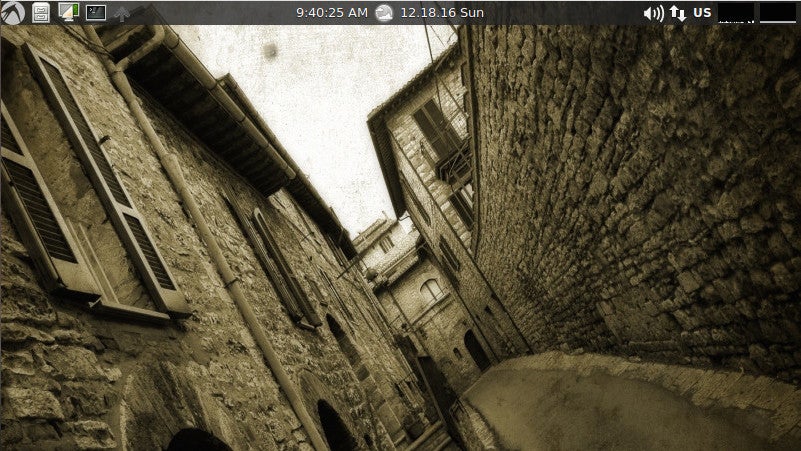
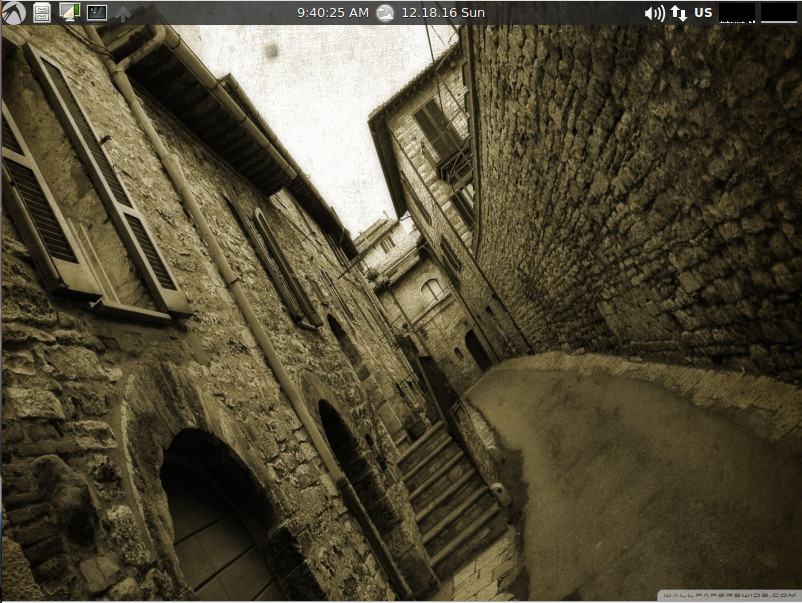
As with most of the lightweight Linux distributions, you’ll find zero learning curve with the desktop environment. LXLE makes great use of LXDE. With the main panel at the top of the desktop (Figure 1), you’ll find the applications menu, shortcuts for the file manager, wallpaper changer app, a launcher for the terminal app, a quick launch app, time/calendar app, and system tray.

Figure 1: The LXLE default desktop is instantly familiar to the user.

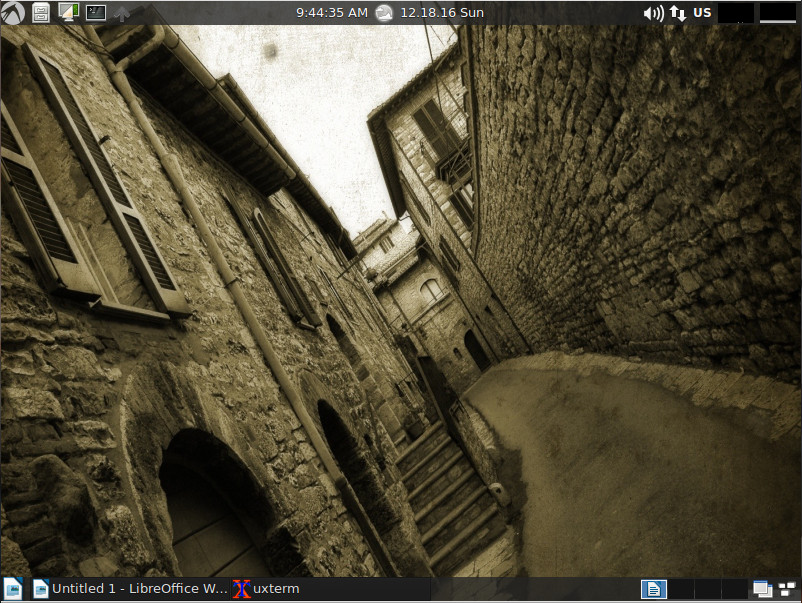
A second panel, set to auto hide, can be found at the bottom of the screen (Figure 2). This panel includes the Application Launch Bar (where you can add application launchers), Window List app (for minimized apps), desktop pager, window iconify, and Exposé button.

Figure 2: The LXLE bottom panel.

Update system

Although LXLE does ship with the Synaptic package manager, I wouldn’t recommend using it to upgrade the system. I attempted two runs with Synaptic and both attempts brought the desktop to a pixelated halt. Instead, LXLE includes a very handy app called uCareSystem. This text-based tool does the following:

  • Updates all available packages

  • Updates your Ubuntu system

  • Downloads and install updates

  • Checks for the list of old Linux Kernels and uninstalls them

  • Clears the cache folder

  • Uninstalls packages that are obsolete or no longer needed

  • Uninstalls orphaned packages

  • Deletes package settings that have been previously uninstalled

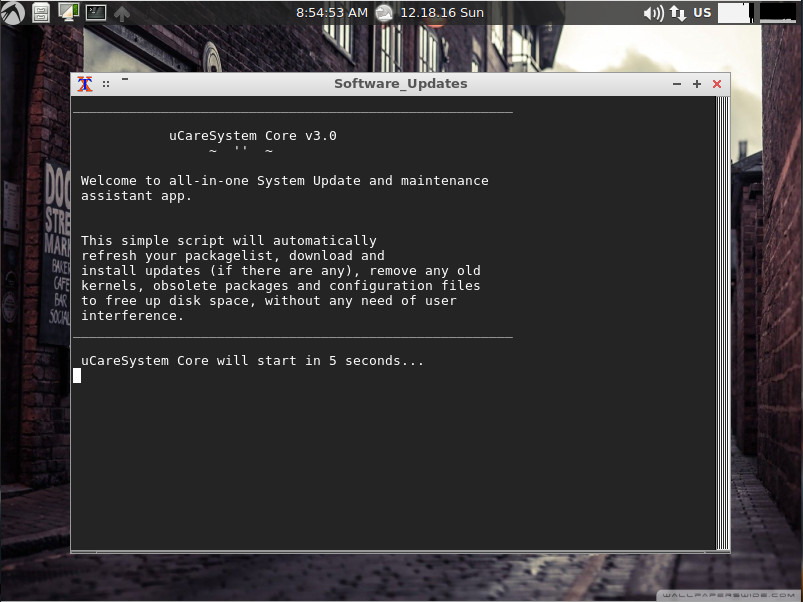
You can launch uCareSystem by clicking Applications > Updates. A terminal window will open (Figure 3), and the tool will automatically run through all of its steps to update and clean your system. This tool is so easy to use, it makes me wonder why more distributions don’t include it.

Figure 3: The uCareSystem tool in action.

You can also run uCareSystem from the terminal window by issuing the command sudo ucaresystem-core. The uCareSystem tool was so impressive, I added it to my running Elementary OS Loki production machine. This can be done with the following commands:

  • sudo add-apt-repository ppa:utappia/stable

  • sudo apt update

  • sudo apt install ucaresystem-core

Not without problems

LXLE is an impressive distribution, but it’s not without its problems. The first issue reared its ugly head during installation. I tend to prefer the live-to-install route, so I booted up the live instance of LXLE…only to be greeted by a password prompt. There was no indication on the website of a required username/password for the live instance and the only mention I could find was within the forums (that being a possible corrupted ISO image). I downloaded a second…and third…and fourth. Each of the live instances required a username and password—something no one seemed to know.

To that end, I opted to go the direct install route. This also failed. The installation would walk me through the wizard and start copying packages. Before the installation of the boot loader could begin, the installation crashed. I attempted this five times before finally giving up.

However, during the user setup process of the direct-install method, I noticed the installer always wanted to default to user qwerty. I took that as a hint and rebooted into a live instance. After entering qwerty as the username and an empty password, I was greeted with the LXLE desktop. Bingo. Next step, run the installer from the live instance. This time, the installation succeeded without a hitch. Within a few minutes, I had a working LXLE and was happily kicking the tires.

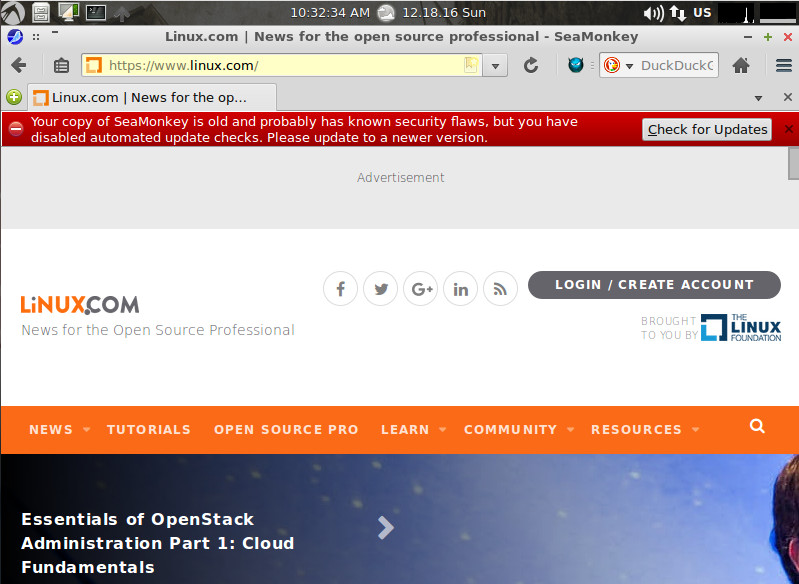
The only other caveat I came across was something that tends to plague most small-footprint distributions…an out-of-date web browser. LXLE uses a Mozilla build of Seamonkey and the second you open it (even after running uCareSystem), you’ll be warned that the included version is out of date (Figure 4).

Figure 4: An out-of-date web browser is not something you want on a desktop.

Clicking on the Check for Updates button came back with no available updates. A sticky conundrum, no doubt. The best way around this is to install either Firefox, Vivaldi, Chrome, or Chromium and avoid the pitfalls that come along with using an out-of-date browser (security vulnerabilities, lack of support, etc.).

A treat to use

Beyond the easily resolved issues, LXLE was a treat to use. As a desktop, it is instantly familiar and runs with the stability of a well-seasoned environment. As a Linux distribution, it will serve you incredibly well, whether you’re running new or older hardware.
Give LXLE a go and see if you don’t opt to make it your distribution of choice.

Advance your career with Linux system administration skills. Check out the Essentials of System Administration course from The Linux Foundation.

How Facebook Uses Linux and Btrfs: An Interview with Chris Mason

Chris Mason is the principal author of Btrfs, the open source file system that’s seen as the default file system for SUSE Enterprise Linux. Mason started working on Btrfs at Oracle and then moved to Facebook where he continued to work on the file system as a member of the company’s Linux kernel team. When Facebook has new kernels that need to go out, Mason helps make sure that everything’s been properly tested and meets performance needs.

We sat down with Mason to learn more about the status of Btrfs and how Facebook is using Linux and Btrfs. Here is an edited version of that interview.

Linux.com: Btrfs has been in development for a long time. Is it ready for prime time? I know some Linux distributions are using it as the default file system, whereas others don’t.

Chris Mason: It’s certainly the default in SUSE Linux Enterprise Server. SUSE spends a considerable amount of energy and people in supporting Btrfs, which I really appreciate. Red Hat hasn’t picked it up the same way. It’s one of those things where people pick up the features that they care the most about and the ones that they want to build on top of.

Linux.com: What are the areas where Btrfs makes more sense? If I am not wrong, Facebook also uses Btrfs?

Mason: Inside of Facebook, again we pick targeted places where we think the features of Btrfs are really beneficial to the workloads at hand. The big areas we are trying to focus on are system management tasks, the snapshotting type of things.

Linux.com: We all know that Facebook is a heavy user of Linux. Within the massive infrastructure of Facebook, where is Linux being used?

Mason: The easiest way to describe the infrastructure at Facebook is that it’s pretty much all Linux. The places we’re targeting for Btrfs are really management tasks around distributing the operating system, distributing updates quickly using the snapshotting features of Btrfs, using the checksumming features of Btrfs and so on.

We also have a number of machines running Gluster, using both XFS and Btrfs. The target there is primary data storage. One of the reasons why they like Btrfs for the Gluster use case is because the data CRCs (cyclic redundancy checks) and the metadata CRCs give us the ability to detect problems in the hardware such as silent data corruption in the hardware. We have actually found a few major hardware bugs with Btrfs so it’s been very beneficial to Btrfs.

Linux.com: While we are talking about Linux at Facebook, I am curious how close or far you are from the mainline as no one is using the stock kernel; everyone creates a minor fork with tweaks and tuning for use case.

Mason: From a Linux point of view, our primary goal with the Linux kernel is to track main line as much as we can. Our goal is to update the kernel at least once a year. We’re trying to move to a more frequent update cycle than that. We have an upstream first policy where we get the changes in the mainline before we use it. If we want to have a feature in the kernel, it has to go to mainline first.

Linux.com: Why do you need your own fork?

Mason: It’s impossible to run mainline kernel. You have to have some kind of fork, you fine-tune things, you tweak things, and you apply some patches for your own use cases. Our goal is to keep that fork as small as humanly possible. When we were moving from the 4.0 kernel to the 4.6 kernel, which we’re still in the process of moving to, I was really happy when we were able to get a production workload performance on par with just one patch. That was a really big deal. Being able to take basically a vanilla 4.6 kernel and have the same performances we had on our patched 4.0 kernel. And, that’s really our long-term goal: to get closer and closer to just being able to run mainline so that we can do the transition from one kernel to another very quickly.

Linux.com: We have all seen machines running really old Linux kernels, whereas you are aiming to run the latest one if you can. What’s the advantage?

Mason: The biggest benefit, as an engineering organization, is that we want to hire people who are doing upstream things. Developers want to work on new and innovative technologies, they want to do their work upstream, they want to come to these conferences, and they want to be a part of the community. We want to be able to get our work into the upstream kernel and then bring that back to Facebook. It’s easier to find and hire upstream developers, and it’s the best way to keep the maintenance workload down.

Linux.com: In the server space, we often hear from sysadmins that “once it’s installed and running don’t touch it,” which is contrary to what we see in modern IT infrastructure where the mantra seems to be move faster to stay secure.

Mason:  I think that the scale of Facebook makes it easier for us to test things. It’s not that the testing work itself is easier, but we can spread that work over a large number of machines.We have the ability to take the testing work to what we call “Shadow Tiers.” On those Shadow Tiers, we can replay production traffic in a non-production environment so we can be in a very safe place to check performance and ensure stability. We can ramp that traffic up so I can start and say, “Okay, I’ll give it 5 percent of a replay of the production traffic and go all the way up to 100 and watch the performance current as I go.” I can get a very strong A/B comparison between two kernels along the way.

We have the tools to validate the kernels and to help test the upstream kernels. It’s easier to fix new and interesting bugs in upstream than it is to constantly just find old bugs that upstream has already fixed.

Linux.com: What are the things that keep you worried?

Mason: In terms of running the Linux Kernel or file systems, we test so well and there’s so much community support around Linux that I don’t really worry about running that.

Linux.com: You have been involved with Linux for a very long time and Linux just celebrated its 25th anniversary, what do you think Linux has achieved in these 25 years?

Mason: The part that I give Linus the most credit for, aside from the technical contributions which are obvious, is his ability to create the kernel community of developers where people were so actively interested in moving forward from version to version. Linux didn’t fragment the way so many other projects have. It’s not all Linus, but I give Linus so much credit because with the processes that he set up, it was much easier to move forward with the kernel than it was to fork it and do something different.

I think that’s an important contribution that a lot of people overlook in terms of how the kernel community has stuck together and brought in new companies instead of pushing them away.

Get started with Linux development. Check out the “Introduction to Linux, Open Source Development, and GIT” course from The Linux Foundation.

Tools and Processes for Monitoring Containers

With the introduction of containers and microservices, monitoring solutions have to handle more ephemeral services and server instances than ever before. And while the infrastructure landscape has changed, operations teams still need to monitor the same information on the central processing unit (CPU), random access memory (RAM), hard disk drive (HDD), network utilization, and the availability of application endpoints.

While you can use an older tool or existing monitoring service for traditional infrastructures, there are newer cloud-based offerings that can ensure monitoring solutions are as scalable as the services being built and monitored. Many of these cloud-based and self-hosted tools are purpose-built for containers. No matter what solution or service you use, you still need to know how you’re going to collect the metrics you’re looking to monitor.

Read more at The New Stack

2016 SDN Trends: The Year of the Software-Defined WAN

In 2015, the networking world was abuzz about software-defined WAN and its potential. The buzz remained — and perhaps intensified — throughout 2016, as more enterprises deployed SD-WAN technology and the potential became reality.

It comes as little surprise, then, that SD-WAN was a consistent and popular topic in SearchSDN’s news and commentary throughout the year. Other percolating software-defined networking (SDN) trends were open source SDN, Cisco ACI versus VMware NSX, DevOps and training for the software-defined future. Here’s a glimpse into some of the SDN trends we covered throughout 2016.

Read more at TechTarget